
My Take on Dell Boomi

             Anil Kurnool
DISCLAIMER

 Al l the opinions presented in this presentation are purely personal and in no way
                                      represent that of my employer, current or past!
I claim no responsibility for any damage that happens due to some decisions you
                                     might take post going through this presentation.
        Would highly recommend you going through Dell Boomi’s documentation or
            consultation from their representatives for any technical advise for your
                                                                        organization.
Access and installation
   Boomi allows Trail users a 30-day period, where they
    can do some “Hello World” programs.
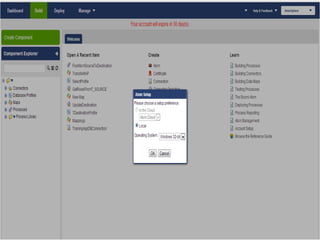
   During installation of Atom (Run-Time of Boomi) you
    are shown two options, one an on-cloud runtime and
    another a local (on your machine) runtime.
    However, the on-cloud runtime is disabled.
   You have to either download a 32-bit version or 64-
    bit version, based on your machine.
   In my case, I used a 64-bit version.
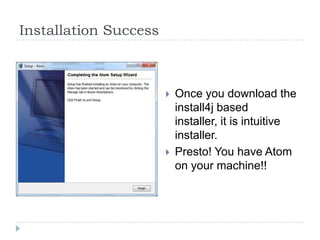
Installation Success


                          Once you download the
                           install4j based
                           installer, it is intuitive
                           installer.
                          Presto! You have Atom
                           on your machine!!
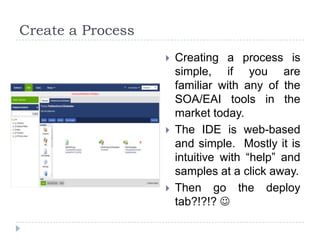
Create a Process
                      Creating a process is
                       simple, if you are
                       familiar with any of the
                       SOA/EAI tools in the
                       market today.
                      The IDE is web-based
                       and simple. Mostly it is
                       intuitive with “help” and
                       samples at a click away.
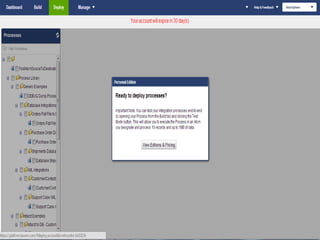
                      Then go the deploy
                       tab?!?!? 
Deployment
   Here is the place where Dell puts a break on your
    journey. You cannot deploy it on your local atom and
    can only deploy it on the Atom-Cloud.
   The catch-22 is
       You cannot create a Cloud based Atom as a Trail User as
        you are forced to use the local atom.
       You cannot deploy your process on your local atom.

    In Simple words:
      You can only play around with the IDE – with no real
      Proof of Concept; Taste of a pudding, is eating it, not
      smelling it, isn't it?? 
My Take
   Go in for Dell Boomi, if you are looking at only
    moving data across applications. In most of the
    cases, the major EAI/SOA tools end up as “million
    dollar FTP tools”, as most of the times, no value-add
    is done by interchange of data.
       You will save millions in form of license fees, SI fees and
        O&M expense, CAPEX for the “server racks” etc.

   Not that is a fashion to have some XaaS in your
    landscape, it makes sense only when you really
    need “only” data movement….
   You can argue that you have ETL tools for that –
    yes, once again the argument of “cost”….
Thank you very much!

  If you have come so far, you may as well give a feedback or
              your opinion about this presentation.
Please feel free to reach to me at Anil (at) AnilKurnool (dot) com

Dell Boomi : My First Take

  • 1.
    My Take onDell Boomi Anil Kurnool
  • 2.
    DISCLAIMER Al lthe opinions presented in this presentation are purely personal and in no way represent that of my employer, current or past! I claim no responsibility for any damage that happens due to some decisions you might take post going through this presentation. Would highly recommend you going through Dell Boomi’s documentation or consultation from their representatives for any technical advise for your organization.
  • 4.
    Access and installation  Boomi allows Trail users a 30-day period, where they can do some “Hello World” programs.  During installation of Atom (Run-Time of Boomi) you are shown two options, one an on-cloud runtime and another a local (on your machine) runtime. However, the on-cloud runtime is disabled.  You have to either download a 32-bit version or 64- bit version, based on your machine.  In my case, I used a 64-bit version.
  • 5.
    Installation Success  Once you download the install4j based installer, it is intuitive installer.  Presto! You have Atom on your machine!!
  • 6.
    Create a Process  Creating a process is simple, if you are familiar with any of the SOA/EAI tools in the market today.  The IDE is web-based and simple. Mostly it is intuitive with “help” and samples at a click away.  Then go the deploy tab?!?!? 
  • 8.
    Deployment  Here is the place where Dell puts a break on your journey. You cannot deploy it on your local atom and can only deploy it on the Atom-Cloud.  The catch-22 is  You cannot create a Cloud based Atom as a Trail User as you are forced to use the local atom.  You cannot deploy your process on your local atom. In Simple words: You can only play around with the IDE – with no real Proof of Concept; Taste of a pudding, is eating it, not smelling it, isn't it?? 
  • 9.
    My Take  Go in for Dell Boomi, if you are looking at only moving data across applications. In most of the cases, the major EAI/SOA tools end up as “million dollar FTP tools”, as most of the times, no value-add is done by interchange of data.  You will save millions in form of license fees, SI fees and O&M expense, CAPEX for the “server racks” etc.  Not that is a fashion to have some XaaS in your landscape, it makes sense only when you really need “only” data movement….  You can argue that you have ETL tools for that – yes, once again the argument of “cost”….
  • 10.
    Thank you verymuch! If you have come so far, you may as well give a feedback or your opinion about this presentation. Please feel free to reach to me at Anil (at) AnilKurnool (dot) com