IADCS Diploma Course Applets U Nyein Oo COO/Director(IT) Myanma Computer Co., Ltd
Java Applets  Is a Java program that runs with the help of a web browser All applets are sub-classes of the class ‘Applet’ To create an applet, you need to import the following two packages: java.applet java.awt
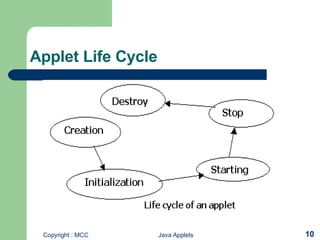
Applet Structure An applet defines its structure from four events that take place during the execution   For each event, a method is automatically called   Methods init( )  start( )   stop( )   destroy( )
Applet Structure (Contd…)   Other related methods paint( )  repaint( ) showStatus( )  getAppletInfo( )  Applet methods init(), start(), stop(), destroy(), and paint()  are inherited by an applet Each of these methods is empty by default. Hence, these methods are overridden
Applet Compilation & Execution An applet is compiled using the syntax javac Applet1.java To execute an applet, create an HTML file which uses the applet tag  The applet tag has two attributes Width Height To pass parameters to the applet, use the ‘param’ tag, followed by the ‘value’ tag Applet can be executed using an applet viewer
Example of Applet Import java.applet.Applet; Import java.awt.Graphics; Public class HelloWorldApplet extends Applet{ public void paint(Graphics g){ g.drawString(“Hello World”,50,35); } }
Example of Applet (Cont] <html> <head> <title>Hello World</title> </head> <body> This is an applet<p> <applet codebase=“classes” code=“HelloWorldApplet.class” width=200 height=300></applet> </body> </html>
Difference between an Applet and an Application  Applications run using the Java interpreter, while applets run on any browser that supports Java, or use an ‘AppletViewer’ that is included in the JDK The execution of applications begins with the ‘main()’ method. This is not the case with applets  Applications use the ‘System.out.println()’ to display the output, while applets use the ‘drawstring()’ method to display the output
Security Restrictions on Applets Cannot read or write files on the user’s file system Cannot communicate with an Internet site, but only with one that serves the web page, including the applet Cannot run any programs on the reader’s system Cannot load any programs stored on the user’s system
Applet Life Cycle
Passing parameters to an Applet To pass parameter, the PARAM parameter is to be included in HTML tag Example <applet code = &quot;Mybutton1&quot; width = “100” height = “100”> <PARAM NAME = “Mybutton” value = “Display Dialog”> </applet>
Graphics Class   Provided by AWT package  Provides a collection of methods to draw the following graphical figures Oval  Rectangle Square Circle  Lines Text in different fonts
Graphical Background Methods for getting a graphical background   getGraphics( )  repaint( ) update(Graphics g) paint(Graphics g)
Drawing Strings, Characters and Bytes   Method to draw or print a string on the frame Syntax drawString(String str, int  xCoor, int yCoor); Method to draw or print characters on the frame  Syntax drawChars(char array[ ], int offset, int length, int  xCoor, int yCoor);   Method to draw or print bytes on the frame  Syntax drawBytes(byte array[ ], int offset, int length, int  xCoor, int yCoor);
Drawing Lines and Ovals Method used to draw lines  Syntax drawLine(int x1, int y1, int x2, int y2); Methods used to draw ovals Syntax drawOval(int xCoor, int yCoor, int width, int height); setColor(Color c); fillOval(int xCoor, int yCoor, int width, int height);
Drawing Rectangles and Rounded Rectangles  Methods used to draw rectangles  Syntax drawRect(int xCoor, int yCoor, int width, int height); fillRect(int xCoor, int yCoor, int width, int height); Methods used to draw rounded rectangles Syntax drawRoundRect(int xCoor, int yCoor, int width, int height, int arcWidth, int arcHeight); fillRoundRect (int xCoor, int yCoor, int width, int height, int arcWidth, int arcHeight);
3D Rectangles & Arcs Methods used to draw 3D Rectangles and arcs Syntax  draw3DRect(int xCoord, int yCoord, int width, int height, boolean raised); drawArc(int xCoord, int yCoord, int width, int height, int arcwidth, int archeight); fillArc(int xCoord, int yCoord, int width, int height, int arcwidth, int archeight);
Drawing PolyLines   Methods used to draw a series of lines  Syntax drawPolyline(int xArray[ ], int yArray[ ], int totalPoints); g.setFont(new Font(&quot;Times Roman&quot;, Font.BOLD,15));
Drawing and Filling Polygons Methods to draw and fill polygons   Syntax drawPolygon(int x[ ], int y[ ], int numPoints); fillPolygon(int x[ ], int y[ ], int numPoints);
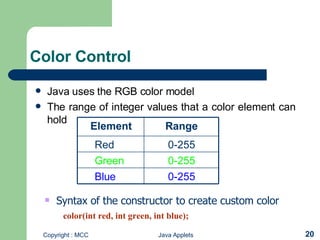
Color Control Java uses the RGB color model   The range of integer values that a color element can hold   Syntax of the constructor to create custom color   color(int red, int green, int blue); 0-255 Green 0-255 Blue 0-255 Red Range Element
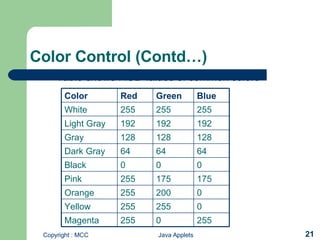
Color Control (Contd…) Table shows RGB values of common colors   255 0 255 Magenta 0 255 255 Yellow 0 200 255 Orange 175 175 255 Pink 0 0 0 Black 64 64 64 Dark Gray 128 128 128 Gray 192 192 192 Light Gray 255 255 255 White Blue Green Red Color
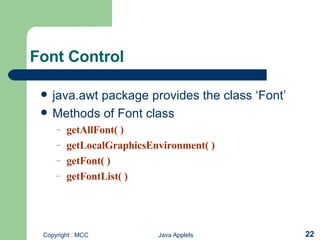
Font Control java.awt package provides the class ‘Font’  Methods of Font class getAllFont( )  getLocalGraphicsEnvironment( )  getFont( ) getFontList( )
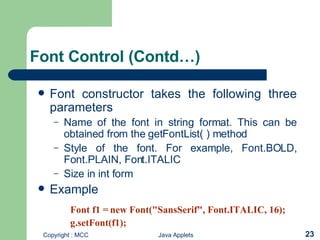
Font Control (Contd…) Font constructor takes the following three parameters  Name of the font in string format. This can be obtained from the getFontList( ) method Style of the font. For example, Font.BOLD, Font.PLAIN, Font.ITALIC Size in int form Example Font f1 = new Font(&quot;SansSerif&quot;, Font.ITALIC, 16); g.setFont(f1);
FontMetrics Class Measures various characters present in different fonts Measurement includes the ‘height’, ‘baseline’, ‘ascent’, ‘descent’ and ‘leading’ of a font  It cannot be instantiated as it is an abstract class Methods getFontMetrics(f1)  getHeight( )  getAscent( )  getDescent( )  getLeading( )  getName( )
Paint mode Objects are drawn using the paint mode set Method used to make old and new contents visible on the screen setXORMode(Color c)  Method used t o revert to the overwrite mode setPaintMode( )
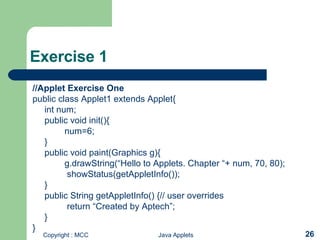
Exercise 1 //Applet Exercise One public class Applet1 extends Applet{ int num; public void init(){ num=6; } public void paint(Graphics g){ g.drawString(“Hello to Applets. Chapter “+ num, 70, 80);   showStatus(getAppletInfo());  } public String getAppletInfo() {// user overrides   return “Created by Aptech”; } }
Exercise 2 import java.applet.Applet; import java.awt.*; /*  <applet code = “both” width = 200 height = 100 > </applet> */ public class both extends Applet { Button btn;  public void init() {   btn = new Button(“Click”); } public void paint(Graphics g) { g.drawString(“Applet”, 70, 50 ); } public static void main(String args[]) { both app=new both(); app.init(); System.out.println(“Application Main”); } }

Client Side Programming with Applet

  • 1.
    IADCS Diploma CourseApplets U Nyein Oo COO/Director(IT) Myanma Computer Co., Ltd
  • 2.
    Java Applets Is a Java program that runs with the help of a web browser All applets are sub-classes of the class ‘Applet’ To create an applet, you need to import the following two packages: java.applet java.awt
  • 3.
    Applet Structure Anapplet defines its structure from four events that take place during the execution For each event, a method is automatically called Methods init( ) start( ) stop( ) destroy( )
  • 4.
    Applet Structure (Contd…) Other related methods paint( ) repaint( ) showStatus( ) getAppletInfo( ) Applet methods init(), start(), stop(), destroy(), and paint() are inherited by an applet Each of these methods is empty by default. Hence, these methods are overridden
  • 5.
    Applet Compilation &Execution An applet is compiled using the syntax javac Applet1.java To execute an applet, create an HTML file which uses the applet tag The applet tag has two attributes Width Height To pass parameters to the applet, use the ‘param’ tag, followed by the ‘value’ tag Applet can be executed using an applet viewer
  • 6.
    Example of AppletImport java.applet.Applet; Import java.awt.Graphics; Public class HelloWorldApplet extends Applet{ public void paint(Graphics g){ g.drawString(“Hello World”,50,35); } }
  • 7.
    Example of Applet(Cont] <html> <head> <title>Hello World</title> </head> <body> This is an applet<p> <applet codebase=“classes” code=“HelloWorldApplet.class” width=200 height=300></applet> </body> </html>
  • 8.
    Difference between anApplet and an Application Applications run using the Java interpreter, while applets run on any browser that supports Java, or use an ‘AppletViewer’ that is included in the JDK The execution of applications begins with the ‘main()’ method. This is not the case with applets Applications use the ‘System.out.println()’ to display the output, while applets use the ‘drawstring()’ method to display the output
  • 9.
    Security Restrictions onApplets Cannot read or write files on the user’s file system Cannot communicate with an Internet site, but only with one that serves the web page, including the applet Cannot run any programs on the reader’s system Cannot load any programs stored on the user’s system
  • 10.
  • 11.
    Passing parameters toan Applet To pass parameter, the PARAM parameter is to be included in HTML tag Example <applet code = &quot;Mybutton1&quot; width = “100” height = “100”> <PARAM NAME = “Mybutton” value = “Display Dialog”> </applet>
  • 12.
    Graphics Class Provided by AWT package Provides a collection of methods to draw the following graphical figures Oval Rectangle Square Circle Lines Text in different fonts
  • 13.
    Graphical Background Methodsfor getting a graphical background getGraphics( ) repaint( ) update(Graphics g) paint(Graphics g)
  • 14.
    Drawing Strings, Charactersand Bytes Method to draw or print a string on the frame Syntax drawString(String str, int xCoor, int yCoor); Method to draw or print characters on the frame Syntax drawChars(char array[ ], int offset, int length, int xCoor, int yCoor); Method to draw or print bytes on the frame Syntax drawBytes(byte array[ ], int offset, int length, int xCoor, int yCoor);
  • 15.
    Drawing Lines andOvals Method used to draw lines Syntax drawLine(int x1, int y1, int x2, int y2); Methods used to draw ovals Syntax drawOval(int xCoor, int yCoor, int width, int height); setColor(Color c); fillOval(int xCoor, int yCoor, int width, int height);
  • 16.
    Drawing Rectangles andRounded Rectangles Methods used to draw rectangles Syntax drawRect(int xCoor, int yCoor, int width, int height); fillRect(int xCoor, int yCoor, int width, int height); Methods used to draw rounded rectangles Syntax drawRoundRect(int xCoor, int yCoor, int width, int height, int arcWidth, int arcHeight); fillRoundRect (int xCoor, int yCoor, int width, int height, int arcWidth, int arcHeight);
  • 17.
    3D Rectangles &Arcs Methods used to draw 3D Rectangles and arcs Syntax draw3DRect(int xCoord, int yCoord, int width, int height, boolean raised); drawArc(int xCoord, int yCoord, int width, int height, int arcwidth, int archeight); fillArc(int xCoord, int yCoord, int width, int height, int arcwidth, int archeight);
  • 18.
    Drawing PolyLines Methods used to draw a series of lines Syntax drawPolyline(int xArray[ ], int yArray[ ], int totalPoints); g.setFont(new Font(&quot;Times Roman&quot;, Font.BOLD,15));
  • 19.
    Drawing and FillingPolygons Methods to draw and fill polygons Syntax drawPolygon(int x[ ], int y[ ], int numPoints); fillPolygon(int x[ ], int y[ ], int numPoints);
  • 20.
    Color Control Javauses the RGB color model The range of integer values that a color element can hold Syntax of the constructor to create custom color   color(int red, int green, int blue); 0-255 Green 0-255 Blue 0-255 Red Range Element
  • 21.
    Color Control (Contd…)Table shows RGB values of common colors 255 0 255 Magenta 0 255 255 Yellow 0 200 255 Orange 175 175 255 Pink 0 0 0 Black 64 64 64 Dark Gray 128 128 128 Gray 192 192 192 Light Gray 255 255 255 White Blue Green Red Color
  • 22.
    Font Control java.awtpackage provides the class ‘Font’ Methods of Font class getAllFont( ) getLocalGraphicsEnvironment( ) getFont( ) getFontList( )
  • 23.
    Font Control (Contd…)Font constructor takes the following three parameters Name of the font in string format. This can be obtained from the getFontList( ) method Style of the font. For example, Font.BOLD, Font.PLAIN, Font.ITALIC Size in int form Example Font f1 = new Font(&quot;SansSerif&quot;, Font.ITALIC, 16); g.setFont(f1);
  • 24.
    FontMetrics Class Measuresvarious characters present in different fonts Measurement includes the ‘height’, ‘baseline’, ‘ascent’, ‘descent’ and ‘leading’ of a font It cannot be instantiated as it is an abstract class Methods getFontMetrics(f1) getHeight( ) getAscent( ) getDescent( ) getLeading( ) getName( )
  • 25.
    Paint mode Objectsare drawn using the paint mode set Method used to make old and new contents visible on the screen setXORMode(Color c) Method used t o revert to the overwrite mode setPaintMode( )
  • 26.
    Exercise 1 //AppletExercise One public class Applet1 extends Applet{ int num; public void init(){ num=6; } public void paint(Graphics g){ g.drawString(“Hello to Applets. Chapter “+ num, 70, 80); showStatus(getAppletInfo()); } public String getAppletInfo() {// user overrides return “Created by Aptech”; } }
  • 27.
    Exercise 2 importjava.applet.Applet; import java.awt.*; /* <applet code = “both” width = 200 height = 100 > </applet> */ public class both extends Applet { Button btn; public void init() { btn = new Button(“Click”); } public void paint(Graphics g) { g.drawString(“Applet”, 70, 50 ); } public static void main(String args[]) { both app=new both(); app.init(); System.out.println(“Application Main”); } }