Applets
Session 4
Applets / 2 of 27
Objectives
 Differentiate between Java applications and Java
applets
 Explain how to create a program to work as both
applet and an application
 Identify how parameters are passed to applets
 Discuss Event handling with applets
 Describe the graphics class
 Discuss the Font class
 Examine the FontMetrics class
 Discuss the Color class
 Define an applet
Applets / 3 of 27
Introduction
 There are a number of ways to create interactive
programs on the Web but one of the most remarkable
ways is using a Java applet
 An applet is a Java program designed to work on the
Internet through a web browser
 An applet can be used for a variety of purposes right
from web-based communications to designing
graphical user interfaces for backend applications
 HTML pages by themselves are very passive
Applets / 4 of 27
Applets
 Created by subclassing the ‘java.applet.Applet’
class
 Examples of Java enabled web browsers are
Internet Explorer
 An ‘Applet’ is a Java program that can be
embedded in an HTML page and executed on
a Java enabled browser
and Netscape Communicator
Applets / 5 of 27
Difference between
Applets and Applications (1)
 Applets are created by extending the
java.applet.Applet class.
There is no such constraint for an application
 Applets run on any browser while
applications run using Java interpreter
 An applet is basically designed for deploying on
the web whereas an
application is designed to work as a standalone
program
Applets / 6 of 27
Difference between
Applets and Applications (2)
 Applet must contain at least one public class
failing which the compiler reports an error. There
it is not mandatory to declare main( ) for an
applet where as
In case of application, ‘main( )’ has to be included
in a public class
 Execution of applets begin with the init() method
while Execution of applications begins with
main() method
Applets / 7 of 27
Life cycle of an Applet (1)
 An applet defines its structure from four
events that take place during execution
 For each event, a method is automatically
called
 Life cycle of an object specifies stages the
object has to pass right from its creation until
it is destroyed
Applets / 8 of 27
Life cycle of an Applet (2)
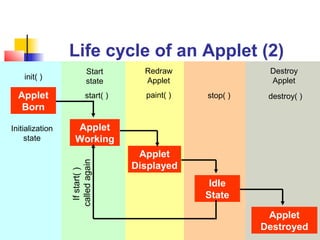
 init() – called during initialization
 start() – starts the applet once it is initialized
 stop() – used to pause the execution of an applet
 destroy() – used to destroy the applet
 The method paint() is used to display a line, text
or an image on the screen
 Whenever an applet has to be painted again after
it has been drawn once, the repaint() method is
used.
 The methods are as follows:
Applets / 9 of 27
Redraw
Applet
stop( )
Start
state
start( ) paint( )
Life cycle of an Applet (2)
Applet
Working
Applet
Born
Applet
Displayed
Idle
State
Applet
Destroyed
Initialization
state
Ifstart()
calledagain
destroy( )
Destroy
Appletinit( )
Applets / 10 of 27
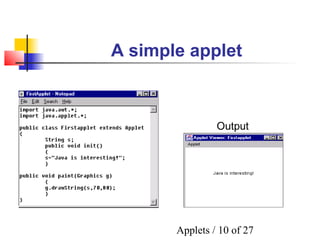
A simple applet
Output
Applets / 11 of 27
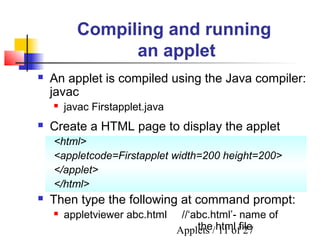
 Create a HTML page to display the applet
<html>
<appletcode=Firstapplet width=200 height=200>
</applet>
</html>
 Then type the following at command prompt:
 appletviewer abc.html //‘abc.html’- name of
the html file
Compiling and running
an applet
 An applet is compiled using the Java compiler:
javac
 javac Firstapplet.java
Applets / 12 of 27
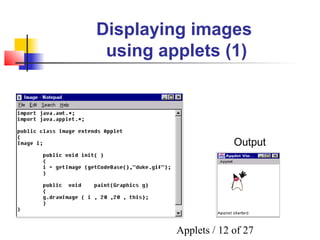
Displaying images
using applets (1)
Output
Applets / 13 of 27
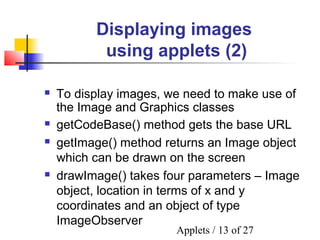
Displaying images
using applets (2)
 getCodeBase() method gets the base URL
 getImage() method returns an Image object
which can be drawn on the screen
 drawImage() takes four parameters – Image
object, location in terms of x and y
coordinates and an object of type
ImageObserver
 To display images, we need to make use of
the Image and Graphics classes
Applets / 14 of 27
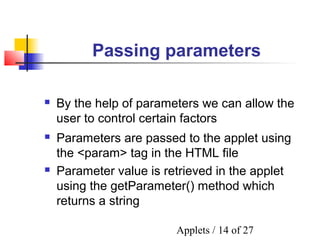
Passing parameters
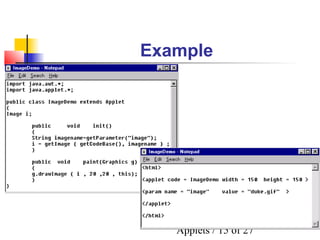
 Parameters are passed to the applet using
the <param> tag in the HTML file
 Parameter value is retrieved in the applet
using the getParameter() method which
returns a string
 By the help of parameters we can allow the
user to control certain factors
Applets / 15 of 27
Example
Applets / 16 of 27
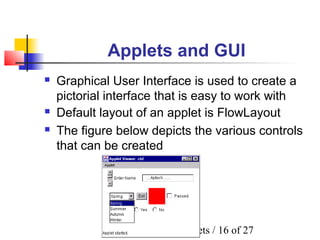
Applets and GUI
 Default layout of an applet is FlowLayout
 The figure below depicts the various controls
that can be created
 Graphical User Interface is used to create a
pictorial interface that is easy to work with
Applets / 17 of 27
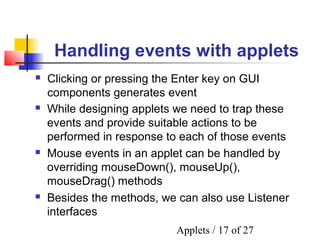
Handling events with applets
 While designing applets we need to trap these
events and provide suitable actions to be
performed in response to each of those events
 Mouse events in an applet can be handled by
overriding mouseDown(), mouseUp(),
mouseDrag() methods
 Besides the methods, we can also use Listener
interfaces
 Clicking or pressing the Enter key on GUI
components generates event
Applets / 18 of 27
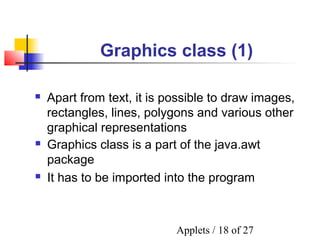
Graphics class (1)
 Graphics class is a part of the java.awt
package
 It has to be imported into the program
 Apart from text, it is possible to draw images,
rectangles, lines, polygons and various other
graphical representations
Applets / 19 of 27
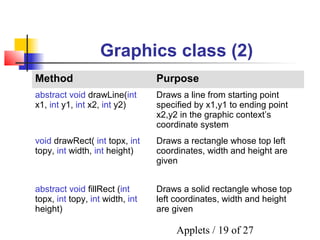
Graphics class (2)
Method Purpose
abstract void drawLine(int
x1, int y1, int x2, int y2)
Draws a line from starting point
specified by x1,y1 to ending point
x2,y2 in the graphic context’s
coordinate system
void drawRect( int topx, int
topy, int width, int height)
Draws a rectangle whose top left
coordinates, width and height are
given
abstract void fillRect (int
topx, int topy, int width, int
height)
Draws a solid rectangle whose top
left coordinates, width and height
are given
Applets / 20 of 27
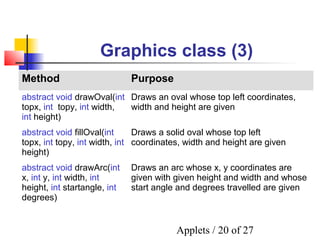
Graphics class (3)
Method Purpose
abstract void drawOval(int
topx, int topy, int width,
int height)
Draws an oval whose top left coordinates,
width and height are given
abstract void fillOval(int
topx, int topy, int width, int
height)
Draws a solid oval whose top left
coordinates, width and height are given
abstract void drawArc(int
x, int y, int width, int
height, int startangle, int
degrees)
Draws an arc whose x, y coordinates are
given with given height and width and whose
start angle and degrees travelled are given
Applets / 21 of 27
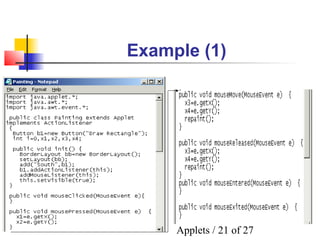
Example (1)
Applets / 22 of 27
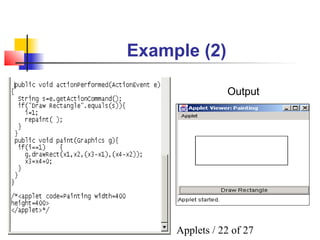
Example (2)
Output
Applets / 23 of 27
Font class
 One constructor of the Font is:
 public Font(String name, int style, int pointsize)

name can be “Times New Roman”, “Arial”, etc.

style can be Font.PLAIN, Font.BOLD, Font.ITALIC

pointsize for fonts can be 11,12,14,16,etc.
 java.awt.Font class is used to set or retrieve
fonts
Applets / 24 of 27
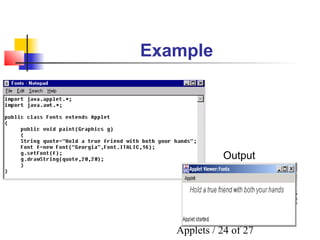
Example
Output
Applets / 25 of 27
FontMetrics class
 In such a case, the FontMetrics class proves
useful
 Commonly used methods of FontMetrics class
 int stringWidth(String s) – returns full width of string
 int charWidth(char c) – returns width of that
character
 int getHeight() – returns total height of the font
 At times, it is necessary to know the attributes
of fonts used within a program
Applets / 26 of 27
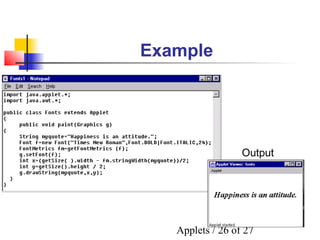
Example
Output
Applets / 27 of 27
Color class
 Colors can be constructed as shown :
 Color a=new Color(255,255,0);
 Color b=new Color(0.907F,2F,0F);
 To change or set colors for a component :
 void setColor(Color) of Graphics class
 void setForeground(Color) of Component class ,inherited
by various components
 void setBackground(Color) of Component class ,inherited
by various components
 java.awt.Color class is used to add color to
applications and applets

Session4 applets

  • 1.
  • 2.
    Applets / 2of 27 Objectives  Differentiate between Java applications and Java applets  Explain how to create a program to work as both applet and an application  Identify how parameters are passed to applets  Discuss Event handling with applets  Describe the graphics class  Discuss the Font class  Examine the FontMetrics class  Discuss the Color class  Define an applet
  • 3.
    Applets / 3of 27 Introduction  There are a number of ways to create interactive programs on the Web but one of the most remarkable ways is using a Java applet  An applet is a Java program designed to work on the Internet through a web browser  An applet can be used for a variety of purposes right from web-based communications to designing graphical user interfaces for backend applications  HTML pages by themselves are very passive
  • 4.
    Applets / 4of 27 Applets  Created by subclassing the ‘java.applet.Applet’ class  Examples of Java enabled web browsers are Internet Explorer  An ‘Applet’ is a Java program that can be embedded in an HTML page and executed on a Java enabled browser and Netscape Communicator
  • 5.
    Applets / 5of 27 Difference between Applets and Applications (1)  Applets are created by extending the java.applet.Applet class. There is no such constraint for an application  Applets run on any browser while applications run using Java interpreter  An applet is basically designed for deploying on the web whereas an application is designed to work as a standalone program
  • 6.
    Applets / 6of 27 Difference between Applets and Applications (2)  Applet must contain at least one public class failing which the compiler reports an error. There it is not mandatory to declare main( ) for an applet where as In case of application, ‘main( )’ has to be included in a public class  Execution of applets begin with the init() method while Execution of applications begins with main() method
  • 7.
    Applets / 7of 27 Life cycle of an Applet (1)  An applet defines its structure from four events that take place during execution  For each event, a method is automatically called  Life cycle of an object specifies stages the object has to pass right from its creation until it is destroyed
  • 8.
    Applets / 8of 27 Life cycle of an Applet (2)  init() – called during initialization  start() – starts the applet once it is initialized  stop() – used to pause the execution of an applet  destroy() – used to destroy the applet  The method paint() is used to display a line, text or an image on the screen  Whenever an applet has to be painted again after it has been drawn once, the repaint() method is used.  The methods are as follows:
  • 9.
    Applets / 9of 27 Redraw Applet stop( ) Start state start( ) paint( ) Life cycle of an Applet (2) Applet Working Applet Born Applet Displayed Idle State Applet Destroyed Initialization state Ifstart() calledagain destroy( ) Destroy Appletinit( )
  • 10.
    Applets / 10of 27 A simple applet Output
  • 11.
    Applets / 11of 27  Create a HTML page to display the applet <html> <appletcode=Firstapplet width=200 height=200> </applet> </html>  Then type the following at command prompt:  appletviewer abc.html //‘abc.html’- name of the html file Compiling and running an applet  An applet is compiled using the Java compiler: javac  javac Firstapplet.java
  • 12.
    Applets / 12of 27 Displaying images using applets (1) Output
  • 13.
    Applets / 13of 27 Displaying images using applets (2)  getCodeBase() method gets the base URL  getImage() method returns an Image object which can be drawn on the screen  drawImage() takes four parameters – Image object, location in terms of x and y coordinates and an object of type ImageObserver  To display images, we need to make use of the Image and Graphics classes
  • 14.
    Applets / 14of 27 Passing parameters  Parameters are passed to the applet using the <param> tag in the HTML file  Parameter value is retrieved in the applet using the getParameter() method which returns a string  By the help of parameters we can allow the user to control certain factors
  • 15.
    Applets / 15of 27 Example
  • 16.
    Applets / 16of 27 Applets and GUI  Default layout of an applet is FlowLayout  The figure below depicts the various controls that can be created  Graphical User Interface is used to create a pictorial interface that is easy to work with
  • 17.
    Applets / 17of 27 Handling events with applets  While designing applets we need to trap these events and provide suitable actions to be performed in response to each of those events  Mouse events in an applet can be handled by overriding mouseDown(), mouseUp(), mouseDrag() methods  Besides the methods, we can also use Listener interfaces  Clicking or pressing the Enter key on GUI components generates event
  • 18.
    Applets / 18of 27 Graphics class (1)  Graphics class is a part of the java.awt package  It has to be imported into the program  Apart from text, it is possible to draw images, rectangles, lines, polygons and various other graphical representations
  • 19.
    Applets / 19of 27 Graphics class (2) Method Purpose abstract void drawLine(int x1, int y1, int x2, int y2) Draws a line from starting point specified by x1,y1 to ending point x2,y2 in the graphic context’s coordinate system void drawRect( int topx, int topy, int width, int height) Draws a rectangle whose top left coordinates, width and height are given abstract void fillRect (int topx, int topy, int width, int height) Draws a solid rectangle whose top left coordinates, width and height are given
  • 20.
    Applets / 20of 27 Graphics class (3) Method Purpose abstract void drawOval(int topx, int topy, int width, int height) Draws an oval whose top left coordinates, width and height are given abstract void fillOval(int topx, int topy, int width, int height) Draws a solid oval whose top left coordinates, width and height are given abstract void drawArc(int x, int y, int width, int height, int startangle, int degrees) Draws an arc whose x, y coordinates are given with given height and width and whose start angle and degrees travelled are given
  • 21.
    Applets / 21of 27 Example (1)
  • 22.
    Applets / 22of 27 Example (2) Output
  • 23.
    Applets / 23of 27 Font class  One constructor of the Font is:  public Font(String name, int style, int pointsize)  name can be “Times New Roman”, “Arial”, etc.  style can be Font.PLAIN, Font.BOLD, Font.ITALIC  pointsize for fonts can be 11,12,14,16,etc.  java.awt.Font class is used to set or retrieve fonts
  • 24.
    Applets / 24of 27 Example Output
  • 25.
    Applets / 25of 27 FontMetrics class  In such a case, the FontMetrics class proves useful  Commonly used methods of FontMetrics class  int stringWidth(String s) – returns full width of string  int charWidth(char c) – returns width of that character  int getHeight() – returns total height of the font  At times, it is necessary to know the attributes of fonts used within a program
  • 26.
    Applets / 26of 27 Example Output
  • 27.
    Applets / 27of 27 Color class  Colors can be constructed as shown :  Color a=new Color(255,255,0);  Color b=new Color(0.907F,2F,0F);  To change or set colors for a component :  void setColor(Color) of Graphics class  void setForeground(Color) of Component class ,inherited by various components  void setBackground(Color) of Component class ,inherited by various components  java.awt.Color class is used to add color to applications and applets