1
CICD Pipeline configuration as a
Code
(a.k.a. JobConfig)
by Anatolii Kaliuzhnyi
2
Who am I?
3
Agenda:
1. Business case and Prerequisites
2. JobConfig and ConfigProcessor
3. Close to real case
4. Troubles and issues
5. Conclusion
6. Q&A
4
Business Case
5
1. Security limitations
Business Case
2. Multiple release support
3. Different teams
4. Comfort
6
Prerequisites
7
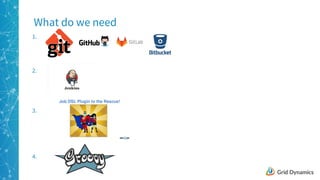
1.
What do we need
2.
3.
4.
8
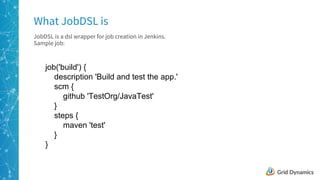
JobDSL is a dsl wrapper for job creation in Jenkins.
Sample job:
What JobDSL is
job('build') {
description 'Build and test the app.'
scm {
github 'TestOrg/JavaTest'
}
steps {
maven 'test'
}
}
9
What JobDSL is
10
JobDSL allows you to insert any Groovy code inside it, so you can such tricks:
JobDSL power
job('build') {
description 'Build and test the app.'
scm {
github 'TestOrg/JavaTest'
}
steps {
def mavenSteps = ['test', 'deploy', 'clean']
mavenSteps.each{
maven it
}
}
}
11
JobDSL power
12
1. Using JobDSL you can create base classes for each type of Jenkins job you have.
2. Upload them to git and use it inside a seed job(job that executes JobDSL)
3. This is much better than go and click out some jobs in UI in Jenkins (which sucks)
4. With JobDSL you can make a change in a file, push to git and run seed.
Base Class
BaseClass file GIT
Push
Seed Job
Checkout
Jobs
13
class MavenBuild {
static job (name) {
job(name) {
description 'Build and test the app.'
scm {
github 'TestOrg/JavaTest'
}
steps {
def mavenSteps = ['test', 'deploy', 'clean']
mavenSteps.each{
maven it
}
}
}
}
}
Base Class
Wrap the JobDSL with a class:
14
JobConfig and ConfigProcessor
15
What do we need from such a DSL:
1. We need to have each sub closure as a job (with name as job’s name)
2. Import from external files (preferably with overrides)
3. Reusable blocks, in case we have several alike jobs in a single file
4. All filewise variables (which will be included into each job)
5. Jobs should have a link to its Base Class and folder, where it should be located
DSL above JobDSL
16
1. Use existing some format (json, yaml, etc)
Format
2. Invent bicycle own format
3. Use same approach as for JobDSL
17
JobConfig
18
Example of a JobConfig
imports = ["default.cfg", "build.cfg"]
common {
github {
org = "SomeOrg"
repo = "JavaTest"
}
}
__build {
imports = ["maven.cfg"]
maven {
steps = "deploy"
}
}
Build {
imports = ["__build"]
}
19
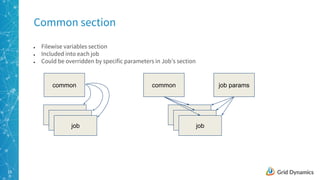
● Filewise variables section
● Included into each job
● Could be overridden by specific parameters in Job’s section
Common section
common
job
common
job
job params
20
● “imports” keyword
● Receives a list of filenames or “__” starting sections to include as a part of the jc itself (also a closure)
● First file of the list is first imported (params could be overridden by next file or section)
Importing
filename
job
section
imports
sections or
files
job
import
order
21
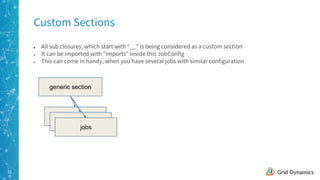
● All sub closures, which start with “__” is being considered as a custom section
● It can be imported with “imports” inside this JobConfig
● This can come in handy, when you have several jobs with similar configuration
Custom Sections
generic section
jobs
22
● Each job will have its own JC
● JC will be a compile of all included blocks and files
● Can be addressed from inside the Base Class, so that you can create more or less generic classes, with
necessary flexibility
Jobs
common
section(s)
file(s)
JobConfig for a job
23
● Use ConfigSlurper to parse the file
● Find all keywords and apply appropriate rules for them
● Generate JCs for each job, include all imports(if needed) and include common section
powered by
Config Processor
24
def processJCFile(fileName) {
def configProcessor = new ConfigProcessor(dslFactory)
def allJCs = configProcessor.processConfig(fileName)
allJCs.each { jc ->
configProcessor.printJC(jc)
def jobClass = Class.forName("${jc.'jobClass.baseClassName'}")?.newInstance()
jobClass.job(context, jc)
}
return allJCs
}
Seed Executor
25
Seed Job Example
26
What could be improved:
● OOP principles applied
● Libraries and collections
● Non-flat structure of the framework
● Helpers
● Fancy stuff (e.g. package into a jar, start using releases and hotfixes)
2 files framework
27
Let’s make a JC for the pipeline:
● Create a base class for pipeline
● Add the map of pipeline steps
● Add all params to paa them into
next step
Create a workflow file:
● Handle the map of steps in the
pipeline itself
● Ensure to pass all params to the
next step
Pipelines
JC:
Pipeline {
imports = ["__pipeline"]
jobClass {
baseClassName = "Pipeline"
classPath = ""
}
job {
pipeline = [ Build: [
BRANCH_NAME:"master"
]
]
}
}
Workflow(jenkins)file
for (kv in mapToList(JC.job.pipeline)) {
def pipeJob = kv[0]
def pipelineParameters = []
for (paramskv in mapToList(kv[1])) {
pipelineParameters.add([$class:
'StringParameterValue', name: paramskv[0], value:
paramskv[1]])
}
build job: JC.allJobs."${pipeJob}", parameters:
pipelineParameters
}
28
Troubles and issues
29
Complexity of real case
● Arrange files by their purposes and handle those locations
● Split the JCs and framework into separate repos or at least
folders
● Create libraries and collections, to reuse them in Base Classes
or elsewhere
● Create docs (or keep everything in mind)
30
● To debug something, you need to start the seed process, so you need to push the code to the repo and
use some non-master branch, which could take time
● Stack trace is so long for seed jobs and it is not very clear where did it fail
● Non-comprehensive errors appear during the seed process, if something fails
PITA of debug
31
● It will take some time to have ambiguous number of base classes for all cases in you work (yet you will
come across situations, when you need to create new class)
● Maintaining the framework and infrastructural changes in it (e.g. adding storage to store JCs to use in
inside pipelines)
● Engineers need time to start using it as a pro
Time Consuming Development
32
Why and in what cases do you need such solution?
33
1. Laziness (obviously)
Why do we need it?
5. Agility
2. Trackability
3. Simplification of configuration
4. Transparency
34
1. Personal framework to start automation
2. Application is a microservice hell
3. ~10 application to build out
4. Because you want to
In what cases do we need it?
35
1. Only one application
When we don’t need it
2. Support hasn’t been calculated
3. Small amount of jobs in Jenkins
36
Pros and Cons
Pros:
● Super fast creation of jobs from scratch
● Version control
● Fixing issues with several jobs is simpler
● Adding generic functionality to existing jobs
will be much easier
Cons:
● Will take a while, before you get all classes
created
● Debug is horrible
● Changing a single job will take you more time,
than just changing it in UI instead
● Will work only, if you have big number of jobs
to maintain
37
Q&A
38
Thank you

CICD Pipeline configuration as a code

  • 1.
    1 CICD Pipeline configurationas a Code (a.k.a. JobConfig) by Anatolii Kaliuzhnyi
  • 2.
  • 3.
    3 Agenda: 1. Business caseand Prerequisites 2. JobConfig and ConfigProcessor 3. Close to real case 4. Troubles and issues 5. Conclusion 6. Q&A
  • 4.
  • 5.
    5 1. Security limitations BusinessCase 2. Multiple release support 3. Different teams 4. Comfort
  • 6.
  • 7.
    7 1. What do weneed 2. 3. 4.
  • 8.
    8 JobDSL is adsl wrapper for job creation in Jenkins. Sample job: What JobDSL is job('build') { description 'Build and test the app.' scm { github 'TestOrg/JavaTest' } steps { maven 'test' } }
  • 9.
  • 10.
    10 JobDSL allows youto insert any Groovy code inside it, so you can such tricks: JobDSL power job('build') { description 'Build and test the app.' scm { github 'TestOrg/JavaTest' } steps { def mavenSteps = ['test', 'deploy', 'clean'] mavenSteps.each{ maven it } } }
  • 11.
  • 12.
    12 1. Using JobDSLyou can create base classes for each type of Jenkins job you have. 2. Upload them to git and use it inside a seed job(job that executes JobDSL) 3. This is much better than go and click out some jobs in UI in Jenkins (which sucks) 4. With JobDSL you can make a change in a file, push to git and run seed. Base Class BaseClass file GIT Push Seed Job Checkout Jobs
  • 13.
    13 class MavenBuild { staticjob (name) { job(name) { description 'Build and test the app.' scm { github 'TestOrg/JavaTest' } steps { def mavenSteps = ['test', 'deploy', 'clean'] mavenSteps.each{ maven it } } } } } Base Class Wrap the JobDSL with a class:
  • 14.
  • 15.
    15 What do weneed from such a DSL: 1. We need to have each sub closure as a job (with name as job’s name) 2. Import from external files (preferably with overrides) 3. Reusable blocks, in case we have several alike jobs in a single file 4. All filewise variables (which will be included into each job) 5. Jobs should have a link to its Base Class and folder, where it should be located DSL above JobDSL
  • 16.
    16 1. Use existingsome format (json, yaml, etc) Format 2. Invent bicycle own format 3. Use same approach as for JobDSL
  • 17.
  • 18.
    18 Example of aJobConfig imports = ["default.cfg", "build.cfg"] common { github { org = "SomeOrg" repo = "JavaTest" } } __build { imports = ["maven.cfg"] maven { steps = "deploy" } } Build { imports = ["__build"] }
  • 19.
    19 ● Filewise variablessection ● Included into each job ● Could be overridden by specific parameters in Job’s section Common section common job common job job params
  • 20.
    20 ● “imports” keyword ●Receives a list of filenames or “__” starting sections to include as a part of the jc itself (also a closure) ● First file of the list is first imported (params could be overridden by next file or section) Importing filename job section imports sections or files job import order
  • 21.
    21 ● All subclosures, which start with “__” is being considered as a custom section ● It can be imported with “imports” inside this JobConfig ● This can come in handy, when you have several jobs with similar configuration Custom Sections generic section jobs
  • 22.
    22 ● Each jobwill have its own JC ● JC will be a compile of all included blocks and files ● Can be addressed from inside the Base Class, so that you can create more or less generic classes, with necessary flexibility Jobs common section(s) file(s) JobConfig for a job
  • 23.
    23 ● Use ConfigSlurperto parse the file ● Find all keywords and apply appropriate rules for them ● Generate JCs for each job, include all imports(if needed) and include common section powered by Config Processor
  • 24.
    24 def processJCFile(fileName) { defconfigProcessor = new ConfigProcessor(dslFactory) def allJCs = configProcessor.processConfig(fileName) allJCs.each { jc -> configProcessor.printJC(jc) def jobClass = Class.forName("${jc.'jobClass.baseClassName'}")?.newInstance() jobClass.job(context, jc) } return allJCs } Seed Executor
  • 25.
  • 26.
    26 What could beimproved: ● OOP principles applied ● Libraries and collections ● Non-flat structure of the framework ● Helpers ● Fancy stuff (e.g. package into a jar, start using releases and hotfixes) 2 files framework
  • 27.
    27 Let’s make aJC for the pipeline: ● Create a base class for pipeline ● Add the map of pipeline steps ● Add all params to paa them into next step Create a workflow file: ● Handle the map of steps in the pipeline itself ● Ensure to pass all params to the next step Pipelines JC: Pipeline { imports = ["__pipeline"] jobClass { baseClassName = "Pipeline" classPath = "" } job { pipeline = [ Build: [ BRANCH_NAME:"master" ] ] } } Workflow(jenkins)file for (kv in mapToList(JC.job.pipeline)) { def pipeJob = kv[0] def pipelineParameters = [] for (paramskv in mapToList(kv[1])) { pipelineParameters.add([$class: 'StringParameterValue', name: paramskv[0], value: paramskv[1]]) } build job: JC.allJobs."${pipeJob}", parameters: pipelineParameters }
  • 28.
  • 29.
    29 Complexity of realcase ● Arrange files by their purposes and handle those locations ● Split the JCs and framework into separate repos or at least folders ● Create libraries and collections, to reuse them in Base Classes or elsewhere ● Create docs (or keep everything in mind)
  • 30.
    30 ● To debugsomething, you need to start the seed process, so you need to push the code to the repo and use some non-master branch, which could take time ● Stack trace is so long for seed jobs and it is not very clear where did it fail ● Non-comprehensive errors appear during the seed process, if something fails PITA of debug
  • 31.
    31 ● It willtake some time to have ambiguous number of base classes for all cases in you work (yet you will come across situations, when you need to create new class) ● Maintaining the framework and infrastructural changes in it (e.g. adding storage to store JCs to use in inside pipelines) ● Engineers need time to start using it as a pro Time Consuming Development
  • 32.
    32 Why and inwhat cases do you need such solution?
  • 33.
    33 1. Laziness (obviously) Whydo we need it? 5. Agility 2. Trackability 3. Simplification of configuration 4. Transparency
  • 34.
    34 1. Personal frameworkto start automation 2. Application is a microservice hell 3. ~10 application to build out 4. Because you want to In what cases do we need it?
  • 35.
    35 1. Only oneapplication When we don’t need it 2. Support hasn’t been calculated 3. Small amount of jobs in Jenkins
  • 36.
    36 Pros and Cons Pros: ●Super fast creation of jobs from scratch ● Version control ● Fixing issues with several jobs is simpler ● Adding generic functionality to existing jobs will be much easier Cons: ● Will take a while, before you get all classes created ● Debug is horrible ● Changing a single job will take you more time, than just changing it in UI instead ● Will work only, if you have big number of jobs to maintain
  • 37.
  • 38.