Gradle: Build tool that rocks
                            with DSL

Rajmahendra Hegde
JUGChennai Founder & Lead
rajmahendra@gmail.com
tweet: @rajonjava
aboutMe {

     name: 'Rajmahendra Hegde'

 community: name: 'Java User Group – Chennai', role: 'Founder and Lead', url:
'http://jugchennai.in'

     profession: company: 'Logica', designation: 'Project Lead'

     javaDeveloperSince: 1999

     contributions {

    jcp: [jsrID: 354, name: 'Money and Currency API'],[jsrID: 357, 'Social Media']

  communityProject: 'Agorava', 'VisageFX', 'Scalaxia.com', 'gradle-weaverfx-
plugin'

     }

    interests: 'JUG Activities','JEE', 'Groovy', 'Scala', 'JavaFX', 'VisageFX',
'NetBeans', 'Gradle'

     twitter: '@rajonjava'

     email: 'rajmahendra@gmail.com'
}
Agenda
•   Build tools
•   Build tool basics
•   Gradle
•   Getting Started
•   Gradle Tasks
•   Gradle with Ant
•   Gradle with Maven
•   Plugins
•   Multi Project Support
•   Project Templates
•   IDEs Support
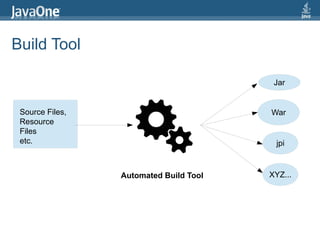
Build Tool

                                         Jar


 Source Files,                          War
 Resource
 Files
 etc.                                    jpi


                 Automated Build Tool   XYZ...
Build Tool
•   Initialize      •   Generic build process
•   checkout        •   Dev, Test, Integ,
•   Compile             environment
•   Check-style     •   Continuous Integration
•   Test
•   Code coverage
•   Jar
•   War
•   Ear
•   Deploy
•   etc...
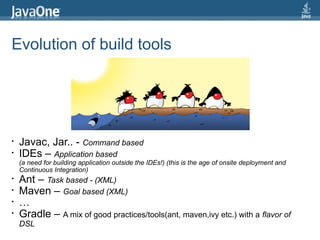
Evolution of build tools


•   Javac, Jar.. - Command based
•   IDEs – Application based
    (a need for building application outside the IDEs!) (this is the age of onsite deployment and
    Continuous Integration)
•   Ant – Task based - (XML)
•   Maven – Goal based (XML)
•   …
•   Gradle – A mix of good practices/tools(ant, maven,ivy etc.) with a flavor of
    DSL
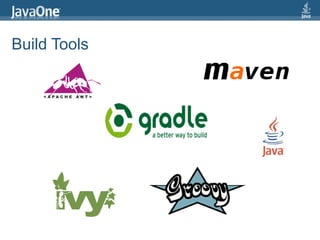
Build Tools
Gradle is
•   A general purpose Java build system
•   Platform independent
•   DSL based
•   Built for java based projects
•   Full support of Grooy, Ant and Maven
•   Task based system
•   Convention over configuration
•   Flexible, scalable, extensible
•   Plugins
•   Flexible multi-project support
•   Free and open source
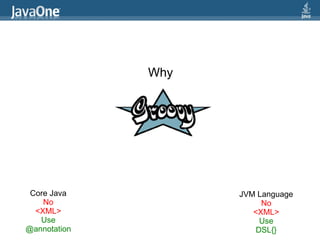
Why


 Core Java          JVM Language
    No                   No
  <XML>                <XML>
   Use                   Use
@annotation             DSL{}
DSL? Domain Specific Language
A domain-specific language (DSL) is a programming language or specification language dedicated
to a particular problem domain, a particular problem representation technique, and/or a particular
solution technique. - Wikipedia

Examples

Chess Notation
  1. e4 e5 2. Nf3 Nc6 3. Bb5 a6
  1. P-K4 P-K4 2. N-KB3 N-QB3 3. B-B4 B-B4

Music
 Western Musical Notation – C, D, E, F, G, A, B, C
 Solfège syllables – Do, Re, Mi, Fa, Sol, La, Ti, Do.
 Carnatic Music Notation – Sa Re Ga Ma Pa Da Ne Sa
 Guitar Tab - 0 1 2 3 4
 Harmonica Tab – 1b 1b 2d 2d

Rubik's
  Cube Notation - d', d2. f, f', f2, b, b', b2

Very popular in our own field SQL! SELECT * FROM MYTABLE WHERE MYFIELD = 4

And many...
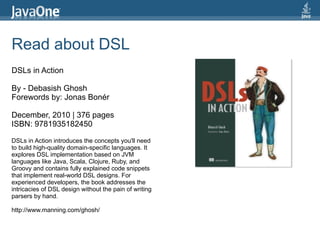
Read about DSL
DSLs in Action

By - Debasish Ghosh
Forewords by: Jonas Bonér

December, 2010 | 376 pages
ISBN: 9781935182450

DSLs in Action introduces the concepts you'll need
to build high-quality domain-specific languages. It
explores DSL implementation based on JVM
languages like Java, Scala, Clojure, Ruby, and
Groovy and contains fully explained code snippets
that implement real-world DSL designs. For
experienced developers, the book addresses the
intricacies of DSL design without the pain of writing
parsers by hand.

http://www.manning.com/ghosh/
Getting Started
•   Download binary zip from gradle.org   $ gradle -v
•   Unzip in your favorite folder
                                          --------------------------------------
•   Set GRADLE_HOME Env. Variable         Gradle 1.0-rc-2
                                          --------------------------------------
•   Add GRADLE_HOME[/ or  ]bin to PATH
                                          Gradle build time: Tuesday, April 24, 2012
•   To test                               11:52:37 PM UTC
      $ gradle -v                         Groovy: 1.8.6
                                          Ant: Apache Ant(TM) version 1.8.2 compiled
                                          on December 20 2010
•   Build File name:                      Ivy: 2.2.0
      – build.gradle                      JVM: 1.6.0_31 (Apple Inc. 20.6-b01-415)
      – gradle.properties                 OS: Mac OS X 10.7.3 x86_64
      – settings.gradle
Build Lifecycle
•   Initialization
    l
      Initializes the scope of the build
    l
      Identifies projects [multi-project env.] involved
    l
      Creates Project instance
•   Configuration
    l
      Executes buildscript{} for all its scope
    l
      Configures the project objects
•   Execution
    l
      Determines the subset of the tasks
    l
      Runs the build
Gradle Tasks
task mytask << {             $ gradle mytask
     println 'Hello World'   :mytask
}                            The First
                             Hello World
mytask.doFirst {             The Last
  println 'The First'        Add more
}                            BUILD SUCCESSFUL
mytask.doLast {
  println 'The Last'
}

mytask << {
    println 'Add more'
}
Gradle is Groovy
    task mytask << {                    $ gradle mytask
                                        :mytask
      String myString = 'Hello World'   Hello World
                                        HELLO WORLD
   def myMap = ['map1': '1',            Map2: 2
'map2':'2']                             Count 0
                                        Count 2
     println myString                   Count 4
     println myString.toUpperCase()
     println 'Map2: ' +
                                        BUILD SUCCESSFUL
myMap['map2']

        5.times {
           if (it % 2 == 0)
           println (“Count $it”)
        }

}
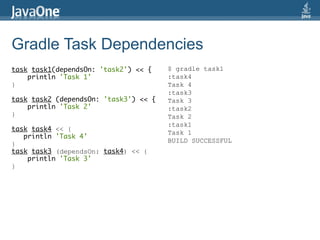
Gradle Task Dependencies
task task1(dependsOn: 'task2') << {    $ gradle task1
    println 'Task 1'                   :task4
}                                      Task 4
                                       :task3
task task2 (dependsOn: 'task3') << {   Task 3
    println 'Task 2'                   :task2
}                                      Task 2
                                       :task1
task task4 << {
                                       Task 1
   println 'Task 4'
                                       BUILD SUCCESSFUL
}
task task3 (dependsOn: task4) << {
    println 'Task 3'
}
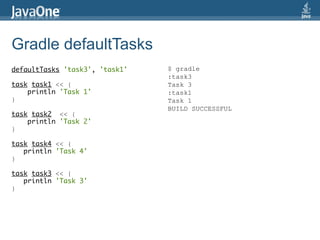
Gradle defaultTasks
defaultTasks 'task3', 'task1'   $ gradle
                                :task3
task task1 << {                 Task 3
    println 'Task 1'            :task1
}                               Task 1
                                BUILD SUCCESSFUL
task task2 << {
    println 'Task 2'
}

task task4 << {
   println 'Task 4'
}

task task3 << {
   println 'Task 3'
}
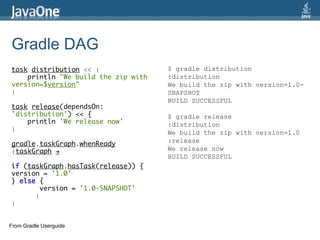
Gradle DAG
task distribution << {               $ gradle distribution
    println "We build the zip with   :distribution
version=$version"                    We build the zip with version=1.0-
}                                    SNAPSHOT
                                     BUILD SUCCESSFUL
task release(dependsOn:
'distribution') << {                 $ gradle release
    println 'We release now'         :distribution
}
                                     We build the zip with version=1.0
                                     :release
gradle.taskGraph.whenReady
{taskGraph →                         We release now
                                     BUILD SUCCESSFUL
if (taskGraph.hasTask(release)) {
version = '1.0'
} else {
        version = '1.0-SNAPSHOT'
      }
}


From Gradle Userguide
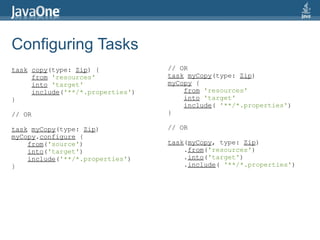
Configuring Tasks
task copy(type: Zip) {            // OR
     from 'resources'             task myCopy(type: Zip)
     into 'target'                myCopy {
     include('**/*.properties')       from 'resources'
}                                     into 'target'
                                      include( '**/*.properties')
// OR                             }

task myCopy(type: Zip)            // OR
myCopy.configure {
    from('source')                task(myCopy, type: Zip)
    into('target')                    .from('resources')
    include('**/*.properties')        .into('target')
}                                     .include( '**/*.properties')
Gradle with Ant
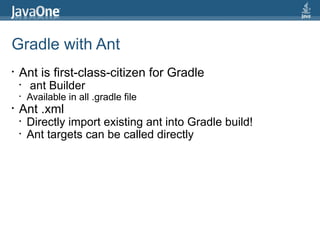
•   Ant is first-class-citizen for Gradle
    •   ant Builder
    •   Available in all .gradle file
•   Ant .xml
    •   Directly import existing ant into Gradle build!
    •   Ant targets can be called directly
Gradle with Ant...
task callAnt << {                              $ gradle callAnt
  ant.echo (message: 'Hello Ant 1')            :callAnt
  ant.echo ('Hello Ant 2')                     [ant:echo] Hello   Ant   1
  ant.echo message: 'Hello Ant 3'              [ant:echo] Hello   Ant   2
  ant.echo 'Hello Ant 4'                       [ant:echo] Hello   Ant   3
}                                              [ant:echo] Hello   Ant   4

task myCompile << {                            BUILD SUCCESSFUL
ant.java(classname: 'com.my.classname',
classpath:
${sourceSets.main.runtimeClasspath.asPath}")

}
Gradle with Ant...
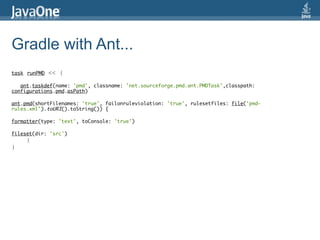
task runPMD   << {

   ant.taskdef(name: 'pmd', classname: 'net.sourceforge.pmd.ant.PMDTask',classpath:
configurations.pmd.asPath)

ant.pmd(shortFilenames: 'true', failonruleviolation: 'true', rulesetfiles: file('pmd-
rules.xml').toURI().toString()) {

formatter(type: 'text', toConsole: 'true')

fileset(dir: 'src')
     }
}
Gradle calls Ant
<!-- build.xml -->             $ gradle antHello
<project>                      :antHello
    <target name="antHello">   [ant:echo] Hello, from Ant.
        <echo>Hello, from
Ant.</echo>                    BUILD SUCCESSFUL
    </target>
</project>


// build.gradle
ant.importBuild 'build.xml'
Gradle adds behaviour to Ant task
<!-- build.xml -->                   $ gradle callAnt
<project>                            :callAnt
    <target name="callAnt">          [ant:echo] Hello, from Ant.
            <echo>Hello, from        Gradle adds behaviour to Ant task
Ant.</echo>
    </target>                        BUILD SUCCESSFUL
</project>


// build.gradle
ant.importBuild 'build.xml'

callAnt << {
    println 'Gradle adds behaviour
to Ant task.'
}
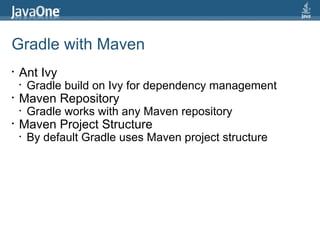
Gradle with Maven
•   Ant Ivy
    •   Gradle build on Ivy for dependency management
•   Maven Repository
    •   Gradle works with any Maven repository
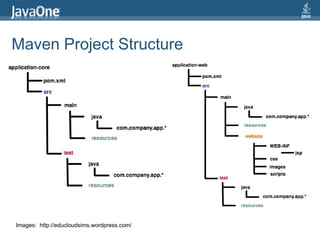
•   Maven Project Structure
    •   By default Gradle uses Maven project structure
Maven Project Structure


Images: http://educloudsims.wordpress.com/
Gradle repository
 repository {

        mavenCentral()

        mavenLocal()

        maven {
         url: “http://repo.myserver.come/m2”, “http://myserver.com/m2”
        }


    ivy {
        url: “http://repo.myserver.come/m2”, “http://myserver.com/m2”
          url: “../repo”
    }
   mavenRepo url: "http://twitter4j.org/maven2", artifactUrls:
["http://oss.sonatype.org/content/repositories/snapshots/", "http://siasia.github.com/maven2",
"http://typesafe.artifactoryonline.com/typesafe/ivy-releases", "http://twitter4j.org/maven2"]

}
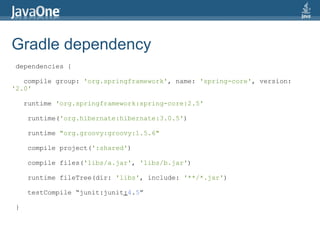
Gradle dependency
dependencies {

   compile group: 'org.springframework', name: 'spring-core', version:
'2.0'

    runtime 'org.springframework:spring-core:2.5'

    runtime('org.hibernate:hibernate:3.0.5')

    runtime "org.groovy:groovy:1.5.6"

    compile project(':shared')

    compile files('libs/a.jar', 'libs/b.jar')

    runtime fileTree(dir: 'libs', include: '**/*.jar')

    testCompile “junit:junit:4.5”

}
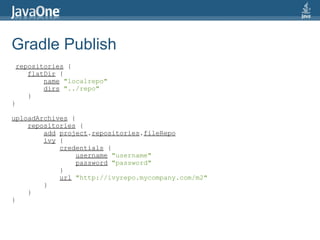
Gradle Publish
 repositories {
    flatDir {
        name "localrepo"
        dirs "../repo"
    }
}

uploadArchives {
    repositories {
        add project.repositories.fileRepo
        ivy {
            credentials {
                 username "username"
                 password "password"
            }
            url "http://ivyrepo.mycompany.com/m2"
        }
    }
}
Plugin Support
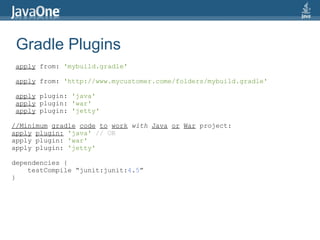
Gradle Plugins
apply from: 'mybuild.gradle'

apply from: 'http://www.mycustomer.come/folders/mybuild.gradle'

apply plugin: 'java'
apply plugin: 'war'
apply plugin: 'jetty'

//Minimum gradle code to work with Java or War project:
apply plugin: 'java' // OR
apply plugin: 'war'
apply plugin: 'jetty'

dependencies {
    testCompile “junit:junit:4.5”
}
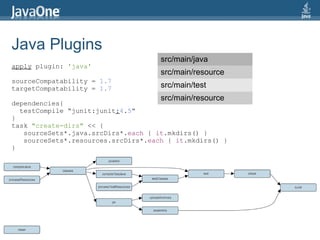
Java Plugins
                                     src/main/java
apply plugin: 'java'
                                     src/main/resource
sourceCompatability = 1.7
targetCompatability = 1.7            src/main/test
                                     src/main/resource
dependencies{
  testCompile “junit:junit:4.5”
}
task "create-dirs" << {
   sourceSets*.java.srcDirs*.each { it.mkdirs() }
   sourceSets*.resources.srcDirs*.each { it.mkdirs() }
}
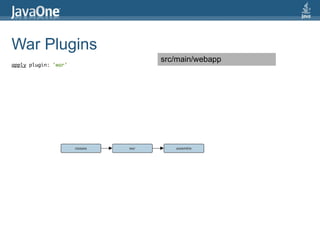
War Plugins
                      src/main/webapp
apply plugin: 'war'
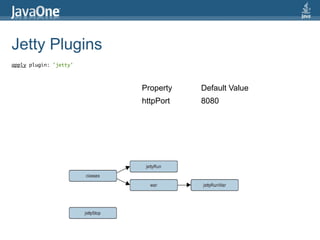
Jetty Plugins
apply plugin: 'jetty'


                        Property   Default Value
                        httpPort   8080
Community Plugins
•   Android
•   AspectJ
•   CloudFactory
•   Cobertura
•   Ubuntu Packager
•   Emma
•   Exec
•   FindBug
•   Flex
•   Git
•   Eclipse
•   GWT
•   JAXB
•   ...

    For more plugins : http://wiki.gradle.org/display/GRADLE/Plugins
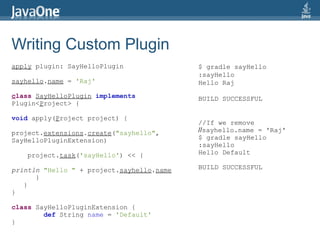
Writing Custom Plugin
apply plugin: SayHelloPlugin               $ gradle sayHello
                                           :sayHello
sayhello.name = 'Raj'                      Hello Raj
class SayHelloPlugin implements            BUILD SUCCESSFUL
Plugin<Project> {

void apply(Project project) {
                                           //If we remove
project.extensions.create("sayhello",      //sayhello.name = 'Raj'
SayHelloPluginExtension)                   $ gradle sayHello
                                           :sayHello
    project.task('sayHello') << {          Hello Default

println "Hello " + project.sayhello.name   BUILD SUCCESSFUL
      }
   }
}

class SayHelloPluginExtension {
        def String name = 'Default'
}
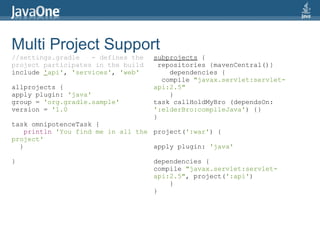
Multi Project Support
//settings.gradle   - defines the   subprojects {
project participates in the build     repositories {mavenCentral()}
include 'api', 'services', 'web'         dependencies {
                                       compile "javax.servlet:servlet-
allprojects {                       api:2.5"
apply plugin: 'java'                     }
group = 'org.gradle.sample'         task callHoldMyBro (dependsOn:
version = '1.0                      ':elderBro:compileJava') {}
                                    }
task omnipotenceTask {
    println 'You find me in all the project(':war') {
project'
  }                                 apply plugin: 'java'

}                                   dependencies {
                                    compile "javax.servlet:servlet-
                                    api:2.5", project(':api')
                                        }
                                    }
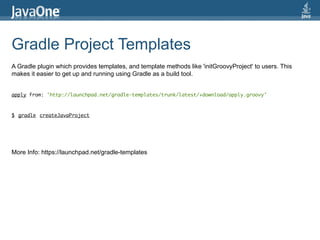
Gradle Project Templates
A Gradle plugin which provides templates, and template methods like 'initGroovyProject' to users. This
makes it easier to get up and running using Gradle as a build tool.


apply from: 'http://launchpad.net/gradle-templates/trunk/latest/+download/apply.groovy'


$ gradle createJavaProject


More Info: https://launchpad.net/gradle-templates
Gradle Project Templates
// Inside apply.gradle
buildscript {
    repositories {
        ivy {
            name = 'gradle_templates'
            artifactPattern "http://launchpad.net/[organization]/trunk/
[revision]/+download/[artifact]-[revision].jar"
        }
    }
    dependencies {
        classpath 'gradle-templates:templates:1.2'
    }
}
// Check to make sure templates.TemplatesPlugin isn't already added.
if (!project.plugins.findPlugin(templates.TemplatesPlugin)) {
    project.apply(plugin: templates.TemplatesPlugin)
}
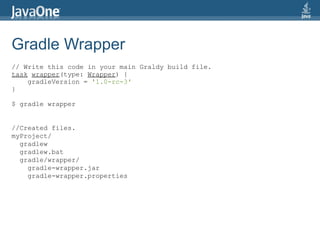
Gradle Wrapper
// Write this code in your main Graldy build file.
task wrapper(type: Wrapper) {
    gradleVersion = '1.0-rc-3'
}

$ gradle wrapper


//Created files.
myProject/
  gradlew
  gradlew.bat
  gradle/wrapper/
    gradle-wrapper.jar
    gradle-wrapper.properties
Gradle IDE Support
Reference
•   http://gradle.orga
•   http://gradle.org/overview
•   http://gradle.org/documentation
•   http://gradle.org/roadmap
•   http://docs.codehaus.org/display/GRADLE/Cookbook
    http://www.gradle.org/tooling
    http://gradle.org/contribute
Q&A
User Group Events
                                                                          JUG-India
                   JUGChennai                                      Java User Groups - India
            Java User Groups - Chennai
                                                                      Find your nearest JUG at
                      Main Website                      http://java.net/projects/jug-india
             http://jugchennai.in
                                                                    For JUG updates around india
                 Tweets: @jug_c
                  G Group: jug-c                         discussion@jug-india.java.net


May 5th
JUGChennai - Chennai - Stephen Chin – http://jugchennai.in/javafx
BOJUG – Bangalore - Simon Ritter, Chuk Munn Lee,Roger Brinkley and Terrence Barr
PuneJUG – Pune - Arun Gupta

November 2nd & 3rd
AIOUG Sangam '12 [Java Track] (Main Speaker as of now Arun Gupta)
Call for Paper is open - http://www.aioug.org/sangamspeakers.php
Rajmahendra Hegde
rajmahendra@gmail.com
tweet: @rajonjava

Gradle build tool that rocks with DSL JavaOne India 4th May 2012

  • 1.
    Gradle: Build toolthat rocks with DSL Rajmahendra Hegde JUGChennai Founder & Lead rajmahendra@gmail.com tweet: @rajonjava
  • 2.
    aboutMe { name: 'Rajmahendra Hegde' community: name: 'Java User Group – Chennai', role: 'Founder and Lead', url: 'http://jugchennai.in' profession: company: 'Logica', designation: 'Project Lead' javaDeveloperSince: 1999 contributions { jcp: [jsrID: 354, name: 'Money and Currency API'],[jsrID: 357, 'Social Media'] communityProject: 'Agorava', 'VisageFX', 'Scalaxia.com', 'gradle-weaverfx- plugin' } interests: 'JUG Activities','JEE', 'Groovy', 'Scala', 'JavaFX', 'VisageFX', 'NetBeans', 'Gradle' twitter: '@rajonjava' email: 'rajmahendra@gmail.com' }
  • 3.
    Agenda • Build tools • Build tool basics • Gradle • Getting Started • Gradle Tasks • Gradle with Ant • Gradle with Maven • Plugins • Multi Project Support • Project Templates • IDEs Support
  • 4.
    Build Tool Jar Source Files, War Resource Files etc. jpi Automated Build Tool XYZ...
  • 5.
    Build Tool • Initialize • Generic build process • checkout • Dev, Test, Integ, • Compile environment • Check-style • Continuous Integration • Test • Code coverage • Jar • War • Ear • Deploy • etc...
  • 6.
    Evolution of buildtools • Javac, Jar.. - Command based • IDEs – Application based (a need for building application outside the IDEs!) (this is the age of onsite deployment and Continuous Integration) • Ant – Task based - (XML) • Maven – Goal based (XML) • … • Gradle – A mix of good practices/tools(ant, maven,ivy etc.) with a flavor of DSL
  • 7.
  • 8.
    Gradle is • A general purpose Java build system • Platform independent • DSL based • Built for java based projects • Full support of Grooy, Ant and Maven • Task based system • Convention over configuration • Flexible, scalable, extensible • Plugins • Flexible multi-project support • Free and open source
  • 9.
    Why Core Java JVM Language No No <XML> <XML> Use Use @annotation DSL{}
  • 10.
    DSL? Domain SpecificLanguage A domain-specific language (DSL) is a programming language or specification language dedicated to a particular problem domain, a particular problem representation technique, and/or a particular solution technique. - Wikipedia Examples Chess Notation 1. e4 e5 2. Nf3 Nc6 3. Bb5 a6 1. P-K4 P-K4 2. N-KB3 N-QB3 3. B-B4 B-B4 Music Western Musical Notation – C, D, E, F, G, A, B, C Solfège syllables – Do, Re, Mi, Fa, Sol, La, Ti, Do. Carnatic Music Notation – Sa Re Ga Ma Pa Da Ne Sa Guitar Tab - 0 1 2 3 4 Harmonica Tab – 1b 1b 2d 2d Rubik's Cube Notation - d', d2. f, f', f2, b, b', b2 Very popular in our own field SQL! SELECT * FROM MYTABLE WHERE MYFIELD = 4 And many...
  • 11.
    Read about DSL DSLsin Action By - Debasish Ghosh Forewords by: Jonas Bonér December, 2010 | 376 pages ISBN: 9781935182450 DSLs in Action introduces the concepts you'll need to build high-quality domain-specific languages. It explores DSL implementation based on JVM languages like Java, Scala, Clojure, Ruby, and Groovy and contains fully explained code snippets that implement real-world DSL designs. For experienced developers, the book addresses the intricacies of DSL design without the pain of writing parsers by hand. http://www.manning.com/ghosh/
  • 12.
    Getting Started • Download binary zip from gradle.org $ gradle -v • Unzip in your favorite folder -------------------------------------- • Set GRADLE_HOME Env. Variable Gradle 1.0-rc-2 -------------------------------------- • Add GRADLE_HOME[/ or ]bin to PATH Gradle build time: Tuesday, April 24, 2012 • To test 11:52:37 PM UTC $ gradle -v Groovy: 1.8.6 Ant: Apache Ant(TM) version 1.8.2 compiled on December 20 2010 • Build File name: Ivy: 2.2.0 – build.gradle JVM: 1.6.0_31 (Apple Inc. 20.6-b01-415) – gradle.properties OS: Mac OS X 10.7.3 x86_64 – settings.gradle
  • 13.
    Build Lifecycle • Initialization l Initializes the scope of the build l Identifies projects [multi-project env.] involved l Creates Project instance • Configuration l Executes buildscript{} for all its scope l Configures the project objects • Execution l Determines the subset of the tasks l Runs the build
  • 14.
    Gradle Tasks task mytask<< { $ gradle mytask println 'Hello World' :mytask } The First Hello World mytask.doFirst { The Last println 'The First' Add more } BUILD SUCCESSFUL mytask.doLast { println 'The Last' } mytask << { println 'Add more' }
  • 15.
    Gradle is Groovy task mytask << { $ gradle mytask :mytask String myString = 'Hello World' Hello World HELLO WORLD def myMap = ['map1': '1', Map2: 2 'map2':'2'] Count 0 Count 2 println myString Count 4 println myString.toUpperCase() println 'Map2: ' + BUILD SUCCESSFUL myMap['map2'] 5.times { if (it % 2 == 0) println (“Count $it”) } }
  • 16.
    Gradle Task Dependencies tasktask1(dependsOn: 'task2') << { $ gradle task1 println 'Task 1' :task4 } Task 4 :task3 task task2 (dependsOn: 'task3') << { Task 3 println 'Task 2' :task2 } Task 2 :task1 task task4 << { Task 1 println 'Task 4' BUILD SUCCESSFUL } task task3 (dependsOn: task4) << { println 'Task 3' }
  • 17.
    Gradle defaultTasks defaultTasks 'task3','task1' $ gradle :task3 task task1 << { Task 3 println 'Task 1' :task1 } Task 1 BUILD SUCCESSFUL task task2 << { println 'Task 2' } task task4 << { println 'Task 4' } task task3 << { println 'Task 3' }
  • 18.
    Gradle DAG task distribution<< { $ gradle distribution println "We build the zip with :distribution version=$version" We build the zip with version=1.0- } SNAPSHOT BUILD SUCCESSFUL task release(dependsOn: 'distribution') << { $ gradle release println 'We release now' :distribution } We build the zip with version=1.0 :release gradle.taskGraph.whenReady {taskGraph → We release now BUILD SUCCESSFUL if (taskGraph.hasTask(release)) { version = '1.0' } else { version = '1.0-SNAPSHOT' } } From Gradle Userguide
  • 19.
    Configuring Tasks task copy(type:Zip) { // OR from 'resources' task myCopy(type: Zip) into 'target' myCopy { include('**/*.properties') from 'resources' } into 'target' include( '**/*.properties') // OR } task myCopy(type: Zip) // OR myCopy.configure { from('source') task(myCopy, type: Zip) into('target') .from('resources') include('**/*.properties') .into('target') } .include( '**/*.properties')
  • 20.
    Gradle with Ant • Ant is first-class-citizen for Gradle • ant Builder • Available in all .gradle file • Ant .xml • Directly import existing ant into Gradle build! • Ant targets can be called directly
  • 21.
    Gradle with Ant... taskcallAnt << { $ gradle callAnt ant.echo (message: 'Hello Ant 1') :callAnt ant.echo ('Hello Ant 2') [ant:echo] Hello Ant 1 ant.echo message: 'Hello Ant 3' [ant:echo] Hello Ant 2 ant.echo 'Hello Ant 4' [ant:echo] Hello Ant 3 } [ant:echo] Hello Ant 4 task myCompile << { BUILD SUCCESSFUL ant.java(classname: 'com.my.classname', classpath: ${sourceSets.main.runtimeClasspath.asPath}") }
  • 22.
    Gradle with Ant... taskrunPMD << { ant.taskdef(name: 'pmd', classname: 'net.sourceforge.pmd.ant.PMDTask',classpath: configurations.pmd.asPath) ant.pmd(shortFilenames: 'true', failonruleviolation: 'true', rulesetfiles: file('pmd- rules.xml').toURI().toString()) { formatter(type: 'text', toConsole: 'true') fileset(dir: 'src') } }
  • 23.
    Gradle calls Ant <!--build.xml --> $ gradle antHello <project> :antHello <target name="antHello"> [ant:echo] Hello, from Ant. <echo>Hello, from Ant.</echo> BUILD SUCCESSFUL </target> </project> // build.gradle ant.importBuild 'build.xml'
  • 24.
    Gradle adds behaviourto Ant task <!-- build.xml --> $ gradle callAnt <project> :callAnt <target name="callAnt"> [ant:echo] Hello, from Ant. <echo>Hello, from Gradle adds behaviour to Ant task Ant.</echo> </target> BUILD SUCCESSFUL </project> // build.gradle ant.importBuild 'build.xml' callAnt << { println 'Gradle adds behaviour to Ant task.' }
  • 25.
    Gradle with Maven • Ant Ivy • Gradle build on Ivy for dependency management • Maven Repository • Gradle works with any Maven repository • Maven Project Structure • By default Gradle uses Maven project structure
  • 26.
    Maven Project Structure Images:http://educloudsims.wordpress.com/
  • 27.
    Gradle repository repository{ mavenCentral() mavenLocal() maven { url: “http://repo.myserver.come/m2”, “http://myserver.com/m2” } ivy { url: “http://repo.myserver.come/m2”, “http://myserver.com/m2” url: “../repo” } mavenRepo url: "http://twitter4j.org/maven2", artifactUrls: ["http://oss.sonatype.org/content/repositories/snapshots/", "http://siasia.github.com/maven2", "http://typesafe.artifactoryonline.com/typesafe/ivy-releases", "http://twitter4j.org/maven2"] }
  • 28.
    Gradle dependency dependencies { compile group: 'org.springframework', name: 'spring-core', version: '2.0' runtime 'org.springframework:spring-core:2.5' runtime('org.hibernate:hibernate:3.0.5') runtime "org.groovy:groovy:1.5.6" compile project(':shared') compile files('libs/a.jar', 'libs/b.jar') runtime fileTree(dir: 'libs', include: '**/*.jar') testCompile “junit:junit:4.5” }
  • 29.
    Gradle Publish repositories{ flatDir { name "localrepo" dirs "../repo" } } uploadArchives { repositories { add project.repositories.fileRepo ivy { credentials { username "username" password "password" } url "http://ivyrepo.mycompany.com/m2" } } }
  • 30.
  • 31.
    Gradle Plugins apply from:'mybuild.gradle' apply from: 'http://www.mycustomer.come/folders/mybuild.gradle' apply plugin: 'java' apply plugin: 'war' apply plugin: 'jetty' //Minimum gradle code to work with Java or War project: apply plugin: 'java' // OR apply plugin: 'war' apply plugin: 'jetty' dependencies { testCompile “junit:junit:4.5” }
  • 32.
    Java Plugins src/main/java apply plugin: 'java' src/main/resource sourceCompatability = 1.7 targetCompatability = 1.7 src/main/test src/main/resource dependencies{ testCompile “junit:junit:4.5” } task "create-dirs" << { sourceSets*.java.srcDirs*.each { it.mkdirs() } sourceSets*.resources.srcDirs*.each { it.mkdirs() } }
  • 33.
    War Plugins src/main/webapp apply plugin: 'war'
  • 34.
    Jetty Plugins apply plugin:'jetty' Property Default Value httpPort 8080
  • 35.
    Community Plugins • Android • AspectJ • CloudFactory • Cobertura • Ubuntu Packager • Emma • Exec • FindBug • Flex • Git • Eclipse • GWT • JAXB • ... For more plugins : http://wiki.gradle.org/display/GRADLE/Plugins
  • 36.
    Writing Custom Plugin applyplugin: SayHelloPlugin $ gradle sayHello :sayHello sayhello.name = 'Raj' Hello Raj class SayHelloPlugin implements BUILD SUCCESSFUL Plugin<Project> { void apply(Project project) { //If we remove project.extensions.create("sayhello", //sayhello.name = 'Raj' SayHelloPluginExtension) $ gradle sayHello :sayHello project.task('sayHello') << { Hello Default println "Hello " + project.sayhello.name BUILD SUCCESSFUL } } } class SayHelloPluginExtension { def String name = 'Default' }
  • 37.
  • 38.
    Multi Project Support //settings.gradle - defines the subprojects { project participates in the build repositories {mavenCentral()} include 'api', 'services', 'web' dependencies { compile "javax.servlet:servlet- allprojects { api:2.5" apply plugin: 'java' } group = 'org.gradle.sample' task callHoldMyBro (dependsOn: version = '1.0 ':elderBro:compileJava') {} } task omnipotenceTask { println 'You find me in all the project(':war') { project' } apply plugin: 'java' } dependencies { compile "javax.servlet:servlet- api:2.5", project(':api') } }
  • 39.
    Gradle Project Templates AGradle plugin which provides templates, and template methods like 'initGroovyProject' to users. This makes it easier to get up and running using Gradle as a build tool. apply from: 'http://launchpad.net/gradle-templates/trunk/latest/+download/apply.groovy' $ gradle createJavaProject More Info: https://launchpad.net/gradle-templates
  • 40.
    Gradle Project Templates //Inside apply.gradle buildscript { repositories { ivy { name = 'gradle_templates' artifactPattern "http://launchpad.net/[organization]/trunk/ [revision]/+download/[artifact]-[revision].jar" } } dependencies { classpath 'gradle-templates:templates:1.2' } } // Check to make sure templates.TemplatesPlugin isn't already added. if (!project.plugins.findPlugin(templates.TemplatesPlugin)) { project.apply(plugin: templates.TemplatesPlugin) }
  • 41.
    Gradle Wrapper // Writethis code in your main Graldy build file. task wrapper(type: Wrapper) { gradleVersion = '1.0-rc-3' } $ gradle wrapper //Created files. myProject/ gradlew gradlew.bat gradle/wrapper/ gradle-wrapper.jar gradle-wrapper.properties
  • 42.
  • 43.
    Reference • http://gradle.orga • http://gradle.org/overview • http://gradle.org/documentation • http://gradle.org/roadmap • http://docs.codehaus.org/display/GRADLE/Cookbook http://www.gradle.org/tooling http://gradle.org/contribute
  • 44.
  • 45.
    User Group Events JUG-India JUGChennai Java User Groups - India Java User Groups - Chennai Find your nearest JUG at Main Website http://java.net/projects/jug-india http://jugchennai.in For JUG updates around india Tweets: @jug_c G Group: jug-c discussion@jug-india.java.net May 5th JUGChennai - Chennai - Stephen Chin – http://jugchennai.in/javafx BOJUG – Bangalore - Simon Ritter, Chuk Munn Lee,Roger Brinkley and Terrence Barr PuneJUG – Pune - Arun Gupta November 2nd & 3rd AIOUG Sangam '12 [Java Track] (Main Speaker as of now Arun Gupta) Call for Paper is open - http://www.aioug.org/sangamspeakers.php
  • 46.