ELECTRONIC BANKING
CHAPTER 7
By end of this chapter, students will be able to:
• Define electronic banking and electronic funds
transfer (EFT).
• Describe EFT as a means of payment
• Identify categories of electronic banking systems
• Differentiate the following non-consumer
activated electronic banking systems.
• Understand consumer-activated electronic
banking systems
• Discuss the issues involving e-commerce banking
Introduction
• Electronic revolution in the Malaysian banking sector
started since 1970s.
 The actualization of the electronic revolution happened during
the introduction of Automated Teller Machine (ATM) in 1981.
 The introduction of telephone banking service in 1990s became
the next technological leap in Malaysian banking industry
(Suganthi et al, 2001).

 In June 2000, the Bank Negara Malaysia allowed commercial
banks to offer Internet banking services to their customers.
 i.e. CIMB, Maybank and RHB Bank Berhad collectively had an
estimated 917,000 Internet banking users as of end of 2006.
Content
1

• Basic of electronic banking
• Electronic Funds Transfer (EFT)

2

• Non-Customer Activated Electronic Banking Systems
• Customer Activated Electronic Banking Systems

3

• Issues involving e-commerce banking
• Security & Secrecy
ELECTRONIC BANKING
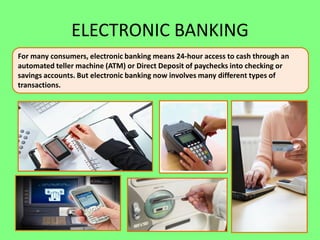
For many consumers, electronic banking means 24-hour access to cash through an
automated teller machine (ATM) or Direct Deposit of paychecks into checking or
savings accounts. But electronic banking now involves many different types of
transactions.
ELECTRONIC BANKING
 “Electronic Banking is the use of a computer to
retrieve and process banking data and to initiate
transactions directly with a bank via a
telecommunications network” Lipis et al,1986.
“Electronic Banking is actually a repackaging,
delivery and processing of traditional banking
financial services such as cash withdrawals, fund
transfers, placement of deposits through an
electronic on-line medium as compared to customary
paper based, off-line system” Tan Min Ching , 1993.
ELECTRONIC BANKING
Electronic banking, also known as electronic funds
transfer (EFT), is simply the use of electronic means to
transfer funds directly from one account to another,
rather than by check or cash. You can use electronic funds
transfer to:

• have your paycheck deposited directly into
your bank or credit union checking account;
• withdraw money from your checking
account from an ATM machine;
More Facts
• transfer funds from your checking account to your mutual
fund account;
• have your government social security benefits check or
your tax refund deposited directly into your checking
account;
• instruct your bank or credit union to automatically pay
certain monthly bills from your account;
• make purchases using a check card rather than
cash;
More Facts
• use a smart card with a prepaid amount of money
embedded in it instead of cash;

• use your computer and personal finance software to
coordinate your total personal financial management.
1

• Basic of electronic banking
• Electronic Funds Transfer (EFT)

Definitions
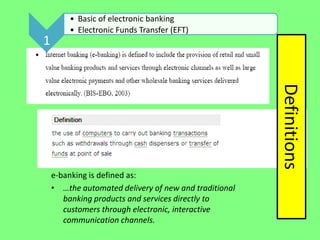
e-banking is defined as:
• …the automated delivery of new and traditional
banking products and services directly to
customers through electronic, interactive
communication channels.
Question:
What is electronic funds transfer (EFT)?
Answer:
Withdrawals, deposits, and bill payments.
ELECTRONIC FUND TRANSFERS
 Electronic Funds Transfer (EFT) is a system of transferring
money from one bank account directly to another without any
paper money changing hands.
 EFT is safe, secure, efficient, and less expensive than paper
check payments and collections.

 EFT offers several services that consumers may find practical
to be as a means of payment.
ELECTRONIC FUND TRANSFERS
• Cardholder-initiated transactions, where a cardholder makes
use of a payment card
• Direct deposit payroll payments for a business to its
employees
• Direct debit payments, sometimes called electronic checks,
for which a business debits the consumer's bank accounts for
payment for goods or services
• Electronic bill payment in online banking
2

• Non-Customer Activated Electronic Banking Systems
• Customer Activated Electronic Banking Systems

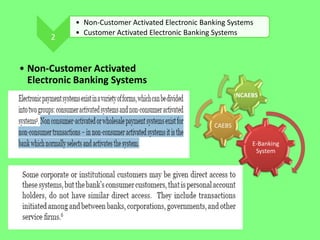
• Non-Customer Activated
Electronic Banking Systems
NCAEBS

CAEBS
E-Banking
System
Non-consumer-activated EFT System
 Exist for non-consumer-transactions-banks selects and
activates the system.
 Some corporate or institutional customers may be given direct
access to these systems, but the bank’s consumer customers,
that is personal account holders, do not have similar direct
access to this system.
 They include transactions initiated among and between
banks, corporations, governments, and other service firms.
 It consists of:
 Electronic Credit and Debit Transfer
 Nature of Credit and Debit Transfer
 International Electronic Transfer
Non-consumer-activated EFT System
• An example of the non-consumer-activated system is the
international electronic funds transfer system SWIFT operated
by the Society for Worldwide Interbank Financial
Telecommunication.
SWIFT
• Society for Worldwide Interbank Financial
Telecommunication ("SWIFT")
• a co-operative society, founded in 1974 by seven
international banks, which operate a global network
to facilitate the transfer of financial messages.
– transports financial messages in a highly secure way

– banks can exchange data for funds transfer between
financial institutions
– Can do money transfer, currency exchange, loan, deposit etc
– Improve the productivity and avoid error
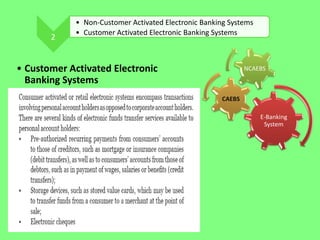
2

• Non-Customer Activated Electronic Banking Systems
• Customer Activated Electronic Banking Systems

• Customer Activated Electronic
Banking Systems

NCAEBS

CAEBS
E-Banking
System
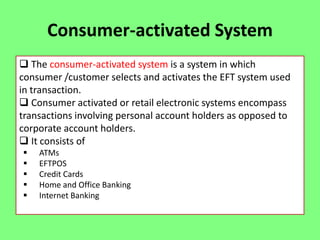
Consumer-activated System
 The consumer-activated system is a system in which
consumer /customer selects and activates the EFT system used
in transaction.
 Consumer activated or retail electronic systems encompass
transactions involving personal account holders as opposed to
corporate account holders.
 It consists of






ATMs
EFTPOS
Credit Cards
Home and Office Banking
Internet Banking
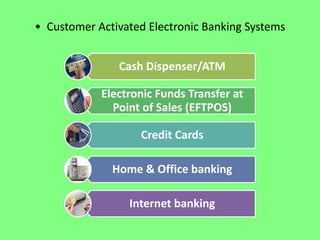
• Customer Activated Electronic Banking Systems
Cash Dispenser/ATM

Electronic Funds Transfer at
Point of Sales (EFTPOS)
Credit Cards
Home & Office banking
Internet banking
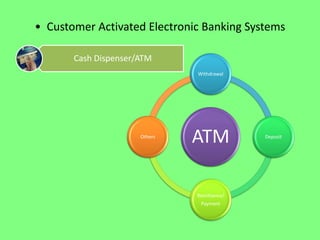
• Customer Activated Electronic Banking Systems
Cash Dispenser/ATM
Withdrawal

Others

ATM
Remittance/
Payment

Deposit
Automated Teller Machines (ATMs)
• The common functions of ATM machines are:
(a) Account balances inquiries;
(b) Cash withdrawals;
(c) Statement of accounts requests;
(d) Cash and cheque deposits.
• Some of the other functions of ATMs include Touch & Go
topup, air-ticket purchasing (Malaysia Airline System
Electronic) and many more.
Automated Teller Machines (ATMs)
Automated Teller Machines or 24-hour Tellers are
electronic terminals that let you bank almost any time.
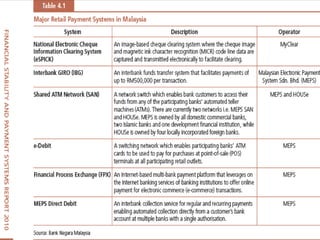
Most ATM are members of Malaysian Electronic Payment
System (MEPS) Sdn Bhd.
 can have access to their accounts via any ATM belonging to the MEPS network.

Some financial institutions and ATM owners charge a fee,
particularly to consumers who don’t have accounts with them
or on transactions at remote locations.
Can be used for balance enquiry, cash withdrawal, transfer of
funds between checking, savings and credit card accounts, bill
payments, making payments to application for initial public
offerings in the Kuala Lumpur Stock Exchange and for making
cash and check deposits
• Customer Activated Electronic Banking Systems
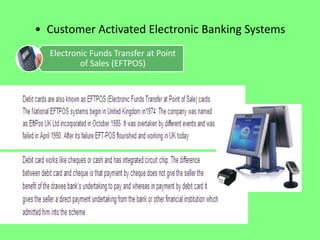
Electronic Funds Transfer at Point
of Sales (EFTPOS)
Electronic Fund Transfer Point of Sales
 A number of merchants permit customers using a debit card
to withdraw cash as part of the EFTPOS transaction.
 Allows customers to obtain the funds directly debited (taken)
from his bank account.
EFTPOS basically means that there is a funds transfer
Electronically at the point of sale.
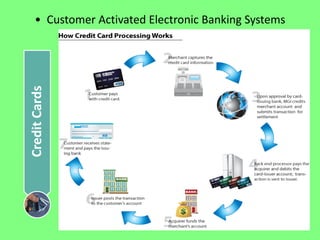
Credit Cards

• Customer Activated Electronic Banking Systems
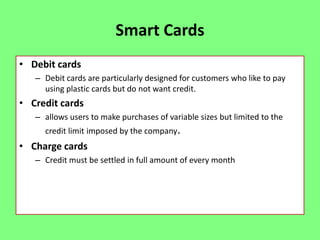
Smart Cards
• Debit cards
– Debit cards are particularly designed for customers who like to pay
using plastic cards but do not want credit.

• Credit cards
– allows users to make purchases of variable sizes but limited to the
credit limit imposed by the company.

• Charge cards
– Credit must be settled in full amount of every month
CONTINUE…
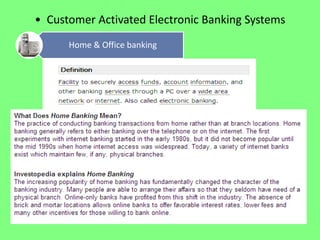
• Customer Activated Electronic Banking Systems
Home & Office banking
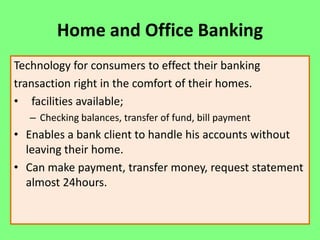
Home and Office Banking
Technology for consumers to effect their banking
transaction right in the comfort of their homes.
• facilities available;
– Checking balances, transfer of fund, bill payment

• Enables a bank client to handle his accounts without
leaving their home.
• Can make payment, transfer money, request statement
almost 24hours.
SMS Banking
• SMS banking uses short text messages sent through the
client’s mobile phone.
• Kept updated on important information when it concerns
your business matters by SMS alert
• A client can automatically receive information about his
account balance: an SMS is sent to the client immediately
after a certain operation is performed, or on request: a client
sends the bank a correctly formatted message which
processes it and answers the client’s request by SMS.
– Check balance
– Account Transfer
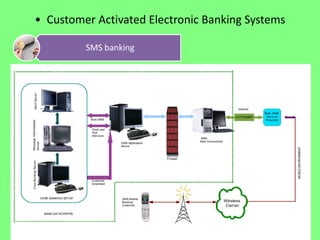
• Customer Activated Electronic Banking Systems
SMS banking
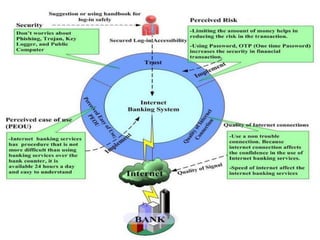
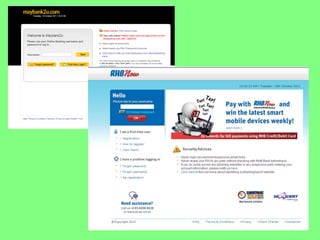
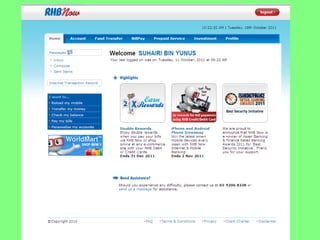
Internet Banking
• Customers can use their personal computers at
home, office or everywhere to access their accounts
for transactions by subscribing to and dialing into the
banks’ Intranet proprietary software system by use of
password.
• More common among corporate customers
compared to individual customers.
• Reducing cost, increasing speed and improved
flexibility of business transactions.
– Account balance, request transfers between accounts, and
pay bills electronically.
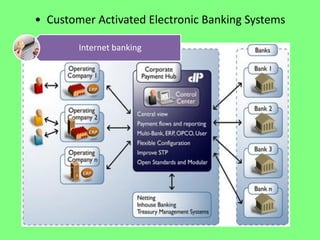
• Customer Activated Electronic Banking Systems
Internet banking
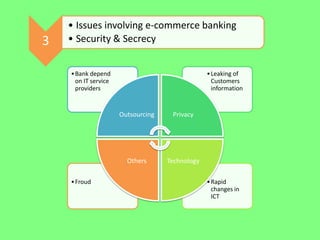
3

• Issues involving e-commerce banking
• Security & Secrecy
• Bank depend
on IT service
providers

• Leaking of
Customers
information

Outsourcing

Others
• Froud

Privacy

Technology
• Rapid
changes in
ICT
3

• Issues involving e-commerce banking
• Security & Secrecy

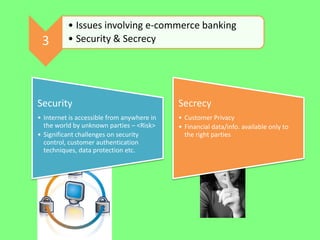
Security

Secrecy

• Internet is accessible from anywhere in
the world by unknown parties – <Risk>
• Significant challenges on security
control, customer authentication
techniques, data protection etc.

• Customer Privacy
• Financial data/info. available only to
the right parties
SECURITY
Security
• Regardless of what type of security is in place for on line
banking sites or ATMs, people are able to obtain customer
information.
– Phishing: where someone tries to trick a customer into revealing
sensitive information
– Pharming: where malicious code is introduced into a computer,
customers can become victims to identity theft.

• These issues are often beyond the bank’s control, as criminals
try many tactics to obtain customer information.
• At ATMs, thieves can also hack the system, so your personal
identification number (commonly called a PIN number) and
card number are stolen after you use them.
SECURITY
• Nowadays, most of us use the internet. We like to e-mail, chat
and have fun online as well as use it to buy and sell things and
do our banking.
• Unfortunately, it also provides opportunities for criminals to:
–
–
–
–

Infect your computer with spyware and steal your identity
Mess up your computer with pop-ups and viruses
Send you spam and scam e-mails
Trick you into visiting fake websites and handing over personal
information
– Hack into your wireless network
PROBLEMS
Fraud
• Fraud is a common concern with electronic banking because
the security features, such as a password or PIN number can
be stolen and used without identification.
• There are few ways to verify who is making a transaction until
it is too late.
• People can steal a PIN and card number and use it on line
without the owner’s permission.
• Money transfers can also occur through online banking sites
by an outside party.
PROBLEMS
Customer Service
• Electronic banking also lacks the one thing most bank
institutes thrive on customer service.
• Electronic banking is conducted by the customer instead of a
bank teller, so there is no face-to-face interaction.
• The customer must seek any additional services or help on by
pro-actively contacting the bank.
• Some customers refuse to use these services because they
feel they are entitled to in-person customer service
SECRECY
• Bank secrecy (or bank privacy) is a legal principle under which
banks are allowed to protect personal information about their
customers, through the use of numbered bank accounts or
otherwise.
• Data protection and privacy policies
• Every institution already describe their terms and conditions
for their services offered.
STEPS TAKEN TO BE SECURED
1. Choose the right browser and make sure your PC has
installed any antivirus, spyware or firewall to prevent any
hackers or stolen data.
2. Update your information from time to time, renew your
password.
3. Save all your transaction statement as a proof if any matters
arising later.
4. Save all your PIN and personal information and don’t reveal
to anyone even your spouse.
5. Always check your account balance. MORE….
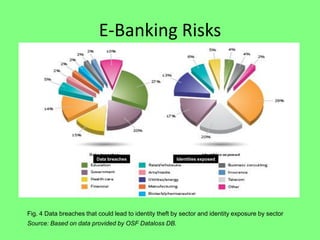
E-Banking Risks

Data breaches

Identities exposed

Fig. 4 Data breaches that could lead to identity theft by sector and identity exposure by sector
Source: Based on data provided by OSF Dataloss DB.
FINISH…..
TUTORIAL

Additional slide

chapter 7 : electronic banking

  • 1.
  • 2.
    By end ofthis chapter, students will be able to: • Define electronic banking and electronic funds transfer (EFT). • Describe EFT as a means of payment • Identify categories of electronic banking systems • Differentiate the following non-consumer activated electronic banking systems. • Understand consumer-activated electronic banking systems • Discuss the issues involving e-commerce banking
  • 3.
    Introduction • Electronic revolutionin the Malaysian banking sector started since 1970s.  The actualization of the electronic revolution happened during the introduction of Automated Teller Machine (ATM) in 1981.  The introduction of telephone banking service in 1990s became the next technological leap in Malaysian banking industry (Suganthi et al, 2001).  In June 2000, the Bank Negara Malaysia allowed commercial banks to offer Internet banking services to their customers.  i.e. CIMB, Maybank and RHB Bank Berhad collectively had an estimated 917,000 Internet banking users as of end of 2006.
  • 4.
    Content 1 • Basic ofelectronic banking • Electronic Funds Transfer (EFT) 2 • Non-Customer Activated Electronic Banking Systems • Customer Activated Electronic Banking Systems 3 • Issues involving e-commerce banking • Security & Secrecy
  • 5.
    ELECTRONIC BANKING For manyconsumers, electronic banking means 24-hour access to cash through an automated teller machine (ATM) or Direct Deposit of paychecks into checking or savings accounts. But electronic banking now involves many different types of transactions.
  • 6.
    ELECTRONIC BANKING  “ElectronicBanking is the use of a computer to retrieve and process banking data and to initiate transactions directly with a bank via a telecommunications network” Lipis et al,1986. “Electronic Banking is actually a repackaging, delivery and processing of traditional banking financial services such as cash withdrawals, fund transfers, placement of deposits through an electronic on-line medium as compared to customary paper based, off-line system” Tan Min Ching , 1993.
  • 7.
    ELECTRONIC BANKING Electronic banking,also known as electronic funds transfer (EFT), is simply the use of electronic means to transfer funds directly from one account to another, rather than by check or cash. You can use electronic funds transfer to: • have your paycheck deposited directly into your bank or credit union checking account; • withdraw money from your checking account from an ATM machine;
  • 8.
    More Facts • transferfunds from your checking account to your mutual fund account; • have your government social security benefits check or your tax refund deposited directly into your checking account; • instruct your bank or credit union to automatically pay certain monthly bills from your account; • make purchases using a check card rather than cash;
  • 9.
    More Facts • usea smart card with a prepaid amount of money embedded in it instead of cash; • use your computer and personal finance software to coordinate your total personal financial management.
  • 10.
    1 • Basic ofelectronic banking • Electronic Funds Transfer (EFT) Definitions e-banking is defined as: • …the automated delivery of new and traditional banking products and services directly to customers through electronic, interactive communication channels.
  • 11.
    Question: What is electronicfunds transfer (EFT)?
  • 12.
  • 13.
    ELECTRONIC FUND TRANSFERS Electronic Funds Transfer (EFT) is a system of transferring money from one bank account directly to another without any paper money changing hands.  EFT is safe, secure, efficient, and less expensive than paper check payments and collections.  EFT offers several services that consumers may find practical to be as a means of payment.
  • 14.
    ELECTRONIC FUND TRANSFERS •Cardholder-initiated transactions, where a cardholder makes use of a payment card • Direct deposit payroll payments for a business to its employees • Direct debit payments, sometimes called electronic checks, for which a business debits the consumer's bank accounts for payment for goods or services • Electronic bill payment in online banking
  • 15.
    2 • Non-Customer ActivatedElectronic Banking Systems • Customer Activated Electronic Banking Systems • Non-Customer Activated Electronic Banking Systems NCAEBS CAEBS E-Banking System
  • 16.
    Non-consumer-activated EFT System Exist for non-consumer-transactions-banks selects and activates the system.  Some corporate or institutional customers may be given direct access to these systems, but the bank’s consumer customers, that is personal account holders, do not have similar direct access to this system.  They include transactions initiated among and between banks, corporations, governments, and other service firms.  It consists of:  Electronic Credit and Debit Transfer  Nature of Credit and Debit Transfer  International Electronic Transfer
  • 17.
    Non-consumer-activated EFT System •An example of the non-consumer-activated system is the international electronic funds transfer system SWIFT operated by the Society for Worldwide Interbank Financial Telecommunication.
  • 18.
    SWIFT • Society forWorldwide Interbank Financial Telecommunication ("SWIFT") • a co-operative society, founded in 1974 by seven international banks, which operate a global network to facilitate the transfer of financial messages. – transports financial messages in a highly secure way – banks can exchange data for funds transfer between financial institutions – Can do money transfer, currency exchange, loan, deposit etc – Improve the productivity and avoid error
  • 19.
    2 • Non-Customer ActivatedElectronic Banking Systems • Customer Activated Electronic Banking Systems • Customer Activated Electronic Banking Systems NCAEBS CAEBS E-Banking System
  • 20.
    Consumer-activated System  Theconsumer-activated system is a system in which consumer /customer selects and activates the EFT system used in transaction.  Consumer activated or retail electronic systems encompass transactions involving personal account holders as opposed to corporate account holders.  It consists of      ATMs EFTPOS Credit Cards Home and Office Banking Internet Banking
  • 22.
    • Customer ActivatedElectronic Banking Systems Cash Dispenser/ATM Electronic Funds Transfer at Point of Sales (EFTPOS) Credit Cards Home & Office banking Internet banking
  • 23.
    • Customer ActivatedElectronic Banking Systems Cash Dispenser/ATM Withdrawal Others ATM Remittance/ Payment Deposit
  • 24.
    Automated Teller Machines(ATMs) • The common functions of ATM machines are: (a) Account balances inquiries; (b) Cash withdrawals; (c) Statement of accounts requests; (d) Cash and cheque deposits. • Some of the other functions of ATMs include Touch & Go topup, air-ticket purchasing (Malaysia Airline System Electronic) and many more.
  • 25.
    Automated Teller Machines(ATMs) Automated Teller Machines or 24-hour Tellers are electronic terminals that let you bank almost any time. Most ATM are members of Malaysian Electronic Payment System (MEPS) Sdn Bhd.  can have access to their accounts via any ATM belonging to the MEPS network. Some financial institutions and ATM owners charge a fee, particularly to consumers who don’t have accounts with them or on transactions at remote locations. Can be used for balance enquiry, cash withdrawal, transfer of funds between checking, savings and credit card accounts, bill payments, making payments to application for initial public offerings in the Kuala Lumpur Stock Exchange and for making cash and check deposits
  • 26.
    • Customer ActivatedElectronic Banking Systems Electronic Funds Transfer at Point of Sales (EFTPOS)
  • 27.
    Electronic Fund TransferPoint of Sales  A number of merchants permit customers using a debit card to withdraw cash as part of the EFTPOS transaction.  Allows customers to obtain the funds directly debited (taken) from his bank account. EFTPOS basically means that there is a funds transfer Electronically at the point of sale.
  • 28.
    Credit Cards • CustomerActivated Electronic Banking Systems
  • 29.
    Smart Cards • Debitcards – Debit cards are particularly designed for customers who like to pay using plastic cards but do not want credit. • Credit cards – allows users to make purchases of variable sizes but limited to the credit limit imposed by the company. • Charge cards – Credit must be settled in full amount of every month
  • 30.
  • 31.
    • Customer ActivatedElectronic Banking Systems Home & Office banking
  • 32.
    Home and OfficeBanking Technology for consumers to effect their banking transaction right in the comfort of their homes. • facilities available; – Checking balances, transfer of fund, bill payment • Enables a bank client to handle his accounts without leaving their home. • Can make payment, transfer money, request statement almost 24hours.
  • 33.
    SMS Banking • SMSbanking uses short text messages sent through the client’s mobile phone. • Kept updated on important information when it concerns your business matters by SMS alert • A client can automatically receive information about his account balance: an SMS is sent to the client immediately after a certain operation is performed, or on request: a client sends the bank a correctly formatted message which processes it and answers the client’s request by SMS. – Check balance – Account Transfer
  • 34.
    • Customer ActivatedElectronic Banking Systems SMS banking
  • 35.
    Internet Banking • Customerscan use their personal computers at home, office or everywhere to access their accounts for transactions by subscribing to and dialing into the banks’ Intranet proprietary software system by use of password. • More common among corporate customers compared to individual customers. • Reducing cost, increasing speed and improved flexibility of business transactions. – Account balance, request transfers between accounts, and pay bills electronically.
  • 36.
    • Customer ActivatedElectronic Banking Systems Internet banking
  • 40.
    3 • Issues involvinge-commerce banking • Security & Secrecy • Bank depend on IT service providers • Leaking of Customers information Outsourcing Others • Froud Privacy Technology • Rapid changes in ICT
  • 41.
    3 • Issues involvinge-commerce banking • Security & Secrecy Security Secrecy • Internet is accessible from anywhere in the world by unknown parties – <Risk> • Significant challenges on security control, customer authentication techniques, data protection etc. • Customer Privacy • Financial data/info. available only to the right parties
  • 42.
    SECURITY Security • Regardless ofwhat type of security is in place for on line banking sites or ATMs, people are able to obtain customer information. – Phishing: where someone tries to trick a customer into revealing sensitive information – Pharming: where malicious code is introduced into a computer, customers can become victims to identity theft. • These issues are often beyond the bank’s control, as criminals try many tactics to obtain customer information. • At ATMs, thieves can also hack the system, so your personal identification number (commonly called a PIN number) and card number are stolen after you use them.
  • 43.
    SECURITY • Nowadays, mostof us use the internet. We like to e-mail, chat and have fun online as well as use it to buy and sell things and do our banking. • Unfortunately, it also provides opportunities for criminals to: – – – – Infect your computer with spyware and steal your identity Mess up your computer with pop-ups and viruses Send you spam and scam e-mails Trick you into visiting fake websites and handing over personal information – Hack into your wireless network
  • 44.
    PROBLEMS Fraud • Fraud isa common concern with electronic banking because the security features, such as a password or PIN number can be stolen and used without identification. • There are few ways to verify who is making a transaction until it is too late. • People can steal a PIN and card number and use it on line without the owner’s permission. • Money transfers can also occur through online banking sites by an outside party.
  • 45.
    PROBLEMS Customer Service • Electronicbanking also lacks the one thing most bank institutes thrive on customer service. • Electronic banking is conducted by the customer instead of a bank teller, so there is no face-to-face interaction. • The customer must seek any additional services or help on by pro-actively contacting the bank. • Some customers refuse to use these services because they feel they are entitled to in-person customer service
  • 46.
    SECRECY • Bank secrecy(or bank privacy) is a legal principle under which banks are allowed to protect personal information about their customers, through the use of numbered bank accounts or otherwise. • Data protection and privacy policies • Every institution already describe their terms and conditions for their services offered.
  • 47.
    STEPS TAKEN TOBE SECURED 1. Choose the right browser and make sure your PC has installed any antivirus, spyware or firewall to prevent any hackers or stolen data. 2. Update your information from time to time, renew your password. 3. Save all your transaction statement as a proof if any matters arising later. 4. Save all your PIN and personal information and don’t reveal to anyone even your spouse. 5. Always check your account balance. MORE….
  • 48.
    E-Banking Risks Data breaches Identitiesexposed Fig. 4 Data breaches that could lead to identity theft by sector and identity exposure by sector Source: Based on data provided by OSF Dataloss DB.
  • 49.
  • 50.