6–1
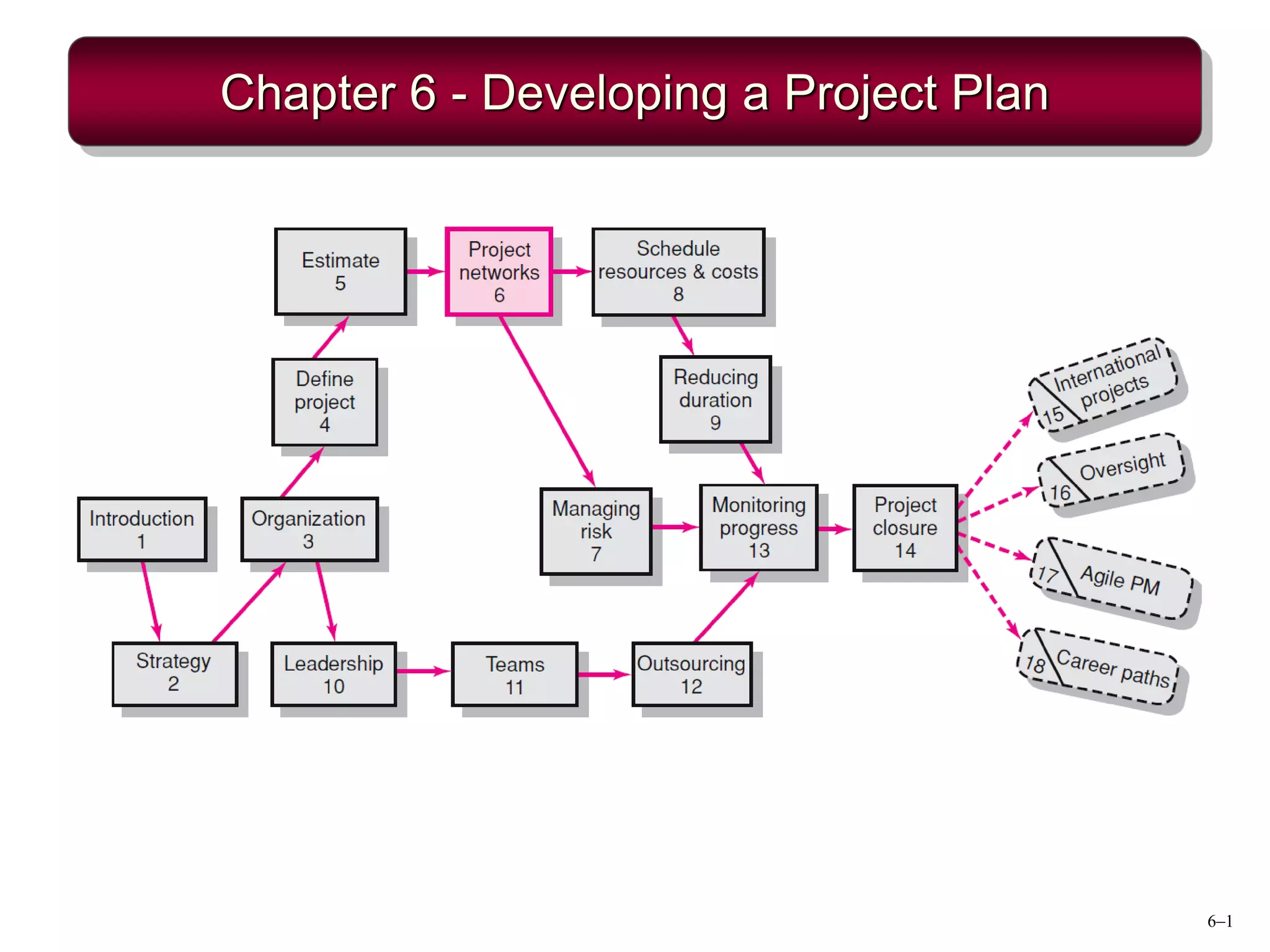
Chapter 6 - Developing a Project Plan
6–2
Developing the Project Plan
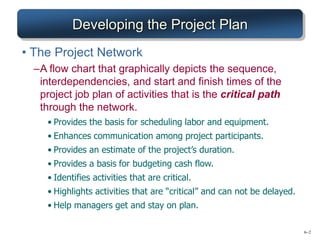
• The Project Network
–A flow chart that graphically depicts the sequence,
interdependencies, and start and finish times of the
project job plan of activities that is the critical path
through the network.
• Provides the basis for scheduling labor and equipment.
• Enhances communication among project participants.
• Provides an estimate of the project’s duration.
• Provides a basis for budgeting cash flow.
• Identifies activities that are critical.
• Highlights activities that are “critical” and can not be delayed.
• Help managers get and stay on plan.
6–3
Constructing a Project Network
• Terminology
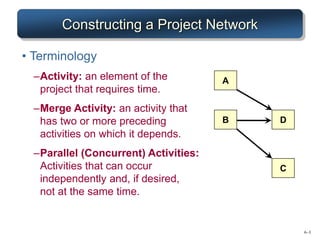
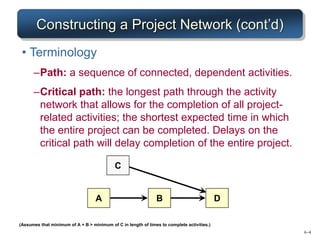
–Activity: an element of the
project that requires time.
–Merge Activity: an activity that
has two or more preceding
activities on which it depends.
–Parallel (Concurrent) Activities:
Activities that can occur
independently and, if desired,
not at the same time.
A
C
D
B
6–4
Constructing a Project Network (cont’d)
• Terminology
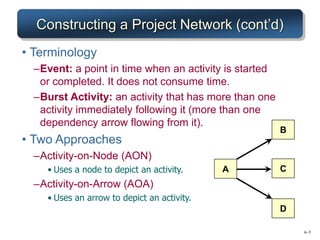
–Path: a sequence of connected, dependent activities.
–Critical path: the longest path through the activity
network that allows for the completion of all project-
related activities; the shortest expected time in which
the entire project can be completed. Delays on the
critical path will delay completion of the entire project.
A B D
(Assumes that minimum of A + B > minimum of C in length of times to complete activities.)
C
6–5
Constructing a Project Network (cont’d)
• Terminology
–Event: a point in time when an activity is started
or completed. It does not consume time.
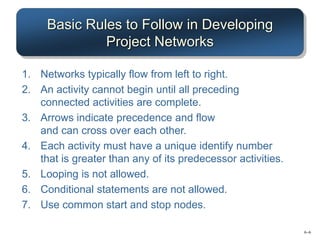
–Burst Activity: an activity that has more than one
activity immediately following it (more than one
dependency arrow flowing from it).
• Two Approaches
–Activity-on-Node (AON)
• Uses a node to depict an activity.
–Activity-on-Arrow (AOA)
• Uses an arrow to depict an activity.
B
D
A C
6–6
Basic Rules to Follow in Developing
Project Networks
1. Networks typically flow from left to right.
2. An activity cannot begin until all preceding
connected activities are complete.
3. Arrows indicate precedence and flow
and can cross over each other.
4. Each activity must have a unique identify number
that is greater than any of its predecessor activities.
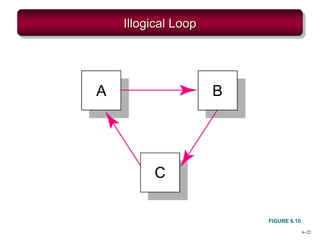
5. Looping is not allowed.
6. Conditional statements are not allowed.
7. Use common start and stop nodes.
6–7
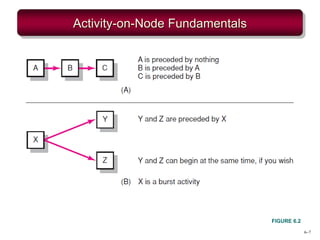
Activity-on-Node Fundamentals
FIGURE 6.2
6–8
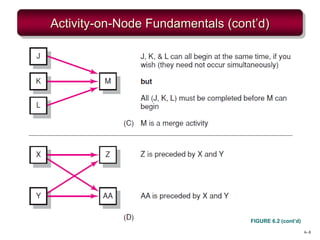
Activity-on-Node Fundamentals (cont’d)
FIGURE 6.2 (cont’d)
6–9
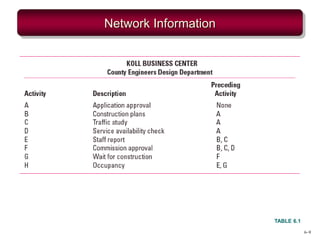
Network Information
TABLE 6.1
6–10
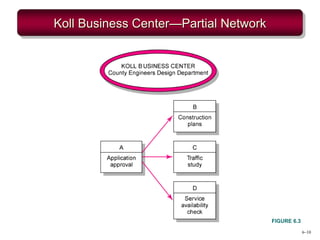
Koll Business Center—Partial Network
FIGURE 6.3
6–11
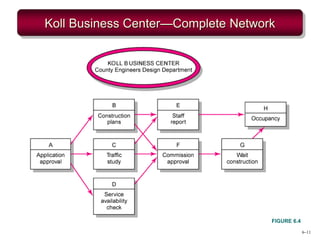
Koll Business Center—Complete Network
FIGURE 6.4
6–12
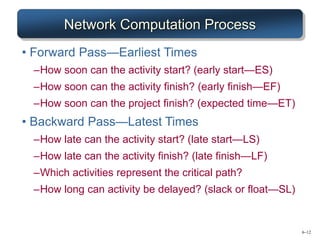
Network Computation Process
• Forward Pass—Earliest Times
–How soon can the activity start? (early start—ES)
–How soon can the activity finish? (early finish—EF)
–How soon can the project finish? (expected time—ET)
• Backward Pass—Latest Times
–How late can the activity start? (late start—LS)
–How late can the activity finish? (late finish—LF)
–Which activities represent the critical path?
–How long can activity be delayed? (slack or float—SL)
6–13
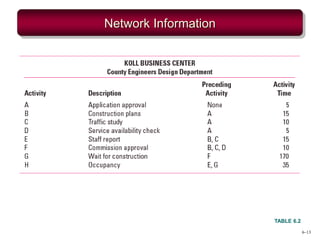
Network Information
TABLE 6.2
6–14
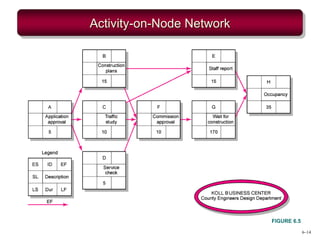
Activity-on-Node Network
FIGURE 6.5
6–15
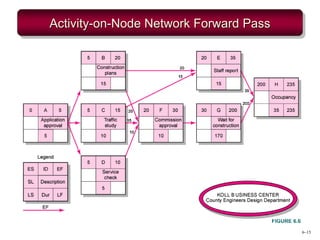
Activity-on-Node Network Forward Pass
FIGURE 6.6
6–16
Forward Pass Computation
• Add activity times along each path in the
network (ES + Duration = EF).
• Carry the early finish (EF) to the next activity
where it becomes its early start (ES) unless…
• The next succeeding activity is a merge activity,
in which case the largest EF of all preceding
activities is selected.
6–17
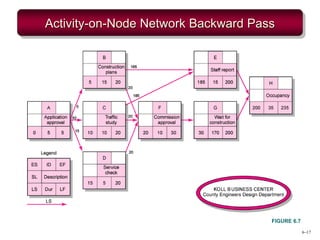
Activity-on-Node Network Backward Pass
FIGURE 6.7
6–18
Backward Pass Computation
• Subtract activity times along each path in the
network (LF - Duration = LS).
• Carry the late start (LS) to the next activity
where it becomes its late finish (LF) unless
• The next succeeding activity is a burst activity, in
which case the smallest LF of all preceding
activities is selected.
6–19
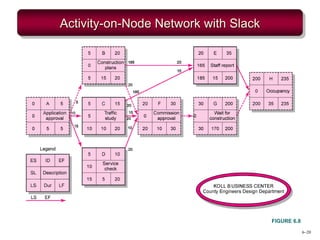
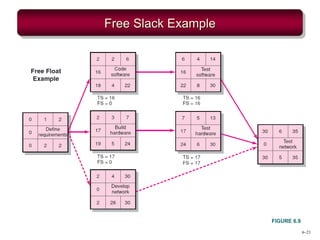
Determining Free Slack (or Float)
• Free Slack (or Float)
–Is the amount of time an activity can be delayed after
the start of a longer parallel activity or activities.
–Is how long an activity can exceed its early finish date
without affecting early start dates of any successor(s).
–Allows flexibility in scheduling scarce resources.
• Sensitivity
–The likelihood the original critical path(s) will change
once the project is initiated.
–The critical path is the network path(s) that has (have)
the least slack in common.
6–20
Activity-on-Node Network with Slack
FIGURE 6.8
6–21
Free Slack Example
FIGURE 6.9
6–22
Illogical Loop
FIGURE 6.10
6–23
Extended Network Techniques
to Come Close to Reality
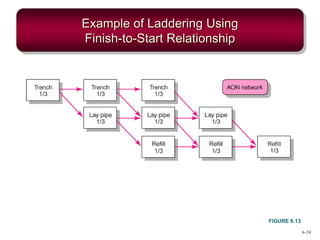
• Laddering
–Activities are broken into segments so the following
activity can begin sooner and not delay the work.
6–24
Example of Laddering Using
Finish-to-Start Relationship
FIGURE 6.13
6–25
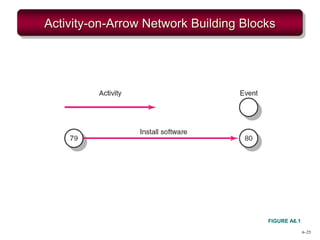
Activity-on-Arrow Network Building Blocks
FIGURE A6.1
6–26
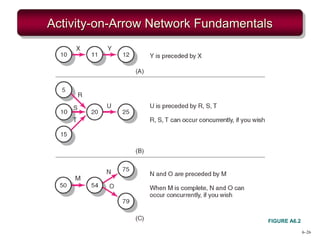
Activity-on-Arrow Network Fundamentals
FIGURE A6.2

Chapter 6 - Developing a Project Plan.pdf

  • 1.
    6–1 Chapter 6 -Developing a Project Plan
  • 2.
    6–2 Developing the ProjectPlan • The Project Network –A flow chart that graphically depicts the sequence, interdependencies, and start and finish times of the project job plan of activities that is the critical path through the network. • Provides the basis for scheduling labor and equipment. • Enhances communication among project participants. • Provides an estimate of the project’s duration. • Provides a basis for budgeting cash flow. • Identifies activities that are critical. • Highlights activities that are “critical” and can not be delayed. • Help managers get and stay on plan.
  • 3.
    6–3 Constructing a ProjectNetwork • Terminology –Activity: an element of the project that requires time. –Merge Activity: an activity that has two or more preceding activities on which it depends. –Parallel (Concurrent) Activities: Activities that can occur independently and, if desired, not at the same time. A C D B
  • 4.
    6–4 Constructing a ProjectNetwork (cont’d) • Terminology –Path: a sequence of connected, dependent activities. –Critical path: the longest path through the activity network that allows for the completion of all project- related activities; the shortest expected time in which the entire project can be completed. Delays on the critical path will delay completion of the entire project. A B D (Assumes that minimum of A + B > minimum of C in length of times to complete activities.) C
  • 5.
    6–5 Constructing a ProjectNetwork (cont’d) • Terminology –Event: a point in time when an activity is started or completed. It does not consume time. –Burst Activity: an activity that has more than one activity immediately following it (more than one dependency arrow flowing from it). • Two Approaches –Activity-on-Node (AON) • Uses a node to depict an activity. –Activity-on-Arrow (AOA) • Uses an arrow to depict an activity. B D A C
  • 6.
    6–6 Basic Rules toFollow in Developing Project Networks 1. Networks typically flow from left to right. 2. An activity cannot begin until all preceding connected activities are complete. 3. Arrows indicate precedence and flow and can cross over each other. 4. Each activity must have a unique identify number that is greater than any of its predecessor activities. 5. Looping is not allowed. 6. Conditional statements are not allowed. 7. Use common start and stop nodes.
  • 7.
  • 8.
  • 9.
  • 10.
  • 11.
  • 12.
    6–12 Network Computation Process •Forward Pass—Earliest Times –How soon can the activity start? (early start—ES) –How soon can the activity finish? (early finish—EF) –How soon can the project finish? (expected time—ET) • Backward Pass—Latest Times –How late can the activity start? (late start—LS) –How late can the activity finish? (late finish—LF) –Which activities represent the critical path? –How long can activity be delayed? (slack or float—SL)
  • 13.
  • 14.
  • 15.
  • 16.
    6–16 Forward Pass Computation •Add activity times along each path in the network (ES + Duration = EF). • Carry the early finish (EF) to the next activity where it becomes its early start (ES) unless… • The next succeeding activity is a merge activity, in which case the largest EF of all preceding activities is selected.
  • 17.
  • 18.
    6–18 Backward Pass Computation •Subtract activity times along each path in the network (LF - Duration = LS). • Carry the late start (LS) to the next activity where it becomes its late finish (LF) unless • The next succeeding activity is a burst activity, in which case the smallest LF of all preceding activities is selected.
  • 19.
    6–19 Determining Free Slack(or Float) • Free Slack (or Float) –Is the amount of time an activity can be delayed after the start of a longer parallel activity or activities. –Is how long an activity can exceed its early finish date without affecting early start dates of any successor(s). –Allows flexibility in scheduling scarce resources. • Sensitivity –The likelihood the original critical path(s) will change once the project is initiated. –The critical path is the network path(s) that has (have) the least slack in common.
  • 20.
  • 21.
  • 22.
  • 23.
    6–23 Extended Network Techniques toCome Close to Reality • Laddering –Activities are broken into segments so the following activity can begin sooner and not delay the work.
  • 24.
    6–24 Example of LadderingUsing Finish-to-Start Relationship FIGURE 6.13
  • 25.
  • 26.