DEVELOPING
PROJECT PLAN
Chapter 6
Outline
 Developing Project Network
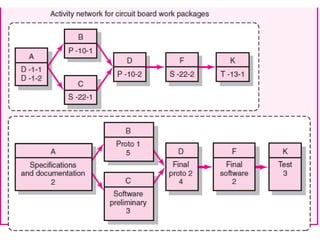
 From work package to network
 Constructing a project network
 Activity On Nod (AON) Fundamentals
 Network computation process
Project Network
 The project network is the tool used for
planning, scheduling, and monitoring
project progress
 It shows project activities in logical
sequence, and their interdependencies
 It is used by PM to make project time, cost
and performance decisions
 It is useful when duration of project is not
short
Project Network (Continued…)
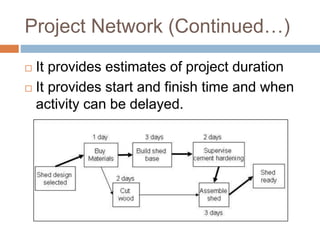
 It provides estimates of project duration
 It provides start and finish time and when
activity can be delayed.
From work Packages to
Network
 An activity is an element in the project that
consumes time - work or waiting
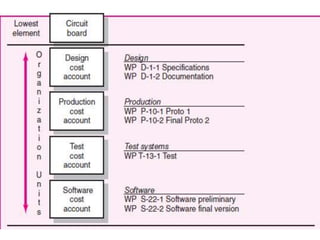
 Work packages from WBS are used to
build activities found in project network
 An activity can include one or more work
packages.
 The activities are placed in a sequence
that provides for orderly completion of the
project
From work Packages to Network
(Continue…)
 Networks provide the project schedule by
identifying dependencies, sequencing,
and timing of activities, which the WBS is
not designed to do.
 Each work package requires resources,
definite time, specifications
Terminology
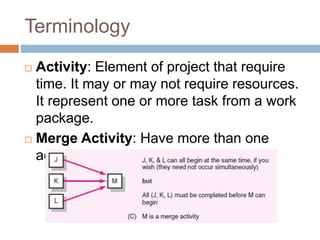
 Activity: Element of project that require
time. It may or may not require resources.
It represent one or more task from a work
package.
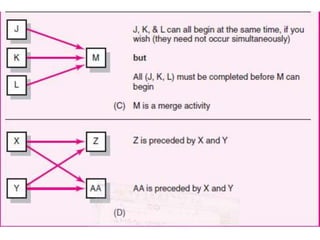
 Merge Activity: Have more than one
activity immediately preceding it.
Terminology (Continued….)
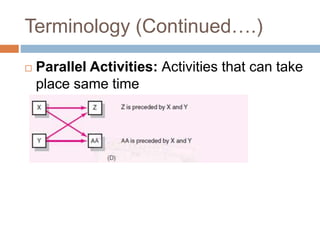
 Parallel Activities: Activities that can take
place same time
Terminology (Continued….)
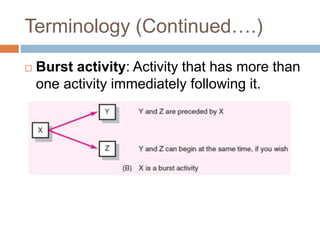
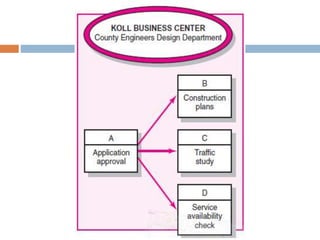
 Burst activity: Activity that has more than
one activity immediately following it.
Terminology (Continued….)
 Path: Sequence of connected, dependent
activities
 Critical Path: Path with longest duration
in network.
 Event: Point in time when activity is
started or completed.
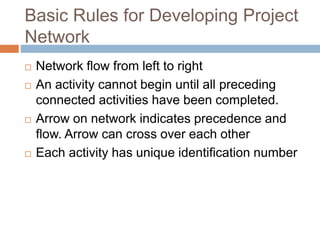
Project Network development
 Two approaches
Activity-on-node (AON)
Activity-on-arrow (AOA)
Basic Rules for Developing Project
Network
 Network flow from left to right
 An activity cannot begin until all preceding
connected activities have been completed.
 Arrow on network indicates precedence and
flow. Arrow can cross over each other
 Each activity has unique identification number
Basic Rules for Developing Project
Network (Continued…)
 An activity identification number must be larger
than preceding activity.
 Common node should be used to show clear
start and single project end not node indicated
to show end.
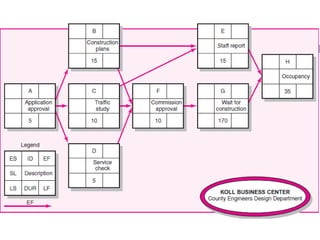
Activity-on-Node Fundamentals
 An activity is represented by a node (Box)
 Dependencies among activities are
depicted by arrows
 Length and slope of arrow is for
convenience to draw
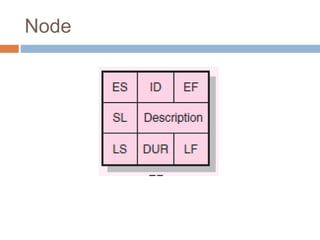
Node
Activity-on-Node Fundamentals
(Continued…)
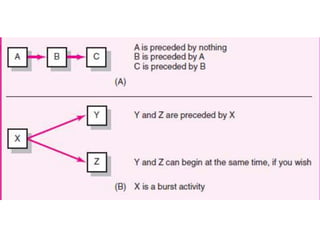
 Relationship for activities must be
established
 Predecessor activity (must be completed)
 Successor Activity (follow the activity)
 Concurrent or parallel activities (concurrent)
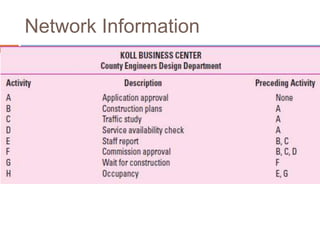
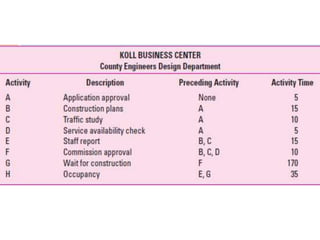
Network Information
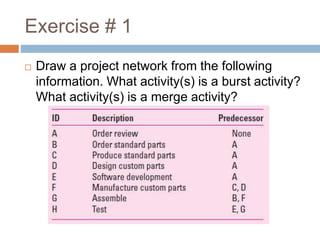
Exercise # 1
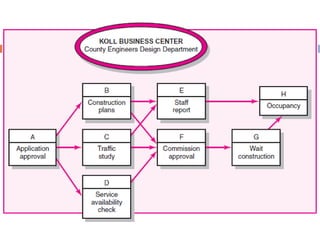
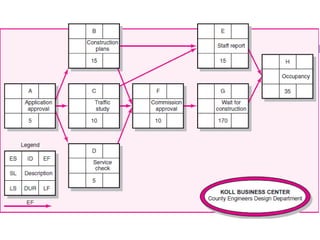
 Draw a project network from the following
information. What activity(s) is a burst activity?
What activity(s) is a merge activity?
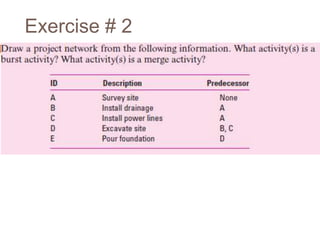
Exercise # 2
Network Computation Process
 Activity time estimates are taken from
work packages and added to network
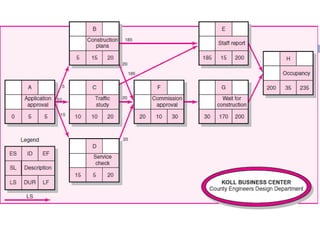
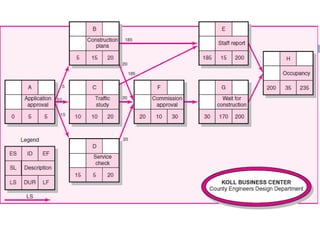
 Forward Pass (Earliest Time)
 Backward Pass (Latest Time)
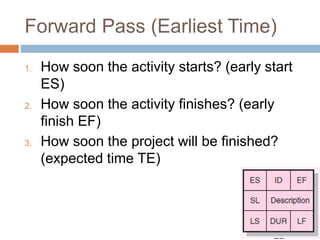
Forward Pass (Earliest Time)
1. How soon the activity starts? (early start
ES)
2. How soon the activity finishes? (early
finish EF)
3. How soon the project will be finished?
(expected time TE)
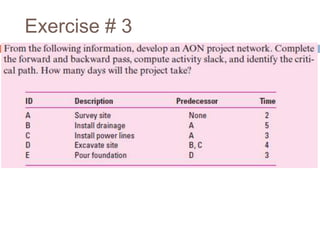
Exercise # 3
Forward Pass (Earliest Time)
(Continued…)
 Forward pass begin with project start time
zero
 Start with first project activity traces to
last project activity
 You add activity times along each path in
the network (ES + DUR = EF).
Forward Pass (Earliest Time)
(Continued…)
 You carry the early finish (EF) to the next
activity where it becomes its early start
(ES), unless
 The next succeeding activity is a merge
activity. In this case you select the largest
early finish number (EF) of all its
immediate predecessor activities
Backward Pass—Latest Times
1. How late can the activity start? (late start—
LS)
2. How late can the activity finish? (late finish—
LF)
3. Which activities represent the critical path
(CP)? This is the longest path in the
network which, when delayed, will delay the
project.
4. How long can the activity be delayed? (slack
or float—SL)
Backward Pass—Latest Times
(Continued…)
 Starts with the last project activity(ies) on
the network
 You trace backward on each path
subtracting activity times to find the late
start (LS) and finish times (LF) for each
activity.
 The late finish for the last project
activity(ies) must be selected
Backward Pass—Latest Times
(Continued…)
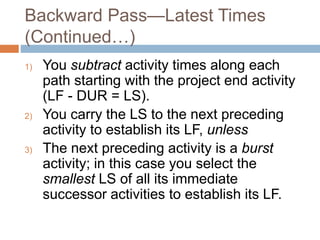
1) You subtract activity times along each
path starting with the project end activity
(LF - DUR = LS).
2) You carry the LS to the next preceding
activity to establish its LF, unless
3) The next preceding activity is a burst
activity; in this case you select the
smallest LS of all its immediate
successor activities to establish its LF.
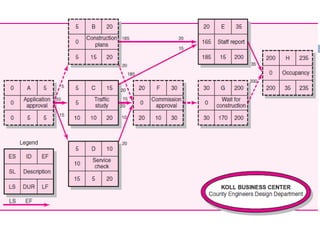
Determining Slack or Float
 Which activities can be delayed by
computing “slack” or “float.”
 Total slack is the amount of time an
activity can exceed its early finish date
without affecting the project end date or
an imposed completion date.
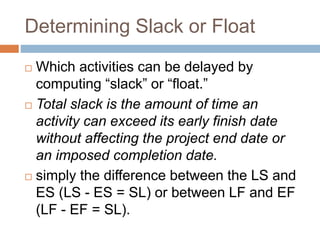
 simply the difference between the LS and
ES (LS - ES = SL) or between LF and EF
(LF - EF = SL).
Critical Path
 After slack for each activity is computed,
the critical path(s) is (are) easily identified
 The critical path is the network path(s) that
has (have) the least slack in common.
 When the LF = EF for the end project
activity, the critical path can be identified
Critical Path (Continued…)
 Those activities that also have LF 5 EF or
a slack of zero (LF - EF = 0)
 Project managers pay close attention to
the
 Critical path activities to be sure they are
not delayed
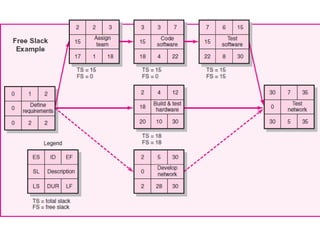
Free Slack (Float) (FS)
 It is the amount of time an activity can be
delayed without delaying any immediately
following (successor) activity.
 Or, free slack is the amount of time an
activity can exceed its early finish date
without affecting the early start date of any
successor(s).
 Only activities that occur at the end of a
chain of activities, where you have a
merge activity
Using Forward and Backward Pass
Information
 Slack allows flexibility in scheduling
scarce project resources
 The ES and LF tell the project manager
the time interval in which the activity
should be completed
 Identification of critical path will help
project manager to tightly manage
resources so no delays be made.
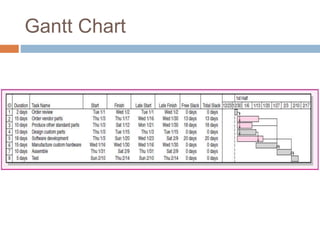
Gantt Chart
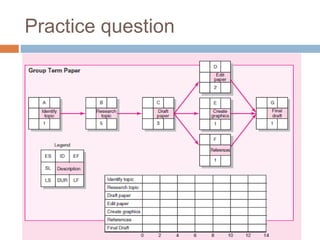
Practice question
End of Chapter

6. Developing Project Plan.pptx

  • 1.
  • 2.
    Outline  Developing ProjectNetwork  From work package to network  Constructing a project network  Activity On Nod (AON) Fundamentals  Network computation process
  • 3.
    Project Network  Theproject network is the tool used for planning, scheduling, and monitoring project progress  It shows project activities in logical sequence, and their interdependencies  It is used by PM to make project time, cost and performance decisions  It is useful when duration of project is not short
  • 4.
    Project Network (Continued…) It provides estimates of project duration  It provides start and finish time and when activity can be delayed.
  • 5.
    From work Packagesto Network  An activity is an element in the project that consumes time - work or waiting  Work packages from WBS are used to build activities found in project network  An activity can include one or more work packages.  The activities are placed in a sequence that provides for orderly completion of the project
  • 6.
    From work Packagesto Network (Continue…)  Networks provide the project schedule by identifying dependencies, sequencing, and timing of activities, which the WBS is not designed to do.  Each work package requires resources, definite time, specifications
  • 9.
    Terminology  Activity: Elementof project that require time. It may or may not require resources. It represent one or more task from a work package.  Merge Activity: Have more than one activity immediately preceding it.
  • 10.
    Terminology (Continued….)  ParallelActivities: Activities that can take place same time
  • 11.
    Terminology (Continued….)  Burstactivity: Activity that has more than one activity immediately following it.
  • 12.
    Terminology (Continued….)  Path:Sequence of connected, dependent activities  Critical Path: Path with longest duration in network.  Event: Point in time when activity is started or completed.
  • 13.
    Project Network development Two approaches Activity-on-node (AON) Activity-on-arrow (AOA)
  • 14.
    Basic Rules forDeveloping Project Network  Network flow from left to right  An activity cannot begin until all preceding connected activities have been completed.  Arrow on network indicates precedence and flow. Arrow can cross over each other  Each activity has unique identification number
  • 15.
    Basic Rules forDeveloping Project Network (Continued…)  An activity identification number must be larger than preceding activity.  Common node should be used to show clear start and single project end not node indicated to show end.
  • 16.
    Activity-on-Node Fundamentals  Anactivity is represented by a node (Box)  Dependencies among activities are depicted by arrows  Length and slope of arrow is for convenience to draw
  • 17.
  • 18.
    Activity-on-Node Fundamentals (Continued…)  Relationshipfor activities must be established  Predecessor activity (must be completed)  Successor Activity (follow the activity)  Concurrent or parallel activities (concurrent)
  • 21.
  • 24.
    Exercise # 1 Draw a project network from the following information. What activity(s) is a burst activity? What activity(s) is a merge activity?
  • 25.
  • 26.
    Network Computation Process Activity time estimates are taken from work packages and added to network  Forward Pass (Earliest Time)  Backward Pass (Latest Time)
  • 27.
    Forward Pass (EarliestTime) 1. How soon the activity starts? (early start ES) 2. How soon the activity finishes? (early finish EF) 3. How soon the project will be finished? (expected time TE)
  • 30.
  • 31.
    Forward Pass (EarliestTime) (Continued…)  Forward pass begin with project start time zero  Start with first project activity traces to last project activity  You add activity times along each path in the network (ES + DUR = EF).
  • 32.
    Forward Pass (EarliestTime) (Continued…)  You carry the early finish (EF) to the next activity where it becomes its early start (ES), unless  The next succeeding activity is a merge activity. In this case you select the largest early finish number (EF) of all its immediate predecessor activities
  • 34.
    Backward Pass—Latest Times 1.How late can the activity start? (late start— LS) 2. How late can the activity finish? (late finish— LF) 3. Which activities represent the critical path (CP)? This is the longest path in the network which, when delayed, will delay the project. 4. How long can the activity be delayed? (slack or float—SL)
  • 35.
    Backward Pass—Latest Times (Continued…) Starts with the last project activity(ies) on the network  You trace backward on each path subtracting activity times to find the late start (LS) and finish times (LF) for each activity.  The late finish for the last project activity(ies) must be selected
  • 37.
    Backward Pass—Latest Times (Continued…) 1)You subtract activity times along each path starting with the project end activity (LF - DUR = LS). 2) You carry the LS to the next preceding activity to establish its LF, unless 3) The next preceding activity is a burst activity; in this case you select the smallest LS of all its immediate successor activities to establish its LF.
  • 39.
    Determining Slack orFloat  Which activities can be delayed by computing “slack” or “float.”  Total slack is the amount of time an activity can exceed its early finish date without affecting the project end date or an imposed completion date.  simply the difference between the LS and ES (LS - ES = SL) or between LF and EF (LF - EF = SL).
  • 41.
    Critical Path  Afterslack for each activity is computed, the critical path(s) is (are) easily identified  The critical path is the network path(s) that has (have) the least slack in common.  When the LF = EF for the end project activity, the critical path can be identified
  • 42.
    Critical Path (Continued…) Those activities that also have LF 5 EF or a slack of zero (LF - EF = 0)  Project managers pay close attention to the  Critical path activities to be sure they are not delayed
  • 44.
    Free Slack (Float)(FS)  It is the amount of time an activity can be delayed without delaying any immediately following (successor) activity.  Or, free slack is the amount of time an activity can exceed its early finish date without affecting the early start date of any successor(s).  Only activities that occur at the end of a chain of activities, where you have a merge activity
  • 46.
    Using Forward andBackward Pass Information  Slack allows flexibility in scheduling scarce project resources  The ES and LF tell the project manager the time interval in which the activity should be completed  Identification of critical path will help project manager to tightly manage resources so no delays be made.
  • 47.
  • 48.
  • 49.