Planning and Managing Software Projects 2011-12
Class 7

Work Breakdown Structure (WBS)
Emanuele Della Valle
http://emanueledellavalle.org
Credits                                                           2

§  This slides are largely based on Prof. John Musser
    class notes on Principles of Software Project
    Management
§  Original slides are available at
    http://www.projectreference.com/
§  Reuse and republish permission was granted


 Planning and Managing Software Projects – Emanuele Della Valle
Agenda                                                            3

§  Today
     •  Review Classes 5 and 6
     •  Work Breakdown Structures (WBS)
§  Next Class
     •  Estimation


 Planning and Managing Software Projects – Emanuele Della Valle
Classes 5 and 6 Review                                            4

§  Phases in details
     •  Know the 7 phases
     •  Understand the steps in each phase
     •  Know the primary goals, characteristics and issues of
        each
§  Lifecycles
     •      Know a representative sample
     •      Waterfall and variation, 1-2 iterative ones
     •      Learn a bit about XP and other Agile methods
     •      Matching Lifecycles to Project
§  Planning (introduction)
     •  Primary Planning Steps
     •  Documents


 Planning and Managing Software Projects – Emanuele Della Valle
Introduction to session 7, 8, and 9
Estimation                                                                         5

§          Predictions are hard, especially about the future
                                                                       - Yogi Berra*
§  2 Types: Lucky or Lousy?


* http://en.wikipedia.org/wiki/Yogi_Berra


      Planning and Managing Software Projects – Emanuele Della Valle
Introduction to session 7, 8, and 9
Planning, Estimating, Scheduling                                  6

§  What s the difference?
§  Plan: Identify activities. No specific start and end
    dates.
§  Estimating: Determining the size & duration of
    activities.
§  Schedule: Adds specific start and end dates,
    relationships, and resources.


 Planning and Managing Software Projects – Emanuele Della Valle
Introduction to session 7, 8, and 9
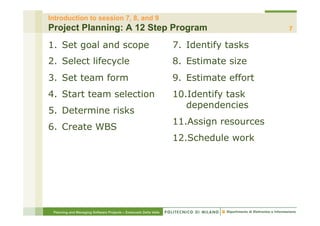
Project Planning: A 12 Step Program                                                      7

1.  Set goal and scope                                            7.  Identify tasks
2.  Select lifecycle                                              8.  Estimate size
3.  Set team form                                                 9.  Estimate effort
4.  Start team selection                                          10. Identify task
                                                                     dependencies
5.  Determine risks
                                                                  11. Assign resources
6.  Create WBS
                                                                  12. Schedule work


 Planning and Managing Software Projects – Emanuele Della Valle
Introduction to session 7, 8, and 9
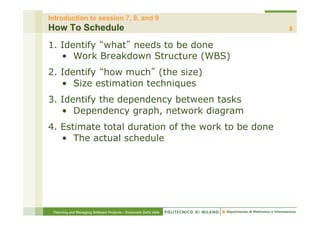
How To Schedule                                                   8

1. Identify what needs to be done
   •  Work Breakdown Structure (WBS)
2. Identify how much (the size)
   •  Size estimation techniques
3. Identify the dependency between tasks
   •  Dependency graph, network diagram
4. Estimate total duration of the work to be done
   •  The actual schedule


 Planning and Managing Software Projects – Emanuele Della Valle
Introduction to session 7, 8, and 9
WBS & Estimation                                                  9

§  How did you feel when I asked
    •  How long will your project take?
§  Not an easy answer to give right?
§  At least not if I were are real customer on a real
    project
§  How can you manage that issue?


 Planning and Managing Software Projects – Emanuele Della Valle
Introduction to session 7, 8, and 9
Partitioning Your Project                                         10

§  You need to decompose your project into manageable
    chunks
§  ALL projects need this step
§  Divide & Conquer
§  Two main causes of project failure
     •  Forgetting something critical
     •  Ballpark estimates become targets
§  How does partitioning help this?


 Planning and Managing Software Projects – Emanuele Della Valle
Introduction to session 7, 8, and 9
Project Elements                                                  11

§  A Project: functions, activities, tasks


 Planning and Managing Software Projects – Emanuele Della Valle
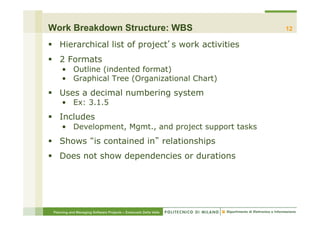
Work Breakdown Structure: WBS                                     12

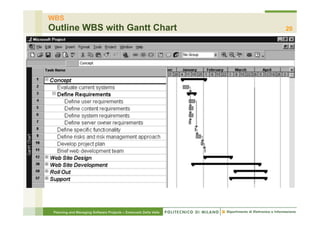
§  Hierarchical list of project s work activities
§  2 Formats
     •  Outline (indented format)
     •  Graphical Tree (Organizational Chart)
§  Uses a decimal numbering system
     •  Ex: 3.1.5
§  Includes
     •  Development, Mgmt., and project support tasks
§  Shows is contained in relationships
§  Does not show dependencies or durations


 Planning and Managing Software Projects – Emanuele Della Valle
WBS
Contract vs. Project WBS                                                                     13

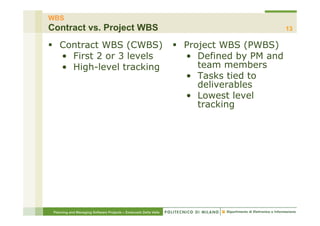
§  Contract WBS (CWBS)                                           §  Project WBS (PWBS)
    •  First 2 or 3 levels                                            •  Defined by PM and
    •  High-level tracking                                               team members
                                                                      •  Tasks tied to
                                                                         deliverables
                                                                      •  Lowest level
                                                                         tracking


 Planning and Managing Software Projects – Emanuele Della Valle
WBS
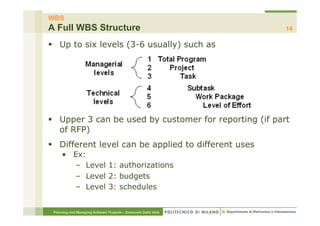
A Full WBS Structure                                              14

§  Up to six levels (3-6 usually) such as


§  Upper 3 can be used by customer for reporting (if part
    of RFP)
§  Different level can be applied to different uses
     •  Ex:
        –  Level 1: authorizations
        –  Level 2: budgets
        –  Level 3: schedules


 Planning and Managing Software Projects – Emanuele Della Valle
WBS
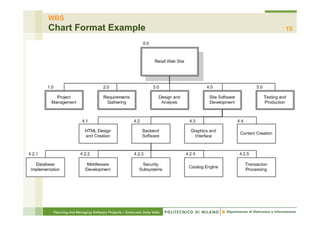
Chart Format Example                                              15


 Planning and Managing Software Projects – Emanuele Della Valle
WBS
Outline Format Example                                            16

Retail Web Site
1.0 Project Management
2.0 Requirements Gathering
3.0 Analysis & Design
4.0 Site Software Development
  4.1 HTML Design and Creation
  4.2 Backend Software
      4.2.1 Database Implementation
      4.2.2 Middleware Development
      4.2.3 Security Subsystems
      4.2.4 Catalog Engine
      4.2.5 Transaction Processing
  4.3 Graphics and Interface
  4.4 Content Creation
5.0 Testing and Production
 Planning and Managing Software Projects – Emanuele Della Valle
WBS
Types                                                             17

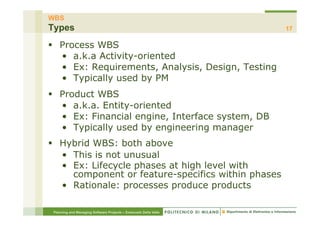
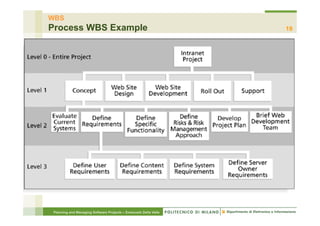
§  Process WBS
    •  a.k.a Activity-oriented
    •  Ex: Requirements, Analysis, Design, Testing
    •  Typically used by PM
§  Product WBS
    •  a.k.a. Entity-oriented
    •  Ex: Financial engine, Interface system, DB
    •  Typically used by engineering manager
§  Hybrid WBS: both above
    •  This is not unusual
    •  Ex: Lifecycle phases at high level with
       component or feature-specifics within phases
    •  Rationale: processes produce products

 Planning and Managing Software Projects – Emanuele Della Valle
WBS
Product WBS Example                                               18


 Planning and Managing Software Projects – Emanuele Della Valle
WBS
Process WBS Example                                              19


Planning and Managing Software Projects – Emanuele Della Valle
WBS
Outline WBS with Gantt Chart                                      20


 Planning and Managing Software Projects – Emanuele Della Valle
WBS
WBS by PMI Process Groups                                         21


 Planning and Managing Software Projects – Emanuele Della Valle
WBS
Less Frequently Used Alternatives                                 22

§  Organizational WBS
     •  Research, Product Design, Engineering, Operations
     •  Can be useful for highly cross-functional projects
§  Geographical WBS
     •  Can be useful with distributed teams
     •  NYC team, San Jose team, Off-shore team


 Planning and Managing Software Projects – Emanuele Della Valle
WBS
Work Packages                                                     23

§  Generic term for discrete tasks with definable end
    results
§  Typically the leaves on the tree
§  The one-to-two rule
     •  Often at: 1 or 2 persons for 1 or 2 weeks
§  Basis for monitoring and reporting progress
     •  Can be tied to budget items (charge numbers)
     •  Resources (personnel) assigned
§  Ideally shorter rather than longer
     •      Longer makes in-progress estimates needed
     •      These are more subjective than done
     •      2-3 weeks maximum for software projects
     •      1 day minimum (occasionally a half day)
     •      Not so small as to micro-manage

 Planning and Managing Software Projects – Emanuele Della Valle
WBS
Wrap Up (so far)                                                  24

§  List of Activities, not Things
§  List of items can come from many sources
     •  SOW, Proposal, brainstorming, stakeholders, team
§  Describe activities using bullet language
     •  Meaningful but terse labels
§  All WBS paths do not have to go to the same level
§  Do not plan more detail than you can manage


 Planning and Managing Software Projects – Emanuele Della Valle
WBS
WBS & Chosen Lifecycle                                            25

§  PM must map activities to chosen lifecycle
§  Each lifecycle has different sets of activities
§  Integral process activities occur for all
     •  Planning, configuration, testing
§  Operations and maintenance phases are not normally
    in plan (considered post-project)
§  Some models are straightened for WBS
     •  Spiral and other iterative models
     •  Linear sequence several times
§  Deliverables of tasks vary by chosen lifecycle


 Planning and Managing Software Projects – Emanuele Della Valle
WBS
Techniques                                                        26

§  Top-Down
§  Bottom-Up
§  Analogy
§  Brainstorming
     •  Post-its on a wall
§  Rolling Wave
     •  1st pass: go 1-3 levels deep
     •  Gather more requirements or data
     •  Add more detail later


 Planning and Managing Software Projects – Emanuele Della Valle
WBS -Techniques
Top-down                                                          27

§  Start at highest level
§  Systematically develop increasing level of detail
§  Best if
     •  The problem is well understood
     •  Technology and methodology are not new
     •  This is similar to an earlier project or problem
§  But is also applied in majority of situations
§  Advantages
     •  Quick
     •  Can be done when only part of the requirements is
        understood
§  Disadvantages
     •  May lack important details specific to the project that
        have never occurred in earlier projects

 Planning and Managing Software Projects – Emanuele Della Valle
WBS -Techniques
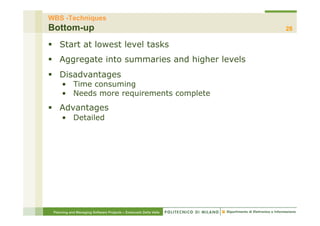
Bottom-up                                                         28

§  Start at lowest level tasks
§  Aggregate into summaries and higher levels
§  Disadvantages
     •  Time consuming
     •  Needs more requirements complete
§  Advantages
     •  Detailed


 Planning and Managing Software Projects – Emanuele Della Valle
WBS -Techniques
Analogy                                                           29

§  Base WBS upon that of a similar project
§  Use a template
§  Analogy also can be estimation basis
§  Advantages
     •  Based on past actual experience
§  Disadvantages
     •  Needs comparable project


 Planning and Managing Software Projects – Emanuele Della Valle
WBS -Techniques
Brainstorming                                                      30

§  Approach
     •  Generate all activities you can think of that need to be
        done
     •  Group them into categories
§  Both Top-down and Brainstorming can be used on the
    same WBS
§  Remember to get the people who will be doing the
    work involved (buy-in matters!)
§  Advantages
     •  Detailed
     •  Buy-in
§  Disadvantages
     •  Time consuming


 Planning and Managing Software Projects – Emanuele Della Valle
WBS -Techniques
Rolling Wave                                                      31

§  1st pass: go 1-3 levels deep
§  Gather more requirements or data
§  Add more detail later
§  Advantages
     •      Quick
     •      Works with poorly understood requirements
     •      Mitigates the risk of forgetting important items
     •      Detailed
§  Disadvantages
     •  Time consuming


 Planning and Managing Software Projects – Emanuele Della Valle
WBS
WBS are Basis of Many Things                                      32

§  Network scheduling
§  Costing
§  Risk analysis
§  Organizational structure
§  Control
§  Measurement


 Planning and Managing Software Projects – Emanuele Della Valle
WBS
Guidelines Part 1                                                 33

§  Should be easy to understand
§  Some companies have corporate standards for these
    schemes
§  Some top-level items, like Project Mgmt. are in WBS
    for each project
     •  Others vary by project
§  What often hurts most is what s missing
§  Break down until you can generate accurate time &
    cost estimates
§  Ensure each element corresponds to a deliverable


 Planning and Managing Software Projects – Emanuele Della Valle
WBS
Guidelines Part 2                                                 34

§  How detailed should it be?
     •  Not as detailed as the final MS-Project plan
     •  Each level should have no more than 7 items
     •  It can evolve over time
§  What tool should you use?
     •  Excel, Word, Project
     •  Org chart diagramming tool (Visio, etc)
     •  Specialized commercial apps
§  Re-use a template if you have one


 Planning and Managing Software Projects – Emanuele Della Valle
WBS
Put yourself at work :-)                                          35

§  Divide in groups (3-5 people)
§  Develop a WBS for a software project that aims at
    delivering an online music store (e.g., iTunes)
§  Choose one of the following approaches and stick to it
     •  Top-Down
     •  Bottom-Up
     •  Brainstorming
§  Use outline format
§  You have 30 minutes
§  We will discuss your WBS together


 Planning and Managing Software Projects – Emanuele Della Valle
Homework – 2: WBS                                                          36
§  Create a WBS for your project
     •  Please think this through. You re the PM now!
§  Guidelines
     •  Do it at managerial level (see slide 14)
             –     4-7 nodes at 1st level
             –     2-5 nodes at 2nd level (per each node at 1st level)
             –     You can go deeper at your discretion
             –     Include project management tasks
     •  As we covered in class, you can use either a process,
        product or hybrid approach
             –  For most of your projects I suspect the process approach
                would work best at managerial level.
     •  Follow the standard hierarchical numbering scheme for
        WBS structures
     •  Use outline format


 Planning and Managing Software Projects – Emanuele Della Valle
Homework – 2: WBS                                                 37
§  Submission
     •  Use the tool you prefer between Notepad/Word/Excel
     •  Add homework-2 to the appropriate folder in the
        dropbox folder of your project


 Planning and Managing Software Projects – Emanuele Della Valle
Optional Readings                                                 38

§  McConnell: 8 Estimation


 Planning and Managing Software Projects – Emanuele Della Valle

Work Breakdown Structure

  • 1.
    Planning and ManagingSoftware Projects 2011-12 Class 7 Work Breakdown Structure (WBS) Emanuele Della Valle http://emanueledellavalle.org
  • 2.
    Credits 2 §  This slides are largely based on Prof. John Musser class notes on Principles of Software Project Management §  Original slides are available at http://www.projectreference.com/ §  Reuse and republish permission was granted Planning and Managing Software Projects – Emanuele Della Valle
  • 3.
    Agenda 3 §  Today •  Review Classes 5 and 6 •  Work Breakdown Structures (WBS) §  Next Class •  Estimation Planning and Managing Software Projects – Emanuele Della Valle
  • 4.
    Classes 5 and6 Review 4 §  Phases in details •  Know the 7 phases •  Understand the steps in each phase •  Know the primary goals, characteristics and issues of each §  Lifecycles •  Know a representative sample •  Waterfall and variation, 1-2 iterative ones •  Learn a bit about XP and other Agile methods •  Matching Lifecycles to Project §  Planning (introduction) •  Primary Planning Steps •  Documents Planning and Managing Software Projects – Emanuele Della Valle
  • 5.
    Introduction to session7, 8, and 9 Estimation 5 §  Predictions are hard, especially about the future - Yogi Berra* §  2 Types: Lucky or Lousy? * http://en.wikipedia.org/wiki/Yogi_Berra Planning and Managing Software Projects – Emanuele Della Valle
  • 6.
    Introduction to session7, 8, and 9 Planning, Estimating, Scheduling 6 §  What s the difference? §  Plan: Identify activities. No specific start and end dates. §  Estimating: Determining the size & duration of activities. §  Schedule: Adds specific start and end dates, relationships, and resources. Planning and Managing Software Projects – Emanuele Della Valle
  • 7.
    Introduction to session7, 8, and 9 Project Planning: A 12 Step Program 7 1.  Set goal and scope 7.  Identify tasks 2.  Select lifecycle 8.  Estimate size 3.  Set team form 9.  Estimate effort 4.  Start team selection 10. Identify task dependencies 5.  Determine risks 11. Assign resources 6.  Create WBS 12. Schedule work Planning and Managing Software Projects – Emanuele Della Valle
  • 8.
    Introduction to session7, 8, and 9 How To Schedule 8 1. Identify what needs to be done •  Work Breakdown Structure (WBS) 2. Identify how much (the size) •  Size estimation techniques 3. Identify the dependency between tasks •  Dependency graph, network diagram 4. Estimate total duration of the work to be done •  The actual schedule Planning and Managing Software Projects – Emanuele Della Valle
  • 9.
    Introduction to session7, 8, and 9 WBS & Estimation 9 §  How did you feel when I asked •  How long will your project take? §  Not an easy answer to give right? §  At least not if I were are real customer on a real project §  How can you manage that issue? Planning and Managing Software Projects – Emanuele Della Valle
  • 10.
    Introduction to session7, 8, and 9 Partitioning Your Project 10 §  You need to decompose your project into manageable chunks §  ALL projects need this step §  Divide & Conquer §  Two main causes of project failure •  Forgetting something critical •  Ballpark estimates become targets §  How does partitioning help this? Planning and Managing Software Projects – Emanuele Della Valle
  • 11.
    Introduction to session7, 8, and 9 Project Elements 11 §  A Project: functions, activities, tasks Planning and Managing Software Projects – Emanuele Della Valle
  • 12.
    Work Breakdown Structure:WBS 12 §  Hierarchical list of project s work activities §  2 Formats •  Outline (indented format) •  Graphical Tree (Organizational Chart) §  Uses a decimal numbering system •  Ex: 3.1.5 §  Includes •  Development, Mgmt., and project support tasks §  Shows is contained in relationships §  Does not show dependencies or durations Planning and Managing Software Projects – Emanuele Della Valle
  • 13.
    WBS Contract vs. ProjectWBS 13 §  Contract WBS (CWBS) §  Project WBS (PWBS) •  First 2 or 3 levels •  Defined by PM and •  High-level tracking team members •  Tasks tied to deliverables •  Lowest level tracking Planning and Managing Software Projects – Emanuele Della Valle
  • 14.
    WBS A Full WBSStructure 14 §  Up to six levels (3-6 usually) such as §  Upper 3 can be used by customer for reporting (if part of RFP) §  Different level can be applied to different uses •  Ex: –  Level 1: authorizations –  Level 2: budgets –  Level 3: schedules Planning and Managing Software Projects – Emanuele Della Valle
  • 15.
    WBS Chart Format Example 15 Planning and Managing Software Projects – Emanuele Della Valle
  • 16.
    WBS Outline Format Example 16 Retail Web Site 1.0 Project Management 2.0 Requirements Gathering 3.0 Analysis & Design 4.0 Site Software Development 4.1 HTML Design and Creation 4.2 Backend Software 4.2.1 Database Implementation 4.2.2 Middleware Development 4.2.3 Security Subsystems 4.2.4 Catalog Engine 4.2.5 Transaction Processing 4.3 Graphics and Interface 4.4 Content Creation 5.0 Testing and Production Planning and Managing Software Projects – Emanuele Della Valle
  • 17.
    WBS Types 17 §  Process WBS •  a.k.a Activity-oriented •  Ex: Requirements, Analysis, Design, Testing •  Typically used by PM §  Product WBS •  a.k.a. Entity-oriented •  Ex: Financial engine, Interface system, DB •  Typically used by engineering manager §  Hybrid WBS: both above •  This is not unusual •  Ex: Lifecycle phases at high level with component or feature-specifics within phases •  Rationale: processes produce products Planning and Managing Software Projects – Emanuele Della Valle
  • 18.
    WBS Product WBS Example 18 Planning and Managing Software Projects – Emanuele Della Valle
  • 19.
    WBS Process WBS Example 19 Planning and Managing Software Projects – Emanuele Della Valle
  • 20.
    WBS Outline WBS withGantt Chart 20 Planning and Managing Software Projects – Emanuele Della Valle
  • 21.
    WBS WBS by PMIProcess Groups 21 Planning and Managing Software Projects – Emanuele Della Valle
  • 22.
    WBS Less Frequently UsedAlternatives 22 §  Organizational WBS •  Research, Product Design, Engineering, Operations •  Can be useful for highly cross-functional projects §  Geographical WBS •  Can be useful with distributed teams •  NYC team, San Jose team, Off-shore team Planning and Managing Software Projects – Emanuele Della Valle
  • 23.
    WBS Work Packages 23 §  Generic term for discrete tasks with definable end results §  Typically the leaves on the tree §  The one-to-two rule •  Often at: 1 or 2 persons for 1 or 2 weeks §  Basis for monitoring and reporting progress •  Can be tied to budget items (charge numbers) •  Resources (personnel) assigned §  Ideally shorter rather than longer •  Longer makes in-progress estimates needed •  These are more subjective than done •  2-3 weeks maximum for software projects •  1 day minimum (occasionally a half day) •  Not so small as to micro-manage Planning and Managing Software Projects – Emanuele Della Valle
  • 24.
    WBS Wrap Up (sofar) 24 §  List of Activities, not Things §  List of items can come from many sources •  SOW, Proposal, brainstorming, stakeholders, team §  Describe activities using bullet language •  Meaningful but terse labels §  All WBS paths do not have to go to the same level §  Do not plan more detail than you can manage Planning and Managing Software Projects – Emanuele Della Valle
  • 25.
    WBS WBS & ChosenLifecycle 25 §  PM must map activities to chosen lifecycle §  Each lifecycle has different sets of activities §  Integral process activities occur for all •  Planning, configuration, testing §  Operations and maintenance phases are not normally in plan (considered post-project) §  Some models are straightened for WBS •  Spiral and other iterative models •  Linear sequence several times §  Deliverables of tasks vary by chosen lifecycle Planning and Managing Software Projects – Emanuele Della Valle
  • 26.
    WBS Techniques 26 §  Top-Down §  Bottom-Up §  Analogy §  Brainstorming •  Post-its on a wall §  Rolling Wave •  1st pass: go 1-3 levels deep •  Gather more requirements or data •  Add more detail later Planning and Managing Software Projects – Emanuele Della Valle
  • 27.
    WBS -Techniques Top-down 27 §  Start at highest level §  Systematically develop increasing level of detail §  Best if •  The problem is well understood •  Technology and methodology are not new •  This is similar to an earlier project or problem §  But is also applied in majority of situations §  Advantages •  Quick •  Can be done when only part of the requirements is understood §  Disadvantages •  May lack important details specific to the project that have never occurred in earlier projects Planning and Managing Software Projects – Emanuele Della Valle
  • 28.
    WBS -Techniques Bottom-up 28 §  Start at lowest level tasks §  Aggregate into summaries and higher levels §  Disadvantages •  Time consuming •  Needs more requirements complete §  Advantages •  Detailed Planning and Managing Software Projects – Emanuele Della Valle
  • 29.
    WBS -Techniques Analogy 29 §  Base WBS upon that of a similar project §  Use a template §  Analogy also can be estimation basis §  Advantages •  Based on past actual experience §  Disadvantages •  Needs comparable project Planning and Managing Software Projects – Emanuele Della Valle
  • 30.
    WBS -Techniques Brainstorming 30 §  Approach •  Generate all activities you can think of that need to be done •  Group them into categories §  Both Top-down and Brainstorming can be used on the same WBS §  Remember to get the people who will be doing the work involved (buy-in matters!) §  Advantages •  Detailed •  Buy-in §  Disadvantages •  Time consuming Planning and Managing Software Projects – Emanuele Della Valle
  • 31.
    WBS -Techniques Rolling Wave 31 §  1st pass: go 1-3 levels deep §  Gather more requirements or data §  Add more detail later §  Advantages •  Quick •  Works with poorly understood requirements •  Mitigates the risk of forgetting important items •  Detailed §  Disadvantages •  Time consuming Planning and Managing Software Projects – Emanuele Della Valle
  • 32.
    WBS WBS are Basisof Many Things 32 §  Network scheduling §  Costing §  Risk analysis §  Organizational structure §  Control §  Measurement Planning and Managing Software Projects – Emanuele Della Valle
  • 33.
    WBS Guidelines Part 1 33 §  Should be easy to understand §  Some companies have corporate standards for these schemes §  Some top-level items, like Project Mgmt. are in WBS for each project •  Others vary by project §  What often hurts most is what s missing §  Break down until you can generate accurate time & cost estimates §  Ensure each element corresponds to a deliverable Planning and Managing Software Projects – Emanuele Della Valle
  • 34.
    WBS Guidelines Part 2 34 §  How detailed should it be? •  Not as detailed as the final MS-Project plan •  Each level should have no more than 7 items •  It can evolve over time §  What tool should you use? •  Excel, Word, Project •  Org chart diagramming tool (Visio, etc) •  Specialized commercial apps §  Re-use a template if you have one Planning and Managing Software Projects – Emanuele Della Valle
  • 35.
    WBS Put yourself atwork :-) 35 §  Divide in groups (3-5 people) §  Develop a WBS for a software project that aims at delivering an online music store (e.g., iTunes) §  Choose one of the following approaches and stick to it •  Top-Down •  Bottom-Up •  Brainstorming §  Use outline format §  You have 30 minutes §  We will discuss your WBS together Planning and Managing Software Projects – Emanuele Della Valle
  • 36.
    Homework – 2:WBS 36 §  Create a WBS for your project •  Please think this through. You re the PM now! §  Guidelines •  Do it at managerial level (see slide 14) –  4-7 nodes at 1st level –  2-5 nodes at 2nd level (per each node at 1st level) –  You can go deeper at your discretion –  Include project management tasks •  As we covered in class, you can use either a process, product or hybrid approach –  For most of your projects I suspect the process approach would work best at managerial level. •  Follow the standard hierarchical numbering scheme for WBS structures •  Use outline format Planning and Managing Software Projects – Emanuele Della Valle
  • 37.
    Homework – 2:WBS 37 §  Submission •  Use the tool you prefer between Notepad/Word/Excel •  Add homework-2 to the appropriate folder in the dropbox folder of your project Planning and Managing Software Projects – Emanuele Della Valle
  • 38.
    Optional Readings 38 §  McConnell: 8 Estimation Planning and Managing Software Projects – Emanuele Della Valle