aslkjdhfalskhjfgalsdkfhalskdhjfglaskdhjflaskdhjfglaksjdhflakshflaksdhjfglaksjhflaksjhf aslkjdhfalskhjfgalsdkfhalskdhjfglaskdhjflaskdhjfglaksjdhflakshflaksdhjfglaksjhflaksjhf aslkjdhfalskhjfgalsdkfhalskdhjfglaskdhjflaskdhjfglaksjdhflakshflaksdhjfglaksjhflaksjhf aslkjdhfalskhjfgalsdkfhalskdhjfglaskdhjflaskdhjfglaksjdhflakshflaksdhjfglaksjhflaksjhf aslkjdhfalskhjfgalsdkfhalskdhjfglaskdhjflaskdhjfglaksjdhflakshflaksdhjfglaksjhflaksjhf aslkjdhfalskhjfgalsdkfhalskdhjfglaskdhjflaskdhjfglaksjdhflakshflaksdhjfglaksjhflaksjhf aslkjdhfalskhjfgalsdkfhalskdhjfglaskdhjflaskdhjfglaksjdhflakshflaksdhjfglaksjhflaksjhf aslkjdhfalskhjfgalsdkfhalskdhjfglaskdhjflaskdhjfglaksjdhflakshflaksdhjfglaksjhflaksjhf aslkjdhfalskhjfgalsdkfhalskdhjfglaskdhjflaskdhjfglaksjdhflakshflaksdhjfglaksjhflaksjhf aslkjdhfalskhjfgalsdkfhalskdhjfglaskdhjflaskdhjfglaksjdhflakshflaksdhjfglaksjhflaksjhf aslkjdhfalskhjfgalsdkfhalskdhjfglaskdhjflaskdhjfglaksjdhflakshflaksdhjfglaksjhflaksjhf aslkjdhfalskhjfgalsdkfhalskdhjfglaskdhjflaskdhjfglaksjdhflakshflaksdhjfglaksjhflaksjhf aslkjdhfalskhjfgalsdkfhalskdhjfglaskdhjflaskdhjfglaksjdhflakshflaksdhjfglaksjhflaksjhf aslkjdhfalskhjfgalsdkfhalskdhjfglaskdhjflaskdhjfglaksjdhflakshflaksdhjfglaksjhflaksjhf aslkjdhfalskhjfgalsdkfhalskdhjfglaskdhjflaskdhjfglaksjdhflakshflaksdhjfglaksjhflaksjhf aslkjdhfalskhjfgalsdkfhalskdhjfglaskdhjflaskdhjfglaksjdhflakshflaksdhjfglaksjhflaksjhf aslkjdhfalskhjfgalsdkfhalskdhjfglaskdhjflaskdhjfglaksjdhflakshflaksdhjfglaksjhflaksjhf aslkjdhfalskhjfgalsdkfhalskdhjfglaskdhjflaskdhjfglaksjdhflakshflaksdhjfglaksjhflaksjhf aslkjdhfalskhjfgalsdkfhalskdhjfglaskdhjflaskdhjfglaksjdhflakshflaksdhjfglaksjhflaksjhf aslkjdhfalskhjfgalsdkfhalskdhjfglaskdhjflaskdhjfglaksjdhflakshflaksdhjfglaksjhflaksjhf aslkjdhfalskhjfgalsdkfhalskdhjfglaskdhjflaskdhjfglaksjdhflakshflaksdhjfglaksjhflaksjhf aslkjdhfalskhjfgalsdkfhalskdhjfglaskdhjflaskdhjfglaksjdhflakshflaksdhjfglaksjhflaksjhf aslkjdhfalskhjfgalsdkfhalskdhjfglaskdhjflaskdhjfglaksjdhflakshflaksdhjfglaksjhflaksjhf aslkjdhfalskhjfgalsdkfhalskdhjfglaskdhjflaskdhjfglaksjdhflakshflaksdhjfglaksjhflaksjhf
OOP: Creating Object-Oriented Programs Chapter 12 McGraw-Hill © 2006 The McGraw-Hill Companies, Inc. All rights reserved.
Objectives  (1 of 2) Use object-oriented terminology correctly Create a two-tier application that separates the user interface from the business logic Differentiate between a class and an  object Create a class that has properties and methods Declare object variables and use  property procedures  to set and retrieve properties of a class
Objectives  (2 of 2) Assign values to the properties with a  constructor Instantiate  an object in a project using your class Differentiate between shared members and  instance  members Understand the purpose of the constructor and  destructor  methods Inherit a new class from your own class Use  visual   inheritance  by deriving a form from another form
Object-Oriented Programming (OOP) OOP is currently the most accepted style of programming Java, C# and SmallTalk were desgined to be OO (object oriented) from inception VB and C++ have been modified to accommodate OOP VB.NET is the first version of VB to be truly object oriented As projects become more complex, using objects becomes increasingly important
Objects VB allows the creation of new object types by creating a class Classes may have both properties, methods, and events Objects are things such as buttons; buttons is a class but exitButton is an instance of the class—the instance is the object There may be many objects of a new class type
"Cookie Analogy" Class = Cookie cutter Instantiate = Making a cookie using the cookie cutter Instance = Newly made cookie Properties of the Instance may have different values Icing property can be True or False Flavor property could be Lemon or Chocolate Methods = Eat, Bake, or Crumble Events = Cookie crumbling and informing you
Object-Oriented Terminology   Encapsulation  Inheritance Polymorphism Reusable Classes Multitier Applications
Encapsulation Combination of characteristics of an object along with its behavior in "one package" Cannot make object do anything it does not already "know" how to do Cannot make up new properties, methods, or events Sometimes referred to as data hiding; an object can expose only those data elements and procedures that it wishes
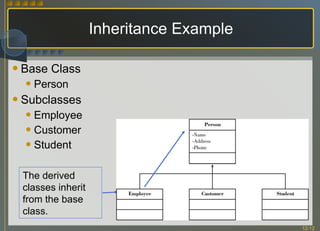
Inheritance  (1 of 2) Ability to create a new class from an existing class Original class is called  Base Class ,  Superclass , or  Parent   Class Inherited class is called  Subclass ,  Derived Class , or  Child Class For example, each form created is inherited from the existing Form class Purpose of inheritance is  reusability
Inheritance  (2 of 2) Examine first line of code for a form in the Editor Public Class Form1 Inherits System.Windows.Forms.Form Inherited Class: Subclass, Derived Class,   Child Class Original Class: Base Class, Superclass, Parent Class
Inheritance Example Base Class Person Subclasses Employee Customer Student The derived classes inherit from the base class.
Polymorphism Methods having identical names but different implementations Radio button, check boxes and list boxes all have a Select method—the Select method operates appropriately for its class Overloading  -Several argument lists for callling the method Example: MessageBox.Show method Overriding  -Refers to a class that has the same method name as its base class Method in subclass takes precedence
Reusability Big advantage of OOP over traditional programming New classes created can be used in multiple projects Each object created from the class can have its own properties
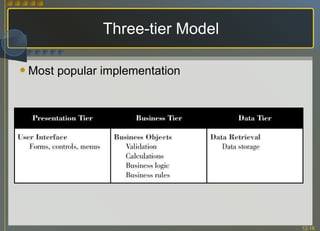
Multitier Applications Classes are used to create multitier applications Each of the functions of a multitier application can be coded in a separate component and stored and run on different machines Goal is to create components that can be combined and replaced
Three-tier Model Most popular implementation
Designing Your Own Class Analyze characteristics needed by new objects Characteristics or properties are defined as variables Define the properties as variables in the class module Analyze behaviors needed by new objects Behaviors are methods Define the methods as sub procedures or functions
Creating Properties in a Class Define variables inside the Class module by declaring them as Private – these store the value of the properties of the class Do not make Public, that would violate encapsulation (each object should be in charge of its own data)
Property Procedures Properties in a class are accessed with  accessor methods  in a property procedure Name used for property procedure is the name of the property seen by the outside world Set accessor method Uses  Value keyword  to refer to incoming value for property Assigns a value to the property Get Statement uses the value keyword to refer to the incoming value of the property Must assign a return value to the procedure name or use a Return Statement to return a value
Property Procedure General Form Private  ClassVariable  As  DataType [Public]  Property   PropertyName( )  As  DataType Get Return ClassVariable [PropertyName = ClassVariable] End Get Set  (ByVal Value As  DataType ) [ statements, such As validation ] ClassVariable  = Value End Set End Property
Read-Only Properties In some instances a value for a property can be retrieved by an object but not changed A property can be written to create a read only property Create a read-only property by using the  ReadOnly  modifier ' The property procedure for a read-only property. ReadOnly Property TotalPay() As Decimal Get Return totalPayDecimal End Get End Property
Write-Only Properties At times a property can be assigned by an object but not retrieved Create a property block that contains only a  Set  to create a write-only property ' Private class-level variable to hold the property value. Private priceDecimal As Decimal Public WriteOnly Property Price() As Decimal Set(ByVal value As Decimal) If value >= 0 Then priceDecimal = value End If End Set End Property
Class Methods Create methods by coding public procedures within a class Methods declared with the Private keyword are available only within the class Methods declared with the Public keyword are available to external objects
Constructors and Destructors Constructor Method that automatically executes when an object is instantiated Constructor must be public and is named New Ideal location for an initialization tasks such as setting the initial values of variable and properties Destructor Method  that automatically executes when an object is destroyed
Overloading the Constructor Overloading means that two methods have the same name but a different list of arguments (the signature) Create by giving the same name to multiple procedures in a class module, each with a different argument list
Parameterized Constructor Constructor that requires arguments Allows arguments to be passed when creating an object
Create a New Class Steps Project, Add Class In Add New Item dialog box, choose Class Name the Class Define the Class properties To allow access from outside the class, add property procedures Code the methods
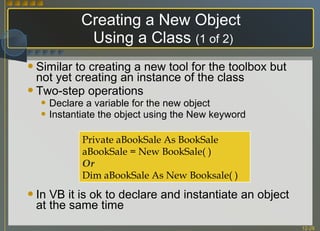
Creating a New Object  Using a Class  (1 of 2) Similar to creating a new tool for the toolbox but not yet creating an instance of the class Two-step operations Declare a variable for the new object Instantiate the object using the New keyword In VB it is ok to declare and instantiate an object at the same time Private aBookSale As BookSale aBookSale = New BookSale( ) Or Dim aBookSale As New Booksale( )
Creating a New Object Using a Class  ( 2 of 2) If object variable is needed in multiple procedures, delcare the object at class level Instantiate the object  May need to include a New statement and a Try/Catch block for error handling (Try/Catch block must be inside a procedure) The preferred technique is to include the New statement inside of a procedure at the time the object is needed Pass values for the arguments at instantiation when using a  parameterized constructor
Instance Variables versus  Shared Variables Instance variables  or properties Separate memory location for each instance of the object Shared variables  or properties Single variable that is available for ALL objects of a class Can be accessed without instantiating an object of the class When creating use the  Shared  keyword to create Shared properties can be set to read-only so that their values can be retrieved but not set directly
Shared Members in MSDN Help
Garbage Collection Feature of .NET Common Language Runtime (CLR) that cleans up unused components Periodically checks for unreferenced objects and releases all memory and system resources used by the objects Microsoft recommends depending on  garbage collection  to release resources rather than Finalize procedures
Inheritance New class can Be based on another class (base class) Inherit the properties and methods (but not constructors) of the base class, which can be One of the VB existing classes Your own class Use the Inherits statement following the class header and prior to any comments
Inheriting Properties and Methods Public and  protected  data members and methods of the base class are inherited in the derived class Must write the method in the derived class if wanting to override the base-class method Can declare elements with the Protected keyword which specifies that the element is accessible only within its own class or any class derived from that class
Constructors in Inheritance There is one exception for a derived class inheriting all public and protected methods- A subclass cannot inherit constructors from the base class Each class must have its own constructors  Exception is if the only constructor needed is an empty constructor-VB automatically creates an empty constructor for all classes
Overriding Methods Methods with the same name and the same argument list as the base class Derived class (subclass) will use the new method rather than the method in the base class To override a method Declare the original  method with the  Overridable  keyword  Declare the new method with the  Overrides  keyword The access modifier for the base-class procedure can be Private or Protected (not Public)
Accessing Properties Derived class can set and retrieve base class properties by using the property accessor methods Call the base class constructor from the derived class constructor to use the property values from the base class If the constructor requires arguments, the values can be passed when the constructor is called
Creating a Base Class Strictly for Inheritance Classes can be created strictly for inheritance by two or more similar classes and are never instantiated For a base class that you intend to inherit from, include the  MustInherit  modifier on the class declaration In each base class method that must be overridden, include the  MustOverride  modifier and no code in the base class method
Inheriting Form Classes Many projects require several forms Create a base form and inherit the visual interface to new forms Base form inherits from System.Windows.Forms.Form New form inherits from Base form
Creating Inherited Form Class Project menu, Add Windows Form Modify the Inherits Statement to inherit from base form using project name as the namespace -- OR-- Project menu, Add Inherited Form In dialog select name of base form
Base and Inherited Forms
Coding for Events of an Inherited Class Copy procedure from base class into derived class and make modifications An alternate way is to use the inherited event handler in the derived class
Managing Multiclass Projects VB projects are automatically assigned a namespace which defaults to the name of the project Add an existing class to a project by copying the file into the project folder and then add the file to the project using Project/Add Existing Item --OR-- Right-click the project name in the Solution Explorer and select Add/Existing Item from the context menu
Using the Object Browser Use it to view the names, properties, methods, events and constants of VB objects, your own objects, and objects available from other applications To Display Select View/Object Browser  –OR-- Object Browser toolbar button
The Object Browser Window
Examining VB Classes  (1 of 2) Members of System.Windows.Forms.MessageBox  Class
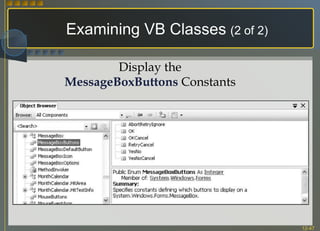
Examining VB Classes   (2 of 2) Display the MessageBoxButtons  Constants
Examining Your Own Classes

Chapter 12

  • 1.
    aslkjdhfalskhjfgalsdkfhalskdhjfglaskdhjflaskdhjfglaksjdhflakshflaksdhjfglaksjhflaksjhf aslkjdhfalskhjfgalsdkfhalskdhjfglaskdhjflaskdhjfglaksjdhflakshflaksdhjfglaksjhflaksjhf aslkjdhfalskhjfgalsdkfhalskdhjfglaskdhjflaskdhjfglaksjdhflakshflaksdhjfglaksjhflaksjhfaslkjdhfalskhjfgalsdkfhalskdhjfglaskdhjflaskdhjfglaksjdhflakshflaksdhjfglaksjhflaksjhf aslkjdhfalskhjfgalsdkfhalskdhjfglaskdhjflaskdhjfglaksjdhflakshflaksdhjfglaksjhflaksjhf aslkjdhfalskhjfgalsdkfhalskdhjfglaskdhjflaskdhjfglaksjdhflakshflaksdhjfglaksjhflaksjhf aslkjdhfalskhjfgalsdkfhalskdhjfglaskdhjflaskdhjfglaksjdhflakshflaksdhjfglaksjhflaksjhf aslkjdhfalskhjfgalsdkfhalskdhjfglaskdhjflaskdhjfglaksjdhflakshflaksdhjfglaksjhflaksjhf aslkjdhfalskhjfgalsdkfhalskdhjfglaskdhjflaskdhjfglaksjdhflakshflaksdhjfglaksjhflaksjhf aslkjdhfalskhjfgalsdkfhalskdhjfglaskdhjflaskdhjfglaksjdhflakshflaksdhjfglaksjhflaksjhf aslkjdhfalskhjfgalsdkfhalskdhjfglaskdhjflaskdhjfglaksjdhflakshflaksdhjfglaksjhflaksjhf aslkjdhfalskhjfgalsdkfhalskdhjfglaskdhjflaskdhjfglaksjdhflakshflaksdhjfglaksjhflaksjhf aslkjdhfalskhjfgalsdkfhalskdhjfglaskdhjflaskdhjfglaksjdhflakshflaksdhjfglaksjhflaksjhf aslkjdhfalskhjfgalsdkfhalskdhjfglaskdhjflaskdhjfglaksjdhflakshflaksdhjfglaksjhflaksjhf aslkjdhfalskhjfgalsdkfhalskdhjfglaskdhjflaskdhjfglaksjdhflakshflaksdhjfglaksjhflaksjhf aslkjdhfalskhjfgalsdkfhalskdhjfglaskdhjflaskdhjfglaksjdhflakshflaksdhjfglaksjhflaksjhf aslkjdhfalskhjfgalsdkfhalskdhjfglaskdhjflaskdhjfglaksjdhflakshflaksdhjfglaksjhflaksjhf aslkjdhfalskhjfgalsdkfhalskdhjfglaskdhjflaskdhjfglaksjdhflakshflaksdhjfglaksjhflaksjhf aslkjdhfalskhjfgalsdkfhalskdhjfglaskdhjflaskdhjfglaksjdhflakshflaksdhjfglaksjhflaksjhf aslkjdhfalskhjfgalsdkfhalskdhjfglaskdhjflaskdhjfglaksjdhflakshflaksdhjfglaksjhflaksjhf aslkjdhfalskhjfgalsdkfhalskdhjfglaskdhjflaskdhjfglaksjdhflakshflaksdhjfglaksjhflaksjhf aslkjdhfalskhjfgalsdkfhalskdhjfglaskdhjflaskdhjfglaksjdhflakshflaksdhjfglaksjhflaksjhf aslkjdhfalskhjfgalsdkfhalskdhjfglaskdhjflaskdhjfglaksjdhflakshflaksdhjfglaksjhflaksjhf aslkjdhfalskhjfgalsdkfhalskdhjfglaskdhjflaskdhjfglaksjdhflakshflaksdhjfglaksjhflaksjhf
  • 2.
    OOP: Creating Object-OrientedPrograms Chapter 12 McGraw-Hill © 2006 The McGraw-Hill Companies, Inc. All rights reserved.
  • 3.
    Objectives (1of 2) Use object-oriented terminology correctly Create a two-tier application that separates the user interface from the business logic Differentiate between a class and an object Create a class that has properties and methods Declare object variables and use property procedures to set and retrieve properties of a class
  • 4.
    Objectives (2of 2) Assign values to the properties with a constructor Instantiate an object in a project using your class Differentiate between shared members and instance members Understand the purpose of the constructor and destructor methods Inherit a new class from your own class Use visual inheritance by deriving a form from another form
  • 5.
    Object-Oriented Programming (OOP)OOP is currently the most accepted style of programming Java, C# and SmallTalk were desgined to be OO (object oriented) from inception VB and C++ have been modified to accommodate OOP VB.NET is the first version of VB to be truly object oriented As projects become more complex, using objects becomes increasingly important
  • 6.
    Objects VB allowsthe creation of new object types by creating a class Classes may have both properties, methods, and events Objects are things such as buttons; buttons is a class but exitButton is an instance of the class—the instance is the object There may be many objects of a new class type
  • 7.
    "Cookie Analogy" Class= Cookie cutter Instantiate = Making a cookie using the cookie cutter Instance = Newly made cookie Properties of the Instance may have different values Icing property can be True or False Flavor property could be Lemon or Chocolate Methods = Eat, Bake, or Crumble Events = Cookie crumbling and informing you
  • 8.
    Object-Oriented Terminology Encapsulation Inheritance Polymorphism Reusable Classes Multitier Applications
  • 9.
    Encapsulation Combination ofcharacteristics of an object along with its behavior in "one package" Cannot make object do anything it does not already "know" how to do Cannot make up new properties, methods, or events Sometimes referred to as data hiding; an object can expose only those data elements and procedures that it wishes
  • 10.
    Inheritance (1of 2) Ability to create a new class from an existing class Original class is called Base Class , Superclass , or Parent Class Inherited class is called Subclass , Derived Class , or Child Class For example, each form created is inherited from the existing Form class Purpose of inheritance is reusability
  • 11.
    Inheritance (2of 2) Examine first line of code for a form in the Editor Public Class Form1 Inherits System.Windows.Forms.Form Inherited Class: Subclass, Derived Class, Child Class Original Class: Base Class, Superclass, Parent Class
  • 12.
    Inheritance Example BaseClass Person Subclasses Employee Customer Student The derived classes inherit from the base class.
  • 13.
    Polymorphism Methods havingidentical names but different implementations Radio button, check boxes and list boxes all have a Select method—the Select method operates appropriately for its class Overloading -Several argument lists for callling the method Example: MessageBox.Show method Overriding -Refers to a class that has the same method name as its base class Method in subclass takes precedence
  • 14.
    Reusability Big advantageof OOP over traditional programming New classes created can be used in multiple projects Each object created from the class can have its own properties
  • 15.
    Multitier Applications Classesare used to create multitier applications Each of the functions of a multitier application can be coded in a separate component and stored and run on different machines Goal is to create components that can be combined and replaced
  • 16.
    Three-tier Model Mostpopular implementation
  • 17.
    Designing Your OwnClass Analyze characteristics needed by new objects Characteristics or properties are defined as variables Define the properties as variables in the class module Analyze behaviors needed by new objects Behaviors are methods Define the methods as sub procedures or functions
  • 18.
    Creating Properties ina Class Define variables inside the Class module by declaring them as Private – these store the value of the properties of the class Do not make Public, that would violate encapsulation (each object should be in charge of its own data)
  • 19.
    Property Procedures Propertiesin a class are accessed with accessor methods in a property procedure Name used for property procedure is the name of the property seen by the outside world Set accessor method Uses Value keyword to refer to incoming value for property Assigns a value to the property Get Statement uses the value keyword to refer to the incoming value of the property Must assign a return value to the procedure name or use a Return Statement to return a value
  • 20.
    Property Procedure GeneralForm Private ClassVariable As DataType [Public] Property PropertyName( ) As DataType Get Return ClassVariable [PropertyName = ClassVariable] End Get Set (ByVal Value As DataType ) [ statements, such As validation ] ClassVariable = Value End Set End Property
  • 21.
    Read-Only Properties Insome instances a value for a property can be retrieved by an object but not changed A property can be written to create a read only property Create a read-only property by using the ReadOnly modifier ' The property procedure for a read-only property. ReadOnly Property TotalPay() As Decimal Get Return totalPayDecimal End Get End Property
  • 22.
    Write-Only Properties Attimes a property can be assigned by an object but not retrieved Create a property block that contains only a Set to create a write-only property ' Private class-level variable to hold the property value. Private priceDecimal As Decimal Public WriteOnly Property Price() As Decimal Set(ByVal value As Decimal) If value >= 0 Then priceDecimal = value End If End Set End Property
  • 23.
    Class Methods Createmethods by coding public procedures within a class Methods declared with the Private keyword are available only within the class Methods declared with the Public keyword are available to external objects
  • 24.
    Constructors and DestructorsConstructor Method that automatically executes when an object is instantiated Constructor must be public and is named New Ideal location for an initialization tasks such as setting the initial values of variable and properties Destructor Method that automatically executes when an object is destroyed
  • 25.
    Overloading the ConstructorOverloading means that two methods have the same name but a different list of arguments (the signature) Create by giving the same name to multiple procedures in a class module, each with a different argument list
  • 26.
    Parameterized Constructor Constructorthat requires arguments Allows arguments to be passed when creating an object
  • 27.
    Create a NewClass Steps Project, Add Class In Add New Item dialog box, choose Class Name the Class Define the Class properties To allow access from outside the class, add property procedures Code the methods
  • 28.
    Creating a NewObject Using a Class (1 of 2) Similar to creating a new tool for the toolbox but not yet creating an instance of the class Two-step operations Declare a variable for the new object Instantiate the object using the New keyword In VB it is ok to declare and instantiate an object at the same time Private aBookSale As BookSale aBookSale = New BookSale( ) Or Dim aBookSale As New Booksale( )
  • 29.
    Creating a NewObject Using a Class ( 2 of 2) If object variable is needed in multiple procedures, delcare the object at class level Instantiate the object May need to include a New statement and a Try/Catch block for error handling (Try/Catch block must be inside a procedure) The preferred technique is to include the New statement inside of a procedure at the time the object is needed Pass values for the arguments at instantiation when using a parameterized constructor
  • 30.
    Instance Variables versus Shared Variables Instance variables or properties Separate memory location for each instance of the object Shared variables or properties Single variable that is available for ALL objects of a class Can be accessed without instantiating an object of the class When creating use the Shared keyword to create Shared properties can be set to read-only so that their values can be retrieved but not set directly
  • 31.
  • 32.
    Garbage Collection Featureof .NET Common Language Runtime (CLR) that cleans up unused components Periodically checks for unreferenced objects and releases all memory and system resources used by the objects Microsoft recommends depending on garbage collection to release resources rather than Finalize procedures
  • 33.
    Inheritance New classcan Be based on another class (base class) Inherit the properties and methods (but not constructors) of the base class, which can be One of the VB existing classes Your own class Use the Inherits statement following the class header and prior to any comments
  • 34.
    Inheriting Properties andMethods Public and protected data members and methods of the base class are inherited in the derived class Must write the method in the derived class if wanting to override the base-class method Can declare elements with the Protected keyword which specifies that the element is accessible only within its own class or any class derived from that class
  • 35.
    Constructors in InheritanceThere is one exception for a derived class inheriting all public and protected methods- A subclass cannot inherit constructors from the base class Each class must have its own constructors Exception is if the only constructor needed is an empty constructor-VB automatically creates an empty constructor for all classes
  • 36.
    Overriding Methods Methodswith the same name and the same argument list as the base class Derived class (subclass) will use the new method rather than the method in the base class To override a method Declare the original method with the Overridable keyword Declare the new method with the Overrides keyword The access modifier for the base-class procedure can be Private or Protected (not Public)
  • 37.
    Accessing Properties Derivedclass can set and retrieve base class properties by using the property accessor methods Call the base class constructor from the derived class constructor to use the property values from the base class If the constructor requires arguments, the values can be passed when the constructor is called
  • 38.
    Creating a BaseClass Strictly for Inheritance Classes can be created strictly for inheritance by two or more similar classes and are never instantiated For a base class that you intend to inherit from, include the MustInherit modifier on the class declaration In each base class method that must be overridden, include the MustOverride modifier and no code in the base class method
  • 39.
    Inheriting Form ClassesMany projects require several forms Create a base form and inherit the visual interface to new forms Base form inherits from System.Windows.Forms.Form New form inherits from Base form
  • 40.
    Creating Inherited FormClass Project menu, Add Windows Form Modify the Inherits Statement to inherit from base form using project name as the namespace -- OR-- Project menu, Add Inherited Form In dialog select name of base form
  • 41.
  • 42.
    Coding for Eventsof an Inherited Class Copy procedure from base class into derived class and make modifications An alternate way is to use the inherited event handler in the derived class
  • 43.
    Managing Multiclass ProjectsVB projects are automatically assigned a namespace which defaults to the name of the project Add an existing class to a project by copying the file into the project folder and then add the file to the project using Project/Add Existing Item --OR-- Right-click the project name in the Solution Explorer and select Add/Existing Item from the context menu
  • 44.
    Using the ObjectBrowser Use it to view the names, properties, methods, events and constants of VB objects, your own objects, and objects available from other applications To Display Select View/Object Browser –OR-- Object Browser toolbar button
  • 45.
  • 46.
    Examining VB Classes (1 of 2) Members of System.Windows.Forms.MessageBox Class
  • 47.
    Examining VB Classes (2 of 2) Display the MessageBoxButtons Constants
  • 48.

Editor's Notes

  • #2 Brief description on how to navigate within this slideshow The first time a Key Term from the chapter is used in the ppt it will display in blue Gold colored text boxes display coding examples Slides will be numbered (# of #) when multiple slides on same topic Speaker notes are included where appropriate for slides (*)Denotes either a comment for page reference to textbook or slide reference in ppt
  • #7 The next slide provides the coolie analogy describing the relationship of a class and an object
  • #8 Sometimes the distinction between a method and an event is somewhat fuzzy Generally anything that an object is told to do is a method; if the object does an action and needs to make it known—that’s an event
  • #9 Key features of an object-oriented language are encapsulation, inheritance, and polymorphism *The next several slides are going to define several object-oriented terms
  • #10 Think of it being a completed package; all parts of the package are in a capsule Encapsulation can be witnessed by looking at any program; the form is actually a class; all methods and events that are coded are enclosed within the Class and End Class statements; the variables placed in the code are properties of the specific form class being created
  • #14 The term ploymorphism actually means the ability to take on many shapes or forms
  • #16 A common practice for writing professional applications is to write independent components that work in multiple “tiers” or layers If one part of the application needs to change, such as a redesign of the user interface or a new database format, the other components do not need to be replaced
  • #17 The term “n-tier” application is an expansion of the three-tier model The middle tier may be written in multiple classes that can be stored and run from multiple locations
  • #19 Protected variable behave as private but are available in any class that inherits from this class—as a private or protected variable, the value is available only to procedures within the class, the same way that private module-level varialbe are available only to procedures within a form’s class code
  • #20 *The next slide displays the Property Procedure General Form
  • #25 The constructor must be public, because the objects that are created must execute this method If a class does not contain a constructor, the compiler creates an implicit method called the default constructor and has an empty argument list
  • #29 Creating a new class defines a new type—does not create any objects—
  • #31 Terminology varies from one OOP language to another-in some languages, shared members are called class variables or static variables Microsoft documentation refers to instance members and shared members, which includes both properties and methods
  • #41 Using the second technique creates a form class in a different format – the inherited form is created in one file with designer-generated code embedded in the file
  • #45 The Object Browser is an important tool for working with objects
  • #47 Available properties, methods, events or constants of a Visual Basic class can be looked up Information such as which elements are defined in the class, what is the base class, and which properties, methods, and events are inherited are displayed *The next slide displays the constants for the MessageBoxButtons
  • #49 With the chapter step-by-step project open, select the project name in the Object Browser Use the Object Browser to jump to the definition of any property or method by double-clicking on its name in the Members list—this technique is also a great way to jump to any of the procedures in the forms