OBJECT ORIENTED ANALYSIS & DESIGN
Text Book: JIM ARLOW, ILA NEUSTATD, “UML2 and the Unified Process Second
Edition, Practical Object Oriented Analysis and Design”, Addison- Wesley
Publication
Instructor: Dr. Ch. Rupa, Professor, Dept. of CSE
UNIT –II
Analysis
◦ Analysis Workflow
◦ Artifacts –Meta Model
◦ UP analysis Work Flow
◦ Objects & Classes Notations – Vocabulary
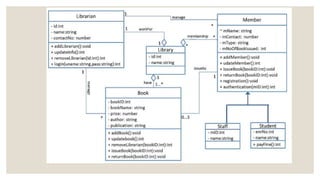
◦ Class Diagram
◦ Case Study
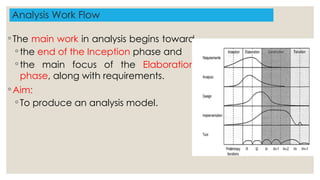
Analysis Work Flow
◦ The main work in analysis begins toward
◦ the end of the Inception phase and
◦ the main focus of the Elaboration
phase, along with requirements.
◦ Aim:
◦ To produce an analysis model.
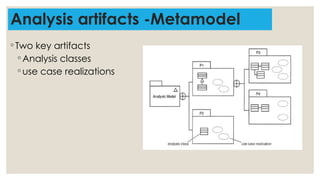
Analysis artifacts -Metamodel
◦ Two key artifacts
◦ Analysis classes
◦ use case realizations
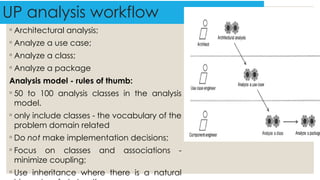
UP analysis workflow
◦ Architectural analysis;
◦ Analyze a use case;
◦ Analyze a class;
◦ Analyze a package
Analysis model - rules of thumb:
◦ 50 to 100 analysis classes in the analysis
model.
◦ only include classes - the vocabulary of the
problem domain related
◦ Do not make implementation decisions;
◦ Focus on classes and associations -
minimize coupling;
◦ Use inheritance where there is a natural
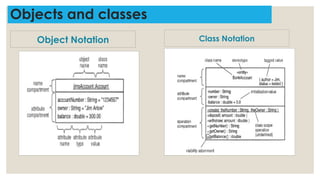
Objects and classes
Object Notation Class Notation
Finding Classes
◦ by using noun/verb analysis
◦ by using CRC analysis
◦ by using the RUP stereotypes
◦ from other sources
Noun/verb analysis
◦ Nouns and noun phrases in the text indicate classes or attributes
of classes.
◦ Verbs and verb phrases indicate responsibilities or operations of
a class.
Noun /verb analysis procedure
◦ Step 1: To collect as much relevant information as possible.
◦ Suitable sources of information are
◦ the requirements model;
◦ the use case model;
◦ the project glossary;
◦ anything else (architecture, vision documents, etc.).
◦ Step 2: To analyze it in a very simple way by highlighting the following:
◦ Nouns – Ex: Flight;
◦ Noun phrases – Ex: Flight number;
◦ Verbs – Ex: Allocate;
◦ Verb phrases – Ex: Verify credit card.
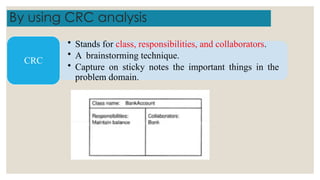
By using CRC analysis
• Stands for class, responsibilities, and collaborators.
• A brainstorming technique.
• Capture on sticky notes the important things in the
problem domain.
CRC
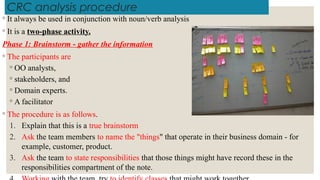
CRC analysis procedure
◦ It always be used in conjunction with noun/verb analysis
◦ It is a two-phase activity.
Phase 1: Brainstorm - gather the information
◦ The participants are
◦ OO analysts,
◦ stakeholders, and
◦ Domain experts.
◦ A facilitator
◦ The procedure is as follows.
1. Explain that this is a true brainstorm
2. Ask the team members to name the "things" that operate in their business domain - for
example, customer, product.
3. Ask the team to state responsibilities that those things might have record these in the
responsibilities compartment of the note.
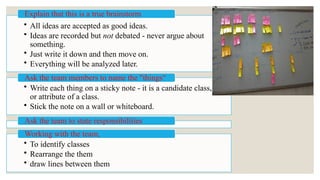
• All ideas are accepted as good ideas.
• Ideas are recorded but not debated - never argue about
something.
• Just write it down and then move on.
• Everything will be analyzed later.
Explain that this is a true brainstorm
• Write each thing on a sticky note - it is a candidate class,
or attribute of a class.
• Stick the note on a wall or whiteboard.
Ask the team members to name the "things“
Ask the team to state responsibilities
• To identify classes
• Rearrange the them
• draw lines between them
Working with the team,
Phase 2: Analyze information
◦ The participants are OO analysts and domain experts.
◦ How do you decide which sticky notes should ·become classes and which should
become attributes?
◦ Analysis classes must represent a crisp abstraction in the problem domain.
◦ If a note logically seems to be a part of another note, this is a good indication
that it represents an attribute.
◦ If a note doesn't seem to be particularly important or has very little interesting
behavior, see if it can be made an attribute of another class.
◦ If in doubt about a note just make it a class.
We can always refine the model later.
Finding classes by using the RUP stereotypes
◦ According to RUP, it helps to identify three distinct types of analysis
class during analysis activity.
◦ «boundary»,
◦ «control», and
◦ «entity» classes.
◦ A useful technique comes from RUP in the form of RUP stereotypes.
◦ It is an optional technique.
◦ Use it as a complement the core noun/verb and CRC card analysis
techniques.
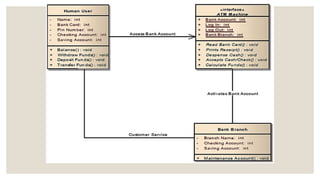
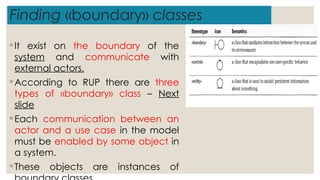
Finding «boundary» classes
◦ It exist on the boundary of the
system and communicate with
external actors.
◦ According to RUP there are three
types of «boundary» class – Next
slide
◦ Each communication between an
actor and a use case in the model
must be enabled by some object in
a system.
◦ These objects are instances of
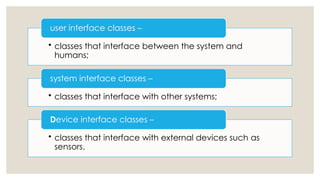
• classes that interface between the system and
humans;
user interface classes –
• classes that interface with other systems;
system interface classes –
• classes that interface with external devices such as
sensors.
Device interface classes –
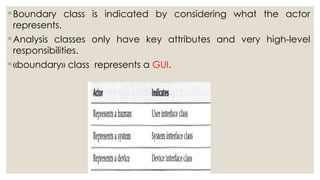
◦ Boundary class is indicated by considering what the actor
represents.
◦ Analysis classes only have key attributes and very high-level
responsibilities.
◦ «boundary» class represents a GUI.
Finding «control» classes
◦These classes are controllers.
◦It coordinate system behavior that corresponds to one or
more use cases.
◦Find control classes by considering the behavior of the
system (Use cases).
◦If a controller class has a very complicated behavior then
◦break it down into two or more simpler controllers.
Case study:
◦ System: Designing a course registration
◦ Control class: CourseRegistrationController - that coordinates the whole
process.
◦ such a class has a complex behaviour
◦ The CourseRegistrationController might be decomposed into
◦ Registrar,
◦ CourseManager, and
◦ PersonnelManager classes
Finding «entity» classes
◦ These classes model information about something.
◦ It has simple behavior that getting and setting values.
◦ Classes that represent persistent information.
◦ Ex: addresses, People (Also called Entity classes)
◦ Entity classes Characteristics
◦ Cut across many use cases;
◦ are manipulated by control classes;
◦ provide information to, and accept information from, boundary
classes;
◦ represent key things managed by the system (e.g., Customer);
◦ are often persistent.
Finding classes from other sources
◦ Like others it is also a worthy.
◦ Physical objects
◦ Ex: aircraft, people, and hotels may all indicate classes.
◦ Paperwork is another rich source of classes.
◦ Ex: invoices, orders, and bankbooks
◦ Known interfaces to the outside world
◦ Ex: screens, keyboards, peripherals, and other systems
◦ Conceptual entities - crucial to the operation of the business
◦ Ex: reward card
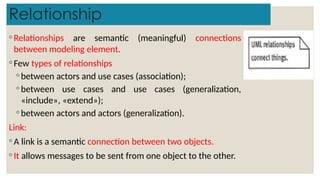
Relationship
◦ Relationships are semantic (meaningful) connections
between modeling element.
◦ Few types of relationships
◦ between actors and use cases (association);
◦ between use cases and use cases (generalization,
«include», «extend»);
◦ between actors and actors (generalization).
Link:
◦ A link is a semantic connection between two objects.
◦ It allows messages to be sent from one object to the other.
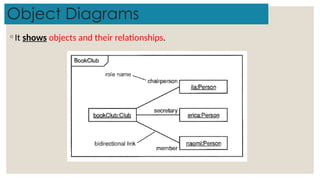
Object Diagrams
◦ It shows objects and their relationships.
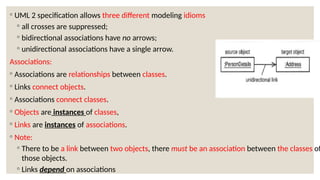
◦ UML 2 specification allows three different modeling idioms
◦ all crosses are suppressed;
◦ bidirectional associations have no arrows;
◦ unidirectional associations have a single arrow.
Associations:
◦ Associations are relationships between classes.
◦ Links connect objects.
◦ Associations connect classes.
◦ Objects are instances of classes,
◦ Links are instances of associations.
◦ Note:
◦ There to be a link between two objects, there must be an association between the classes of
those objects.
◦ Links depend on associations
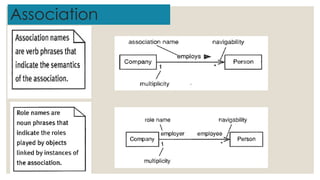
Association
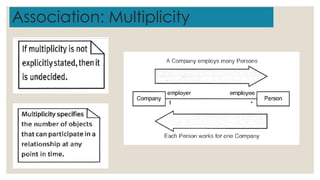
Association: Multiplicity
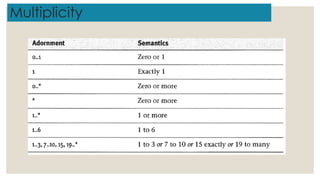
Multiplicity
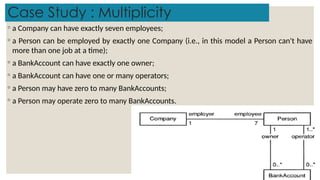
Case Study : Multiplicity
◦ a Company can have exactly seven employees;
◦ a Person can be employed by exactly one Company (i.e., in this model a Person can't have
more than one job at a time);
◦ a BankAccount can have exactly one owner;
◦ a BankAccount can have one or many operators;
◦ a Person may have zero to many BankAccounts;
◦ a Person may operate zero to many BankAccounts.
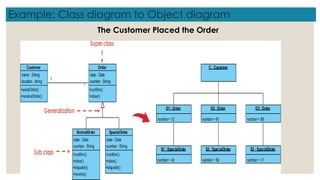
Example: Class diagram to Object diagram
The Customer Placed the Order
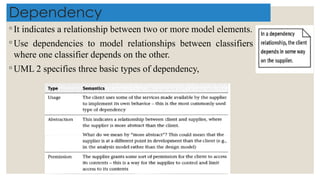
Dependency
◦ It indicates a relationship between two or more model elements.
◦ Use dependencies to model relationships between classifiers
where one classifier depends on the other.
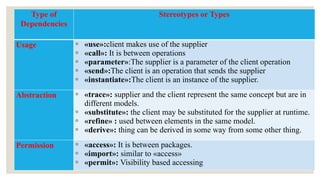
◦ UML 2 specifies three basic types of dependency,
Type of
Dependencies
Stereotypes or Types
Usage ◦ «use»:client makes use of the supplier
◦ «call»: It is between operations
◦ «parameter»:The supplier is a parameter of the client operation
◦ «send»:The client is an operation that sends the supplier
◦ «instantiate»:The client is an instance of the supplier.
Abstraction ◦ «trace»: supplier and the client represent the same concept but are in
different models.
◦ «substitute»: the client may be substituted for the supplier at runtime.
◦ «refine» : used between elements in the same model.
◦ «derive»: thing can be derived in some way from some other thing.
Permission ◦ «access»: It is between packages.
◦ «import»: similar to «access»
◦ «permit»: Visibility based accessing
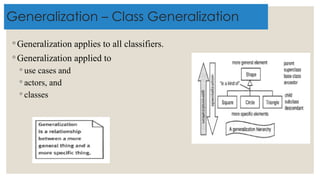
Generalization – Class Generalization
◦ Generalization applies to all classifiers.
◦ Generalization applied to
◦ use cases and
◦ actors, and
◦ classes
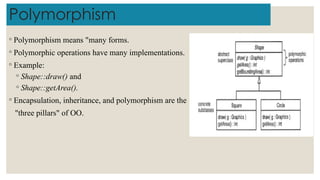
Polymorphism
◦ Polymorphism means "many forms.
◦ Polymorphic operations have many implementations.
◦ Example:
◦ Shape::draw() and
◦ Shape::getArea().
◦ Encapsulation, inheritance, and polymorphism are the
"three pillars" of OO.
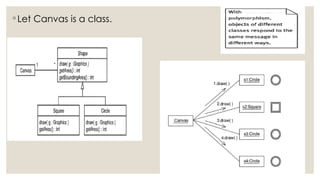
◦ Let Canvas is a class.
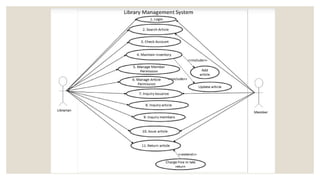
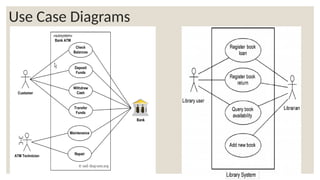
Use Case Diagrams
Object Oriented Analysis and Design UNIT II

Object Oriented Analysis and Design UNIT II

  • 1.
    OBJECT ORIENTED ANALYSIS& DESIGN Text Book: JIM ARLOW, ILA NEUSTATD, “UML2 and the Unified Process Second Edition, Practical Object Oriented Analysis and Design”, Addison- Wesley Publication Instructor: Dr. Ch. Rupa, Professor, Dept. of CSE
  • 3.
    UNIT –II Analysis ◦ AnalysisWorkflow ◦ Artifacts –Meta Model ◦ UP analysis Work Flow ◦ Objects & Classes Notations – Vocabulary ◦ Class Diagram ◦ Case Study
  • 4.
    Analysis Work Flow ◦The main work in analysis begins toward ◦ the end of the Inception phase and ◦ the main focus of the Elaboration phase, along with requirements. ◦ Aim: ◦ To produce an analysis model.
  • 5.
    Analysis artifacts -Metamodel ◦Two key artifacts ◦ Analysis classes ◦ use case realizations
  • 6.
    UP analysis workflow ◦Architectural analysis; ◦ Analyze a use case; ◦ Analyze a class; ◦ Analyze a package Analysis model - rules of thumb: ◦ 50 to 100 analysis classes in the analysis model. ◦ only include classes - the vocabulary of the problem domain related ◦ Do not make implementation decisions; ◦ Focus on classes and associations - minimize coupling; ◦ Use inheritance where there is a natural
  • 7.
    Objects and classes ObjectNotation Class Notation
  • 11.
    Finding Classes ◦ byusing noun/verb analysis ◦ by using CRC analysis ◦ by using the RUP stereotypes ◦ from other sources
  • 12.
    Noun/verb analysis ◦ Nounsand noun phrases in the text indicate classes or attributes of classes. ◦ Verbs and verb phrases indicate responsibilities or operations of a class.
  • 13.
    Noun /verb analysisprocedure ◦ Step 1: To collect as much relevant information as possible. ◦ Suitable sources of information are ◦ the requirements model; ◦ the use case model; ◦ the project glossary; ◦ anything else (architecture, vision documents, etc.). ◦ Step 2: To analyze it in a very simple way by highlighting the following: ◦ Nouns – Ex: Flight; ◦ Noun phrases – Ex: Flight number; ◦ Verbs – Ex: Allocate; ◦ Verb phrases – Ex: Verify credit card.
  • 14.
    By using CRCanalysis • Stands for class, responsibilities, and collaborators. • A brainstorming technique. • Capture on sticky notes the important things in the problem domain. CRC
  • 15.
    CRC analysis procedure ◦It always be used in conjunction with noun/verb analysis ◦ It is a two-phase activity. Phase 1: Brainstorm - gather the information ◦ The participants are ◦ OO analysts, ◦ stakeholders, and ◦ Domain experts. ◦ A facilitator ◦ The procedure is as follows. 1. Explain that this is a true brainstorm 2. Ask the team members to name the "things" that operate in their business domain - for example, customer, product. 3. Ask the team to state responsibilities that those things might have record these in the responsibilities compartment of the note.
  • 16.
    • All ideasare accepted as good ideas. • Ideas are recorded but not debated - never argue about something. • Just write it down and then move on. • Everything will be analyzed later. Explain that this is a true brainstorm • Write each thing on a sticky note - it is a candidate class, or attribute of a class. • Stick the note on a wall or whiteboard. Ask the team members to name the "things“ Ask the team to state responsibilities • To identify classes • Rearrange the them • draw lines between them Working with the team,
  • 17.
    Phase 2: Analyzeinformation ◦ The participants are OO analysts and domain experts. ◦ How do you decide which sticky notes should ·become classes and which should become attributes? ◦ Analysis classes must represent a crisp abstraction in the problem domain. ◦ If a note logically seems to be a part of another note, this is a good indication that it represents an attribute. ◦ If a note doesn't seem to be particularly important or has very little interesting behavior, see if it can be made an attribute of another class. ◦ If in doubt about a note just make it a class. We can always refine the model later.
  • 18.
    Finding classes byusing the RUP stereotypes ◦ According to RUP, it helps to identify three distinct types of analysis class during analysis activity. ◦ «boundary», ◦ «control», and ◦ «entity» classes. ◦ A useful technique comes from RUP in the form of RUP stereotypes. ◦ It is an optional technique. ◦ Use it as a complement the core noun/verb and CRC card analysis techniques.
  • 19.
    Finding «boundary» classes ◦It exist on the boundary of the system and communicate with external actors. ◦ According to RUP there are three types of «boundary» class – Next slide ◦ Each communication between an actor and a use case in the model must be enabled by some object in a system. ◦ These objects are instances of
  • 20.
    • classes thatinterface between the system and humans; user interface classes – • classes that interface with other systems; system interface classes – • classes that interface with external devices such as sensors. Device interface classes –
  • 21.
    ◦ Boundary classis indicated by considering what the actor represents. ◦ Analysis classes only have key attributes and very high-level responsibilities. ◦ «boundary» class represents a GUI.
  • 22.
    Finding «control» classes ◦Theseclasses are controllers. ◦It coordinate system behavior that corresponds to one or more use cases. ◦Find control classes by considering the behavior of the system (Use cases). ◦If a controller class has a very complicated behavior then ◦break it down into two or more simpler controllers.
  • 23.
    Case study: ◦ System:Designing a course registration ◦ Control class: CourseRegistrationController - that coordinates the whole process. ◦ such a class has a complex behaviour ◦ The CourseRegistrationController might be decomposed into ◦ Registrar, ◦ CourseManager, and ◦ PersonnelManager classes
  • 24.
    Finding «entity» classes ◦These classes model information about something. ◦ It has simple behavior that getting and setting values. ◦ Classes that represent persistent information. ◦ Ex: addresses, People (Also called Entity classes) ◦ Entity classes Characteristics ◦ Cut across many use cases; ◦ are manipulated by control classes; ◦ provide information to, and accept information from, boundary classes; ◦ represent key things managed by the system (e.g., Customer); ◦ are often persistent.
  • 25.
    Finding classes fromother sources ◦ Like others it is also a worthy. ◦ Physical objects ◦ Ex: aircraft, people, and hotels may all indicate classes. ◦ Paperwork is another rich source of classes. ◦ Ex: invoices, orders, and bankbooks ◦ Known interfaces to the outside world ◦ Ex: screens, keyboards, peripherals, and other systems ◦ Conceptual entities - crucial to the operation of the business ◦ Ex: reward card
  • 26.
    Relationship ◦ Relationships aresemantic (meaningful) connections between modeling element. ◦ Few types of relationships ◦ between actors and use cases (association); ◦ between use cases and use cases (generalization, «include», «extend»); ◦ between actors and actors (generalization). Link: ◦ A link is a semantic connection between two objects. ◦ It allows messages to be sent from one object to the other.
  • 27.
    Object Diagrams ◦ Itshows objects and their relationships.
  • 28.
    ◦ UML 2specification allows three different modeling idioms ◦ all crosses are suppressed; ◦ bidirectional associations have no arrows; ◦ unidirectional associations have a single arrow. Associations: ◦ Associations are relationships between classes. ◦ Links connect objects. ◦ Associations connect classes. ◦ Objects are instances of classes, ◦ Links are instances of associations. ◦ Note: ◦ There to be a link between two objects, there must be an association between the classes of those objects. ◦ Links depend on associations
  • 29.
  • 30.
  • 31.
  • 32.
    Case Study :Multiplicity ◦ a Company can have exactly seven employees; ◦ a Person can be employed by exactly one Company (i.e., in this model a Person can't have more than one job at a time); ◦ a BankAccount can have exactly one owner; ◦ a BankAccount can have one or many operators; ◦ a Person may have zero to many BankAccounts; ◦ a Person may operate zero to many BankAccounts.
  • 33.
    Example: Class diagramto Object diagram The Customer Placed the Order
  • 34.
    Dependency ◦ It indicatesa relationship between two or more model elements. ◦ Use dependencies to model relationships between classifiers where one classifier depends on the other. ◦ UML 2 specifies three basic types of dependency,
  • 35.
    Type of Dependencies Stereotypes orTypes Usage ◦ «use»:client makes use of the supplier ◦ «call»: It is between operations ◦ «parameter»:The supplier is a parameter of the client operation ◦ «send»:The client is an operation that sends the supplier ◦ «instantiate»:The client is an instance of the supplier. Abstraction ◦ «trace»: supplier and the client represent the same concept but are in different models. ◦ «substitute»: the client may be substituted for the supplier at runtime. ◦ «refine» : used between elements in the same model. ◦ «derive»: thing can be derived in some way from some other thing. Permission ◦ «access»: It is between packages. ◦ «import»: similar to «access» ◦ «permit»: Visibility based accessing
  • 36.
    Generalization – ClassGeneralization ◦ Generalization applies to all classifiers. ◦ Generalization applied to ◦ use cases and ◦ actors, and ◦ classes
  • 37.
    Polymorphism ◦ Polymorphism means"many forms. ◦ Polymorphic operations have many implementations. ◦ Example: ◦ Shape::draw() and ◦ Shape::getArea(). ◦ Encapsulation, inheritance, and polymorphism are the "three pillars" of OO.
  • 38.
    ◦ Let Canvasis a class.
  • 39.