Champion & FAS Deduplication Overview & Best Practices For More Info please contact Michael Hudak  NetApp Sales Specialist [email_address] 800-771-7000 x344
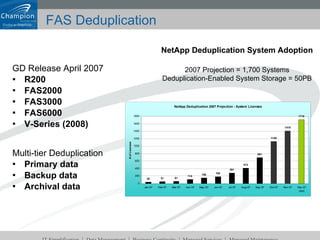
FAS Deduplication GD Release April 2007 R200 FAS2000 FAS3000 FAS6000 V-Series (2008) Multi-tier Deduplication Primary data Backup data Archival data NetApp Deduplication System Adoption 2007 Projection = 1,700 Systems Deduplication-Enabled System Storage = 50PB
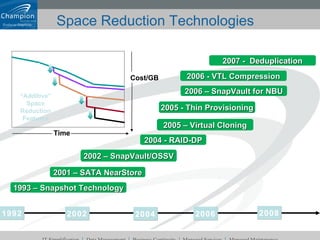
Space Reduction Technologies 2002 1992 2004 2006 2004 - RAID-DP 2002 – SnapVault/OSSV 1993 – Snapshot Technology 2005 - Thin Provisioning 2006 - VTL Compression 2007 -  Deduplication 2008 2001 – SATA NearStore 2006 – SnapVault for NBU 2005 – Virtual Cloning Cost/GB Time “ Additive” Space Reduction Features
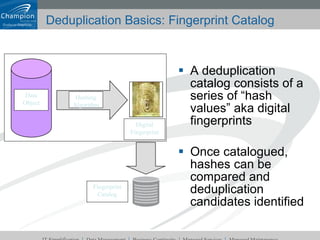
Deduplication Basics: Fingerprint Catalog A deduplication catalog consists of a series of “hash values” aka digital fingerprints Once catalogued, hashes can be compared and deduplication candidates identified Hashing Algorithm Data Object Digital Fingerprint Fingerprint Catalog
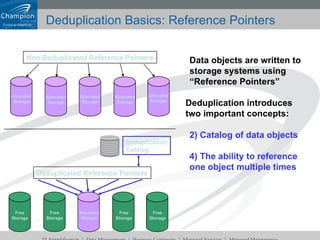
Deduplication Basics: Reference Pointers Data objects are written to storage systems using “Reference Pointers” Deduplication introduces two important concepts: Catalog of data objects The ability to reference one object multiple times Non-Deduplicated Reference Pointers Allocated Storage Allocated Storage Allocated Storage Allocated Storage Allocated Storage Deduplication Catalog Deduplicated Reference Pointers Allocated Storage Free Storage Free Storage Free Storage Free Storage
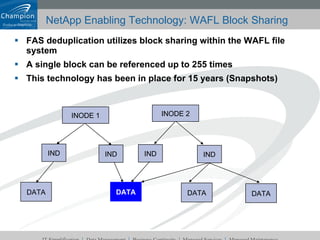
NetApp Enabling Technology: WAFL Block Sharing FAS deduplication utilizes block sharing within the WAFL file system A single block can be referenced up to 255 times This technology has been in place for 15 years (Snapshots) INODE 1 INODE 2 IND IND IND IND DATA DATA DATA DATA
FAS Deduplication: Commands License it Turn it on [Deduplicate existing data] Schedule when to deduplicate or run manually Check out what’s happening See the savings! license add <a_sis> sis on <vol> sis start -s <vol> sis config [-s schedule] <vol> sis start <vol> sis status [-l] <vol> df  – s <vol>
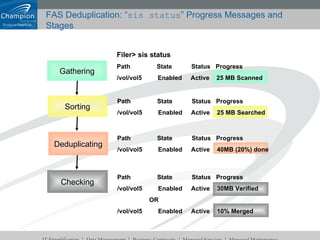
FAS Deduplication: “ sis status ” Progress Messages and Stages Path  State  Status  Progress /vol/vol5  Enabled  Active  40MB (20%) done Path  State  Status  Progress /vol/vol5  Enabled  Active  30MB Verified OR /vol/vol5  Enabled  Active  10% Merged Filer> sis status Path  State  Status  Progress /vol/vol5  Enabled  Active  25 MB Scanned Path  State  Status  Progress /vol/vol5  Enabled  Active  25 MB Searched Gathering Sorting Deduplicating Checking
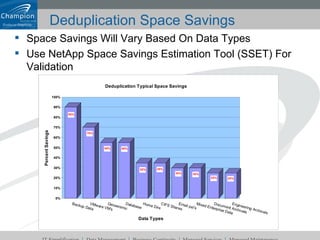
Deduplication Space Savings Space Savings Will Vary Based On Data Types Use NetApp Space Savings Estimation Tool (SSET) For Validation
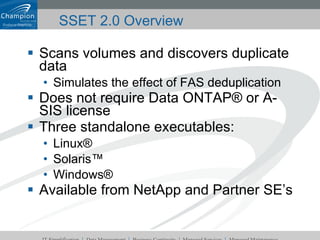
Scans volumes and discovers duplicate data Simulates the effect of FAS deduplication Does not require Data ONTAP® or A-SIS license Three standalone executables: Linux® Solaris™ Windows® Available from NetApp and Partner SE’s SSET 2.0 Overview
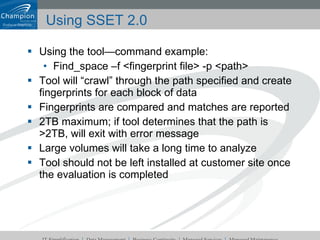
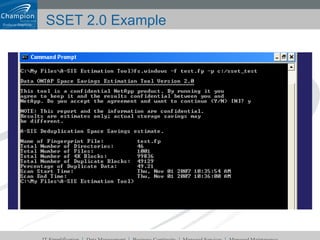
Using SSET 2.0 Using the tool—command example: Find_space –f <fingerprint file> -p <path> Tool will “crawl” through the path specified and create fingerprints for each block of data Fingerprints are compared and matches are reported 2TB maximum; if tool determines that the path is >2TB, will exit with error message Large volumes will take a long time to analyze Tool should not be left installed at customer site once the evaluation is completed
SSET 2.0 Example
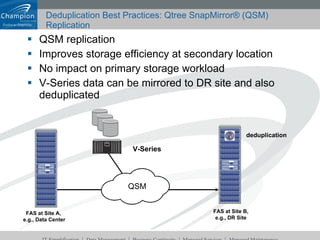
Deduplication Best Practices: Qtree SnapMirror® (QSM) Replication QSM replication Improves storage efficiency at secondary location No impact on primary storage workload V-Series data can be mirrored to DR site and also deduplicated FAS at Site A,  e.g., Data Center FAS at Site B, e.g., DR Site deduplication  QSM V-Series
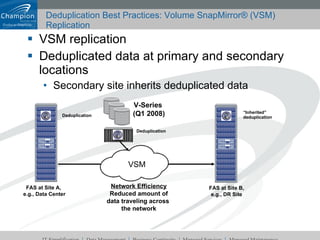
Deduplication Best Practices: Volume SnapMirror® (VSM) Replication VSM replication Deduplicated data at primary and secondary locations Secondary site inherits deduplicated data FAS at Site A,  e.g., Data Center Network Efficiency Reduced amount of data traveling across  the network FAS at Site B, e.g., DR Site VSM Deduplication  V-Series  (Q1 2008) Deduplication  “ Inherited” deduplication
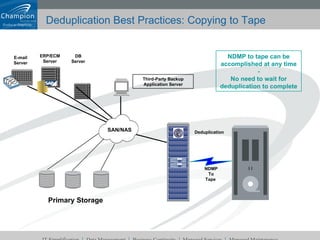
Deduplication Best Practices: Copying to Tape Third-Party Backup Application Server DB Server Deduplication  SAN/NAS NDMP To Tape  NDMP to tape can be accomplished at any time - No need to wait for deduplication to complete Primary Storage ERP/ECM Server E-mail Server
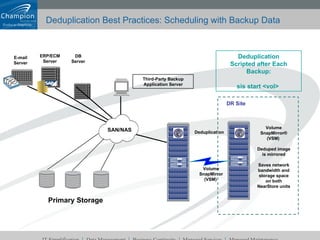
Deduplication Best Practices: Scheduling with Backup Data Third-Party Backup Application Server DB Server Deduplication  SAN/NAS Volume SnapMirror (VSM)  Volume SnapMirror® (VSM)  Deduped image is mirrored Saves network bandwidth and storage space on both NearStore units DR Site Deduplication Scripted after Each Backup: sis start <vol>  Primary Storage ERP/ECM Server E-mail Server
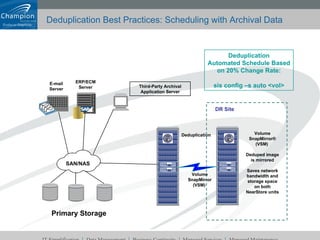
Deduplication Best Practices: Scheduling with Archival Data Deduplication  Volume SnapMirror (VSM)  Volume SnapMirror® (VSM)  Deduped image is mirrored Saves network bandwidth and storage space on both NearStore units DR Site Deduplication Automated Schedule Based on 20% Change Rate: sis config –s auto <vol> Third-Party Archival Application Server SAN/NAS Primary Storage ERP/ECM Server E-mail Server
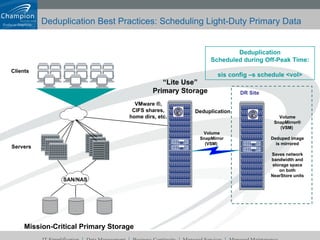
Deduplication Best Practices: Scheduling Light-Duty Primary Data Mission-Critical Primary Storage “ Lite Use” Primary Storage Servers Clients Deduplication VMware ®, CIFS shares, home dirs, etc. Volume SnapMirror (VSM)  Volume SnapMirror® (VSM)  Deduped image is mirrored Saves network bandwidth and storage space on both NearStore units DR Site Deduplication Scheduled during Off-Peak Time: sis config –s schedule <vol> SAN/NAS
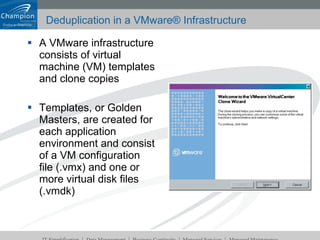
Deduplication in a VMware® Infrastructure A VMware infrastructure consists of virtual machine (VM) templates and clone copies Templates, or Golden Masters, are created for each application environment and consist of a VM configuration file (.vmx) and one or more virtual disk files (.vmdk)
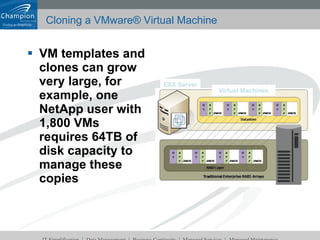
Cloning a VMware® Virtual Machine VM templates and clones can grow very large, for example, one NetApp user with 1,800 VMs requires 64TB of disk capacity to manage these copies Virtual Machines ESX Server
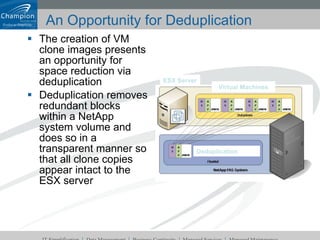
An Opportunity for Deduplication The creation of VM clone images presents an opportunity for space reduction via deduplication Deduplication removes redundant blocks within a NetApp system volume and does so in a transparent manner so that all clone copies appear intact to the ESX server Virtual Machines ESX Server Deduplication
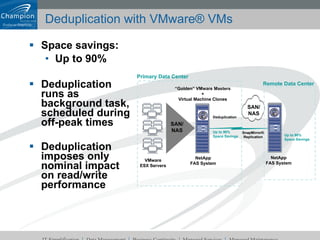
Deduplication with VMware® VMs Space savings:  Up to 90% Deduplication runs as background task, scheduled during off-peak times Deduplication imposes only nominal impact on read/write performance Deduplication Up to 90% Space Savings Remote Data Center VMware ESX Servers SAN/ NAS Primary Data Center “ Golden” VMware Masters + Virtual Machine Clones NetApp FAS System SnapMirror® Replication SAN/ NAS Up to 90% Space Savings NetApp FAS System
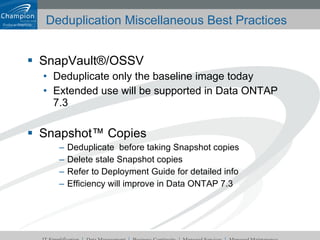
Deduplication Miscellaneous Best Practices SnapVault®/OSSV Deduplicate only the baseline image today Extended use will be supported in Data ONTAP 7.3 Snapshot™ Copies Deduplicate  before taking Snapshot copies Delete stale Snapshot copies Refer to Deployment Guide for detailed info Efficiency will improve in Data ONTAP 7.3
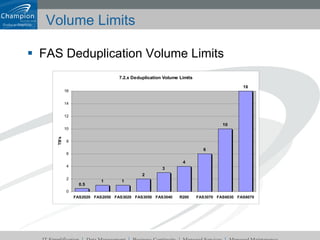
Volume Limits FAS Deduplication Volume Limits
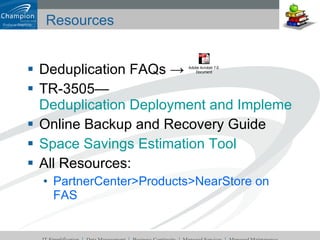
Resources Deduplication FAQs -> TR-3505—  Deduplication Deployment and Implementation Guide Online Backup and Recovery Guide Space Savings Estimation Tool All Resources: PartnerCenter>Products>NearStore on FAS

Champion Fas Deduplication

  • 1.
    Champion & FASDeduplication Overview & Best Practices For More Info please contact Michael Hudak NetApp Sales Specialist [email_address] 800-771-7000 x344
  • 2.
    FAS Deduplication GDRelease April 2007 R200 FAS2000 FAS3000 FAS6000 V-Series (2008) Multi-tier Deduplication Primary data Backup data Archival data NetApp Deduplication System Adoption 2007 Projection = 1,700 Systems Deduplication-Enabled System Storage = 50PB
  • 3.
    Space Reduction Technologies2002 1992 2004 2006 2004 - RAID-DP 2002 – SnapVault/OSSV 1993 – Snapshot Technology 2005 - Thin Provisioning 2006 - VTL Compression 2007 - Deduplication 2008 2001 – SATA NearStore 2006 – SnapVault for NBU 2005 – Virtual Cloning Cost/GB Time “ Additive” Space Reduction Features
  • 4.
    Deduplication Basics: FingerprintCatalog A deduplication catalog consists of a series of “hash values” aka digital fingerprints Once catalogued, hashes can be compared and deduplication candidates identified Hashing Algorithm Data Object Digital Fingerprint Fingerprint Catalog
  • 5.
    Deduplication Basics: ReferencePointers Data objects are written to storage systems using “Reference Pointers” Deduplication introduces two important concepts: Catalog of data objects The ability to reference one object multiple times Non-Deduplicated Reference Pointers Allocated Storage Allocated Storage Allocated Storage Allocated Storage Allocated Storage Deduplication Catalog Deduplicated Reference Pointers Allocated Storage Free Storage Free Storage Free Storage Free Storage
  • 6.
    NetApp Enabling Technology:WAFL Block Sharing FAS deduplication utilizes block sharing within the WAFL file system A single block can be referenced up to 255 times This technology has been in place for 15 years (Snapshots) INODE 1 INODE 2 IND IND IND IND DATA DATA DATA DATA
  • 7.
    FAS Deduplication: CommandsLicense it Turn it on [Deduplicate existing data] Schedule when to deduplicate or run manually Check out what’s happening See the savings! license add <a_sis> sis on <vol> sis start -s <vol> sis config [-s schedule] <vol> sis start <vol> sis status [-l] <vol> df – s <vol>
  • 8.
    FAS Deduplication: “sis status ” Progress Messages and Stages Path State Status Progress /vol/vol5 Enabled Active 40MB (20%) done Path State Status Progress /vol/vol5 Enabled Active 30MB Verified OR /vol/vol5 Enabled Active 10% Merged Filer> sis status Path State Status Progress /vol/vol5 Enabled Active 25 MB Scanned Path State Status Progress /vol/vol5 Enabled Active 25 MB Searched Gathering Sorting Deduplicating Checking
  • 9.
    Deduplication Space SavingsSpace Savings Will Vary Based On Data Types Use NetApp Space Savings Estimation Tool (SSET) For Validation
  • 10.
    Scans volumes anddiscovers duplicate data Simulates the effect of FAS deduplication Does not require Data ONTAP® or A-SIS license Three standalone executables: Linux® Solaris™ Windows® Available from NetApp and Partner SE’s SSET 2.0 Overview
  • 11.
    Using SSET 2.0Using the tool—command example: Find_space –f <fingerprint file> -p <path> Tool will “crawl” through the path specified and create fingerprints for each block of data Fingerprints are compared and matches are reported 2TB maximum; if tool determines that the path is >2TB, will exit with error message Large volumes will take a long time to analyze Tool should not be left installed at customer site once the evaluation is completed
  • 12.
  • 13.
    Deduplication Best Practices:Qtree SnapMirror® (QSM) Replication QSM replication Improves storage efficiency at secondary location No impact on primary storage workload V-Series data can be mirrored to DR site and also deduplicated FAS at Site A, e.g., Data Center FAS at Site B, e.g., DR Site deduplication QSM V-Series
  • 14.
    Deduplication Best Practices:Volume SnapMirror® (VSM) Replication VSM replication Deduplicated data at primary and secondary locations Secondary site inherits deduplicated data FAS at Site A, e.g., Data Center Network Efficiency Reduced amount of data traveling across the network FAS at Site B, e.g., DR Site VSM Deduplication V-Series (Q1 2008) Deduplication “ Inherited” deduplication
  • 15.
    Deduplication Best Practices:Copying to Tape Third-Party Backup Application Server DB Server Deduplication SAN/NAS NDMP To Tape NDMP to tape can be accomplished at any time - No need to wait for deduplication to complete Primary Storage ERP/ECM Server E-mail Server
  • 16.
    Deduplication Best Practices:Scheduling with Backup Data Third-Party Backup Application Server DB Server Deduplication SAN/NAS Volume SnapMirror (VSM) Volume SnapMirror® (VSM) Deduped image is mirrored Saves network bandwidth and storage space on both NearStore units DR Site Deduplication Scripted after Each Backup: sis start <vol> Primary Storage ERP/ECM Server E-mail Server
  • 17.
    Deduplication Best Practices:Scheduling with Archival Data Deduplication Volume SnapMirror (VSM) Volume SnapMirror® (VSM) Deduped image is mirrored Saves network bandwidth and storage space on both NearStore units DR Site Deduplication Automated Schedule Based on 20% Change Rate: sis config –s auto <vol> Third-Party Archival Application Server SAN/NAS Primary Storage ERP/ECM Server E-mail Server
  • 18.
    Deduplication Best Practices:Scheduling Light-Duty Primary Data Mission-Critical Primary Storage “ Lite Use” Primary Storage Servers Clients Deduplication VMware ®, CIFS shares, home dirs, etc. Volume SnapMirror (VSM) Volume SnapMirror® (VSM) Deduped image is mirrored Saves network bandwidth and storage space on both NearStore units DR Site Deduplication Scheduled during Off-Peak Time: sis config –s schedule <vol> SAN/NAS
  • 19.
    Deduplication in aVMware® Infrastructure A VMware infrastructure consists of virtual machine (VM) templates and clone copies Templates, or Golden Masters, are created for each application environment and consist of a VM configuration file (.vmx) and one or more virtual disk files (.vmdk)
  • 20.
    Cloning a VMware®Virtual Machine VM templates and clones can grow very large, for example, one NetApp user with 1,800 VMs requires 64TB of disk capacity to manage these copies Virtual Machines ESX Server
  • 21.
    An Opportunity forDeduplication The creation of VM clone images presents an opportunity for space reduction via deduplication Deduplication removes redundant blocks within a NetApp system volume and does so in a transparent manner so that all clone copies appear intact to the ESX server Virtual Machines ESX Server Deduplication
  • 22.
    Deduplication with VMware®VMs Space savings: Up to 90% Deduplication runs as background task, scheduled during off-peak times Deduplication imposes only nominal impact on read/write performance Deduplication Up to 90% Space Savings Remote Data Center VMware ESX Servers SAN/ NAS Primary Data Center “ Golden” VMware Masters + Virtual Machine Clones NetApp FAS System SnapMirror® Replication SAN/ NAS Up to 90% Space Savings NetApp FAS System
  • 23.
    Deduplication Miscellaneous BestPractices SnapVault®/OSSV Deduplicate only the baseline image today Extended use will be supported in Data ONTAP 7.3 Snapshot™ Copies Deduplicate before taking Snapshot copies Delete stale Snapshot copies Refer to Deployment Guide for detailed info Efficiency will improve in Data ONTAP 7.3
  • 24.
    Volume Limits FASDeduplication Volume Limits
  • 25.
    Resources Deduplication FAQs-> TR-3505— Deduplication Deployment and Implementation Guide Online Backup and Recovery Guide Space Savings Estimation Tool All Resources: PartnerCenter>Products>NearStore on FAS