© 2017, Amazon Web Services, Inc. or its Affiliates. All rights reserved.
Grant McAlister – Senior Principal Engineer - RDS
December 2017
Deep Dive into the RDS
PostgreSQL Universe
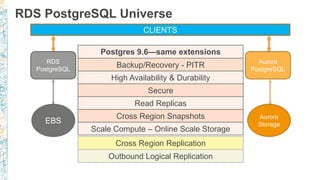
RDS PostgreSQL Universe
CLIENTS
RDS
PostgreSQL
Aurora
PostgreSQL
EBS
Aurora
Storage
Postgres 9.6—same extensions
Backup/Recovery - PITR
High Availability & Durability
Secure
Read Replicas
Cross Region Snapshots
Scale Compute – Online Scale Storage
Cross Region Replication
Outbound Logical Replication
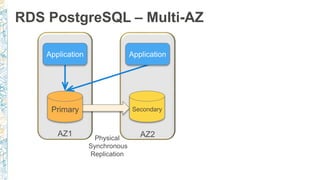
RDS PostgreSQL – Multi-AZ
Physical
Synchronous
Replication
AZ1 AZ2
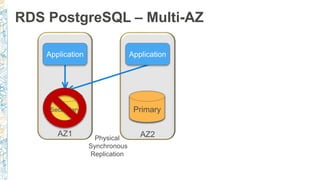
RDS PostgreSQL – Multi-AZ
Physical
Synchronous
Replication
AZ1 AZ2
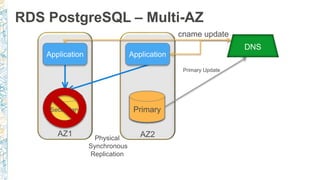
RDS PostgreSQL – Multi-AZ
Physical
Synchronous
Replication
AZ1 AZ2
DNS
cname update
Primary Update
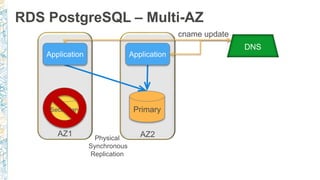
RDS PostgreSQL – Multi-AZ
Physical
Synchronous
Replication
AZ1 AZ2
DNS
cname update
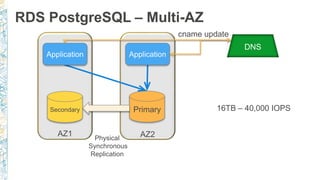
RDS PostgreSQL – Multi-AZ
Physical
Synchronous
Replication
AZ1 AZ2
DNS
cname update
16TB – 40,000 IOPS
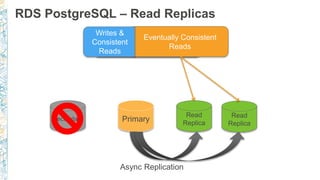
RDS PostgreSQL – Read Replicas
Sync
Replication
Multi-AZ
Async Replication
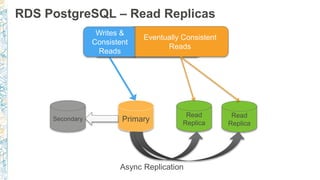
RDS PostgreSQL – Read Replicas
Async Replication
RDS PostgreSQL – Read Replicas
Async Replication
AZ-1 AZ-2 AZ-3
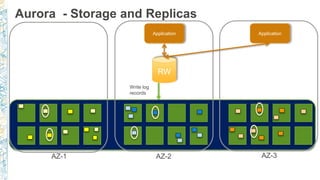
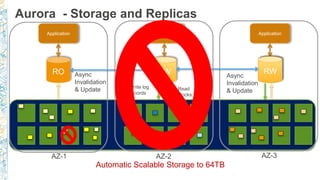
Aurora - Storage and Replicas
RW
Application Application
Write log
records
AZ-1 AZ-2 AZ-3
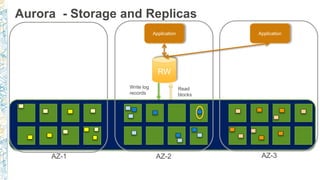
Aurora - Storage and Replicas
RW
Application Application
Write log
records
Read
blocks
AZ-1 AZ-2 AZ-3
Aurora - Storage and Replicas
RW
Application Application
Write log
records
Read
blocks
AZ-1 AZ-2 AZ-3
Aurora - Storage and Replicas
RW
Application Application
Write log
records
Read
blocks
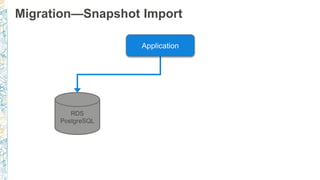
RO
Application
AZ-1 AZ-2 AZ-3
Aurora - Storage and Replicas
RW
Application
RO
Application
Async
Invalidation
& Update
Async
Invalidation
& Update
Write log
records
Read
blocks
RO
Application
AZ-1 AZ-2 AZ-3
Aurora - Storage and Replicas
RW
Application
RO
Application
Async
Invalidation
& Update
Async
Invalidation
& Update
Write log
records
Read
blocks
RO
Application
AZ-1 AZ-2 AZ-3
Aurora - Storage and Replicas
RW
Application
RO
Application
Async
Invalidation
& Update
Async
Invalidation
& Update
Write log
records
Read
blocks
RW
Automatic Scalable Storage to 64TB
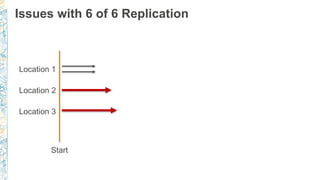
Issues with 6 of 6 Replication
Location 1
Location 2
Location 3
Start
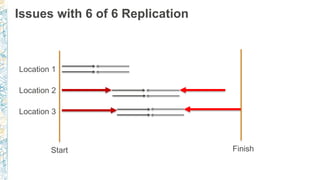
Issues with 6 of 6 Replication
Location 1
Location 2
Location 3
Start Finish
6
10
21
31
7
12
28
123
0
20
40
60
80
100
120
140
50 90 99.9 99.99
Latency(ms)
Percentile
High Concurrency Sync Write Test
2 Node (4 copy) 3 Node (6 Copy)
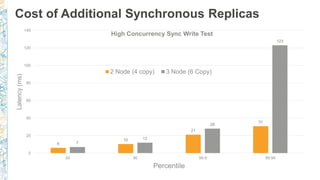
Cost of Additional Synchronous Replicas
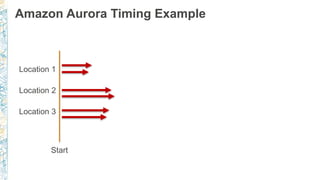
Amazon Aurora Timing Example
Location 1
Location 2
Location 3
Start
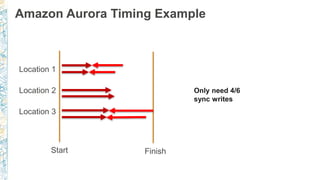
Amazon Aurora Timing Example
Location 1
Location 2
Location 3
Start Finish
Only need 4/6
sync writes
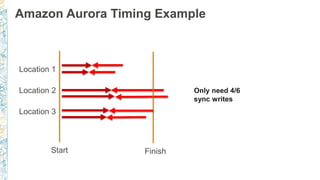
Amazon Aurora Timing Example
Location 1
Location 2
Location 3
Start Finish
Only need 4/6
sync writes
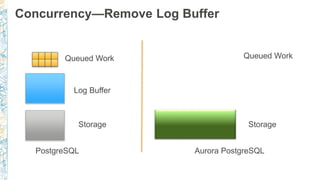
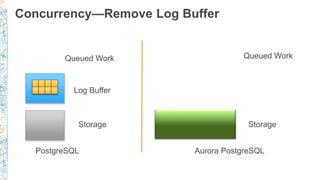
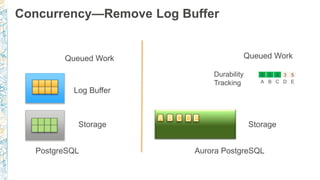
Concurrency—Remove Log Buffer
Queued Work
Log Buffer
PostgreSQL Aurora PostgreSQL
Storage
Queued Work
Storage
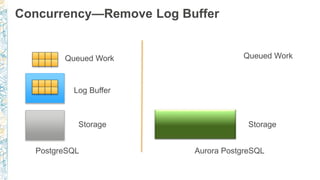
Concurrency—Remove Log Buffer
Queued Work
Log Buffer
PostgreSQL Aurora PostgreSQL
Storage
Queued Work
Storage
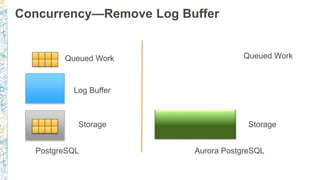
Concurrency—Remove Log Buffer
Queued Work
Log Buffer
PostgreSQL Aurora PostgreSQL
Storage
Queued Work
Storage
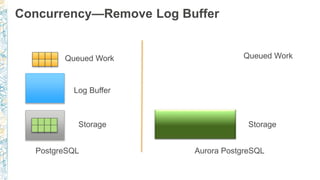
Concurrency—Remove Log Buffer
Queued Work
Log Buffer
PostgreSQL Aurora PostgreSQL
Storage
Queued Work
Storage
Concurrency—Remove Log Buffer
Queued Work
Log Buffer
PostgreSQL Aurora PostgreSQL
Storage
Queued Work
Storage
Concurrency—Remove Log Buffer
Queued Work
Log Buffer
PostgreSQL Aurora PostgreSQL
Storage
Queued Work
Storage
Concurrency—Remove Log Buffer
Queued Work
Log Buffer
PostgreSQL Aurora PostgreSQL
Storage
A Queued Work
Storage
B
Concurrency—Remove Log Buffer
Queued Work
Log Buffer
PostgreSQL Aurora PostgreSQL
Storage
A
Queued Work
Storage
B C D E
2 2 1 0 1
A B C D E
Durability
Tracking
Concurrency—Remove Log Buffer
Queued Work
Log Buffer
PostgreSQL Aurora PostgreSQL
Storage
A
Queued Work
Storage
B C D E
4 3 4 2 4
A B C D E
Durability
Tracking
Concurrency—Remove Log Buffer
Queued Work
Log Buffer
PostgreSQL Aurora PostgreSQL
Storage
A
Queued Work
Storage
B C D E
6 5 6 3 5
A B C D E
Durability
Tracking
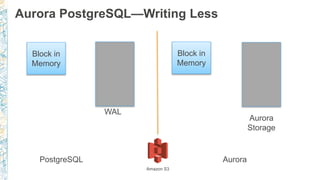
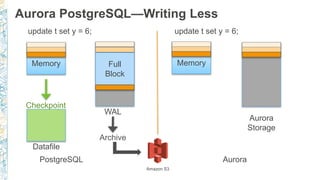
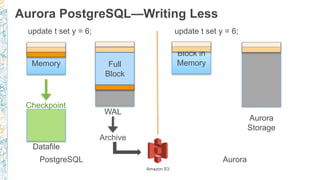
Aurora PostgreSQL—Writing Less
Block in
Memory
PostgreSQL Aurora
WAL
Block in
Memory
Aurora
Storage
Amazon S3
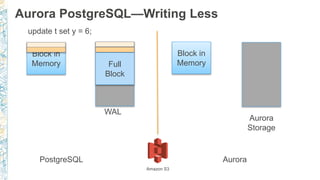
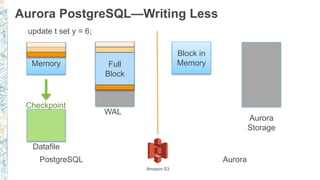
Aurora PostgreSQL—Writing Less
Block in
Memory
PostgreSQL Aurora
update t set y = 6;
Full
Block
WAL
Block in
Memory
Aurora
Storage
Amazon S3
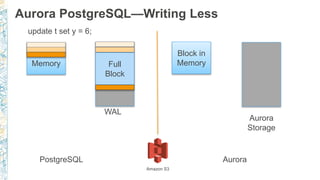
Aurora PostgreSQL—Writing Less
Block in
Memory
PostgreSQL Aurora
update t set y = 6;
Full
Block
WAL
Block in
Memory
Aurora
Storage
Amazon S3
Aurora PostgreSQL—Writing Less
Block in
Memory
PostgreSQL Aurora
update t set y = 6;
Checkpoint
Datafile
Full
Block
WAL
Block in
Memory
Aurora
Storage
Amazon S3
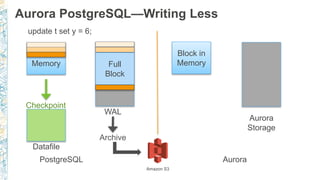
Aurora PostgreSQL—Writing Less
Block in
Memory
PostgreSQL Aurora
update t set y = 6;
Checkpoint
Datafile
Full
Block
WAL
Archive
Block in
Memory
Aurora
Storage
Amazon S3
Aurora PostgreSQL—Writing Less
Block in
Memory
PostgreSQL Aurora
update t set y = 6; update t set y = 6;
Checkpoint
Datafile
Full
Block
WAL
Archive
Block in
Memory
Aurora
Storage
Amazon S3
Aurora PostgreSQL—Writing Less
Block in
Memory
PostgreSQL Aurora
update t set y = 6; update t set y = 6;
Checkpoint
Datafile
Full
Block
WAL
Archive
Block in
Memory
Aurora
Storage
Amazon S3
Aurora PostgreSQL—Writing Less
Block in
Memory
PostgreSQL Aurora
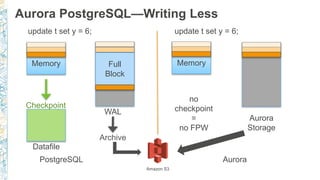
update t set y = 6; update t set y = 6;
Checkpoint
Datafile
Full
Block
WAL
Archive
Block in
Memory
Aurora
Storage
no
checkpoint
=
no FPW
Amazon S3
© 2017, Amazon Web Services, Inc. or its Affiliates. All rights reserved.
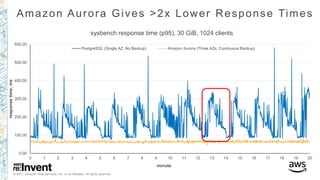
Amazon Aurora Gives >2x Lower Response Times
0.00
100.00
200.00
300.00
400.00
500.00
600.00
0 1 2 3 4 5 6 7 8 9 10 11 12 13 14 15 16 17 18 19 20
responsetime,ms
minute
sysbench response time (p95), 30 GiB, 1024 clients
PostgreSQL (Single AZ, No Backup) Amazon Aurora (Three AZs, Continuous Backup)
© 2017, Amazon Web Services, Inc. or its Affiliates. All rights reserved.
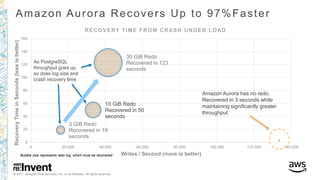
Amazon Aurora Recovers Up to 97%Faster
3 GiB Redo
Recovered in 19
seconds
10 GiB Redo
Recovered in 50
seconds
30 GiB Redo
Recovered in 123
seconds
0
20
40
60
80
100
120
140
160
0 20,000 40,000 60,000 80,000 100,000 120,000 140,000
RecoveryTimeinSeconds(lessisbetter)
Writes / Second (more is better)
RECOVERY TIME FROM CRASH UNDER LOAD
Bubble size represents redo log, which must be recovered
As PostgreSQL
throughput goes up,
so does log size and
crash recovery time
Amazon Aurora has no redo.
Recovered in 3 seconds while
maintaining significantly greater
throughput.
Versions and Features
PostgreSQL Versions
RDS supports multiple major versions
Latest minor versions available
• 9.6.5 – Aurora Postgres 9.6.3
• 9.5.9
• 9.4.14
• 9.3.19
Next major release - PostgreSQL 10
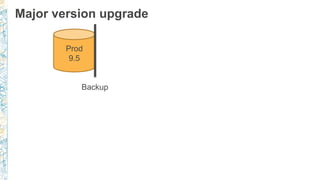
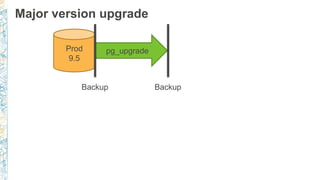
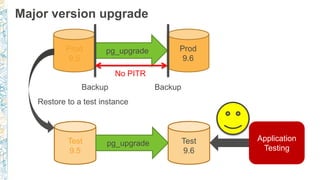
Major version upgrade
Prod
9.5
Backup
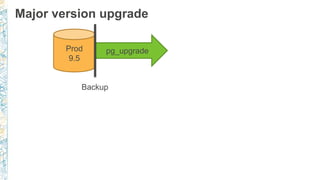
Major version upgrade
Prod
9.5
pg_upgrade
Backup
Major version upgrade
Prod
9.5
pg_upgrade
Backup Backup
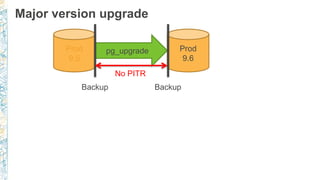
Major version upgrade
Prod
9.5
Prod
9.6
pg_upgrade
Backup Backup
No PITR
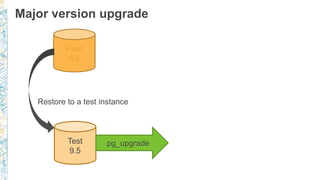
Major version upgrade
Prod
9.5
Test
9.5
pg_upgrade
Restore to a test instance
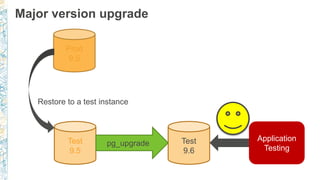
Major version upgrade
Prod
9.5
Test
9.5
Test
9.6
pg_upgrade
Restore to a test instance
Application
Testing
Major version upgrade
Prod
9.5
Prod
9.6
pg_upgrade
Backup Backup
No PITR
Test
9.5
Test
9.6
pg_upgrade
Restore to a test instance
Application
Testing
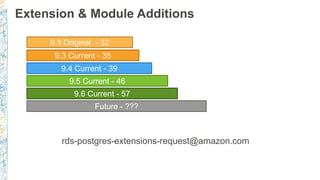
Extension & Module Additions
rds-postgres-extensions-request@amazon.com
9.3 Original - 32
9.3 Current - 35
9.4 Current - 39
9.5 Current - 46
Future - ???
9.6 Current - 57
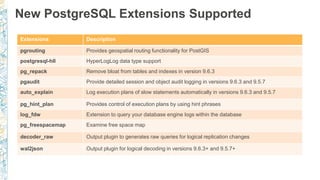
New PostgreSQL Extensions Supported
Extensions Description
pgrouting Provides geospatial routing functionality for PostGIS
postgresql-hll HyperLogLog data type support
pg_repack Remove bloat from tables and indexes in version 9.6.3
pgaudit Provide detailed session and object audit logging in versions 9.6.3 and 9.5.7
auto_explain Log execution plans of slow statements automatically in versions 9.6.3 and 9.5.7
pg_hint_plan Provides control of execution plans by using hint phrases
log_fdw Extension to query your database engine logs within the database
pg_freespacemap Examine free space map
decoder_raw Output plugin to generates raw queries for logical replication changes
wal2json Output plugin for logical decoding in versions 9.6.3+ and 9.5.7+
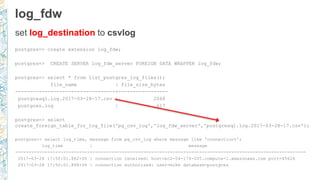
log_fdw
set log_destination to csvlog
postgres=> create extension log_fdw;
postgres=> CREATE SERVER log_fdw_server FOREIGN DATA WRAPPER log_fdw;
postgres=> select * from list_postgres_log_files();
file_name | file_size_bytes
----------------------------------+-----------------
postgresql.log.2017-03-28-17.csv | 2068
postgres.log | 617
postgres=> select
create_foreign_table_for_log_file('pg_csv_log','log_fdw_server','postgresql.log.2017-03-28-17.csv');
postgres=> select log_time, message from pg_csv_log where message like 'connection%';
log_time | message
----------------------------+--------------------------------------------------------------------------------
2017-03-28 17:50:01.862+00 | connection received: host=ec2-54-174-205.compute-1.amazonaws.com port=45626
2017-03-28 17:50:01.868+00 | connection authorized: user=mike database=postgres
log_fdw - continued
can be done without csv
postgres=> select
create_foreign_table_for_log_file('pg_log','log_fdw_server','postgresql.log.2017-03-28-17');
postgres=> select log_entry from pg_log where log_entry like '%connection%';
log_entry
----------------------------------------------------------------------------------------------------------------------------- -----------------------
2017-03-28 17:50:01 UTC:ec2-54-174.compute-1.amazonaws.com(45626):[unknown]@[unknown]:[20434]:LOG: received: host=ec2-54-174-205..amazonaws.com
2017-03-28 17:50:01 UTC:ec2-54-174.compute-1.amazonaws.com(45626):mike@postgres:[20434]:LOG: connection authorized: user=mike database=postgres
2017-03-28 17:57:44 UTC:ec2-54-174.compute-1.amazonaws.com(45626):mike@postgres:[20434]:ERROR: column "connection" does not exist at character 143
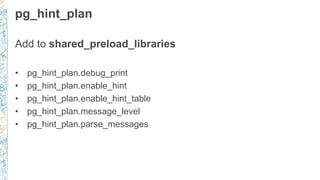
pg_hint_plan
Add to shared_preload_libraries
• pg_hint_plan.debug_print
• pg_hint_plan.enable_hint
• pg_hint_plan.enable_hint_table
• pg_hint_plan.message_level
• pg_hint_plan.parse_messages
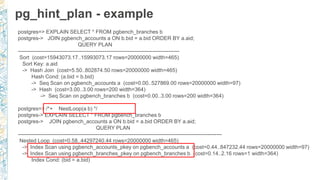
pg_hint_plan - example
postgres=> EXPLAIN SELECT * FROM pgbench_branches b
postgres-> JOIN pgbench_accounts a ON b.bid = a.bid ORDER BY a.aid;
QUERY PLAN
-------------------------------------------------------------------------------------------
Sort (cost=15943073.17..15993073.17 rows=20000000 width=465)
Sort Key: a.aid
-> Hash Join (cost=5.50..802874.50 rows=20000000 width=465)
Hash Cond: (a.bid = b.bid)
-> Seq Scan on pgbench_accounts a (cost=0.00..527869.00 rows=20000000 width=97)
-> Hash (cost=3.00..3.00 rows=200 width=364)
-> Seq Scan on pgbench_branches b (cost=0.00..3.00 rows=200 width=364)
postgres=> /*+ NestLoop(a b) */
postgres-> EXPLAIN SELECT * FROM pgbench_branches b
postgres-> JOIN pgbench_accounts a ON b.bid = a.bid ORDER BY a.aid;
QUERY PLAN
-------------------------------------------------------------------------------------------------------------------
Nested Loop (cost=0.58..44297240.44 rows=20000000 width=465)
-> Index Scan using pgbench_accounts_pkey on pgbench_accounts a (cost=0.44..847232.44 rows=20000000 width=97)
-> Index Scan using pgbench_branches_pkey on pgbench_branches b (cost=0.14..2.16 rows=1 width=364)
Index Cond: (bid = a.bid)
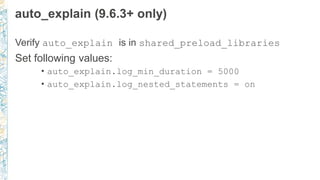
auto_explain (9.6.3+ only)
Verify auto_explain is in shared_preload_libraries
Set following values:
• auto_explain.log_min_duration = 5000
• auto_explain.log_nested_statements = on
Security
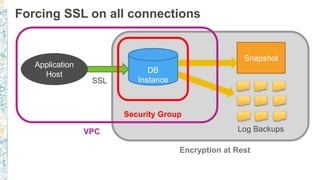
Forcing SSL on all connections
DB
Instance
Snapshot
Application
Host
SSL
Log Backups
Security Group
VPC
Encryption at Rest
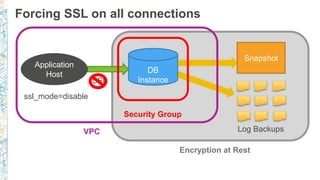
Forcing SSL on all connections
DB
Instance
Snapshot
Application
Host
SSL
Log Backups
Security Group
VPC
Encryption at Rest
ssl_mode=disable
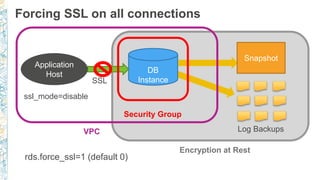
Forcing SSL on all connections
DB
Instance
Snapshot
Application
Host
SSL
Log Backups
Security Group
VPC
Encryption at Rest
ssl_mode=disable
rds.force_ssl=1 (default 0)
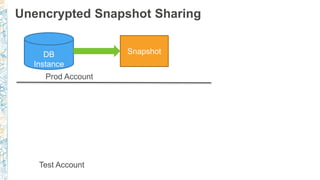
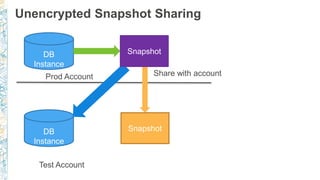
Unencrypted Snapshot Sharing
DB
Instance
Snapshot
Prod Account
Test Account
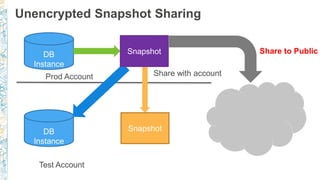
Unencrypted Snapshot Sharing
DB
Instance
Snapshot
Prod Account
Test Account
SnapshotDB
Instance
Snapshot
Share with account
Unencrypted Snapshot Sharing
DB
Instance
Snapshot
Prod Account
Test Account
SnapshotDB
Instance
Snapshot
Share with account
Share to Public
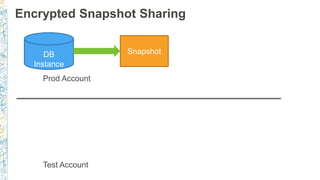
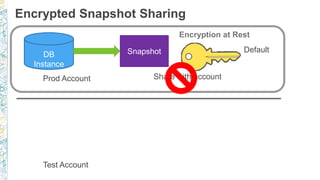
Encrypted Snapshot Sharing
DB
Instance
Snapshot
Prod Account
Test Account
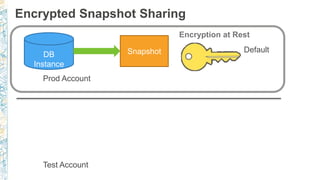
Encrypted Snapshot Sharing
DB
Instance
Snapshot
Prod Account
Test Account
Encryption at Rest
Default
Encrypted Snapshot Sharing
DB
Instance
Snapshot
Prod Account
Test Account
Snapshot
Share with account
Encryption at Rest
Default
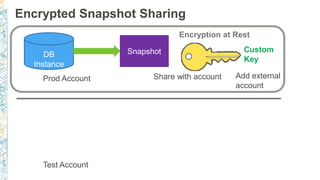
Encrypted Snapshot Sharing
DB
Instance
Snapshot
Prod Account
Test Account
Snapshot
Share with account
Encryption at Rest
Custom
Key
Add external
account
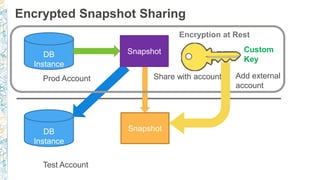
Encrypted Snapshot Sharing
DB
Instance
Snapshot
Prod Account
Test Account
SnapshotDB
Instance
Snapshot
Share with account
Encryption at Rest
Custom
Key
Add external
account
PostgreSQL Audit : pgaudit (9.6.3+)
CREATE ROLE rds_pgaudit;
Add pgaudit to shared_preload_libraries in parameter group
SET pgaudit.role = rds_pgaudit;
CREATE EXTENSION pgaudit;
For tables to be enabled for auditing:
GRANT SELECT ON table1 TO rds_pgaudit;
Database logs will show entry as follows:
2017-06-12 19:09:49 UTC:…:pgadmin@postgres:[11701]:LOG:
AUDIT: OBJECT,1,1,READ,SELECT,TABLE,public.t1,select * from
t1; ...
HIPAA-eligible service & FedRAMP
• RDS PostgreSQL & Aurora PostgreSQL are HIPAA-eligible services
• https://aws.amazon.com/compliance/hipaa-compliance/
• RDS PostgreSQL - FedRAMP in AWS GovCloud (US) region
• https://aws.amazon.com/compliance/fedramp/
Replication
© 2017, Amazon Web Services, Inc. or its Affiliates. All rights reserved.
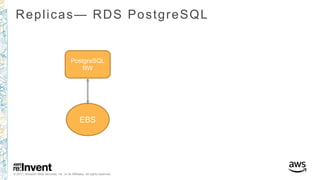
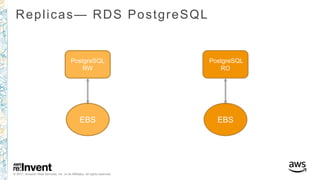
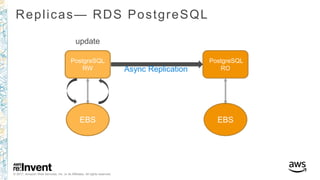
Replicas— RDS PostgreSQL
PostgreSQL
RW
EBS
© 2017, Amazon Web Services, Inc. or its Affiliates. All rights reserved.
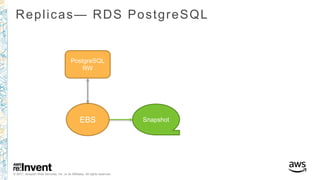
Replicas— RDS PostgreSQL
PostgreSQL
RW
EBS Snapshot
© 2017, Amazon Web Services, Inc. or its Affiliates. All rights reserved.
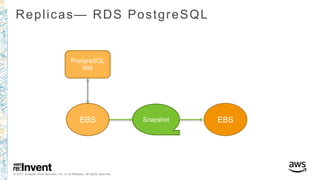
Replicas— RDS PostgreSQL
PostgreSQL
RW
EBS Snapshot EBS
© 2017, Amazon Web Services, Inc. or its Affiliates. All rights reserved.
Replicas— RDS PostgreSQL
PostgreSQL
RW
EBS
PostgreSQL
RO
EBS
© 2017, Amazon Web Services, Inc. or its Affiliates. All rights reserved.
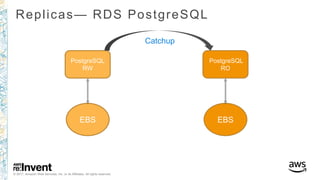
Replicas— RDS PostgreSQL
PostgreSQL
RW
EBS
PostgreSQL
RO
EBS
Catchup
© 2017, Amazon Web Services, Inc. or its Affiliates. All rights reserved.
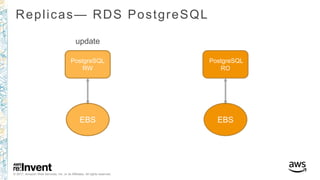
Replicas— RDS PostgreSQL
PostgreSQL
RW
EBS
PostgreSQL
RO
EBS
update
© 2017, Amazon Web Services, Inc. or its Affiliates. All rights reserved.
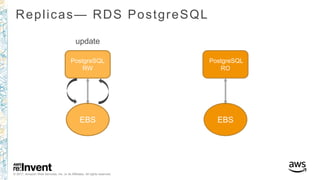
Replicas— RDS PostgreSQL
PostgreSQL
RW
EBS
PostgreSQL
RO
EBS
update
© 2017, Amazon Web Services, Inc. or its Affiliates. All rights reserved.
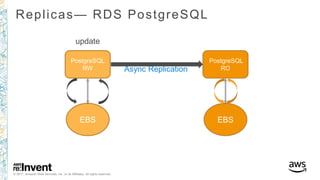
Replicas— RDS PostgreSQL
PostgreSQL
RW
EBS
PostgreSQL
RO
EBS
update
Async Replication
© 2017, Amazon Web Services, Inc. or its Affiliates. All rights reserved.
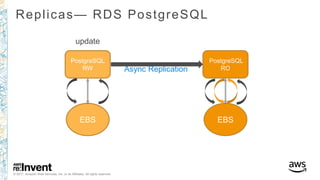
Replicas— RDS PostgreSQL
PostgreSQL
RW
EBS
PostgreSQL
RO
EBS
update
Async Replication
© 2017, Amazon Web Services, Inc. or its Affiliates. All rights reserved.
Replicas— RDS PostgreSQL
PostgreSQL
RW
EBS
PostgreSQL
RO
EBS
update
Async Replication
© 2017, Amazon Web Services, Inc. or its Affiliates. All rights reserved.
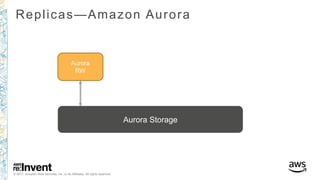
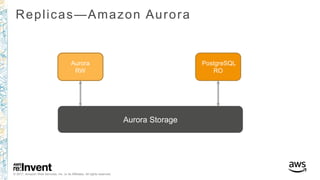
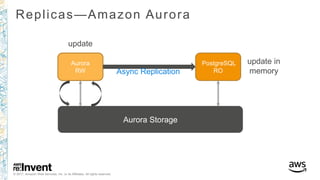
Replicas—Amazon Aurora
Aurora
RW
Aurora Storage
© 2017, Amazon Web Services, Inc. or its Affiliates. All rights reserved.
Replicas—Amazon Aurora
Aurora
RW
PostgreSQL
RO
Aurora Storage
© 2017, Amazon Web Services, Inc. or its Affiliates. All rights reserved.
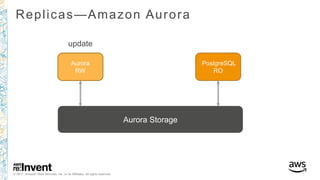
Replicas—Amazon Aurora
Aurora
RW
PostgreSQL
RO
update
Aurora Storage
© 2017, Amazon Web Services, Inc. or its Affiliates. All rights reserved.
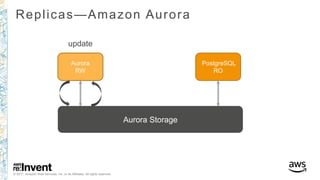
Replicas—Amazon Aurora
Aurora
RW
PostgreSQL
RO
update
Aurora Storage
© 2017, Amazon Web Services, Inc. or its Affiliates. All rights reserved.
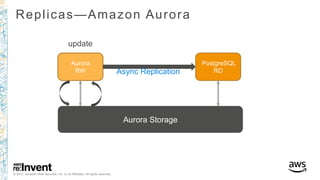
Replicas—Amazon Aurora
Aurora
RW
PostgreSQL
RO
update
Async Replication
Aurora Storage
© 2017, Amazon Web Services, Inc. or its Affiliates. All rights reserved.
Replicas—Amazon Aurora
Aurora
RW
PostgreSQL
RO
update
Async Replication
Aurora Storage
update in
memory
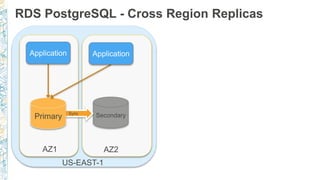
RDS PostgreSQL - Cross Region Replicas
AZ1 AZ2
US-EAST-1
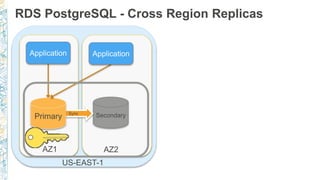
RDS PostgreSQL - Cross Region Replicas
AZ1 AZ2
US-EAST-1
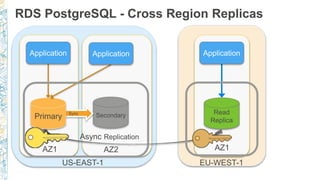
RDS PostgreSQL - Cross Region Replicas
AZ1 AZ2 AZ1
Async Replication
US-EAST-1 EU-WEST-1
Data movement & Migration
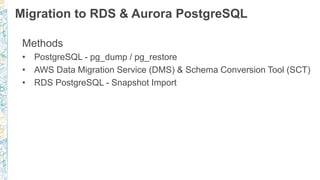
Migration to RDS & Aurora PostgreSQL
Methods
• PostgreSQL - pg_dump / pg_restore
• AWS Data Migration Service (DMS) & Schema Conversion Tool (SCT)
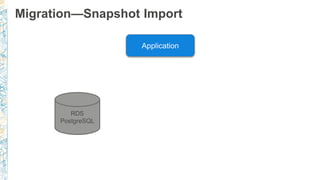
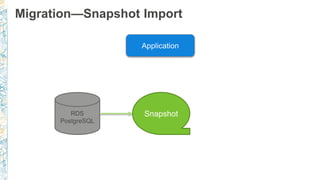
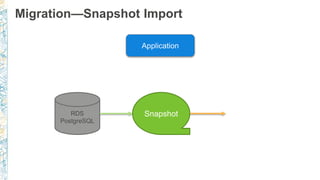
• RDS PostgreSQL - Snapshot Import
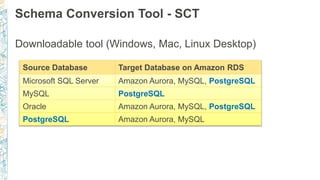
Schema Conversion Tool - SCT
Downloadable tool (Windows, Mac, Linux Desktop)
Source Database Target Database on Amazon RDS
Microsoft SQL Server Amazon Aurora, MySQL, PostgreSQL
MySQL PostgreSQL
Oracle Amazon Aurora, MySQL, PostgreSQL
PostgreSQL Amazon Aurora, MySQL
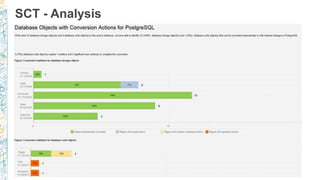
SCT - Analysis
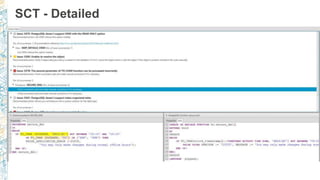
SCT - Detailed
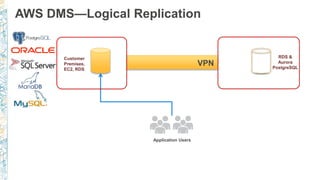
Customer
Premises,
EC2, RDS
Application Users
RDS &
Aurora
PostgreSQL
VPN
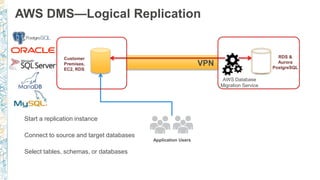
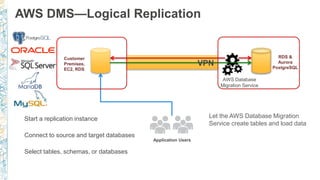
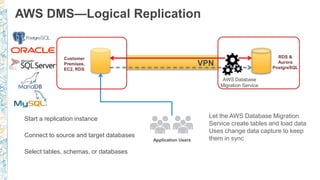
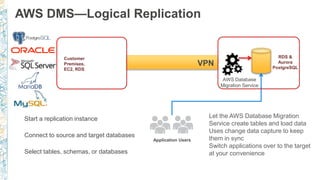
AWS DMS—Logical Replication
Customer
Premises,
EC2, RDS
Application Users
RDS &
Aurora
PostgreSQL
VPN
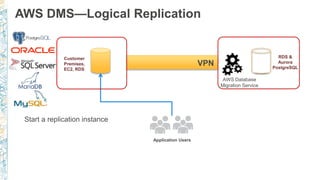
AWS DMS—Logical Replication
Start a replication instance
AWS Database
Migration Service
Customer
Premises,
EC2, RDS
Application Users
RDS &
Aurora
PostgreSQL
VPN
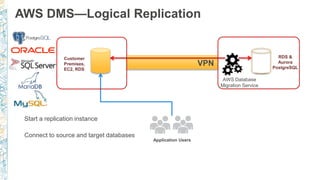
AWS DMS—Logical Replication
Start a replication instance
Connect to source and target databases
AWS Database
Migration Service
Customer
Premises,
EC2, RDS
Application Users
RDS &
Aurora
PostgreSQL
VPN
AWS DMS—Logical Replication
Start a replication instance
Connect to source and target databases
Select tables, schemas, or databases
AWS Database
Migration Service
Customer
Premises,
EC2, RDS
Application Users
RDS &
Aurora
PostgreSQL
VPN
AWS DMS—Logical Replication
Start a replication instance
Connect to source and target databases
Select tables, schemas, or databases
Let the AWS Database Migration
Service create tables and load data
AWS Database
Migration Service
Customer
Premises,
EC2, RDS
Application Users
RDS &
Aurora
PostgreSQL
VPN
AWS DMS—Logical Replication
Start a replication instance
Connect to source and target databases
Select tables, schemas, or databases
Let the AWS Database Migration
Service create tables and load data
Uses change data capture to keep
them in sync
AWS Database
Migration Service
Customer
Premises,
EC2, RDS
Application Users
RDS &
Aurora
PostgreSQL
VPN
AWS DMS—Logical Replication
Start a replication instance
Connect to source and target databases
Select tables, schemas, or databases
Let the AWS Database Migration
Service create tables and load data
Uses change data capture to keep
them in sync
Switch applications over to the target
at your convenience
AWS Database
Migration Service
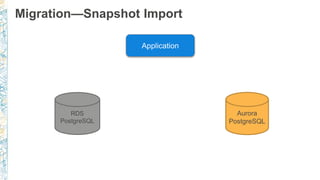
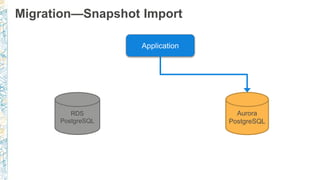
Migration—Snapshot Import
Snapshot
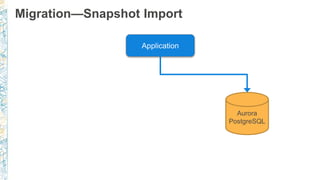
Migration—Snapshot Import
Snapshot
Migration—Snapshot Import
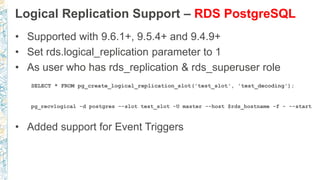
Logical Replication Support – RDS PostgreSQL
• Supported with 9.6.1+, 9.5.4+ and 9.4.9+
• Set rds.logical_replication parameter to 1
• As user who has rds_replication & rds_superuser role
SELECT * FROM pg_create_logical_replication_slot('test_slot', 'test_decoding');
pg_recvlogical -d postgres --slot test_slot -U master --host $rds_hostname -f - --start
• Added support for Event Triggers
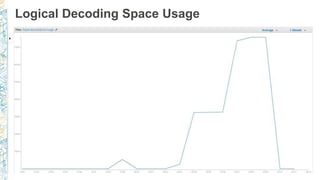
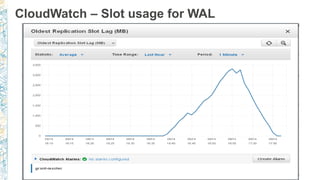
Logical Decoding Space Usage
CloudWatch – Slot usage for WAL
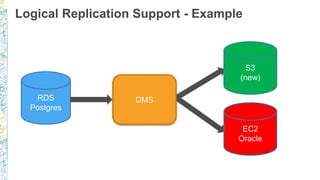
Logical Replication Support - Example
RDS
Postgres
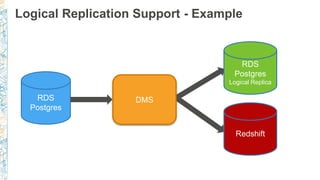
Logical Replication Support - Example
RDS
Postgres
RDS
Postgres
Logical Replica
Redshift
DMS
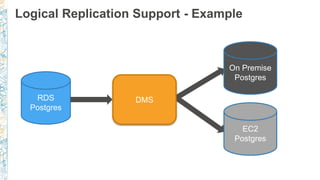
Logical Replication Support - Example
RDS
Postgres
RDS
Postgres
Logical Replica
Redshift
EC2
Postgres
On Premise
Postgres
DMS
Logical Replication Support - Example
RDS
Postgres
RDS
Postgres
Logical Replica
Redshift
EC2
Postgres
On Premise
Postgres
DMS
EC2
Oracle
S3
(new)
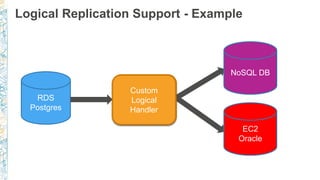
Logical Replication Support - Example
RDS
Postgres
RDS
Postgres
Logical Replica
Redshift
EC2
Postgres
On Premise
Postgres
DMS
EC2
Oracle
Custom
Logical
Handler
S3
(new)
NoSQL DB
Vacuuming
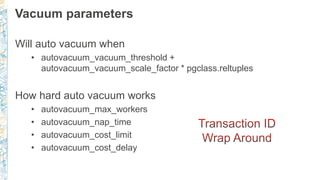
Vacuum parameters
Will auto vacuum when
• autovacuum_vacuum_threshold +
autovacuum_vacuum_scale_factor * pgclass.reltuples
How hard auto vacuum works
• autovacuum_max_workers
• autovacuum_nap_time
• autovacuum_cost_limit
• autovacuum_cost_delay
RDS autovacuum logging (9.4.5+)
log_autovacuum_min_duration = 5000 (i.e. 5 secs)
rds.force_autovacuum_logging_level = LOG
…[14638]:ERROR: canceling autovacuum task
…[14638]:CONTEXT: automatic vacuum of table "postgres.public.pgbench_tellers"
…[14638]:LOG: skipping vacuum of "pgbench_branches" --- lock not available
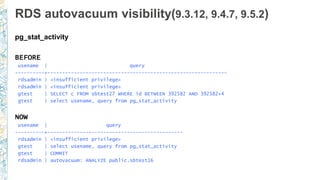
RDS autovacuum visibility(9.3.12, 9.4.7, 9.5.2)
pg_stat_activity
BEFORE
usename | query
----------+-------------------------------------------------------------
rdsadmin | <insufficient privilege>
gtest | SELECT c FROM sbtest27 WHERE id BETWEEN 392582 AND 392582+4
gtest | select usename, query from pg_stat_activity
NOW
usename | query
----------+----------------------------------------------
rdsadmin | <insufficient privilege>
gtest | select usename, query from pg_stat_activity
gtest | COMMIT
rdsadmin | autovacuum: ANALYZE public.sbtest16
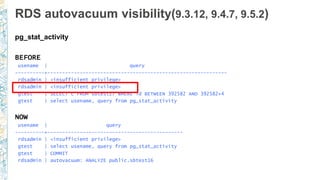
RDS autovacuum visibility(9.3.12, 9.4.7, 9.5.2)
pg_stat_activity
BEFORE
usename | query
----------+-------------------------------------------------------------
rdsadmin | <insufficient privilege>
gtest | SELECT c FROM sbtest27 WHERE id BETWEEN 392582 AND 392582+4
gtest | select usename, query from pg_stat_activity
NOW
usename | query
----------+----------------------------------------------
rdsadmin | <insufficient privilege>
gtest | select usename, query from pg_stat_activity
gtest | COMMIT
rdsadmin | autovacuum: ANALYZE public.sbtest16
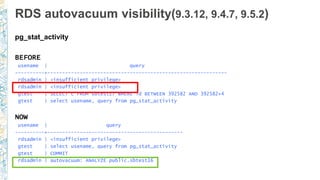
RDS autovacuum visibility(9.3.12, 9.4.7, 9.5.2)
pg_stat_activity
BEFORE
usename | query
----------+-------------------------------------------------------------
rdsadmin | <insufficient privilege>
gtest | SELECT c FROM sbtest27 WHERE id BETWEEN 392582 AND 392582+4
gtest | select usename, query from pg_stat_activity
NOW
usename | query
----------+----------------------------------------------
rdsadmin | <insufficient privilege>
gtest | select usename, query from pg_stat_activity
gtest | COMMIT
rdsadmin | autovacuum: ANALYZE public.sbtest16
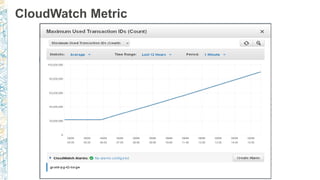
CloudWatch Metric
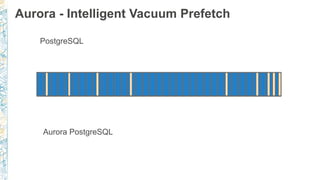
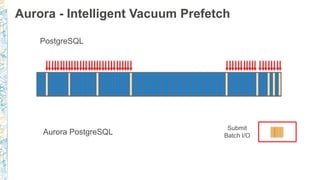
Aurora - Intelligent Vacuum Prefetch
PostgreSQL
Aurora PostgreSQL
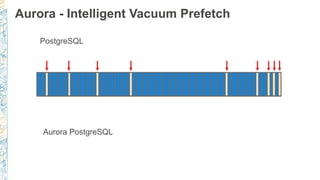
Aurora - Intelligent Vacuum Prefetch
PostgreSQL
Aurora PostgreSQL
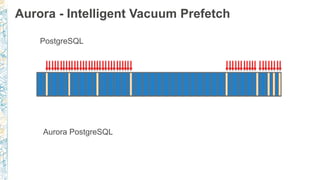
Aurora - Intelligent Vacuum Prefetch
PostgreSQL
Aurora PostgreSQL
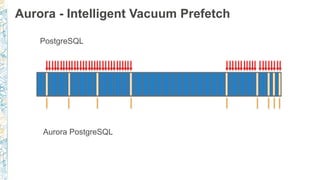
Aurora - Intelligent Vacuum Prefetch
PostgreSQL
Aurora PostgreSQL
Aurora - Intelligent Vacuum Prefetch
PostgreSQL
Aurora PostgreSQL
Submit
Batch I/O
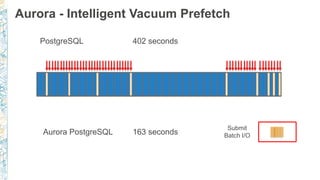
Aurora - Intelligent Vacuum Prefetch
PostgreSQL
Aurora PostgreSQL
Submit
Batch I/O
402 seconds
163 seconds
Performance Monitoring
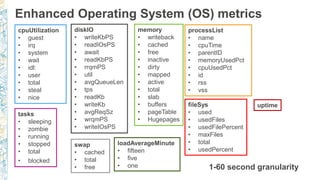
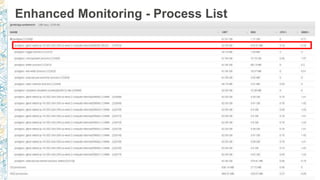
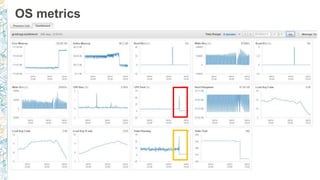
Enhanced Operating System (OS) metrics
1-60 second granularity
cpuUtilization
• guest
• irq
• system
• wait
• idl:
• user
• total
• steal
• nice
diskIO
• writeKbPS
• readIOsPS
• await
• readKbPS
• rrqmPS
• util
• avgQueueLen
• tps
• readKb
• writeKb
• avgReqSz
• wrqmPS
• writeIOsPS
memory
• writeback
• cached
• free
• inactive
• dirty
• mapped
• active
• total
• slab
• buffers
• pageTable
• Hugepages
swap
• cached
• total
• free
tasks
• sleeping
• zombie
• running
• stopped
• total
• blocked
fileSys
• used
• usedFiles
• usedFilePercent
• maxFiles
• total
• usedPercent
loadAverageMinute
• fifteen
• five
• one
uptime
processList
• name
• cpuTime
• parentID
• memoryUsedPct
• cpuUsedPct
• id
• rss
• vss
Enhanced Monitoring - Process List
OS metrics
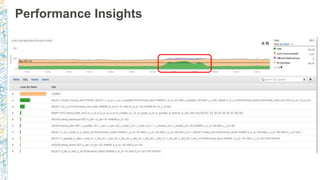
Performance Insights
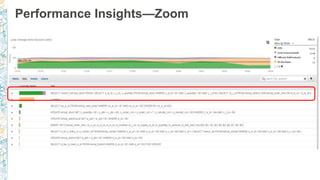
Performance Insights—Zoom
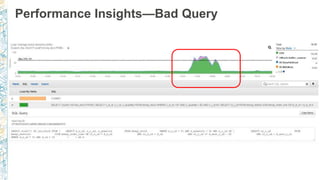
Performance Insights—Bad Query
Thank you!
Questions?

Deep dive into the Rds PostgreSQL Universe Austin 2017

  • 1.
    © 2017, AmazonWeb Services, Inc. or its Affiliates. All rights reserved. Grant McAlister – Senior Principal Engineer - RDS December 2017 Deep Dive into the RDS PostgreSQL Universe
  • 2.
    RDS PostgreSQL Universe CLIENTS RDS PostgreSQL Aurora PostgreSQL EBS Aurora Storage Postgres9.6—same extensions Backup/Recovery - PITR High Availability & Durability Secure Read Replicas Cross Region Snapshots Scale Compute – Online Scale Storage Cross Region Replication Outbound Logical Replication
  • 3.
    RDS PostgreSQL –Multi-AZ Physical Synchronous Replication AZ1 AZ2
  • 4.
    RDS PostgreSQL –Multi-AZ Physical Synchronous Replication AZ1 AZ2
  • 5.
    RDS PostgreSQL –Multi-AZ Physical Synchronous Replication AZ1 AZ2 DNS cname update Primary Update
  • 6.
    RDS PostgreSQL –Multi-AZ Physical Synchronous Replication AZ1 AZ2 DNS cname update
  • 7.
    RDS PostgreSQL –Multi-AZ Physical Synchronous Replication AZ1 AZ2 DNS cname update 16TB – 40,000 IOPS
  • 8.
    RDS PostgreSQL –Read Replicas Sync Replication Multi-AZ Async Replication
  • 9.
    RDS PostgreSQL –Read Replicas Async Replication
  • 10.
    RDS PostgreSQL –Read Replicas Async Replication
  • 11.
    AZ-1 AZ-2 AZ-3 Aurora- Storage and Replicas RW Application Application Write log records
  • 12.
    AZ-1 AZ-2 AZ-3 Aurora- Storage and Replicas RW Application Application Write log records Read blocks
  • 13.
    AZ-1 AZ-2 AZ-3 Aurora- Storage and Replicas RW Application Application Write log records Read blocks
  • 14.
    AZ-1 AZ-2 AZ-3 Aurora- Storage and Replicas RW Application Application Write log records Read blocks
  • 15.
    RO Application AZ-1 AZ-2 AZ-3 Aurora- Storage and Replicas RW Application RO Application Async Invalidation & Update Async Invalidation & Update Write log records Read blocks
  • 16.
    RO Application AZ-1 AZ-2 AZ-3 Aurora- Storage and Replicas RW Application RO Application Async Invalidation & Update Async Invalidation & Update Write log records Read blocks
  • 17.
    RO Application AZ-1 AZ-2 AZ-3 Aurora- Storage and Replicas RW Application RO Application Async Invalidation & Update Async Invalidation & Update Write log records Read blocks RW Automatic Scalable Storage to 64TB
  • 18.
    Issues with 6of 6 Replication Location 1 Location 2 Location 3 Start
  • 19.
    Issues with 6of 6 Replication Location 1 Location 2 Location 3 Start Finish
  • 20.
    6 10 21 31 7 12 28 123 0 20 40 60 80 100 120 140 50 90 99.999.99 Latency(ms) Percentile High Concurrency Sync Write Test 2 Node (4 copy) 3 Node (6 Copy) Cost of Additional Synchronous Replicas
  • 21.
    Amazon Aurora TimingExample Location 1 Location 2 Location 3 Start
  • 22.
    Amazon Aurora TimingExample Location 1 Location 2 Location 3 Start Finish Only need 4/6 sync writes
  • 23.
    Amazon Aurora TimingExample Location 1 Location 2 Location 3 Start Finish Only need 4/6 sync writes
  • 24.
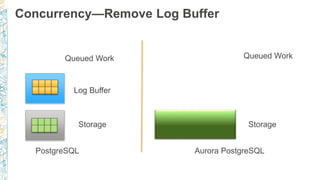
    Concurrency—Remove Log Buffer QueuedWork Log Buffer PostgreSQL Aurora PostgreSQL Storage Queued Work Storage
  • 25.
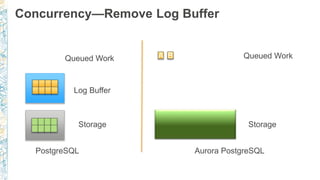
    Concurrency—Remove Log Buffer QueuedWork Log Buffer PostgreSQL Aurora PostgreSQL Storage Queued Work Storage
  • 26.
    Concurrency—Remove Log Buffer QueuedWork Log Buffer PostgreSQL Aurora PostgreSQL Storage Queued Work Storage
  • 27.
    Concurrency—Remove Log Buffer QueuedWork Log Buffer PostgreSQL Aurora PostgreSQL Storage Queued Work Storage
  • 28.
    Concurrency—Remove Log Buffer QueuedWork Log Buffer PostgreSQL Aurora PostgreSQL Storage Queued Work Storage
  • 29.
    Concurrency—Remove Log Buffer QueuedWork Log Buffer PostgreSQL Aurora PostgreSQL Storage Queued Work Storage
  • 30.
    Concurrency—Remove Log Buffer QueuedWork Log Buffer PostgreSQL Aurora PostgreSQL Storage A Queued Work Storage B
  • 31.
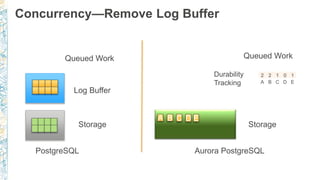
    Concurrency—Remove Log Buffer QueuedWork Log Buffer PostgreSQL Aurora PostgreSQL Storage A Queued Work Storage B C D E 2 2 1 0 1 A B C D E Durability Tracking
  • 32.
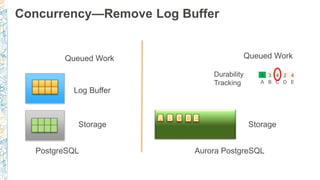
    Concurrency—Remove Log Buffer QueuedWork Log Buffer PostgreSQL Aurora PostgreSQL Storage A Queued Work Storage B C D E 4 3 4 2 4 A B C D E Durability Tracking
  • 33.
    Concurrency—Remove Log Buffer QueuedWork Log Buffer PostgreSQL Aurora PostgreSQL Storage A Queued Work Storage B C D E 6 5 6 3 5 A B C D E Durability Tracking
  • 34.
    Aurora PostgreSQL—Writing Less Blockin Memory PostgreSQL Aurora WAL Block in Memory Aurora Storage Amazon S3
  • 35.
    Aurora PostgreSQL—Writing Less Blockin Memory PostgreSQL Aurora update t set y = 6; Full Block WAL Block in Memory Aurora Storage Amazon S3
  • 36.
    Aurora PostgreSQL—Writing Less Blockin Memory PostgreSQL Aurora update t set y = 6; Full Block WAL Block in Memory Aurora Storage Amazon S3
  • 37.
    Aurora PostgreSQL—Writing Less Blockin Memory PostgreSQL Aurora update t set y = 6; Checkpoint Datafile Full Block WAL Block in Memory Aurora Storage Amazon S3
  • 38.
    Aurora PostgreSQL—Writing Less Blockin Memory PostgreSQL Aurora update t set y = 6; Checkpoint Datafile Full Block WAL Archive Block in Memory Aurora Storage Amazon S3
  • 39.
    Aurora PostgreSQL—Writing Less Blockin Memory PostgreSQL Aurora update t set y = 6; update t set y = 6; Checkpoint Datafile Full Block WAL Archive Block in Memory Aurora Storage Amazon S3
  • 40.
    Aurora PostgreSQL—Writing Less Blockin Memory PostgreSQL Aurora update t set y = 6; update t set y = 6; Checkpoint Datafile Full Block WAL Archive Block in Memory Aurora Storage Amazon S3
  • 41.
    Aurora PostgreSQL—Writing Less Blockin Memory PostgreSQL Aurora update t set y = 6; update t set y = 6; Checkpoint Datafile Full Block WAL Archive Block in Memory Aurora Storage no checkpoint = no FPW Amazon S3
  • 42.
    © 2017, AmazonWeb Services, Inc. or its Affiliates. All rights reserved. Amazon Aurora Gives >2x Lower Response Times 0.00 100.00 200.00 300.00 400.00 500.00 600.00 0 1 2 3 4 5 6 7 8 9 10 11 12 13 14 15 16 17 18 19 20 responsetime,ms minute sysbench response time (p95), 30 GiB, 1024 clients PostgreSQL (Single AZ, No Backup) Amazon Aurora (Three AZs, Continuous Backup)
  • 43.
    © 2017, AmazonWeb Services, Inc. or its Affiliates. All rights reserved. Amazon Aurora Recovers Up to 97%Faster 3 GiB Redo Recovered in 19 seconds 10 GiB Redo Recovered in 50 seconds 30 GiB Redo Recovered in 123 seconds 0 20 40 60 80 100 120 140 160 0 20,000 40,000 60,000 80,000 100,000 120,000 140,000 RecoveryTimeinSeconds(lessisbetter) Writes / Second (more is better) RECOVERY TIME FROM CRASH UNDER LOAD Bubble size represents redo log, which must be recovered As PostgreSQL throughput goes up, so does log size and crash recovery time Amazon Aurora has no redo. Recovered in 3 seconds while maintaining significantly greater throughput.
  • 44.
  • 45.
    PostgreSQL Versions RDS supportsmultiple major versions Latest minor versions available • 9.6.5 – Aurora Postgres 9.6.3 • 9.5.9 • 9.4.14 • 9.3.19 Next major release - PostgreSQL 10
  • 46.
  • 47.
  • 48.
  • 49.
  • 50.
  • 51.
  • 52.
    Major version upgrade Prod 9.5 Prod 9.6 pg_upgrade BackupBackup No PITR Test 9.5 Test 9.6 pg_upgrade Restore to a test instance Application Testing
  • 53.
    Extension & ModuleAdditions rds-postgres-extensions-request@amazon.com 9.3 Original - 32 9.3 Current - 35 9.4 Current - 39 9.5 Current - 46 Future - ??? 9.6 Current - 57
  • 54.
    New PostgreSQL ExtensionsSupported Extensions Description pgrouting Provides geospatial routing functionality for PostGIS postgresql-hll HyperLogLog data type support pg_repack Remove bloat from tables and indexes in version 9.6.3 pgaudit Provide detailed session and object audit logging in versions 9.6.3 and 9.5.7 auto_explain Log execution plans of slow statements automatically in versions 9.6.3 and 9.5.7 pg_hint_plan Provides control of execution plans by using hint phrases log_fdw Extension to query your database engine logs within the database pg_freespacemap Examine free space map decoder_raw Output plugin to generates raw queries for logical replication changes wal2json Output plugin for logical decoding in versions 9.6.3+ and 9.5.7+
  • 55.
    log_fdw set log_destination tocsvlog postgres=> create extension log_fdw; postgres=> CREATE SERVER log_fdw_server FOREIGN DATA WRAPPER log_fdw; postgres=> select * from list_postgres_log_files(); file_name | file_size_bytes ----------------------------------+----------------- postgresql.log.2017-03-28-17.csv | 2068 postgres.log | 617 postgres=> select create_foreign_table_for_log_file('pg_csv_log','log_fdw_server','postgresql.log.2017-03-28-17.csv'); postgres=> select log_time, message from pg_csv_log where message like 'connection%'; log_time | message ----------------------------+-------------------------------------------------------------------------------- 2017-03-28 17:50:01.862+00 | connection received: host=ec2-54-174-205.compute-1.amazonaws.com port=45626 2017-03-28 17:50:01.868+00 | connection authorized: user=mike database=postgres
  • 56.
    log_fdw - continued canbe done without csv postgres=> select create_foreign_table_for_log_file('pg_log','log_fdw_server','postgresql.log.2017-03-28-17'); postgres=> select log_entry from pg_log where log_entry like '%connection%'; log_entry ----------------------------------------------------------------------------------------------------------------------------- ----------------------- 2017-03-28 17:50:01 UTC:ec2-54-174.compute-1.amazonaws.com(45626):[unknown]@[unknown]:[20434]:LOG: received: host=ec2-54-174-205..amazonaws.com 2017-03-28 17:50:01 UTC:ec2-54-174.compute-1.amazonaws.com(45626):mike@postgres:[20434]:LOG: connection authorized: user=mike database=postgres 2017-03-28 17:57:44 UTC:ec2-54-174.compute-1.amazonaws.com(45626):mike@postgres:[20434]:ERROR: column "connection" does not exist at character 143
  • 57.
    pg_hint_plan Add to shared_preload_libraries •pg_hint_plan.debug_print • pg_hint_plan.enable_hint • pg_hint_plan.enable_hint_table • pg_hint_plan.message_level • pg_hint_plan.parse_messages
  • 58.
    pg_hint_plan - example postgres=>EXPLAIN SELECT * FROM pgbench_branches b postgres-> JOIN pgbench_accounts a ON b.bid = a.bid ORDER BY a.aid; QUERY PLAN ------------------------------------------------------------------------------------------- Sort (cost=15943073.17..15993073.17 rows=20000000 width=465) Sort Key: a.aid -> Hash Join (cost=5.50..802874.50 rows=20000000 width=465) Hash Cond: (a.bid = b.bid) -> Seq Scan on pgbench_accounts a (cost=0.00..527869.00 rows=20000000 width=97) -> Hash (cost=3.00..3.00 rows=200 width=364) -> Seq Scan on pgbench_branches b (cost=0.00..3.00 rows=200 width=364) postgres=> /*+ NestLoop(a b) */ postgres-> EXPLAIN SELECT * FROM pgbench_branches b postgres-> JOIN pgbench_accounts a ON b.bid = a.bid ORDER BY a.aid; QUERY PLAN ------------------------------------------------------------------------------------------------------------------- Nested Loop (cost=0.58..44297240.44 rows=20000000 width=465) -> Index Scan using pgbench_accounts_pkey on pgbench_accounts a (cost=0.44..847232.44 rows=20000000 width=97) -> Index Scan using pgbench_branches_pkey on pgbench_branches b (cost=0.14..2.16 rows=1 width=364) Index Cond: (bid = a.bid)
  • 59.
    auto_explain (9.6.3+ only) Verifyauto_explain is in shared_preload_libraries Set following values: • auto_explain.log_min_duration = 5000 • auto_explain.log_nested_statements = on
  • 60.
  • 61.
    Forcing SSL onall connections DB Instance Snapshot Application Host SSL Log Backups Security Group VPC Encryption at Rest
  • 62.
    Forcing SSL onall connections DB Instance Snapshot Application Host SSL Log Backups Security Group VPC Encryption at Rest ssl_mode=disable
  • 63.
    Forcing SSL onall connections DB Instance Snapshot Application Host SSL Log Backups Security Group VPC Encryption at Rest ssl_mode=disable rds.force_ssl=1 (default 0)
  • 64.
  • 65.
    Unencrypted Snapshot Sharing DB Instance Snapshot ProdAccount Test Account SnapshotDB Instance Snapshot Share with account
  • 66.
    Unencrypted Snapshot Sharing DB Instance Snapshot ProdAccount Test Account SnapshotDB Instance Snapshot Share with account Share to Public
  • 67.
  • 68.
    Encrypted Snapshot Sharing DB Instance Snapshot ProdAccount Test Account Encryption at Rest Default
  • 69.
    Encrypted Snapshot Sharing DB Instance Snapshot ProdAccount Test Account Snapshot Share with account Encryption at Rest Default
  • 70.
    Encrypted Snapshot Sharing DB Instance Snapshot ProdAccount Test Account Snapshot Share with account Encryption at Rest Custom Key Add external account
  • 71.
    Encrypted Snapshot Sharing DB Instance Snapshot ProdAccount Test Account SnapshotDB Instance Snapshot Share with account Encryption at Rest Custom Key Add external account
  • 72.
    PostgreSQL Audit :pgaudit (9.6.3+) CREATE ROLE rds_pgaudit; Add pgaudit to shared_preload_libraries in parameter group SET pgaudit.role = rds_pgaudit; CREATE EXTENSION pgaudit; For tables to be enabled for auditing: GRANT SELECT ON table1 TO rds_pgaudit; Database logs will show entry as follows: 2017-06-12 19:09:49 UTC:…:pgadmin@postgres:[11701]:LOG: AUDIT: OBJECT,1,1,READ,SELECT,TABLE,public.t1,select * from t1; ...
  • 73.
    HIPAA-eligible service &FedRAMP • RDS PostgreSQL & Aurora PostgreSQL are HIPAA-eligible services • https://aws.amazon.com/compliance/hipaa-compliance/ • RDS PostgreSQL - FedRAMP in AWS GovCloud (US) region • https://aws.amazon.com/compliance/fedramp/
  • 74.
  • 75.
    © 2017, AmazonWeb Services, Inc. or its Affiliates. All rights reserved. Replicas— RDS PostgreSQL PostgreSQL RW EBS
  • 76.
    © 2017, AmazonWeb Services, Inc. or its Affiliates. All rights reserved. Replicas— RDS PostgreSQL PostgreSQL RW EBS Snapshot
  • 77.
    © 2017, AmazonWeb Services, Inc. or its Affiliates. All rights reserved. Replicas— RDS PostgreSQL PostgreSQL RW EBS Snapshot EBS
  • 78.
    © 2017, AmazonWeb Services, Inc. or its Affiliates. All rights reserved. Replicas— RDS PostgreSQL PostgreSQL RW EBS PostgreSQL RO EBS
  • 79.
    © 2017, AmazonWeb Services, Inc. or its Affiliates. All rights reserved. Replicas— RDS PostgreSQL PostgreSQL RW EBS PostgreSQL RO EBS Catchup
  • 80.
    © 2017, AmazonWeb Services, Inc. or its Affiliates. All rights reserved. Replicas— RDS PostgreSQL PostgreSQL RW EBS PostgreSQL RO EBS update
  • 81.
    © 2017, AmazonWeb Services, Inc. or its Affiliates. All rights reserved. Replicas— RDS PostgreSQL PostgreSQL RW EBS PostgreSQL RO EBS update
  • 82.
    © 2017, AmazonWeb Services, Inc. or its Affiliates. All rights reserved. Replicas— RDS PostgreSQL PostgreSQL RW EBS PostgreSQL RO EBS update Async Replication
  • 83.
    © 2017, AmazonWeb Services, Inc. or its Affiliates. All rights reserved. Replicas— RDS PostgreSQL PostgreSQL RW EBS PostgreSQL RO EBS update Async Replication
  • 84.
    © 2017, AmazonWeb Services, Inc. or its Affiliates. All rights reserved. Replicas— RDS PostgreSQL PostgreSQL RW EBS PostgreSQL RO EBS update Async Replication
  • 85.
    © 2017, AmazonWeb Services, Inc. or its Affiliates. All rights reserved. Replicas—Amazon Aurora Aurora RW Aurora Storage
  • 86.
    © 2017, AmazonWeb Services, Inc. or its Affiliates. All rights reserved. Replicas—Amazon Aurora Aurora RW PostgreSQL RO Aurora Storage
  • 87.
    © 2017, AmazonWeb Services, Inc. or its Affiliates. All rights reserved. Replicas—Amazon Aurora Aurora RW PostgreSQL RO update Aurora Storage
  • 88.
    © 2017, AmazonWeb Services, Inc. or its Affiliates. All rights reserved. Replicas—Amazon Aurora Aurora RW PostgreSQL RO update Aurora Storage
  • 89.
    © 2017, AmazonWeb Services, Inc. or its Affiliates. All rights reserved. Replicas—Amazon Aurora Aurora RW PostgreSQL RO update Async Replication Aurora Storage
  • 90.
    © 2017, AmazonWeb Services, Inc. or its Affiliates. All rights reserved. Replicas—Amazon Aurora Aurora RW PostgreSQL RO update Async Replication Aurora Storage update in memory
  • 91.
    RDS PostgreSQL -Cross Region Replicas AZ1 AZ2 US-EAST-1
  • 92.
    RDS PostgreSQL -Cross Region Replicas AZ1 AZ2 US-EAST-1
  • 93.
    RDS PostgreSQL -Cross Region Replicas AZ1 AZ2 AZ1 Async Replication US-EAST-1 EU-WEST-1
  • 94.
    Data movement &Migration
  • 95.
    Migration to RDS& Aurora PostgreSQL Methods • PostgreSQL - pg_dump / pg_restore • AWS Data Migration Service (DMS) & Schema Conversion Tool (SCT) • RDS PostgreSQL - Snapshot Import
  • 96.
    Schema Conversion Tool- SCT Downloadable tool (Windows, Mac, Linux Desktop) Source Database Target Database on Amazon RDS Microsoft SQL Server Amazon Aurora, MySQL, PostgreSQL MySQL PostgreSQL Oracle Amazon Aurora, MySQL, PostgreSQL PostgreSQL Amazon Aurora, MySQL
  • 97.
  • 98.
  • 99.
    Customer Premises, EC2, RDS Application Users RDS& Aurora PostgreSQL VPN AWS DMS—Logical Replication
  • 100.
    Customer Premises, EC2, RDS Application Users RDS& Aurora PostgreSQL VPN AWS DMS—Logical Replication Start a replication instance AWS Database Migration Service
  • 101.
    Customer Premises, EC2, RDS Application Users RDS& Aurora PostgreSQL VPN AWS DMS—Logical Replication Start a replication instance Connect to source and target databases AWS Database Migration Service
  • 102.
    Customer Premises, EC2, RDS Application Users RDS& Aurora PostgreSQL VPN AWS DMS—Logical Replication Start a replication instance Connect to source and target databases Select tables, schemas, or databases AWS Database Migration Service
  • 103.
    Customer Premises, EC2, RDS Application Users RDS& Aurora PostgreSQL VPN AWS DMS—Logical Replication Start a replication instance Connect to source and target databases Select tables, schemas, or databases Let the AWS Database Migration Service create tables and load data AWS Database Migration Service
  • 104.
    Customer Premises, EC2, RDS Application Users RDS& Aurora PostgreSQL VPN AWS DMS—Logical Replication Start a replication instance Connect to source and target databases Select tables, schemas, or databases Let the AWS Database Migration Service create tables and load data Uses change data capture to keep them in sync AWS Database Migration Service
  • 105.
    Customer Premises, EC2, RDS Application Users RDS& Aurora PostgreSQL VPN AWS DMS—Logical Replication Start a replication instance Connect to source and target databases Select tables, schemas, or databases Let the AWS Database Migration Service create tables and load data Uses change data capture to keep them in sync Switch applications over to the target at your convenience AWS Database Migration Service
  • 106.
  • 107.
  • 108.
  • 109.
  • 110.
  • 111.
  • 112.
  • 113.
    Logical Replication Support– RDS PostgreSQL • Supported with 9.6.1+, 9.5.4+ and 9.4.9+ • Set rds.logical_replication parameter to 1 • As user who has rds_replication & rds_superuser role SELECT * FROM pg_create_logical_replication_slot('test_slot', 'test_decoding'); pg_recvlogical -d postgres --slot test_slot -U master --host $rds_hostname -f - --start • Added support for Event Triggers
  • 114.
  • 115.
    CloudWatch – Slotusage for WAL
  • 116.
    Logical Replication Support- Example RDS Postgres
  • 117.
    Logical Replication Support- Example RDS Postgres RDS Postgres Logical Replica Redshift DMS
  • 118.
    Logical Replication Support- Example RDS Postgres RDS Postgres Logical Replica Redshift EC2 Postgres On Premise Postgres DMS
  • 119.
    Logical Replication Support- Example RDS Postgres RDS Postgres Logical Replica Redshift EC2 Postgres On Premise Postgres DMS EC2 Oracle S3 (new)
  • 120.
    Logical Replication Support- Example RDS Postgres RDS Postgres Logical Replica Redshift EC2 Postgres On Premise Postgres DMS EC2 Oracle Custom Logical Handler S3 (new) NoSQL DB
  • 121.
  • 122.
    Vacuum parameters Will autovacuum when • autovacuum_vacuum_threshold + autovacuum_vacuum_scale_factor * pgclass.reltuples How hard auto vacuum works • autovacuum_max_workers • autovacuum_nap_time • autovacuum_cost_limit • autovacuum_cost_delay
  • 123.
    RDS autovacuum logging(9.4.5+) log_autovacuum_min_duration = 5000 (i.e. 5 secs) rds.force_autovacuum_logging_level = LOG …[14638]:ERROR: canceling autovacuum task …[14638]:CONTEXT: automatic vacuum of table "postgres.public.pgbench_tellers" …[14638]:LOG: skipping vacuum of "pgbench_branches" --- lock not available
  • 124.
    RDS autovacuum visibility(9.3.12,9.4.7, 9.5.2) pg_stat_activity BEFORE usename | query ----------+------------------------------------------------------------- rdsadmin | <insufficient privilege> rdsadmin | <insufficient privilege> gtest | SELECT c FROM sbtest27 WHERE id BETWEEN 392582 AND 392582+4 gtest | select usename, query from pg_stat_activity NOW usename | query ----------+---------------------------------------------- rdsadmin | <insufficient privilege> gtest | select usename, query from pg_stat_activity gtest | COMMIT rdsadmin | autovacuum: ANALYZE public.sbtest16
  • 125.
    RDS autovacuum visibility(9.3.12,9.4.7, 9.5.2) pg_stat_activity BEFORE usename | query ----------+------------------------------------------------------------- rdsadmin | <insufficient privilege> rdsadmin | <insufficient privilege> gtest | SELECT c FROM sbtest27 WHERE id BETWEEN 392582 AND 392582+4 gtest | select usename, query from pg_stat_activity NOW usename | query ----------+---------------------------------------------- rdsadmin | <insufficient privilege> gtest | select usename, query from pg_stat_activity gtest | COMMIT rdsadmin | autovacuum: ANALYZE public.sbtest16
  • 126.
    RDS autovacuum visibility(9.3.12,9.4.7, 9.5.2) pg_stat_activity BEFORE usename | query ----------+------------------------------------------------------------- rdsadmin | <insufficient privilege> rdsadmin | <insufficient privilege> gtest | SELECT c FROM sbtest27 WHERE id BETWEEN 392582 AND 392582+4 gtest | select usename, query from pg_stat_activity NOW usename | query ----------+---------------------------------------------- rdsadmin | <insufficient privilege> gtest | select usename, query from pg_stat_activity gtest | COMMIT rdsadmin | autovacuum: ANALYZE public.sbtest16
  • 127.
  • 128.
    Aurora - IntelligentVacuum Prefetch PostgreSQL Aurora PostgreSQL
  • 129.
    Aurora - IntelligentVacuum Prefetch PostgreSQL Aurora PostgreSQL
  • 130.
    Aurora - IntelligentVacuum Prefetch PostgreSQL Aurora PostgreSQL
  • 131.
    Aurora - IntelligentVacuum Prefetch PostgreSQL Aurora PostgreSQL
  • 132.
    Aurora - IntelligentVacuum Prefetch PostgreSQL Aurora PostgreSQL Submit Batch I/O
  • 133.
    Aurora - IntelligentVacuum Prefetch PostgreSQL Aurora PostgreSQL Submit Batch I/O 402 seconds 163 seconds
  • 134.
  • 135.
    Enhanced Operating System(OS) metrics 1-60 second granularity cpuUtilization • guest • irq • system • wait • idl: • user • total • steal • nice diskIO • writeKbPS • readIOsPS • await • readKbPS • rrqmPS • util • avgQueueLen • tps • readKb • writeKb • avgReqSz • wrqmPS • writeIOsPS memory • writeback • cached • free • inactive • dirty • mapped • active • total • slab • buffers • pageTable • Hugepages swap • cached • total • free tasks • sleeping • zombie • running • stopped • total • blocked fileSys • used • usedFiles • usedFilePercent • maxFiles • total • usedPercent loadAverageMinute • fifteen • five • one uptime processList • name • cpuTime • parentID • memoryUsedPct • cpuUsedPct • id • rss • vss
  • 136.
  • 137.
  • 138.
  • 139.
  • 140.
  • 141.

Editor's Notes

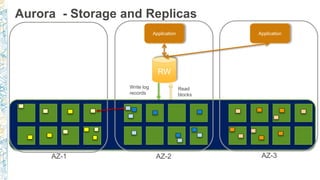
  • #12 Data is replicated 6 times across 3 Availability Zones Continuous backup to Amazon S3 Continuous monitoring of nodes and disks for repair 10GB segments as unit of repair or hotspot rebalance Storage volume automatically grows up to 64 TB
  • #13 Data is replicated 6 times across 3 Availability Zones Continuous backup to Amazon S3 Continuous monitoring of nodes and disks for repair 10GB segments as unit of repair or hotspot rebalance Storage volume automatically grows up to 64 TB
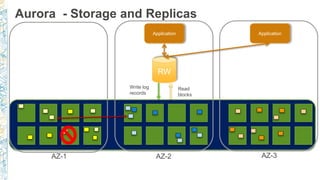
  • #14 Data is replicated 6 times across 3 Availability Zones Continuous backup to Amazon S3 Continuous monitoring of nodes and disks for repair 10GB segments as unit of repair or hotspot rebalance Storage volume automatically grows up to 64 TB
  • #15 Data is replicated 6 times across 3 Availability Zones Continuous backup to Amazon S3 Continuous monitoring of nodes and disks for repair 10GB segments as unit of repair or hotspot rebalance Storage volume automatically grows up to 64 TB
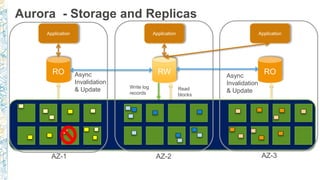
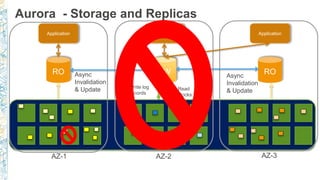
  • #16 Data is replicated 6 times across 3 Availability Zones Continuous backup to Amazon S3 Continuous monitoring of nodes and disks for repair 10GB segments as unit of repair or hotspot rebalance Storage volume automatically grows up to 64 TB
  • #17 Data is replicated 6 times across 3 Availability Zones Continuous backup to Amazon S3 Continuous monitoring of nodes and disks for repair 10GB segments as unit of repair or hotspot rebalance Storage volume automatically grows up to 64 TB
  • #18 Data is replicated 6 times across 3 Availability Zones Continuous backup to Amazon S3 Continuous monitoring of nodes and disks for repair 10GB segments as unit of repair or hotspot rebalance Storage volume automatically grows up to 64 TB
  • #25 Quorum system for read/write; latency tolerant Quorum membership changes do not stall writes
  • #26 Quorum system for read/write; latency tolerant Quorum membership changes do not stall writes
  • #27 Quorum system for read/write; latency tolerant Quorum membership changes do not stall writes
  • #28 Quorum system for read/write; latency tolerant Quorum membership changes do not stall writes
  • #29 Quorum system for read/write; latency tolerant Quorum membership changes do not stall writes
  • #30 Quorum system for read/write; latency tolerant Quorum membership changes do not stall writes
  • #31 Quorum system for read/write; latency tolerant Quorum membership changes do not stall writes
  • #32 Quorum system for read/write; latency tolerant Quorum membership changes do not stall writes
  • #33 Quorum system for read/write; latency tolerant Quorum membership changes do not stall writes
  • #34 Quorum system for read/write; latency tolerant Quorum membership changes do not stall writes
  • #43 PostgreSQL: approx. 95 percentile: 183.13ms. STDEV for 20 minute sample, 72.44, Variance 5247 Amazon Aurora: approx. 95 percentile: 64.48ms, STDEV for 20 minute sample, 4.60, Variance 21 Variance reduced by 99.6% SYSBENCH configured with 250 tables and 450000 rows per table. 1024 clients running from r4.8xlarge in same AZ. PostgreSQL EBS is configured with an EXT4 file system on a logical volume (LVM2) striped across three (3) 1000 GiB, 20000 IOPS io1 volumes (60k total IOPS)
  • #44 Y-axis: Recovery time in seconds (less is better) X-axis: Writes / Second (more is better) Z-axis / bubble size: amount of redo log which must be recovered. Test details: SYSBENCH configured with 250 tables and 450000 rows per table (30 GiB). 1024 clients running from r4.8xlarge in same AZ. PostgreSQL EBS is configured with an EXT4 file system on a logical volume (LVM2) striped across three (3) 1000 GiB, 20000 IOPS io1 volumes (60k total IOPS) Test was conducted by issuing a ‘kill -9’ against the database engine measuring the time from engine start to database availability. Recovery time did not account for failure detection. PostgreSQL redo size is calculated from the start and end points printed in the server log. Configuration note: Aurora “survivable_cache_mode” was set to off. Enabling “survivable_cache_mode” in version 9.6.3.1.0.7 resulted in 19 second recovery time. This will be fixed in an upcoming release.
  • #46 Aurora PostgreSQL supports 9.6 major version
  • #47 Line data type Reg* data types Open prepared transactions
  • #48 Line data type Reg* data types Open prepared transactions
  • #49 Line data type Reg* data types Open prepared transactions
  • #50 Line data type Reg* data types Open prepared transactions
  • #51 Line data type Reg* data types Open prepared transactions
  • #52 Line data type Reg* data types Open prepared transactions
  • #53 Line data type Reg* data types Open prepared transactions
  • #68 Add a Key for the encrypted snapshot and then show that it needs to be shared for this to work. Note that this doesn’t work with default keys.
  • #69 Add a Key for the encrypted snapshot and then show that it needs to be shared for this to work. Note that this doesn’t work with default keys.
  • #70 Add a Key for the encrypted snapshot and then show that it needs to be shared for this to work. Note that this doesn’t work with default keys.
  • #71 Add a Key for the encrypted snapshot and then show that it needs to be shared for this to work. Note that this doesn’t work with default keys.
  • #72 Add a Key for the encrypted snapshot and then show that it needs to be shared for this to work. Note that this doesn’t work with default keys.
  • #73 Customers requested pgaudit to meet their internal compliance requirements. We now support pgaudit in RDS PostgreSQL/Aurora PostgreSQL
  • #100 Using the AWS Database Migration Service to migrate data to AWS is simple. (CLICK) Start by spinning up a DMS instance in your AWS environment (CLICK) Next, from within DMS, connect to both your source and target databases (CLICK) Choose what data you want to migrate. DMS lets you migrate tables, schemas, or whole databases Then sit back and let DMS do the rest. (CLICK) It creates the tables, loads the data, and best of all, keeps them synchronized for as long as you need That replication capability, which keeps the source and target data in sync, allows customers to switch applications (CLICK) over to point to the AWS database at their leisure. DMS eliminates the need for high-stakes extended outages to migrate production data into the cloud. DMS provides a graceful switchover capability.
  • #101 Using the AWS Database Migration Service to migrate data to AWS is simple. (CLICK) Start by spinning up a DMS instance in your AWS environment (CLICK) Next, from within DMS, connect to both your source and target databases (CLICK) Choose what data you want to migrate. DMS lets you migrate tables, schemas, or whole databases Then sit back and let DMS do the rest. (CLICK) It creates the tables, loads the data, and best of all, keeps them synchronized for as long as you need That replication capability, which keeps the source and target data in sync, allows customers to switch applications (CLICK) over to point to the AWS database at their leisure. DMS eliminates the need for high-stakes extended outages to migrate production data into the cloud. DMS provides a graceful switchover capability.
  • #102 Using the AWS Database Migration Service to migrate data to AWS is simple. (CLICK) Start by spinning up a DMS instance in your AWS environment (CLICK) Next, from within DMS, connect to both your source and target databases (CLICK) Choose what data you want to migrate. DMS lets you migrate tables, schemas, or whole databases Then sit back and let DMS do the rest. (CLICK) It creates the tables, loads the data, and best of all, keeps them synchronized for as long as you need That replication capability, which keeps the source and target data in sync, allows customers to switch applications (CLICK) over to point to the AWS database at their leisure. DMS eliminates the need for high-stakes extended outages to migrate production data into the cloud. DMS provides a graceful switchover capability.
  • #103 Using the AWS Database Migration Service to migrate data to AWS is simple. (CLICK) Start by spinning up a DMS instance in your AWS environment (CLICK) Next, from within DMS, connect to both your source and target databases (CLICK) Choose what data you want to migrate. DMS lets you migrate tables, schemas, or whole databases Then sit back and let DMS do the rest. (CLICK) It creates the tables, loads the data, and best of all, keeps them synchronized for as long as you need That replication capability, which keeps the source and target data in sync, allows customers to switch applications (CLICK) over to point to the AWS database at their leisure. DMS eliminates the need for high-stakes extended outages to migrate production data into the cloud. DMS provides a graceful switchover capability.
  • #104 Using the AWS Database Migration Service to migrate data to AWS is simple. (CLICK) Start by spinning up a DMS instance in your AWS environment (CLICK) Next, from within DMS, connect to both your source and target databases (CLICK) Choose what data you want to migrate. DMS lets you migrate tables, schemas, or whole databases Then sit back and let DMS do the rest. (CLICK) It creates the tables, loads the data, and best of all, keeps them synchronized for as long as you need That replication capability, which keeps the source and target data in sync, allows customers to switch applications (CLICK) over to point to the AWS database at their leisure. DMS eliminates the need for high-stakes extended outages to migrate production data into the cloud. DMS provides a graceful switchover capability.
  • #105 Using the AWS Database Migration Service to migrate data to AWS is simple. (CLICK) Start by spinning up a DMS instance in your AWS environment (CLICK) Next, from within DMS, connect to both your source and target databases (CLICK) Choose what data you want to migrate. DMS lets you migrate tables, schemas, or whole databases Then sit back and let DMS do the rest. (CLICK) It creates the tables, loads the data, and best of all, keeps them synchronized for as long as you need That replication capability, which keeps the source and target data in sync, allows customers to switch applications (CLICK) over to point to the AWS database at their leisure. DMS eliminates the need for high-stakes extended outages to migrate production data into the cloud. DMS provides a graceful switchover capability.
  • #106 Using the AWS Database Migration Service to migrate data to AWS is simple. (CLICK) Start by spinning up a DMS instance in your AWS environment (CLICK) Next, from within DMS, connect to both your source and target databases (CLICK) Choose what data you want to migrate. DMS lets you migrate tables, schemas, or whole databases Then sit back and let DMS do the rest. (CLICK) It creates the tables, loads the data, and best of all, keeps them synchronized for as long as you need That replication capability, which keeps the source and target data in sync, allows customers to switch applications (CLICK) over to point to the AWS database at their leisure. DMS eliminates the need for high-stakes extended outages to migrate production data into the cloud. DMS provides a graceful switchover capability.
  • #114 Who would like to see more decoders supported
  • #142 Ask about preview environment and other decoders