Drew Huynh- Akamai Telecom Bill Maynard – TechCon Services
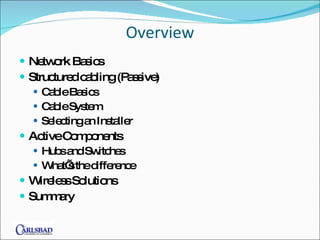
Overview Network Basics Structured cabling (Passive) Cable Basics Cable System Selecting an Installer Active Components Hubs and Switches What’s the difference Wireless Solutions Summary
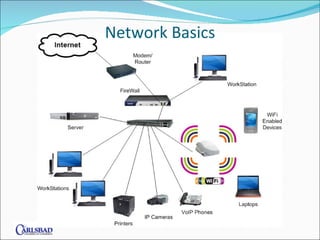
Network Basics
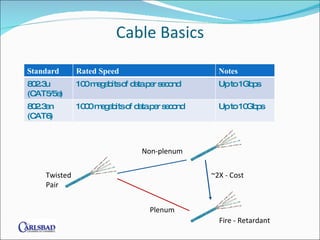
Cable Basics Twisted  Pair Non-plenum Plenum ~2X - Cost Fire - Retardant Standard Rated Speed Notes 802.3u (CAT5/5e) 100 megabits of data per second Up to 1Gbps 802.3an (CAT6) 1000 megabits of data per second Up to 10Gbps
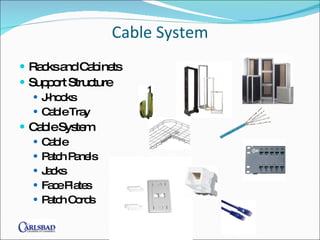
Cable System Racks and Cabinets Support Structure J-hooks Cable Tray Cable System Cable Patch Panels Jacks Face Plates Patch Cords
Selecting an Installer What CA contractors licenses do you have? C-10 License or C7 required, C7 preferred https://www2.cslb.ca.gov/OnlineServices/CheckLicense/LicenseRequest.asp  https://www2.cslb.ca.gov/OnlineServices/CheckLicense/LicenseDetail.asp?LicNum=858920 Are you insured and bonded? How do you test the installed system? What test equipment do you use? Is there a manufacturer warranty with the installation?  How do you train your technicians? Who holds the manufacturer certificates?
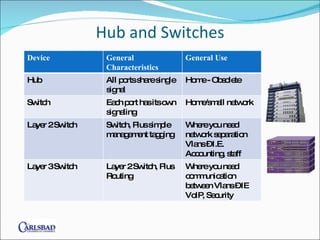
Hub and Switches Device General Characteristics General Use Hub All ports share single signal Home - Obsolete Switch Each port has its own signaling Home/small network Layer 2 Switch Switch, Plus simple management tagging Where you need network separation Vlans – I.E. Accounting, staff Layer 3 Switch Layer 2 Switch, Plus Routing Where you need communication between Vlans – IE VoIP, Security
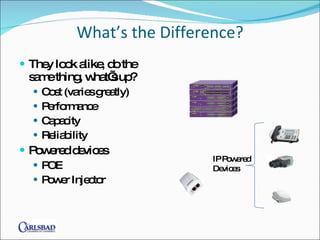
What’s the Difference? They look alike, do the same thing, what’s up? Cost (varies greatly)  Performance Capacity Reliability Powered devices POE Power Injector IP Powered  Devices
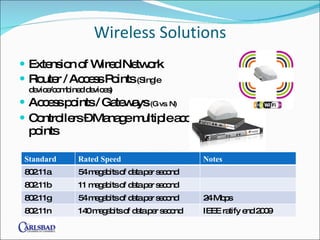
Wireless Solutions Extension of Wired Network Router / Access Points  (Single device/combined devices) Access points / Gateways  (G vs. N) Controllers – Manage multiple access points Standard Rated Speed Notes 802.11a 54 megabits of data per second 802.11b 11 megabits of data per second 802.11g 54 megabits of data per second 24 Mbps 802.11n 140 megabits of data per second IEEE ratify end 2009
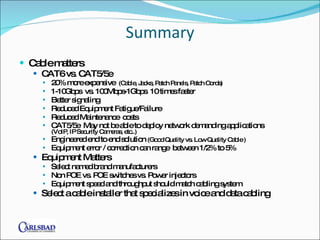
Summary Cable matters CAT6 vs. CAT5/5e 20% more expensive  (Cable, Jacks, Patch Panels, Patch Cords) 1-10Gbps  vs. 100Mbps-1Gbps  10 times faster Better signaling Reduced Equipment Fatigue/Failure Reduced Maintenance  costs CAT5/5e  May not be able to deploy network demanding applications  (VoIP, IP Security Cameras, etc..) Engineered end to end solution  (Good Quality vs. Low Quality Cable ) Equipment error / correction can range  between 1/2% to 5% Equipment Matters Select named brand manufacturers  Non POE vs. POE switches vs. Power injectors Equipment speed and throughput should match cabling system  Select a cable installer that specializes in voice and data cabling
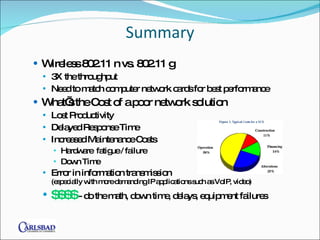
Summary Wireless 802.11 n vs. 802.11 g 3X the throughput Need to match computer network cards for best performance  What’s the Cost of a poor network solution Lost Productivity Delayed Response Time Increased Maintenance Costs Hardware  fatigue / failure Down Time Error in information transmission  (especially with more demanding IP applications such as VoIP, video) $$$$  - do the math, down time, delays, equipment failures
 

Whats behind the wall and why you should care.

  • 1.
    Drew Huynh- AkamaiTelecom Bill Maynard – TechCon Services
  • 2.
    Overview Network BasicsStructured cabling (Passive) Cable Basics Cable System Selecting an Installer Active Components Hubs and Switches What’s the difference Wireless Solutions Summary
  • 3.
  • 4.
    Cable Basics Twisted Pair Non-plenum Plenum ~2X - Cost Fire - Retardant Standard Rated Speed Notes 802.3u (CAT5/5e) 100 megabits of data per second Up to 1Gbps 802.3an (CAT6) 1000 megabits of data per second Up to 10Gbps
  • 5.
    Cable System Racksand Cabinets Support Structure J-hooks Cable Tray Cable System Cable Patch Panels Jacks Face Plates Patch Cords
  • 6.
    Selecting an InstallerWhat CA contractors licenses do you have? C-10 License or C7 required, C7 preferred https://www2.cslb.ca.gov/OnlineServices/CheckLicense/LicenseRequest.asp https://www2.cslb.ca.gov/OnlineServices/CheckLicense/LicenseDetail.asp?LicNum=858920 Are you insured and bonded? How do you test the installed system? What test equipment do you use? Is there a manufacturer warranty with the installation? How do you train your technicians? Who holds the manufacturer certificates?
  • 7.
    Hub and SwitchesDevice General Characteristics General Use Hub All ports share single signal Home - Obsolete Switch Each port has its own signaling Home/small network Layer 2 Switch Switch, Plus simple management tagging Where you need network separation Vlans – I.E. Accounting, staff Layer 3 Switch Layer 2 Switch, Plus Routing Where you need communication between Vlans – IE VoIP, Security
  • 8.
    What’s the Difference?They look alike, do the same thing, what’s up? Cost (varies greatly) Performance Capacity Reliability Powered devices POE Power Injector IP Powered Devices
  • 9.
    Wireless Solutions Extensionof Wired Network Router / Access Points (Single device/combined devices) Access points / Gateways (G vs. N) Controllers – Manage multiple access points Standard Rated Speed Notes 802.11a 54 megabits of data per second 802.11b 11 megabits of data per second 802.11g 54 megabits of data per second 24 Mbps 802.11n 140 megabits of data per second IEEE ratify end 2009
  • 10.
    Summary Cable mattersCAT6 vs. CAT5/5e 20% more expensive (Cable, Jacks, Patch Panels, Patch Cords) 1-10Gbps vs. 100Mbps-1Gbps 10 times faster Better signaling Reduced Equipment Fatigue/Failure Reduced Maintenance costs CAT5/5e May not be able to deploy network demanding applications (VoIP, IP Security Cameras, etc..) Engineered end to end solution (Good Quality vs. Low Quality Cable ) Equipment error / correction can range between 1/2% to 5% Equipment Matters Select named brand manufacturers Non POE vs. POE switches vs. Power injectors Equipment speed and throughput should match cabling system Select a cable installer that specializes in voice and data cabling
  • 11.
    Summary Wireless 802.11n vs. 802.11 g 3X the throughput Need to match computer network cards for best performance What’s the Cost of a poor network solution Lost Productivity Delayed Response Time Increased Maintenance Costs Hardware fatigue / failure Down Time Error in information transmission (especially with more demanding IP applications such as VoIP, video) $$$$ - do the math, down time, delays, equipment failures
  • 12.

Editor's Notes

  • #2 Why should you care what’s behind the wall? Network Infrustrcture 3/17/2009 What's Behind the Wall and Why You Should Care!
  • #3 Structured cabling What's Behind the Wall and Why You Should Care! 3/17/2009
  • #13 3/17/2009 What's Behind the Wall and Why You Should Care!