Topics
*
 Network Topology
 Cables and connectors
 Network Devices
Network Topologies
*
 LANs and WANs - Geographical coverage
 LANs
 A single geographical location, such as office building,
school, etc
 Typically High speed and cheaper.
 WANs
 Spans more than one geographical location often connecting
separated LANs
 Slower
 Costly hardware, routers, dedicated leased lines and
complicated implementation procedures.
Network Topologies
*
 Topology - Physical and logical network layout
 Physical – actual layout of the computer cables and other
network devices
 Logical – the way in which the network appears to the devices
that use it.
 Common topologies:
 Bus, ring, star, mesh and wireless
Bus topology
*
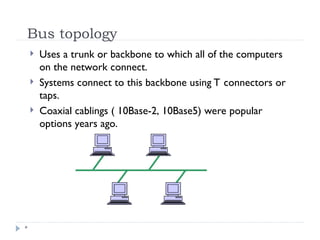
 Uses a trunk or backbone to which all of the computers
on the network connect.
 Systems connect to this backbone using T connectors or
taps.
 Coaxial cablings ( 10Base-2, 10Base5) were popular
options years ago.
Bus Topology
*
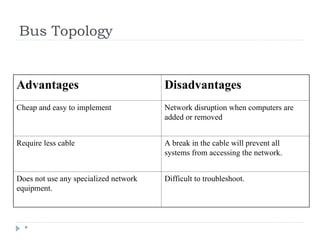
Advantages Disadvantages
Cheap and easy to implement Network disruption when computers are
added or removed
Require less cable A break in the cable will prevent all
systems from accessing the network.
Does not use any specialized network
equipment.
Difficult to troubleshoot.
Ring Topology
*
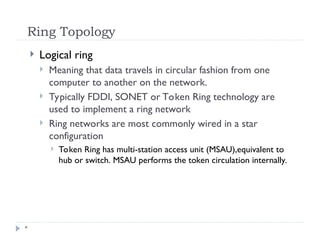
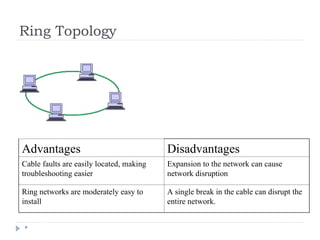
 Logical ring
 Meaning that data travels in circular fashion from one
computer to another on the network.
 Typically FDDI, SONET or Token Ring technology are
used to implement a ring network
 Ring networks are most commonly wired in a star
configuration
 Token Ring has multi-station access unit (MSAU),equivalent to
hub or switch. MSAU performs the token circulation internally.
Ring Topology
*
Advantages Disadvantages
Cable faults are easily located, making
troubleshooting easier
Expansion to the network can cause
network disruption
Ring networks are moderately easy to
install
A single break in the cable can disrupt the
entire network.
Star Topology
*
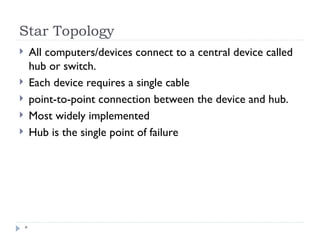
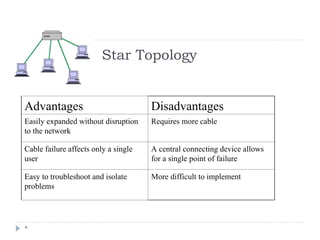
 All computers/devices connect to a central device called
hub or switch.
 Each device requires a single cable
 point-to-point connection between the device and hub.
 Most widely implemented
 Hub is the single point of failure
Star Topology
*
Advantages Disadvantages
Easily expanded without disruption
to the network
Requires more cable
Cable failure affects only a single
user
A central connecting device allows
for a single point of failure
Easy to troubleshoot and isolate
problems
More difficult to implement
Mesh Topology
*
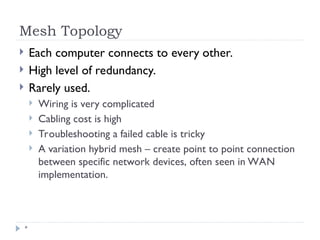
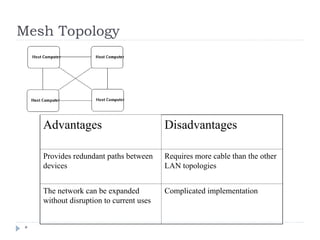
 Each computer connects to every other.
 High level of redundancy.
 Rarely used.
 Wiring is very complicated
 Cabling cost is high
 Troubleshooting a failed cable is tricky
 A variation hybrid mesh – create point to point connection
between specific network devices, often seen in WAN
implementation.
Mesh Topology
*
Advantages Disadvantages
Provides redundant paths between
devices
Requires more cable than the other
LAN topologies
The network can be expanded
without disruption to current uses
Complicated implementation
Wireless networking
*
 Do not require physical cabling
 Particularly useful for remote access for laptop users
 Eliminate cable faults and cable breaks.
 Signal interference and security issue.
Wireless networking
*
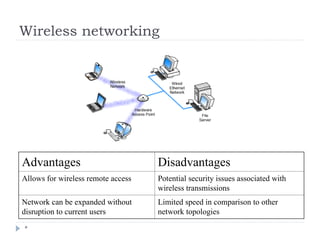
Advantages Disadvantages
Allows for wireless remote access Potential security issues associated with
wireless transmissions
Network can be expanded without
disruption to current users
Limited speed in comparison to other
network topologies
Cabling and Connectors
 General media considerations
 Broadband versus baseband
 Baseband transmissions use digital signaling and Time Division
Multiplexing (TDM)
 Broadband transmissions use analog and Frequency Division
Multiplexing(FDM)
 Dialog modes: Simplex, half duplex and full duplex
Cabling and Connectors
*
 Media interference
 Electromagnetic interference (EMI) and cross talk
 Network media vary in their resistance to the effect of EMC.
 UTP is susceptible and fiber is resistant
 Attenuation
 Resistance :Coaxial cable > UTP, STP > UTP, Fiber > all
 Maximum distance
 Repeaters
 Attenuation-related problems require a network analyzer to detect
 Bandwidth
 Transmission capacity of a media
 Data throughput is measured in bits per second(bps), Mbps, and Gbps
 For today’s application-intensive networks, Old 10Mbps is not enough,
100Mbps is very common and 1000Mbps is used too.
Network Media
 Cable-based media
 Coaxial
 Copper wire to conduct the signals electronically
 Was the choice for LAN for many years.
 Retiring
 Twisted pair
 Copper wire to conduct too
 Most widely used
 Fiber-optic
 transmits the signals as light
 Uses glass or plastic conductor and
 High Cost. Restricted to where segment length and higher speeds
are needed.
 Server room, backbone
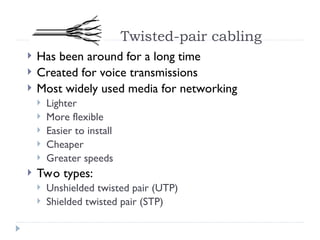
Twisted-pair cabling
 Has been around for a long time
 Created for voice transmissions
 Most widely used media for networking
 Lighter
 More flexible
 Easier to install
 Cheaper
 Greater speeds
 Two types:
 Unshielded twisted pair (UTP)
 Shielded twisted pair (STP)
Twisted-pair cabling
 UTP is more commonplace
 STP
 provides the extra shielding by using an insulating material
wrapped around the wire
 Greater resistance to EMI and attenuation
 More cost
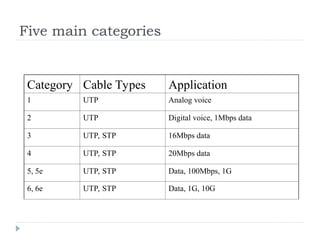
Five main categories
Category Cable Types Application
1 UTP Analog voice
2 UTP Digital voice, 1Mbps data
3 UTP, STP 16Mbps data
4 UTP, STP 20Mbps data
5, 5e UTP, STP Data, 100Mbps, 1G
6, 6e UTP, STP Data, 1G, 10G
RJ-45 connectors
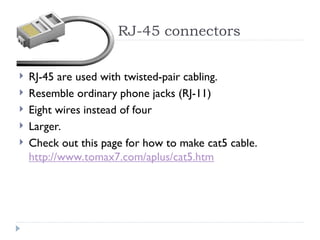
 RJ-45 are used with twisted-pair cabling.
 Resemble ordinary phone jacks (RJ-11)
 Eight wires instead of four
 Larger.
 Check out this page for how to make cat5 cable.
http://www.tomax7.com/aplus/cat5.htm
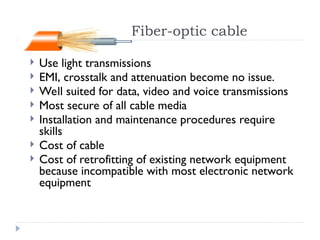
Fiber-optic cable
 Use light transmissions
 EMI, crosstalk and attenuation become no issue.
 Well suited for data, video and voice transmissions
 Most secure of all cable media
 Installation and maintenance procedures require
skills
 Cost of cable
 Cost of retrofitting of existing network equipment
because incompatible with most electronic network
equipment
Fiber-optic cable
 Single mode fiber:
 A single direct bean of light, allowing for greater distances and increased
transfer speeds.
 Multimode fiber:
 Many beams of light travel through the cable
 This strategy weakens the signal, reducing the length and speed the data
signal can travel.
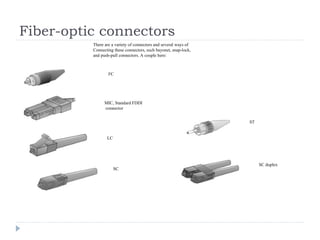
Fiber-optic connectors
MIC, Standard FDDI
connector
FC
LC
There are a variety of connectors and several ways of
Connecting these connectors, such bayonet, snap-lock,
and push-pull connectors. A couple here:
SC duplex
ST
SC
Wireless media
 Three types:
 Radio wave
 Infrared
 Microwave
 Speeds of wireless solutions don’t keep pace with
cable solutions
 Installation and maintenance are far more
complicated and costly.
 Some solutions require line-of-sight, such as infrared
and microwave.
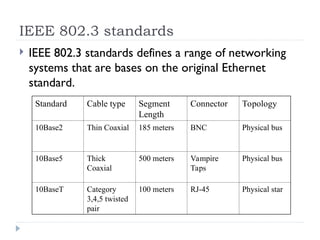
IEEE 802.3 standards
 IEEE 802.3 standards defines a range of networking
systems that are bases on the original Ethernet
standard.
Standard Cable type Segment
Length
Connector Topology
10Base2 Thin Coaxial 185 meters BNC Physical bus
10Base5 Thick
Coaxial
500 meters Vampire
Taps
Physical bus
10BaseT Category
3,4,5 twisted
pair
100 meters RJ-45 Physical star
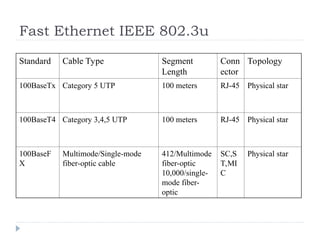
Fast Ethernet IEEE 802.3u
Standard Cable Type Segment
Length
Conn
ector
Topology
100BaseTx Category 5 UTP 100 meters RJ-45 Physical star
100BaseT4 Category 3,4,5 UTP 100 meters RJ-45 Physical star
100BaseF
X
Multimode/Single-mode
fiber-optic cable
412/Multimode
fiber-optic
10,000/single-
mode fiber-
optic
SC,S
T,MI
C
Physical star
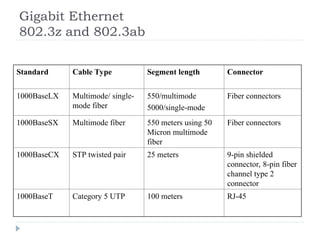
Gigabit Ethernet
802.3z and 802.3ab
Standard Cable Type Segment length Connector
1000BaseLX Multimode/ single-
mode fiber
550/multimode
5000/single-mode
Fiber connectors
1000BaseSX Multimode fiber 550 meters using 50
Micron multimode
fiber
Fiber connectors
1000BaseCX STP twisted pair 25 meters 9-pin shielded
connector, 8-pin fiber
channel type 2
connector
1000BaseT Category 5 UTP 100 meters RJ-45
*
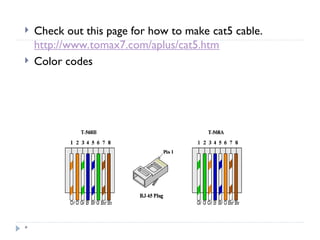
 Check out this page for how to make cat5 cable.
http://www.tomax7.com/aplus/cat5.htm
 Color codes
*
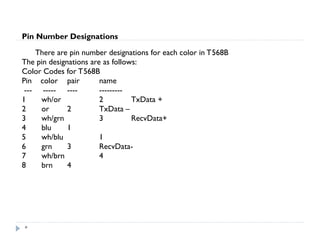
Pin Number Designations
There are pin number designations for each color in T568B
The pin designations are as follows:
Color Codes for T568B
Pin color pair name
--- ----- ---- ---------
1 wh/or 2 TxData +
2 or 2 TxData –
3 wh/grn 3 RecvData+
4 blu 1
5 wh/blu 1
6 grn 3 RecvData-
7 wh/brn 4
8 brn 4
*
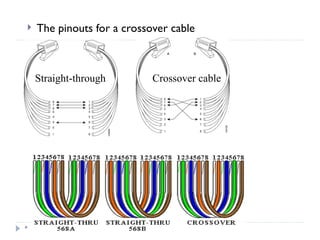
 The pinouts for a crossover cable
Straight-through Crossover cable
*
Networking Devices
• repeaters
• Hubs
• Switches
• Bridges
• Routes
• Gateways
• Network Interface Cards (NICs)
• Wireless access points
• Modems
Hubs
*
 The bottom of the networking food chain
 Connect device and create larger networks
 Small hubs 5-8 ports (workgroup hubs)
 Some hubs have more ports, up to 32 normally
 Direct data packets to all devices connected to the
hub - shared bandwidth
animation
 Scalability, Collision, inefficient
Bridges
*
 Divide larger networks into smaller sections
 Check MAC address, forward or block the data
 Learning bridge builds list of MAC address by watching the
traffic on the network.
 Two issues to consider:
 Placement 80/20 rule
 Bridging loops
 IEEE 802.1d Spanning tree protocol
 Types of bridges
 Transparent bridge
 Source route bridge
 Translational bridge
Bridges
*
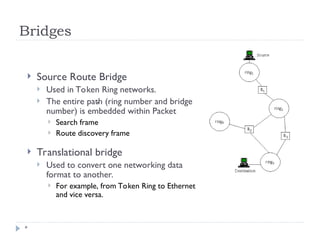
 Source Route Bridge
 Used in Token Ring networks.
 The entire path (ring number and bridge
number) is embedded within Packet
 Search frame
 Route discovery frame
 Translational bridge
 Used to convert one networking data
format to another.
 For example, from Token Ring to Ethernet
and vice versa.
.
Switches
*
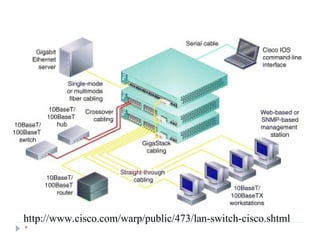
 Like hub, connectivity points of Ethernet network
 Forward only to the port that connects to the
destination device
 knows MAC address
 Match the MAC address in the data it receives.
 Fully switched network, a dedicated segment for each
device is connected to switch. Expensive.
Switches
*
 Allow full duplex Ethernet
 Nodes only communicate with switch, never directly to
each other
 Use twisted pair or fiber optic cabling, using separate
conductors for sending and receiving data.
 collision pair is used to transmit data
 It was half duplex before – one device can transmit at one given time,
 double the capacity, 100Mbps become 200Mbps
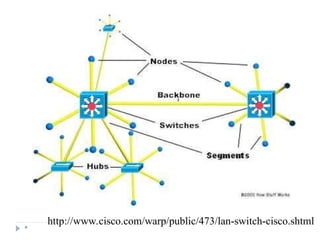
 Most LAN are mixed with hubs and switches.
*
http://www.cisco.com/warp/public/473/lan-switch-cisco.shtml
Switch routing method
*
Packet-based switches use one of the following method
to route packet.
 Cut-through
 Forward as soon as it received the destination MAC – first
14 bytes
 Can cause propagation of error
 Store-and-forward
 Error checked before being forwarded
 Errors are not propagated through network
 Bad frames are discarded
 Error checking takes time.
 Considerably slower
Switch Routing Method
*
 FragmentFree
 Take the advantage of both.
 Check errors by reading the first 64byte of packets where
collision most likely happens
 Offer near cut-through switching performance
Switch physical design
*
LAN switches vary in their physical design
 Shared-memory
 Common buffer for all ports
 Matrix
 Internal grid with input port and output crossing each other
 First check MAC, then switch makes a connection where two
ports (input/output) intersect
 Bus-architecture
 Common-bus
 Dedicated buffer for each port and a circuit to control the
bus access
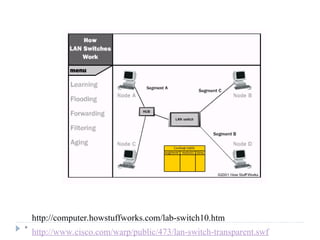
Switch and Transparent Bridging
*
 Most LAN switches use transparent bridging to create
address lookup tables
 Transparent bridging is a technology that allows a
switch to learn everything it needs to know about the
location of nodes on the network within the network
administrator having to do anything. Has five parts:
 Learning
 Flooding
 Filtering
 Forwarding
 Aging
*
http://computer.howstuffworks.com/lab-switch10.htm
http://www.cisco.com/warp/public/473/lan-switch-transparent.swf
*
http://www.cisco.com/warp/public/473/lan-switch-cisco.shtml
Hub and switch cabling
*
 To create larger networks, connect hubs and switches
using
 Standard port with special cable
 Special ports with a standard cable
 Standard port - Medium Dependent Interface-
Crossed (MDI-X)
 Two wires are crossed internally
 Medium Dependent Interface (MDI)
 To see each other as an extension, no signal to be crossed
 Using crossover cable between two MDI-X ports
 To uncross the internal crossing
Punch_down panels
*
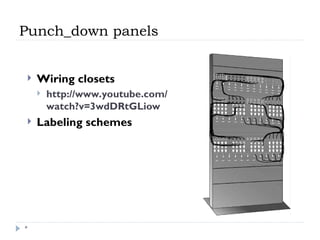
 Wiring closets
 http://www.youtube.com/
watch?v=3wdDRtGLiow
 Labeling schemes
Routers
*
 Create larger networks by joining two networks
segments.
 Dedicated hardware device or computer systems
with more than one network interface and routing
software.
 Routing table
 Static routing
 Dynamic routing
 Use special routing protocols to pass info to other routers.
 Distance Vector Routing (RIP)
 Link state routing (OSPF)
*
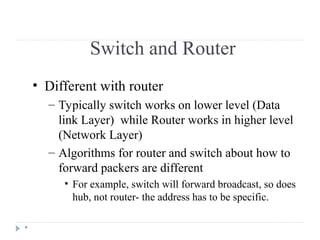
Switch and Router
• Different with router
– Typically switch works on lower level (Data
link Layer) while Router works in higher level
(Network Layer)
– Algorithms for router and switch about how to
forward packers are different
• For example, switch will forward broadcast, so does
hub, not router- the address has to be specific.
Routers and Layer 3 Switch
*
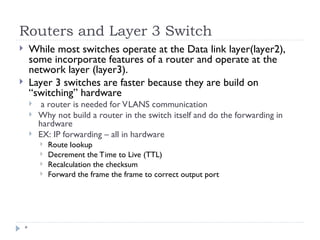
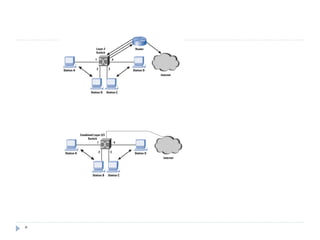
 While most switches operate at the Data link layer(layer2),
some incorporate features of a router and operate at the
network layer (layer3).
 Layer 3 switches are faster because they are build on
“switching” hardware
 a router is needed for VLANS communication
 Why not build a router in the switch itself and do the forwarding in
hardware
 EX: IP forwarding – all in hardware
 Route lookup
 Decrement the Time to Live (TTL)
 Recalculation the checksum
 Forward the frame the frame to correct output port
*
Gateways
*
 Any device that translate one data format to another is
called a gateway.
 Router
 Bridge
 Software
 Gateway and default gateway
CSU/DSU
*
 Channel Server Unit/Digital Service Unit ( CSU/DSU) or
Data Service Unit
 Convert digital format on LAN into signal used on WAN
 Sit between LAN and access point provided by telecom
company
 Many routers have CSU/DSU functionality
Wireless access points
*
 Devices that provide connectivity between wireless LAN
devices and in most cases a wired network.
 Antennae
 Convert signal from radio wave or other to that used on
the LANs.
Modems
*
 Modulator/Demodulator, convert digital signal
generated by computer into analog signals that can
travel over conventional phone line.
 Connect to ISP
 Dialing up to a LAN
 Internal add-in expansion cards or external devices
connect to serial or USB port
 PCMCIA cards for laptop
 Speed
 Modem itself
 Speed of the Universal Asynchronous Receiver/Transmitter
(UART) chip,
 UART 16950 has the speed of 921,600kbp
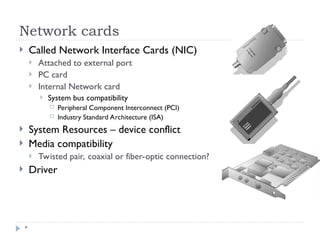
Network cards
*
 Called Network Interface Cards (NIC)
 Attached to external port
 PC card
 Internal Network card
 System bus compatibility
 Peripheral Component Interconnect (PCI)
 Industry Standard Architecture (ISA)
 System Resources – device conflict
 Media compatibility
 Twisted pair, coaxial or fiber-optic connection?
 Driver
ISDN adapters
*
 Integrated Services Digital Networking (ISDN) is a
remote access and WAN technology that can be
used in place of a Plain old telephone systems dial-up
link
 Greater speeds than modem, pick up and drop the
line considerable faster.
 Require ISDN terminal adapter
 Although digital signal, different format with the those used
on LAN.
 Create multiple communication channels on a single line.
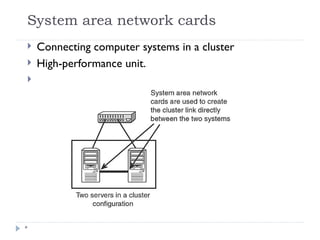
System area network cards
*
 Connecting computer systems in a cluster
 High-performance unit.

*
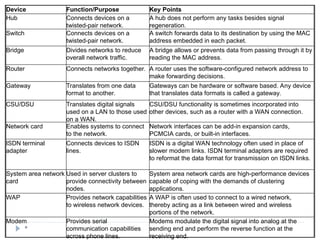
Device Function/Purpose Key Points
Hub Connects devices on a
twisted-pair network.
A hub does not perform any tasks besides signal
regeneration.
Switch Connects devices on a
twisted-pair network.
A switch forwards data to its destination by using the MAC
address embedded in each packet.
Bridge Divides networks to reduce
overall network traffic.
A bridge allows or prevents data from passing through it by
reading the MAC address.
Router Connects networks together. A router uses the software-configured network address to
make forwarding decisions.
Gateway Translates from one data
format to another.
Gateways can be hardware or software based. Any device
that translates data formats is called a gateway.
CSU/DSU Translates digital signals
used on a LAN to those used
on a WAN.
CSU/DSU functionality is sometimes incorporated into
other devices, such as a router with a WAN connection.
Network card Enables systems to connect
to the network.
Network interfaces can be add-in expansion cards,
PCMCIA cards, or built-in interfaces.
ISDN terminal
adapter
Connects devices to ISDN
lines.
ISDN is a digital WAN technology often used in place of
slower modem links. ISDN terminal adapters are required
to reformat the data format for transmission on ISDN links.
System area network
card
Used in server clusters to
provide connectivity between
nodes.
System area network cards are high-performance devices
capable of coping with the demands of clustering
applications.
WAP Provides network capabilities
to wireless network devices.
A WAP is often used to connect to a wired network,
thereby acting as a link between wired and wireless
portions of the network.
Modem Provides serial
communication capabilities
across phone lines.
Modems modulate the digital signal into analog at the
sending end and perform the reverse function at the
receiving end.
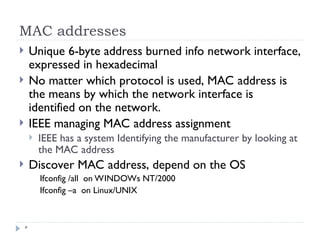
MAC addresses
*
 Unique 6-byte address burned info network interface,
expressed in hexadecimal
 No matter which protocol is used, MAC address is
the means by which the network interface is
identified on the network.
 IEEE managing MAC address assignment
 IEEE has a system Identifying the manufacturer by looking at
the MAC address
 Discover MAC address, depend on the OS
Ifconfig /all on WINDOWs NT/2000
Ifconfig –a on Linux/UNIX
*
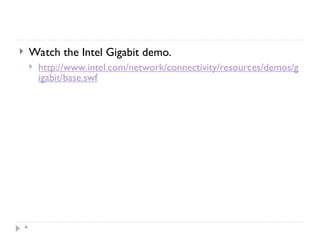
 Watch the Intel Gigabit demo.
 http://www.intel.com/network/connectivity/resources/demos/g
igabit/base.swf
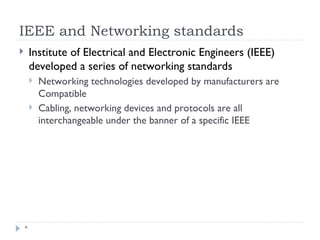
IEEE and Networking standards
*
 Institute of Electrical and Electronic Engineers (IEEE)
developed a series of networking standards
 Networking technologies developed by manufacturers are
Compatible
 Cabling, networking devices and protocols are all
interchangeable under the banner of a specific IEEE
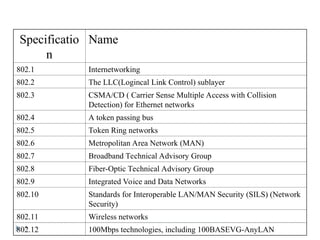
*
Specificatio
n
Name
802.1 Internetworking
802.2 The LLC(Logincal Link Control) sublayer
802.3 CSMA/CD ( Carrier Sense Multiple Access with Collision
Detection) for Ethernet networks
802.4 A token passing bus
802.5 Token Ring networks
802.6 Metropolitan Area Network (MAN)
802.7 Broadband Technical Advisory Group
802.8 Fiber-Optic Technical Advisory Group
802.9 Integrated Voice and Data Networks
802.10 Standards for Interoperable LAN/MAN Security (SILS) (Network
Security)
802.11 Wireless networks
802.12 100Mbps technologies, including 100BASEVG-AnyLAN
802.3 IEEE standard
*
 Defines characteristics for Ethernet networks.
 New additions, 802.3u for Fast Ethernet, 802.3z for
Gigabit Ethernet, referred to as 802.3x.
 Speed: Original 10Mbps, Fast Ethernet 100Mbps,
Gigabit Ethernet 1000Mbps
 Topology: bus or star.
 Media: Coaxial and twisted pair cabling, also fiber
optic cable.
 Access method: CSMA/CD
802.5 IEEE standard
*
 Specifies the characteristics for Token Ring
Networks.
 Introduced by IBM in the mid 80s, network topology
of choice until the rise of the popularity of Ethernet.
 Speed: 4 to 16Mbps
 Topology: logical ring and most often a physical star.
Logical ring is often created in the Multistation
Access Unit (MSAU)
 Media: twisted pair cabling.
 Access method: token passing.
802.11b IEEE Standard
*
 Specifies the characteristics of wireless LAN Ethernet
networks.
 Special devices called wireless access points to allow
communicate.
 Also connect to wired networks to create wireless
portions of entire networks.
 Speed: 802.11b specifies 11M. Today 802.11g can be
108Mbps
 Media: 802.11b standard is 2.4G radio waves.
 Topology: physical wireless, logical bus
 Access method: Carrier Sense Multiple Access/Collision
Avoidance (CSMA/CA ), a variation of CSMA/CD.
FDDI
*
 Fiber Distributed Data Interface (FDDI) standard was
developed by American National Standards Institute
(ANSI)
 Dual ring technology for fault tolerance
 Speed: 100Mbps or higher
 Topology: dual ring topology
 Media: fiber optic cable, > 2 kilometers. Also possible
use copper wire as Copper Distributed Data
Interface (CDDI).
 Access method: token-passing access method
*
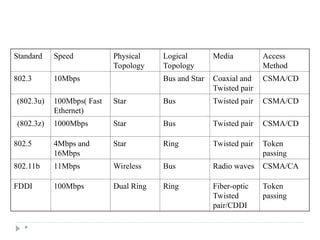
Standard Speed Physical
Topology
Logical
Topology
Media Access
Method
802.3 10Mbps Bus and Star Coaxial and
Twisted pair
CSMA/CD
(802.3u) 100Mbps( Fast
Ethernet)
Star Bus Twisted pair CSMA/CD
(802.3z) 1000Mbps Star Bus Twisted pair CSMA/CD
802.5 4Mbps and
16Mbps
Star Ring Twisted pair Token
passing
802.11b 11Mbps Wireless Bus Radio waves CSMA/CA
FDDI 100Mbps Dual Ring Ring Fiber-optic
Twisted
pair/CDDI
Token
passing

Networking Devices.ppt conatining network topology

  • 1.
    Topics *  Network Topology Cables and connectors  Network Devices
  • 2.
    Network Topologies *  LANsand WANs - Geographical coverage  LANs  A single geographical location, such as office building, school, etc  Typically High speed and cheaper.  WANs  Spans more than one geographical location often connecting separated LANs  Slower  Costly hardware, routers, dedicated leased lines and complicated implementation procedures.
  • 3.
    Network Topologies *  Topology- Physical and logical network layout  Physical – actual layout of the computer cables and other network devices  Logical – the way in which the network appears to the devices that use it.  Common topologies:  Bus, ring, star, mesh and wireless
  • 4.
    Bus topology *  Usesa trunk or backbone to which all of the computers on the network connect.  Systems connect to this backbone using T connectors or taps.  Coaxial cablings ( 10Base-2, 10Base5) were popular options years ago.
  • 5.
    Bus Topology * Advantages Disadvantages Cheapand easy to implement Network disruption when computers are added or removed Require less cable A break in the cable will prevent all systems from accessing the network. Does not use any specialized network equipment. Difficult to troubleshoot.
  • 6.
    Ring Topology *  Logicalring  Meaning that data travels in circular fashion from one computer to another on the network.  Typically FDDI, SONET or Token Ring technology are used to implement a ring network  Ring networks are most commonly wired in a star configuration  Token Ring has multi-station access unit (MSAU),equivalent to hub or switch. MSAU performs the token circulation internally.
  • 7.
    Ring Topology * Advantages Disadvantages Cablefaults are easily located, making troubleshooting easier Expansion to the network can cause network disruption Ring networks are moderately easy to install A single break in the cable can disrupt the entire network.
  • 8.
    Star Topology *  Allcomputers/devices connect to a central device called hub or switch.  Each device requires a single cable  point-to-point connection between the device and hub.  Most widely implemented  Hub is the single point of failure
  • 9.
    Star Topology * Advantages Disadvantages Easilyexpanded without disruption to the network Requires more cable Cable failure affects only a single user A central connecting device allows for a single point of failure Easy to troubleshoot and isolate problems More difficult to implement
  • 10.
    Mesh Topology *  Eachcomputer connects to every other.  High level of redundancy.  Rarely used.  Wiring is very complicated  Cabling cost is high  Troubleshooting a failed cable is tricky  A variation hybrid mesh – create point to point connection between specific network devices, often seen in WAN implementation.
  • 11.
    Mesh Topology * Advantages Disadvantages Providesredundant paths between devices Requires more cable than the other LAN topologies The network can be expanded without disruption to current uses Complicated implementation
  • 12.
    Wireless networking *  Donot require physical cabling  Particularly useful for remote access for laptop users  Eliminate cable faults and cable breaks.  Signal interference and security issue.
  • 13.
    Wireless networking * Advantages Disadvantages Allowsfor wireless remote access Potential security issues associated with wireless transmissions Network can be expanded without disruption to current users Limited speed in comparison to other network topologies
  • 14.
    Cabling and Connectors General media considerations  Broadband versus baseband  Baseband transmissions use digital signaling and Time Division Multiplexing (TDM)  Broadband transmissions use analog and Frequency Division Multiplexing(FDM)  Dialog modes: Simplex, half duplex and full duplex
  • 15.
    Cabling and Connectors * Media interference  Electromagnetic interference (EMI) and cross talk  Network media vary in their resistance to the effect of EMC.  UTP is susceptible and fiber is resistant  Attenuation  Resistance :Coaxial cable > UTP, STP > UTP, Fiber > all  Maximum distance  Repeaters  Attenuation-related problems require a network analyzer to detect  Bandwidth  Transmission capacity of a media  Data throughput is measured in bits per second(bps), Mbps, and Gbps  For today’s application-intensive networks, Old 10Mbps is not enough, 100Mbps is very common and 1000Mbps is used too.
  • 16.
    Network Media  Cable-basedmedia  Coaxial  Copper wire to conduct the signals electronically  Was the choice for LAN for many years.  Retiring  Twisted pair  Copper wire to conduct too  Most widely used  Fiber-optic  transmits the signals as light  Uses glass or plastic conductor and  High Cost. Restricted to where segment length and higher speeds are needed.  Server room, backbone
  • 17.
    Twisted-pair cabling  Hasbeen around for a long time  Created for voice transmissions  Most widely used media for networking  Lighter  More flexible  Easier to install  Cheaper  Greater speeds  Two types:  Unshielded twisted pair (UTP)  Shielded twisted pair (STP)
  • 18.
    Twisted-pair cabling  UTPis more commonplace  STP  provides the extra shielding by using an insulating material wrapped around the wire  Greater resistance to EMI and attenuation  More cost
  • 19.
    Five main categories CategoryCable Types Application 1 UTP Analog voice 2 UTP Digital voice, 1Mbps data 3 UTP, STP 16Mbps data 4 UTP, STP 20Mbps data 5, 5e UTP, STP Data, 100Mbps, 1G 6, 6e UTP, STP Data, 1G, 10G
  • 20.
    RJ-45 connectors  RJ-45are used with twisted-pair cabling.  Resemble ordinary phone jacks (RJ-11)  Eight wires instead of four  Larger.  Check out this page for how to make cat5 cable. http://www.tomax7.com/aplus/cat5.htm
  • 21.
    Fiber-optic cable  Uselight transmissions  EMI, crosstalk and attenuation become no issue.  Well suited for data, video and voice transmissions  Most secure of all cable media  Installation and maintenance procedures require skills  Cost of cable  Cost of retrofitting of existing network equipment because incompatible with most electronic network equipment
  • 22.
    Fiber-optic cable  Singlemode fiber:  A single direct bean of light, allowing for greater distances and increased transfer speeds.  Multimode fiber:  Many beams of light travel through the cable  This strategy weakens the signal, reducing the length and speed the data signal can travel.
  • 23.
    Fiber-optic connectors MIC, StandardFDDI connector FC LC There are a variety of connectors and several ways of Connecting these connectors, such bayonet, snap-lock, and push-pull connectors. A couple here: SC duplex ST SC
  • 24.
    Wireless media  Threetypes:  Radio wave  Infrared  Microwave  Speeds of wireless solutions don’t keep pace with cable solutions  Installation and maintenance are far more complicated and costly.  Some solutions require line-of-sight, such as infrared and microwave.
  • 25.
    IEEE 802.3 standards IEEE 802.3 standards defines a range of networking systems that are bases on the original Ethernet standard. Standard Cable type Segment Length Connector Topology 10Base2 Thin Coaxial 185 meters BNC Physical bus 10Base5 Thick Coaxial 500 meters Vampire Taps Physical bus 10BaseT Category 3,4,5 twisted pair 100 meters RJ-45 Physical star
  • 26.
    Fast Ethernet IEEE802.3u Standard Cable Type Segment Length Conn ector Topology 100BaseTx Category 5 UTP 100 meters RJ-45 Physical star 100BaseT4 Category 3,4,5 UTP 100 meters RJ-45 Physical star 100BaseF X Multimode/Single-mode fiber-optic cable 412/Multimode fiber-optic 10,000/single- mode fiber- optic SC,S T,MI C Physical star
  • 27.
    Gigabit Ethernet 802.3z and802.3ab Standard Cable Type Segment length Connector 1000BaseLX Multimode/ single- mode fiber 550/multimode 5000/single-mode Fiber connectors 1000BaseSX Multimode fiber 550 meters using 50 Micron multimode fiber Fiber connectors 1000BaseCX STP twisted pair 25 meters 9-pin shielded connector, 8-pin fiber channel type 2 connector 1000BaseT Category 5 UTP 100 meters RJ-45
  • 28.
    *  Check outthis page for how to make cat5 cable. http://www.tomax7.com/aplus/cat5.htm  Color codes
  • 29.
    * Pin Number Designations Thereare pin number designations for each color in T568B The pin designations are as follows: Color Codes for T568B Pin color pair name --- ----- ---- --------- 1 wh/or 2 TxData + 2 or 2 TxData – 3 wh/grn 3 RecvData+ 4 blu 1 5 wh/blu 1 6 grn 3 RecvData- 7 wh/brn 4 8 brn 4
  • 30.
    *  The pinoutsfor a crossover cable Straight-through Crossover cable
  • 31.
    * Networking Devices • repeaters •Hubs • Switches • Bridges • Routes • Gateways • Network Interface Cards (NICs) • Wireless access points • Modems
  • 32.
    Hubs *  The bottomof the networking food chain  Connect device and create larger networks  Small hubs 5-8 ports (workgroup hubs)  Some hubs have more ports, up to 32 normally  Direct data packets to all devices connected to the hub - shared bandwidth animation  Scalability, Collision, inefficient
  • 33.
    Bridges *  Divide largernetworks into smaller sections  Check MAC address, forward or block the data  Learning bridge builds list of MAC address by watching the traffic on the network.  Two issues to consider:  Placement 80/20 rule  Bridging loops  IEEE 802.1d Spanning tree protocol  Types of bridges  Transparent bridge  Source route bridge  Translational bridge
  • 34.
    Bridges *  Source RouteBridge  Used in Token Ring networks.  The entire path (ring number and bridge number) is embedded within Packet  Search frame  Route discovery frame  Translational bridge  Used to convert one networking data format to another.  For example, from Token Ring to Ethernet and vice versa. .
  • 35.
    Switches *  Like hub,connectivity points of Ethernet network  Forward only to the port that connects to the destination device  knows MAC address  Match the MAC address in the data it receives.  Fully switched network, a dedicated segment for each device is connected to switch. Expensive.
  • 36.
    Switches *  Allow fullduplex Ethernet  Nodes only communicate with switch, never directly to each other  Use twisted pair or fiber optic cabling, using separate conductors for sending and receiving data.  collision pair is used to transmit data  It was half duplex before – one device can transmit at one given time,  double the capacity, 100Mbps become 200Mbps  Most LAN are mixed with hubs and switches.
  • 37.
  • 38.
    Switch routing method * Packet-basedswitches use one of the following method to route packet.  Cut-through  Forward as soon as it received the destination MAC – first 14 bytes  Can cause propagation of error  Store-and-forward  Error checked before being forwarded  Errors are not propagated through network  Bad frames are discarded  Error checking takes time.  Considerably slower
  • 39.
    Switch Routing Method * FragmentFree  Take the advantage of both.  Check errors by reading the first 64byte of packets where collision most likely happens  Offer near cut-through switching performance
  • 40.
    Switch physical design * LANswitches vary in their physical design  Shared-memory  Common buffer for all ports  Matrix  Internal grid with input port and output crossing each other  First check MAC, then switch makes a connection where two ports (input/output) intersect  Bus-architecture  Common-bus  Dedicated buffer for each port and a circuit to control the bus access
  • 41.
    Switch and TransparentBridging *  Most LAN switches use transparent bridging to create address lookup tables  Transparent bridging is a technology that allows a switch to learn everything it needs to know about the location of nodes on the network within the network administrator having to do anything. Has five parts:  Learning  Flooding  Filtering  Forwarding  Aging
  • 42.
  • 43.
  • 44.
    Hub and switchcabling *  To create larger networks, connect hubs and switches using  Standard port with special cable  Special ports with a standard cable  Standard port - Medium Dependent Interface- Crossed (MDI-X)  Two wires are crossed internally  Medium Dependent Interface (MDI)  To see each other as an extension, no signal to be crossed  Using crossover cable between two MDI-X ports  To uncross the internal crossing
  • 45.
    Punch_down panels *  Wiringclosets  http://www.youtube.com/ watch?v=3wdDRtGLiow  Labeling schemes
  • 46.
    Routers *  Create largernetworks by joining two networks segments.  Dedicated hardware device or computer systems with more than one network interface and routing software.  Routing table  Static routing  Dynamic routing  Use special routing protocols to pass info to other routers.  Distance Vector Routing (RIP)  Link state routing (OSPF)
  • 47.
    * Switch and Router •Different with router – Typically switch works on lower level (Data link Layer) while Router works in higher level (Network Layer) – Algorithms for router and switch about how to forward packers are different • For example, switch will forward broadcast, so does hub, not router- the address has to be specific.
  • 48.
    Routers and Layer3 Switch *  While most switches operate at the Data link layer(layer2), some incorporate features of a router and operate at the network layer (layer3).  Layer 3 switches are faster because they are build on “switching” hardware  a router is needed for VLANS communication  Why not build a router in the switch itself and do the forwarding in hardware  EX: IP forwarding – all in hardware  Route lookup  Decrement the Time to Live (TTL)  Recalculation the checksum  Forward the frame the frame to correct output port
  • 49.
  • 50.
    Gateways *  Any devicethat translate one data format to another is called a gateway.  Router  Bridge  Software  Gateway and default gateway
  • 51.
    CSU/DSU *  Channel ServerUnit/Digital Service Unit ( CSU/DSU) or Data Service Unit  Convert digital format on LAN into signal used on WAN  Sit between LAN and access point provided by telecom company  Many routers have CSU/DSU functionality
  • 52.
    Wireless access points * Devices that provide connectivity between wireless LAN devices and in most cases a wired network.  Antennae  Convert signal from radio wave or other to that used on the LANs.
  • 53.
    Modems *  Modulator/Demodulator, convertdigital signal generated by computer into analog signals that can travel over conventional phone line.  Connect to ISP  Dialing up to a LAN  Internal add-in expansion cards or external devices connect to serial or USB port  PCMCIA cards for laptop  Speed  Modem itself  Speed of the Universal Asynchronous Receiver/Transmitter (UART) chip,  UART 16950 has the speed of 921,600kbp
  • 54.
    Network cards *  CalledNetwork Interface Cards (NIC)  Attached to external port  PC card  Internal Network card  System bus compatibility  Peripheral Component Interconnect (PCI)  Industry Standard Architecture (ISA)  System Resources – device conflict  Media compatibility  Twisted pair, coaxial or fiber-optic connection?  Driver
  • 55.
    ISDN adapters *  IntegratedServices Digital Networking (ISDN) is a remote access and WAN technology that can be used in place of a Plain old telephone systems dial-up link  Greater speeds than modem, pick up and drop the line considerable faster.  Require ISDN terminal adapter  Although digital signal, different format with the those used on LAN.  Create multiple communication channels on a single line.
  • 56.
    System area networkcards *  Connecting computer systems in a cluster  High-performance unit. 
  • 57.
    * Device Function/Purpose KeyPoints Hub Connects devices on a twisted-pair network. A hub does not perform any tasks besides signal regeneration. Switch Connects devices on a twisted-pair network. A switch forwards data to its destination by using the MAC address embedded in each packet. Bridge Divides networks to reduce overall network traffic. A bridge allows or prevents data from passing through it by reading the MAC address. Router Connects networks together. A router uses the software-configured network address to make forwarding decisions. Gateway Translates from one data format to another. Gateways can be hardware or software based. Any device that translates data formats is called a gateway. CSU/DSU Translates digital signals used on a LAN to those used on a WAN. CSU/DSU functionality is sometimes incorporated into other devices, such as a router with a WAN connection. Network card Enables systems to connect to the network. Network interfaces can be add-in expansion cards, PCMCIA cards, or built-in interfaces. ISDN terminal adapter Connects devices to ISDN lines. ISDN is a digital WAN technology often used in place of slower modem links. ISDN terminal adapters are required to reformat the data format for transmission on ISDN links. System area network card Used in server clusters to provide connectivity between nodes. System area network cards are high-performance devices capable of coping with the demands of clustering applications. WAP Provides network capabilities to wireless network devices. A WAP is often used to connect to a wired network, thereby acting as a link between wired and wireless portions of the network. Modem Provides serial communication capabilities across phone lines. Modems modulate the digital signal into analog at the sending end and perform the reverse function at the receiving end.
  • 58.
    MAC addresses *  Unique6-byte address burned info network interface, expressed in hexadecimal  No matter which protocol is used, MAC address is the means by which the network interface is identified on the network.  IEEE managing MAC address assignment  IEEE has a system Identifying the manufacturer by looking at the MAC address  Discover MAC address, depend on the OS Ifconfig /all on WINDOWs NT/2000 Ifconfig –a on Linux/UNIX
  • 59.
    *  Watch theIntel Gigabit demo.  http://www.intel.com/network/connectivity/resources/demos/g igabit/base.swf
  • 60.
    IEEE and Networkingstandards *  Institute of Electrical and Electronic Engineers (IEEE) developed a series of networking standards  Networking technologies developed by manufacturers are Compatible  Cabling, networking devices and protocols are all interchangeable under the banner of a specific IEEE
  • 61.
    * Specificatio n Name 802.1 Internetworking 802.2 TheLLC(Logincal Link Control) sublayer 802.3 CSMA/CD ( Carrier Sense Multiple Access with Collision Detection) for Ethernet networks 802.4 A token passing bus 802.5 Token Ring networks 802.6 Metropolitan Area Network (MAN) 802.7 Broadband Technical Advisory Group 802.8 Fiber-Optic Technical Advisory Group 802.9 Integrated Voice and Data Networks 802.10 Standards for Interoperable LAN/MAN Security (SILS) (Network Security) 802.11 Wireless networks 802.12 100Mbps technologies, including 100BASEVG-AnyLAN
  • 62.
    802.3 IEEE standard * Defines characteristics for Ethernet networks.  New additions, 802.3u for Fast Ethernet, 802.3z for Gigabit Ethernet, referred to as 802.3x.  Speed: Original 10Mbps, Fast Ethernet 100Mbps, Gigabit Ethernet 1000Mbps  Topology: bus or star.  Media: Coaxial and twisted pair cabling, also fiber optic cable.  Access method: CSMA/CD
  • 63.
    802.5 IEEE standard * Specifies the characteristics for Token Ring Networks.  Introduced by IBM in the mid 80s, network topology of choice until the rise of the popularity of Ethernet.  Speed: 4 to 16Mbps  Topology: logical ring and most often a physical star. Logical ring is often created in the Multistation Access Unit (MSAU)  Media: twisted pair cabling.  Access method: token passing.
  • 64.
    802.11b IEEE Standard * Specifies the characteristics of wireless LAN Ethernet networks.  Special devices called wireless access points to allow communicate.  Also connect to wired networks to create wireless portions of entire networks.  Speed: 802.11b specifies 11M. Today 802.11g can be 108Mbps  Media: 802.11b standard is 2.4G radio waves.  Topology: physical wireless, logical bus  Access method: Carrier Sense Multiple Access/Collision Avoidance (CSMA/CA ), a variation of CSMA/CD.
  • 65.
    FDDI *  Fiber DistributedData Interface (FDDI) standard was developed by American National Standards Institute (ANSI)  Dual ring technology for fault tolerance  Speed: 100Mbps or higher  Topology: dual ring topology  Media: fiber optic cable, > 2 kilometers. Also possible use copper wire as Copper Distributed Data Interface (CDDI).  Access method: token-passing access method
  • 66.
    * Standard Speed Physical Topology Logical Topology MediaAccess Method 802.3 10Mbps Bus and Star Coaxial and Twisted pair CSMA/CD (802.3u) 100Mbps( Fast Ethernet) Star Bus Twisted pair CSMA/CD (802.3z) 1000Mbps Star Bus Twisted pair CSMA/CD 802.5 4Mbps and 16Mbps Star Ring Twisted pair Token passing 802.11b 11Mbps Wireless Bus Radio waves CSMA/CA FDDI 100Mbps Dual Ring Ring Fiber-optic Twisted pair/CDDI Token passing