Chapter 25 – Configuration ManagementLecture 11Chapter 25 Configuration management
Topics coveredChange managementVersion management System buildingRelease management2Chapter 25 Configuration management
Configuration managementBecause software changes frequently, systems, can be thought of as a set of versions, each of which has to be maintained and managed.Versions implement proposals for change, corrections of faults, and adaptations for different hardware and operating systems. Configuration management (CM) is concerned with the policies, processes and tools for managing changing software systems. You need CM because it is easy to lose track of what changes and component versions have been incorporated into each system version.3Chapter 25 Configuration management
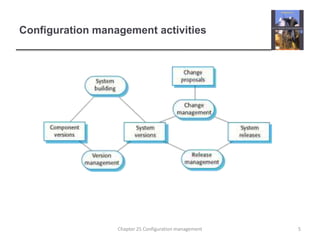
CM activitiesChange managementKeeping track of requests for changes to the software from customers and developers, working out the costs and impact of changes, and deciding the changes should be implemented.Version managementKeeping track of the multiple versions of system components and ensuring that changes made to components by different developers do not interfere with each other. System buildingThe process of assembling program components, data and libraries, then compiling these to create an executable system.Release managementPreparing software for external release and keeping track of the system versions that have been released for customer use.4Chapter 25 Configuration management
Configuration management activities5Chapter 25 Configuration management
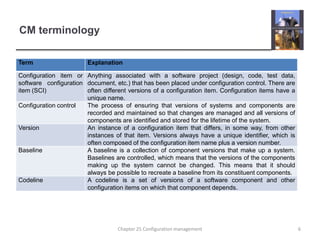
CM terminology6Chapter 25 Configuration management
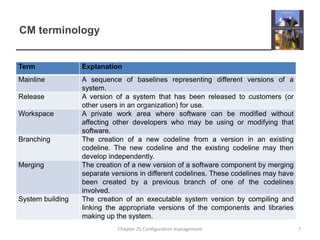
CM terminology7Chapter 25 Configuration management
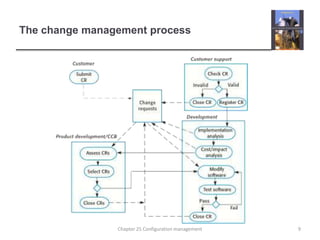
Change managementOrganizational needs and requirements change during the lifetime of a system, bugs have to be repaired and systems have to adapt to changes in their environment.Change management is intended to ensure that system evolution is a managed process and that priority is given to the most urgent and cost-effective changes.The change management process is concerned with analyzing the costs and benefits of proposed changes, approving those changes that are worthwhile and tracking which components in the system have been changed.8Chapter 25 Configuration management
The change management process9Chapter 25 Configuration management
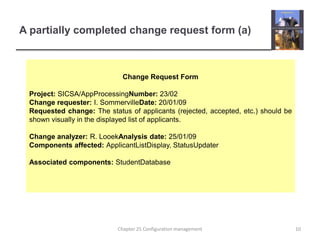
A partially completed change request form (a)Change Request FormProject: SICSA/AppProcessingNumber: 23/02Change requester: I. SommervilleDate: 20/01/09Requested change: The status of applicants (rejected, accepted, etc.) should be shown visually in the displayed list of applicants.Change analyzer: R. LooekAnalysis date: 25/01/09Components affected: ApplicantListDisplay, StatusUpdaterAssociated components: StudentDatabase10Chapter 25 Configuration management
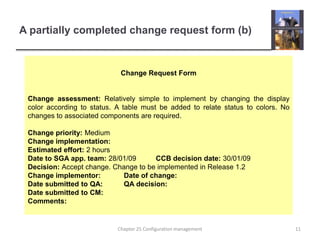
A partially completed change request form (b)Change Request FormChange assessment: Relatively simple to implement by changing the display color according to status. A table must be added to relate status to colors. No changes to associated components are required.Change priority: MediumChange implementation:Estimated effort: 2 hoursDate to SGA app. team: 28/01/09	CCB decision date: 30/01/09Decision: Accept change. Change to be implemented in Release 1.2Change implementor:	Date of change:Date submitted to QA:	QA decision:Date submitted to CM:Comments:11Chapter 25 Configuration management
Factors in change analysisThe consequences of not making the changeThe benefits of the changeThe number of users affected by the changeThe costs of making the changeThe product release cycle12Chapter 25 Configuration management
Change management and agile methodsIn some agile methods, customers are directly involved in change management. The propose a change to the requirements and work with the team to assess its impact and decide whether the change should take priority over the features planned for the next increment of the system. Changes to improve the software improvement are decided by the programmers working on the system. Refactoring, where the software is continually improved, is not seen as an overhead but as a necessary part of the development process. Chapter 25 Configuration management13
Derivation history// SICSA project (XEP 6087)//// APP-SYSTEM/AUTH/RBAC/USER_ROLE//// Object: currentRole// Author: R. Looek// Creation date: 13/11/2009//// © St Andrews University 2009//// Modification history// Version	Modifier	Date	Change		Reason// 1.0	J. Jones	11/11/2009	Add header	Submitted to CM// 1.1	R. Looek 	13/11/2009	New field		Change req. R07/0214Chapter 25 Configuration management
Version managementVersion management (VM) is the process of keeping track of different versions of software components or configuration items and the systems in which these components are used.It also involves ensuring that changes made by different developers to these versions do not interfere with each other.Therefore version management can be thought of as the process of managing codelines and baselines. 15Chapter 25 Configuration management
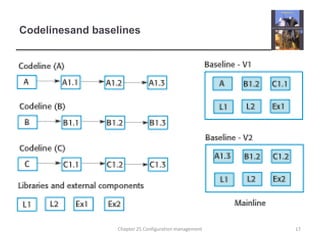
Codelines and baselinesA codelineis a sequence of versions of  source code with later versions in the sequence derived from earlier versions.Codelinesnormally apply to components of systems so that there are different versions of each component.A baseline is a definition of a specific system.The baseline therefore specifies the component versions that are included in the system plus a specification of the libraries used, configuration files, etc. 16Chapter 25 Configuration management
Codelinesand baselines17Chapter 25 Configuration management
BaselinesBaselines may be specified using a configuration language, which allows you to define what components are included in a version of a particular system.Baselines are important because you often have to recreate a specific version of a complete system.For example, a product line may be instantiated so that there are individual system versions for different customers. You may have to recreate the version delivered to a specific customer if, for example, that customer reports bugs in their system that have to be repaired. 18Chapter 25 Configuration management
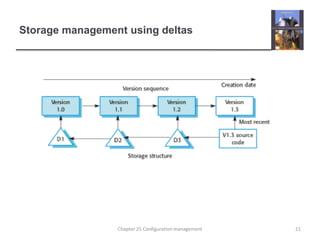
Version management systemsVersion and release identificationManaged versions are assigned identifiers when they are submitted to the system.Storage managementTo reduce the storage space required by multiple versions of components that differ only slightly, version management systems usually provide storage management facilities.Change history recordingAll of the changes made to the code of a system or component are recorded and listed.19Chapter 25 Configuration management
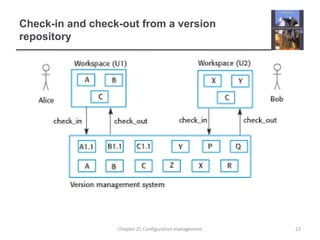
Version management systemsIndependent development The version management system keeps track of components that have been checked out for editing and ensures that changes made to a component by different developers do not interfere. Project support A version management system may support the development of several projects, which share components.20Chapter 25 Configuration management
Storage management using deltas21Chapter 25 Configuration management
Check-in and check-out from a version repository22Chapter 25 Configuration management
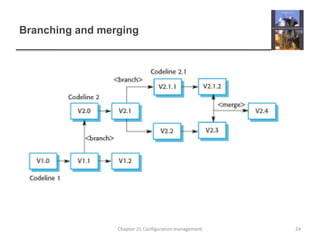
Codeline branchesRather than a linear sequence of versions that reflect changes to the component over time, there may be several independent sequences. This is normal in system development, where different developers work independently on different versions of the source code and so change it in different ways. At some stage, it may be necessary to merge codeline branches to create a new version of a component that includes all changes that have been made. If the changes made involve different parts of the code, the component versions may be merged automatically by combining the deltas that apply to the code. 23Chapter 25 Configuration management
Branching and merging24Chapter 25 Configuration management
Key pointsConfiguration management is the management of an evolving software system. When maintaining a system, a CM team is put in place to ensure that changes are incorporated into the system in a controlled way and that records are maintained with details of the changes that have been implemented.The main configuration management processes are change management, version management, system building and release management.Change management involves assessing proposals for changes from system customers and other stakeholders and deciding if it is cost-effective to implement these in a new version of a system.Version management involves keeping track of the different versions of software components as changes are made to them. Chapter 25 Configuration management25
Chapter 25 – Configuration ManagementLecture 226Chapter 25 Configuration management
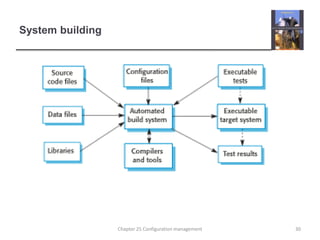
System buildingSystem building is the process of creating a complete, executable system by compiling and linking the system components, external libraries, configuration files, etc.System building tools and version management tools must communicate as the build process involves checking out component versions from the repository managed by the version management system.The configuration description used to identify a baseline is also used by the system building tool.27Chapter 25 Configuration management
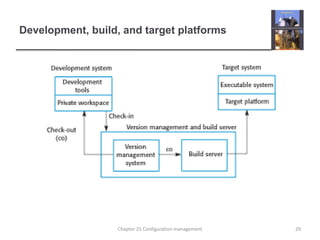
Build platformsThe development system, which includes development tools such as compilers, source code editors, etc.Developers check out code from the version management system into a private workspace before making changes to the system.The build server, which is used to build definitive, executable versions of the system.Developers check-in code to the version management system before it is built. The system build may rely on external libraries that are not included in the version management system.The target environment, which is the platform on which the system executes. 28Chapter 25 Configuration management
Development, build, and target platforms29Chapter 25 Configuration management
System building30Chapter 25 Configuration management
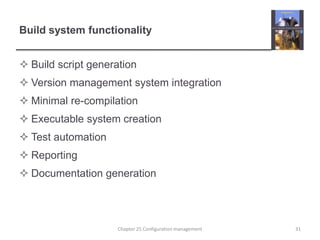
Build system functionalityBuild script generationVersion management system integrationMinimal re-compilationExecutable system creationTest automationReportingDocumentation generation31Chapter 25 Configuration management
Minimizing recompilationTools to support system building are usually designed to minimize the amount of compilation that is required.They do this by checking if a compiled version of a component is available. If so, there is no need to recompile that component.A unique signature identifies each source and object code version and is changed when the source code is edited.By comparing the signatures on the source and object code files, it is possible to decide if the source code was used to generate the object code component.Chapter 25 Configuration management32
File identificationModification timestampsThe signature on the source code file is the time and date when that file was modified. If the source code file of a component has been modified after the related object code file, then the system assumes that recompilation to create a new object code file is necessary.Source code checksumsThe signature on the source code file is a checksum calculated from data in the file. A checksum function calculates a unique number using the source text as input. If you change the source code (even by 1 character), this will generate a different checksum. You can therefore be confident that source code files with different checksums are actually different.Chapter 25 Configuration management33
Timestamps vs checksumsTimestampsBecause source and object files are linked by name rather than an explicit source file signature, it is not usually possible to build different versions of a source code component into the same directory at the same time, as these would generate object files with the same name. ChecksumsWhen you recompile a component, it does not overwrite the object code, as would normally be the case when the timestamp is used. Rather, it generates a new object code file and tags it with the source code signature. Parallel compilation is possible and different versions of a component may be compiled at the same time.Chapter 25 Configuration management34
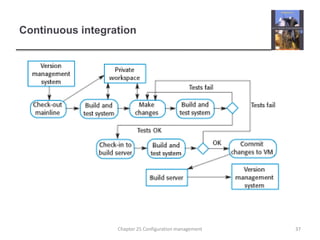
Agile buildingCheck out the mainline system from the version management system into the developer’s private workspace.Build the system and run automated tests to ensure that the built system passes all tests. If not, the build is broken and you should inform whoever checked in the last baseline system. They are responsible for repairing the problem.Make the changes to the system components.Build the system in the private workspace and rerun system tests. If the tests fail, continue editing.Chapter 25 Configuration management35
Agile buildingOnce the system has passed its tests, check it into the build system but do not commit it as a new system baseline.Build the system on the build server and run the tests. You need to do this in case others have modified components since you checked out the system. If this is the case, check out the components that have failed and edit these so that tests pass on your private workspace.If the system passes its tests on the build system, then commit the changes you have made as a new baseline in the system mainline.Chapter 25 Configuration management36
Continuous integration37Chapter 25 Configuration management
Daily buildingThe development organization sets a delivery time (say 2 p.m.) for system components.If developers have new versions of the components that they are writing, they must deliver them by that time.A new version of the system is built from these components by compiling and linking them to form a complete system.This system is then delivered to the testing team, which carries out a set of predefined system testsFaults that are discovered during system testing are documented and returned to the system developers. They repair these faults in a subsequent version of the component.38Chapter 25 Configuration management
Release managementA system release is a version of a software system that is distributed to customers.For mass market software, it is usually possible to identify two types of release: major releases which deliver significant new functionality, and minor releases, which repair bugs and fix customer problems that have been reported.For custom software or software product lines, releases of the system may have to be produced for each customer and individual customers may be running several different releases of the system at the same time. 39Chapter 25 Configuration management
Release trackingIn the event of a problem, it may be necessary to reproduce exactly the software that has been delivered to a particular customer. When a system release is produced, it must be documented to ensure that it can be re-created exactly in the future.This is particularly important for customized, long-lifetime embedded systems, such as those that control complex machines.Customers may use a single release of these systems for many years and may require specific changes to a particular software system long after its original release date.Chapter 25 Configuration management40
Release reproductionTo document a release, you have to record the specific versions of the source code components that were used to create the executable code.You must keep copies of the source code files, corresponding executables and all data and configuration files.You should also record the versions of the operating system, libraries, compilers and other tools used to build the software. Chapter 25 Configuration management41
Release planningAs well as the technical work involved in creating a release distribution, advertising and publicity material have to be prepared and marketing strategies put in place to convince customers to buy the new release of the system.Release timingIf releases are too frequent or require hardware upgrades, customers may not move to the new release, especially if they have to pay for it.If system releases are  too infrequent, market share may be lost as customers move to alternative systems. Chapter 25 Configuration management42
Release componentsAs well as the the executable code of the system, a release may also include:configuration files defining how the release should be configured for particular installations;data files, such as files of error messages, that are needed for successful system operation;an installation program that is used to help install the system on target hardware;electronic and paper documentation describing the system;packaging and associated publicitythat have been designed for that release.Chapter 25 Configuration management43
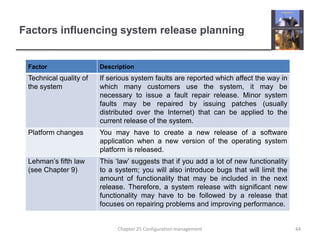
Factors influencing system release planning44Chapter 25 Configuration management
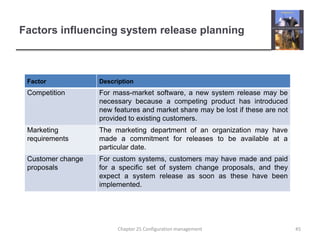
Factors influencing system release planning45Chapter 25 Configuration management
Key pointsSystem building is the process of assembling system components into an executable program to run on a target computer system.  Software should be frequently rebuilt and tested immediately after a new version has been built. This makes it easier to detect bugs and problems that have been introduced since the last build.System releases include executable code, data files, configuration files and documentation. Release management involves making decisions on system release dates, preparing all information for distribution and documenting each system release.Chapter 25 Configuration management46

Ch25-Software Engineering 9

  • 1.
    Chapter 25 –Configuration ManagementLecture 11Chapter 25 Configuration management
  • 2.
    Topics coveredChange managementVersionmanagement System buildingRelease management2Chapter 25 Configuration management
  • 3.
    Configuration managementBecause softwarechanges frequently, systems, can be thought of as a set of versions, each of which has to be maintained and managed.Versions implement proposals for change, corrections of faults, and adaptations for different hardware and operating systems. Configuration management (CM) is concerned with the policies, processes and tools for managing changing software systems. You need CM because it is easy to lose track of what changes and component versions have been incorporated into each system version.3Chapter 25 Configuration management
  • 4.
    CM activitiesChange managementKeepingtrack of requests for changes to the software from customers and developers, working out the costs and impact of changes, and deciding the changes should be implemented.Version managementKeeping track of the multiple versions of system components and ensuring that changes made to components by different developers do not interfere with each other. System buildingThe process of assembling program components, data and libraries, then compiling these to create an executable system.Release managementPreparing software for external release and keeping track of the system versions that have been released for customer use.4Chapter 25 Configuration management
  • 5.
  • 6.
    CM terminology6Chapter 25Configuration management
  • 7.
    CM terminology7Chapter 25Configuration management
  • 8.
    Change managementOrganizational needsand requirements change during the lifetime of a system, bugs have to be repaired and systems have to adapt to changes in their environment.Change management is intended to ensure that system evolution is a managed process and that priority is given to the most urgent and cost-effective changes.The change management process is concerned with analyzing the costs and benefits of proposed changes, approving those changes that are worthwhile and tracking which components in the system have been changed.8Chapter 25 Configuration management
  • 9.
    The change managementprocess9Chapter 25 Configuration management
  • 10.
    A partially completedchange request form (a)Change Request FormProject: SICSA/AppProcessingNumber: 23/02Change requester: I. SommervilleDate: 20/01/09Requested change: The status of applicants (rejected, accepted, etc.) should be shown visually in the displayed list of applicants.Change analyzer: R. LooekAnalysis date: 25/01/09Components affected: ApplicantListDisplay, StatusUpdaterAssociated components: StudentDatabase10Chapter 25 Configuration management
  • 11.
    A partially completedchange request form (b)Change Request FormChange assessment: Relatively simple to implement by changing the display color according to status. A table must be added to relate status to colors. No changes to associated components are required.Change priority: MediumChange implementation:Estimated effort: 2 hoursDate to SGA app. team: 28/01/09 CCB decision date: 30/01/09Decision: Accept change. Change to be implemented in Release 1.2Change implementor: Date of change:Date submitted to QA: QA decision:Date submitted to CM:Comments:11Chapter 25 Configuration management
  • 12.
    Factors in changeanalysisThe consequences of not making the changeThe benefits of the changeThe number of users affected by the changeThe costs of making the changeThe product release cycle12Chapter 25 Configuration management
  • 13.
    Change management andagile methodsIn some agile methods, customers are directly involved in change management. The propose a change to the requirements and work with the team to assess its impact and decide whether the change should take priority over the features planned for the next increment of the system. Changes to improve the software improvement are decided by the programmers working on the system. Refactoring, where the software is continually improved, is not seen as an overhead but as a necessary part of the development process. Chapter 25 Configuration management13
  • 14.
    Derivation history// SICSAproject (XEP 6087)//// APP-SYSTEM/AUTH/RBAC/USER_ROLE//// Object: currentRole// Author: R. Looek// Creation date: 13/11/2009//// © St Andrews University 2009//// Modification history// Version Modifier Date Change Reason// 1.0 J. Jones 11/11/2009 Add header Submitted to CM// 1.1 R. Looek 13/11/2009 New field Change req. R07/0214Chapter 25 Configuration management
  • 15.
    Version managementVersion management(VM) is the process of keeping track of different versions of software components or configuration items and the systems in which these components are used.It also involves ensuring that changes made by different developers to these versions do not interfere with each other.Therefore version management can be thought of as the process of managing codelines and baselines. 15Chapter 25 Configuration management
  • 16.
    Codelines and baselinesAcodelineis a sequence of versions of source code with later versions in the sequence derived from earlier versions.Codelinesnormally apply to components of systems so that there are different versions of each component.A baseline is a definition of a specific system.The baseline therefore specifies the component versions that are included in the system plus a specification of the libraries used, configuration files, etc. 16Chapter 25 Configuration management
  • 17.
    Codelinesand baselines17Chapter 25Configuration management
  • 18.
    BaselinesBaselines may bespecified using a configuration language, which allows you to define what components are included in a version of a particular system.Baselines are important because you often have to recreate a specific version of a complete system.For example, a product line may be instantiated so that there are individual system versions for different customers. You may have to recreate the version delivered to a specific customer if, for example, that customer reports bugs in their system that have to be repaired. 18Chapter 25 Configuration management
  • 19.
    Version management systemsVersionand release identificationManaged versions are assigned identifiers when they are submitted to the system.Storage managementTo reduce the storage space required by multiple versions of components that differ only slightly, version management systems usually provide storage management facilities.Change history recordingAll of the changes made to the code of a system or component are recorded and listed.19Chapter 25 Configuration management
  • 20.
    Version management systemsIndependentdevelopment The version management system keeps track of components that have been checked out for editing and ensures that changes made to a component by different developers do not interfere. Project support A version management system may support the development of several projects, which share components.20Chapter 25 Configuration management
  • 21.
    Storage management usingdeltas21Chapter 25 Configuration management
  • 22.
    Check-in and check-outfrom a version repository22Chapter 25 Configuration management
  • 23.
    Codeline branchesRather thana linear sequence of versions that reflect changes to the component over time, there may be several independent sequences. This is normal in system development, where different developers work independently on different versions of the source code and so change it in different ways. At some stage, it may be necessary to merge codeline branches to create a new version of a component that includes all changes that have been made. If the changes made involve different parts of the code, the component versions may be merged automatically by combining the deltas that apply to the code. 23Chapter 25 Configuration management
  • 24.
    Branching and merging24Chapter25 Configuration management
  • 25.
    Key pointsConfiguration managementis the management of an evolving software system. When maintaining a system, a CM team is put in place to ensure that changes are incorporated into the system in a controlled way and that records are maintained with details of the changes that have been implemented.The main configuration management processes are change management, version management, system building and release management.Change management involves assessing proposals for changes from system customers and other stakeholders and deciding if it is cost-effective to implement these in a new version of a system.Version management involves keeping track of the different versions of software components as changes are made to them. Chapter 25 Configuration management25
  • 26.
    Chapter 25 –Configuration ManagementLecture 226Chapter 25 Configuration management
  • 27.
    System buildingSystem buildingis the process of creating a complete, executable system by compiling and linking the system components, external libraries, configuration files, etc.System building tools and version management tools must communicate as the build process involves checking out component versions from the repository managed by the version management system.The configuration description used to identify a baseline is also used by the system building tool.27Chapter 25 Configuration management
  • 28.
    Build platformsThe developmentsystem, which includes development tools such as compilers, source code editors, etc.Developers check out code from the version management system into a private workspace before making changes to the system.The build server, which is used to build definitive, executable versions of the system.Developers check-in code to the version management system before it is built. The system build may rely on external libraries that are not included in the version management system.The target environment, which is the platform on which the system executes. 28Chapter 25 Configuration management
  • 29.
    Development, build, andtarget platforms29Chapter 25 Configuration management
  • 30.
    System building30Chapter 25Configuration management
  • 31.
    Build system functionalityBuildscript generationVersion management system integrationMinimal re-compilationExecutable system creationTest automationReportingDocumentation generation31Chapter 25 Configuration management
  • 32.
    Minimizing recompilationTools tosupport system building are usually designed to minimize the amount of compilation that is required.They do this by checking if a compiled version of a component is available. If so, there is no need to recompile that component.A unique signature identifies each source and object code version and is changed when the source code is edited.By comparing the signatures on the source and object code files, it is possible to decide if the source code was used to generate the object code component.Chapter 25 Configuration management32
  • 33.
    File identificationModification timestampsThesignature on the source code file is the time and date when that file was modified. If the source code file of a component has been modified after the related object code file, then the system assumes that recompilation to create a new object code file is necessary.Source code checksumsThe signature on the source code file is a checksum calculated from data in the file. A checksum function calculates a unique number using the source text as input. If you change the source code (even by 1 character), this will generate a different checksum. You can therefore be confident that source code files with different checksums are actually different.Chapter 25 Configuration management33
  • 34.
    Timestamps vs checksumsTimestampsBecausesource and object files are linked by name rather than an explicit source file signature, it is not usually possible to build different versions of a source code component into the same directory at the same time, as these would generate object files with the same name. ChecksumsWhen you recompile a component, it does not overwrite the object code, as would normally be the case when the timestamp is used. Rather, it generates a new object code file and tags it with the source code signature. Parallel compilation is possible and different versions of a component may be compiled at the same time.Chapter 25 Configuration management34
  • 35.
    Agile buildingCheck outthe mainline system from the version management system into the developer’s private workspace.Build the system and run automated tests to ensure that the built system passes all tests. If not, the build is broken and you should inform whoever checked in the last baseline system. They are responsible for repairing the problem.Make the changes to the system components.Build the system in the private workspace and rerun system tests. If the tests fail, continue editing.Chapter 25 Configuration management35
  • 36.
    Agile buildingOnce thesystem has passed its tests, check it into the build system but do not commit it as a new system baseline.Build the system on the build server and run the tests. You need to do this in case others have modified components since you checked out the system. If this is the case, check out the components that have failed and edit these so that tests pass on your private workspace.If the system passes its tests on the build system, then commit the changes you have made as a new baseline in the system mainline.Chapter 25 Configuration management36
  • 37.
    Continuous integration37Chapter 25Configuration management
  • 38.
    Daily buildingThe developmentorganization sets a delivery time (say 2 p.m.) for system components.If developers have new versions of the components that they are writing, they must deliver them by that time.A new version of the system is built from these components by compiling and linking them to form a complete system.This system is then delivered to the testing team, which carries out a set of predefined system testsFaults that are discovered during system testing are documented and returned to the system developers. They repair these faults in a subsequent version of the component.38Chapter 25 Configuration management
  • 39.
    Release managementA systemrelease is a version of a software system that is distributed to customers.For mass market software, it is usually possible to identify two types of release: major releases which deliver significant new functionality, and minor releases, which repair bugs and fix customer problems that have been reported.For custom software or software product lines, releases of the system may have to be produced for each customer and individual customers may be running several different releases of the system at the same time. 39Chapter 25 Configuration management
  • 40.
    Release trackingIn theevent of a problem, it may be necessary to reproduce exactly the software that has been delivered to a particular customer. When a system release is produced, it must be documented to ensure that it can be re-created exactly in the future.This is particularly important for customized, long-lifetime embedded systems, such as those that control complex machines.Customers may use a single release of these systems for many years and may require specific changes to a particular software system long after its original release date.Chapter 25 Configuration management40
  • 41.
    Release reproductionTo documenta release, you have to record the specific versions of the source code components that were used to create the executable code.You must keep copies of the source code files, corresponding executables and all data and configuration files.You should also record the versions of the operating system, libraries, compilers and other tools used to build the software. Chapter 25 Configuration management41
  • 42.
    Release planningAs wellas the technical work involved in creating a release distribution, advertising and publicity material have to be prepared and marketing strategies put in place to convince customers to buy the new release of the system.Release timingIf releases are too frequent or require hardware upgrades, customers may not move to the new release, especially if they have to pay for it.If system releases are too infrequent, market share may be lost as customers move to alternative systems. Chapter 25 Configuration management42
  • 43.
    Release componentsAs wellas the the executable code of the system, a release may also include:configuration files defining how the release should be configured for particular installations;data files, such as files of error messages, that are needed for successful system operation;an installation program that is used to help install the system on target hardware;electronic and paper documentation describing the system;packaging and associated publicitythat have been designed for that release.Chapter 25 Configuration management43
  • 44.
    Factors influencing systemrelease planning44Chapter 25 Configuration management
  • 45.
    Factors influencing systemrelease planning45Chapter 25 Configuration management
  • 46.
    Key pointsSystem buildingis the process of assembling system components into an executable program to run on a target computer system. Software should be frequently rebuilt and tested immediately after a new version has been built. This makes it easier to detect bugs and problems that have been introduced since the last build.System releases include executable code, data files, configuration files and documentation. Release management involves making decisions on system release dates, preparing all information for distribution and documenting each system release.Chapter 25 Configuration management46