Configuration management 
Managing the products of 
system change 
Based on Chapter 29 of Somerville, 
6th Edition 
1
Objectives 
• To explain the importance of software 
configuration management (CM) 
• To describe key CM activities namely CM 
planning, change management, version 
management and system building 
• To discuss the use of CASE tools to support 
configuration management processes 
2
Topics covered 
• Configuration management planning 
• Change management 
• Version and release management 
• System building 
• CASE tools for configuration management 
3
Configuration management 
• New versions of software systems are created 
as they change 
– For different machines/OS 
– Offering different functionality 
– Tailored for particular user requirements 
• Configuration management is concerned with 
managing evolving software systems 
– System change is a team activity 
– CM aims to control the costs and effort involved in 
making changes to a system 
4
Configuration management 
• Involves the development and application of 
procedures and standards to manage an 
evolving software product 
• May be seen as part of a more general quality 
management process 
• When released to CM, software systems are 
sometimes called baselines as they are a 
starting point for further development 
5
CM standards 
• CM should always be based on a set of 
standards which are applied within an 
organisation 
• Standards should define how items are 
identified, how changes are controlled and how 
new versions are managed 
• Standards may be based on external CM 
standards (e.g. IEEE standard for CM) 
• Existing standards are based on a waterfall 
process model - new standards are needed for 
evolutionary development 6
Concurrent development and 
testing 
• A time for delivery of system components is 
agreed 
• A new version of a system is built from these 
components by compiling and linking them 
• This new version is delivered for testing using 
pre-defined tests 
• Faults that are discovered during testing are 
documented and returned to the system 
developers 
7
Daily system building 
• It is easier to find problems that stem from 
component interactions early in the process 
• This encourages thorough unit testing - 
developers are under pressure not to ‘break the 
build’ 
• A stringent change management process is 
required to keep track of problems that have 
been discovered and repaired 
8
Configuration management 
planning 
• All products of the software process may have 
to be managed 
– Specifications 
– Designs 
– Programs 
– Test data 
– User manuals 
• Thousands of separate documents are 
generated for a large software system 
9
CM planning 
• Starts during the early phases of the project 
• Must define the documents or document 
classes which are to be managed (Formal 
documents) 
• Documents which might be required for future 
system maintenance should be identified and 
specified as managed documents 
10
The CM plan 
• Defines the types of documents to be managed 
and a document naming scheme 
• Defines who takes responsibility for the CM 
procedures and creation of baselines 
• Defines policies for change control and version 
management 
• Defines the CM records which must be 
maintained 
11
The CM plan 
• Describes the tools which should be used to 
assist the CM process and any limitations on 
their use 
• Defines the process of tool use 
• Defines the CM database used to record 
configuration information 
• May include information such as the CM of 
external software, process auditing, etc. 
12
Configuration item identification 
• Large projects typically produce thousands of 
documents which must be uniquely identified 
• Some of these documents must be maintained 
for the lifetime of the software 
• Document naming scheme should be defined 
so that related documents have related names. 
• A hierarchical scheme with multi-level names is 
probably the most flexible approach 
13
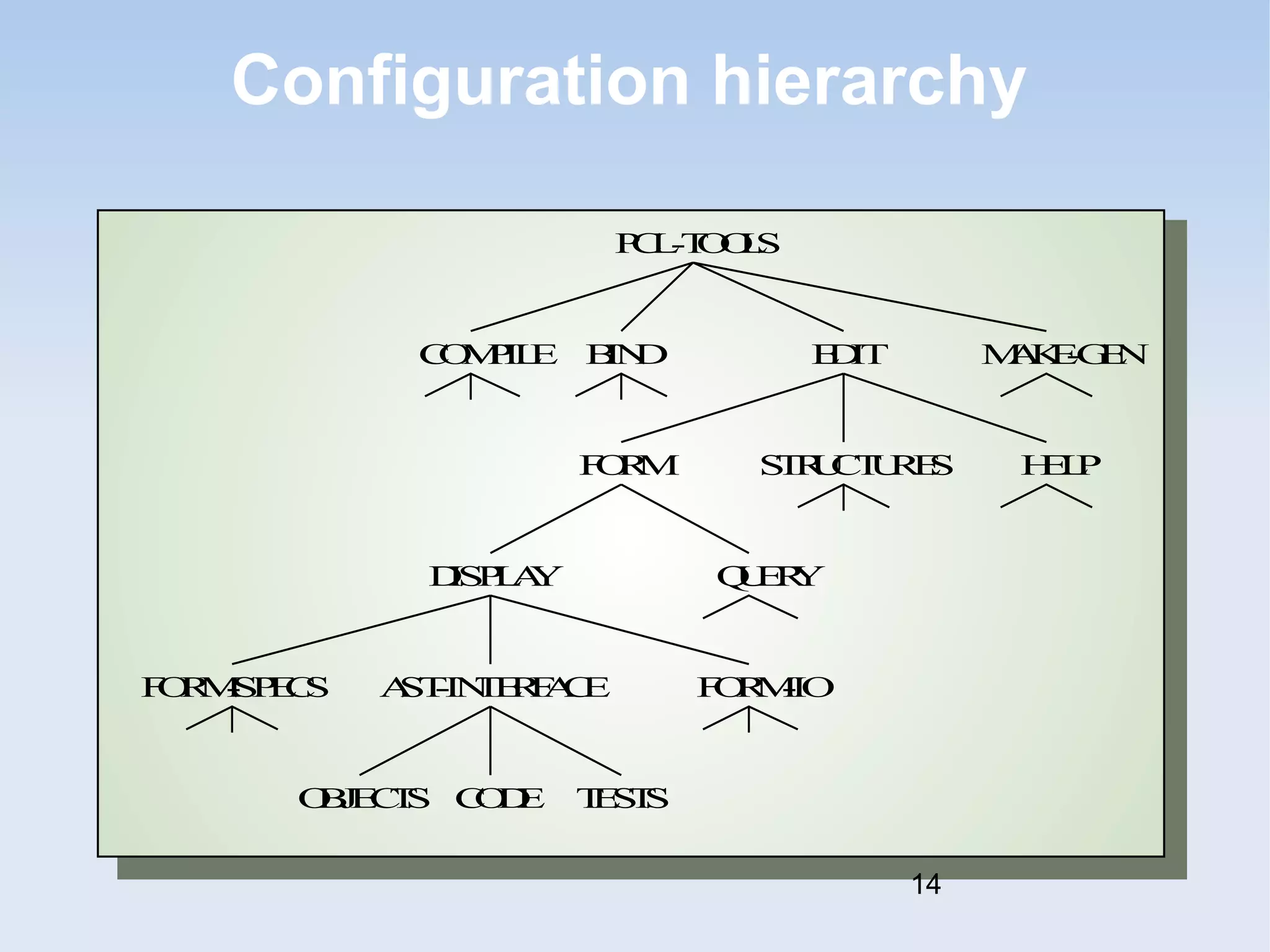
Configuration hierarchy 
PCL-TOOLS 
COMPILE EDIT 
MAKE-GEN 
STRUCTURES 
BIND 
FORM 
HELP 
DISPLAY QUERY 
FORM-SPECS AST-INTERFACE FORM-IO 
OBJECTS CODE TESTS 
14
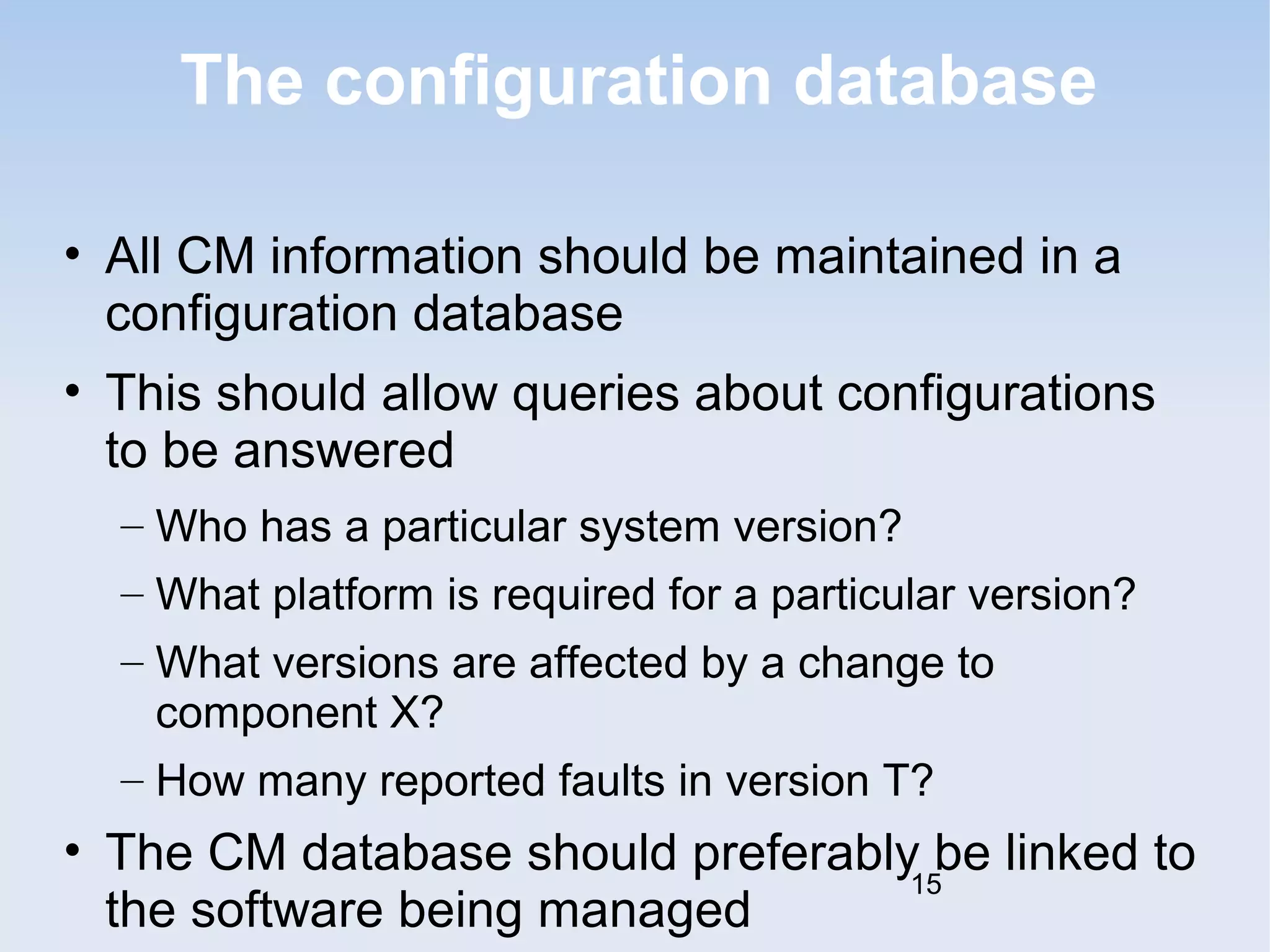
The configuration database 
• All CM information should be maintained in a 
configuration database 
• This should allow queries about configurations 
to be answered 
– Who has a particular system version? 
– What platform is required for a particular version? 
– What versions are affected by a change to 
component X? 
– How many reported faults in version T? 
• The CM database should preferably be linked to 
the software being managed 
15
CM database implementation 
• May be part of an integrated environment to 
support software development. The CM 
database and the managed documents are all 
maintained on the same system 
• CASE tools may be integrated with this so that 
there is a close relationship between the CASE 
tools and the CM tools 
• More commonly, the CM database is 
maintained separately as this is cheaper and 
more flexible 
[i.e the CM tool doesn't have to be included 16 
in the 
CASE tool]
Change management 
• Software systems are subject to continual 
change requests 
– From users 
– From developers 
– From market forces 
• Change management is concerned with 
keeping managing of these changes and 
ensuring that they are implemented in the most 
cost-effective way 
17
The change management process 
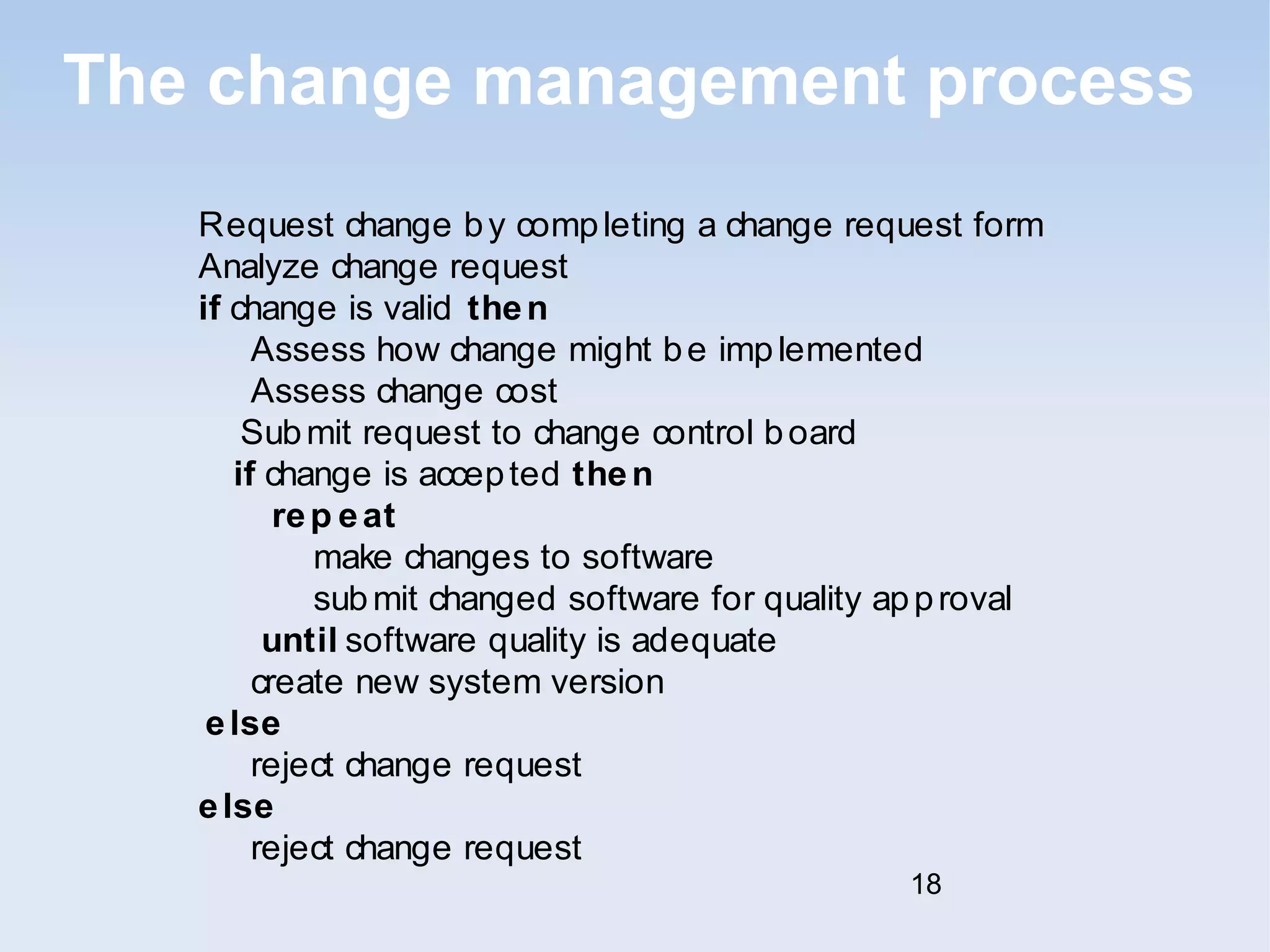
Request change by completing a change request form 
Analyze change request 
if change is valid then 
Assess how change might be implemented 
Assess change cost 
Submit request to change control board 
if change is accepted then 
rep eat 
make changes to software 
submit changed software for quality approval 
until software quality is adequate 
create new system version 
else 
reject change request 
else 
reject change request 
18
Change request form 
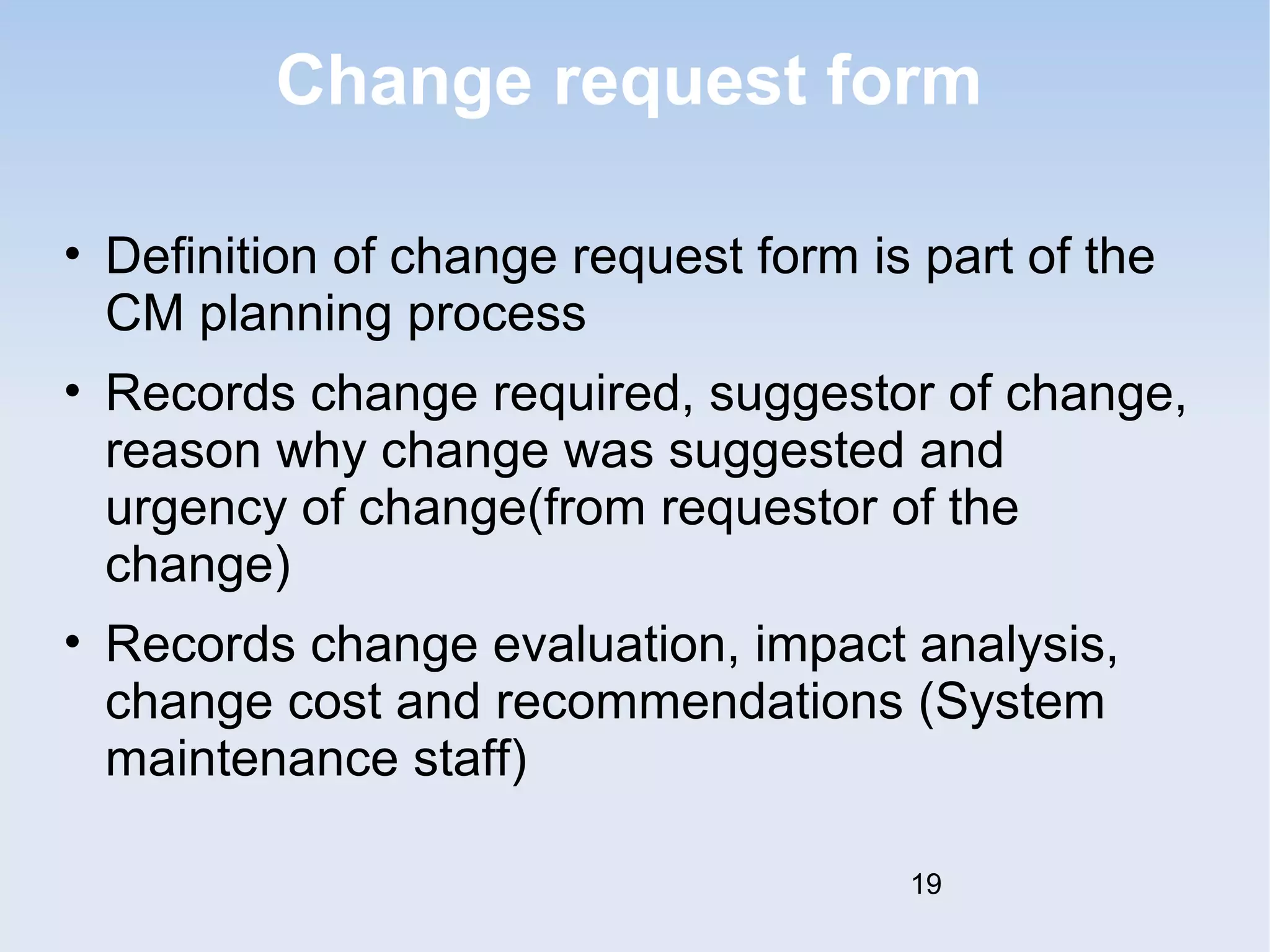
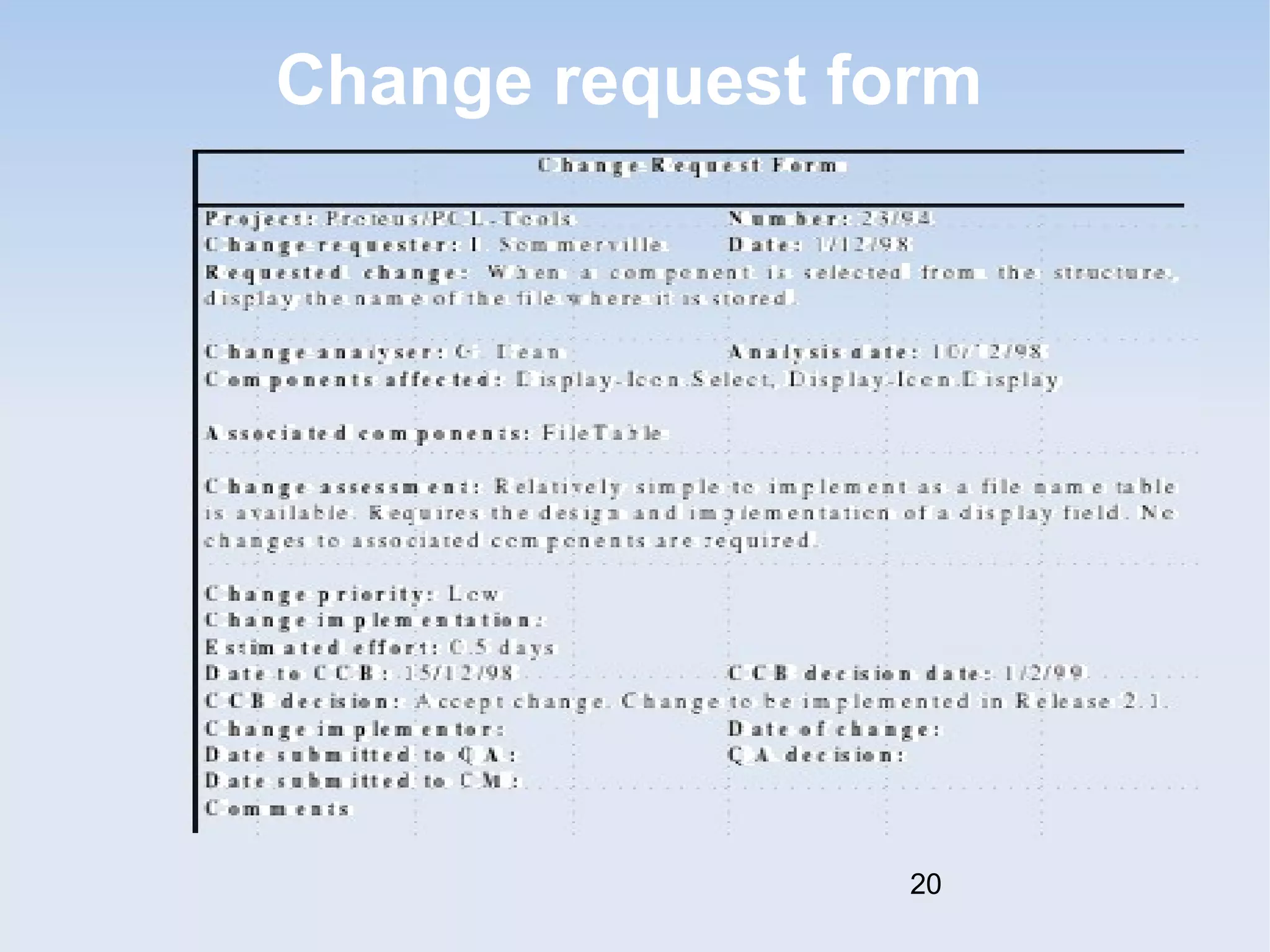
• Definition of change request form is part of the 
CM planning process 
• Records change required, suggestor of change, 
reason why change was suggested and 
urgency of change(from requestor of the 
change) 
• Records change evaluation, impact analysis, 
change cost and recommendations (System 
maintenance staff) 
19
Change request form 
20
Change tracking tools 
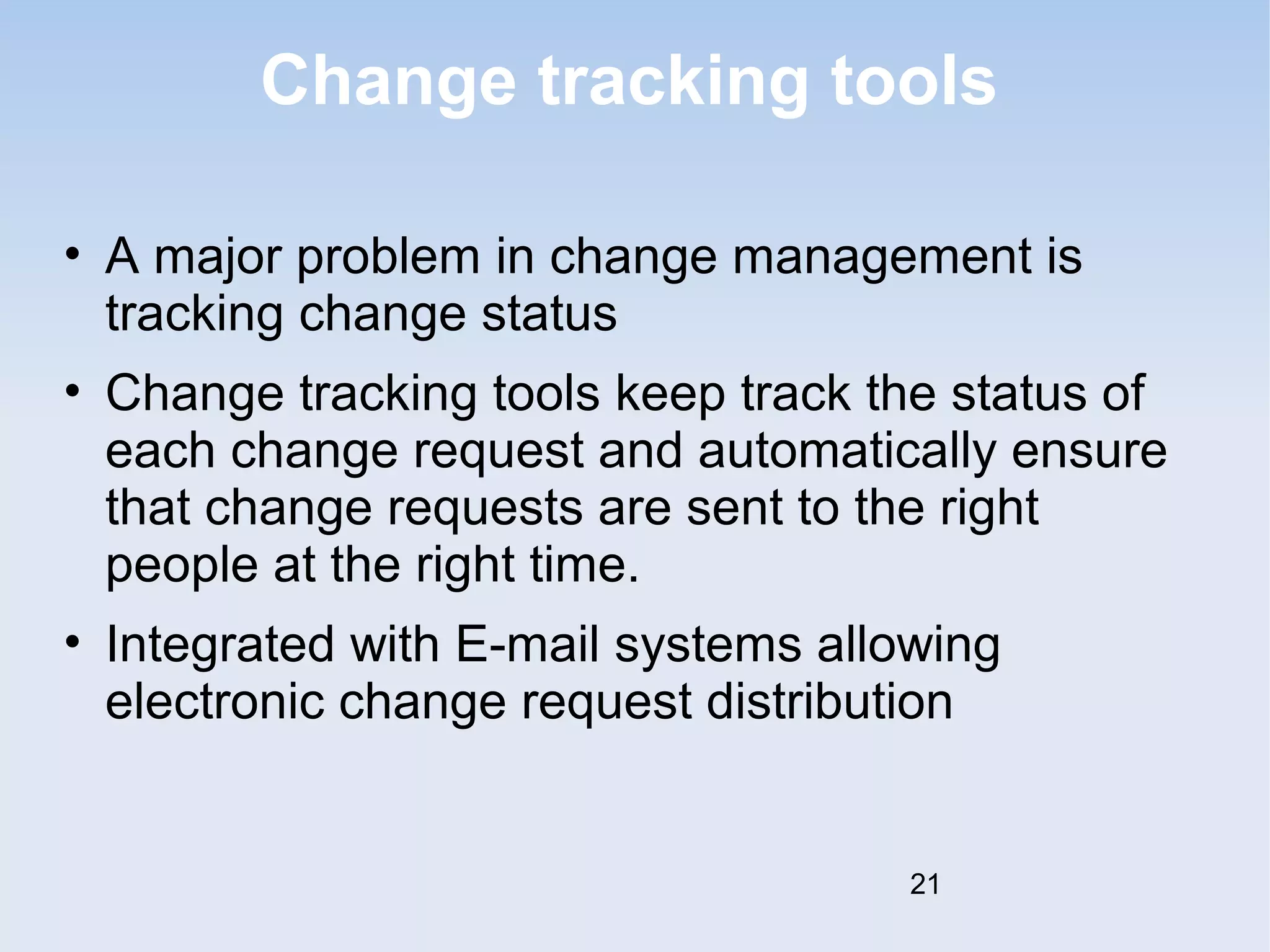
• A major problem in change management is 
tracking change status 
• Change tracking tools keep track the status of 
each change request and automatically ensure 
that change requests are sent to the right 
people at the right time. 
• Integrated with E-mail systems allowing 
electronic change request distribution 
21
Change control board 
• Changes should be reviewed by an external 
group who decide whether or not they are cost-effective 
from a strategic and organizational 
viewpoint rather than a technical viewpoint 
• Should be independent of project responsible 
for system. The group is sometimes called a 
change control board 
• May include representatives from client and 
contractor staff 
22
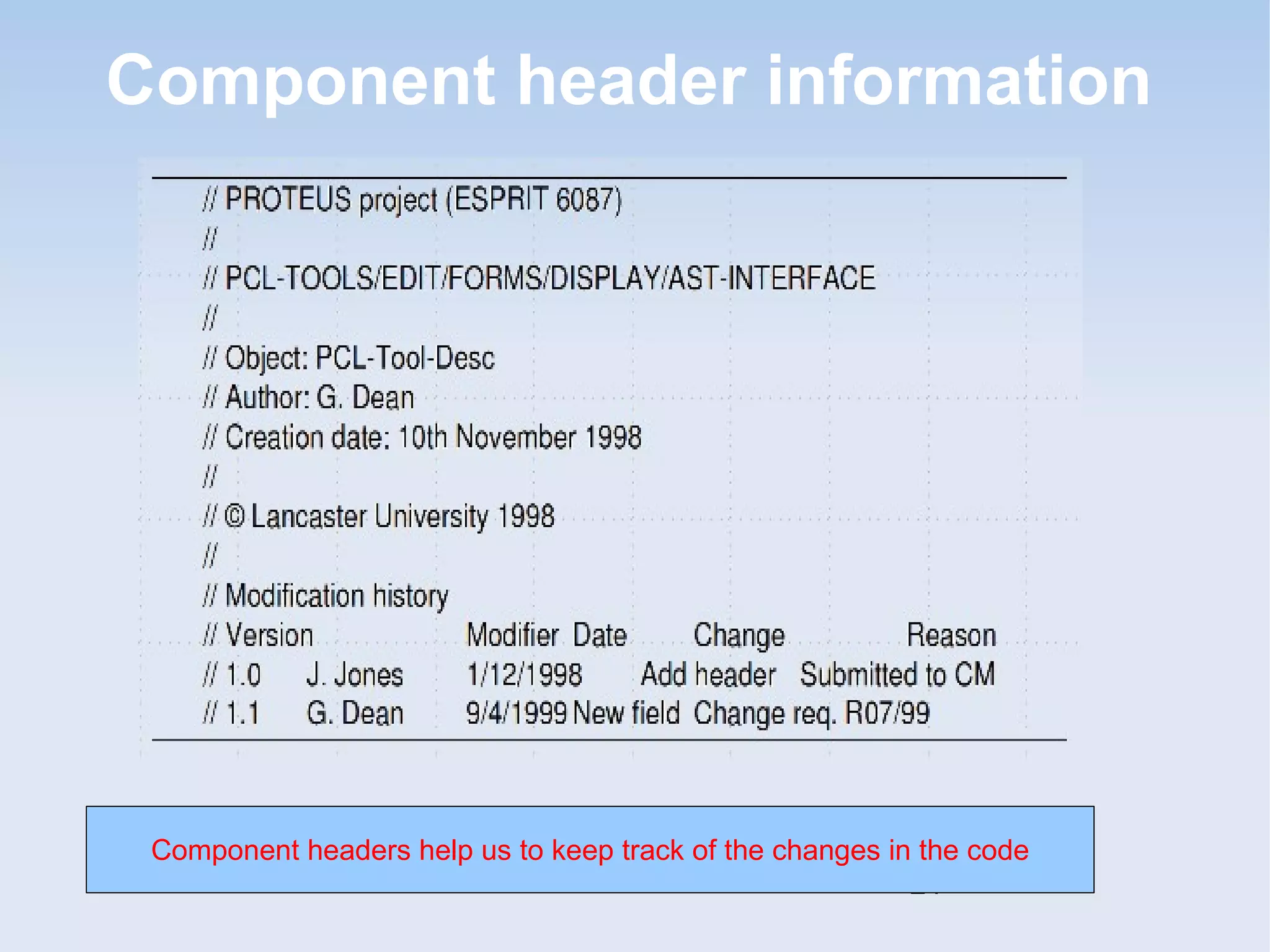
Derivation history 
• Record of changes applied to a document or 
code component 
• Should record, in outline, the change made, the 
rationale for the change, who made the change 
and when it was implemented 
• May be included as a comment in code. If a 
standard prologue style is used for the 
derivation history, tools can process this 
automatically 
23
Component header information 
Component headers help us to keep track of the changes in the code 
24
Version and release management 
• Invent [or determine] identification scheme for 
system versions 
• Plan when new system version is to be 
produced 
• Ensure that version management procedures 
and tools are properly applied 
• Plan and distribute new system releases 
25
Versions/variants/releases 
• Version An instance of a system which is 
functionally distinct in some way from other 
system instances 
• Variant An instance of a system which is 
functionally identical but non-functionally 
distinct from other instances of a system[like a 
system with different colours of 
interfaces/themes-Windows 7 Themes] 
• Release An instance of a system which is 
distributed to users outside of the development 
team 
26
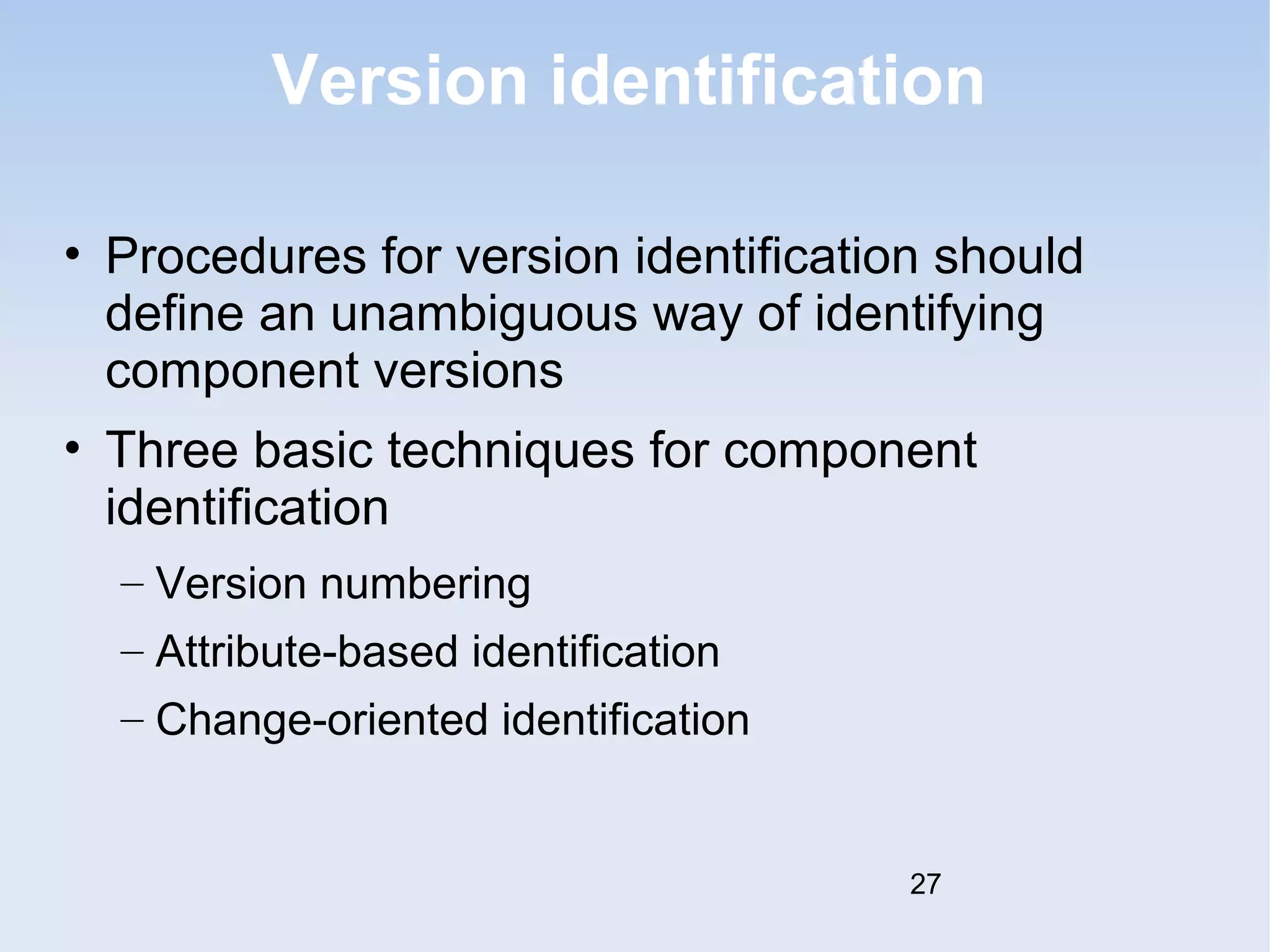
Version identification 
• Procedures for version identification should 
define an unambiguous way of identifying 
component versions 
• Three basic techniques for component 
identification 
– Version numbering 
– Attribute-based identification 
– Change-oriented identification 
27
Version numbering 
• Simple naming scheme uses a linear derivation 
e.g. V1, V1.1, V1.2, V2.1, V2.2 etc. 
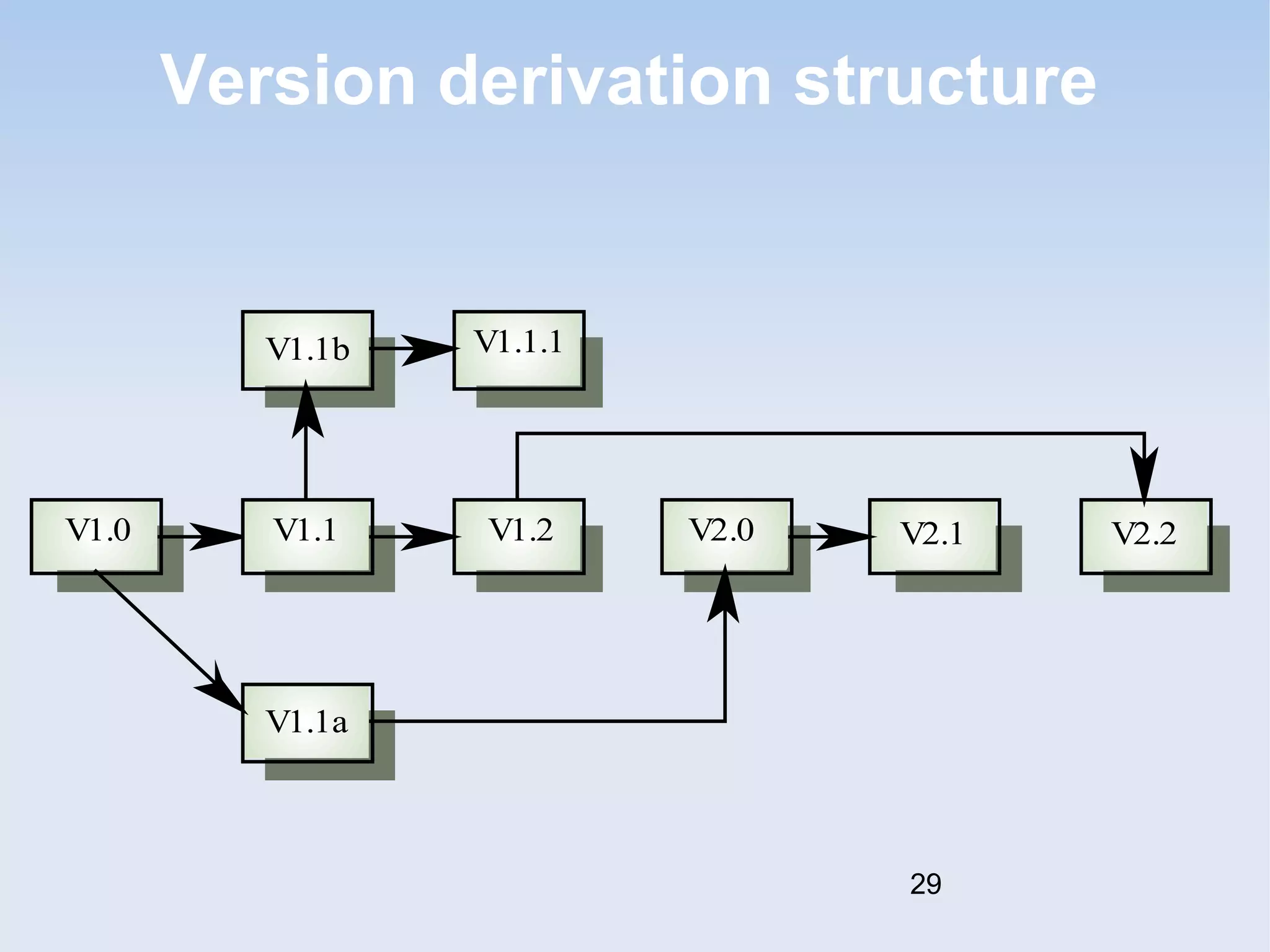
• Actual derivation structure is a tree or a 
network rather than a sequence 
• Names are not meaningful. 
• Hierarchical naming scheme may be better 
28
Version derivation structure 
V1.1b V1.1.1 
V1.0 V1.1 V1.2 V2.0 V2.1 V2.2 
V1.1a 
29
Attribute-based identification 
• Attributes can be associated with a version with 
the combination of attributes identifying that 
version 
• Examples of attributes are Date, Creator, 
Programming Language, Customer, Status etc. 
• More flexible than an explicit naming scheme 
for version retrieval; Can cause problems with 
uniqueness 
• Needs an associated name for easy reference 
30
Attribute-based queries 
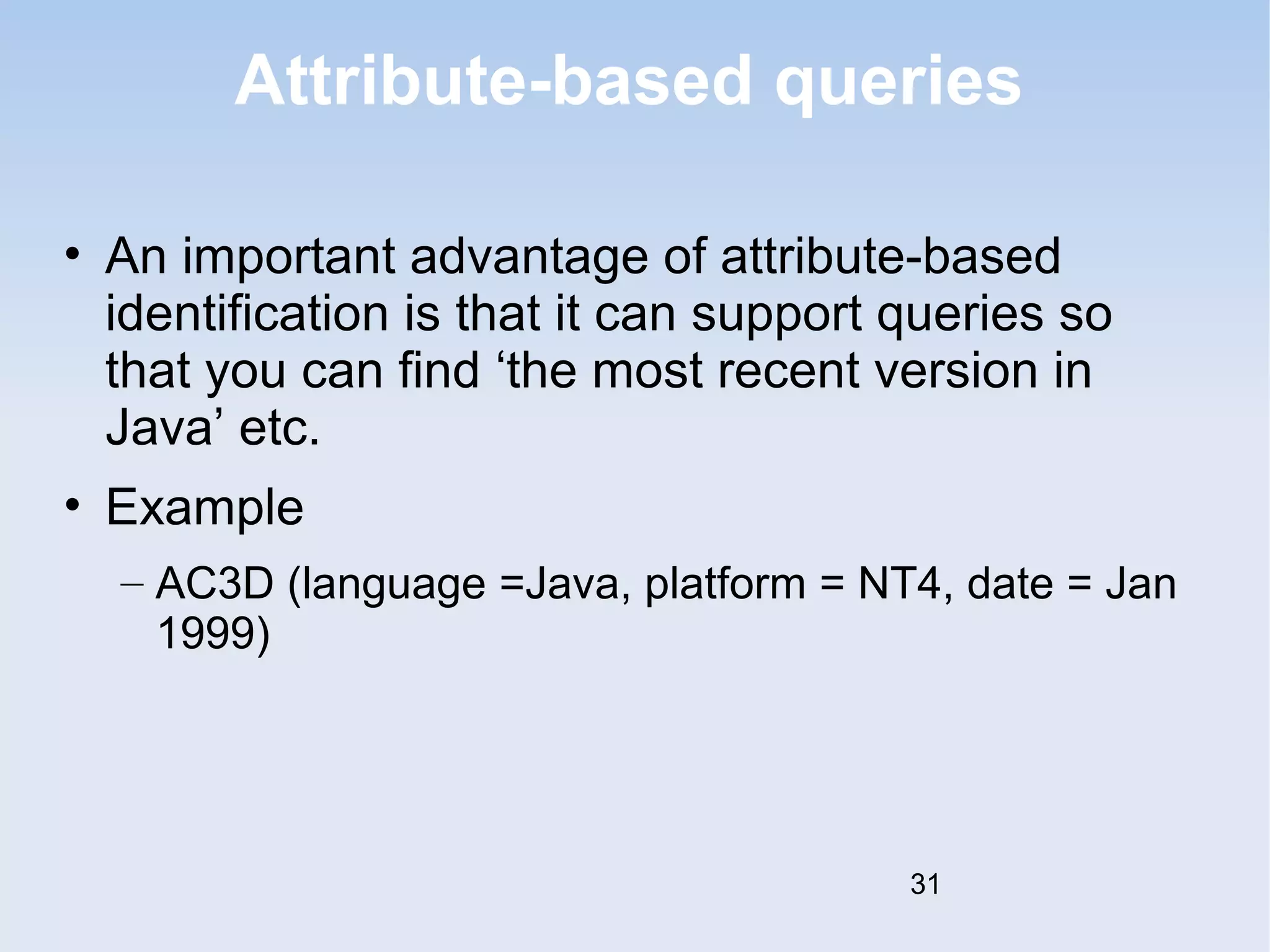
• An important advantage of attribute-based 
identification is that it can support queries so 
that you can find ‘the most recent version in 
Java’ etc. 
• Example 
– AC3D (language =Java, platform = NT4, date = Jan 
1999) 
31
Change-oriented identification 
• Integrates versions and the changes made to 
create these versions 
• Used for systems rather than components 
• Each proposed change has a change set that 
describes changes made to implement that 
change 
• Change sets are applied in sequence so that, in 
principle, a version of the system that 
incorporates an arbitrary set of changes may be 
created 
32
Release management 
• Releases must incorporate changes forced on 
the system by errors discovered by users and 
by hardware changes 
• They must also incorporate new system 
functionality 
• Release planning is concerned with when to 
issue a system version as a release 
33
System releases 
• Not just a set of executable programs 
• May also include 
– Configuration files defining how the release is configured for a particular 
installation 
– Data files needed for system operation 
– An installation program or shell script to install the system on target 
hardware 
– Electronic and paper documentation 
– Packaging and associated publicity 
• Systems are now normally released on CD-ROM or as 
downloadable installation files from the web 
34
Release problems 
• Customer may not want a new release of the 
system 
– They may be happy with their current system as the 
new version may provide unwanted functionality 
• Release management must not assume that all 
previous releases have been accepted. All files 
required for a release should be re-created 
when a new release is installed 
35
Release decision making 
• Preparing and distributing a system release is 
an expensive process 
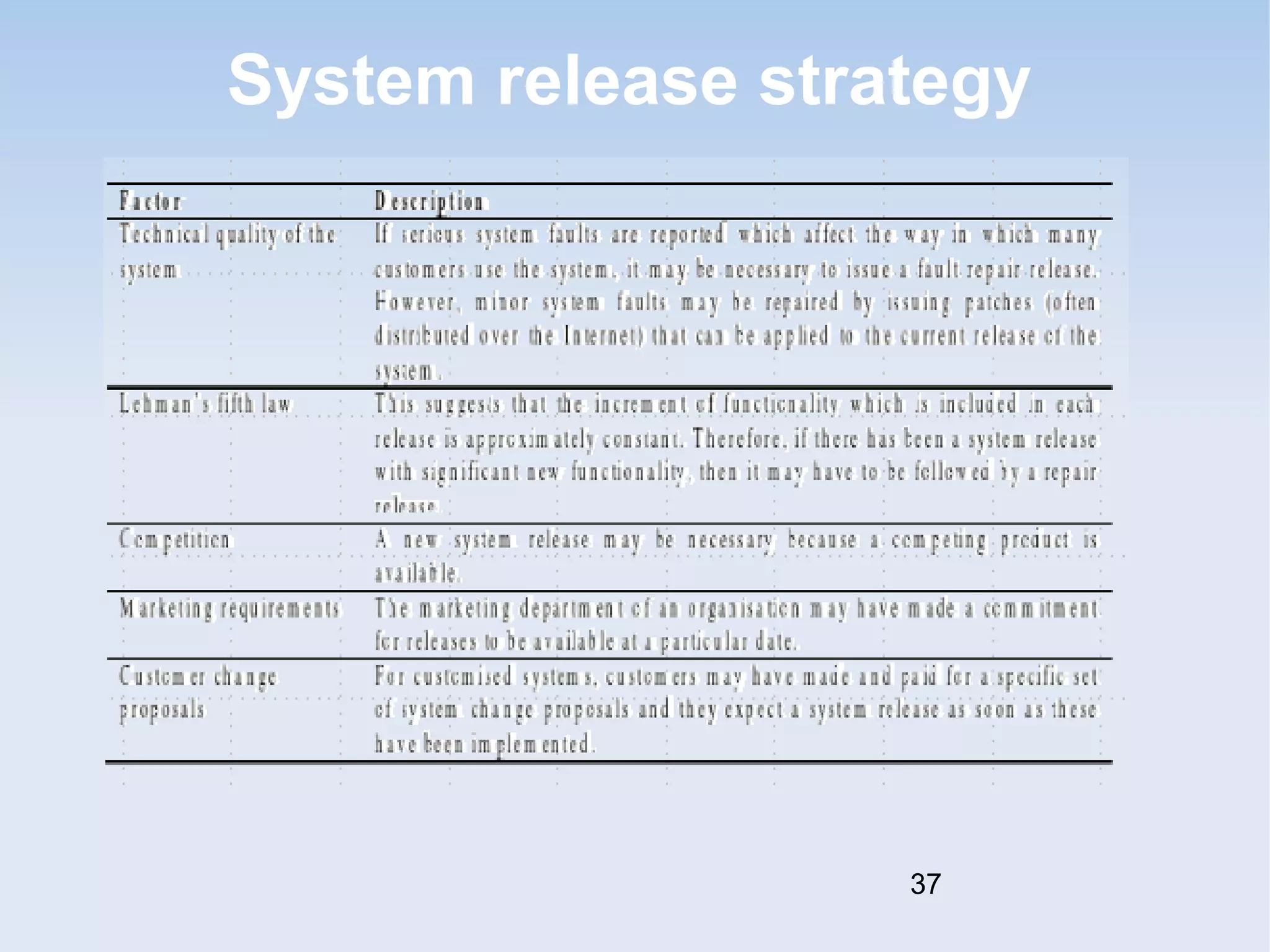
• Factors such as the technical quality of the 
system, competition, marketing requirements 
and customer change requests should all 
influence the decision of when to issue a new 
system release 
36
System release strategy 
37
Release creation 
• Release creation involves collecting all files and 
documentation required to create a system 
release 
• Configuration descriptions have to be written for 
different hardware and installation scripts have 
to be written 
• The specific release must be documented to 
record exactly what files were used to create it. 
This allows it to be re-created if necessary 
38
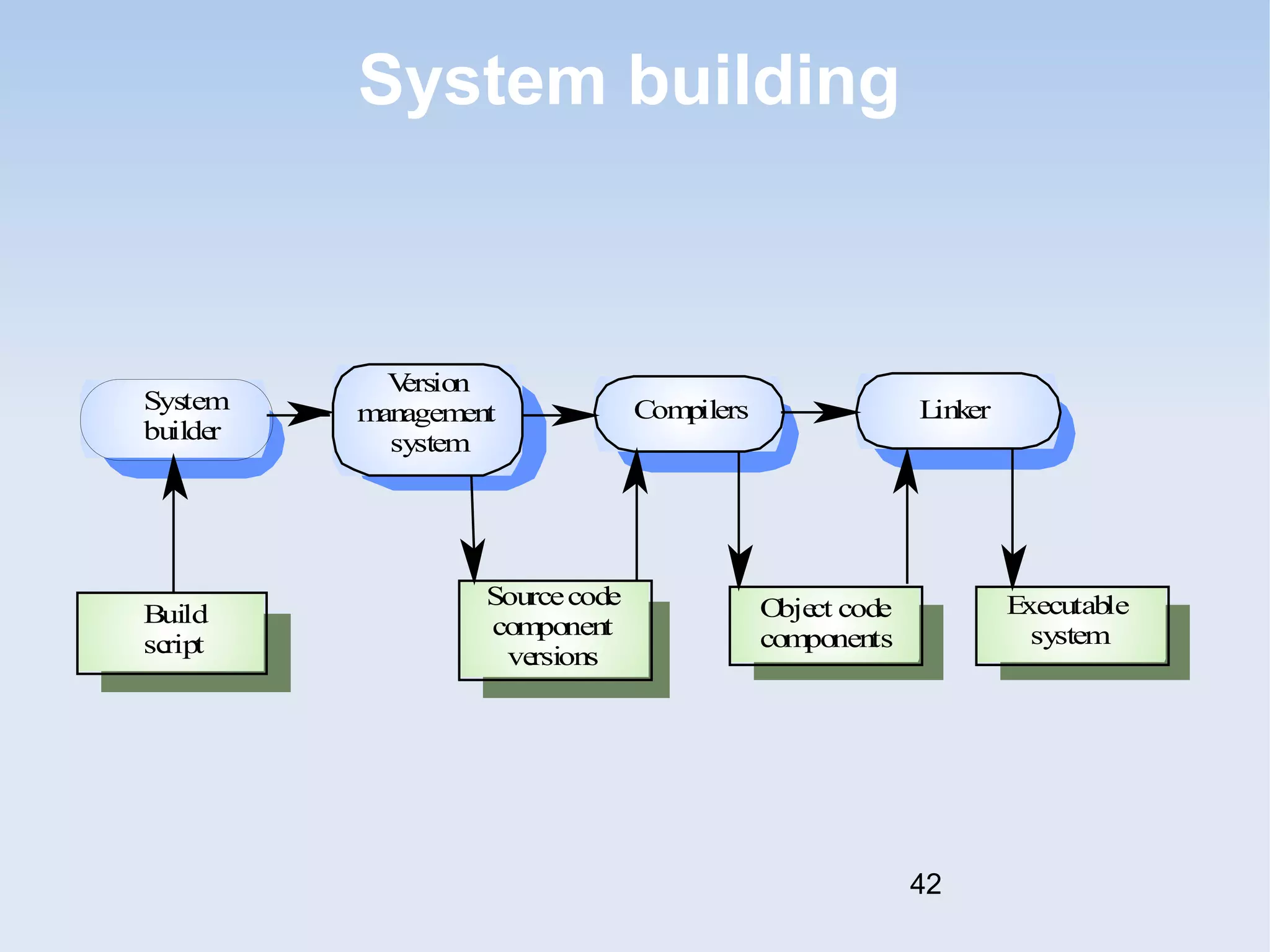
System building 
• The process of compiling and linking software 
components into an executable system 
• Different systems are built from different 
combinations of components 
• Invariably supported by automated tools that are 
driven by ‘build scripts’ 
39
System building problems 
• Do the build instructions include all required 
components? 
– When there are many hundreds of components making up 
a system, it is easy to miss one out. This should normally 
be detected by the linker 
• Is the appropriate component version 
specified? 
– A more significant problem. A system built with the wrong 
version may work initially but fail after delivery 
• Are all data files available? 
– The build should not rely on 'standard' data files. Standards 
vary from place to place 
40
System building problems 
• Are data file references within components 
correct? 
– Embedding absolute names in code almost always causes 
problems as naming conventions differ from place to place. Eg let 
the user enter file names at installation and allow the system to 
auto-generate filenames. 
• Is the system being built for the right platform 
– Sometimes must build for a specific OS version or hardware 
configuration 
• Is the right version of the compiler and other 
software tools specified? 
– Different compiler versions may actually generate different code 
and the compiled component will exhibit different behaviour 
41
System building 
Build 
script 
Sourcecode 
component 
versions 
Object code 
components 
Executable 
system 
System 
builder 
Compilers 
Version 
management 
system 
Linker 
42
System representation 
• Systems are normally represented for building 
by specifying the file name to be processed by 
building tools. Dependencies between these are 
described to the building tools 
• Mistakes can be made as users lose track of 
which objects are stored in which files 
• A system modelling language addresses this 
problem by using a logical rather than a physical 
system representation 
43
CASE tools for configuration 
management 
• CM processes are standardised and involve 
applying pre-defined procedures 
• Large amounts of data must be managed 
• CASE tool support for CM is therefore essential 
• Mature CASE tools to support configuration 
management are available ranging from stand-alone 
tools to integrated CM workbenches 
44
Change management tools 
• Change management is a procedural process 
so it can be modelled and integrated with a 
version management system 
• Change management tools 
– Form editor to support processing the change 
request forms 
– Workflow system to define who does what and to 
automate information transfer 
– Change database that manages change proposals 
and is linked to a Version Mgmt system 
45
Version management tools 
• Version and release identification 
– Systems assign identifiers automatically when a new version 
is submitted to the system 
• Storage management. 
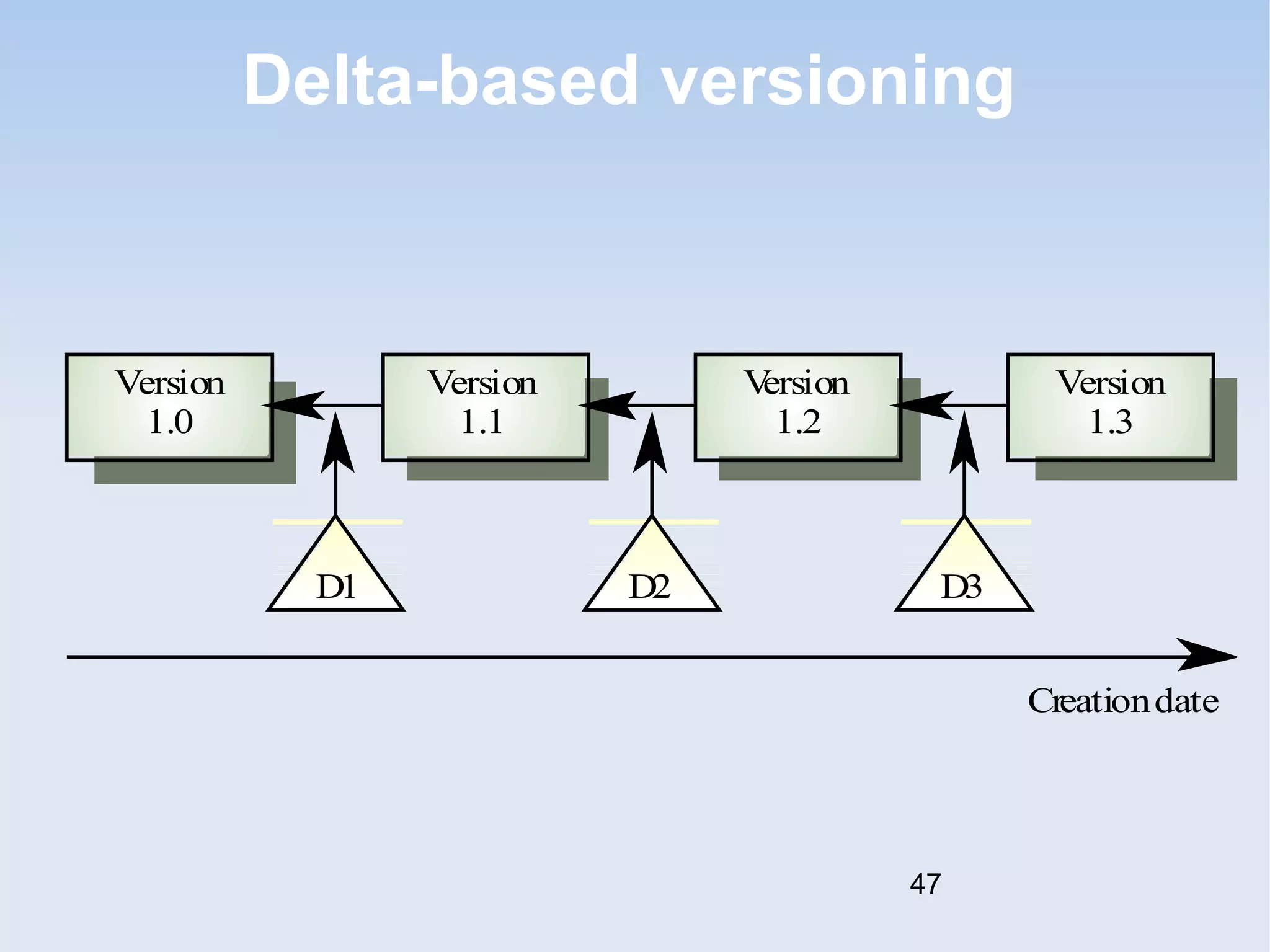
– System stores the differences between versions rather than 
all the version code- e.g GIT Version Control tool 
• Change history recording 
– Record reasons for version creation 
• Independent development 
– Only one version at a time may be checked out for change. 
Parallel working on different versions 
46
Delta-based versioning 
Version 
1.0 
Version 
1.1 
Version 
1.2 
Version 
1.3 
D1 D2 D3 
Creationdate 
47
System building 
• Building a large system is computationally 
expensive and may take several hours 
• Hundreds of files may be involved 
• System building tools may provide 
– A dependency specification language and interpreter 
– Tool selection and instantiation support 
– Distributed compilation 
– Derived object management 
48
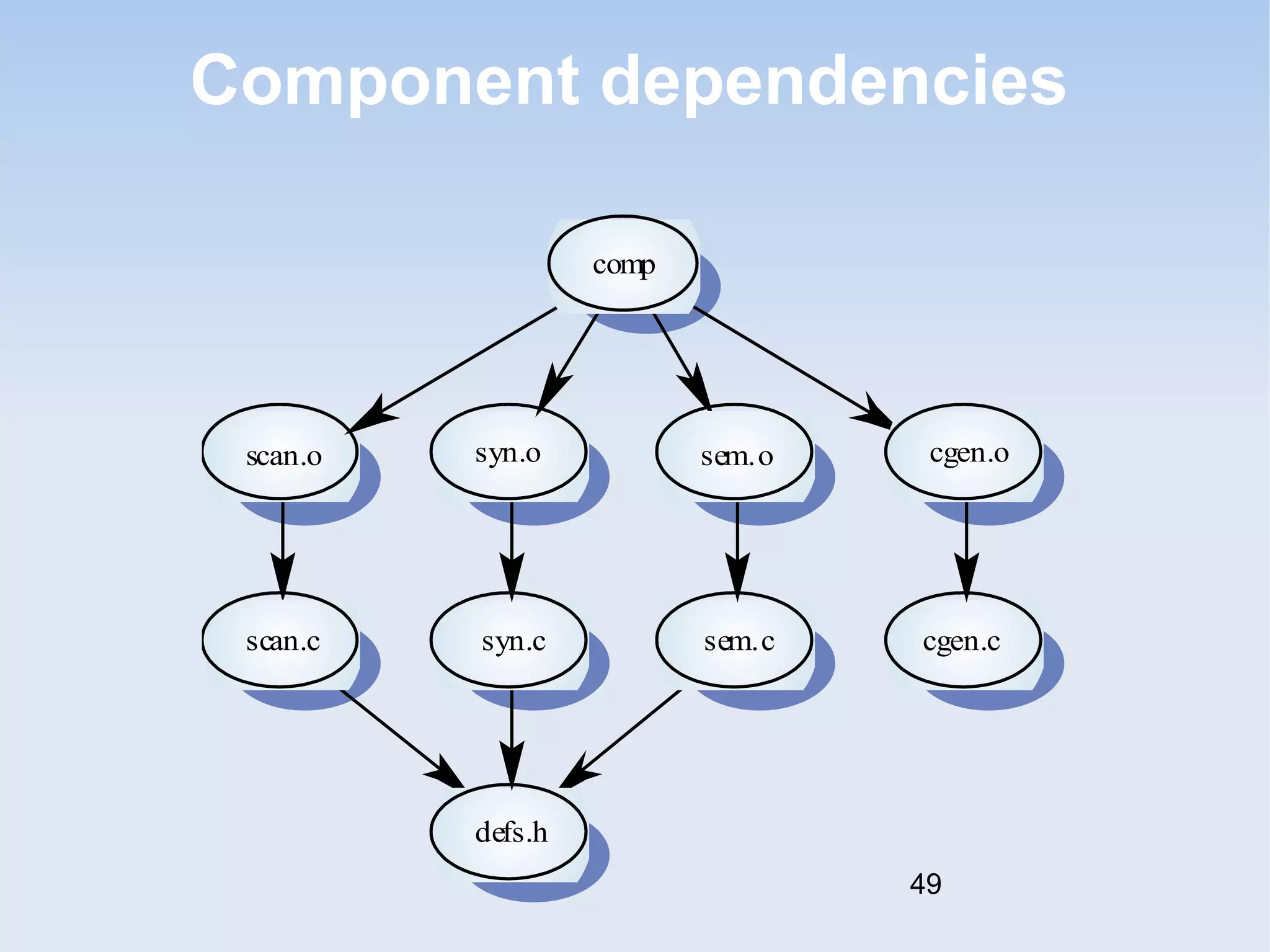
Component dependencies 
comp 
scan.o 
scan.c 
syn.o 
syn.c 
defs.h 
sem.o 
sem.c 
cgen.o 
cgen.c 
49
Key points 
• Configuration management is the management 
of system change to software products 
• A formal document naming scheme should be 
established and documents should be managed 
in a database 
• The configuration data base should record 
information about changes and change 
requests 
• A consistent scheme of version identification 
should be established using version numbers, 
attributes or change sets 
50
Key points 
• System releases include executable code, data, 
configuration files and documentation 
• System building involves assembling 
components into a system 
• CASE tools are available to support all CM 
activities 
• CASE tools may be stand-alone tools or may be 
integrated systems which integrate support for 
version management, system building and 
change management 
51

Bse 3105 lecture 6-configuration management

  • 1.
    Configuration management Managingthe products of system change Based on Chapter 29 of Somerville, 6th Edition 1
  • 2.
    Objectives • Toexplain the importance of software configuration management (CM) • To describe key CM activities namely CM planning, change management, version management and system building • To discuss the use of CASE tools to support configuration management processes 2
  • 3.
    Topics covered •Configuration management planning • Change management • Version and release management • System building • CASE tools for configuration management 3
  • 4.
    Configuration management •New versions of software systems are created as they change – For different machines/OS – Offering different functionality – Tailored for particular user requirements • Configuration management is concerned with managing evolving software systems – System change is a team activity – CM aims to control the costs and effort involved in making changes to a system 4
  • 5.
    Configuration management •Involves the development and application of procedures and standards to manage an evolving software product • May be seen as part of a more general quality management process • When released to CM, software systems are sometimes called baselines as they are a starting point for further development 5
  • 6.
    CM standards •CM should always be based on a set of standards which are applied within an organisation • Standards should define how items are identified, how changes are controlled and how new versions are managed • Standards may be based on external CM standards (e.g. IEEE standard for CM) • Existing standards are based on a waterfall process model - new standards are needed for evolutionary development 6
  • 7.
    Concurrent development and testing • A time for delivery of system components is agreed • A new version of a system is built from these components by compiling and linking them • This new version is delivered for testing using pre-defined tests • Faults that are discovered during testing are documented and returned to the system developers 7
  • 8.
    Daily system building • It is easier to find problems that stem from component interactions early in the process • This encourages thorough unit testing - developers are under pressure not to ‘break the build’ • A stringent change management process is required to keep track of problems that have been discovered and repaired 8
  • 9.
    Configuration management planning • All products of the software process may have to be managed – Specifications – Designs – Programs – Test data – User manuals • Thousands of separate documents are generated for a large software system 9
  • 10.
    CM planning •Starts during the early phases of the project • Must define the documents or document classes which are to be managed (Formal documents) • Documents which might be required for future system maintenance should be identified and specified as managed documents 10
  • 11.
    The CM plan • Defines the types of documents to be managed and a document naming scheme • Defines who takes responsibility for the CM procedures and creation of baselines • Defines policies for change control and version management • Defines the CM records which must be maintained 11
  • 12.
    The CM plan • Describes the tools which should be used to assist the CM process and any limitations on their use • Defines the process of tool use • Defines the CM database used to record configuration information • May include information such as the CM of external software, process auditing, etc. 12
  • 13.
    Configuration item identification • Large projects typically produce thousands of documents which must be uniquely identified • Some of these documents must be maintained for the lifetime of the software • Document naming scheme should be defined so that related documents have related names. • A hierarchical scheme with multi-level names is probably the most flexible approach 13
  • 14.
    Configuration hierarchy PCL-TOOLS COMPILE EDIT MAKE-GEN STRUCTURES BIND FORM HELP DISPLAY QUERY FORM-SPECS AST-INTERFACE FORM-IO OBJECTS CODE TESTS 14
  • 15.
    The configuration database • All CM information should be maintained in a configuration database • This should allow queries about configurations to be answered – Who has a particular system version? – What platform is required for a particular version? – What versions are affected by a change to component X? – How many reported faults in version T? • The CM database should preferably be linked to the software being managed 15
  • 16.
    CM database implementation • May be part of an integrated environment to support software development. The CM database and the managed documents are all maintained on the same system • CASE tools may be integrated with this so that there is a close relationship between the CASE tools and the CM tools • More commonly, the CM database is maintained separately as this is cheaper and more flexible [i.e the CM tool doesn't have to be included 16 in the CASE tool]
  • 17.
    Change management •Software systems are subject to continual change requests – From users – From developers – From market forces • Change management is concerned with keeping managing of these changes and ensuring that they are implemented in the most cost-effective way 17
  • 18.
    The change managementprocess Request change by completing a change request form Analyze change request if change is valid then Assess how change might be implemented Assess change cost Submit request to change control board if change is accepted then rep eat make changes to software submit changed software for quality approval until software quality is adequate create new system version else reject change request else reject change request 18
  • 19.
    Change request form • Definition of change request form is part of the CM planning process • Records change required, suggestor of change, reason why change was suggested and urgency of change(from requestor of the change) • Records change evaluation, impact analysis, change cost and recommendations (System maintenance staff) 19
  • 20.
  • 21.
    Change tracking tools • A major problem in change management is tracking change status • Change tracking tools keep track the status of each change request and automatically ensure that change requests are sent to the right people at the right time. • Integrated with E-mail systems allowing electronic change request distribution 21
  • 22.
    Change control board • Changes should be reviewed by an external group who decide whether or not they are cost-effective from a strategic and organizational viewpoint rather than a technical viewpoint • Should be independent of project responsible for system. The group is sometimes called a change control board • May include representatives from client and contractor staff 22
  • 23.
    Derivation history •Record of changes applied to a document or code component • Should record, in outline, the change made, the rationale for the change, who made the change and when it was implemented • May be included as a comment in code. If a standard prologue style is used for the derivation history, tools can process this automatically 23
  • 24.
    Component header information Component headers help us to keep track of the changes in the code 24
  • 25.
    Version and releasemanagement • Invent [or determine] identification scheme for system versions • Plan when new system version is to be produced • Ensure that version management procedures and tools are properly applied • Plan and distribute new system releases 25
  • 26.
    Versions/variants/releases • VersionAn instance of a system which is functionally distinct in some way from other system instances • Variant An instance of a system which is functionally identical but non-functionally distinct from other instances of a system[like a system with different colours of interfaces/themes-Windows 7 Themes] • Release An instance of a system which is distributed to users outside of the development team 26
  • 27.
    Version identification •Procedures for version identification should define an unambiguous way of identifying component versions • Three basic techniques for component identification – Version numbering – Attribute-based identification – Change-oriented identification 27
  • 28.
    Version numbering •Simple naming scheme uses a linear derivation e.g. V1, V1.1, V1.2, V2.1, V2.2 etc. • Actual derivation structure is a tree or a network rather than a sequence • Names are not meaningful. • Hierarchical naming scheme may be better 28
  • 29.
    Version derivation structure V1.1b V1.1.1 V1.0 V1.1 V1.2 V2.0 V2.1 V2.2 V1.1a 29
  • 30.
    Attribute-based identification •Attributes can be associated with a version with the combination of attributes identifying that version • Examples of attributes are Date, Creator, Programming Language, Customer, Status etc. • More flexible than an explicit naming scheme for version retrieval; Can cause problems with uniqueness • Needs an associated name for easy reference 30
  • 31.
    Attribute-based queries •An important advantage of attribute-based identification is that it can support queries so that you can find ‘the most recent version in Java’ etc. • Example – AC3D (language =Java, platform = NT4, date = Jan 1999) 31
  • 32.
    Change-oriented identification •Integrates versions and the changes made to create these versions • Used for systems rather than components • Each proposed change has a change set that describes changes made to implement that change • Change sets are applied in sequence so that, in principle, a version of the system that incorporates an arbitrary set of changes may be created 32
  • 33.
    Release management •Releases must incorporate changes forced on the system by errors discovered by users and by hardware changes • They must also incorporate new system functionality • Release planning is concerned with when to issue a system version as a release 33
  • 34.
    System releases •Not just a set of executable programs • May also include – Configuration files defining how the release is configured for a particular installation – Data files needed for system operation – An installation program or shell script to install the system on target hardware – Electronic and paper documentation – Packaging and associated publicity • Systems are now normally released on CD-ROM or as downloadable installation files from the web 34
  • 35.
    Release problems •Customer may not want a new release of the system – They may be happy with their current system as the new version may provide unwanted functionality • Release management must not assume that all previous releases have been accepted. All files required for a release should be re-created when a new release is installed 35
  • 36.
    Release decision making • Preparing and distributing a system release is an expensive process • Factors such as the technical quality of the system, competition, marketing requirements and customer change requests should all influence the decision of when to issue a new system release 36
  • 37.
  • 38.
    Release creation •Release creation involves collecting all files and documentation required to create a system release • Configuration descriptions have to be written for different hardware and installation scripts have to be written • The specific release must be documented to record exactly what files were used to create it. This allows it to be re-created if necessary 38
  • 39.
    System building •The process of compiling and linking software components into an executable system • Different systems are built from different combinations of components • Invariably supported by automated tools that are driven by ‘build scripts’ 39
  • 40.
    System building problems • Do the build instructions include all required components? – When there are many hundreds of components making up a system, it is easy to miss one out. This should normally be detected by the linker • Is the appropriate component version specified? – A more significant problem. A system built with the wrong version may work initially but fail after delivery • Are all data files available? – The build should not rely on 'standard' data files. Standards vary from place to place 40
  • 41.
    System building problems • Are data file references within components correct? – Embedding absolute names in code almost always causes problems as naming conventions differ from place to place. Eg let the user enter file names at installation and allow the system to auto-generate filenames. • Is the system being built for the right platform – Sometimes must build for a specific OS version or hardware configuration • Is the right version of the compiler and other software tools specified? – Different compiler versions may actually generate different code and the compiled component will exhibit different behaviour 41
  • 42.
    System building Build script Sourcecode component versions Object code components Executable system System builder Compilers Version management system Linker 42
  • 43.
    System representation •Systems are normally represented for building by specifying the file name to be processed by building tools. Dependencies between these are described to the building tools • Mistakes can be made as users lose track of which objects are stored in which files • A system modelling language addresses this problem by using a logical rather than a physical system representation 43
  • 44.
    CASE tools forconfiguration management • CM processes are standardised and involve applying pre-defined procedures • Large amounts of data must be managed • CASE tool support for CM is therefore essential • Mature CASE tools to support configuration management are available ranging from stand-alone tools to integrated CM workbenches 44
  • 45.
    Change management tools • Change management is a procedural process so it can be modelled and integrated with a version management system • Change management tools – Form editor to support processing the change request forms – Workflow system to define who does what and to automate information transfer – Change database that manages change proposals and is linked to a Version Mgmt system 45
  • 46.
    Version management tools • Version and release identification – Systems assign identifiers automatically when a new version is submitted to the system • Storage management. – System stores the differences between versions rather than all the version code- e.g GIT Version Control tool • Change history recording – Record reasons for version creation • Independent development – Only one version at a time may be checked out for change. Parallel working on different versions 46
  • 47.
    Delta-based versioning Version 1.0 Version 1.1 Version 1.2 Version 1.3 D1 D2 D3 Creationdate 47
  • 48.
    System building •Building a large system is computationally expensive and may take several hours • Hundreds of files may be involved • System building tools may provide – A dependency specification language and interpreter – Tool selection and instantiation support – Distributed compilation – Derived object management 48
  • 49.
    Component dependencies comp scan.o scan.c syn.o syn.c defs.h sem.o sem.c cgen.o cgen.c 49
  • 50.
    Key points •Configuration management is the management of system change to software products • A formal document naming scheme should be established and documents should be managed in a database • The configuration data base should record information about changes and change requests • A consistent scheme of version identification should be established using version numbers, attributes or change sets 50
  • 51.
    Key points •System releases include executable code, data, configuration files and documentation • System building involves assembling components into a system • CASE tools are available to support all CM activities • CASE tools may be stand-alone tools or may be integrated systems which integrate support for version management, system building and change management 51