Software quality infrastructure
components
•
•
•
•
•

Procedures and work instructions.
Quality support devices.
Staff SQA training and certification activities.
Prevention and corrective actions.
Documentation and quality records control.
Procedures and work instructions
• The need for SQA procedures.
• Procedures and procedure manuals.
• Work instructions and work instruction
manuals.
• The organizational framework for preparing,
implementing and updating procedures and
work instructions.
Need for SQA procedures
• Performance of tasks, processes or activities in
the most effective and efficient way without
deviating from quality requirements.
• Effective and efficient communication
between the separate staffs involved in the
development and maintenance of software
systems.
• Simplified coordination between tasks and
activities performed by the various bodies of
the organization.
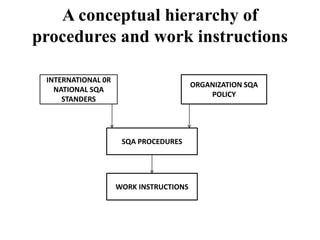
A conceptual hierarchy of
procedures and work instructions
INTERNATIONAL 0R
NATIONAL SQA
STANDERS

ORGANIZATION SQA
POLICY

SQA PROCEDURES

WORK INSTRUCTIONS
Procedures and procedures
manuals
Procedures supply all the details needed to carry
out a task according to the prescribed method
for fulfilling that task’s function.
Five W’s: issues resolved by procedures
What activities have to be performed?
How should each activity be performed?
When should the activity be performed?
Where should the activity be performed?
Who should perform the activity?
Table of contents for procedures
•
•
•
•
•
•
•
•
•

Introduction
Purpose
Terms and abbreviations
Applicable documents
Method
Quality records and documentation
Reporting and follow-up
Responsibility for implementation
List of appendices
( sections included only if applicable)
The procedures manual
• The collection of all SQA procedures is usually
referred to us the SQA procedures manual.
Content of procedure manual:
• Types of software development and maintenance
activities.
• Range of activities belonging to each activity
type.
• Range of customers and suppliers.
Work instructions and work
instruction manuals
• Work instructions deal with the application of
procedures, adopted to the requirements of a
specific project team, customer, or other
relevant party.
• One can add, change or cancel work
instructions without altering the respective
procedures.
SQA work instructions subjects example
Departmental work instruction
 Audit process for new s/w development subcontractors
 Priorities for handling corrective maintenance task
 Annual evaluation s/w development subcontractors
 On-the-job instruction and follow-up for new team
members
 Design documentation templates and their applications
 C++(or other language) programming instructions.
Project management work instruction:
Coordination and cooperation with the
customer.
Weekly progress reporting by team leaders.
Special design report templates and their
application in the project.
Follow-up of beta site reporting .
Monthly progress reporting to the customer.
Coordination of installation and customer team
instructions.
Procedure and work instructions:
preparation, implementation and
updating
On going activities:
1.instance
2.Preparation of the procedures
3.Implementation
4.Regular updates
Staff training and certifications
• Explain the main objectives of training and
certification
• Discuss what is needed to prepare a training
and updating program
• List the main components of a certification
program
• Explain the objectives of follow-up of trained
and certified staff performance and the main
sources of the follow-up data.
Objectives
• To develop the knowledge and skills new staff need to perform
software development and maintenance tasks at an adequate
level of efficiency and effectiveness.
• To assure conformity to the organization’s standards for
software products by transmitting style and structure
procedure together with work instruction.
• To update the knowledge and skills of veteran staff in response
to developments in the organization.
• To transmit knowledge of SQA procedures.
• To assure that candidates for key s/w development and
maintenance positions are adequately qualified.
Process
Determine the professional knowledge
position

requirements for each

Determine the professional training and updating needs
Plan the professional training program
Plan the professional updating program
Define positions requiring certification
Plan certification processes
Deliver training, updating and certification programs
Perform follow-up of trained and certified staff.
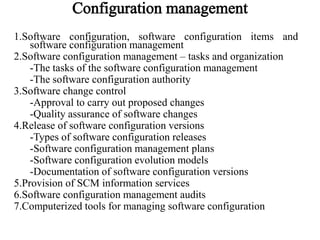
1.Software configuration, software configuration items and
software configuration management
2.Software configuration management – tasks and organization
-The tasks of the software configuration management
-The software configuration authority
3.Software change control
-Approval to carry out proposed changes
-Quality assurance of software changes
4.Release of software configuration versions
-Types of software configuration releases
-Software configuration management plans
-Software configuration evolution models
-Documentation of software configuration versions
5.Provision of SCM information services
6.Software configuration management audits
7.Computerized tools for managing software configuration
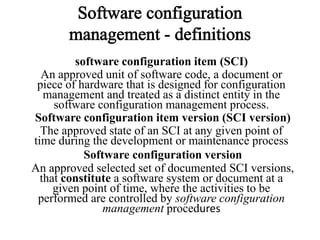
software configuration item (SCI)
An approved unit of software code, a document or
piece of hardware that is designed for configuration
management and treated as a distinct entity in the
software configuration management process.
Software configuration item version (SCI version)
The approved state of an SCI at any given point of
time during the development or maintenance process
Software configuration version
An approved selected set of documented SCI versions,
that constitute a software system or document at a
given point of time, where the activities to be
performed are controlled by software configuration
management procedures
Design documents
Software code
* Source code
* Object code
* Prototype software
Data files
* Test cases and test scripts
* Parameters, codes, etc.
Software development tools (the versions applied
in the development and maintenance stages)
* Compilers and debuggers
* Application generators
* CASE tools
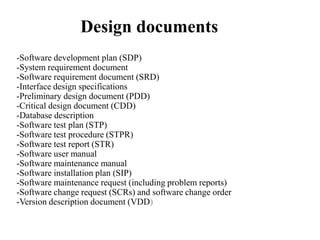
Design documents
-Software development plan (SDP)
-System requirement document
-Software requirement document (SRD)
-Interface design specifications
-Preliminary design document (PDD)
-Critical design document (CDD)
-Database description
-Software test plan (STP)
-Software test procedure (STPR)
-Software test report (STR)
-Software user manual
-Software maintenance manual
-Software installation plan (SIP)
-Software maintenance request (including problem reports)
-Software change request (SCRs) and software change order
-Version description document (VDD)
An SQA component responsible for applying
(computerized
and
non-computerized)
technical tools and administrative procedures
that enable completion of the tasks required
to maintain SCIs and software configuration
versions
-Control software change
-Release
of
SCI
and
software
configuration versions
-Provision of SCM information services
-Verification of compliance to SCM
procedures
•Expected contribution of the proposed
change
•Urgency of the change
•Effect of the proposed change on project
timetables, level of service, etc
•Efforts required in making the change
operational
•Required software quality assurance efforts
•Estimated required professional resources
and cost of performing the change
1.Defective SCIs
2.Special features demanded by new customers
3.Team’s
initiatives
to
introduce
SCI
improvements
The plan includes:
* A list of scheduled baseline version releases.
*A list of SCIs (documents, code, etc.) to be
included in each version.
*A table identifying the relationship of
software development project plans and
maintenance plans to scheduled releases of new
SCIs or SCI versions.
*A list of assumptions about the resources
required to perform the SCMP.
*Estimates of the human resources and budget
needed to perform the SCMP.
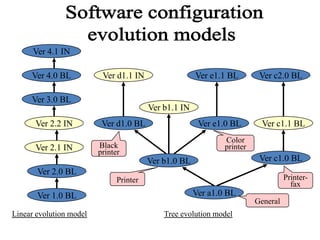
Ver 4.1 IN
Ver 4.0 BL

Ver d1.1 IN

Ver 3.0 BL
Ver 2.2 IN
Ver 2.1 IN

Ver e1.1 BL

Ver c2.0 BL

Ver e1.0 BL

Ver c1.1 BL

Ver b1.1 IN
Ver d1.0 BL

Color
printer

Black
printer

Ver c1.0 BL

Ver b1.0 BL
Ver 2.0 BL

Printerfax

Printer

Ver 1.0 BL
Linear evolution model

Ver a1.0 BL
General
Tree evolution model
a. Identification and installations
* Release version and revision number,
including date
* List of installations where the release was
installed
b. Configuration of the released version
* List of SCIs (including SCI’s version) in the
released
software version
* List of hardware configuration items required
for operating the specified version
* List of interfacing software and hardware
systems
* Installation instructions for the new release
C. Changes in the new version
* Previous software configuration version
* List of SCIs that have been changed, new
SCIs, and deleted SCIs
* Short description of introduced changes.
* Operational and other implications of
changes in the release.
D. Further development issues
* List of software system problems that
have not been solved in the new version.
* List of delayed SCRs and proposals for
development of the software system
Information related to software change control:
*
*

Change request status information
Change order progress information

Information about SCIs and software configuration versions:
*
*
*
*

*
*
*

Accurate copies of SCI versions (code SCIs, document
SCIs, etc.) and entire software configuration versions.
Full reports of changes between successive releases
(versions and/or revisions) of code SCIs and between
successive releases of other types of SCIs.
Copies of SCI version documentation and software
configuration version documentation (VDDs).
Detailed version and revision history for SCIs and
software configurations.
Progress information about planned versions and releases
Information correlated about versions installed at a given
site and about the site itself.
List where a given software configuration version is
installed.
• Controlled
records

documents

and

quality

• Definitions and objectives
• Documentation control procedures
• The controlled documents list

• Controlled document preparation
• Issues of controlled document approval
• Issues of controlled document storage
and retrieval
Controlled document
A document that is currently vital or may become vital
for the development and maintenance of software
systems as well as for the management of current and
future relationships with the customer. Hence, its
preparation, storage, retrieval and disposal are
controlled by documentation procedures.
Quality record
A quality record is a special type of controlled
document. It is a customer-targeted document that
may be required to demonstrate full compliance with
customer requirements and effective operation of the
software quality assurance system throughout the
development and maintenance processes
•To assure the quality of the document.
•To assure its technical completeness and
compliance with document structure procedures
and instructions
•To assure the future availability of documents
that may be required for software system
maintenance, or responses to the customer’s
future complaints.
•To support investigation of software failure
causes as part of corrective and other actions.
•
•
•
•

Definition of the list of the document types
and updates to be controlled (some
classified as quality records).
Document preparation requirements.
Document approval requirements.
Document storage and retrieval
requirements, including controlled storage
of document versions,
revisions and disposal, document security.
• Deciding which document type be
categorized as a controlled document
and which controlled document types
be classified as quality record.
• Deciding about the adequate level of
control for each controlled document
type.
• Following up of compliance with the
controlled document types list.
• Analyzing follow-up findings and
initiating the required updates,
changes, removals and additions to
the controlled documents types list

SQA - chapter 13 (Software Quality Infrastructure)

  • 1.
    Software quality infrastructure components • • • • • Proceduresand work instructions. Quality support devices. Staff SQA training and certification activities. Prevention and corrective actions. Documentation and quality records control.
  • 2.
    Procedures and workinstructions • The need for SQA procedures. • Procedures and procedure manuals. • Work instructions and work instruction manuals. • The organizational framework for preparing, implementing and updating procedures and work instructions.
  • 3.
    Need for SQAprocedures • Performance of tasks, processes or activities in the most effective and efficient way without deviating from quality requirements. • Effective and efficient communication between the separate staffs involved in the development and maintenance of software systems. • Simplified coordination between tasks and activities performed by the various bodies of the organization.
  • 4.
    A conceptual hierarchyof procedures and work instructions INTERNATIONAL 0R NATIONAL SQA STANDERS ORGANIZATION SQA POLICY SQA PROCEDURES WORK INSTRUCTIONS
  • 5.
    Procedures and procedures manuals Proceduressupply all the details needed to carry out a task according to the prescribed method for fulfilling that task’s function. Five W’s: issues resolved by procedures What activities have to be performed? How should each activity be performed? When should the activity be performed? Where should the activity be performed? Who should perform the activity?
  • 6.
    Table of contentsfor procedures • • • • • • • • • Introduction Purpose Terms and abbreviations Applicable documents Method Quality records and documentation Reporting and follow-up Responsibility for implementation List of appendices ( sections included only if applicable)
  • 7.
    The procedures manual •The collection of all SQA procedures is usually referred to us the SQA procedures manual. Content of procedure manual: • Types of software development and maintenance activities. • Range of activities belonging to each activity type. • Range of customers and suppliers.
  • 8.
    Work instructions andwork instruction manuals • Work instructions deal with the application of procedures, adopted to the requirements of a specific project team, customer, or other relevant party. • One can add, change or cancel work instructions without altering the respective procedures.
  • 9.
    SQA work instructionssubjects example Departmental work instruction  Audit process for new s/w development subcontractors  Priorities for handling corrective maintenance task  Annual evaluation s/w development subcontractors  On-the-job instruction and follow-up for new team members  Design documentation templates and their applications  C++(or other language) programming instructions.
  • 10.
    Project management workinstruction: Coordination and cooperation with the customer. Weekly progress reporting by team leaders. Special design report templates and their application in the project. Follow-up of beta site reporting . Monthly progress reporting to the customer. Coordination of installation and customer team instructions.
  • 11.
    Procedure and workinstructions: preparation, implementation and updating On going activities: 1.instance 2.Preparation of the procedures 3.Implementation 4.Regular updates
  • 12.
    Staff training andcertifications • Explain the main objectives of training and certification • Discuss what is needed to prepare a training and updating program • List the main components of a certification program • Explain the objectives of follow-up of trained and certified staff performance and the main sources of the follow-up data.
  • 13.
    Objectives • To developthe knowledge and skills new staff need to perform software development and maintenance tasks at an adequate level of efficiency and effectiveness. • To assure conformity to the organization’s standards for software products by transmitting style and structure procedure together with work instruction. • To update the knowledge and skills of veteran staff in response to developments in the organization. • To transmit knowledge of SQA procedures. • To assure that candidates for key s/w development and maintenance positions are adequately qualified.
  • 14.
    Process Determine the professionalknowledge position requirements for each Determine the professional training and updating needs Plan the professional training program Plan the professional updating program Define positions requiring certification Plan certification processes Deliver training, updating and certification programs Perform follow-up of trained and certified staff.
  • 15.
    1.Software configuration, softwareconfiguration items and software configuration management 2.Software configuration management – tasks and organization -The tasks of the software configuration management -The software configuration authority 3.Software change control -Approval to carry out proposed changes -Quality assurance of software changes 4.Release of software configuration versions -Types of software configuration releases -Software configuration management plans -Software configuration evolution models -Documentation of software configuration versions 5.Provision of SCM information services 6.Software configuration management audits 7.Computerized tools for managing software configuration
  • 16.
    software configuration item(SCI) An approved unit of software code, a document or piece of hardware that is designed for configuration management and treated as a distinct entity in the software configuration management process. Software configuration item version (SCI version) The approved state of an SCI at any given point of time during the development or maintenance process Software configuration version An approved selected set of documented SCI versions, that constitute a software system or document at a given point of time, where the activities to be performed are controlled by software configuration management procedures
  • 17.
    Design documents Software code *Source code * Object code * Prototype software Data files * Test cases and test scripts * Parameters, codes, etc. Software development tools (the versions applied in the development and maintenance stages) * Compilers and debuggers * Application generators * CASE tools
  • 18.
    Design documents -Software developmentplan (SDP) -System requirement document -Software requirement document (SRD) -Interface design specifications -Preliminary design document (PDD) -Critical design document (CDD) -Database description -Software test plan (STP) -Software test procedure (STPR) -Software test report (STR) -Software user manual -Software maintenance manual -Software installation plan (SIP) -Software maintenance request (including problem reports) -Software change request (SCRs) and software change order -Version description document (VDD)
  • 19.
    An SQA componentresponsible for applying (computerized and non-computerized) technical tools and administrative procedures that enable completion of the tasks required to maintain SCIs and software configuration versions
  • 20.
    -Control software change -Release of SCI and software configurationversions -Provision of SCM information services -Verification of compliance to SCM procedures
  • 21.
    •Expected contribution ofthe proposed change •Urgency of the change •Effect of the proposed change on project timetables, level of service, etc •Efforts required in making the change operational •Required software quality assurance efforts •Estimated required professional resources and cost of performing the change
  • 22.
    1.Defective SCIs 2.Special featuresdemanded by new customers 3.Team’s initiatives to introduce SCI improvements
  • 23.
    The plan includes: *A list of scheduled baseline version releases. *A list of SCIs (documents, code, etc.) to be included in each version. *A table identifying the relationship of software development project plans and maintenance plans to scheduled releases of new SCIs or SCI versions. *A list of assumptions about the resources required to perform the SCMP. *Estimates of the human resources and budget needed to perform the SCMP.
  • 24.
    Ver 4.1 IN Ver4.0 BL Ver d1.1 IN Ver 3.0 BL Ver 2.2 IN Ver 2.1 IN Ver e1.1 BL Ver c2.0 BL Ver e1.0 BL Ver c1.1 BL Ver b1.1 IN Ver d1.0 BL Color printer Black printer Ver c1.0 BL Ver b1.0 BL Ver 2.0 BL Printerfax Printer Ver 1.0 BL Linear evolution model Ver a1.0 BL General Tree evolution model
  • 25.
    a. Identification andinstallations * Release version and revision number, including date * List of installations where the release was installed b. Configuration of the released version * List of SCIs (including SCI’s version) in the released software version * List of hardware configuration items required for operating the specified version * List of interfacing software and hardware systems * Installation instructions for the new release
  • 26.
    C. Changes inthe new version * Previous software configuration version * List of SCIs that have been changed, new SCIs, and deleted SCIs * Short description of introduced changes. * Operational and other implications of changes in the release. D. Further development issues * List of software system problems that have not been solved in the new version. * List of delayed SCRs and proposals for development of the software system
  • 27.
    Information related tosoftware change control: * * Change request status information Change order progress information Information about SCIs and software configuration versions: * * * * * * * Accurate copies of SCI versions (code SCIs, document SCIs, etc.) and entire software configuration versions. Full reports of changes between successive releases (versions and/or revisions) of code SCIs and between successive releases of other types of SCIs. Copies of SCI version documentation and software configuration version documentation (VDDs). Detailed version and revision history for SCIs and software configurations. Progress information about planned versions and releases Information correlated about versions installed at a given site and about the site itself. List where a given software configuration version is installed.
  • 28.
    • Controlled records documents and quality • Definitionsand objectives • Documentation control procedures • The controlled documents list • Controlled document preparation • Issues of controlled document approval • Issues of controlled document storage and retrieval
  • 29.
    Controlled document A documentthat is currently vital or may become vital for the development and maintenance of software systems as well as for the management of current and future relationships with the customer. Hence, its preparation, storage, retrieval and disposal are controlled by documentation procedures. Quality record A quality record is a special type of controlled document. It is a customer-targeted document that may be required to demonstrate full compliance with customer requirements and effective operation of the software quality assurance system throughout the development and maintenance processes
  • 30.
    •To assure thequality of the document. •To assure its technical completeness and compliance with document structure procedures and instructions •To assure the future availability of documents that may be required for software system maintenance, or responses to the customer’s future complaints. •To support investigation of software failure causes as part of corrective and other actions.
  • 31.
    • • • • Definition of thelist of the document types and updates to be controlled (some classified as quality records). Document preparation requirements. Document approval requirements. Document storage and retrieval requirements, including controlled storage of document versions, revisions and disposal, document security.
  • 32.
    • Deciding whichdocument type be categorized as a controlled document and which controlled document types be classified as quality record. • Deciding about the adequate level of control for each controlled document type. • Following up of compliance with the controlled document types list. • Analyzing follow-up findings and initiating the required updates, changes, removals and additions to the controlled documents types list