


ARCHITECTING SECURE WEB SYSTEMS

By Josh Sokol
A Matrix Moment


I imagine that right now, you’re feeling a bit like Alice. Hmm? Tumbling down the rabbit hole?
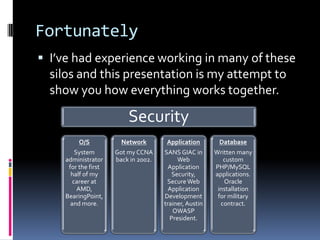
# whoami

 Josh Sokol (josh.sokol@ni.com)
 Information Security Program Owner at
  National Instruments
 Certified Information Systems Security
  Professional (CISSP)
 SANS GIAC in Web Application Security
  (GWAS)
 Cisco Certified Network Associate (CCNA)
 B.S. in Computer Science
Who are you?

 Auditors?
 Systems Administrators?
 Network Administrators?
 Database Administrators?
 Security-focused role?
Problem Statement

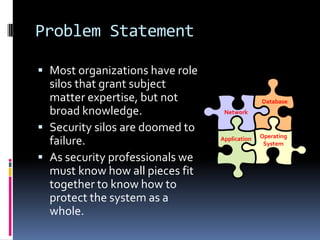
 Most organizations have role
  silos that grant subject
  matter expertise, but not                    Database
  broad knowledge.                Network

 Security silos are doomed to
                                               Operating
  failure.                       Application
                                                System

 As security professionals we
  must know how all pieces fit
  together to know how to
  protect the system as a
  whole.
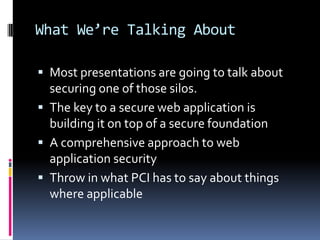
Fortunately
 I’ve had experience working in many of these
  silos and this presentation is my attempt to
  show you how everything works together.

                         Security
         O/S           Network        Application       Database
        System       Got my CCNA     SANS GIAC in      Written many
    administrator    back in 2002.        Web             custom
     for the first                     Application     PHP/MySQL
      half of my                        Security,      applications.
       career at                      Secure Web          Oracle
         AMD,                          Application      installation
    BearingPoint,                    Development        for military
      and more.                      trainer, Austin     contract.
                                        OWASP
                                       President.
What We’re Talking About

 Most presentations are going to talk about
  securing one of those silos.
 The key to a secure web application is
  building it on top of a secure foundation
 A comprehensive approach to web
  application security
 Throw in what PCI has to say about things
  where applicable
How We’ll Accomplish It

 Start with a clean slate
 Discuss basic security principles
 Create a secure network
 Add some secure servers
 Throw in a secure web application
Clean Slate
Think Before You Act

 Too many organizations just start building
  without taking the time to think about what
  they’re trying to accomplish in the long term
 Leads to many issues down the road
   Performance & Availability
   Scalability
   Security
 Ends up costing more time, money, and
  resources than if you just took some time in
  the beginning to plan it right
BASIC SECURITY PRINCIPLES
Least Privilege

 Give a process only the authority it needs to
  do its job
 Example: Program needs to log to a disk
     Raw disk access
     Read/write rights to a directory
     Read/write rights to a file
     Append rights to a file
 The finer grained the security mechanism,
  the closer you get to least privilege and the
  more secure your design is
Defense-in-Depth

 Do not depend on a single security mechanism.
  Have multiple, independent security measures in
  place.
 Failing to employ defense in depth
    Brittle security architectures
    False sense of security
 Defense in depth
    May prevent the exploitability of vulnerabilities
    May reduce the impact of the results of vulnerability
     exploitation
 Extra security generally entails less usability
Fail Open / Fail Closed

 Fail closed systems block access when they
  run into errors
 Fail open systems allow access when they run
  into errors
 Choosing which behavior should be done
  explicitly and with care
Example 1

 Nuclear missile launch software
   Fail closed may be an appropriate choice in this case
Example 2

 Fire door lock control software
   Fail open may be an appropriate choice in this case
Example 3

 Credit card authorization routines
   Fail open might be appropriate for hard-goods where
    there is time to re-attempt the transactions before the
    goods are shipped
   Fail closed might be appropriate for soft-goods where
    they need to be delivered online immediately
Separation of Duties

 More than one person required to complete a
  task.
 Primary objective is the prevention of fraud
  and errors.
 Achieved by disseminating the tasks and
  associated privileges for a specific business
  process among multiple users.
 Reduce the potential damage from the
  actions of one person.
BUILDING A SECURE NETWORK
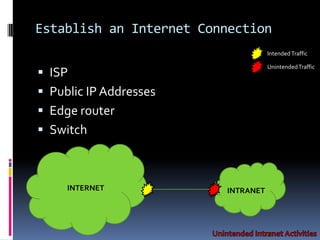
Establish an Internet Connection
                                    Intended Traffic

                                    Unintended Traffic
 ISP
 Public IP Addresses
 Edge router
 Switch


     INTERNET            INTRANET
Establish an Internet Connection

   Router and Switch Configurations (NOT A COMPLETE LIST)
       Disable IP directed broadcasts
           SMURF Attack (ICMP Echo)
           “no ip directed-broadcast”
           Disabled by default after Cisco IOS 12.0
       Disable TCP Small Services (Echo, Chargen, Discard, Daytime)
           “no service tcp-small-servers”
           Disabled by default after Cisco IOS 11.3
       Disable UDP Small Services (Echo, Chargen, Discard)
           “no service tcp-small-servers”
           Disabled by default after Cisco IOS 11.3
       IP Options Selective Drop
           Can alter the path traffic takes through the network and elevate CPU load
           “ip options drop”
           Command added to Cisco IOS 12.3(4)T, 12.0(22)S, and 12.2(25)S
       Disable IP source routing
           Enables source of the IP datagram to specify the network path a packet takes
           “no ip source-route”
           Enabled by default in all Cisco IOS Software Releases
       Incoming packets sourced with invalid addresses
       All web services running on router
Establish an Internet Connection

 Router and Switch Configurations
   Most recent software release/patches
   No local user accounts (use TACACS+ for user
      authentication)
     Enable password should be in a secure encrypted form
     Enable password should be changed from default
     Use corporate standardized SNMP community strings
     Disable SNMP system shutdown (“no snmp-server
      system-shutdown”)
     Set up with NTP for clock synchronization
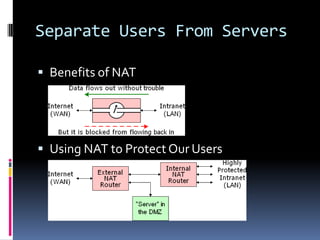
     Use Network Address Translation (NAT)
Separate Users From Servers

 Benefits of NAT


 Using NAT to Protect Our Users
Secure Operations

   Monitor Security Advisories and Responses
       Ex: Cisco Product Security Incident Response Team (PSIRT) @ http://www.cisco.com/go/psirt
   Leverage Authentication, Authorization, and Accounting (AAA)
       Authentication of management sessions
       Limit users to specific commands
       Logs all commands entered by users
   Centralize Log Collection and Monitoring
       Unified strategy for event logging and correlation
       Structured approach to log analysis and incident tracking
   Use Secure Protocols When Possible
       SSH instead of Telnet
       SCP instead of FTP or TFTP
   Gain Traffic Visibility with NetFlow
       See what traffic traverses the network in real time
   Configuration Management
       Control over how changes are proposed, reviewed, approved, and deployed
       Configuration archives to roll back changes
       Don’t forget to secure your configuration archive!
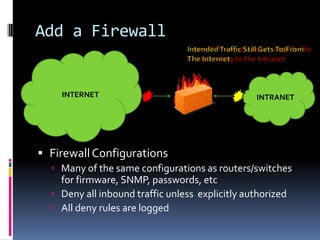
Add a Firewall


    INTERNET                                     INTRANET


 Firewall Configurations
   Many of the same configurations as routers/switches
    for firmware, SNMP, passwords, etc
   Deny all inbound traffic unless explicitly authorized
   All deny rules are logged
Some Definitions
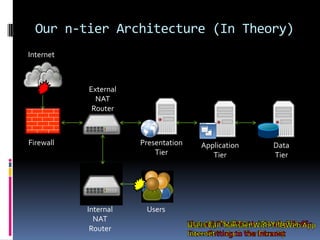
   N-tier/Multi-tier Architecture
       A client-server architecture in which, the presentation, the application processing
        and the data management are logically separate processes.


   Presentation Tier
       The topmost level of the application which displays information related to such
        services as browsing merchandise, purchasing, and shopping cart contents. It
        communicates with the other tiers by outputting results to the browser/client tier
        and all other tiers in the network.


   Application/Business Logic/Logic Tier
       The logic tier is pulled out from the presentation tier and, as its own layer, it
        controls an application’s functionality by performing detailed processing.


   Data Tier
       Consists of database servers where information is stored and retrieved. This tier
        keeps data neutral and independent from application servers or business logic.
Our n-tier Architecture (In Theory)
Internet


           External
             NAT
            Router


Firewall              Presentation   Application   Data
                          Tier          Tier       Tier


           Internal    Users
             NAT
            Router
Major Benefit of n-tier

 Reliability
   An attribute of any system that consistently produces
    the same results, preferably meeting or exceeding its
    specifications.
 Availability
   The degree to which a system suffers degradation or
    interruption in its service to the customer as a
    consequence of failures of one or more of its parts.
 Serviceability
   The ease with which corrective maintenance or
    preventative maintenance can be performed on a
    system.
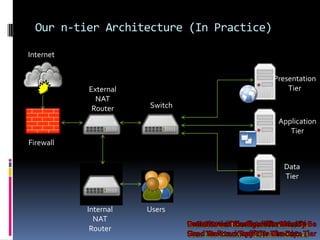
Our n-tier Architecture (In Practice)

Internet


                                          Presentation
           External                           Tier
             NAT
            Router    Switch
                                           Application
                                              Tier
Firewall


                                            Data
                                            Tier


           Internal   Users
             NAT
            Router
Definition

 Demilitarized Zone (DMZ)
   aka Data Management Zone, Demarcation Zone,
    or Perimeter Network
   A physical or logical subnetwork that contains and
    exposes an organization’s external services to a
    larger, untrusted network, usually the Internet.
   Adds an additional layer of security to an
    organization’s LAN; an external attacker only has
    access to equipment in the DMZ, rather than the
    whole of the network.
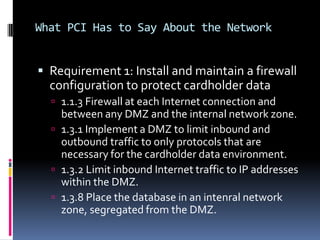
What PCI Has to Say About the Network


 Requirement 1: Install and maintain a firewall
  configuration to protect cardholder data
   1.1.3 Firewall at each Internet connection and
    between any DMZ and the internal network zone.
   1.3.1 Implement a DMZ to limit inbound and
    outbound traffic to only protocols that are
    necessary for the cardholder data environment.
   1.3.2 Limit inbound Internet traffic to IP addresses
    within the DMZ.
   1.3.8 Place the database in an intenral network
    zone, segregated from the DMZ.
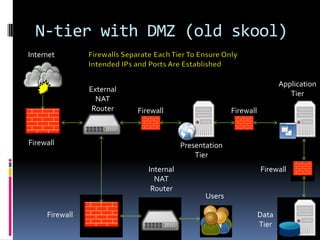
N-tier with DMZ (old skool)
Internet


                                                                          Application
                External
                                                                             Tier
                  NAT
                 Router    Firewall                     Firewall


Firewall                                 Presentation
                                             Tier
                              Internal                             Firewall
                                NAT
                               Router
                                                Users

     Firewall                                                      Data
                                                                   Tier
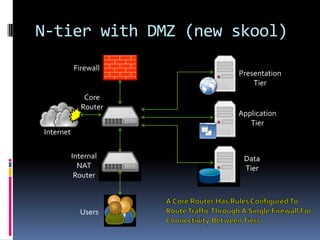
N-tier with DMZ (new skool)
           Firewall
                       Presentation
                           Tier
               Core
              Router
                       Application
                          Tier
Internet

           Internal     Data
             NAT        Tier
            Router


             Users
Other Benefits of n-tier

 Scalability
   How well a solution to some problem will work
    when the size of the problem increases.
 Security
   Protection against unauthorized access to, or
    alteration of, information and system resources
    including CPUs, storage devices, and programs.
BUILDING A SECURE SERVER
What PCI Has to Say About the Servers


 Requirement 2: Do not use vendor-supplied
  defaults for system passwords and other security
  parameters
   2.1 Always change vendor-supplied defaults before
      installing a system on the network
     2.2.1 Implement only one primary function per server.
     2.2.2 Disable all unnecessary and insecure services and
      protocols.
     2.2.4 Remove all unnecessary functionality such as
      scripts, drivers, features, subsystems, file systems,
      and unnecessary web servers.
     2.3 Encrypt all non-console administrative access.
Assume a Fresh OS Install
   Update and patch software
   Change default passwords
   File change monitoring (tripwire)
   Client Firewall (iptables)
       Stateless/stateful packet filtering
 Disable unused/unnecessary services (telnet, any “r” service such
  as rsh, rcp, etc)
 Log to a centralized log server
 Use SSH/SSL to manage the box
 Check file ownership and permissions
 Check all unlocked user accounts for necessity
 TCP Hardening in /etc/sysctl.conf
       Ignore broadcasts
       IP Spoofing Protection
BUILDING A SECURE APPLICATION
Training!

 Developers generally cannot prevent
  introducing security flaws in their code if they
  don’t know what to watch out for.
 Writing secure code is not commonly taught
  at the Universities as part of a Computer
  Science curriculum.
 Even if it was taught in schools, what about
  the current security unaware developers?
 Coding responsibly means knowing how!
Other Benefits of Training

 Help to increase the overall quality of the
  code produced (most security bugs are really
  common coding errors with more serious
  consequences).
 Driving security earlier up in the SDLC means
  less time and money spent fixing those issues
  once they’re in production.
 Don’t forget to train senior development
  managers and the business in how to
  prioritize security fixes.
Threat Modeling

 Should be done early in the development
  lifecycle
 Can find security defects before and code is
  actually created
Steps in Threat Modeling
1. Define use scenarios
2. Gather a list of external dependencies
3. Define security assumptions
4. Create external security notes
5. Create one or more Data Flow Diagrams (DFDs) of the
   application being modeled
6. Determine threat types
7. Identify threats to the system
8. Determine risk
9. Plan mitigations
Why Threat Model?

 If used properly, Threat Modeling helps
  development teams identify potential threats
  and make decisions before any vulnerable
  code is written
 Addressing security bugs early is much
  cheaper than addressing them late
Input Validation

 Most important thing you can do to make your code
  more secure
 Never trust anything that has crossed a trust boundary.
 In web applications, this means:
   GET parameters
   POST parameters
   HTTP headers
     Especially cookies
     Referer

 Anything in an HTTP request is completely under
  the control of an attacker
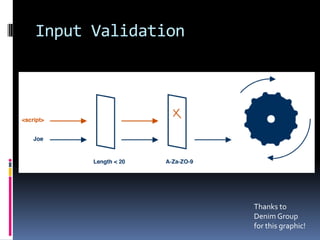
Input Validation


                   Thanks to
                   Denim Group
                   for this graphic!
Validation Strategies

 Positive validation is better than negative
  validation
   Negative validation: here are signatures I don’t want
    to see
   Positive validation: here is what I do want to see
 Things to check for
   Is a field required or not?
   How long should a field be?
   What characters should be in a field?
   What pattern should a valid input follow?
What PCI Has to Say About the Apps


 Pretty much every other requirement not
  previously mentioned talks about how to
  secure your application.
   6.5 Develop all web applications (internal and
    external) based on secure coding guidelines such
    as the Open Web Application Security Project
    Guide.
The OWASP Guide
   Policy Frameworks
   Secure Coding Principles
   Threat Risk Modeling
   Handling E-Commerce Payments
   Phishing
   Web Services
   Authentication
   Authorization
   Session Management
   Data Validation
   Interpreter Injection
   Canonicalization, Locale, and Unicode
   Error Handling, Auditing, and Logging
   …
   The list goes on…and on…and on
DEFENSE-IN-DEPTH ADD-ONS
Defense-in-Depth

 Defend a system against any particular attack
  using several, varying methods.
 Layering tactic, conceived by the NSA as a
  comprehensive approach to information and
  electronic security.
Add-ons

 Network
     IDS/IPS
     WAF
     NAC
     Load Balancer
 Server
   Host-based Intrusion Prevention System
 Auditing
   Network Vulnerability Scanning
   Application Vulnerability Scanning
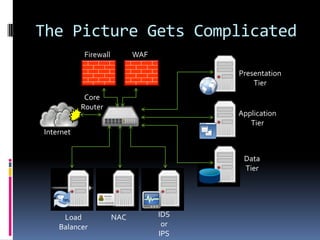
The Picture Gets Complicated
           Firewall         WAF

                                        Presentation
                                            Tier
            Core
           Router
                                        Application
                                           Tier
Internet


                                         Data
                                         Tier


     Load             NAC         IDS
    Balancer                       or
                                  IPS
Additional Resources
 Networks
   Cisco Guide to Harden Cisco IOS Devices
      http://www.cisco.com/application/pdf/paws/13608/21.pdf
   Router Security
      http://www.mavetju.org/networking/security.php
   Firewall Security
      http://security.ucdavis.edu/basic_firewall_rules.pdf
 Servers
   RedHat Linux Server Security
      http://www.servepath.com/support/redhat-securitychecklist.php
 Applications
   OWASP Project Guide
      http://www.owasp.org/index.php/OWASP_Guide_Project
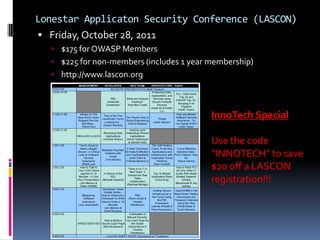
Lonestar Applicaton Security Conference (LASCON)
 Friday, October 28, 2011
   $175 for OWASP Members
   $225 for non-members (includes 1 year membership)
   http://www.lascon.org


                                          InnoTech Special

                                          Use the code
                                          “INNOTECH” to save
                                          $20 off a LASCON
                                          registration!!!
Architecting Secure Web Systems

Architecting Secure Web Systems

  • 1.
    ARCHITECTING SECURE WEBSYSTEMS By Josh Sokol
  • 2.
    A Matrix Moment Iimagine that right now, you’re feeling a bit like Alice. Hmm? Tumbling down the rabbit hole?
  • 3.
    # whoami  JoshSokol (josh.sokol@ni.com)  Information Security Program Owner at National Instruments  Certified Information Systems Security Professional (CISSP)  SANS GIAC in Web Application Security (GWAS)  Cisco Certified Network Associate (CCNA)  B.S. in Computer Science
  • 4.
    Who are you? Auditors?  Systems Administrators?  Network Administrators?  Database Administrators?  Security-focused role?
  • 5.
    Problem Statement  Mostorganizations have role silos that grant subject matter expertise, but not Database broad knowledge. Network  Security silos are doomed to Operating failure. Application System  As security professionals we must know how all pieces fit together to know how to protect the system as a whole.
  • 6.
    Fortunately  I’ve hadexperience working in many of these silos and this presentation is my attempt to show you how everything works together. Security O/S Network Application Database System Got my CCNA SANS GIAC in Written many administrator back in 2002. Web custom for the first Application PHP/MySQL half of my Security, applications. career at Secure Web Oracle AMD, Application installation BearingPoint, Development for military and more. trainer, Austin contract. OWASP President.
  • 7.
    What We’re TalkingAbout  Most presentations are going to talk about securing one of those silos.  The key to a secure web application is building it on top of a secure foundation  A comprehensive approach to web application security  Throw in what PCI has to say about things where applicable
  • 8.
    How We’ll AccomplishIt  Start with a clean slate  Discuss basic security principles  Create a secure network  Add some secure servers  Throw in a secure web application
  • 9.
  • 10.
    Think Before YouAct  Too many organizations just start building without taking the time to think about what they’re trying to accomplish in the long term  Leads to many issues down the road  Performance & Availability  Scalability  Security  Ends up costing more time, money, and resources than if you just took some time in the beginning to plan it right
  • 11.
  • 12.
    Least Privilege  Givea process only the authority it needs to do its job  Example: Program needs to log to a disk  Raw disk access  Read/write rights to a directory  Read/write rights to a file  Append rights to a file  The finer grained the security mechanism, the closer you get to least privilege and the more secure your design is
  • 13.
    Defense-in-Depth  Do notdepend on a single security mechanism. Have multiple, independent security measures in place.  Failing to employ defense in depth  Brittle security architectures  False sense of security  Defense in depth  May prevent the exploitability of vulnerabilities  May reduce the impact of the results of vulnerability exploitation  Extra security generally entails less usability
  • 14.
    Fail Open /Fail Closed  Fail closed systems block access when they run into errors  Fail open systems allow access when they run into errors  Choosing which behavior should be done explicitly and with care
  • 15.
    Example 1  Nuclearmissile launch software  Fail closed may be an appropriate choice in this case
  • 16.
    Example 2  Firedoor lock control software  Fail open may be an appropriate choice in this case
  • 17.
    Example 3  Creditcard authorization routines  Fail open might be appropriate for hard-goods where there is time to re-attempt the transactions before the goods are shipped  Fail closed might be appropriate for soft-goods where they need to be delivered online immediately
  • 18.
    Separation of Duties More than one person required to complete a task.  Primary objective is the prevention of fraud and errors.  Achieved by disseminating the tasks and associated privileges for a specific business process among multiple users.  Reduce the potential damage from the actions of one person.
  • 19.
  • 20.
    Establish an InternetConnection Intended Traffic Unintended Traffic  ISP  Public IP Addresses  Edge router  Switch INTERNET INTRANET
  • 21.
    Establish an InternetConnection  Router and Switch Configurations (NOT A COMPLETE LIST)  Disable IP directed broadcasts  SMURF Attack (ICMP Echo)  “no ip directed-broadcast”  Disabled by default after Cisco IOS 12.0  Disable TCP Small Services (Echo, Chargen, Discard, Daytime)  “no service tcp-small-servers”  Disabled by default after Cisco IOS 11.3  Disable UDP Small Services (Echo, Chargen, Discard)  “no service tcp-small-servers”  Disabled by default after Cisco IOS 11.3  IP Options Selective Drop  Can alter the path traffic takes through the network and elevate CPU load  “ip options drop”  Command added to Cisco IOS 12.3(4)T, 12.0(22)S, and 12.2(25)S  Disable IP source routing  Enables source of the IP datagram to specify the network path a packet takes  “no ip source-route”  Enabled by default in all Cisco IOS Software Releases  Incoming packets sourced with invalid addresses  All web services running on router
  • 22.
    Establish an InternetConnection  Router and Switch Configurations  Most recent software release/patches  No local user accounts (use TACACS+ for user authentication)  Enable password should be in a secure encrypted form  Enable password should be changed from default  Use corporate standardized SNMP community strings  Disable SNMP system shutdown (“no snmp-server system-shutdown”)  Set up with NTP for clock synchronization  Use Network Address Translation (NAT)
  • 23.
    Separate Users FromServers  Benefits of NAT  Using NAT to Protect Our Users
  • 24.
    Secure Operations  Monitor Security Advisories and Responses  Ex: Cisco Product Security Incident Response Team (PSIRT) @ http://www.cisco.com/go/psirt  Leverage Authentication, Authorization, and Accounting (AAA)  Authentication of management sessions  Limit users to specific commands  Logs all commands entered by users  Centralize Log Collection and Monitoring  Unified strategy for event logging and correlation  Structured approach to log analysis and incident tracking  Use Secure Protocols When Possible  SSH instead of Telnet  SCP instead of FTP or TFTP  Gain Traffic Visibility with NetFlow  See what traffic traverses the network in real time  Configuration Management  Control over how changes are proposed, reviewed, approved, and deployed  Configuration archives to roll back changes  Don’t forget to secure your configuration archive!
  • 25.
    Add a Firewall INTERNET INTRANET  Firewall Configurations  Many of the same configurations as routers/switches for firmware, SNMP, passwords, etc  Deny all inbound traffic unless explicitly authorized  All deny rules are logged
  • 26.
    Some Definitions  N-tier/Multi-tier Architecture  A client-server architecture in which, the presentation, the application processing and the data management are logically separate processes.  Presentation Tier  The topmost level of the application which displays information related to such services as browsing merchandise, purchasing, and shopping cart contents. It communicates with the other tiers by outputting results to the browser/client tier and all other tiers in the network.  Application/Business Logic/Logic Tier  The logic tier is pulled out from the presentation tier and, as its own layer, it controls an application’s functionality by performing detailed processing.  Data Tier  Consists of database servers where information is stored and retrieved. This tier keeps data neutral and independent from application servers or business logic.
  • 27.
    Our n-tier Architecture(In Theory) Internet External NAT Router Firewall Presentation Application Data Tier Tier Tier Internal Users NAT Router
  • 28.
    Major Benefit ofn-tier  Reliability  An attribute of any system that consistently produces the same results, preferably meeting or exceeding its specifications.  Availability  The degree to which a system suffers degradation or interruption in its service to the customer as a consequence of failures of one or more of its parts.  Serviceability  The ease with which corrective maintenance or preventative maintenance can be performed on a system.
  • 29.
    Our n-tier Architecture(In Practice) Internet Presentation External Tier NAT Router Switch Application Tier Firewall Data Tier Internal Users NAT Router
  • 30.
    Definition  Demilitarized Zone(DMZ)  aka Data Management Zone, Demarcation Zone, or Perimeter Network  A physical or logical subnetwork that contains and exposes an organization’s external services to a larger, untrusted network, usually the Internet.  Adds an additional layer of security to an organization’s LAN; an external attacker only has access to equipment in the DMZ, rather than the whole of the network.
  • 31.
    What PCI Hasto Say About the Network  Requirement 1: Install and maintain a firewall configuration to protect cardholder data  1.1.3 Firewall at each Internet connection and between any DMZ and the internal network zone.  1.3.1 Implement a DMZ to limit inbound and outbound traffic to only protocols that are necessary for the cardholder data environment.  1.3.2 Limit inbound Internet traffic to IP addresses within the DMZ.  1.3.8 Place the database in an intenral network zone, segregated from the DMZ.
  • 32.
    N-tier with DMZ(old skool) Internet Application External Tier NAT Router Firewall Firewall Firewall Presentation Tier Internal Firewall NAT Router Users Firewall Data Tier
  • 33.
    N-tier with DMZ(new skool) Firewall Presentation Tier Core Router Application Tier Internet Internal Data NAT Tier Router Users
  • 34.
    Other Benefits ofn-tier  Scalability  How well a solution to some problem will work when the size of the problem increases.  Security  Protection against unauthorized access to, or alteration of, information and system resources including CPUs, storage devices, and programs.
  • 35.
  • 36.
    What PCI Hasto Say About the Servers  Requirement 2: Do not use vendor-supplied defaults for system passwords and other security parameters  2.1 Always change vendor-supplied defaults before installing a system on the network  2.2.1 Implement only one primary function per server.  2.2.2 Disable all unnecessary and insecure services and protocols.  2.2.4 Remove all unnecessary functionality such as scripts, drivers, features, subsystems, file systems, and unnecessary web servers.  2.3 Encrypt all non-console administrative access.
  • 37.
    Assume a FreshOS Install  Update and patch software  Change default passwords  File change monitoring (tripwire)  Client Firewall (iptables)  Stateless/stateful packet filtering  Disable unused/unnecessary services (telnet, any “r” service such as rsh, rcp, etc)  Log to a centralized log server  Use SSH/SSL to manage the box  Check file ownership and permissions  Check all unlocked user accounts for necessity  TCP Hardening in /etc/sysctl.conf  Ignore broadcasts  IP Spoofing Protection
  • 38.
    BUILDING A SECUREAPPLICATION
  • 39.
    Training!  Developers generallycannot prevent introducing security flaws in their code if they don’t know what to watch out for.  Writing secure code is not commonly taught at the Universities as part of a Computer Science curriculum.  Even if it was taught in schools, what about the current security unaware developers?  Coding responsibly means knowing how!
  • 40.
    Other Benefits ofTraining  Help to increase the overall quality of the code produced (most security bugs are really common coding errors with more serious consequences).  Driving security earlier up in the SDLC means less time and money spent fixing those issues once they’re in production.  Don’t forget to train senior development managers and the business in how to prioritize security fixes.
  • 41.
    Threat Modeling  Shouldbe done early in the development lifecycle  Can find security defects before and code is actually created
  • 42.
    Steps in ThreatModeling 1. Define use scenarios 2. Gather a list of external dependencies 3. Define security assumptions 4. Create external security notes 5. Create one or more Data Flow Diagrams (DFDs) of the application being modeled 6. Determine threat types 7. Identify threats to the system 8. Determine risk 9. Plan mitigations
  • 43.
    Why Threat Model? If used properly, Threat Modeling helps development teams identify potential threats and make decisions before any vulnerable code is written  Addressing security bugs early is much cheaper than addressing them late
  • 44.
    Input Validation  Mostimportant thing you can do to make your code more secure  Never trust anything that has crossed a trust boundary.  In web applications, this means:  GET parameters  POST parameters  HTTP headers  Especially cookies  Referer  Anything in an HTTP request is completely under the control of an attacker
  • 45.
    Input Validation Thanks to Denim Group for this graphic!
  • 46.
    Validation Strategies  Positivevalidation is better than negative validation  Negative validation: here are signatures I don’t want to see  Positive validation: here is what I do want to see  Things to check for  Is a field required or not?  How long should a field be?  What characters should be in a field?  What pattern should a valid input follow?
  • 47.
    What PCI Hasto Say About the Apps  Pretty much every other requirement not previously mentioned talks about how to secure your application.  6.5 Develop all web applications (internal and external) based on secure coding guidelines such as the Open Web Application Security Project Guide.
  • 48.
    The OWASP Guide  Policy Frameworks  Secure Coding Principles  Threat Risk Modeling  Handling E-Commerce Payments  Phishing  Web Services  Authentication  Authorization  Session Management  Data Validation  Interpreter Injection  Canonicalization, Locale, and Unicode  Error Handling, Auditing, and Logging  …  The list goes on…and on…and on
  • 49.
  • 50.
    Defense-in-Depth  Defend asystem against any particular attack using several, varying methods.  Layering tactic, conceived by the NSA as a comprehensive approach to information and electronic security.
  • 51.
    Add-ons  Network  IDS/IPS  WAF  NAC  Load Balancer  Server  Host-based Intrusion Prevention System  Auditing  Network Vulnerability Scanning  Application Vulnerability Scanning
  • 52.
    The Picture GetsComplicated Firewall WAF Presentation Tier Core Router Application Tier Internet Data Tier Load NAC IDS Balancer or IPS
  • 53.
    Additional Resources  Networks  Cisco Guide to Harden Cisco IOS Devices  http://www.cisco.com/application/pdf/paws/13608/21.pdf  Router Security  http://www.mavetju.org/networking/security.php  Firewall Security  http://security.ucdavis.edu/basic_firewall_rules.pdf  Servers  RedHat Linux Server Security  http://www.servepath.com/support/redhat-securitychecklist.php  Applications  OWASP Project Guide  http://www.owasp.org/index.php/OWASP_Guide_Project
  • 54.
    Lonestar Applicaton SecurityConference (LASCON)  Friday, October 28, 2011  $175 for OWASP Members  $225 for non-members (includes 1 year membership)  http://www.lascon.org InnoTech Special Use the code “INNOTECH” to save $20 off a LASCON registration!!!