Computer Hardware
A level Computing Book (Reference)
By
P.M .Heathcore
Chapter 1 Computer Hardware "mapiyegabriel@gmail.com" 1
Computer System
• Hardware
• Software
Chapter 1 Computer Hardware "mapiyegabriel@gmail.com" 2
Differences
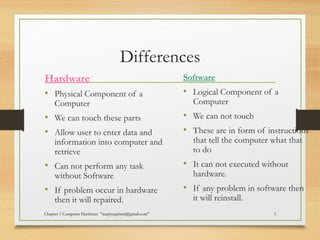
Hardware
• Physical Component of a
Computer
• We can touch these parts
• Allow user to enter data and
information into computer and
retrieve
• Can not perform any task
without Software
• If problem occur in hardware
then it will repaired.
Software
• Logical Component of a
Computer
• We can not touch
• These are in form of instructions
that tell the computer what that
to do
• It can not executed without
hardware.
• If any problem in software then
it will reinstall.
Chapter 1 Computer Hardware "mapiyegabriel@gmail.com" 3
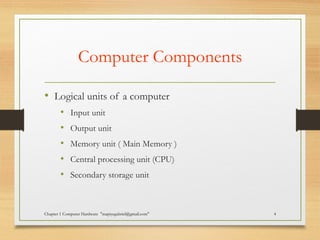
Computer Components
• Logical units of a computer
• Input unit
• Output unit
• Memory unit ( Main Memory )
• Central processing unit (CPU)
• Secondary storage unit
Chapter 1 Computer Hardware "mapiyegabriel@gmail.com" 4
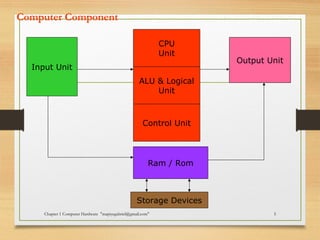
Computer Component
Chapter 1 Computer Hardware "mapiyegabriel@gmail.com" 5
Input Unit
CPU
Unit
Ram / Rom
ALU & Logical
Unit
Control Unit
Output Unit
Storage Devices
Types of computers by Size
• Micro computers
• Mainframe Computers
• Super Computers
• Mini Computers
• Embedded Computers
Chapter 1 Computer Hardware "mapiyegabriel@gmail.com" 6
Micro Computers
• Are the computers that you are most likely to encounter
at home or in school and colleges.
• It consist of one or more input device ,output device,
memory and processor.
Examples
• PCs
• Apples
Chapter 1 Computer Hardware
"mapiyegabriel@gmail.com"
7
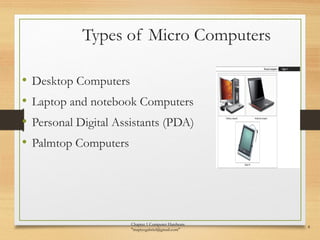
Types of Micro Computers
• Desktop Computers
• Laptop and notebook Computers
• Personal Digital Assistants (PDA)
• Palmtop Computers
Chapter 1 Computer Hardware
"mapiyegabriel@gmail.com"
8
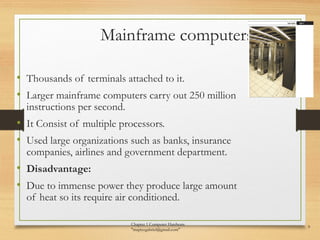
Mainframe computers
• Thousands of terminals attached to it.
• Larger mainframe computers carry out 250 million
instructions per second.
• It Consist of multiple processors.
• Used large organizations such as banks, insurance
companies, airlines and government department.
• Disadvantage:
• Due to immense power they produce large amount
of heat so its require air conditioned.
Chapter 1 Computer Hardware
"mapiyegabriel@gmail.com"
9
Examples
• IBM43810
• NEC610
• DEC 10 etc
Chapter 1 Computer Hardware "mapiyegabriel@gmail.com" 10
Supercomputers
• Largest category of computer, costing millions of
pounds.
• It is complex ,large storage and advanced computers.
• They are mostly used by scientific and industrial
research departments.
Chapter 1 Computer Hardware "mapiyegabriel@gmail.com" 11
Uses
• NASA
• Weather centre
• Stock Exchange
• Weapon design
• Mapping the surface of planets.
• Studying the neural network of brain
• Preparing models of chemical systems.
Chapter 1 Computer Hardware "mapiyegabriel@gmail.com" 12
Examples
• CRAY-XP
• ETA-10
• Blue sky
• ASCI White
Chapter 1 Computer Hardware "mapiyegabriel@gmail.com" 13
Mini computers
• Have a size , power and cost somewhere between
those of microcomputers and mainframes.
• It is much powerful then some of the mainframes
still in use.
• It is used by business institutes and departments.
Chapter 1 Computer Hardware "mapiyegabriel@gmail.com" 14
Examples
• Vax-8800
• MV-1500
Chapter 1 Computer Hardware "mapiyegabriel@gmail.com" 15
Embedded Computers or
Microprocessors• Is a single chip that perform the functions of a
central processing unit
• Many microprocessors makes are Microcontrollers
also called embedded.
• Embedded computers serve as the brain of a larger
piece of machine.
• Their software is stored in the computer’s own.
• They serve as a personal computer but not have a
monitor, keyboard and mouse
Chapter 1 Computer Hardware "mapiyegabriel@gmail.com" 16
Uses
• Microwaves programmable ovens
• Blood pressure monitors
• Air bag sensors
• Washing machines
• Video recorders
• Alarms
• Digital cameras
• MP3 players
• Car engine Controllers
Chapter 1 Computer Hardware "mapiyegabriel@gmail.com" 17
Processors
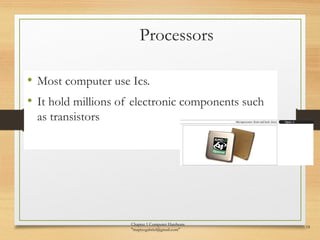
• Most computer use Ics.
• It hold millions of electronic components such
as transistors
Chapter 1 Computer Hardware
"mapiyegabriel@gmail.com"
18
Functions
• It controls the transmission of data from input
device to memory
• It processes the data held in main memory
• It controls the transmission of information from
main memory to output device.
Chapter 1 Computer Hardware "mapiyegabriel@gmail.com" 19
Main Memory
• Instructions and data are held in main memory which
is divided into millions of addressable storage units
called bytes.
• One byte can hold one character
• Total bytes in main memory referred to as the
computer’s memory size.
Chapter 1 Computer Hardware "mapiyegabriel@gmail.com" 20
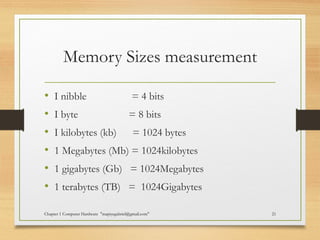
Memory Sizes measurement
• I nibble = 4 bits
• I byte = 8 bits
• I kilobytes (kb) = 1024 bytes
• 1 Megabytes (Mb) = 1024kilobytes
• 1 gigabytes (Gb) = 1024Megabytes
• 1 terabytes (TB) = 1024Gigabytes
Chapter 1 Computer Hardware "mapiyegabriel@gmail.com" 21
Types of Main Memory
• Ram (Random Access Memory)
• Rom (Read Only Memory)
Chapter 1 Computer Hardware "mapiyegabriel@gmail.com" 22
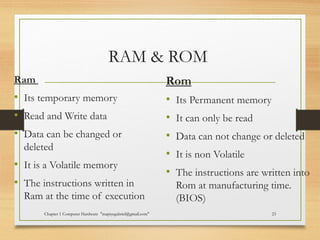
RAM & ROM
Ram
• Its temporary memory
• Read and Write data
• Data can be changed or
deleted
• It is a Volatile memory
• The instructions written in
Ram at the time of execution
Rom
• Its Permanent memory
• It can only be read
• Data can not change or deleted
• It is non Volatile
• The instructions are written into
Rom at manufacturing time.
(BIOS)
Chapter 1 Computer Hardware "mapiyegabriel@gmail.com" 23
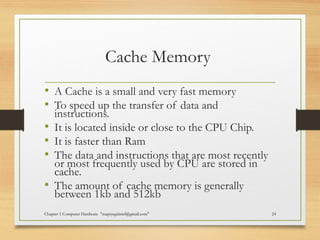
Cache Memory
• A Cache is a small and very fast memory
• To speed up the transfer of data and
instructions.
• It is located inside or close to the CPU Chip.
• It is faster than Ram
• The data and instructions that are most recently
or most frequently used by CPU are stored in
cache.
• The amount of cache memory is generally
between 1kb and 512kb
Chapter 1 Computer Hardware "mapiyegabriel@gmail.com" 24
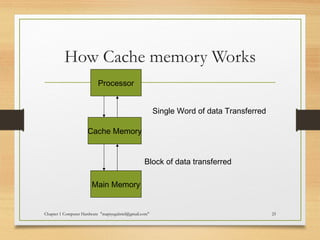
How Cache memory Works
Chapter 1 Computer Hardware "mapiyegabriel@gmail.com" 25
Processor
Cache Memory
Main Memory
Single Word of data Transferred
Block of data transferred
Chapter 1 Computer Hardware "mapiyegabriel@gmail.com" 26
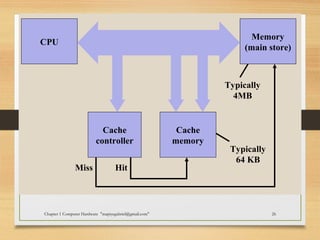
CPU
Memory
(main store)
Cache
controller
Cache
memory
Typically
4MB
Typically
64 KB
HitMiss
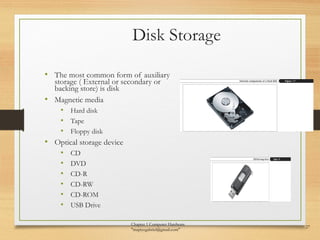
Disk Storage
• The most common form of auxiliary
storage ( External or secondary or
backing store) is disk
• Magnetic media
• Hard disk
• Tape
• Floppy disk
• Optical storage device
• CD
• DVD
• CD-R
• CD-RW
• CD-ROM
• USB Drive
Chapter 1 Computer Hardware
"mapiyegabriel@gmail.com"
27

Ch 1 computer hardware

  • 1.
    Computer Hardware A levelComputing Book (Reference) By P.M .Heathcore Chapter 1 Computer Hardware "mapiyegabriel@gmail.com" 1
  • 2.
    Computer System • Hardware •Software Chapter 1 Computer Hardware "mapiyegabriel@gmail.com" 2
  • 3.
    Differences Hardware • Physical Componentof a Computer • We can touch these parts • Allow user to enter data and information into computer and retrieve • Can not perform any task without Software • If problem occur in hardware then it will repaired. Software • Logical Component of a Computer • We can not touch • These are in form of instructions that tell the computer what that to do • It can not executed without hardware. • If any problem in software then it will reinstall. Chapter 1 Computer Hardware "mapiyegabriel@gmail.com" 3
  • 4.
    Computer Components • Logicalunits of a computer • Input unit • Output unit • Memory unit ( Main Memory ) • Central processing unit (CPU) • Secondary storage unit Chapter 1 Computer Hardware "mapiyegabriel@gmail.com" 4
  • 5.
    Computer Component Chapter 1Computer Hardware "mapiyegabriel@gmail.com" 5 Input Unit CPU Unit Ram / Rom ALU & Logical Unit Control Unit Output Unit Storage Devices
  • 6.
    Types of computersby Size • Micro computers • Mainframe Computers • Super Computers • Mini Computers • Embedded Computers Chapter 1 Computer Hardware "mapiyegabriel@gmail.com" 6
  • 7.
    Micro Computers • Arethe computers that you are most likely to encounter at home or in school and colleges. • It consist of one or more input device ,output device, memory and processor. Examples • PCs • Apples Chapter 1 Computer Hardware "mapiyegabriel@gmail.com" 7
  • 8.
    Types of MicroComputers • Desktop Computers • Laptop and notebook Computers • Personal Digital Assistants (PDA) • Palmtop Computers Chapter 1 Computer Hardware "mapiyegabriel@gmail.com" 8
  • 9.
    Mainframe computers • Thousandsof terminals attached to it. • Larger mainframe computers carry out 250 million instructions per second. • It Consist of multiple processors. • Used large organizations such as banks, insurance companies, airlines and government department. • Disadvantage: • Due to immense power they produce large amount of heat so its require air conditioned. Chapter 1 Computer Hardware "mapiyegabriel@gmail.com" 9
  • 10.
    Examples • IBM43810 • NEC610 •DEC 10 etc Chapter 1 Computer Hardware "mapiyegabriel@gmail.com" 10
  • 11.
    Supercomputers • Largest categoryof computer, costing millions of pounds. • It is complex ,large storage and advanced computers. • They are mostly used by scientific and industrial research departments. Chapter 1 Computer Hardware "mapiyegabriel@gmail.com" 11
  • 12.
    Uses • NASA • Weathercentre • Stock Exchange • Weapon design • Mapping the surface of planets. • Studying the neural network of brain • Preparing models of chemical systems. Chapter 1 Computer Hardware "mapiyegabriel@gmail.com" 12
  • 13.
    Examples • CRAY-XP • ETA-10 •Blue sky • ASCI White Chapter 1 Computer Hardware "mapiyegabriel@gmail.com" 13
  • 14.
    Mini computers • Havea size , power and cost somewhere between those of microcomputers and mainframes. • It is much powerful then some of the mainframes still in use. • It is used by business institutes and departments. Chapter 1 Computer Hardware "mapiyegabriel@gmail.com" 14
  • 15.
    Examples • Vax-8800 • MV-1500 Chapter1 Computer Hardware "mapiyegabriel@gmail.com" 15
  • 16.
    Embedded Computers or Microprocessors•Is a single chip that perform the functions of a central processing unit • Many microprocessors makes are Microcontrollers also called embedded. • Embedded computers serve as the brain of a larger piece of machine. • Their software is stored in the computer’s own. • They serve as a personal computer but not have a monitor, keyboard and mouse Chapter 1 Computer Hardware "mapiyegabriel@gmail.com" 16
  • 17.
    Uses • Microwaves programmableovens • Blood pressure monitors • Air bag sensors • Washing machines • Video recorders • Alarms • Digital cameras • MP3 players • Car engine Controllers Chapter 1 Computer Hardware "mapiyegabriel@gmail.com" 17
  • 18.
    Processors • Most computeruse Ics. • It hold millions of electronic components such as transistors Chapter 1 Computer Hardware "mapiyegabriel@gmail.com" 18
  • 19.
    Functions • It controlsthe transmission of data from input device to memory • It processes the data held in main memory • It controls the transmission of information from main memory to output device. Chapter 1 Computer Hardware "mapiyegabriel@gmail.com" 19
  • 20.
    Main Memory • Instructionsand data are held in main memory which is divided into millions of addressable storage units called bytes. • One byte can hold one character • Total bytes in main memory referred to as the computer’s memory size. Chapter 1 Computer Hardware "mapiyegabriel@gmail.com" 20
  • 21.
    Memory Sizes measurement •I nibble = 4 bits • I byte = 8 bits • I kilobytes (kb) = 1024 bytes • 1 Megabytes (Mb) = 1024kilobytes • 1 gigabytes (Gb) = 1024Megabytes • 1 terabytes (TB) = 1024Gigabytes Chapter 1 Computer Hardware "mapiyegabriel@gmail.com" 21
  • 22.
    Types of MainMemory • Ram (Random Access Memory) • Rom (Read Only Memory) Chapter 1 Computer Hardware "mapiyegabriel@gmail.com" 22
  • 23.
    RAM & ROM Ram •Its temporary memory • Read and Write data • Data can be changed or deleted • It is a Volatile memory • The instructions written in Ram at the time of execution Rom • Its Permanent memory • It can only be read • Data can not change or deleted • It is non Volatile • The instructions are written into Rom at manufacturing time. (BIOS) Chapter 1 Computer Hardware "mapiyegabriel@gmail.com" 23
  • 24.
    Cache Memory • ACache is a small and very fast memory • To speed up the transfer of data and instructions. • It is located inside or close to the CPU Chip. • It is faster than Ram • The data and instructions that are most recently or most frequently used by CPU are stored in cache. • The amount of cache memory is generally between 1kb and 512kb Chapter 1 Computer Hardware "mapiyegabriel@gmail.com" 24
  • 25.
    How Cache memoryWorks Chapter 1 Computer Hardware "mapiyegabriel@gmail.com" 25 Processor Cache Memory Main Memory Single Word of data Transferred Block of data transferred
  • 26.
    Chapter 1 ComputerHardware "mapiyegabriel@gmail.com" 26 CPU Memory (main store) Cache controller Cache memory Typically 4MB Typically 64 KB HitMiss
  • 27.
    Disk Storage • Themost common form of auxiliary storage ( External or secondary or backing store) is disk • Magnetic media • Hard disk • Tape • Floppy disk • Optical storage device • CD • DVD • CD-R • CD-RW • CD-ROM • USB Drive Chapter 1 Computer Hardware "mapiyegabriel@gmail.com" 27