Ceph Tiering with High
performance architecture
Speaker : Thor Chin
Chief Architect
Agenda
Introduction to Ceph
Ceph Tiering Architecture
Performance Measurement Tools
Performance Testing Result
Conclusion
Introduction to Ceph
Why we need Ceph?
Distributed storage system
- Fault tolerant , no SPoF
X86 Commodity hardware
- Saving you costs, giving you flexibility
Large scale – Incremental expansion
- 10s to 1000s of nodes
Unified storage platform
- Scalable object , Block , File system.
Open source – No vender lock-in
Automatically balance the file system
Data security
- with 2 or more copies in different physical store media.
Ceph Architecture
PG and Pools
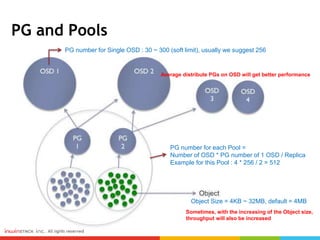
PG number for Single OSD : 30 ~ 300 (soft limit), usually we suggest 256
PG number for each Pool =
Number of OSD * PG number of 1 OSD / Replica
Example for this Pool : 4 * 256 / 2 = 512
Object Size = 4KB ~ 32MB, default = 4MB
Sometimes, with the increasing of the Object size,
throughput will also be increased
Average distribute PGs on OSD will get better performance
CRUSH Maps
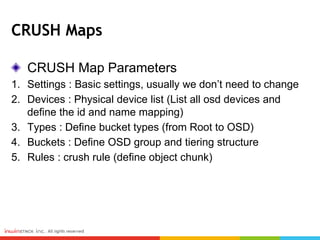
CRUSH Map Parameters
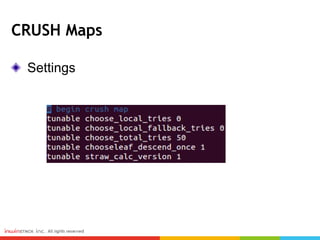
1. Settings : Basic settings, usually we don’t need to change
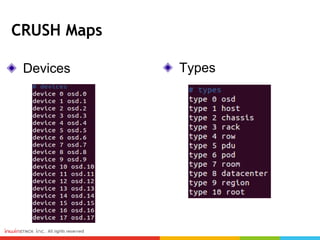
2. Devices : Physical device list (List all osd devices and
define the id and name mapping)
3. Types : Define bucket types (from Root to OSD)
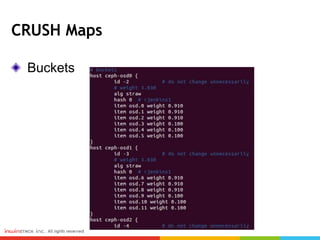
4. Buckets : Define OSD group and tiering structure
5. Rules : crush rule (define object chunk)
CRUSH Maps
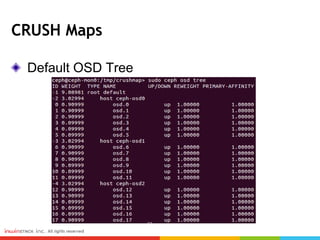
Default OSD Tree
CRUSH Maps
Settings
Devices
CRUSH Maps
Types
CRUSH Maps
Buckets
CRUSH Maps
Rules
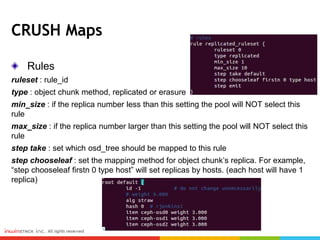
ruleset : rule_id
type : object chunk method, replicated or erasure
min_size : if the replica number less than this setting the pool will NOT select this
rule
max_size : if the replica number larger than this setting the pool will NOT select this
rule
step take : set which osd_tree should be mapped to this rule
step chooseleaf : set the mapping method for object chunk’s replica. For example,
“step chooseleaf firstn 0 type host” will set replicas by hosts. (each host will have 1
replica)
CRUSH Maps
OSD Tree after Tiering
CRUSH Maps
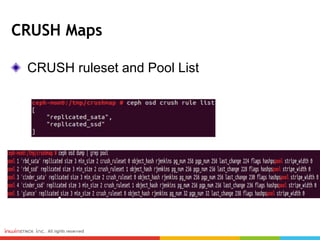
CRUSH ruleset and Pool List
Ceph Tiering Architecture
Storage
Node
SATA
SSD
SAS
Storage
Node
SATA
SSD
SAS
Storage
Node
SATA
SSD
SAS
Ceph-Mon
Node
ceph-mon
RGW
SSD Pool
SAS Pool
SATA Pool
Tier 1
Tier 2
Tier 3
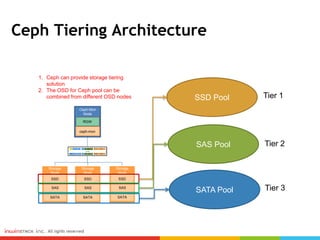
1. Ceph can provide storage tiering
solution
2. The OSD for Ceph pool can be
combined from different OSD nodes
Hardware Architecture
Storage
node
ceph-osd
(SATA)
ceph-osd
(SSD)
ceph-osd
(SAS)
Storage
node
ceph-osd
(SATA)
ceph-osd
(SSD)
ceph-osd
(SAS)
Storage
node
ceph-osd
(SATA)
ceph-osd
(SSD)
ceph-osd
(SAS)
Ceph Monitor
ceph-mon
Ceph Deploy
Ceph Monitor
ceph-mon
Ceph Deploy
Ceph Monitor
ceph-mon
Ceph Deploy
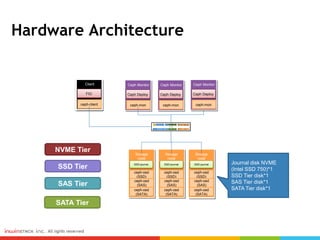
SSD-journalSSD-journalSSD-journal Journal disk NVME
(Intel SSD 750)*1
SSD Tier disk*1
SAS Tier disk*1
SATA Tier disk*1
Client
ceph-client
FIO
NVME Tier
SSD Tier
SAS Tier
SATA Tier
Performance Measurement Tools
FIO
IOmeter
IOZone
dd
Radows-bench
Rest-bench
Cosbench
Performance Measurement Tools
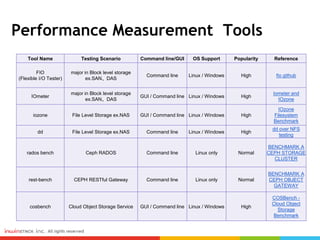
Tool Name Testing Scenario Command line/GUI OS Support Popularity Reference
FIO
(Flexible I/O Tester)
major in Block level storage
ex.SAN、DAS
Command line Linux / Windows High fio github
IOmeter
major in Block level storage
ex.SAN、DAS
GUI / Command line Linux / Windows High
Iometer and
IOzone
iozone File Level Storage ex.NAS GUI / Command line Linux / Windows High
IOzone
Filesystem
Benchmark
dd File Level Storage ex.NAS Command line Linux / Windows High
dd over NFS
testing
rados bench Ceph RADOS Command line Linux only Normal
BENCHMARK A
CEPH STORAGE
CLUSTER
rest-bench CEPH RESTful Gateway Command line Linux only Normal
BENCHMARK A
CEPH OBJECT
GATEWAY
cosbench Cloud Object Storage Service GUI / Command line Linux / Windows High
COSBench -
Cloud Object
Storage
Benchmark
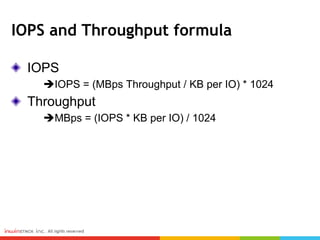
IOPS and Throughput formula
IOPS
IOPS = (MBps Throughput / KB per IO) * 1024
Throughput
MBps = (IOPS * KB per IO) / 1024
Performance Testing Result
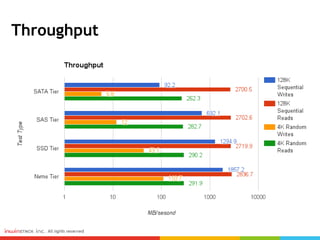
Throughput
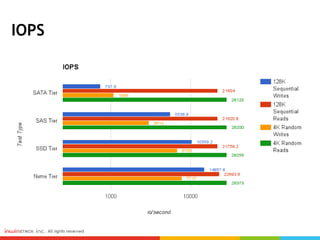
IOPS
Conclusion
Ceph Storage Tiering System is useful for
different kinds of user scenario aggregated in
one system.
For the Read Scenario, Ceph will provide very
good performance in all kinds of Tiers.
For Write Scenario, Nvme can give us a very
good performance than SSD, SAS and SATA.

Ceph Day KL - Ceph Tiering with High Performance Archiecture

Editor's Notes

  • #5 Why we need Ceph? Here we can see the benefits listed about Ceph. Ceph is a Distributed storage system with Fault tolerance and no single point of failure architecture. Ceph is open source and no vender lock-in issue. Another benefit is cost saving. For Ceph architecture, we only need x86 hardware. Moreover, Ceph is a scalable storage system which means it can support large scale from 10 nodes to more than one thousand nodes. When we talk about Ceph, many people may ask what is the difference between Ceph and HDFS? There are some features similar to each other such as replicas, distributed and scalable architecture. It looks like the same, but the most important about Ceph is that it can support three kinds of protocol (Block, Object, and File) and HDFS can only support File. Besides, the most important thing of Ceph is the Crush Map Algorithm. When we modify the Crush Map, we can do many things that HDFS cannot do, like DR Architecture, guarantees 3 replicas into 3 different clusters; Set weight for each OSD. About the Crush Map, we will talk about it more detail In the following pages.
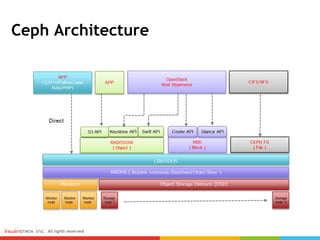
  • #6 This is the Ceph Architecture, from bottom to up means from hardware level to application level. So, in this architecture, we can see in the hardware level, Ceph monitor and OSD is scalable and on top of them is the API level. The first API is LIBRADOS and RADOSGW, RBD, CEPHFS protocols are on top of LIBRADOS. As a result, if you want to have a better performance, you can call the LIBRADOS to develop your applications. On the top is the applications integrate with Ceph. The most common scenarios are OpenStack and File sharing. When Ceph integrate with OpenStack, the Rados gateway can provide Keystone and Swift API; RBD can provide cinder and glance API. For file sharing scenario, before Jewel version, we use RBD and NFS to provide file sharing function because CephFS in Hammer version is not stable. After Jewel version, due to the critical bugs (data loss) about CephFS are fixed, we can provide file sharing functions through CephFS. By using CephFS, the clients need to install the key ring for data access and if you do not want to install key ring for each client, you can also use NFS to simplify the process. When you use NFS you will not need to install key ring for each client because you only need to install key ring on NFS server. But the important thing is that client connect to CephFS directly can get better performance than using NFS. This is a trade-off, depends on the scenario and requirements.
  • #7 In this page, we will talk about PG and Pools. These are very important concept in Ceph. In Ceph, each file will be separated into many objects and objects will be stored to different placement group (PG). A Pool will aggregate placement groups and the formula about the PG Number for each pool is (Number of OS ) Multiply the PG Number for each OSD than Divide the Replica number. For the PG number of each OSD, we have a soft limit, 30 to 300 and usually we suggest 256. For example if we have 4 OSD and PG number for each OSD is 256 with 2 replicas, The PG number for each Pool is 4 multiply 256 and divide 2, equal to 512. When we want to have good performance, we need to average distribute the PGs on OSD. For the Object size, we can set from 4 KB to 32 MB and by default the size is 4MB. Sometimes, with the increasing of the object size, the throughput will also be increased but it still depends on the real environment. After the PG and Pools, we will start to talk about the most important algorithm in the Ceph – Crush Map.
  • #8 Crush map is the most important thing in Ceph. We can achieve many special functions or get better performance by setting the crush map. The are five important parameters in Crush map which are settings, devices, types, buckets, and rules. About settings, which is the basic settings for crush map and usually we don’t need to change it. Devices is the physical device list which will list all the osd devices and define the device id and device name mappings. Types will define the bucket types from root to OSD Buckets will define the OSD group and tiering structures Rules means the crush rule and will define the object chunk. In the following pages, I will take a example about set the crush map to achieve tiering architecture.
  • #9 This is the default OSD tree and we can see we have 3 OSD nodes and each node has 6 OSD (hard drives) with 3 STAT and 3 SSD We separate the replica of object’s chunk by host.
  • #10 This is the defaut setting for crush map and usually we don’t need to change it.
  • #11 Here we can see the device list and the osd id. For the types, here are 10 types from osd to root
  • #12 In the bucket settings, we can set the weight for each osd to set the tiering architecture.
  • #13 There are six imiportant parameters in crush rules. Ruleset is the rule id and type will define the object chunk method, replicated or erasure coding. The min size and the max size is the criteria for the pool the select this rule. The step take will set which osd tree should be mappted to this rule, and in this example will select default osd tree. The step chooseleaf will set the mapping method for object chunk’s replica. In this example “set firstn 0 type host”will set replicas by host which means each host will have 1 replica. So, if you want to have a DR architecture to guarantee each site will have 1 replica, this setting is helpful to you.
  • #14 Then, after the settings, the OSD tree will changed to 2 pools, one is SSD pool and another is SATA pool.
  • #15 We can also use ceph ose crush rule list to see the ruleset and ceph osd dump to see the pool list.
  • #24 We set 4 tier with SATA, SAS, SSD and Nvme SSD Tier and test 4 kinds of parameters which are 128 sequential read / write and 4k random read / write. We can see the nvme get the best write performance and than are SSD, SAS and SATA, but for read, they almost get the similar perfromance. We also find out that 128k block size would get better performance than 4k block size.
  • #25 The IOPS get the same reslut as throughput. Nvme get the best performance in write scenario and all the tier get similar performance in read scenario.