1
Many Cloud Providers
• AWS: Amazon Web Services
– EC2: Elastic Compute Cloud
– S3: Simple Storage Service
– EBS: Elastic Block Storage
• Microsoft Azure
• Google Cloud/Compute Engine/AppEngine
• Rightscale, Salesforce, EMC, Gigaspaces, 10gen, Datastax,
Oracle, VMWare, Yahoo, Cloudera
• And many many more!
2
Two Categories of Clouds
• Can be either a (i) public cloud, or (ii) private cloud
• Private clouds are accessible only to company employees
• Public clouds provide service to any paying customer:
– Amazon S3 (Simple Storage Service): store arbitrary datasets, pay per GB-month
stored
• As of 2019: 0.4c-3 c per GB month
– Amazon EC2 (Elastic Compute Cloud): upload and run arbitrary OS images, pay
per CPU hour used
• As of 2019: 0.2 c per CPU hr to $7.2 per CPU hr (depending on strength)
– Google cloud: similar pricing as above
– Google AppEngine/Compute Engine: develop applications within their appengine
framework, upload data that will be imported into their format, and run
3
Customers Save Time and $$$
• Dave Power, Associate Information Consultant at Eli Lilly and
Company: “With AWS, Powers said, a new server can be up and
running in three minutes (it used to take Eli Lilly seven and a half
weeks to deploy a server internally) and a 64-node Linux cluster can
be online in five minutes (compared with three months internally). …
It's just shy of instantaneous.”
• Ingo Elfering, Vice President of Information Technology Strategy,
GlaxoSmithKline: “With Online Services, we are able to reduce our IT
operational costs by roughly 30% of what we’re spending”
• Jim Swartz, CIO, Sybase: “At Sybase, a private cloud of virtual servers
inside its datacenter has saved nearly $US2 million annually since
2006, Swartz says, because the company can share computing power
and storage resources across servers.”
• 100s of startups in Silicon Valley can harness large computing resources
without buying their own machines.
4
But what exactly IS a cloud?
5
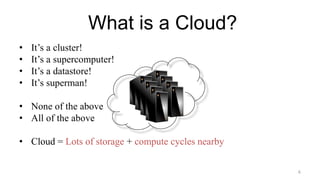
What is a Cloud?
• It’s a cluster!
• It’s a supercomputer!
• It’s a datastore!
• It’s superman!
• None of the above
• All of the above
• Cloud = Lots of storage + compute cycles nearby
6
What is a Cloud?
• A single-site cloud (aka “Datacenter”) consists
of
– Compute nodes (grouped into racks) (2)
– Switches, connecting the racks
– A network topology, e.g., hierarchical
– Storage (backend) nodes connected to the network
(3)
– Front-end for submitting jobs and receiving client
requests (1)
– (1-3: Often called “three-tier architecture”)
– Software Services
• A geographically distributed cloud consists of
– Multiple such sites
– Each site perhaps with a different structure and
services
7
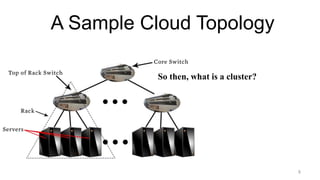
A Sample Cloud Topology
So then, what is a cluster?
8
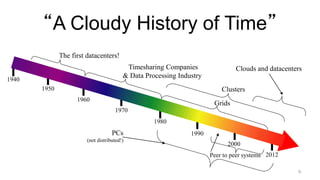
“A Cloudy History of Time”
1940
1950
1960
1970
1980
1990
2000
Timesharing Companies
& Data Processing Industry
Grids
Peer to peer systems
Clusters
The first datacenters!
PCs
(not distributed!)
Clouds and datacenters
2012
9
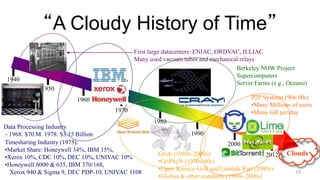
“A Cloudy History of Time”
1940
1950
1960
1970
1980
1990
2000
2012 Clouds
Grids (1980s-2000s):
•GriPhyN (1970s-80s)
•Open Science Grid and Lambda Rail (2000s)
•Globus & other standards (1990s-2000s)
Timesharing Industry (1975):
•Market Share: Honeywell 34%, IBM 15%,
•Xerox 10%, CDC 10%, DEC 10%, UNIVAC 10%
•Honeywell 6000 & 635, IBM 370/168,
Xerox 940 & Sigma 9, DEC PDP-10, UNIVAC 1108
Data Processing Industry
- 1968: $70 M. 1978: $3.15 Billion
First large datacenters: ENIAC, ORDVAC, ILLIAC
Many used vacuum tubes and mechanical relays
Berkeley NOW Project
Supercomputers
Server Farms (e.g., Oceano)
P2P Systems (90s-00s)
•Many Millions of users
•Many GB per day
10
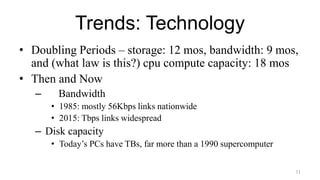
Trends: Technology
• Doubling Periods – storage: 12 mos, bandwidth: 9 mos,
and (what law is this?) cpu compute capacity: 18 mos
• Then and Now
– Bandwidth
• 1985: mostly 56Kbps links nationwide
• 2015: Tbps links widespread
– Disk capacity
• Today’s PCs have TBs, far more than a 1990 supercomputer
11
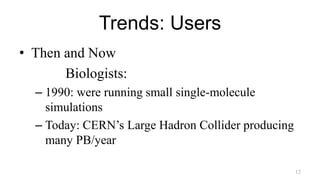
Trends: Users
• Then and Now
Biologists:
– 1990: were running small single-molecule
simulations
– Today: CERN’s Large Hadron Collider producing
many PB/year
12
Prophecies
• In 1965, MIT's Fernando Corbató and the other designers of
the Multics operating system envisioned a computer facility
operating “like a power company or water company”.
• Plug your thin client into the computing Utility and Play
your favorite Intensive Compute & Communicate
Application
– Have today’s clouds brought us closer to this reality? Think
about it.
13
Four Features New in Today’s
Clouds
I. Massive scale.
II. On-demand access: Pay-as-you-go, no upfront commitment.
– And anyone can access it
III. Data-intensive Nature: What was MBs has now become TBs, PBs and
XBs.
– Daily logs, forensics, Web data, etc.
– Humans have data numbness: Wikipedia (large) compressed is only about 10 GB!
IV. New Cloud Programming Paradigms: MapReduce/Hadoop,
NoSQL/Cassandra/MongoDB and many others.
– High in accessibility and ease of programmability
– Lots of open-source
Combination of one or more of these gives rise to novel and unsolved
distributed computing problems in cloud computing. 14
I. Massive Scale
• Facebook [GigaOm, 2012]
– 30K in 2009 -> 60K in 2010 -> 180K in 2012
• Microsoft [NYTimes, 2008]
– 150K machines
– Growth rate of 10K per month
– 80K total running Bing
– In 2013, Microsoft Cosmos had 110K machines (4 sites)
• Yahoo! [2009]:
– 100K
– Split into clusters of 4000
• AWS EC2 [Randy Bias, 2009]
– 40K machines
– 8 cores/machine
• eBay [2012]: 50K machines
• HP [2012]: 380K in 180 DCs
• Google [2011, Data Center Knowledge] : 900K
15
Quiz: Where is the World’s
Largest Datacenter?
16
Quiz: Where is the World’s
Largest Datacenter?
• (2018) China Telecom. 10.7 Million sq. ft.
• (2017) “The Citadel” Nevada. 7.2 Million sq. ft.
• (2015) In Chicago!
• 350 East Cermak, Chicago, 1.1 MILLION sq. ft.
• Shared by many different “carriers”
• Critical to Chicago Mercantile Exchange
• See:
– https://www.gigabitmagazine.com/top10/top-10-biggest-data-centres-world
– https://www.racksolutions.com/news/data-center-news/top-10-largest-data-centers-world/
17
What does a datacenter look like
from inside?
• A virtual walk through a datacenter
• Reference: http://gigaom.com/cleantech/a-rare-look-
inside-facebooks-oregon-data-center-photos-video/
18
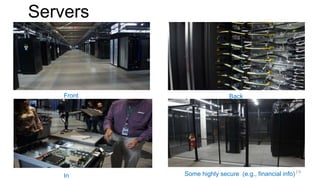
Servers
Front Back
In Some highly secure (e.g., financial info)19
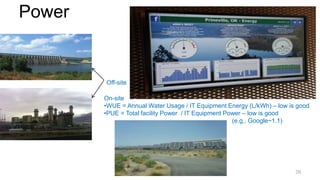
Power
Off-site
On-site
•WUE = Annual Water Usage / IT Equipment Energy (L/kWh) – low is good
•PUE = Total facility Power / IT Equipment Power – low is good
(e.g., Google~1.1)
20
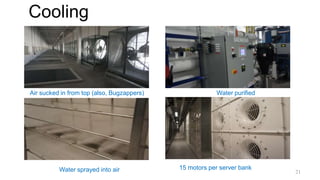
Cooling
Air sucked in from top (also, Bugzappers) Water purified
Water sprayed into air 15 motors per server bank
21
Extra - Fun Videos to Watch
• Microsoft GFS Datacenter Tour (Youtube)
– http://www.youtube.com/watch?v=hOxA1l1pQIw
• Timelapse of a Datacenter Construction on the Inside
(Fortune 500 company)
– http://www.youtube.com/watch?v=ujO-xNvXj3g
22
II. On-demand access: *aaS
Classification
On-demand: renting a cab vs. (previously) renting a car, or buying one. E.g.:
– AWS Elastic Compute Cloud (EC2): a few cents to a few $ per CPU hour
– AWS Simple Storage Service (S3): a few cents per GB-month
• HaaS: Hardware as a Service
– You get access to barebones hardware machines, do whatever you want with them,
Ex: Your own cluster
– Not always a good idea because of security risks
• IaaS: Infrastructure as a Service
– You get access to flexible computing and storage infrastructure. Virtualization is one
way of achieving this (cgroups, Kubernetes, Dockers, VMs,…). Often said to
subsume HaaS.
– Ex: Amazon Web Services (AWS: EC2 and S3), OpenStack, Eucalyptus, Rightscale,
Microsoft Azure, Google Cloud. 23
II. On-demand access: *aaS
Classification
• PaaS: Platform as a Service
– You get access to flexible computing and storage infrastructure,
coupled with a software platform (often tightly coupled)
– Ex: Google’s AppEngine (Python, Java, Go)
• SaaS: Software as a Service
– You get access to software services, when you need them. Often
said to subsume SOA (Service Oriented Architectures).
– Ex: Google docs, MS Office 365 Online
24
III. Data-intensive Computing
• Computation-Intensive Computing
– Example areas: MPI-based, High-performance computing, Grids
– Typically run on supercomputers (e.g., NCSA Blue Waters)
• Data-Intensive
– Typically store data at datacenters
– Use compute nodes nearby
– Compute nodes run computation services
• In data-intensive computing, the focus shifts from computation to the data:
CPU utilization no longer the most important resource metric, instead I/O is
(disk and/or network)
25
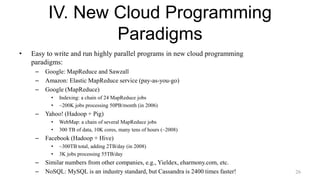
IV. New Cloud Programming
Paradigms
• Easy to write and run highly parallel programs in new cloud programming
paradigms:
– Google: MapReduce and Sawzall
– Amazon: Elastic MapReduce service (pay-as-you-go)
– Google (MapReduce)
• Indexing: a chain of 24 MapReduce jobs
• ~200K jobs processing 50PB/month (in 2006)
– Yahoo! (Hadoop + Pig)
• WebMap: a chain of several MapReduce jobs
• 300 TB of data, 10K cores, many tens of hours (~2008)
– Facebook (Hadoop + Hive)
• ~300TB total, adding 2TB/day (in 2008)
• 3K jobs processing 55TB/day
– Similar numbers from other companies, e.g., Yieldex, eharmony.com, etc.
– NoSQL: MySQL is an industry standard, but Cassandra is 2400 times faster! 26
Two Categories of Clouds
• Can be either a (i) public cloud, or (ii) private cloud
• Private clouds are accessible only to company employees
• Public clouds provide service to any paying customer
• You’re starting a new service/company: should you use a public cloud
or purchase your own private cloud?
27
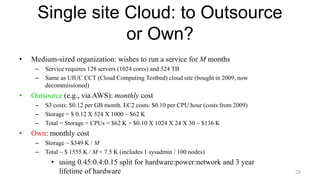
Single site Cloud: to Outsource
or Own?
• Medium-sized organization: wishes to run a service for M months
– Service requires 128 servers (1024 cores) and 524 TB
– Same as UIUC CCT (Cloud Computing Testbed) cloud site (bought in 2009, now
decommissioned)
• Outsource (e.g., via AWS): monthly cost
– S3 costs: $0.12 per GB month. EC2 costs: $0.10 per CPU hour (costs from 2009)
– Storage = $ 0.12 X 524 X 1000 ~ $62 K
– Total = Storage + CPUs = $62 K + $0.10 X 1024 X 24 X 30 ~ $136 K
• Own: monthly cost
– Storage ~ $349 K / M
– Total ~ $ 1555 K / M + 7.5 K (includes 1 sysadmin / 100 nodes)
• using 0.45:0.4:0.15 split for hardware:power:network and 3 year
lifetime of hardware 28
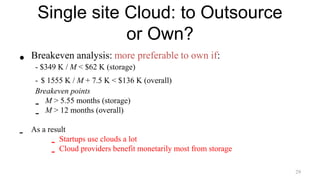
Single site Cloud: to Outsource
or Own?
• Breakeven analysis: more preferable to own if:
- $349 K / M < $62 K (storage)
- $ 1555 K / M + 7.5 K < $136 K (overall)
Breakeven points
- M > 5.55 months (storage)
- M > 12 months (overall)
- As a result
- Startups use clouds a lot
- Cloud providers benefit monetarily most from storage
29
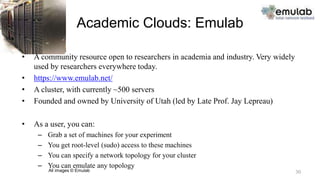
Academic Clouds: Emulab
• A community resource open to researchers in academia and industry. Very widely
used by researchers everywhere today.
• https://www.emulab.net/
• A cluster, with currently ~500 servers
• Founded and owned by University of Utah (led by Late Prof. Jay Lepreau)
• As a user, you can:
– Grab a set of machines for your experiment
– You get root-level (sudo) access to these machines
– You can specify a network topology for your cluster
– You can emulate any topology
All images © Emulab 30
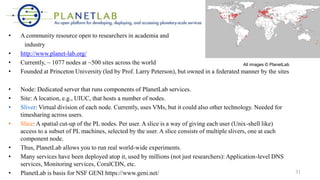
• A community resource open to researchers in academia and
industry
• http://www.planet-lab.org/
• Currently, ~ 1077 nodes at ~500 sites across the world
• Founded at Princeton University (led by Prof. Larry Peterson), but owned in a federated manner by the sites
• Node: Dedicated server that runs components of PlanetLab services.
• Site: A location, e.g., UIUC, that hosts a number of nodes.
• Sliver: Virtual division of each node. Currently, uses VMs, but it could also other technology. Needed for
timesharing across users.
• Slice: A spatial cut-up of the PL nodes. Per user. A slice is a way of giving each user (Unix-shell like)
access to a subset of PL machines, selected by the user. A slice consists of multiple slivers, one at each
component node.
• Thus, PlanetLab allows you to run real world-wide experiments.
• Many services have been deployed atop it, used by millions (not just researchers): Application-level DNS
services, Monitoring services, CoralCDN, etc.
• PlanetLab is basis for NSF GENI https://www.geni.net/
All images © PlanetLab
31
Public Research Clouds
• Accessible to researchers with a qualifying grant
• Chameleon Cloud: https://www.chameleoncloud.org/
• HaaS
• OpenStack (~AWS)
• CloudLab: https://www.cloudlab.us/
• Build your own cloud on their hardware
32
Summary
• Clouds build on many previous generations of distributed
systems
• Especially the timesharing and data processing industry of
the 1960-70s.
• Need to identify unique aspects of a problem to classify it as
a new cloud computing problem
– Scale, On-demand access, data-intensive, new programming
• Otherwise, the solutions to your problem may already exist!
• Next: Mapreduce!
33

Cloud introduction2.ppt

  • 1.
  • 2.
    Many Cloud Providers •AWS: Amazon Web Services – EC2: Elastic Compute Cloud – S3: Simple Storage Service – EBS: Elastic Block Storage • Microsoft Azure • Google Cloud/Compute Engine/AppEngine • Rightscale, Salesforce, EMC, Gigaspaces, 10gen, Datastax, Oracle, VMWare, Yahoo, Cloudera • And many many more! 2
  • 3.
    Two Categories ofClouds • Can be either a (i) public cloud, or (ii) private cloud • Private clouds are accessible only to company employees • Public clouds provide service to any paying customer: – Amazon S3 (Simple Storage Service): store arbitrary datasets, pay per GB-month stored • As of 2019: 0.4c-3 c per GB month – Amazon EC2 (Elastic Compute Cloud): upload and run arbitrary OS images, pay per CPU hour used • As of 2019: 0.2 c per CPU hr to $7.2 per CPU hr (depending on strength) – Google cloud: similar pricing as above – Google AppEngine/Compute Engine: develop applications within their appengine framework, upload data that will be imported into their format, and run 3
  • 4.
    Customers Save Timeand $$$ • Dave Power, Associate Information Consultant at Eli Lilly and Company: “With AWS, Powers said, a new server can be up and running in three minutes (it used to take Eli Lilly seven and a half weeks to deploy a server internally) and a 64-node Linux cluster can be online in five minutes (compared with three months internally). … It's just shy of instantaneous.” • Ingo Elfering, Vice President of Information Technology Strategy, GlaxoSmithKline: “With Online Services, we are able to reduce our IT operational costs by roughly 30% of what we’re spending” • Jim Swartz, CIO, Sybase: “At Sybase, a private cloud of virtual servers inside its datacenter has saved nearly $US2 million annually since 2006, Swartz says, because the company can share computing power and storage resources across servers.” • 100s of startups in Silicon Valley can harness large computing resources without buying their own machines. 4
  • 5.
    But what exactlyIS a cloud? 5
  • 6.
    What is aCloud? • It’s a cluster! • It’s a supercomputer! • It’s a datastore! • It’s superman! • None of the above • All of the above • Cloud = Lots of storage + compute cycles nearby 6
  • 7.
    What is aCloud? • A single-site cloud (aka “Datacenter”) consists of – Compute nodes (grouped into racks) (2) – Switches, connecting the racks – A network topology, e.g., hierarchical – Storage (backend) nodes connected to the network (3) – Front-end for submitting jobs and receiving client requests (1) – (1-3: Often called “three-tier architecture”) – Software Services • A geographically distributed cloud consists of – Multiple such sites – Each site perhaps with a different structure and services 7
  • 8.
    A Sample CloudTopology So then, what is a cluster? 8
  • 9.
    “A Cloudy Historyof Time” 1940 1950 1960 1970 1980 1990 2000 Timesharing Companies & Data Processing Industry Grids Peer to peer systems Clusters The first datacenters! PCs (not distributed!) Clouds and datacenters 2012 9
  • 10.
    “A Cloudy Historyof Time” 1940 1950 1960 1970 1980 1990 2000 2012 Clouds Grids (1980s-2000s): •GriPhyN (1970s-80s) •Open Science Grid and Lambda Rail (2000s) •Globus & other standards (1990s-2000s) Timesharing Industry (1975): •Market Share: Honeywell 34%, IBM 15%, •Xerox 10%, CDC 10%, DEC 10%, UNIVAC 10% •Honeywell 6000 & 635, IBM 370/168, Xerox 940 & Sigma 9, DEC PDP-10, UNIVAC 1108 Data Processing Industry - 1968: $70 M. 1978: $3.15 Billion First large datacenters: ENIAC, ORDVAC, ILLIAC Many used vacuum tubes and mechanical relays Berkeley NOW Project Supercomputers Server Farms (e.g., Oceano) P2P Systems (90s-00s) •Many Millions of users •Many GB per day 10
  • 11.
    Trends: Technology • DoublingPeriods – storage: 12 mos, bandwidth: 9 mos, and (what law is this?) cpu compute capacity: 18 mos • Then and Now – Bandwidth • 1985: mostly 56Kbps links nationwide • 2015: Tbps links widespread – Disk capacity • Today’s PCs have TBs, far more than a 1990 supercomputer 11
  • 12.
    Trends: Users • Thenand Now Biologists: – 1990: were running small single-molecule simulations – Today: CERN’s Large Hadron Collider producing many PB/year 12
  • 13.
    Prophecies • In 1965,MIT's Fernando Corbató and the other designers of the Multics operating system envisioned a computer facility operating “like a power company or water company”. • Plug your thin client into the computing Utility and Play your favorite Intensive Compute & Communicate Application – Have today’s clouds brought us closer to this reality? Think about it. 13
  • 14.
    Four Features Newin Today’s Clouds I. Massive scale. II. On-demand access: Pay-as-you-go, no upfront commitment. – And anyone can access it III. Data-intensive Nature: What was MBs has now become TBs, PBs and XBs. – Daily logs, forensics, Web data, etc. – Humans have data numbness: Wikipedia (large) compressed is only about 10 GB! IV. New Cloud Programming Paradigms: MapReduce/Hadoop, NoSQL/Cassandra/MongoDB and many others. – High in accessibility and ease of programmability – Lots of open-source Combination of one or more of these gives rise to novel and unsolved distributed computing problems in cloud computing. 14
  • 15.
    I. Massive Scale •Facebook [GigaOm, 2012] – 30K in 2009 -> 60K in 2010 -> 180K in 2012 • Microsoft [NYTimes, 2008] – 150K machines – Growth rate of 10K per month – 80K total running Bing – In 2013, Microsoft Cosmos had 110K machines (4 sites) • Yahoo! [2009]: – 100K – Split into clusters of 4000 • AWS EC2 [Randy Bias, 2009] – 40K machines – 8 cores/machine • eBay [2012]: 50K machines • HP [2012]: 380K in 180 DCs • Google [2011, Data Center Knowledge] : 900K 15
  • 16.
    Quiz: Where isthe World’s Largest Datacenter? 16
  • 17.
    Quiz: Where isthe World’s Largest Datacenter? • (2018) China Telecom. 10.7 Million sq. ft. • (2017) “The Citadel” Nevada. 7.2 Million sq. ft. • (2015) In Chicago! • 350 East Cermak, Chicago, 1.1 MILLION sq. ft. • Shared by many different “carriers” • Critical to Chicago Mercantile Exchange • See: – https://www.gigabitmagazine.com/top10/top-10-biggest-data-centres-world – https://www.racksolutions.com/news/data-center-news/top-10-largest-data-centers-world/ 17
  • 18.
    What does adatacenter look like from inside? • A virtual walk through a datacenter • Reference: http://gigaom.com/cleantech/a-rare-look- inside-facebooks-oregon-data-center-photos-video/ 18
  • 19.
    Servers Front Back In Somehighly secure (e.g., financial info)19
  • 20.
    Power Off-site On-site •WUE = AnnualWater Usage / IT Equipment Energy (L/kWh) – low is good •PUE = Total facility Power / IT Equipment Power – low is good (e.g., Google~1.1) 20
  • 21.
    Cooling Air sucked infrom top (also, Bugzappers) Water purified Water sprayed into air 15 motors per server bank 21
  • 22.
    Extra - FunVideos to Watch • Microsoft GFS Datacenter Tour (Youtube) – http://www.youtube.com/watch?v=hOxA1l1pQIw • Timelapse of a Datacenter Construction on the Inside (Fortune 500 company) – http://www.youtube.com/watch?v=ujO-xNvXj3g 22
  • 23.
    II. On-demand access:*aaS Classification On-demand: renting a cab vs. (previously) renting a car, or buying one. E.g.: – AWS Elastic Compute Cloud (EC2): a few cents to a few $ per CPU hour – AWS Simple Storage Service (S3): a few cents per GB-month • HaaS: Hardware as a Service – You get access to barebones hardware machines, do whatever you want with them, Ex: Your own cluster – Not always a good idea because of security risks • IaaS: Infrastructure as a Service – You get access to flexible computing and storage infrastructure. Virtualization is one way of achieving this (cgroups, Kubernetes, Dockers, VMs,…). Often said to subsume HaaS. – Ex: Amazon Web Services (AWS: EC2 and S3), OpenStack, Eucalyptus, Rightscale, Microsoft Azure, Google Cloud. 23
  • 24.
    II. On-demand access:*aaS Classification • PaaS: Platform as a Service – You get access to flexible computing and storage infrastructure, coupled with a software platform (often tightly coupled) – Ex: Google’s AppEngine (Python, Java, Go) • SaaS: Software as a Service – You get access to software services, when you need them. Often said to subsume SOA (Service Oriented Architectures). – Ex: Google docs, MS Office 365 Online 24
  • 25.
    III. Data-intensive Computing •Computation-Intensive Computing – Example areas: MPI-based, High-performance computing, Grids – Typically run on supercomputers (e.g., NCSA Blue Waters) • Data-Intensive – Typically store data at datacenters – Use compute nodes nearby – Compute nodes run computation services • In data-intensive computing, the focus shifts from computation to the data: CPU utilization no longer the most important resource metric, instead I/O is (disk and/or network) 25
  • 26.
    IV. New CloudProgramming Paradigms • Easy to write and run highly parallel programs in new cloud programming paradigms: – Google: MapReduce and Sawzall – Amazon: Elastic MapReduce service (pay-as-you-go) – Google (MapReduce) • Indexing: a chain of 24 MapReduce jobs • ~200K jobs processing 50PB/month (in 2006) – Yahoo! (Hadoop + Pig) • WebMap: a chain of several MapReduce jobs • 300 TB of data, 10K cores, many tens of hours (~2008) – Facebook (Hadoop + Hive) • ~300TB total, adding 2TB/day (in 2008) • 3K jobs processing 55TB/day – Similar numbers from other companies, e.g., Yieldex, eharmony.com, etc. – NoSQL: MySQL is an industry standard, but Cassandra is 2400 times faster! 26
  • 27.
    Two Categories ofClouds • Can be either a (i) public cloud, or (ii) private cloud • Private clouds are accessible only to company employees • Public clouds provide service to any paying customer • You’re starting a new service/company: should you use a public cloud or purchase your own private cloud? 27
  • 28.
    Single site Cloud:to Outsource or Own? • Medium-sized organization: wishes to run a service for M months – Service requires 128 servers (1024 cores) and 524 TB – Same as UIUC CCT (Cloud Computing Testbed) cloud site (bought in 2009, now decommissioned) • Outsource (e.g., via AWS): monthly cost – S3 costs: $0.12 per GB month. EC2 costs: $0.10 per CPU hour (costs from 2009) – Storage = $ 0.12 X 524 X 1000 ~ $62 K – Total = Storage + CPUs = $62 K + $0.10 X 1024 X 24 X 30 ~ $136 K • Own: monthly cost – Storage ~ $349 K / M – Total ~ $ 1555 K / M + 7.5 K (includes 1 sysadmin / 100 nodes) • using 0.45:0.4:0.15 split for hardware:power:network and 3 year lifetime of hardware 28
  • 29.
    Single site Cloud:to Outsource or Own? • Breakeven analysis: more preferable to own if: - $349 K / M < $62 K (storage) - $ 1555 K / M + 7.5 K < $136 K (overall) Breakeven points - M > 5.55 months (storage) - M > 12 months (overall) - As a result - Startups use clouds a lot - Cloud providers benefit monetarily most from storage 29
  • 30.
    Academic Clouds: Emulab •A community resource open to researchers in academia and industry. Very widely used by researchers everywhere today. • https://www.emulab.net/ • A cluster, with currently ~500 servers • Founded and owned by University of Utah (led by Late Prof. Jay Lepreau) • As a user, you can: – Grab a set of machines for your experiment – You get root-level (sudo) access to these machines – You can specify a network topology for your cluster – You can emulate any topology All images © Emulab 30
  • 31.
    • A communityresource open to researchers in academia and industry • http://www.planet-lab.org/ • Currently, ~ 1077 nodes at ~500 sites across the world • Founded at Princeton University (led by Prof. Larry Peterson), but owned in a federated manner by the sites • Node: Dedicated server that runs components of PlanetLab services. • Site: A location, e.g., UIUC, that hosts a number of nodes. • Sliver: Virtual division of each node. Currently, uses VMs, but it could also other technology. Needed for timesharing across users. • Slice: A spatial cut-up of the PL nodes. Per user. A slice is a way of giving each user (Unix-shell like) access to a subset of PL machines, selected by the user. A slice consists of multiple slivers, one at each component node. • Thus, PlanetLab allows you to run real world-wide experiments. • Many services have been deployed atop it, used by millions (not just researchers): Application-level DNS services, Monitoring services, CoralCDN, etc. • PlanetLab is basis for NSF GENI https://www.geni.net/ All images © PlanetLab 31
  • 32.
    Public Research Clouds •Accessible to researchers with a qualifying grant • Chameleon Cloud: https://www.chameleoncloud.org/ • HaaS • OpenStack (~AWS) • CloudLab: https://www.cloudlab.us/ • Build your own cloud on their hardware 32
  • 33.
    Summary • Clouds buildon many previous generations of distributed systems • Especially the timesharing and data processing industry of the 1960-70s. • Need to identify unique aspects of a problem to classify it as a new cloud computing problem – Scale, On-demand access, data-intensive, new programming • Otherwise, the solutions to your problem may already exist! • Next: Mapreduce! 33