










1
PLANNING A
MIGRATION TO
2
MAKE SURE TO THANK OUR SPONSORS!
WEAR YOUR NACS WRISTBAND FOR
LUNCH SPECIALS ON BRANSON LANDING
PLAY VENDOR BINGO FOR YOUR CHANCE
TO WIN A i7 16GB 1TB SURFACE BOOK
3
ATTENDEE
PARTY FRIDAY
NIGHT AT 7:30PM
AT BLACK OAK
GRILL WITH
GREATE LIVE
MUSIC
GET YOUR FREE
DRINK TICKETS
AT THE END OF
THE DAY
SESSION ON
FRIDAY
4
PRIZE DRAWINGS HAPPEN AFTER THE END OF THE DAY SESSIONS ON FRIDAY AND
SATURDAY. YOU MUST ATTEND THE END OF THE DAY SESSION TO WIN.
5
DOUG
HEMMINGER
Based out of Chicago
SharePoint and Office 365 Solution
Architect and Evangelist for SPR
Consulting
Email: doug.hemminger@spr.com
Twitter: @DougHemminger
Blog: www.sharepointdoug.com
6
P R O J E C T D E S C R I P T I O N
SETUP YOUR
PRODUCTION OFFICE
365 TENANT
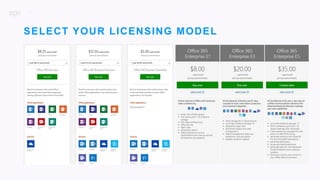
| Select your licensing model
| Designate your tenant name
| Setup custom domains
7
SELECT YOUR LICENSING MODEL
8
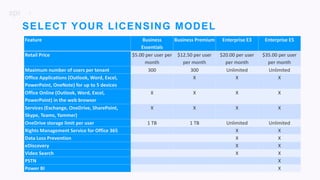
SELECT YOUR LICENSING MODEL
Feature Business
Essentials
Business Premium Enterprise E3 Enterprise E5
Retail Price $5.00 per user per
month
$12.50 per user
per month
$20.00 per user
per month
$35.00 per user
per month
Maximum number of users per tenant 300 300 Unlimited Unlimited
Office Applications (Outlook, Word, Excel,
PowerPoint, OneNote) for up to 5 devices
X X X
Office Online (Outlook, Word, Excel,
PowerPoint) in the web browser
X X X X
Services (Exchange, OneDrive, SharePoint,
Skype, Teams, Yammer)
X X X X
OneDrive storage limit per user 1 TB 1 TB Unlimited Unlimited
Rights Management Service for Office 365 X X
Data Loss Prevention X X
eDiscovery X X
Video Search X X
PSTN X
Power BI X
9
| Designate an onmicrosoft.com domain:
”tenantname.onmicrosoft.com” where “tenantname” is your tenant name that you
create.
| Tenant name must be unique across all organizations.
| Your tenant name is used in SharePoint online (“tenantname.sharepoint.com”) and
One Drive for Business (“tenantname-my.sharepoint.com”)
| Tenant name cannot be change after it is initially setup
DESIGNATE YOUR
TENANT NAME
10
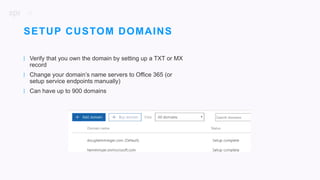
| Verify that you own the domain by setting up a TXT or MX
record
| Change your domain’s name servers to Office 365 (or
setup service endpoints manually)
| Can have up to 900 domains
SETUP CUSTOM DOMAINS
11
P R O J E C T D E S C R I P T I O N
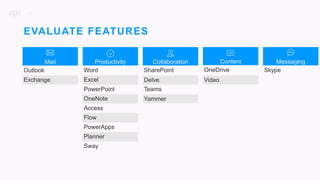
EVALUATE FEATURES
| Evaluate features and decide which ones will be
enabled
| Establish roles and responsibilities for
administration and data ownership
12
EVALUATE FEATURES
Mail
Outlook
Exchange
Content
OneDrive
Video
Productivity
Word
Excel
PowerPoint
OneNote
Access
Flow
PowerApps
Planner
Sway
Collaboration
SharePoint
Delve
Teams
Yammer
Messaging
Skype
13
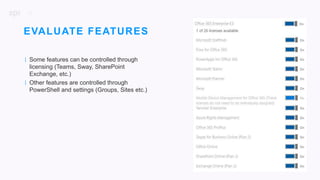
| Some features can be controlled through
licensing (Teams, Sway, SharePoint
Exchange, etc.)
| Other features are controlled through
PowerShell and settings (Groups, Sites etc.)
EVALUATE FEATURES
14
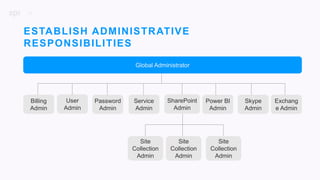
Global Administrator
Password
Admin
Service
Admin
User
Admin
Billing
Admin
Site
Collection
Admin
Site
Collection
Admin
Site
Collection
Admin
Power BI
Admin
SharePoint
Admin
Skype
Admin
Exchang
e Admin
ESTABLISH ADMINISTRATIVE
RESPONSIBILITIES
15
P R O J E C T D E S C R I P T I O N
SETUP INFORMATION
PROTECTION
| Simplify and protect access
| Allow collaboration and prevent leaks
| Stop external threats
| Secure admin access
| Consider Retention Policies
16
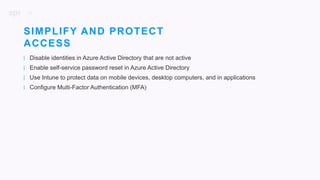
| Disable identities in Azure Active Directory that are not active
| Enable self-service password reset in Azure Active Directory
| Use Intune to protect data on mobile devices, desktop computers, and in applications
| Configure Multi-Factor Authentication (MFA)
SIMPLIFY AND PROTECT
ACCESS
17
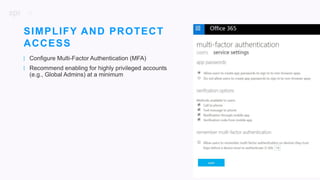
| Configure Multi-Factor Authentication (MFA)
| Recommend enabling for highly privileged accounts
(e.g., Global Admins) at a minimum
SIMPLIFY AND PROTECT
ACCESS
18
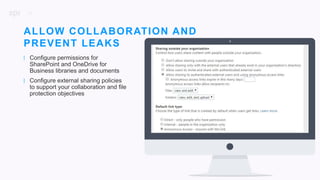
| Configure permissions for
SharePoint and OneDrive for
Business libraries and documents
| Configure external sharing policies
to support your collaboration and file
protection objectives
ALLOW COLLABORATION AND
PREVENT LEAKS
19
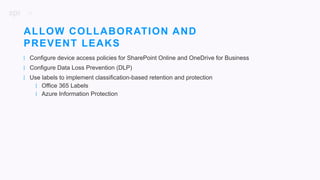
| Configure device access policies for SharePoint Online and OneDrive for Business
| Configure Data Loss Prevention (DLP)
| Use labels to implement classification-based retention and protection
| Office 365 Labels
| Azure Information Protection
ALLOW COLLABORATION AND
PREVENT LEAKS
20
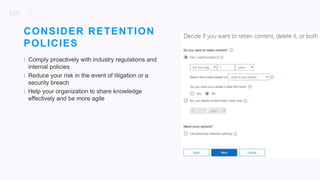
| Comply proactively with industry regulations and
internal policies
| Reduce your risk in the event of litigation or a
security breach
| Help your organization to share knowledge
effectively and be more agile
CONSIDER RETENTION
POLICIES
21
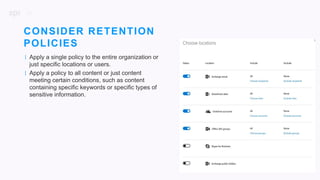
| Apply a single policy to the entire organization or
just specific locations or users.
| Apply a policy to all content or just content
meeting certain conditions, such as content
containing specific keywords or specific types of
sensitive information.
CONSIDER RETENTION
POLICIES
22
| Add Exchange Online Advanced Threat Protection for your organization
| Use Office 365 Advanced Security Management
STOP EXTERNAL THREATS
23
| Conduct eDiscovery in Office 365
| Audit user and administrator actions in Office 365 for compliance
| Apply security restrictions in Exchange Online to protect messages
STAY COMPLIANT
24
| Secure privileged access
| Separate duties of administrators by role — SharePoint Online, Exchange Online, and Skype for
Business Online
| Review the Office 365 administrator audit logs
SECURE ADMIN ACCESS
25
P R O J E C T D E S C R I P T I O N
VALIDATE NETWORK
INFRASTRUCTURE
| Secure sufficient internet capacity for each office
building or location
| Consider the acquisition of redundant network
links for high priority office locations
26
Office 365 is a secure, reliable, high performance service that runs over the public internet. Microsoft
continues to invest to enhance these aspects of the service. All Office 365 services are available via
internet connectivity.
VALIDATE NETWORK
INFRASTRUCTURE
27
| Ensure proxy and firewall devices are sized to handle the additional traffic.
| If your outbound proxies require user authentication you may experience slow connectivity or a loss
of functionality.
| If you're filtering outbound connections from computers on your network, bypassing this filtering to
the Office 365 domains will improve connectivity and performance.
VALIDATE NETWORK
INFRASTRUCTURE
28
| Assess the number of clients that will use each internet egress.
| Determine which Office 365 services and features will be available for clients to use.
| Use the calculators and network tools to get a rough estimate for Exchange Online and Skype for
Business bandwidth needs.
| Measure the network utilization for a pilot group of clients.
| Use the measurements from the pilot group to extrapolate the entire organization's needs and re-test
to validate the estimations before making any changes to your network.
ESTIMATE NETWORK
BANDWITH REQUIREMENTS
29
P R O J E C T D E S C R I P T I O N
IMPLEMENT IDENTITY
MANAGEMENT
| Ensure Active Directory is accurate and up to
date (OUs are organized, profile data is
complete, etc.)
| Consider identity management options and
configure
30
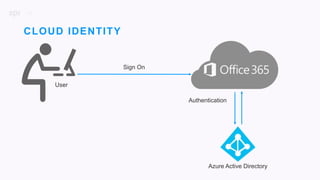
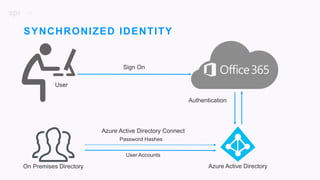
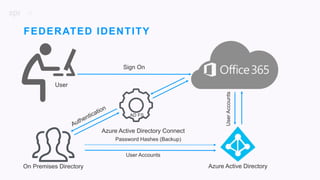
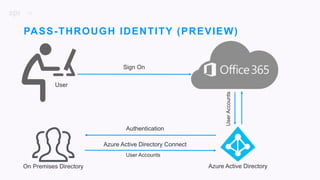
| Active Directory user data is synced to Office 365 using Azure Active Directory Connect and appears
in profiles
| Profiles are only as good as the data replicated from Active Directory
| Manager field is used to build organization hierarchy
ENSURE ACTIVE DIRECTORY
IS ACCURATE
31
Azure Active Directory
Authentication
CLOUD IDENTITY
User
Sign On
32
Sign On
Azure Active Directory
Authentication
SYNCHRONIZED IDENTITY
User
Azure Active Directory Connect
Password Hashes
User Accounts
On Premises Directory
33
Sign On
Azure Active Directory
FEDERATED IDENTITY
User
AD FS
UserAccounts
Azure Active Directory Connect
Password Hashes (Backup)
User Accounts
On Premises Directory
34
Sign On
Azure Active Directory
PASS-THROUGH IDENTITY (PREVIEW)
User
UserAccounts
Azure Active Directory Connect
User Accounts
On Premises Directory
Authentication
35
P R O J E C T D E S C R I P T I O N
CONSIDER
ADDITIONAL TOOLS
| Microsoft Fasttrack
| Third Party tools
36
| FastTrack is a Microsoft program that provides a set of best practices, tools, resources, and experts
to help transition to the cloud.
| Customers who purchase 50 licenses or more of an eligible plan receive onboarding and adoption
assistance
| Customers with more than 150 licenses may also take advantage of data migration assistance as
needed
MICROSOFT FASTTRACK
37
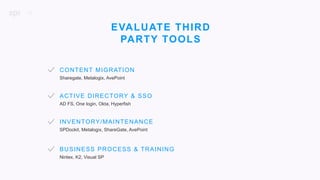
CONTENT MIGRATION
ACTIVE DIRECTORY & SSO
Sharegate, Metalogix, AvePoint
AD FS, One login, Okta, Hyperfish
SPDockit, Metalogix, ShareGate, AvePoint
INVENTORY/MAINTENANCE
EVALUATE THIRD
PARTY TOOLS
Nintex, K2, Visual SP
BUSINESS PROCESS & TRAINING
38
P R O J E C T D E S C R I P T I O N
DEVELOP A ROADMAP
39
| Moving email to the cloud
| Moving files to the cloud
| Collaborating in the cloud
| SharePoint
| Teams
| Groups
| Communicating in the cloud
| Skype for Business
DEVELOP A ROADMAP
40
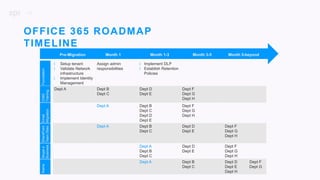
OFFICE 365 ROADMAP
TIMELINE
| Setup tenant
| Validate Network
infrastructure
| Implement Identity
Management
Assign admin
responsibilities
| Implement DLP
| Establish Retention
Policies
Dept A Dept B
Dept C
Dept D
Dept E
Dept F
Dept G
Dept H
Dept A Dept B
Dept C
Dept D
Dept E
Dept F
Dept G
Dept H
Dept A Dept B
Dept C
Dept D
Dept E
Dept F
Dept G
Dept H
Dept A
Dept B
Dept C
Dept D
Dept E
Dept F
Dept G
Dept H
Dept A Dept B
Dept C
Dept D Dept F
Dept E Dept G
Dept H
Pre-Migration Month 1 Month 1-3 Month 3-5 Month 5-beyond
FoundationO365
Training
Email
Migration
SharePoint
TeamSites
Skype4
Business
Teams
41
DELIVER
BEYOND
THE BUILD
To carry out
the end result as promised
above and over

Planning a Migration to Office 365

  • 1.
  • 2.
    2 MAKE SURE TOTHANK OUR SPONSORS! WEAR YOUR NACS WRISTBAND FOR LUNCH SPECIALS ON BRANSON LANDING PLAY VENDOR BINGO FOR YOUR CHANCE TO WIN A i7 16GB 1TB SURFACE BOOK
  • 3.
    3 ATTENDEE PARTY FRIDAY NIGHT AT7:30PM AT BLACK OAK GRILL WITH GREATE LIVE MUSIC GET YOUR FREE DRINK TICKETS AT THE END OF THE DAY SESSION ON FRIDAY
  • 4.
    4 PRIZE DRAWINGS HAPPENAFTER THE END OF THE DAY SESSIONS ON FRIDAY AND SATURDAY. YOU MUST ATTEND THE END OF THE DAY SESSION TO WIN.
  • 5.
    5 DOUG HEMMINGER Based out ofChicago SharePoint and Office 365 Solution Architect and Evangelist for SPR Consulting Email: doug.hemminger@spr.com Twitter: @DougHemminger Blog: www.sharepointdoug.com
  • 6.
    6 P R OJ E C T D E S C R I P T I O N SETUP YOUR PRODUCTION OFFICE 365 TENANT | Select your licensing model | Designate your tenant name | Setup custom domains
  • 7.
  • 8.
    8 SELECT YOUR LICENSINGMODEL Feature Business Essentials Business Premium Enterprise E3 Enterprise E5 Retail Price $5.00 per user per month $12.50 per user per month $20.00 per user per month $35.00 per user per month Maximum number of users per tenant 300 300 Unlimited Unlimited Office Applications (Outlook, Word, Excel, PowerPoint, OneNote) for up to 5 devices X X X Office Online (Outlook, Word, Excel, PowerPoint) in the web browser X X X X Services (Exchange, OneDrive, SharePoint, Skype, Teams, Yammer) X X X X OneDrive storage limit per user 1 TB 1 TB Unlimited Unlimited Rights Management Service for Office 365 X X Data Loss Prevention X X eDiscovery X X Video Search X X PSTN X Power BI X
  • 9.
    9 | Designate anonmicrosoft.com domain: ”tenantname.onmicrosoft.com” where “tenantname” is your tenant name that you create. | Tenant name must be unique across all organizations. | Your tenant name is used in SharePoint online (“tenantname.sharepoint.com”) and One Drive for Business (“tenantname-my.sharepoint.com”) | Tenant name cannot be change after it is initially setup DESIGNATE YOUR TENANT NAME
  • 10.
    10 | Verify thatyou own the domain by setting up a TXT or MX record | Change your domain’s name servers to Office 365 (or setup service endpoints manually) | Can have up to 900 domains SETUP CUSTOM DOMAINS
  • 11.
    11 P R OJ E C T D E S C R I P T I O N EVALUATE FEATURES | Evaluate features and decide which ones will be enabled | Establish roles and responsibilities for administration and data ownership
  • 12.
  • 13.
    13 | Some featurescan be controlled through licensing (Teams, Sway, SharePoint Exchange, etc.) | Other features are controlled through PowerShell and settings (Groups, Sites etc.) EVALUATE FEATURES
  • 14.
  • 15.
    15 P R OJ E C T D E S C R I P T I O N SETUP INFORMATION PROTECTION | Simplify and protect access | Allow collaboration and prevent leaks | Stop external threats | Secure admin access | Consider Retention Policies
  • 16.
    16 | Disable identitiesin Azure Active Directory that are not active | Enable self-service password reset in Azure Active Directory | Use Intune to protect data on mobile devices, desktop computers, and in applications | Configure Multi-Factor Authentication (MFA) SIMPLIFY AND PROTECT ACCESS
  • 17.
    17 | Configure Multi-FactorAuthentication (MFA) | Recommend enabling for highly privileged accounts (e.g., Global Admins) at a minimum SIMPLIFY AND PROTECT ACCESS
  • 18.
    18 | Configure permissionsfor SharePoint and OneDrive for Business libraries and documents | Configure external sharing policies to support your collaboration and file protection objectives ALLOW COLLABORATION AND PREVENT LEAKS
  • 19.
    19 | Configure deviceaccess policies for SharePoint Online and OneDrive for Business | Configure Data Loss Prevention (DLP) | Use labels to implement classification-based retention and protection | Office 365 Labels | Azure Information Protection ALLOW COLLABORATION AND PREVENT LEAKS
  • 20.
    20 | Comply proactivelywith industry regulations and internal policies | Reduce your risk in the event of litigation or a security breach | Help your organization to share knowledge effectively and be more agile CONSIDER RETENTION POLICIES
  • 21.
    21 | Apply asingle policy to the entire organization or just specific locations or users. | Apply a policy to all content or just content meeting certain conditions, such as content containing specific keywords or specific types of sensitive information. CONSIDER RETENTION POLICIES
  • 22.
    22 | Add ExchangeOnline Advanced Threat Protection for your organization | Use Office 365 Advanced Security Management STOP EXTERNAL THREATS
  • 23.
    23 | Conduct eDiscoveryin Office 365 | Audit user and administrator actions in Office 365 for compliance | Apply security restrictions in Exchange Online to protect messages STAY COMPLIANT
  • 24.
    24 | Secure privilegedaccess | Separate duties of administrators by role — SharePoint Online, Exchange Online, and Skype for Business Online | Review the Office 365 administrator audit logs SECURE ADMIN ACCESS
  • 25.
    25 P R OJ E C T D E S C R I P T I O N VALIDATE NETWORK INFRASTRUCTURE | Secure sufficient internet capacity for each office building or location | Consider the acquisition of redundant network links for high priority office locations
  • 26.
    26 Office 365 isa secure, reliable, high performance service that runs over the public internet. Microsoft continues to invest to enhance these aspects of the service. All Office 365 services are available via internet connectivity. VALIDATE NETWORK INFRASTRUCTURE
  • 27.
    27 | Ensure proxyand firewall devices are sized to handle the additional traffic. | If your outbound proxies require user authentication you may experience slow connectivity or a loss of functionality. | If you're filtering outbound connections from computers on your network, bypassing this filtering to the Office 365 domains will improve connectivity and performance. VALIDATE NETWORK INFRASTRUCTURE
  • 28.
    28 | Assess thenumber of clients that will use each internet egress. | Determine which Office 365 services and features will be available for clients to use. | Use the calculators and network tools to get a rough estimate for Exchange Online and Skype for Business bandwidth needs. | Measure the network utilization for a pilot group of clients. | Use the measurements from the pilot group to extrapolate the entire organization's needs and re-test to validate the estimations before making any changes to your network. ESTIMATE NETWORK BANDWITH REQUIREMENTS
  • 29.
    29 P R OJ E C T D E S C R I P T I O N IMPLEMENT IDENTITY MANAGEMENT | Ensure Active Directory is accurate and up to date (OUs are organized, profile data is complete, etc.) | Consider identity management options and configure
  • 30.
    30 | Active Directoryuser data is synced to Office 365 using Azure Active Directory Connect and appears in profiles | Profiles are only as good as the data replicated from Active Directory | Manager field is used to build organization hierarchy ENSURE ACTIVE DIRECTORY IS ACCURATE
  • 31.
  • 32.
    32 Sign On Azure ActiveDirectory Authentication SYNCHRONIZED IDENTITY User Azure Active Directory Connect Password Hashes User Accounts On Premises Directory
  • 33.
    33 Sign On Azure ActiveDirectory FEDERATED IDENTITY User AD FS UserAccounts Azure Active Directory Connect Password Hashes (Backup) User Accounts On Premises Directory
  • 34.
    34 Sign On Azure ActiveDirectory PASS-THROUGH IDENTITY (PREVIEW) User UserAccounts Azure Active Directory Connect User Accounts On Premises Directory Authentication
  • 35.
    35 P R OJ E C T D E S C R I P T I O N CONSIDER ADDITIONAL TOOLS | Microsoft Fasttrack | Third Party tools
  • 36.
    36 | FastTrack isa Microsoft program that provides a set of best practices, tools, resources, and experts to help transition to the cloud. | Customers who purchase 50 licenses or more of an eligible plan receive onboarding and adoption assistance | Customers with more than 150 licenses may also take advantage of data migration assistance as needed MICROSOFT FASTTRACK
  • 37.
    37 CONTENT MIGRATION ACTIVE DIRECTORY& SSO Sharegate, Metalogix, AvePoint AD FS, One login, Okta, Hyperfish SPDockit, Metalogix, ShareGate, AvePoint INVENTORY/MAINTENANCE EVALUATE THIRD PARTY TOOLS Nintex, K2, Visual SP BUSINESS PROCESS & TRAINING
  • 38.
    38 P R OJ E C T D E S C R I P T I O N DEVELOP A ROADMAP
  • 39.
    39 | Moving emailto the cloud | Moving files to the cloud | Collaborating in the cloud | SharePoint | Teams | Groups | Communicating in the cloud | Skype for Business DEVELOP A ROADMAP
  • 40.
    40 OFFICE 365 ROADMAP TIMELINE |Setup tenant | Validate Network infrastructure | Implement Identity Management Assign admin responsibilities | Implement DLP | Establish Retention Policies Dept A Dept B Dept C Dept D Dept E Dept F Dept G Dept H Dept A Dept B Dept C Dept D Dept E Dept F Dept G Dept H Dept A Dept B Dept C Dept D Dept E Dept F Dept G Dept H Dept A Dept B Dept C Dept D Dept E Dept F Dept G Dept H Dept A Dept B Dept C Dept D Dept F Dept E Dept G Dept H Pre-Migration Month 1 Month 1-3 Month 3-5 Month 5-beyond FoundationO365 Training Email Migration SharePoint TeamSites Skype4 Business Teams
  • 41.
    41 DELIVER BEYOND THE BUILD To carryout the end result as promised above and over

Editor's Notes

  • #8 Maximum number of users for business plans is 300
  • #10 See https://support.office.com/en-us/article/Domains-FAQ-1272bad0-4bd4-4796-8005-67d6fb3afc5a?ui=en-US&rs=en-US&ad=US
  • #15 Global Administrator Accesses all administrative features in the Office 365 suite of services in your plan. Billing Administrator Makes purchases, manages subscriptions, manages support tickets, and monitors service health. User Management Administrator Resets passwords, monitors service health, adds and deletes user accounts, and manages service requests. Password Administrator Resets passwords, manages service requests, and monitors service health. Password admins are limited to resetting passwords for users. Service Administrator Opens support requests with Microsoft, and views the service dashboard and message center. They have “view only” permissions except for opening support tickets and reading them. SharePoint Administrator Manages the document storage for your business on SharePoint Online. They do this in the SharePoint admin center. They can also assign other people to be Site Collection administrators and Term Store administrators. Skype for Business Administrator Configures Skype for Business for your organization and can view all the activity reports in the Office 365 admin center Exchange Administrator Manages mailboxes and anti-spam policies for your business, using the Exchange admin center. Site Collection Administrator Responsible for provisioning sites, enabling site collection features/functionality, managing collection-wide content types and information architecture. FTE Estimate: minimal time Site Owner SharePoint Site Owners are responsible for a single site or small subset of sites within a SharePoint environment. Focus revolves more around granting access/enforcing site security, create/manage libraries/sites/lists for the users, enable site features, etc. Power User Users who champion SharePoint best practices within defined standards set by governance committee. Train other users on effective, efficient, and proper use. FTE Estimate: 2 – 4 hours per week or more depending on role definition. Compliance Administrator Manages security and compliance policies for your organization. Compliance admins have permission to the Office 365 admin center, Security and Compliance Center, Exchange Online Admin Center and the Azure AD Admin Portal eDiscovery Manager Perform searches and place holds on mailboxes, SharePoint Online sites, and OneDrive for Business locations
  • #16 Transition slide – intros the first section: setting up a tenant
  • #17 https://technet.microsoft.com/en-us/library/dn919927.aspx Disable identities in Azure Active Directory that are not active Reduce the number of active identities to reduce licensing costs and the identity attack surface. Periodically check for inactive users and disable accounts that are not active. For example, you can identify Exchange Online mailboxes that have not been accessed for at least the last 30 days and then disable these accounts in Azure Active Directory Enable self-service password reset in Azure Active Directory Deploy Password Management and train users. Azure Active Directory Premium password management includes on-premises write-back. Use Intune to protect data on mobile devices, desktop computers, and in applications Ensure device policy compliance using configurable conditional access policies for Office 365 to apply to Exchange Online, SharePoint Online, OneDrive for Business, and Skype for Business. Configure secure access with certificates, Wi-Fi, VPN and email profiles Configure Multi-Factor Authentication (MFA) Add a second-layer of security to user sign-ins and transactions by using multi-factor authentication (MFA).
  • #19 https://technet.microsoft.com/en-us/library/dn919927.aspx Configure permissions for SharePoint and OneDrive for Business libraries and documents Use permissions in SharePoint to provide or restrict user access to a site or its contents. SharePoint sites come with several default groups that you can use to manage permissions. These are not related to Office 365 groups. Encourage users to apply permissions to documents in their OneDrive for Business libraries. Configure external sharing policies to support your collaboration and file protection objectives An external user is someone outside of your organization who is invited to access your SharePoint Online sites and documents but does not have a license for your SharePoint Online or Microsoft Office 365 subscription. External sharing policies apply to both SharePoint Online and OneDrive for Business.
  • #20 https://technet.microsoft.com/en-us/library/dn919927.aspx Configure device access policies for SharePoint Online and OneDrive for Business Conditional access and network location policies in SharePoint admin let you determine whether access to data is limited to a browser-only experience or blocked. Use labels to implement classification-based protection Use Office 365 labels and Azure Information Protection labels to classify and protect your data. Classification can be fully automatic, user-driven, or both. Once data is classified and labeled, protection can be applied automatically on that basis Configure Data Loss Prevention (DLP) Enforce policies and analyze how users adhere. Use built-in templates and customizable policies. Policies include transport rules, actions, and exceptions that you create. Inform mail senders that they are about to violate a policy. Set up policies for SharePoint Online and OneDrive for Business that automatically apply to Word, Excel, and PowerPoint 2016 applications.
  • #23 https://technet.microsoft.com/en-us/library/dn919927.aspx Add Exchange Online Advanced Threat Protection for your organization Protect your environment against advanced threats, including malicious links, unsafe attachments, and malware campaigns. Gain insights with reporting and URL trace capabilities. Configure settings for your organization’s objectives. Use Office 365 Advanced Security Management Use Office 365 Advanced Security Management to evaluate risk, to alert on suspicious activity, and to automatically take action. Requires Office 365 E5 plan. Or, use Microsoft Cloud App Security to obtain deeper visibility even after access is granted, comprehensive controls, and improved protection for all your cloud applications, including Office 365. Requires EMS E5 plan.
  • #24 https://technet.microsoft.com/en-us/library/dn919927.aspx Conduct eDiscovery in Office 365 Identify, preserve, search, analyze, and export email, documents, messages, and other types of content to investigate and meet legal obligations. Audit user and administrator actions in Office 365 for compliance Use the Office 365 Security & Compliance Center to search the unified audit log to view user and administrator activity in your Office 365 organization. Apply security restrictions in Exchange Online to protect messages Require encryption, digitally sign messages, and monitor or restrict forwarding. Create partner connectors to apply a set of restrictions to messages exchanged with a partner organization or service provider. Use retention policies in SharePoint and OneDrive for sites and documents Compliance officers can apply policies that define when sites or documents are retained, expire, close, or are deleted.
  • #25 https://technet.microsoft.com/en-us/library/dn919927.aspx Secure privileged access Take a prescribed approach to securing privileged access. Cyberattackers are targeting these accounts and other elements of privileged access to rapidly gain access to targeted data and systems using credential theft attacks like Pass-the-Hash and Pass-the-Ticket Separate duties of administrators by role — SharePoint Online, Exchange Online, and Skype for Business Online Designate several admins who serve different functions. This segments permissions to ensure that a single administrator doesn t have greater access than necessary Review the Office 365 administrator audit logs Track the cause of unexpected behavior, identify a malicious administrator, investigate leaks, or verify that compliance requirements are being met.
  • #27 https://aka.ms/o365networkconnectivity
  • #28 https://support.office.com/en-us/article/Network-planning-and-performance-tuning-for-Office-365-e5f1228c-da3c-4654-bf16-d163daee8848?ui=en-US&rs=en-US&ad=US Ensure proxy and firewall devices are sized to handle the additional traffic. The additional traffic going to Office 365 results in an increase of outbound proxy connections as well as an increase in SSL traffic. If your outbound proxies require user authentication you may experience slow connectivity or a loss of functionality. Bypassing the authentication requirement for the Office 365 domains can reduce this overhead.
  • #29 https://support.office.com/en-us/article/Network-planning-and-performance-tuning-for-Office-365-e5f1228c-da3c-4654-bf16-d163daee8848?ui=en-US&rs=en-US&ad=US Technical Case Study: https://www.microsoft.com/itshowcase/Article/Content/631/Optimizing-network-performance-for-Microsoft-Office-365
  • #34 No need to enter password into browser when accessing Office 365 from IE on a domain-joined computer Allows for accounts to be immediately disabled Requires on-premises servers and configuration
  • #35 Simple to setup – It only utilizes a lightweight on-premises connector that listens for and responds to password validation requests. https://docs.microsoft.com/en-us/azure/active-directory/connect/active-directory-aadconnect-pass-through-authentication
  • #36 Transition slide – intros the first section: setting up a tenant
  • #37 http://fasttrack.microsoft.com/office
  • #39 Transition slide – intros the first section: setting up a tenant