Chapter 2 Objectives
•The CCNA Topics Covered in this chapter
include:
• TCP/IP and the DoD Model
– Process/Application Layer
– Host-to-Host Layer
– Internet Layer
– Network Access
• IP Addressing
– Class A
– Class B
– Class C
– Private Addressing
2
3.
TCP/IP and theDoD Model
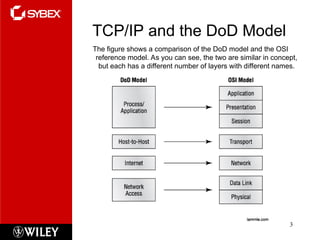
The figure shows a comparison of the DoD model and the OSI
reference model. As you can see, the two are similar in concept,
but each has a different number of layers with different names.
3
4.
The TCP/IP ProtocolSuite
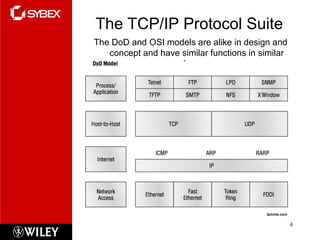
The DoD and OSI models are alike in design and
concept and have similar functions in similar
layers.
4
5.
Process/Application Layer
This sectiondescribes different applications and services typically used
in IP networks. Some of the protocols and applications are
discussed are:
– Telnet
– FTP
– TFTP
– NFS
– SMTP
– LPD
– X Window
– SNMP
– DNS
– DHCP/BootP
5
Host to HostLayer
The main purpose of the Host-to-Host layer
is to shield the upper-layer applications
from the complexities of the network.
This layer says to the upper layer, “Just give
me your data stream, with any instructions,
and I’ll begin the process of getting your
information ready to send.”
The following sections describe the two
protocols at this layer:
– Transmission Control Protocol (TCP)
– User Datagram Protocol (UDP)
7
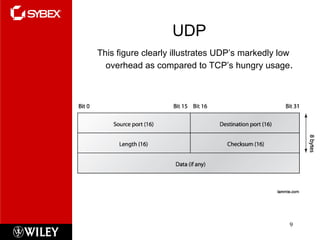
UDP
This figure clearlyillustrates UDP’s markedly low
overhead as compared to TCP’s hungry usage.
9
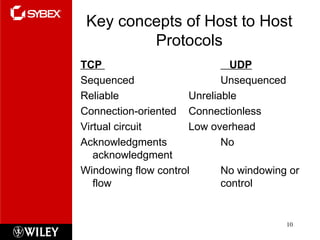
10.
Key concepts ofHost to Host
Protocols
TCP UDP
Sequenced Unsequenced
Reliable Unreliable
Connection-oriented Connectionless
Virtual circuit Low overhead
Acknowledgments No
acknowledgment
Windowing flow control No windowing or
flow control
10
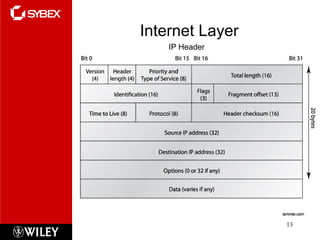
Internet Layer
15
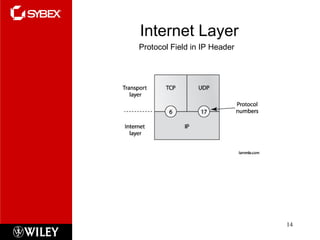
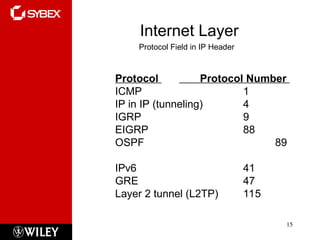
Protocol Fieldin IP Header
Protocol Protocol Number
ICMP 1
IP in IP (tunneling) 4
IGRP 9
EIGRP 88
OSPF 89
IPv6 41
GRE 47
Layer 2 tunnel (L2TP) 115
16.
Internet Layer
16
ICMP
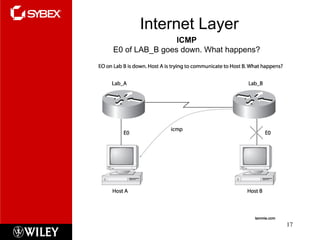
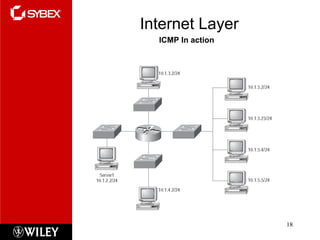
Internet ControlMessage Protocol (ICMP)
works at the Network layer and is used by IP
for many different services.
•ICMP is a management protocol and
messaging service provider for IP.
•Its messages are carried as IP datagrams.
ICMP packets have the following
characteristics:
• They can provide hosts with information about
network problems.
• They are encapsulated within IP datagrams.
IP Addressing
21
An IPaddress is a numeric identifier assigned
to each machine on an IP network.
It designates the specific location of a device
on the network.
IP addressing was designed to allow hosts on
one network to communicate with a host on a
different network regardless of the type of
LANs the hosts are participating in.
22.
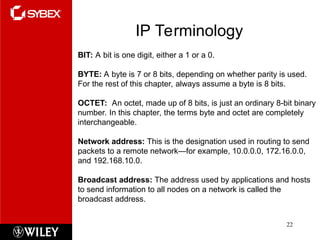
IP Terminology
22
BIT: Abit is one digit, either a 1 or a 0.
BYTE: A byte is 7 or 8 bits, depending on whether parity is used.
For the rest of this chapter, always assume a byte is 8 bits.
OCTET: An octet, made up of 8 bits, is just an ordinary 8-bit binary
number. In this chapter, the terms byte and octet are completely
interchangeable.
Network address: This is the designation used in routing to send
packets to a remote network—for example, 10.0.0.0, 172.16.0.0,
and 192.168.10.0.
Broadcast address: The address used by applications and hosts
to send information to all nodes on a network is called the
broadcast address.
23.
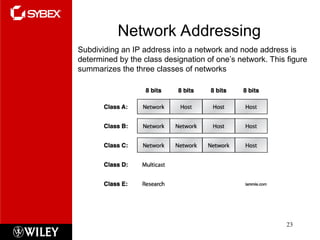
Network Addressing
23
Subdividing anIP address into a network and node address is
determined by the class designation of one’s network. This figure
summarizes the three classes of networks
24.
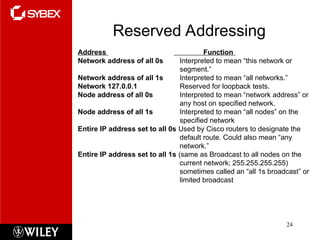
Reserved Addressing
24
Address Function
Networkaddress of all 0s Interpreted to mean “this network or
segment.”
Network address of all 1s Interpreted to mean “all networks.”
Network 127.0.0.1 Reserved for loopback tests.
Node address of all 0s Interpreted to mean “network address” or
any host on specified network.
Node address of all 1s Interpreted to mean “all nodes” on the
specified network
Entire IP address set to all 0s Used by Cisco routers to designate the
default route. Could also mean “any
network.”
Entire IP address set to all 1s (same as Broadcast to all nodes on the
current network; 255.255.255.255)
sometimes called an “all 1s broadcast” or
limited broadcast
25.
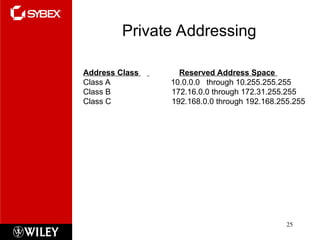
Private Addressing
25
Address ClassReserved Address Space
Class A 10.0.0.0 through 10.255.255.255
Class B 172.16.0.0 through 172.31.255.255
Class C 192.168.0.0 through 192.168.255.255