Instructor Materials
Chapter 2: Scaling VLANs
CCNA Routing and Switching
Scaling Networks v6.0
3© 2016 Cisco and/or its affiliates. All rights reserved. Cisco Confidential
Chapter 2: Scaling VLANs
Scaling networks 6.0 Planning Guide
Chapter 2: Scaling VLANs
CCNA Routing and Switching
Scaling Networks v6.0
13© 2016 Cisco and/or its affiliates. All rights reserved. Cisco Confidential
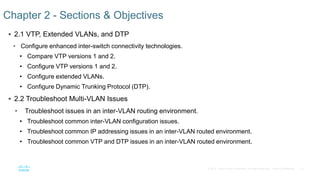
 2.1 VTP, Extended VLANs, and DTP
• Configure enhanced inter-switch connectivity technologies.
• Compare VTP versions 1 and 2.
• Configure VTP versions 1 and 2.
• Configure extended VLANs.
• Configure Dynamic Trunking Protocol (DTP).
 2.2 Troubleshoot Multi-VLAN Issues
• Troubleshoot issues in an inter-VLAN routing environment.
• Troubleshoot common inter-VLAN configuration issues.
• Troubleshoot common IP addressing issues in an inter-VLAN routed environment.
• Troubleshoot common VTP and DTP issues in an inter-VLAN routed environment.
Chapter 2 - Sections & Objectives
14© 2016 Cisco and/or its affiliates. All rights reserved. Cisco Confidential
 2.3 Layer 3 Switching
• Implement inter-VLAN routing using Layer 3 switching to forward data in a small to medium-sized
business LAN.
• Configure inter-VLAN routing using Layer 3 switching.
• Troubleshoot inter-VLAN routing in a Layer 3 switched environment.
Chapter 2 - Sections & Objectives (Cont.)
15© 2016 Cisco and/or its affiliates. All rights reserved. Cisco Confidential
2.1 VTP, Extended VLANs, and DTP
16© 2016 Cisco and/or its affiliates. All rights reserved. Cisco Confidential
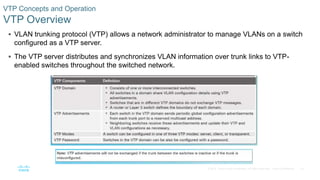
 VLAN trunking protocol (VTP) allows a network administrator to manage VLANs on a switch
configured as a VTP server.
 The VTP server distributes and synchronizes VLAN information over trunk links to VTP-
enabled switches throughout the switched network.
VTP Concepts and Operation
VTP Overview
17© 2016 Cisco and/or its affiliates. All rights reserved. Cisco Confidential
VTP Concepts and Operation
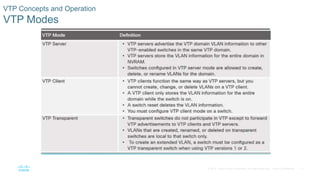
VTP Modes
18© 2016 Cisco and/or its affiliates. All rights reserved. Cisco Confidential
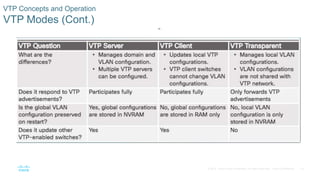
VTP Concepts and Operation
VTP Modes (Cont.)
19© 2016 Cisco and/or its affiliates. All rights reserved. Cisco Confidential
VTP Concepts and Operation
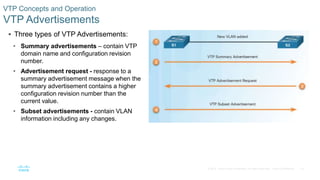
VTP Advertisements
 Three types of VTP Advertisements:
• Summary advertisements – contain VTP
domain name and configuration revision
number.
• Advertisement request - response to a
summary advertisement message when the
summary advertisement contains a higher
configuration revision number than the
current value.
• Subset advertisements - contain VLAN
information including any changes.
20© 2016 Cisco and/or its affiliates. All rights reserved. Cisco Confidential
VTP Concepts and Operation
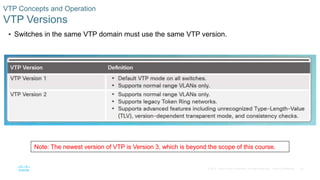
VTP Versions
 Switches in the same VTP domain must use the same VTP version.
Note: The newest version of VTP is Version 3, which is beyond the scope of this course.
21© 2016 Cisco and/or its affiliates. All rights reserved. Cisco Confidential
VTP Concepts and Operation
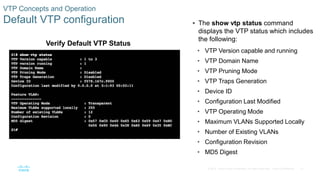
Default VTP configuration  The show vtp status command
displays the VTP status which includes
the following:
• VTP Version capable and running
• VTP Domain Name
• VTP Pruning Mode
• VTP Traps Generation
• Device ID
• Configuration Last Modified
• VTP Operating Mode
• Maximum VLANs Supported Locally
• Number of Existing VLANs
• Configuration Revision
• MD5 Digest
Verify Default VTP Status
22© 2016 Cisco and/or its affiliates. All rights reserved. Cisco Confidential
VTP Concepts and Operation
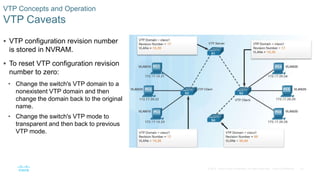
VTP Caveats
 VTP configuration revision number
is stored in NVRAM.
 To reset VTP configuration revision
number to zero:
• Change the switch's VTP domain to a
nonexistent VTP domain and then
change the domain back to the original
name.
• Change the switch's VTP mode to
transparent and then back to previous
VTP mode.
23© 2016 Cisco and/or its affiliates. All rights reserved. Cisco Confidential
VTP Concepts and Operation
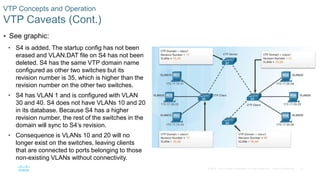
VTP Caveats (Cont.)
 See graphic:
• S4 is added. The startup config has not been
erased and VLAN.DAT file on S4 has not been
deleted. S4 has the same VTP domain name
configured as other two switches but its
revision number is 35, which is higher than the
revision number on the other two switches.
• S4 has VLAN 1 and is configured with VLAN
30 and 40. S4 does not have VLANs 10 and 20
in its database. Because S4 has a higher
revision number, the rest of the switches in the
domain will sync to S4’s revision.
• Consequence is VLANs 10 and 20 will no
longer exist on the switches, leaving clients
that are connected to ports belonging to those
non-existing VLANs without connectivity.
24© 2016 Cisco and/or its affiliates. All rights reserved. Cisco Confidential
VTP Configuration
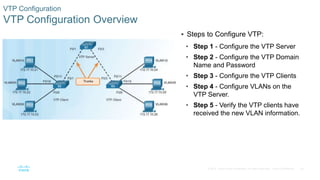
VTP Configuration Overview
 Steps to Configure VTP:
• Step 1 - Configure the VTP Server
• Step 2 - Configure the VTP Domain
Name and Password
• Step 3 - Configure the VTP Clients
• Step 4 - Configure VLANs on the
VTP Server.
• Step 5 - Verify the VTP clients have
received the new VLAN information.
25© 2016 Cisco and/or its affiliates. All rights reserved. Cisco Confidential
VTP Configuration
Step 1 – Configure the VTP Server
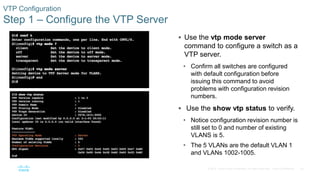
 Use the vtp mode server
command to configure a switch as a
VTP server.
• Confirm all switches are configured
with default configuration before
issuing this command to avoid
problems with configuration revision
numbers.
 Use the show vtp status to verify.
• Notice configuration revision number is
still set to 0 and number of existing
VLANS is 5.
• The 5 VLANs are the default VLAN 1
and VLANs 1002-1005.
26© 2016 Cisco and/or its affiliates. All rights reserved. Cisco Confidential
VTP Configuration
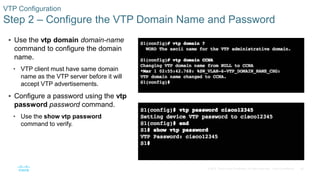
Step 2 – Configure the VTP Domain Name and Password
 Use the vtp domain domain-name
command to configure the domain
name.
• VTP client must have same domain
name as the VTP server before it will
accept VTP advertisements.
 Configure a password using the vtp
password password command.
• Use the show vtp password
command to verify.
27© 2016 Cisco and/or its affiliates. All rights reserved. Cisco Confidential
VTP Configuration
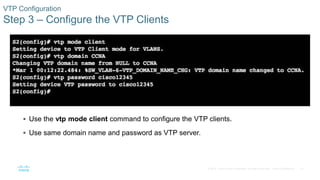
Step 3 – Configure the VTP Clients
 Use the vtp mode client command to configure the VTP clients.
 Use same domain name and password as VTP server.
28© 2016 Cisco and/or its affiliates. All rights reserved. Cisco Confidential
VTP Configuration
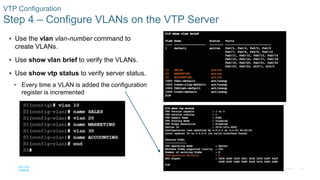
Step 4 – Configure VLANs on the VTP Server
 Use the vlan vlan-number command to
create VLANs.
 Use show vlan brief to verify the VLANs.
 Use show vtp status to verify server status.
• Every time a VLAN is added the configuration
register is incremented
29© 2016 Cisco and/or its affiliates. All rights reserved. Cisco Confidential
VTP Configuration
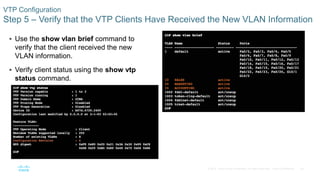
Step 5 – Verify that the VTP Clients Have Received the New VLAN Information
 Use the show vlan brief command to
verify that the client received the new
VLAN information.
 Verify client status using the show vtp
status command.
30© 2016 Cisco and/or its affiliates. All rights reserved. Cisco Confidential
Extended VLANs
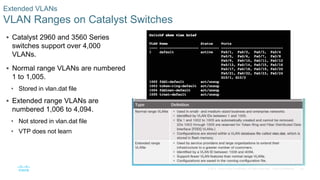
VLAN Ranges on Catalyst Switches
 Catalyst 2960 and 3560 Series
switches support over 4,000
VLANs.
 Normal range VLANs are numbered
1 to 1,005.
• Stored in vlan.dat file
 Extended range VLANs are
numbered 1,006 to 4,094.
• Not stored in vlan.dat file
• VTP does not learn
31© 2016 Cisco and/or its affiliates. All rights reserved. Cisco Confidential
Extended VLANs
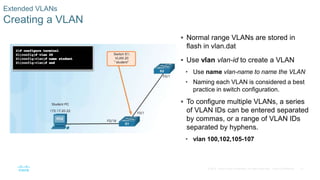
Creating a VLAN
 Normal range VLANs are stored in
flash in vlan.dat
 Use vlan vlan-id to create a VLAN
• Use name vlan-name to name the VLAN
• Naming each VLAN is considered a best
practice in switch configuration.
 To configure multiple VLANs, a series
of VLAN IDs can be entered separated
by commas, or a range of VLAN IDs
separated by hyphens.
• vlan 100,102,105-107
32© 2016 Cisco and/or its affiliates. All rights reserved. Cisco Confidential
Extended VLANs
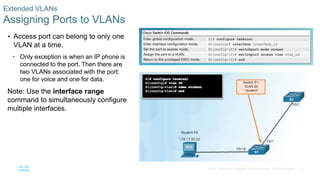
Assigning Ports to VLANs
 Access port can belong to only one
VLAN at a time.
• Only exception is when an IP phone is
connected to the port. Then there are
two VLANs associated with the port:
one for voice and one for data.
Note: Use the interface range
command to simultaneously configure
multiple interfaces.
33© 2016 Cisco and/or its affiliates. All rights reserved. Cisco Confidential
Extended VLANs
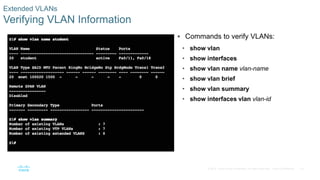
Verifying VLAN Information
 Commands to verify VLANs:
• show vlan
• show interfaces
• show vlan name vlan-name
• show vlan brief
• show vlan summary
• show interfaces vlan vlan-id
34© 2016 Cisco and/or its affiliates. All rights reserved. Cisco Confidential
Extended VLANs
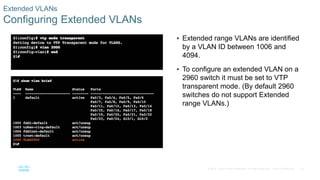
Configuring Extended VLANs
 Extended range VLANs are identified
by a VLAN ID between 1006 and
4094.
 To configure an extended VLAN on a
2960 switch it must be set to VTP
transparent mode. (By default 2960
switches do not support Extended
range VLANs.)
35© 2016 Cisco and/or its affiliates. All rights reserved. Cisco Confidential
Dynamic Trunking Protocol
Introduction to DTP
 Trunk negotiation is managed by the Dynamic Trunking Protocol (DTP)
• DTP is a Cisco proprietary protocol
• automatically enabled on Catalyst 2960 and Catalyst 3560 Series switches.
 To enable trunking from a Cisco switch to a device that does not support DTP, use the switchport
mode trunk and switchport nonegotiate
36© 2016 Cisco and/or its affiliates. All rights reserved. Cisco Confidential
Dynamic Trunking Protocol
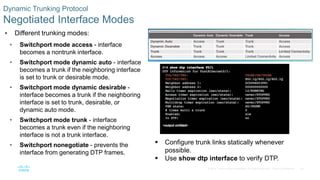
Negotiated Interface Modes
 Different trunking modes:
• Switchport mode access - interface
becomes a nontrunk interface.
• Switchport mode dynamic auto - interface
becomes a trunk if the neighboring interface
is set to trunk or desirable mode.
• Switchport mode dynamic desirable -
interface becomes a trunk if the neighboring
interface is set to trunk, desirable, or
dynamic auto mode.
• Switchport mode trunk - interface
becomes a trunk even if the neighboring
interface is not a trunk interface.
• Switchport nonegotiate - prevents the
interface from generating DTP frames.
 Configure trunk links statically whenever
possible.
 Use show dtp interface to verify DTP.
37© 2016 Cisco and/or its affiliates. All rights reserved. Cisco Confidential
Dynamic Trunking Protocol
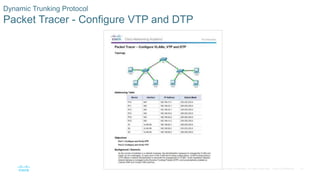
Packet Tracer - Configure VTP and DTP
38© 2016 Cisco and/or its affiliates. All rights reserved. Cisco Confidential
Dynamic Trunking Protocol
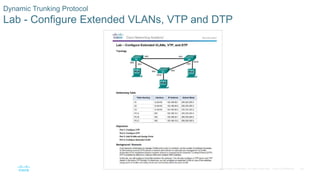
Lab - Configure Extended VLANs, VTP and DTP
39© 2016 Cisco and/or its affiliates. All rights reserved. Cisco Confidential
2.2 Troubleshoot Multi-VLAN Issues
40© 2016 Cisco and/or its affiliates. All rights reserved. Cisco Confidential
Inter-VLAN Configuration Issues
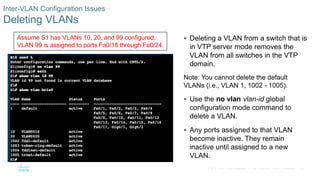
Deleting VLANs
 Deleting a VLAN from a switch that is
in VTP server mode removes the
VLAN from all switches in the VTP
domain.
Note: You cannot delete the default
VLANs (i.e., VLAN 1, 1002 - 1005).
 Use the no vlan vlan-id global
configuration mode command to
delete a VLAN.
 Any ports assigned to that VLAN
become inactive. They remain
inactive until assigned to a new
VLAN.
Assume S1 has VLANs 10, 20, and 99 configured,
VLAN 99 is assigned to ports Fa0/18 through Fa0/24.
41© 2016 Cisco and/or its affiliates. All rights reserved. Cisco Confidential
Inter-VLAN Configuration Issues
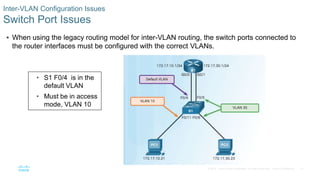
Switch Port Issues
 When using the legacy routing model for inter-VLAN routing, the switch ports connected to
the router interfaces must be configured with the correct VLANs.
• S1 F0/4 is in the
default VLAN
• Must be in access
mode, VLAN 10
42© 2016 Cisco and/or its affiliates. All rights reserved. Cisco Confidential
Inter-VLAN Configuration Issues
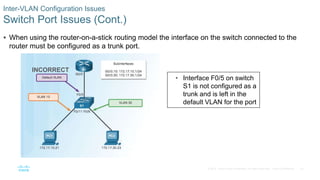
Switch Port Issues (Cont.)
 When using the router-on-a-stick routing model the interface on the switch connected to the
router must be configured as a trunk port.
INCORRECT
• Interface F0/5 on switch
S1 is not configured as a
trunk and is left in the
default VLAN for the port
43© 2016 Cisco and/or its affiliates. All rights reserved. Cisco Confidential
Inter-VLAN Configuration Issues
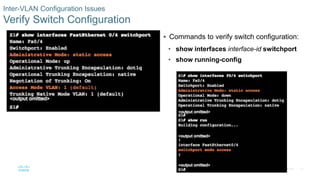
Verify Switch Configuration
 Commands to verify switch configuration:
• show interfaces interface-id switchport
• show running-config
44© 2016 Cisco and/or its affiliates. All rights reserved. Cisco Confidential
Inter-VLAN Configuration Issues
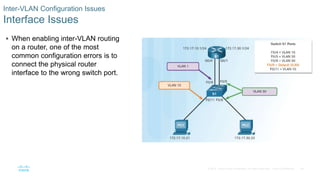
Interface Issues
 When enabling inter-VLAN routing
on a router, one of the most
common configuration errors is to
connect the physical router
interface to the wrong switch port.
45© 2016 Cisco and/or its affiliates. All rights reserved. Cisco Confidential
Inter-VLAN Configuration Issues
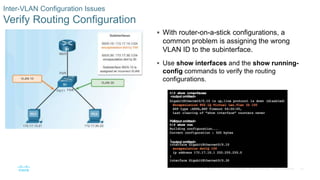
Verify Routing Configuration
 With router-on-a-stick configurations, a
common problem is assigning the wrong
VLAN ID to the subinterface.
 Use show interfaces and the show running-
config commands to verify the routing
configurations.
46© 2016 Cisco and/or its affiliates. All rights reserved. Cisco Confidential
IP Addressing Issues
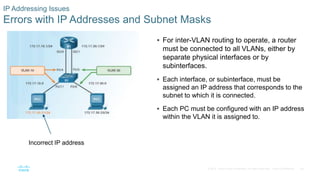
Errors with IP Addresses and Subnet Masks
 For inter-VLAN routing to operate, a router
must be connected to all VLANs, either by
separate physical interfaces or by
subinterfaces.
 Each interface, or subinterface, must be
assigned an IP address that corresponds to the
subnet to which it is connected.
 Each PC must be configured with an IP address
within the VLAN it is assigned to.
Incorrect IP address
47© 2016 Cisco and/or its affiliates. All rights reserved. Cisco Confidential
IP Addressing Issues
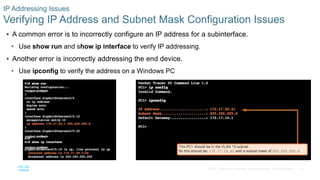
Verifying IP Address and Subnet Mask Configuration Issues
 A common error is to incorrectly configure an IP address for a subinterface.
• Use show run and show ip interface to verify IP addressing.
 Another error is incorrectly addressing the end device.
• Use ipconfig to verify the address on a Windows PC
48© 2016 Cisco and/or its affiliates. All rights reserved. Cisco Confidential
IP Addressing Issues
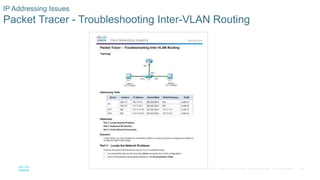
Packet Tracer - Troubleshooting Inter-VLAN Routing
49© 2016 Cisco and/or its affiliates. All rights reserved. Cisco Confidential
IP Addressing Issues
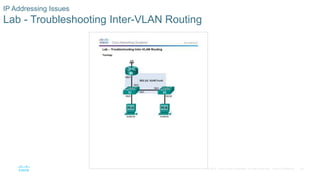
Lab - Troubleshooting Inter-VLAN Routing
50© 2016 Cisco and/or its affiliates. All rights reserved. Cisco Confidential
VTP and DTP Issues
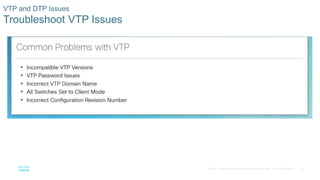
Troubleshoot VTP Issues
51© 2016 Cisco and/or its affiliates. All rights reserved. Cisco Confidential
VTP and DTP Issues
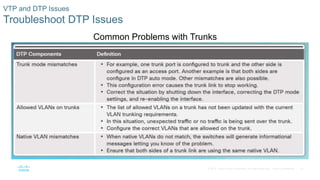
Troubleshoot DTP Issues
Common Problems with Trunks
52© 2016 Cisco and/or its affiliates. All rights reserved. Cisco Confidential
VTP and DTP Issues
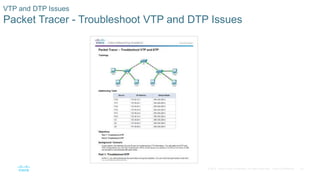
Packet Tracer - Troubleshoot VTP and DTP Issues
53© 2016 Cisco and/or its affiliates. All rights reserved. Cisco Confidential
2.3 Layer 3 Switching
54© 2016 Cisco and/or its affiliates. All rights reserved. Cisco Confidential
Layer 3 Switching Operation and Configuration
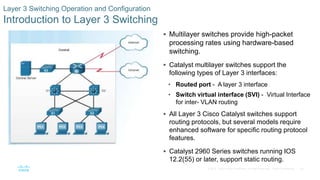
Introduction to Layer 3 Switching
 Multilayer switches provide high-packet
processing rates using hardware-based
switching.
 Catalyst multilayer switches support the
following types of Layer 3 interfaces:
• Routed port - A layer 3 interface
• Switch virtual interface (SVI) - Virtual Interface
for inter- VLAN routing
 All Layer 3 Cisco Catalyst switches support
routing protocols, but several models require
enhanced software for specific routing protocol
features.
 Catalyst 2960 Series switches running IOS
12.2(55) or later, support static routing.
55© 2016 Cisco and/or its affiliates. All rights reserved. Cisco Confidential
Layer 3 Switching Operation and Configuration
Inter-VLAN Routing with Switch Virtual Interfaces
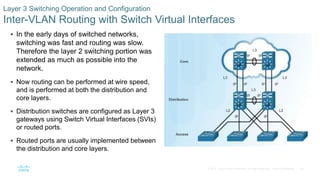
 In the early days of switched networks,
switching was fast and routing was slow.
Therefore the layer 2 switching portion was
extended as much as possible into the
network.
 Now routing can be performed at wire speed,
and is performed at both the distribution and
core layers.
 Distribution switches are configured as Layer 3
gateways using Switch Virtual Interfaces (SVIs)
or routed ports.
 Routed ports are usually implemented between
the distribution and core layers.
56© 2016 Cisco and/or its affiliates. All rights reserved. Cisco Confidential
Layer 3 Switching Operation and Configuration
Inter-VLAN Routing with Switch Virtual Interfaces (Cont.)
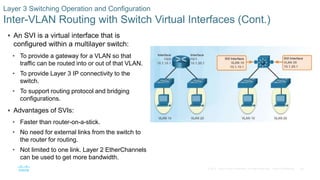
 An SVI is a virtual interface that is
configured within a multilayer switch:
• To provide a gateway for a VLAN so that
traffic can be routed into or out of that VLAN.
• To provide Layer 3 IP connectivity to the
switch.
• To support routing protocol and bridging
configurations.
 Advantages of SVIs:
• Faster than router-on-a-stick.
• No need for external links from the switch to
the router for routing.
• Not limited to one link. Layer 2 EtherChannels
can be used to get more bandwidth.
57© 2016 Cisco and/or its affiliates. All rights reserved. Cisco Confidential
Layer 3 Switching Operation and Configuration
Inter-VLAN Routing with Routed Ports
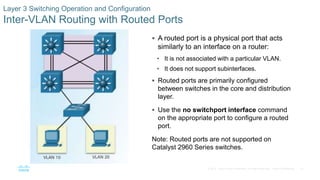
 A routed port is a physical port that acts
similarly to an interface on a router:
• It is not associated with a particular VLAN.
• It does not support subinterfaces.
 Routed ports are primarily configured
between switches in the core and distribution
layer.
 Use the no switchport interface command
on the appropriate port to configure a routed
port.
Note: Routed ports are not supported on
Catalyst 2960 Series switches.
58© 2016 Cisco and/or its affiliates. All rights reserved. Cisco Confidential
Layer 3 Switching Operation and Configuration
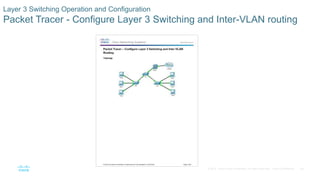
Packet Tracer - Configure Layer 3 Switching and Inter-VLAN routing
59© 2016 Cisco and/or its affiliates. All rights reserved. Cisco Confidential
Troubleshoot Layer 3 Switching
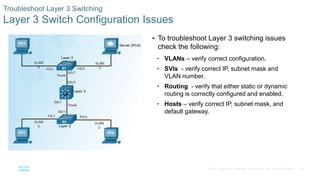
Layer 3 Switch Configuration Issues
 To troubleshoot Layer 3 switching issues
check the following:
• VLANs – verify correct configuration.
• SVIs - verify correct IP, subnet mask and
VLAN number.
• Routing - verify that either static or dynamic
routing is correctly configured and enabled.
• Hosts – verify correct IP, subnet mask, and
default gateway.
60© 2016 Cisco and/or its affiliates. All rights reserved. Cisco Confidential
Troubleshoot Layer 3 Switching
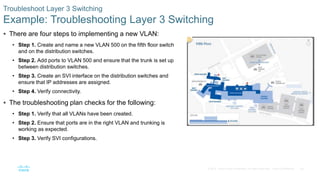
Example: Troubleshooting Layer 3 Switching
 There are four steps to implementing a new VLAN:
• Step 1. Create and name a new VLAN 500 on the fifth floor switch
and on the distribution switches.
• Step 2. Add ports to VLAN 500 and ensure that the trunk is set up
between distribution switches.
• Step 3. Create an SVI interface on the distribution switches and
ensure that IP addresses are assigned.
• Step 4. Verify connectivity.
 The troubleshooting plan checks for the following:
• Step 1. Verify that all VLANs have been created.
• Step 2. Ensure that ports are in the right VLAN and trunking is
working as expected.
• Step 3. Verify SVI configurations.
61© 2016 Cisco and/or its affiliates. All rights reserved. Cisco Confidential
2.3 Chapter Summary
62© 2016 Cisco and/or its affiliates. All rights reserved. Cisco Confidential
 Configure enhanced inter-switch connectivity technologies.
 Troubleshoot issues in an inter-VLAN routing environment.
 Implement inter-VLAN routing using Layer 3 switching to forward data in a small to medium-sized
business LAN.
Conclusion
Chapter 2: Scaling VLANs
Sca nv6 instructorppt_chapter2

Sca nv6 instructorppt_chapter2

  • 1.
    Instructor Materials Chapter 2:Scaling VLANs CCNA Routing and Switching Scaling Networks v6.0
  • 2.
    3© 2016 Ciscoand/or its affiliates. All rights reserved. Cisco Confidential Chapter 2: Scaling VLANs Scaling networks 6.0 Planning Guide
  • 3.
    Chapter 2: ScalingVLANs CCNA Routing and Switching Scaling Networks v6.0
  • 4.
    13© 2016 Ciscoand/or its affiliates. All rights reserved. Cisco Confidential  2.1 VTP, Extended VLANs, and DTP • Configure enhanced inter-switch connectivity technologies. • Compare VTP versions 1 and 2. • Configure VTP versions 1 and 2. • Configure extended VLANs. • Configure Dynamic Trunking Protocol (DTP).  2.2 Troubleshoot Multi-VLAN Issues • Troubleshoot issues in an inter-VLAN routing environment. • Troubleshoot common inter-VLAN configuration issues. • Troubleshoot common IP addressing issues in an inter-VLAN routed environment. • Troubleshoot common VTP and DTP issues in an inter-VLAN routed environment. Chapter 2 - Sections & Objectives
  • 5.
    14© 2016 Ciscoand/or its affiliates. All rights reserved. Cisco Confidential  2.3 Layer 3 Switching • Implement inter-VLAN routing using Layer 3 switching to forward data in a small to medium-sized business LAN. • Configure inter-VLAN routing using Layer 3 switching. • Troubleshoot inter-VLAN routing in a Layer 3 switched environment. Chapter 2 - Sections & Objectives (Cont.)
  • 6.
    15© 2016 Ciscoand/or its affiliates. All rights reserved. Cisco Confidential 2.1 VTP, Extended VLANs, and DTP
  • 7.
    16© 2016 Ciscoand/or its affiliates. All rights reserved. Cisco Confidential  VLAN trunking protocol (VTP) allows a network administrator to manage VLANs on a switch configured as a VTP server.  The VTP server distributes and synchronizes VLAN information over trunk links to VTP- enabled switches throughout the switched network. VTP Concepts and Operation VTP Overview
  • 8.
    17© 2016 Ciscoand/or its affiliates. All rights reserved. Cisco Confidential VTP Concepts and Operation VTP Modes
  • 9.
    18© 2016 Ciscoand/or its affiliates. All rights reserved. Cisco Confidential VTP Concepts and Operation VTP Modes (Cont.)
  • 10.
    19© 2016 Ciscoand/or its affiliates. All rights reserved. Cisco Confidential VTP Concepts and Operation VTP Advertisements  Three types of VTP Advertisements: • Summary advertisements – contain VTP domain name and configuration revision number. • Advertisement request - response to a summary advertisement message when the summary advertisement contains a higher configuration revision number than the current value. • Subset advertisements - contain VLAN information including any changes.
  • 11.
    20© 2016 Ciscoand/or its affiliates. All rights reserved. Cisco Confidential VTP Concepts and Operation VTP Versions  Switches in the same VTP domain must use the same VTP version. Note: The newest version of VTP is Version 3, which is beyond the scope of this course.
  • 12.
    21© 2016 Ciscoand/or its affiliates. All rights reserved. Cisco Confidential VTP Concepts and Operation Default VTP configuration  The show vtp status command displays the VTP status which includes the following: • VTP Version capable and running • VTP Domain Name • VTP Pruning Mode • VTP Traps Generation • Device ID • Configuration Last Modified • VTP Operating Mode • Maximum VLANs Supported Locally • Number of Existing VLANs • Configuration Revision • MD5 Digest Verify Default VTP Status
  • 13.
    22© 2016 Ciscoand/or its affiliates. All rights reserved. Cisco Confidential VTP Concepts and Operation VTP Caveats  VTP configuration revision number is stored in NVRAM.  To reset VTP configuration revision number to zero: • Change the switch's VTP domain to a nonexistent VTP domain and then change the domain back to the original name. • Change the switch's VTP mode to transparent and then back to previous VTP mode.
  • 14.
    23© 2016 Ciscoand/or its affiliates. All rights reserved. Cisco Confidential VTP Concepts and Operation VTP Caveats (Cont.)  See graphic: • S4 is added. The startup config has not been erased and VLAN.DAT file on S4 has not been deleted. S4 has the same VTP domain name configured as other two switches but its revision number is 35, which is higher than the revision number on the other two switches. • S4 has VLAN 1 and is configured with VLAN 30 and 40. S4 does not have VLANs 10 and 20 in its database. Because S4 has a higher revision number, the rest of the switches in the domain will sync to S4’s revision. • Consequence is VLANs 10 and 20 will no longer exist on the switches, leaving clients that are connected to ports belonging to those non-existing VLANs without connectivity.
  • 15.
    24© 2016 Ciscoand/or its affiliates. All rights reserved. Cisco Confidential VTP Configuration VTP Configuration Overview  Steps to Configure VTP: • Step 1 - Configure the VTP Server • Step 2 - Configure the VTP Domain Name and Password • Step 3 - Configure the VTP Clients • Step 4 - Configure VLANs on the VTP Server. • Step 5 - Verify the VTP clients have received the new VLAN information.
  • 16.
    25© 2016 Ciscoand/or its affiliates. All rights reserved. Cisco Confidential VTP Configuration Step 1 – Configure the VTP Server  Use the vtp mode server command to configure a switch as a VTP server. • Confirm all switches are configured with default configuration before issuing this command to avoid problems with configuration revision numbers.  Use the show vtp status to verify. • Notice configuration revision number is still set to 0 and number of existing VLANS is 5. • The 5 VLANs are the default VLAN 1 and VLANs 1002-1005.
  • 17.
    26© 2016 Ciscoand/or its affiliates. All rights reserved. Cisco Confidential VTP Configuration Step 2 – Configure the VTP Domain Name and Password  Use the vtp domain domain-name command to configure the domain name. • VTP client must have same domain name as the VTP server before it will accept VTP advertisements.  Configure a password using the vtp password password command. • Use the show vtp password command to verify.
  • 18.
    27© 2016 Ciscoand/or its affiliates. All rights reserved. Cisco Confidential VTP Configuration Step 3 – Configure the VTP Clients  Use the vtp mode client command to configure the VTP clients.  Use same domain name and password as VTP server.
  • 19.
    28© 2016 Ciscoand/or its affiliates. All rights reserved. Cisco Confidential VTP Configuration Step 4 – Configure VLANs on the VTP Server  Use the vlan vlan-number command to create VLANs.  Use show vlan brief to verify the VLANs.  Use show vtp status to verify server status. • Every time a VLAN is added the configuration register is incremented
  • 20.
    29© 2016 Ciscoand/or its affiliates. All rights reserved. Cisco Confidential VTP Configuration Step 5 – Verify that the VTP Clients Have Received the New VLAN Information  Use the show vlan brief command to verify that the client received the new VLAN information.  Verify client status using the show vtp status command.
  • 21.
    30© 2016 Ciscoand/or its affiliates. All rights reserved. Cisco Confidential Extended VLANs VLAN Ranges on Catalyst Switches  Catalyst 2960 and 3560 Series switches support over 4,000 VLANs.  Normal range VLANs are numbered 1 to 1,005. • Stored in vlan.dat file  Extended range VLANs are numbered 1,006 to 4,094. • Not stored in vlan.dat file • VTP does not learn
  • 22.
    31© 2016 Ciscoand/or its affiliates. All rights reserved. Cisco Confidential Extended VLANs Creating a VLAN  Normal range VLANs are stored in flash in vlan.dat  Use vlan vlan-id to create a VLAN • Use name vlan-name to name the VLAN • Naming each VLAN is considered a best practice in switch configuration.  To configure multiple VLANs, a series of VLAN IDs can be entered separated by commas, or a range of VLAN IDs separated by hyphens. • vlan 100,102,105-107
  • 23.
    32© 2016 Ciscoand/or its affiliates. All rights reserved. Cisco Confidential Extended VLANs Assigning Ports to VLANs  Access port can belong to only one VLAN at a time. • Only exception is when an IP phone is connected to the port. Then there are two VLANs associated with the port: one for voice and one for data. Note: Use the interface range command to simultaneously configure multiple interfaces.
  • 24.
    33© 2016 Ciscoand/or its affiliates. All rights reserved. Cisco Confidential Extended VLANs Verifying VLAN Information  Commands to verify VLANs: • show vlan • show interfaces • show vlan name vlan-name • show vlan brief • show vlan summary • show interfaces vlan vlan-id
  • 25.
    34© 2016 Ciscoand/or its affiliates. All rights reserved. Cisco Confidential Extended VLANs Configuring Extended VLANs  Extended range VLANs are identified by a VLAN ID between 1006 and 4094.  To configure an extended VLAN on a 2960 switch it must be set to VTP transparent mode. (By default 2960 switches do not support Extended range VLANs.)
  • 26.
    35© 2016 Ciscoand/or its affiliates. All rights reserved. Cisco Confidential Dynamic Trunking Protocol Introduction to DTP  Trunk negotiation is managed by the Dynamic Trunking Protocol (DTP) • DTP is a Cisco proprietary protocol • automatically enabled on Catalyst 2960 and Catalyst 3560 Series switches.  To enable trunking from a Cisco switch to a device that does not support DTP, use the switchport mode trunk and switchport nonegotiate
  • 27.
    36© 2016 Ciscoand/or its affiliates. All rights reserved. Cisco Confidential Dynamic Trunking Protocol Negotiated Interface Modes  Different trunking modes: • Switchport mode access - interface becomes a nontrunk interface. • Switchport mode dynamic auto - interface becomes a trunk if the neighboring interface is set to trunk or desirable mode. • Switchport mode dynamic desirable - interface becomes a trunk if the neighboring interface is set to trunk, desirable, or dynamic auto mode. • Switchport mode trunk - interface becomes a trunk even if the neighboring interface is not a trunk interface. • Switchport nonegotiate - prevents the interface from generating DTP frames.  Configure trunk links statically whenever possible.  Use show dtp interface to verify DTP.
  • 28.
    37© 2016 Ciscoand/or its affiliates. All rights reserved. Cisco Confidential Dynamic Trunking Protocol Packet Tracer - Configure VTP and DTP
  • 29.
    38© 2016 Ciscoand/or its affiliates. All rights reserved. Cisco Confidential Dynamic Trunking Protocol Lab - Configure Extended VLANs, VTP and DTP
  • 30.
    39© 2016 Ciscoand/or its affiliates. All rights reserved. Cisco Confidential 2.2 Troubleshoot Multi-VLAN Issues
  • 31.
    40© 2016 Ciscoand/or its affiliates. All rights reserved. Cisco Confidential Inter-VLAN Configuration Issues Deleting VLANs  Deleting a VLAN from a switch that is in VTP server mode removes the VLAN from all switches in the VTP domain. Note: You cannot delete the default VLANs (i.e., VLAN 1, 1002 - 1005).  Use the no vlan vlan-id global configuration mode command to delete a VLAN.  Any ports assigned to that VLAN become inactive. They remain inactive until assigned to a new VLAN. Assume S1 has VLANs 10, 20, and 99 configured, VLAN 99 is assigned to ports Fa0/18 through Fa0/24.
  • 32.
    41© 2016 Ciscoand/or its affiliates. All rights reserved. Cisco Confidential Inter-VLAN Configuration Issues Switch Port Issues  When using the legacy routing model for inter-VLAN routing, the switch ports connected to the router interfaces must be configured with the correct VLANs. • S1 F0/4 is in the default VLAN • Must be in access mode, VLAN 10
  • 33.
    42© 2016 Ciscoand/or its affiliates. All rights reserved. Cisco Confidential Inter-VLAN Configuration Issues Switch Port Issues (Cont.)  When using the router-on-a-stick routing model the interface on the switch connected to the router must be configured as a trunk port. INCORRECT • Interface F0/5 on switch S1 is not configured as a trunk and is left in the default VLAN for the port
  • 34.
    43© 2016 Ciscoand/or its affiliates. All rights reserved. Cisco Confidential Inter-VLAN Configuration Issues Verify Switch Configuration  Commands to verify switch configuration: • show interfaces interface-id switchport • show running-config
  • 35.
    44© 2016 Ciscoand/or its affiliates. All rights reserved. Cisco Confidential Inter-VLAN Configuration Issues Interface Issues  When enabling inter-VLAN routing on a router, one of the most common configuration errors is to connect the physical router interface to the wrong switch port.
  • 36.
    45© 2016 Ciscoand/or its affiliates. All rights reserved. Cisco Confidential Inter-VLAN Configuration Issues Verify Routing Configuration  With router-on-a-stick configurations, a common problem is assigning the wrong VLAN ID to the subinterface.  Use show interfaces and the show running- config commands to verify the routing configurations.
  • 37.
    46© 2016 Ciscoand/or its affiliates. All rights reserved. Cisco Confidential IP Addressing Issues Errors with IP Addresses and Subnet Masks  For inter-VLAN routing to operate, a router must be connected to all VLANs, either by separate physical interfaces or by subinterfaces.  Each interface, or subinterface, must be assigned an IP address that corresponds to the subnet to which it is connected.  Each PC must be configured with an IP address within the VLAN it is assigned to. Incorrect IP address
  • 38.
    47© 2016 Ciscoand/or its affiliates. All rights reserved. Cisco Confidential IP Addressing Issues Verifying IP Address and Subnet Mask Configuration Issues  A common error is to incorrectly configure an IP address for a subinterface. • Use show run and show ip interface to verify IP addressing.  Another error is incorrectly addressing the end device. • Use ipconfig to verify the address on a Windows PC
  • 39.
    48© 2016 Ciscoand/or its affiliates. All rights reserved. Cisco Confidential IP Addressing Issues Packet Tracer - Troubleshooting Inter-VLAN Routing
  • 40.
    49© 2016 Ciscoand/or its affiliates. All rights reserved. Cisco Confidential IP Addressing Issues Lab - Troubleshooting Inter-VLAN Routing
  • 41.
    50© 2016 Ciscoand/or its affiliates. All rights reserved. Cisco Confidential VTP and DTP Issues Troubleshoot VTP Issues
  • 42.
    51© 2016 Ciscoand/or its affiliates. All rights reserved. Cisco Confidential VTP and DTP Issues Troubleshoot DTP Issues Common Problems with Trunks
  • 43.
    52© 2016 Ciscoand/or its affiliates. All rights reserved. Cisco Confidential VTP and DTP Issues Packet Tracer - Troubleshoot VTP and DTP Issues
  • 44.
    53© 2016 Ciscoand/or its affiliates. All rights reserved. Cisco Confidential 2.3 Layer 3 Switching
  • 45.
    54© 2016 Ciscoand/or its affiliates. All rights reserved. Cisco Confidential Layer 3 Switching Operation and Configuration Introduction to Layer 3 Switching  Multilayer switches provide high-packet processing rates using hardware-based switching.  Catalyst multilayer switches support the following types of Layer 3 interfaces: • Routed port - A layer 3 interface • Switch virtual interface (SVI) - Virtual Interface for inter- VLAN routing  All Layer 3 Cisco Catalyst switches support routing protocols, but several models require enhanced software for specific routing protocol features.  Catalyst 2960 Series switches running IOS 12.2(55) or later, support static routing.
  • 46.
    55© 2016 Ciscoand/or its affiliates. All rights reserved. Cisco Confidential Layer 3 Switching Operation and Configuration Inter-VLAN Routing with Switch Virtual Interfaces  In the early days of switched networks, switching was fast and routing was slow. Therefore the layer 2 switching portion was extended as much as possible into the network.  Now routing can be performed at wire speed, and is performed at both the distribution and core layers.  Distribution switches are configured as Layer 3 gateways using Switch Virtual Interfaces (SVIs) or routed ports.  Routed ports are usually implemented between the distribution and core layers.
  • 47.
    56© 2016 Ciscoand/or its affiliates. All rights reserved. Cisco Confidential Layer 3 Switching Operation and Configuration Inter-VLAN Routing with Switch Virtual Interfaces (Cont.)  An SVI is a virtual interface that is configured within a multilayer switch: • To provide a gateway for a VLAN so that traffic can be routed into or out of that VLAN. • To provide Layer 3 IP connectivity to the switch. • To support routing protocol and bridging configurations.  Advantages of SVIs: • Faster than router-on-a-stick. • No need for external links from the switch to the router for routing. • Not limited to one link. Layer 2 EtherChannels can be used to get more bandwidth.
  • 48.
    57© 2016 Ciscoand/or its affiliates. All rights reserved. Cisco Confidential Layer 3 Switching Operation and Configuration Inter-VLAN Routing with Routed Ports  A routed port is a physical port that acts similarly to an interface on a router: • It is not associated with a particular VLAN. • It does not support subinterfaces.  Routed ports are primarily configured between switches in the core and distribution layer.  Use the no switchport interface command on the appropriate port to configure a routed port. Note: Routed ports are not supported on Catalyst 2960 Series switches.
  • 49.
    58© 2016 Ciscoand/or its affiliates. All rights reserved. Cisco Confidential Layer 3 Switching Operation and Configuration Packet Tracer - Configure Layer 3 Switching and Inter-VLAN routing
  • 50.
    59© 2016 Ciscoand/or its affiliates. All rights reserved. Cisco Confidential Troubleshoot Layer 3 Switching Layer 3 Switch Configuration Issues  To troubleshoot Layer 3 switching issues check the following: • VLANs – verify correct configuration. • SVIs - verify correct IP, subnet mask and VLAN number. • Routing - verify that either static or dynamic routing is correctly configured and enabled. • Hosts – verify correct IP, subnet mask, and default gateway.
  • 51.
    60© 2016 Ciscoand/or its affiliates. All rights reserved. Cisco Confidential Troubleshoot Layer 3 Switching Example: Troubleshooting Layer 3 Switching  There are four steps to implementing a new VLAN: • Step 1. Create and name a new VLAN 500 on the fifth floor switch and on the distribution switches. • Step 2. Add ports to VLAN 500 and ensure that the trunk is set up between distribution switches. • Step 3. Create an SVI interface on the distribution switches and ensure that IP addresses are assigned. • Step 4. Verify connectivity.  The troubleshooting plan checks for the following: • Step 1. Verify that all VLANs have been created. • Step 2. Ensure that ports are in the right VLAN and trunking is working as expected. • Step 3. Verify SVI configurations.
  • 52.
    61© 2016 Ciscoand/or its affiliates. All rights reserved. Cisco Confidential 2.3 Chapter Summary
  • 53.
    62© 2016 Ciscoand/or its affiliates. All rights reserved. Cisco Confidential  Configure enhanced inter-switch connectivity technologies.  Troubleshoot issues in an inter-VLAN routing environment.  Implement inter-VLAN routing using Layer 3 switching to forward data in a small to medium-sized business LAN. Conclusion Chapter 2: Scaling VLANs