© 2014-2015 CCIEREALLABWORKBOOK.COM
October 10,
2014
© 2014-2015 CCIEREALLABWORKBOOK.COM 1
CCIE RSV5
WORKBOOK
© 2014-2015 CCIEREALLABWORKBOOK.COM
LAB Configuration Section
Version 1.0
Update: 2014-OCT-10
© 2014-2015 CCIEREALLABWORKBOOK.COM
October 10,
2014
© 2014-2015 CCIEREALLABWORKBOOK.COM 2
Disclaimer: CCCIE RSv5 lab Exam Workbook is designed to provide extensive practical information to
help candidates in the preparation for CISCO Systems CCIE RSv5 Lab Exam. We do not take liability or
responsibility to any person or entity with respect to loss or damage caused by the information
presented in the workbook.
Cisco, Cisco Systems, and CCIE (Cisco Certified Internetwork Expert) are registered trademarks of
Cisco Systems, Inc. And of its affiliates in the USA and other countries.
The information presented in the workbook is not necessarily related to Cisco Systems, Inc. This
workbook is not affiliated, endorsed or sponsored by Cisco Systems, Inc. This workbook provides
detailed and comprehensive practical examples for the preparation of CCIE RSv5 labs but
cannot be used as a replacement of other supplementary books or prescribed materials.
Purpose of the workbook is to provide more practical information about the CCIE RSv5 lab Exam.
This workbook is prepared for the individual candidates who have purchased it with non-
disclosure agreement. Imitation, copying, editing or posting contents of the workbook over the
internet is part of copyright and non-disclosure agreement violation.
Important read the following guidelines before starting the section
© 2014-2015 CCIEREALLABWORKBOOK.COM
October 10,
2014
© 2014-2015 CCIEREALLABWORKBOOK.COM 3
• This section is comprised of set of configuration tasks to be completed within 5.30 hours.
• The final score of this secion is combined with the troubleshooting section to comprise your
final pass or fail staus on the ccie lab exam
• A candidate is required to pass both sections of cisco ccie certification.
1. Read all questions in each section before proceeding with any configuration .
2. Before starting the exam confirm that all devices in your rack are in working order. During the exam, if
any device is locked or inaccessible for any reason you must recover it. When you comlete the exam
ensure that all devices are accessible to the grading proctor. A device that is not accessible for grading
cannot be marked and may cause you to lose substantial point.
3. Knowledge of implementation and troubleshooting techniques is part of skills tested in the
configuration section of the lab exam.
4. If you suspect that there may be hardware problem with your equipment contact the lab proctor
immediately
5. Points are awarded for working configuration only. Test the functionality of all of the requirements
before you complete your exam. As you configure one part of the exam you may break a previous
requirement or configuration.
6. No partial points can be granted for any question. All requirements nedde to be full fill in order to
receive the points for the question some requiremnts depend on other questions eith er before or after
the current question.
7. You will be presented with preconfiguration Routers and switches. Do not change the following
configuration on the device.
Hostname
Enable password ‘’cisco’’
Console line configuration
8. In any configuration where additional addressing may be necessary. Use only the major network as
displayed in diagram 1. Ensure that it does not conflict with a network that is already used in your
network.
9. Unicast or multicast static and default routes are not permitted unless permission to use them is
directly stated in a specific question. This restricted includes floating static routes and those routes
that were generated by a routing protocol routes to null 0 that are generated as a result of a dynamic
routing protocol solution are permitted.
10. Save your configuration frequently.
Section 1 (layer 2 technology)
© 2014-2015 CCIEREALLABWORKBOOK.COM
October 10,
2014
© 2014-2015 CCIEREALLABWORKBOOK.COM 4
1.1 Switch Administration
Configure the ACME headquarters network (AS 12345) as per the following requirements
• The VTP domain must be set to CCIE
•Use VTP version 2
• SW1 must be the VTP server and SW2 must be the VTP client
• Secure all VTP update with an MD5 digest of the ASCII string CCIErock$
• In order to avoid as much as possible unknown unicast flooding in all VLANs the administrator requires
that any dynamic entries learned by either SW1 to SW2 must be retained for 2 hours before being
refresh,
Configure the network of the new York office (AS 34567) as per the following requirements
• The VTP domain must be set to CCIE
• Use VTP version 2
• SW3 and SW4 must no advertise their VLAN configuration but must forward VTP
advertisement that they receive out their trunk ports
• Secure all VTP update with an MD5 digest of the ASCII string CCIErock?
Solution:
SW1:
VTP domain CCIE
VTP version 2
VTP password CCIErock?
Mac-address again 7200
SW2:
VTP domain CCIE
VTP mode client
VTP password CCIErock?
Mac-address again 7200
SW3/SW4:
VTP domain CCIE
VTP version 2
VTP mode transparent
VTP password CCIErock$
© 2014-2015 CCIEREALLABWORKBOOK.COM
October 10,
2014
© 2014-2015 CCIEREALLABWORKBOOK.COM 5
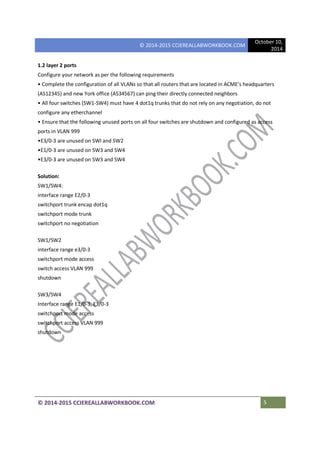
1.2 layer 2 ports
Configure your network as per the following requirements
• Complete the configuration of all VLANs so that all routers that are located in ACME's headquarters
(AS12345) and new York office (AS34567) can ping their directly connected neighbors
• All four switches (SW1-SW4) must have 4 dot1q trunks that do not rely on any negotiation, do not
configure any etherchannel
• Ensure that the following unused ports on all four switches are shutdown and configured as access
ports in VLAN 999
•E3/0-3 are unused on SWl and SW2
•E1/0-3 are unused on SW3 and SW4
•E3/0-3 are unused on SW3 and SW4
Solution:
SW1/SW4:
interface range E2/0-3
switchport trunk encap dot1q
switchport mode trunk
switchport no negotiation
SW1/SW2
interface range e3/0-3
switchport mode access
switch access VLAN 999
shutdown
SW3/SW4
Interface range E1/0-3, E3/0-3
switchport mode access
switchport access VLAN 999
shutdown
© 2014-2015 CCIEREALLABWORKBOOK.COM
October 10,
2014
© 2014-2015 CCIEREALLABWORKBOOK.COM 6
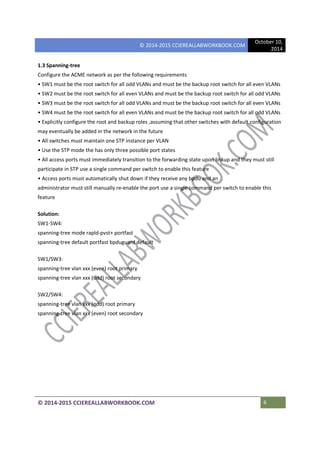
1.3 Spanning-tree
Configure the ACME network as per the following requirements
• SW1 must be the root switch for all odd VLANs and must be the backup root switch for all even VLANs
• SW2 must be the root switch for all even VLANs and must be the backup root switch for all odd VLANs
• SW3 must be the root switch for all odd VLANs and must be the backup root switch for all even VLANs
• SW4 must be the root switch for all even VLANs and must be the backup root switch for all odd VLANs
• Explicitly configure the root and backup roles ,assuming that other switches with default configuration
may eventually be added in the network in the future
• All switches must maintain one STP instance per VLAN
• Use the STP mode the has only three possible port states
• All access ports must immediately transition to the forwarding state upon linkup and they must still
participate in STP use a single command per switch to enable this feature
• Access ports must automatically shut down if they receive any bpdu and an
administrator must still manually re-enable the port use a single command per switch to enable this
feature
Solution:
SW1-SW4:
spanning-tree mode rapld-pvst+ portfast
spanning-tree default portfast bpduguard default
SW1/SW3:
spanning-tree vlan xxx (even) root primary
spanning-tree vlan xxx (odd) root secondary
SW2/SW4:
spanning-tree vlan xxx (odd) root primary
spanning-tree vlan xxx (even) root secondary
© 2014-2015 CCIEREALLABWORKBOOK.COM
October 10,
2014
© 2014-2015 CCIEREALLABWORKBOOK.COM 7
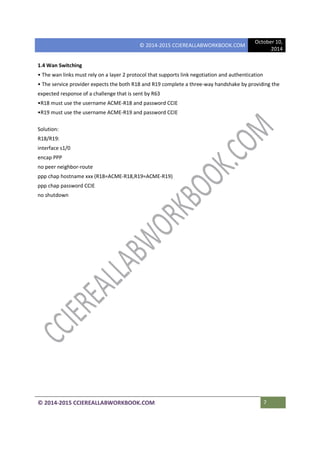
1.4 Wan Switching
• The wan links must rely on a layer 2 protocol that supports link negotiation and authentication
• The service provider expects the both R18 and R19 complete a three-way handshake by providing the
expected response of a challenge that is sent by R63
•R18 must use the username ACME-R18 and password CCIE
•R19 must use the username ACME-R19 and password CCIE
Solution:
R18/R19:
interface s1/0
encap PPP
no peer neighbor-route
ppp chap hostname xxx (R18=ACME-R18,R19=ACME-R19)
ppp chap password CCIE
no shutdown
© 2014-2015 CCIEREALLABWORKBOOK.COM
October 10,
2014
© 2014-2015 CCIEREALLABWORKBOOK.COM 8
Section 2 (layer 3 technology
2.1 OSPF in AS12345
Configure OSPFv2 area 0 in ACME headquarters (AS12345) according to the following requirements
• Configure the OSPF process id to 12345 and set the router-id to interface Loopback 0 on all seven
routers
• The interface Loopback 0 at each router must be seen as an internal OSPF prefix by all other routers
• Ensure that OSPF is not running on any interface that is facing another AS use any method to
accomplish this requirement
• SW1 and SW2 must not participate in routing at all
• Do not change the default OSPF cost of any interface in AS12345
• R1 must see the following OSPF routes in its routing table
R1# sh ip route OSPF
123.0.0.0/8 is variably subnetted, 17 subnets, 2 masks
0 123.2.2.2/32 [110/21] via 123.10.1.14d20h Ethernet e0/2
0 123.3.3.3/32 [110/21] via 123.10.1.6 4d20h Ethernet e0/1
0 123.4.4.4132 [110/21]via 123.10.1.1 4d20h Ethernet e0/1
0 123.5.5.5132 [110121] via 123.10.1.6 4d20h Ethernet e0/1
0 123.6.6.6132 [110/21] via 123.10.1.14d20h Ethernet e0/1
0 123.7.7.7/32 [110/21] via 123.10.1.6 4d20h Ethernet e0/1
0 123.10.1.8/30 [110/30] via 123.10.1.6 4d20h Ethernet e0/1
[110/30] via 123.10.1.1 4d20h Ethernet e0/2
0 123.10.1.12130 [110/20] via 123.10.1.6 4d20h Ethernet e0/1
0 123.10.1.16130 [110/20] via 123.10.1.1 4d20h Ethernet e0/1
0 123.10.1.20/30 [110/20] via 123.10.1.14d20h Ethernet e0/1
0 123.10.1.24/30 [110/30] via 123.10.1.6 4d20h Ethernet e0/1
[110/30] via 123.10.1.1 4d20h Ethernet e0/1
0 123.10.1.28/30 [110/20] via 123.10.1.6 4d20h Ethernet e0/1
0 123.2.2.2/8 [110/21] via 123.10.1.1 4d20h Ethernet e0/1
0 123.3.3.318 [110/21] via 123.10.1.6 4d20h Ethernet e0/1
Solution:
R1:
router OSPF 12345
router-id 123.1.1.1
network 0.0.0.0 255.255.255.255 area 0
© 2014-2015 CCIEREALLABWORKBOOK.COM
October 10,
2014
© 2014-2015 CCIEREALLABWORKBOOK.COM 9
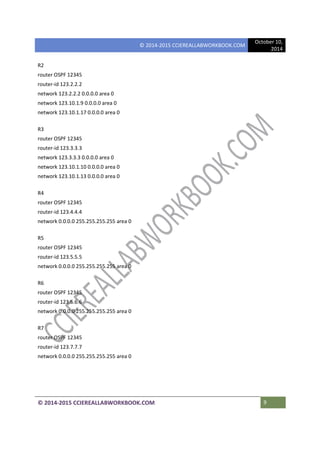
R2
router OSPF 12345
router-id 123.2.2.2
network 123.2.2.2 0.0.0.0 area 0
network 123.10.1.9 0.0.0.0 area 0
network 123.10.1.17 0.0.0.0 area 0
R3
router OSPF 12345
router-id 123.3.3.3
network 123.3.3.3 0.0.0.0 area 0
network 123.10.1.10 0.0.0.0 area 0
network 123.10.1.13 0.0.0.0 area 0
R4
router OSPF 12345
router-id 123.4.4.4
network 0.0.0.0 255.255.255.255 area 0
R5
router OSPF 12345
router-id 123.5.5.5
network 0.0.0.0 255.255.255.255 area 0
R6
router OSPF 12345
router-id 123.6.6.6
network 0.0.0.0 255.255.255.255 area 0
R7
router OSPF 12345
router-id 123.7.7.7
network 0.0.0.0 255.255.255.255 area 0
© 2014-2015 CCIEREALLABWORKBOOK.COM
October 10,
2014
© 2014-2015 CCIEREALLABWORKBOOK.COM 10
2.2 EIGRP in AS 34567
Configure EIGRP for ipv4 in the new York office(AS 34567) according to the following requirements
• The EIGRP autonomous system 34567
• The interface loopback 0 on each router must be seen as an internal EIGRP prefix by all other routers
• Ensure the EIGRP is not running on any interface that is facing another AS use any method to
accomplish this requirement
• Using a single command on one switch only ensure the R8 install two equal-cost route for the
following three path
VLAN 411
interface loopback 0 at SW4
interface loopback 0 at R11
• Using a single command on one switch only ensure the R9 install two equal-cost route for the
following three path
VLAN 310
interface loopback 0 at SW3
interface loopback 0 at R10
Solution:
R8:
router EIGRP CCIE
address-family ipv4 unicast autonomous-system 34567
topology base
exit-af-topology
network 123.8.8.8 0.0.0.0
network 123.10.2.10.0.0.0
network 123.10.2. .5 0.0.0.0
exit-address-family
R9:
router EIGRP CCIE
address-family ipv4 unicast autonomous-system 34567
topology base
exit-af-topology
network 123.9.9.9 0.0.0.0
network 123.10.2.2 0.0.0.0

CCIE Real LAB LAB 1.1 CCIEREALLABWORKBOOK.COM

  • 1.
    © 2014-2015 CCIEREALLABWORKBOOK.COM October10, 2014 © 2014-2015 CCIEREALLABWORKBOOK.COM 1 CCIE RSV5 WORKBOOK © 2014-2015 CCIEREALLABWORKBOOK.COM LAB Configuration Section Version 1.0 Update: 2014-OCT-10
  • 2.
    © 2014-2015 CCIEREALLABWORKBOOK.COM October10, 2014 © 2014-2015 CCIEREALLABWORKBOOK.COM 2 Disclaimer: CCCIE RSv5 lab Exam Workbook is designed to provide extensive practical information to help candidates in the preparation for CISCO Systems CCIE RSv5 Lab Exam. We do not take liability or responsibility to any person or entity with respect to loss or damage caused by the information presented in the workbook. Cisco, Cisco Systems, and CCIE (Cisco Certified Internetwork Expert) are registered trademarks of Cisco Systems, Inc. And of its affiliates in the USA and other countries. The information presented in the workbook is not necessarily related to Cisco Systems, Inc. This workbook is not affiliated, endorsed or sponsored by Cisco Systems, Inc. This workbook provides detailed and comprehensive practical examples for the preparation of CCIE RSv5 labs but cannot be used as a replacement of other supplementary books or prescribed materials. Purpose of the workbook is to provide more practical information about the CCIE RSv5 lab Exam. This workbook is prepared for the individual candidates who have purchased it with non- disclosure agreement. Imitation, copying, editing or posting contents of the workbook over the internet is part of copyright and non-disclosure agreement violation. Important read the following guidelines before starting the section
  • 3.
    © 2014-2015 CCIEREALLABWORKBOOK.COM October10, 2014 © 2014-2015 CCIEREALLABWORKBOOK.COM 3 • This section is comprised of set of configuration tasks to be completed within 5.30 hours. • The final score of this secion is combined with the troubleshooting section to comprise your final pass or fail staus on the ccie lab exam • A candidate is required to pass both sections of cisco ccie certification. 1. Read all questions in each section before proceeding with any configuration . 2. Before starting the exam confirm that all devices in your rack are in working order. During the exam, if any device is locked or inaccessible for any reason you must recover it. When you comlete the exam ensure that all devices are accessible to the grading proctor. A device that is not accessible for grading cannot be marked and may cause you to lose substantial point. 3. Knowledge of implementation and troubleshooting techniques is part of skills tested in the configuration section of the lab exam. 4. If you suspect that there may be hardware problem with your equipment contact the lab proctor immediately 5. Points are awarded for working configuration only. Test the functionality of all of the requirements before you complete your exam. As you configure one part of the exam you may break a previous requirement or configuration. 6. No partial points can be granted for any question. All requirements nedde to be full fill in order to receive the points for the question some requiremnts depend on other questions eith er before or after the current question. 7. You will be presented with preconfiguration Routers and switches. Do not change the following configuration on the device. Hostname Enable password ‘’cisco’’ Console line configuration 8. In any configuration where additional addressing may be necessary. Use only the major network as displayed in diagram 1. Ensure that it does not conflict with a network that is already used in your network. 9. Unicast or multicast static and default routes are not permitted unless permission to use them is directly stated in a specific question. This restricted includes floating static routes and those routes that were generated by a routing protocol routes to null 0 that are generated as a result of a dynamic routing protocol solution are permitted. 10. Save your configuration frequently. Section 1 (layer 2 technology)
  • 4.
    © 2014-2015 CCIEREALLABWORKBOOK.COM October10, 2014 © 2014-2015 CCIEREALLABWORKBOOK.COM 4 1.1 Switch Administration Configure the ACME headquarters network (AS 12345) as per the following requirements • The VTP domain must be set to CCIE •Use VTP version 2 • SW1 must be the VTP server and SW2 must be the VTP client • Secure all VTP update with an MD5 digest of the ASCII string CCIErock$ • In order to avoid as much as possible unknown unicast flooding in all VLANs the administrator requires that any dynamic entries learned by either SW1 to SW2 must be retained for 2 hours before being refresh, Configure the network of the new York office (AS 34567) as per the following requirements • The VTP domain must be set to CCIE • Use VTP version 2 • SW3 and SW4 must no advertise their VLAN configuration but must forward VTP advertisement that they receive out their trunk ports • Secure all VTP update with an MD5 digest of the ASCII string CCIErock? Solution: SW1: VTP domain CCIE VTP version 2 VTP password CCIErock? Mac-address again 7200 SW2: VTP domain CCIE VTP mode client VTP password CCIErock? Mac-address again 7200 SW3/SW4: VTP domain CCIE VTP version 2 VTP mode transparent VTP password CCIErock$
  • 5.
    © 2014-2015 CCIEREALLABWORKBOOK.COM October10, 2014 © 2014-2015 CCIEREALLABWORKBOOK.COM 5 1.2 layer 2 ports Configure your network as per the following requirements • Complete the configuration of all VLANs so that all routers that are located in ACME's headquarters (AS12345) and new York office (AS34567) can ping their directly connected neighbors • All four switches (SW1-SW4) must have 4 dot1q trunks that do not rely on any negotiation, do not configure any etherchannel • Ensure that the following unused ports on all four switches are shutdown and configured as access ports in VLAN 999 •E3/0-3 are unused on SWl and SW2 •E1/0-3 are unused on SW3 and SW4 •E3/0-3 are unused on SW3 and SW4 Solution: SW1/SW4: interface range E2/0-3 switchport trunk encap dot1q switchport mode trunk switchport no negotiation SW1/SW2 interface range e3/0-3 switchport mode access switch access VLAN 999 shutdown SW3/SW4 Interface range E1/0-3, E3/0-3 switchport mode access switchport access VLAN 999 shutdown
  • 6.
    © 2014-2015 CCIEREALLABWORKBOOK.COM October10, 2014 © 2014-2015 CCIEREALLABWORKBOOK.COM 6 1.3 Spanning-tree Configure the ACME network as per the following requirements • SW1 must be the root switch for all odd VLANs and must be the backup root switch for all even VLANs • SW2 must be the root switch for all even VLANs and must be the backup root switch for all odd VLANs • SW3 must be the root switch for all odd VLANs and must be the backup root switch for all even VLANs • SW4 must be the root switch for all even VLANs and must be the backup root switch for all odd VLANs • Explicitly configure the root and backup roles ,assuming that other switches with default configuration may eventually be added in the network in the future • All switches must maintain one STP instance per VLAN • Use the STP mode the has only three possible port states • All access ports must immediately transition to the forwarding state upon linkup and they must still participate in STP use a single command per switch to enable this feature • Access ports must automatically shut down if they receive any bpdu and an administrator must still manually re-enable the port use a single command per switch to enable this feature Solution: SW1-SW4: spanning-tree mode rapld-pvst+ portfast spanning-tree default portfast bpduguard default SW1/SW3: spanning-tree vlan xxx (even) root primary spanning-tree vlan xxx (odd) root secondary SW2/SW4: spanning-tree vlan xxx (odd) root primary spanning-tree vlan xxx (even) root secondary
  • 7.
    © 2014-2015 CCIEREALLABWORKBOOK.COM October10, 2014 © 2014-2015 CCIEREALLABWORKBOOK.COM 7 1.4 Wan Switching • The wan links must rely on a layer 2 protocol that supports link negotiation and authentication • The service provider expects the both R18 and R19 complete a three-way handshake by providing the expected response of a challenge that is sent by R63 •R18 must use the username ACME-R18 and password CCIE •R19 must use the username ACME-R19 and password CCIE Solution: R18/R19: interface s1/0 encap PPP no peer neighbor-route ppp chap hostname xxx (R18=ACME-R18,R19=ACME-R19) ppp chap password CCIE no shutdown
  • 8.
    © 2014-2015 CCIEREALLABWORKBOOK.COM October10, 2014 © 2014-2015 CCIEREALLABWORKBOOK.COM 8 Section 2 (layer 3 technology 2.1 OSPF in AS12345 Configure OSPFv2 area 0 in ACME headquarters (AS12345) according to the following requirements • Configure the OSPF process id to 12345 and set the router-id to interface Loopback 0 on all seven routers • The interface Loopback 0 at each router must be seen as an internal OSPF prefix by all other routers • Ensure that OSPF is not running on any interface that is facing another AS use any method to accomplish this requirement • SW1 and SW2 must not participate in routing at all • Do not change the default OSPF cost of any interface in AS12345 • R1 must see the following OSPF routes in its routing table R1# sh ip route OSPF 123.0.0.0/8 is variably subnetted, 17 subnets, 2 masks 0 123.2.2.2/32 [110/21] via 123.10.1.14d20h Ethernet e0/2 0 123.3.3.3/32 [110/21] via 123.10.1.6 4d20h Ethernet e0/1 0 123.4.4.4132 [110/21]via 123.10.1.1 4d20h Ethernet e0/1 0 123.5.5.5132 [110121] via 123.10.1.6 4d20h Ethernet e0/1 0 123.6.6.6132 [110/21] via 123.10.1.14d20h Ethernet e0/1 0 123.7.7.7/32 [110/21] via 123.10.1.6 4d20h Ethernet e0/1 0 123.10.1.8/30 [110/30] via 123.10.1.6 4d20h Ethernet e0/1 [110/30] via 123.10.1.1 4d20h Ethernet e0/2 0 123.10.1.12130 [110/20] via 123.10.1.6 4d20h Ethernet e0/1 0 123.10.1.16130 [110/20] via 123.10.1.1 4d20h Ethernet e0/1 0 123.10.1.20/30 [110/20] via 123.10.1.14d20h Ethernet e0/1 0 123.10.1.24/30 [110/30] via 123.10.1.6 4d20h Ethernet e0/1 [110/30] via 123.10.1.1 4d20h Ethernet e0/1 0 123.10.1.28/30 [110/20] via 123.10.1.6 4d20h Ethernet e0/1 0 123.2.2.2/8 [110/21] via 123.10.1.1 4d20h Ethernet e0/1 0 123.3.3.318 [110/21] via 123.10.1.6 4d20h Ethernet e0/1 Solution: R1: router OSPF 12345 router-id 123.1.1.1 network 0.0.0.0 255.255.255.255 area 0
  • 9.
    © 2014-2015 CCIEREALLABWORKBOOK.COM October10, 2014 © 2014-2015 CCIEREALLABWORKBOOK.COM 9 R2 router OSPF 12345 router-id 123.2.2.2 network 123.2.2.2 0.0.0.0 area 0 network 123.10.1.9 0.0.0.0 area 0 network 123.10.1.17 0.0.0.0 area 0 R3 router OSPF 12345 router-id 123.3.3.3 network 123.3.3.3 0.0.0.0 area 0 network 123.10.1.10 0.0.0.0 area 0 network 123.10.1.13 0.0.0.0 area 0 R4 router OSPF 12345 router-id 123.4.4.4 network 0.0.0.0 255.255.255.255 area 0 R5 router OSPF 12345 router-id 123.5.5.5 network 0.0.0.0 255.255.255.255 area 0 R6 router OSPF 12345 router-id 123.6.6.6 network 0.0.0.0 255.255.255.255 area 0 R7 router OSPF 12345 router-id 123.7.7.7 network 0.0.0.0 255.255.255.255 area 0
  • 10.
    © 2014-2015 CCIEREALLABWORKBOOK.COM October10, 2014 © 2014-2015 CCIEREALLABWORKBOOK.COM 10 2.2 EIGRP in AS 34567 Configure EIGRP for ipv4 in the new York office(AS 34567) according to the following requirements • The EIGRP autonomous system 34567 • The interface loopback 0 on each router must be seen as an internal EIGRP prefix by all other routers • Ensure the EIGRP is not running on any interface that is facing another AS use any method to accomplish this requirement • Using a single command on one switch only ensure the R8 install two equal-cost route for the following three path VLAN 411 interface loopback 0 at SW4 interface loopback 0 at R11 • Using a single command on one switch only ensure the R9 install two equal-cost route for the following three path VLAN 310 interface loopback 0 at SW3 interface loopback 0 at R10 Solution: R8: router EIGRP CCIE address-family ipv4 unicast autonomous-system 34567 topology base exit-af-topology network 123.8.8.8 0.0.0.0 network 123.10.2.10.0.0.0 network 123.10.2. .5 0.0.0.0 exit-address-family R9: router EIGRP CCIE address-family ipv4 unicast autonomous-system 34567 topology base exit-af-topology network 123.9.9.9 0.0.0.0 network 123.10.2.2 0.0.0.0