Cloudify 3 Workshop 
#ccceu 
Budapest 2014 
Uri Cohen - @uri1803
INTRODUCTION 
(OR WHY WE NEED THIS AT ALL…)
The World Is 
about 
Services & 
Apps
Automation Is 
Key for: 
• Testability 
• Consistency 
• Agility 
• Stability
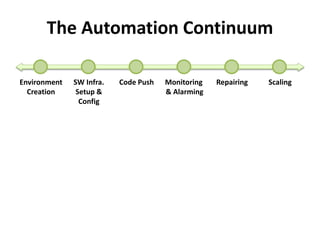
The Automation Continuum 
Environment 
Creation 
SW Infra. 
Setup & 
Config 
Code Push Monitoring 
& Alarming 
Repairing Scaling
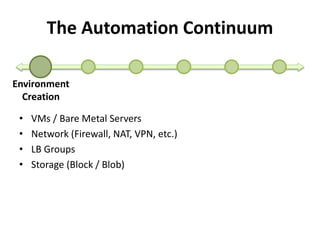
The Automation Continuum 
Environment 
Creation 
• VMs / Bare Metal Servers 
• Network (Firewall, NAT, VPN, etc.) 
• LB Groups 
• Storage (Block / Blob)
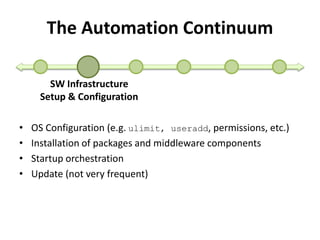
The Automation Continuum 
SW Infrastructure 
Setup & Configuration 
• OS Configuration (e.g. ulimit, useradd, permissions, etc.) 
• Installation of packages and middleware components 
• Startup orchestration 
• Update (not very frequent)
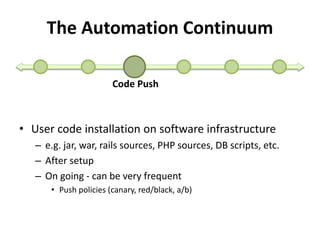
The Automation Continuum 
Code Push 
• User code installation on software infrastructure 
– e.g. jar, war, rails sources, PHP sources, DB scripts, etc. 
– After setup 
– On going - can be very frequent 
• Push policies (canary, red/black, a/b)
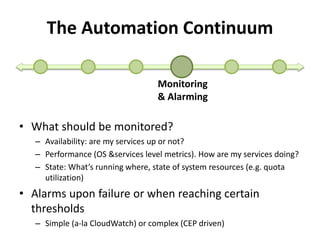
The Automation Continuum 
Monitoring 
& Alarming 
• What should be monitored? 
– Availability: are my services up or not? 
– Performance (OS &services level metrics). How are my services doing? 
– State: What’s running where, state of system resources (e.g. quota 
utilization) 
• Alarms upon failure or when reaching certain 
thresholds 
– Simple (a-la CloudWatch) or complex (CEP driven)
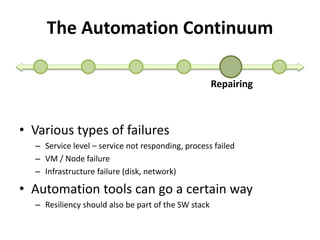
The Automation Continuum 
Repairing 
• Various types of failures 
– Service level – service not responding, process failed 
– VM / Node failure 
– Infrastructure failure (disk, network) 
• Automation tools can go a certain way 
– Resiliency should also be part of the SW stack
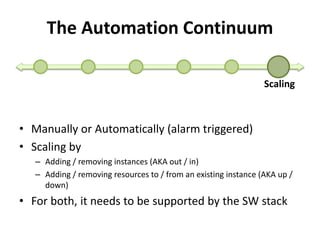
The Automation Continuum 
Scaling 
• Manually or Automatically (alarm triggered) 
• Scaling by 
– Adding / removing instances (AKA out / in) 
– Adding / removing resources to / from an existing instance (AKA up / 
down) 
• For both, it needs to be supported by the SW stack
Let’s Look at 
Some Tools
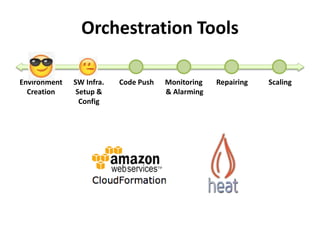
Orchestration Tools 
Environment 
Creation 
SW Infra. 
Setup & 
Config 
Code Push Monitoring 
& Alarming 
Repairing Scaling
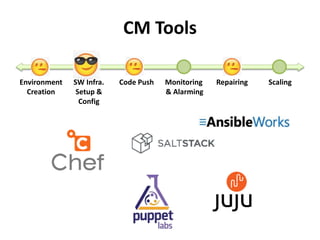
CM Tools 
Environment 
Creation 
SW Infra. 
Setup & 
Config 
Code Push Monitoring 
& Alarming 
Repairing Scaling
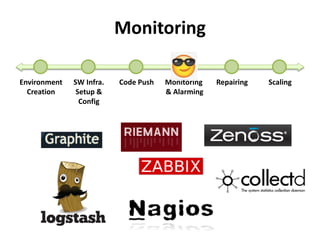
Monitoring 
Environment 
Creation 
SW Infra. 
Setup & 
Config 
Code Push Monitoring 
& Alarming 
Repairing Scaling
Tying The 
Pieces 
Together 
Usually 
Looks Like 
This
A Way to tie all the pieces 
on the Automation 
Continuum together 
• Use what works best, 
not reinvent each piece 
from scratch
Open Source Platform 
for Deploying, Managing 
and Scaling Complex 
Multi-Tier Applications 
on the Cloud
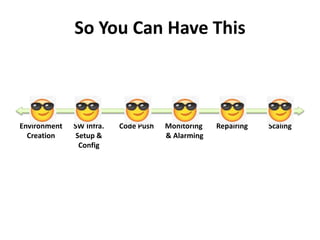
So You Can Have This 
Environment 
Creation 
SW Infra. 
Setup & 
Config 
Code Push Monitoring 
& Alarming 
Repairing Scaling
Main Functions 
• Deployment modeling using TOSCA 
• Automated resource creation, placement, 
configuration and startup 
• Metric and log collection 
• Monitoring 
• Auto-repairing 
• Auto-scaling 
• Deployment updates (infra and app code)
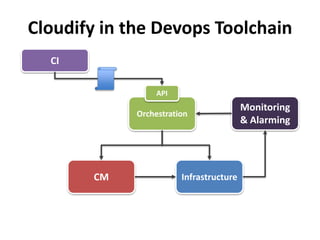
Cloudify in the Devops Toolchain 
API 
Orchestration 
CI 
Monitoring 
& Alarming 
CM Infrastructure
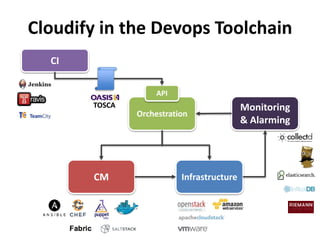
Cloudify in the Devops Toolchain 
API 
Orchestration 
CI 
Monitoring 
& Alarming 
TOSCA 
CM Infrastructure
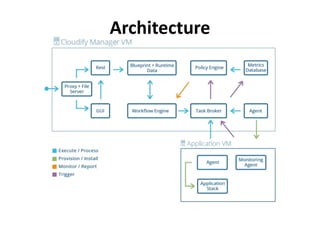
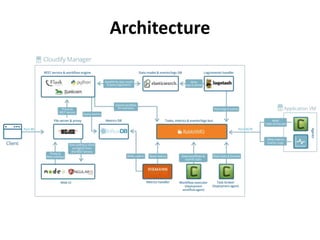
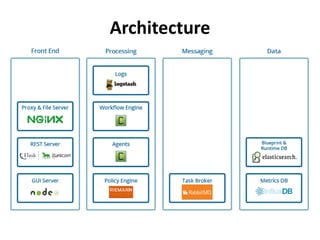
Architecture
Architecture
Architecture
Demo 1 
Setup up a Manager 
on CloudStack
CLOUDIFY 3 BLUEPRINTS – 
DOING IT THE TOSCA WAY
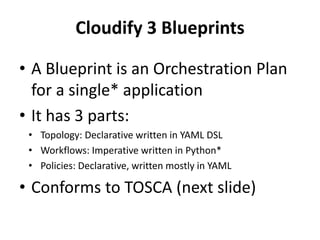
Cloudify 3 Blueprints 
• A Blueprint is an Orchestration Plan 
for a single* application 
• It has 3 parts: 
• Topology: Declarative written in YAML DSL 
• Workflows: Imperative written in Python* 
• Policies: Declarative, written mostly in YAML 
• Conforms to TOSCA (next slide)
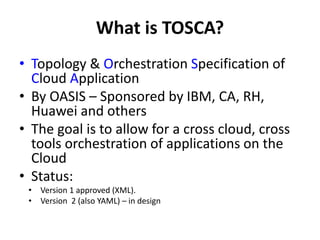
What is TOSCA? 
• Topology & Orchestration Specification of 
Cloud Application 
• By OASIS – Sponsored by IBM, CA, RH, 
Huawei and others 
• The goal is to allow for a cross cloud, cross 
tools orchestration of applications on the 
Cloud 
• Status: 
• Version 1 approved (XML). 
• Version 2 (also YAML) – in design
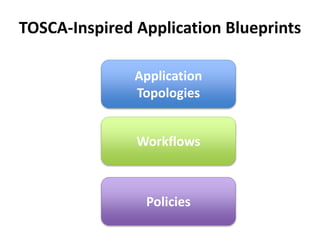
TOSCA-Inspired Application Blueprints 
Application 
Topologies 
Workflows 
Policies
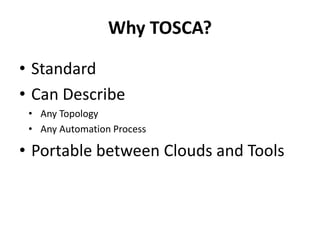
Why TOSCA? 
• Standard 
• Can Describe 
• Any Topology 
• Any Automation Process 
• Portable between Clouds and Tools
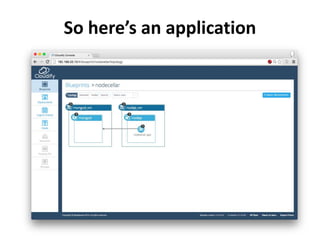
So here’s an application
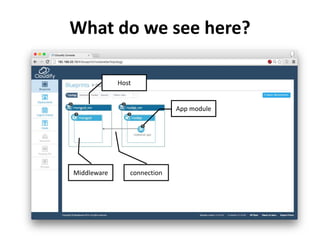
What do we see here? 
Host 
Middleware 
App module 
connection
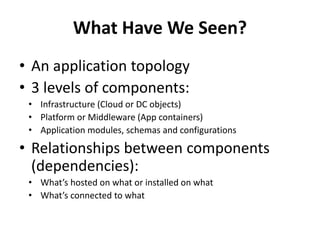
What Have We Seen? 
• An application topology 
• 3 levels of components: 
• Infrastructure (Cloud or DC objects) 
• Platform or Middleware (App containers) 
• Application modules, schemas and configurations 
• Relationships between components 
(dependencies): 
• What’s hosted on what or installed on what 
• What’s connected to what
What’s in TOSCA Topology? 
• Inputs and outputs 
• Types and nodes 
• Relationships 
• Requirements and capabilities
Input and Outputs 
• A way to parameterize blueprints 
and let them declare runtime 
computed values (URLs, passwords, 
etc.)
Inputs and Outputs 
inputs: 
cloudstack_api_url: 
default: '' 
type: string 
cloudstack_key: 
default: '' 
type: string 
cloudstack_secret: 
default: '' 
type: string 
... 
outputs: 
endpoint: 
description: Web application endpoint 
value: 
ip_address: { get_attribute: [ nodejs_vm, ip ] } 
port: { get_property: [ nodecellar_app, base_port ] }
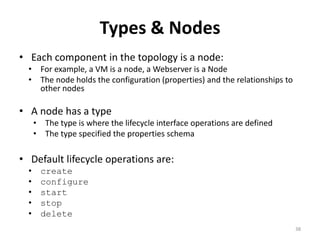
Types & Nodes 
• Each component in the topology is a node: 
• For example, a VM is a node, a Webserver is a Node 
• The node holds the configuration (properties) and the relationships to 
other nodes 
• A node has a type 
• The type is where the lifecycle interface operations are defined 
• The type specified the properties schema 
• Default lifecycle operations are: 
• create 
• configure 
• start 
• stop 
• delete 
38
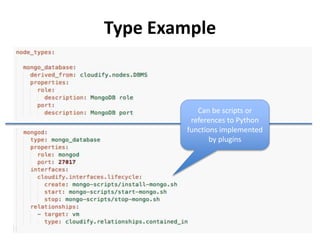
Type Example 
39 
Can be scripts or 
references to Python 
functions implemented 
by plugins
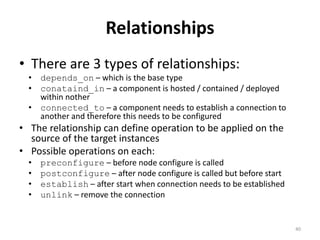
Relationships 
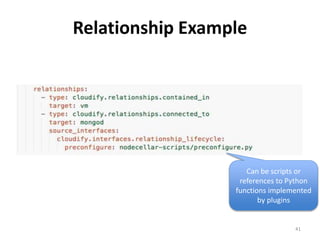
• There are 3 types of relationships: 
• depends_on – which is the base type 
• conataind_in – a component is hosted / contained / deployed 
within nother 
• connected_to – a component needs to establish a connection to 
another and therefore this needs to be configured 
• The relationship can define operation to be applied on the 
source of the target instances 
• Possible operations on each: 
• preconfigure – before node configure is called 
• postconfigure – after node configure is called but before start 
• establish – after start when connection needs to be established 
• unlink – remove the connection 
40
Relationship Example 
Can be scripts or 
references to Python 
functions implemented 
41 
by plugins
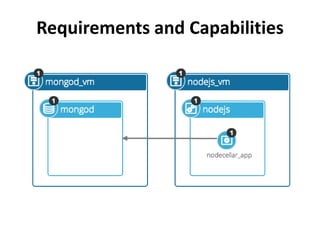
Requirements and Capabilities
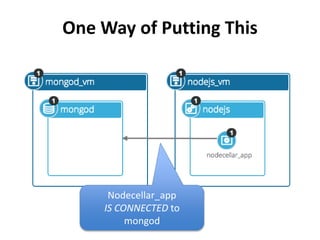
One Way of Putting This 
Nodecellar_app 
IS CONNECTED to 
mongod
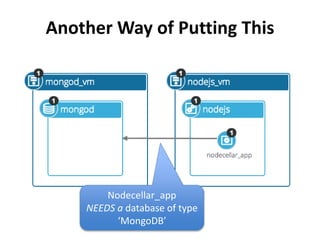
Another Way of Putting This 
Nodecellar_app 
NEEDS a database of type 
‘MongoDB’
Requirements and Capabilities 
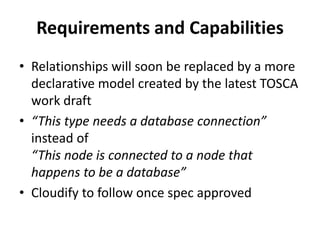
• Relationships will soon be replaced by a more 
declarative model created by the latest TOSCA 
work draft 
• “This type needs a database connection” 
instead of 
“This node is connected to a node that 
happens to be a database” 
• Cloudify to follow once spec approved
Requirements and Capabilities 
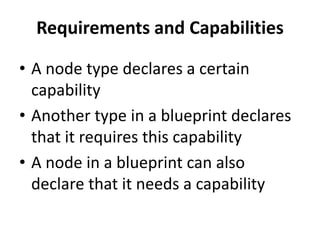
• A node type declares a certain 
capability 
• Another type in a blueprint declares 
that it requires this capability 
• A node in a blueprint can also 
declare that it needs a capability
Requirements and Capabilities 
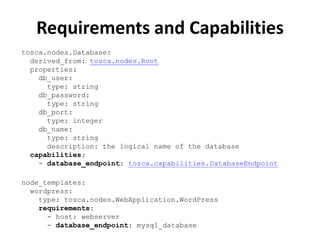
tosca.nodes.Database: 
derived_from: tosca.nodes.Root 
properties: 
db_user: 
type: string 
db_password: 
type: string 
db_port: 
type: integer 
db_name: 
type: string 
description: the logical name of the database 
capabilities: 
- database_endpoint: tosca.capabilities.DatabaseEndpoint 
node_templates: 
wordpress: 
type: tosca.nodes.WebApplication.WordPress 
requirements: 
- host: webserver 
- database_endpoint: mysql_database
A Word About Blueprint Portability 
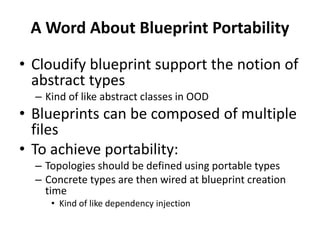
• Cloudify blueprint support the notion of 
abstract types 
– Kind of like abstract classes in OOD 
• Blueprints can be composed of multiple 
files 
• To achieve portability: 
– Topologies should be defined using portable types 
– Concrete types are then wired at blueprint creation 
time 
• Kind of like dependency injection
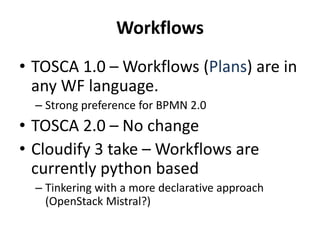
Workflows 
• TOSCA 1.0 –Workflows (Plans) are in 
any WF language. 
– Strong preference for BPMN 2.0 
• TOSCA 2.0 – No change 
• Cloudify 3 take – Workflows are 
currently python based 
– Tinkering with a more declarative approach 
(OpenStack Mistral?)
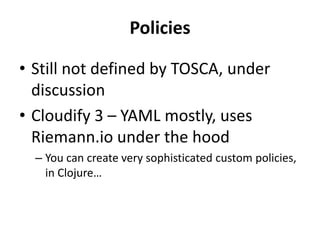
Policies 
• Still not defined by TOSCA, under 
discussion 
• Cloudify 3 – YAML mostly, uses 
Riemann.io under the hood 
– You can create very sophisticated custom policies, 
in Clojure…
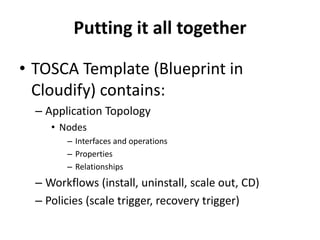
Putting it all together 
• TOSCA Template (Blueprint in 
Cloudify) contains: 
– Application Topology 
• Nodes 
– Interfaces and operations 
– Properties 
– Relationships 
– Workflows (install, uninstall, scale out, CD) 
– Policies (scale trigger, recovery trigger)
Demo 2 
Upload a blueprint 
and install it
WHAT REALLY HAPPENED HERE?
We Triggered a Few Processes 
• Blueprint and deployment creation 
• Workflow execution 
• Availability reporting 
• Log and metric collection
BLUEPRINT AND DEPLOYMENT 
CREATION
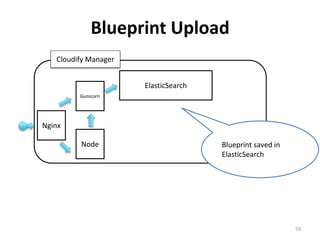
Blueprint Upload 
59 
Gunicorn 
Node 
ElasticSearch 
Cloudify Manager 
Nginx 
Blueprint saved in 
ElasticSearch
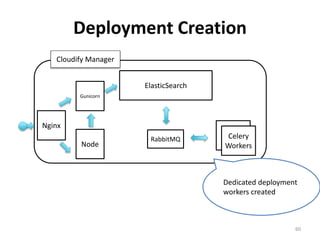
Deployment Creation 
60 
Gunicorn 
Node 
ElasticSearch 
Cloudify Manager 
Nginx 
Celery 
Worker 
Celery 
Workers 
Dedicated deployment 
workers created 
RabbitMQ
WORKFLOW EXECUTION
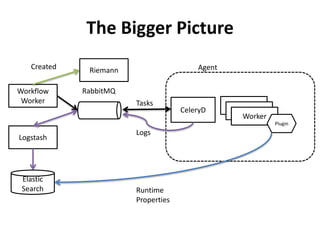
The Bigger Picture 
Agent 
CeleryD 
Worker 
Worker 
Worker 
Plugin 
RabbitMQ 
Tasks 
Logs 
Workflow 
Worker 
Logstash 
Elastic 
Search Runtime 
Properties 
Created Riemann
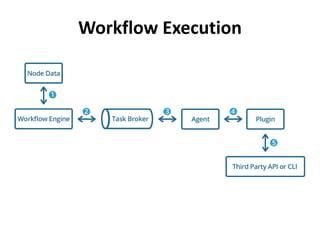
Workflow Execution
LOGS & EVENTS
Logs & Events Functionality 
• Cloudify components logs are 
gathered, indexed and persisted 
• Events give the user a simple and 
clear way to trace the progress of a 
workflow execution 
• Available from API, CLI and web GUI
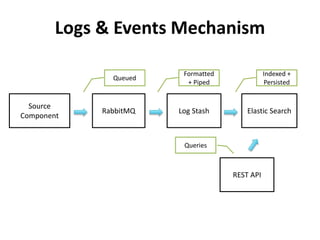
Logs & Events Mechanism 
Source 
Component 
RabbitMQ Log Stash Elastic Search 
REST API 
Queued 
Formatted 
+ Piped 
Indexed + 
Persisted 
Queries
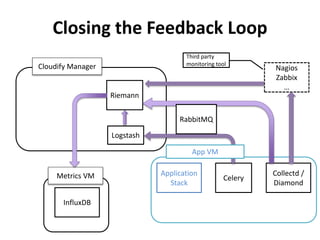
Closing the Feedback Loop 
Celery 
Collectd / 
Diamond 
RabbitMQ 
Application 
Stack 
Nagios 
Zabbix 
… 
Riemann 
Cloudify Manager 
Third party 
monitoring tool 
Metrics VM 
InfluxDB 
Logstash 
App VM
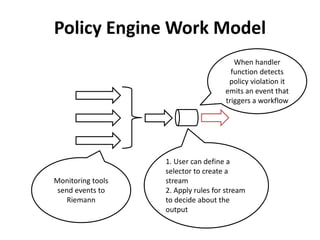
Policy Engine Work Model 
When handler 
function detects 
policy violation it 
emits an event that 
triggers a workflow 
1. User can define a 
selector to create a 
stream 
2. Apply rules for stream 
to decide about the 
output 
Monitoring tools 
send events to 
Riemann
Demo 3 Monitoring
If You Want 
to Dive 
Deeper 
• Plugins 
– IaaS: CloudStack, 
OpenStack, AWS 
(libcloud), vSphere, 
vCloud, SoftLayer 
– Chef, Puppet, Salt, 
Fabric, Docker 
– Role your own 
• Workflows 
• Policies
References 
• Cloudify home: getcloudify.org 
• Github: github.com/cloudify-cosmo 
• CloudStack integration (in the works): 
github.com/cloudify-cosmo/?query=cloudstack 
• TOSCA: 
https://www.oasis-open.org/committees/tosca/
Thank You!

Cloudify workshop at CCCEU 2014

  • 1.
    Cloudify 3 Workshop #ccceu Budapest 2014 Uri Cohen - @uri1803
  • 2.
    INTRODUCTION (OR WHYWE NEED THIS AT ALL…)
  • 3.
    The World Is about Services & Apps
  • 4.
    Automation Is Keyfor: • Testability • Consistency • Agility • Stability
  • 5.
    The Automation Continuum Environment Creation SW Infra. Setup & Config Code Push Monitoring & Alarming Repairing Scaling
  • 6.
    The Automation Continuum Environment Creation • VMs / Bare Metal Servers • Network (Firewall, NAT, VPN, etc.) • LB Groups • Storage (Block / Blob)
  • 7.
    The Automation Continuum SW Infrastructure Setup & Configuration • OS Configuration (e.g. ulimit, useradd, permissions, etc.) • Installation of packages and middleware components • Startup orchestration • Update (not very frequent)
  • 8.
    The Automation Continuum Code Push • User code installation on software infrastructure – e.g. jar, war, rails sources, PHP sources, DB scripts, etc. – After setup – On going - can be very frequent • Push policies (canary, red/black, a/b)
  • 9.
    The Automation Continuum Monitoring & Alarming • What should be monitored? – Availability: are my services up or not? – Performance (OS &services level metrics). How are my services doing? – State: What’s running where, state of system resources (e.g. quota utilization) • Alarms upon failure or when reaching certain thresholds – Simple (a-la CloudWatch) or complex (CEP driven)
  • 10.
    The Automation Continuum Repairing • Various types of failures – Service level – service not responding, process failed – VM / Node failure – Infrastructure failure (disk, network) • Automation tools can go a certain way – Resiliency should also be part of the SW stack
  • 11.
    The Automation Continuum Scaling • Manually or Automatically (alarm triggered) • Scaling by – Adding / removing instances (AKA out / in) – Adding / removing resources to / from an existing instance (AKA up / down) • For both, it needs to be supported by the SW stack
  • 12.
    Let’s Look at Some Tools
  • 13.
    Orchestration Tools Environment Creation SW Infra. Setup & Config Code Push Monitoring & Alarming Repairing Scaling
  • 14.
    CM Tools Environment Creation SW Infra. Setup & Config Code Push Monitoring & Alarming Repairing Scaling
  • 15.
    Monitoring Environment Creation SW Infra. Setup & Config Code Push Monitoring & Alarming Repairing Scaling
  • 16.
    Tying The Pieces Together Usually Looks Like This
  • 17.
    A Way totie all the pieces on the Automation Continuum together • Use what works best, not reinvent each piece from scratch
  • 18.
    Open Source Platform for Deploying, Managing and Scaling Complex Multi-Tier Applications on the Cloud
  • 19.
    So You CanHave This Environment Creation SW Infra. Setup & Config Code Push Monitoring & Alarming Repairing Scaling
  • 20.
    Main Functions •Deployment modeling using TOSCA • Automated resource creation, placement, configuration and startup • Metric and log collection • Monitoring • Auto-repairing • Auto-scaling • Deployment updates (infra and app code)
  • 21.
    Cloudify in theDevops Toolchain API Orchestration CI Monitoring & Alarming CM Infrastructure
  • 22.
    Cloudify in theDevops Toolchain API Orchestration CI Monitoring & Alarming TOSCA CM Infrastructure
  • 23.
  • 24.
  • 25.
  • 26.
    Demo 1 Setupup a Manager on CloudStack
  • 27.
    CLOUDIFY 3 BLUEPRINTS– DOING IT THE TOSCA WAY
  • 28.
    Cloudify 3 Blueprints • A Blueprint is an Orchestration Plan for a single* application • It has 3 parts: • Topology: Declarative written in YAML DSL • Workflows: Imperative written in Python* • Policies: Declarative, written mostly in YAML • Conforms to TOSCA (next slide)
  • 29.
    What is TOSCA? • Topology & Orchestration Specification of Cloud Application • By OASIS – Sponsored by IBM, CA, RH, Huawei and others • The goal is to allow for a cross cloud, cross tools orchestration of applications on the Cloud • Status: • Version 1 approved (XML). • Version 2 (also YAML) – in design
  • 30.
    TOSCA-Inspired Application Blueprints Application Topologies Workflows Policies
  • 31.
    Why TOSCA? •Standard • Can Describe • Any Topology • Any Automation Process • Portable between Clouds and Tools
  • 32.
    So here’s anapplication
  • 33.
    What do wesee here? Host Middleware App module connection
  • 34.
    What Have WeSeen? • An application topology • 3 levels of components: • Infrastructure (Cloud or DC objects) • Platform or Middleware (App containers) • Application modules, schemas and configurations • Relationships between components (dependencies): • What’s hosted on what or installed on what • What’s connected to what
  • 35.
    What’s in TOSCATopology? • Inputs and outputs • Types and nodes • Relationships • Requirements and capabilities
  • 36.
    Input and Outputs • A way to parameterize blueprints and let them declare runtime computed values (URLs, passwords, etc.)
  • 37.
    Inputs and Outputs inputs: cloudstack_api_url: default: '' type: string cloudstack_key: default: '' type: string cloudstack_secret: default: '' type: string ... outputs: endpoint: description: Web application endpoint value: ip_address: { get_attribute: [ nodejs_vm, ip ] } port: { get_property: [ nodecellar_app, base_port ] }
  • 38.
    Types & Nodes • Each component in the topology is a node: • For example, a VM is a node, a Webserver is a Node • The node holds the configuration (properties) and the relationships to other nodes • A node has a type • The type is where the lifecycle interface operations are defined • The type specified the properties schema • Default lifecycle operations are: • create • configure • start • stop • delete 38
  • 39.
    Type Example 39 Can be scripts or references to Python functions implemented by plugins
  • 40.
    Relationships • Thereare 3 types of relationships: • depends_on – which is the base type • conataind_in – a component is hosted / contained / deployed within nother • connected_to – a component needs to establish a connection to another and therefore this needs to be configured • The relationship can define operation to be applied on the source of the target instances • Possible operations on each: • preconfigure – before node configure is called • postconfigure – after node configure is called but before start • establish – after start when connection needs to be established • unlink – remove the connection 40
  • 41.
    Relationship Example Canbe scripts or references to Python functions implemented 41 by plugins
  • 42.
  • 43.
    One Way ofPutting This Nodecellar_app IS CONNECTED to mongod
  • 44.
    Another Way ofPutting This Nodecellar_app NEEDS a database of type ‘MongoDB’
  • 45.
    Requirements and Capabilities • Relationships will soon be replaced by a more declarative model created by the latest TOSCA work draft • “This type needs a database connection” instead of “This node is connected to a node that happens to be a database” • Cloudify to follow once spec approved
  • 46.
    Requirements and Capabilities • A node type declares a certain capability • Another type in a blueprint declares that it requires this capability • A node in a blueprint can also declare that it needs a capability
  • 47.
    Requirements and Capabilities tosca.nodes.Database: derived_from: tosca.nodes.Root properties: db_user: type: string db_password: type: string db_port: type: integer db_name: type: string description: the logical name of the database capabilities: - database_endpoint: tosca.capabilities.DatabaseEndpoint node_templates: wordpress: type: tosca.nodes.WebApplication.WordPress requirements: - host: webserver - database_endpoint: mysql_database
  • 48.
    A Word AboutBlueprint Portability • Cloudify blueprint support the notion of abstract types – Kind of like abstract classes in OOD • Blueprints can be composed of multiple files • To achieve portability: – Topologies should be defined using portable types – Concrete types are then wired at blueprint creation time • Kind of like dependency injection
  • 49.
    Workflows • TOSCA1.0 –Workflows (Plans) are in any WF language. – Strong preference for BPMN 2.0 • TOSCA 2.0 – No change • Cloudify 3 take – Workflows are currently python based – Tinkering with a more declarative approach (OpenStack Mistral?)
  • 50.
    Policies • Stillnot defined by TOSCA, under discussion • Cloudify 3 – YAML mostly, uses Riemann.io under the hood – You can create very sophisticated custom policies, in Clojure…
  • 51.
    Putting it alltogether • TOSCA Template (Blueprint in Cloudify) contains: – Application Topology • Nodes – Interfaces and operations – Properties – Relationships – Workflows (install, uninstall, scale out, CD) – Policies (scale trigger, recovery trigger)
  • 52.
    Demo 2 Uploada blueprint and install it
  • 53.
  • 54.
    We Triggered aFew Processes • Blueprint and deployment creation • Workflow execution • Availability reporting • Log and metric collection
  • 55.
  • 56.
    Blueprint Upload 59 Gunicorn Node ElasticSearch Cloudify Manager Nginx Blueprint saved in ElasticSearch
  • 57.
    Deployment Creation 60 Gunicorn Node ElasticSearch Cloudify Manager Nginx Celery Worker Celery Workers Dedicated deployment workers created RabbitMQ
  • 58.
  • 59.
    The Bigger Picture Agent CeleryD Worker Worker Worker Plugin RabbitMQ Tasks Logs Workflow Worker Logstash Elastic Search Runtime Properties Created Riemann
  • 60.
  • 61.
  • 62.
    Logs & EventsFunctionality • Cloudify components logs are gathered, indexed and persisted • Events give the user a simple and clear way to trace the progress of a workflow execution • Available from API, CLI and web GUI
  • 63.
    Logs & EventsMechanism Source Component RabbitMQ Log Stash Elastic Search REST API Queued Formatted + Piped Indexed + Persisted Queries
  • 64.
    Closing the FeedbackLoop Celery Collectd / Diamond RabbitMQ Application Stack Nagios Zabbix … Riemann Cloudify Manager Third party monitoring tool Metrics VM InfluxDB Logstash App VM
  • 65.
    Policy Engine WorkModel When handler function detects policy violation it emits an event that triggers a workflow 1. User can define a selector to create a stream 2. Apply rules for stream to decide about the output Monitoring tools send events to Riemann
  • 66.
  • 67.
    If You Want to Dive Deeper • Plugins – IaaS: CloudStack, OpenStack, AWS (libcloud), vSphere, vCloud, SoftLayer – Chef, Puppet, Salt, Fabric, Docker – Role your own • Workflows • Policies
  • 68.
    References • Cloudifyhome: getcloudify.org • Github: github.com/cloudify-cosmo • CloudStack integration (in the works): github.com/cloudify-cosmo/?query=cloudstack • TOSCA: https://www.oasis-open.org/committees/tosca/
  • 69.

Editor's Notes

  • #14 Great at creating openstack resources, basic integration with Chef / puppet for sw config, basic built in monitoring and alarming, moving to ceilometer in Havana
  • #15 Env setup is not automated SW infra setup is good but has no startup orchestration
  • #16 Healthnmon is more geared toward cloud resource monitoring and is has more opinionated domain model, ceilometer seems to be picking momentum and
  • #18 Even AWS used Chef for this…
  • #19 Talk about what’s next
  • #22 Templates to describe and drive all these processes
  • #23 Templates to describe and drive all these processes