Performance	
  Tes-ng	
  with	
  Real	
  Browsers	
  
Harnessing	
  the	
  power	
  of	
  JMeter	
  &	
  Selenium	
  Webdriver	
  
785 Castro Street, Mountain View, CA 94041 | 1.855.445.2285 | info@blazemeter.com
BlazeMeter
OPHIR	
  PRUSAK	
  
Chief	
  Evangelist	
  -­‐	
  BlazeMeter	
  
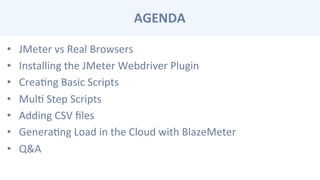
AGENDA	
  
•  JMeter	
  vs	
  Real	
  Browsers	
  
•  Installing	
  the	
  JMeter	
  Webdriver	
  Plugin	
  
•  CreaCng	
  Basic	
  Scripts	
  
•  MulC	
  Step	
  Scripts	
  
•  Adding	
  CSV	
  files	
  
•  GeneraCng	
  Load	
  in	
  the	
  Cloud	
  with	
  BlazeMeter	
  
•  Q&A	
  
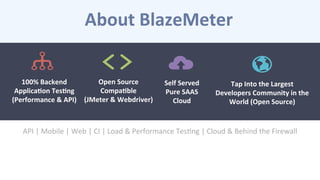
About	
  BlazeMeter	
  
API	
  |	
  Mobile	
  |	
  Web	
  |	
  CI	
  |	
  Load	
  &	
  Performance	
  TesCng	
  |	
  Cloud	
  &	
  Behind	
  the	
  Firewall	
  
Open	
  Source	
  
Compa-ble	
  	
  
(JMeter	
  &	
  Webdriver)	
  
100%	
  Backend	
  
Applica-on	
  Tes-ng	
  
(Performance	
  &	
  API)	
  
Self	
  Served	
  
Pure	
  SAAS	
  
Cloud	
  
Tap	
  Into	
  the	
  Largest	
  	
  
Developers	
  Community	
  in	
  the	
  
World	
  (Open	
  Source)	
  
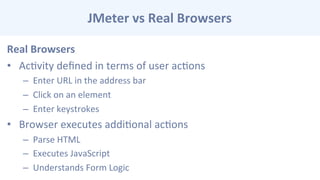
JMeter	
  vs	
  Real	
  Browsers	
  
Real	
  Browsers	
  
•  AcCvity	
  defined	
  in	
  terms	
  of	
  user	
  acCons	
  
–  Enter	
  URL	
  in	
  the	
  address	
  bar	
  
–  Click	
  on	
  an	
  element	
  
–  Enter	
  keystrokes	
  
•  Browser	
  executes	
  addiConal	
  acCons	
  
–  Parse	
  HTML	
  
–  Executes	
  JavaScript	
  
–  Understands	
  Form	
  Logic	
  
JMeter	
  vs	
  Real	
  Browsers	
  
JMeter	
  
•  AcCvity	
  defined	
  in	
  terms	
  of	
  HTTP	
  acCons	
  
–  HTTP	
  GET,	
  HTTP	
  POST,	
  etc	
  
–  Supports	
  Cookies	
  and	
  Caching	
  
–  User	
  Variables,	
  Response	
  Data	
  ExtracCon	
  and	
  Flow	
  Logic	
  
•  JMeter	
  does	
  not	
  execute	
  most	
  client	
  side	
  logic	
  
–  Parse	
  HTML	
  
–  Executes	
  JavaScript	
  
–  Understands	
  Form	
  Logic	
  
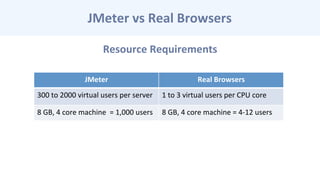
Resource	
  Requirements	
  
JMeter	
  vs	
  Real	
  Browsers	
  
JMeter	
   Real	
  Browsers	
  
300	
  to	
  2000	
  virtual	
  users	
  per	
  server	
   1	
  to	
  3	
  virtual	
  users	
  per	
  CPU	
  core	
  
8	
  GB,	
  4	
  core	
  machine	
  	
  =	
  1,000	
  users	
   8	
  GB,	
  4	
  core	
  machine	
  =	
  4-­‐12	
  users	
  
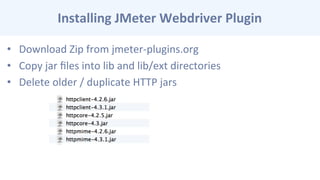
Installing	
  JMeter	
  Webdriver	
  Plugin	
  
•  Download	
  Zip	
  from	
  jmeter-­‐plugins.org	
  
•  Copy	
  jar	
  files	
  into	
  lib	
  and	
  lib/ext	
  directories	
  
•  Delete	
  older	
  /	
  duplicate	
  HTTP	
  jars	
  
Simple	
  Scrip-ng	
  
•  Add	
  Thread	
  Group	
  (1	
  user)	
  
•  Add	
  FireFox	
  Driver	
  Config	
  (easiest	
  to	
  get	
  working)	
  
–  FireFox	
  26.0	
  works.	
  Later	
  versions	
  not	
  guaranteed.	
  
•  Add	
  Sampler	
  /	
  Webdriver	
  Sampler	
  
•  Enter	
  Webdriver	
  Code	
  
•  Add	
  Listeners	
  for	
  Debugging	
  
•  Run	
  Test	


Simple	
  Scrip-ng	
  
•  WDS.sampleResult.sampleStart()	
  
•  Do	
  some	
  stuff	
  	
  
•  WDS.sampleResult.sampleEnd()	
  
•  Tutorials	
  
•  hcp://jmeter-­‐plugins.org/wiki/WebDriverTutorial/	
  
•  hcp://jmeter-­‐plugins.org/wiki/WebDriverSampler/	
  
•  hcp://blazemeter.com/blog/webdriver-­‐sampler-­‐your-­‐top-­‐10-­‐quesCons-­‐answered	
  
Mul-	
  Step	
  Scrip-ng	
  
•  Add	
  More	
  Webdriver	
  Samplers	
  
•  Each	
  Sampler	
  ConCnues	
  Same	
  Session	
  
•  Each	
  Thread	
  IteraCon	
  is	
  a	
  New	
  Session	
  
CSV	
  Files	
  
•  Use	
  Standard	
  CSV	
  Data	
  Set	
  Config	
  Element	
  
•  Variables	
  are	
  referenced	
  as	
  ${varname}	
  
–  For	
  example	
  
–  WDS.browser.findElement(pkg.By.id('zipCode')).sendKeys(['${zip}'])
Genera-ng	
  Load	
  with	
  BlazeMeter	
  
1.  Create	
  script	
  and	
  debug	
  locally	
  
2.  Upload	
  to	
  BlazeMeter	
  and	
  set	
  load	
  parameters	
  
1.  Currently	
  running	
  Webdriver	
  1.1.2	
  
2.  Firefox	
  browsers	
  for	
  webdriver	
  tests	
  
3.  Phantom.js	
  and	
  Chrome	
  support	
  coming	
  soon	
  
3.  Run	
  test	
  
4.  For	
  errors,	
  check	
  log	
  files	
  
Genera-ng	
  Load	
  with	
  BlazeMeter	
  
•  Free	
  Users	
  –	
  one	
  machine	
  with	
  up	
  to	
  5	
  browsers	
  
•  Paid	
  Accounts	
  –	
  up	
  to	
  20	
  browsers	
  per	
  server	
  
•  Enterprise	
  Accounts	
  –	
  up	
  to	
  1,000	
  servers	
  /	
  per	
  test	
  
DEMO	
  
THANK	
  YOU	
  FOR	
  YOUR	
  TIME!	
  	
  
Q	
  &	
  A	
  
For more information:
BlazeMeter.com/blog	
   info@blazemeter.com	
   @BlazeMeter	
  

Performance Testing using Real Browsers with JMeter & Webdriver

  • 1.
    Performance  Tes-ng  with  Real  Browsers   Harnessing  the  power  of  JMeter  &  Selenium  Webdriver   785 Castro Street, Mountain View, CA 94041 | 1.855.445.2285 | info@blazemeter.com BlazeMeter OPHIR  PRUSAK   Chief  Evangelist  -­‐  BlazeMeter  
  • 2.
    AGENDA   •  JMeter  vs  Real  Browsers   •  Installing  the  JMeter  Webdriver  Plugin   •  CreaCng  Basic  Scripts   •  MulC  Step  Scripts   •  Adding  CSV  files   •  GeneraCng  Load  in  the  Cloud  with  BlazeMeter   •  Q&A  
  • 3.
    About  BlazeMeter   API  |  Mobile  |  Web  |  CI  |  Load  &  Performance  TesCng  |  Cloud  &  Behind  the  Firewall   Open  Source   Compa-ble     (JMeter  &  Webdriver)   100%  Backend   Applica-on  Tes-ng   (Performance  &  API)   Self  Served   Pure  SAAS   Cloud   Tap  Into  the  Largest     Developers  Community  in  the   World  (Open  Source)  
  • 4.
    JMeter  vs  Real  Browsers   Real  Browsers   •  AcCvity  defined  in  terms  of  user  acCons   –  Enter  URL  in  the  address  bar   –  Click  on  an  element   –  Enter  keystrokes   •  Browser  executes  addiConal  acCons   –  Parse  HTML   –  Executes  JavaScript   –  Understands  Form  Logic  
  • 5.
    JMeter  vs  Real  Browsers   JMeter   •  AcCvity  defined  in  terms  of  HTTP  acCons   –  HTTP  GET,  HTTP  POST,  etc   –  Supports  Cookies  and  Caching   –  User  Variables,  Response  Data  ExtracCon  and  Flow  Logic   •  JMeter  does  not  execute  most  client  side  logic   –  Parse  HTML   –  Executes  JavaScript   –  Understands  Form  Logic  
  • 6.
    Resource  Requirements   JMeter  vs  Real  Browsers   JMeter   Real  Browsers   300  to  2000  virtual  users  per  server   1  to  3  virtual  users  per  CPU  core   8  GB,  4  core  machine    =  1,000  users   8  GB,  4  core  machine  =  4-­‐12  users  
  • 7.
    Installing  JMeter  Webdriver  Plugin   •  Download  Zip  from  jmeter-­‐plugins.org   •  Copy  jar  files  into  lib  and  lib/ext  directories   •  Delete  older  /  duplicate  HTTP  jars  
  • 8.
    Simple  Scrip-ng   • Add  Thread  Group  (1  user)   •  Add  FireFox  Driver  Config  (easiest  to  get  working)   –  FireFox  26.0  works.  Later  versions  not  guaranteed.   •  Add  Sampler  /  Webdriver  Sampler   •  Enter  Webdriver  Code   •  Add  Listeners  for  Debugging   •  Run  Test      
  • 9.
    Simple  Scrip-ng   • WDS.sampleResult.sampleStart()   •  Do  some  stuff     •  WDS.sampleResult.sampleEnd()   •  Tutorials   •  hcp://jmeter-­‐plugins.org/wiki/WebDriverTutorial/   •  hcp://jmeter-­‐plugins.org/wiki/WebDriverSampler/   •  hcp://blazemeter.com/blog/webdriver-­‐sampler-­‐your-­‐top-­‐10-­‐quesCons-­‐answered  
  • 10.
    Mul-  Step  Scrip-ng   •  Add  More  Webdriver  Samplers   •  Each  Sampler  ConCnues  Same  Session   •  Each  Thread  IteraCon  is  a  New  Session  
  • 11.
    CSV  Files   • Use  Standard  CSV  Data  Set  Config  Element   •  Variables  are  referenced  as  ${varname}   –  For  example   –  WDS.browser.findElement(pkg.By.id('zipCode')).sendKeys(['${zip}'])
  • 12.
    Genera-ng  Load  with  BlazeMeter   1.  Create  script  and  debug  locally   2.  Upload  to  BlazeMeter  and  set  load  parameters   1.  Currently  running  Webdriver  1.1.2   2.  Firefox  browsers  for  webdriver  tests   3.  Phantom.js  and  Chrome  support  coming  soon   3.  Run  test   4.  For  errors,  check  log  files  
  • 13.
    Genera-ng  Load  with  BlazeMeter   •  Free  Users  –  one  machine  with  up  to  5  browsers   •  Paid  Accounts  –  up  to  20  browsers  per  server   •  Enterprise  Accounts  –  up  to  1,000  servers  /  per  test  
  • 14.
  • 15.
    THANK  YOU  FOR  YOUR  TIME!     Q  &  A   For more information: BlazeMeter.com/blog   info@blazemeter.com   @BlazeMeter