@ArthurBerezin
Director of Product - Cloudify,
GigaSpaces
Orchestrating
Cloud Applications with TOSCA
OpenStack TLV Meetup
5 August 2015
Agenda
● Cloud Applications
● TOSCA (Topology & Orchestration Specification of Cloud Application)
● Cloudify
About Me
Director of Product - Cloudify, GigaSpaces
I come from
● OpenStack Product Manager @Red Hat
● DevOps @LivePerson
● Linux Services, Field
and Support @Matrix
About Me
Director of Product - Cloudify,
GigaSpaces - 1 Month In
Where do I come from
● OpenStack Product Manager @Red Hat
● DevOps @LivePerson
● Linux Services, Field
and Support @Matrix
Cloud Native
and
Cloud Aware Applications
Vision
Open
Source Open
Standard
Trend
Aware
*-as-a-Service
Automation
*-as-a-Service
Automation
Awareness
Reaction to Self
What It Really
Takes to
Deploy and
Manage Apps
Provision
Install
Configure
Deploy
Monitor
Scale
Large Parts Are Mostly Manual
Real Time
Analytics
Correlate
with
Historical
Events
Feedback
Execute
Policy
Send
Metrics
Setup Monitoring and Alerts
Deploy and Configure
Applications
Setup Machine, Network,
Storage
Push updates
Collect and Analyze Logs
Troubleshoot
Measure performance
against expected SLA’s
Set and tune Alerts
thresholds
Match Policy to Incident
The Impact
of Human
Errors
80%of
outages impacting mission-critical services
will be caused by people and process issues
50%of those outages will
be caused by
change/configuration/release integration
and hand-off issues
What is
TOSCA?
Topology &
Orchestration
Specification of Cloud
Application
By OASIS – Sponsored by IBM, CA, Rackspace, Red Hat, Huawei and others
What is
TOSCA?
• Goal: cross-cloud,
cross-tool
orchestration of
applications on the
Cloud
• Status:
– Version 1 approved (XML ☹)
– Version 2 (YAML!) in design
Why TOSCA?
• Open Standard
• Can Describe
– Any Topology
– Any Automation
Process
• (Theoretically)
portable between
Clouds and Tools
The TOSCA Building Blocks
Application
Topologies
Workflows
Policies
A Topology
A Topology
What’s in TOSCA Topology?
• Inputs and outputs
• Types, nodes and interfaces
• Relationships
• Requirements and capabilities
Input and Outputs
• A way to parameterize blueprints
and let them declare runtime
computed values (URLs, passwords,
etc.)
Inputs and Outputs
inputs:
cloudstack_api_url:
default: ''
type: string
cloudstack_key:
default: ''
type: string
cloudstack_secret:
default: ''
type: string
...
outputs:
endpoint:
description: Web application endpoint
value:
ip_address: { get_attribute: [ nodejs_vm, ip ] }
port: { get_property: [ nodecellar_app, base_port ] }
Types & Nodes
• Each component in the topology is a node:
• For example, a VM is a node, a Webserver is a Node
• The node holds the configuration (properties) and the relationships to
other nodes
• A node has a type
• The type is where the lifecycle interface operations are defined
• The type specified the properties schema
• Default lifecycle operations are:
• create, configure, start, stop, delete
Type Example
21
Can be scripts or
references to Python
functions implemented
by plugins
Relationships
• There are 3 types of relationships:
• depends_on – which is the base type
• conataind_in – a component is hosted / contained / deployed within another
• connected_to – a component needs to establish a connection to another and
therefore this needs to be configured
• The relationship can define operation to be
applied on the source of the target instances
22
Relationships
• Possible operations on each:
• preconfigure – before node configure is called
• postconfigure – after node configure is called but before start
• establish – after start when connection needs to be established
• unlink – remove the connection
23
Relationship Example
Can be scripts or
references to Python
functions implemented
by plugins
24
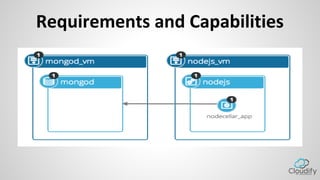
Requirements and Capabilities
One Way of Putting This
Nodecellar_app
IS CONNECTED to mongod
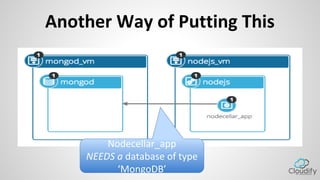
Another Way of Putting This
Nodecellar_app
NEEDS a database of type
‘MongoDB’
Requirements and Capabilities
• Relationships will soon be replaced by a more
declarative model created by the latest TOSCA
work draft
• “This type needs a database connection” instead
of
“This node is connected to a node that happens
to be a database”
• Cloudify to follow once spec approved
Requirements and Capabilities
• A node type declares a certain capability
• Another type in a blueprint declares that it
requires this capability
• A node in a blueprint can also declare that it
needs a capability
Requirements and Capabilities
tosca.nodes.Database:
derived_from: tosca.nodes.Root
properties:
db_user:
type: string
db_password:
type: string
db_port:
type: integer
db_name:
type: string
description: the logical name of the database
capabilities:
- database_endpoint: tosca.capabilities.DatabaseEndpoint
...
Requirements and Capabilities
...
node_templates:
wordpress:
type: tosca.nodes.WebApplication.WordPress
requirements:
- host: webserver
- database_endpoint: mysql_database
Workflows
• TOSCA 1.0 – Workflows (Plans) are in any WF
language.
– Strong preference for BPMN 2.0
• TOSCA 2.0 – No change
• Cloudify 3 take – Workflows are currently python
based
– Tinkering with a more declarative approach
(OpenStack Mistral?)
Policies
• Still not defined by TOSCA, under discussion
• Cloudify 3 – YAML mostly, uses Riemann.io under
the hood
– You can create very sophisticated custom policies,
in Clojure…
Putting it all together
• TOSCA Template (Blueprint in Cloudify) contains:
– Application Topology
• Nodes
– Interfaces and operations
– Properties
– Relationships
– Workflows (install, uninstall, scale out, CD)
– Policies (scale trigger, recovery trigger)
Cloudify
Provision
ConfigureMonitor
Manage
Can be used as a
command line tool or
as a managed service
Monitoring &
Alarming
CM Infrastructure
TOSCA
Blueprint
Cloudify
Provision
ConfigureMonitor
Manage
Can be used as a
command line tool or
as a managed service
Monitoring &
Alarming
CM Infrastructure
TOSCA
Blueprint
The Only Constant Is Change!
Web 2.0 > ITIL > SOA > Virtualization > Public Clouds > SaaS > IaaS > PaaS > Docker Docker
Docker.. > Kubernentes > What’s next to come?
Thank You!
References
• TOSCA Spec:
https://www.oasis-open.org/committees/tosca/
• Cloudify home: getcloudify.org
• Github: github.com/cloudify-cosmo

Orchestrating Cloud Applications With TOSCA

  • 1.
    @ArthurBerezin Director of Product- Cloudify, GigaSpaces Orchestrating Cloud Applications with TOSCA OpenStack TLV Meetup 5 August 2015
  • 2.
    Agenda ● Cloud Applications ●TOSCA (Topology & Orchestration Specification of Cloud Application) ● Cloudify
  • 3.
    About Me Director ofProduct - Cloudify, GigaSpaces I come from ● OpenStack Product Manager @Red Hat ● DevOps @LivePerson ● Linux Services, Field and Support @Matrix
  • 4.
    About Me Director ofProduct - Cloudify, GigaSpaces - 1 Month In Where do I come from ● OpenStack Product Manager @Red Hat ● DevOps @LivePerson ● Linux Services, Field and Support @Matrix
  • 5.
    Cloud Native and Cloud AwareApplications Vision Open Source Open Standard Trend Aware
  • 6.
  • 7.
  • 8.
    What It Really Takesto Deploy and Manage Apps Provision Install Configure Deploy Monitor Scale
  • 9.
    Large Parts AreMostly Manual Real Time Analytics Correlate with Historical Events Feedback Execute Policy Send Metrics Setup Monitoring and Alerts Deploy and Configure Applications Setup Machine, Network, Storage Push updates Collect and Analyze Logs Troubleshoot Measure performance against expected SLA’s Set and tune Alerts thresholds Match Policy to Incident
  • 10.
    The Impact of Human Errors 80%of outagesimpacting mission-critical services will be caused by people and process issues 50%of those outages will be caused by change/configuration/release integration and hand-off issues
  • 11.
    What is TOSCA? Topology & Orchestration Specificationof Cloud Application By OASIS – Sponsored by IBM, CA, Rackspace, Red Hat, Huawei and others
  • 12.
    What is TOSCA? • Goal:cross-cloud, cross-tool orchestration of applications on the Cloud • Status: – Version 1 approved (XML ☹) – Version 2 (YAML!) in design
  • 13.
    Why TOSCA? • OpenStandard • Can Describe – Any Topology – Any Automation Process • (Theoretically) portable between Clouds and Tools
  • 14.
    The TOSCA BuildingBlocks Application Topologies Workflows Policies
  • 15.
  • 16.
  • 17.
    What’s in TOSCATopology? • Inputs and outputs • Types, nodes and interfaces • Relationships • Requirements and capabilities
  • 18.
    Input and Outputs •A way to parameterize blueprints and let them declare runtime computed values (URLs, passwords, etc.)
  • 19.
    Inputs and Outputs inputs: cloudstack_api_url: default:'' type: string cloudstack_key: default: '' type: string cloudstack_secret: default: '' type: string ... outputs: endpoint: description: Web application endpoint value: ip_address: { get_attribute: [ nodejs_vm, ip ] } port: { get_property: [ nodecellar_app, base_port ] }
  • 20.
    Types & Nodes •Each component in the topology is a node: • For example, a VM is a node, a Webserver is a Node • The node holds the configuration (properties) and the relationships to other nodes • A node has a type • The type is where the lifecycle interface operations are defined • The type specified the properties schema • Default lifecycle operations are: • create, configure, start, stop, delete
  • 21.
    Type Example 21 Can bescripts or references to Python functions implemented by plugins
  • 22.
    Relationships • There are3 types of relationships: • depends_on – which is the base type • conataind_in – a component is hosted / contained / deployed within another • connected_to – a component needs to establish a connection to another and therefore this needs to be configured • The relationship can define operation to be applied on the source of the target instances 22
  • 23.
    Relationships • Possible operationson each: • preconfigure – before node configure is called • postconfigure – after node configure is called but before start • establish – after start when connection needs to be established • unlink – remove the connection 23
  • 24.
    Relationship Example Can bescripts or references to Python functions implemented by plugins 24
  • 25.
  • 26.
    One Way ofPutting This Nodecellar_app IS CONNECTED to mongod
  • 27.
    Another Way ofPutting This Nodecellar_app NEEDS a database of type ‘MongoDB’
  • 28.
    Requirements and Capabilities •Relationships will soon be replaced by a more declarative model created by the latest TOSCA work draft • “This type needs a database connection” instead of “This node is connected to a node that happens to be a database” • Cloudify to follow once spec approved
  • 29.
    Requirements and Capabilities •A node type declares a certain capability • Another type in a blueprint declares that it requires this capability • A node in a blueprint can also declare that it needs a capability
  • 30.
    Requirements and Capabilities tosca.nodes.Database: derived_from:tosca.nodes.Root properties: db_user: type: string db_password: type: string db_port: type: integer db_name: type: string description: the logical name of the database capabilities: - database_endpoint: tosca.capabilities.DatabaseEndpoint ...
  • 31.
    Requirements and Capabilities ... node_templates: wordpress: type:tosca.nodes.WebApplication.WordPress requirements: - host: webserver - database_endpoint: mysql_database
  • 32.
    Workflows • TOSCA 1.0– Workflows (Plans) are in any WF language. – Strong preference for BPMN 2.0 • TOSCA 2.0 – No change • Cloudify 3 take – Workflows are currently python based – Tinkering with a more declarative approach (OpenStack Mistral?)
  • 33.
    Policies • Still notdefined by TOSCA, under discussion • Cloudify 3 – YAML mostly, uses Riemann.io under the hood – You can create very sophisticated custom policies, in Clojure…
  • 34.
    Putting it alltogether • TOSCA Template (Blueprint in Cloudify) contains: – Application Topology • Nodes – Interfaces and operations – Properties – Relationships – Workflows (install, uninstall, scale out, CD) – Policies (scale trigger, recovery trigger)
  • 35.
    Cloudify Provision ConfigureMonitor Manage Can be usedas a command line tool or as a managed service Monitoring & Alarming CM Infrastructure TOSCA Blueprint
  • 36.
    Cloudify Provision ConfigureMonitor Manage Can be usedas a command line tool or as a managed service Monitoring & Alarming CM Infrastructure TOSCA Blueprint
  • 37.
    The Only ConstantIs Change! Web 2.0 > ITIL > SOA > Virtualization > Public Clouds > SaaS > IaaS > PaaS > Docker Docker Docker.. > Kubernentes > What’s next to come?
  • 38.
  • 39.
    References • TOSCA Spec: https://www.oasis-open.org/committees/tosca/ •Cloudify home: getcloudify.org • Github: github.com/cloudify-cosmo