



Enhancing OpenStack
FWaaS for real world
applications
Performance, Logging & Scheduling
Sarath Chandra Mekala
Chandan Dutta Chowdhury
Sarath Chandra Mekala
• Tech Lead @ Juniper Networks
• Works on Neutron Plugins
• Over a decade+ of experience with J2EE/NMS
• Contributed to Juniper’s FWaaS plugin
• Blogs @ sarathblogs.blogspot.in
• Likes Gadgets & Photography.
Chandan Dutta Chowdhury
• Tech Lead @ Juniper Networks
• Works on Neutron Plugins
• DevOPS & Opensource hacker
• Contributed to Juniper’s L2, L3 & NSX plugins
• Blogs @ chandanduttachowdhury.wordpress.com
Agenda
• Improve FWaaS Performance
• Scheduling Firewall Policies
• Logging Firewall Policies
Ideas to enable FWaaS cater to real world application needs
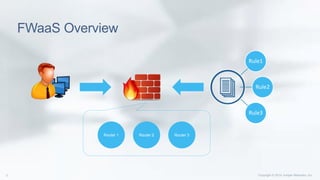
FWaaS Overview
Rule1
Rule2
Rule3
Router 1 Router 2 Router 3
FWaaS Performance
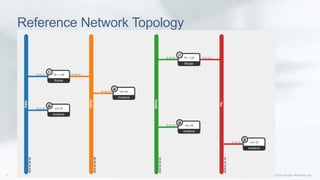
Reference Network Topology
Problem 1: Invalid Rules
Problem 2: Unnecessary Rule Deployment
Router 1 Router 2 Router 3
R1 R2 R3R1 R2 R3R1 R2 R3Firewall Policy
Firewall
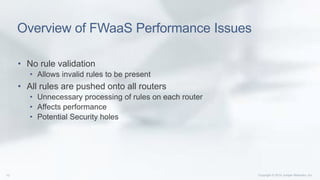
Overview of FWaaS Performance Issues
• No rule validation
• Allows invalid rules to be present
• All rules are pushed onto all routers
• Unnecessary processing of rules on each router
• Affects performance
• Potential Security holes
Solution 1: Rule Validation
Solution 2: Rule Split & Distribution
10 -> 20 30 -> 40
TCP-10-20-
allow
Firewall Policy
Firewall
TCP-30-40-
allow
Any-AnyAny-Any
Proposed Improvements
Validation (Invalid Rule Check)
• Rule’s Source IP and/or Destination IP do not belong to any of tenant
networks
(or)
• Rule’s Source/Destination IP belong to an existing tenant’s network
but the network is yet to be assigned to any router.
Performance
• All rules are segregated and grouped based on the networks they
belong to and allocated to their corresponding routers only.
Challenges
• Rule Ordering
• Deletion of router
Scheduling
Scheduling Rules
• Restrict access to:
• Web Sites
• Web Servers/FTP servers/SSH/RDP e.t.c
• Improves productivity
• Conserves Bandwidth
• Increases ROI
Scheduling – IPTables Spec
• IPTables on Ubuntu & CentOS supports rule scheduling
• Uses UTC for time zone by default
• iptables –A <chain> -m time --timestart 09:00 --
timestop 17:00 -weekdays Mon,Tue,Wed,Thu,Fri -j
<Action>
• -m time : match time
• --timestart : Start time
• --timestop : End time
• --weekdays : Days of the week
Scheduling – IPTables Spec
• Periodicity:
• datestart YYYY[-MM[-DD[Thh[:mm[:ss]]]]]
• datestop YYYY[-MM[-DD[Thh[:mm[:ss]]]]]
• timestart hh:mm[:ss]
• timestop hh:mm[:ss]
• monthdays day[,day...]
• weekdays day[,day...]
• contiguous
• Kerneltz
Scheduling – IPTables Examples
• To match on weekends, use:
-m time --weekdays SAT,SUN
• To match between a set of days with a specific time interval:
-m time --datestart 2015-08-23 T09:00 --datestop 2007-01-01T15:00
• To match on a time interval:
-m time --timestart 09:00 --timestop 17:00
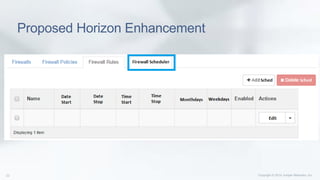
Proposed Horizon Enhancement
Firewall Logs
Current Firewall implementation in OpenStack
• Doesn't provide packet logging
• Tenant does not have any knowledge of dropped packets
• While deploying new rules in the firewall, there is no way to
debug the rule
• No way to determine the effectiveness of the firewall rules
Benefits of Enabling Firewall Logs
• Monitoring
• Threat Alerting
• Threat correlation
• Report generation
• Troubleshooting packet drops
• Fine tuning Rules
• Detecting false positives
• Detecting false negatives
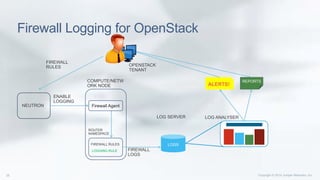
Firewall Logging for OpenStack
COMPUTE/NETW
ORK NODE
ROUTER
NAMESPACE
LOGGING RULE
LOG SERVER LOG ANALYSER
Firewall Agent
ENABLE
LOGGING
NEUTRON
FIREWALL
LOGS
LOGS
ALERTS!
REPORTS
OPENSTACK
TENANT
FIREWALL
RULES
FIREWALL RULES
Enable Firewall Logs with IPTables rules
iptables –A <chain> -m limit –limit <limit> -j LOG --log-prefix <prefix-string> -
-log-level <log-level>
-J LOG : processed by target LOG that logs packets with syslog
--log-prefix : a string to identify the log message
--log-level : log level to use with syslog message
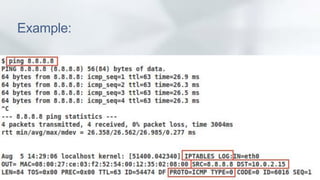
iptables -A INPUT -j LOG --log-prefix "IPTABES LOG:" -m limit --limit 10/min --log-level 4
Example:
Proposed Horizon Enhancement for Firewall
Logging
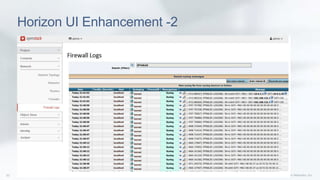
Horizon UI Enhancement -2
Summary of logging feature
• Firewall Logs
• can help with debugging, threat analysis , Rule fine tuning
• Firewall Logging Can be integrated with FWaaS on OpenStack
• IPTables provides options to enable packet logging
• A centralized server can be introduced to collect and analyze firewall
logs
• Horizon UI extension can make logs accessible to the tenant
Q & A
Thank You

Enhancing OpenStack FWaaS for real world application

  • 1.
    Enhancing OpenStack FWaaS forreal world applications Performance, Logging & Scheduling Sarath Chandra Mekala Chandan Dutta Chowdhury
  • 2.
    Sarath Chandra Mekala •Tech Lead @ Juniper Networks • Works on Neutron Plugins • Over a decade+ of experience with J2EE/NMS • Contributed to Juniper’s FWaaS plugin • Blogs @ sarathblogs.blogspot.in • Likes Gadgets & Photography.
  • 3.
    Chandan Dutta Chowdhury •Tech Lead @ Juniper Networks • Works on Neutron Plugins • DevOPS & Opensource hacker • Contributed to Juniper’s L2, L3 & NSX plugins • Blogs @ chandanduttachowdhury.wordpress.com
  • 4.
    Agenda • Improve FWaaSPerformance • Scheduling Firewall Policies • Logging Firewall Policies Ideas to enable FWaaS cater to real world application needs
  • 5.
  • 6.
  • 7.
  • 8.
  • 9.
    Problem 2: UnnecessaryRule Deployment Router 1 Router 2 Router 3 R1 R2 R3R1 R2 R3R1 R2 R3Firewall Policy Firewall
  • 10.
    Overview of FWaaSPerformance Issues • No rule validation • Allows invalid rules to be present • All rules are pushed onto all routers • Unnecessary processing of rules on each router • Affects performance • Potential Security holes
  • 11.
    Solution 1: RuleValidation
  • 13.
    Solution 2: RuleSplit & Distribution
  • 14.
    Solution 2: RuleSplit & Distribution 10 -> 20 30 -> 40 TCP-10-20- allow Firewall Policy Firewall TCP-30-40- allow Any-AnyAny-Any
  • 15.
    Proposed Improvements Validation (InvalidRule Check) • Rule’s Source IP and/or Destination IP do not belong to any of tenant networks (or) • Rule’s Source/Destination IP belong to an existing tenant’s network but the network is yet to be assigned to any router. Performance • All rules are segregated and grouped based on the networks they belong to and allocated to their corresponding routers only.
  • 16.
  • 17.
  • 18.
    Scheduling Rules • Restrictaccess to: • Web Sites • Web Servers/FTP servers/SSH/RDP e.t.c • Improves productivity • Conserves Bandwidth • Increases ROI
  • 19.
    Scheduling – IPTablesSpec • IPTables on Ubuntu & CentOS supports rule scheduling • Uses UTC for time zone by default • iptables –A <chain> -m time --timestart 09:00 -- timestop 17:00 -weekdays Mon,Tue,Wed,Thu,Fri -j <Action> • -m time : match time • --timestart : Start time • --timestop : End time • --weekdays : Days of the week
  • 20.
    Scheduling – IPTablesSpec • Periodicity: • datestart YYYY[-MM[-DD[Thh[:mm[:ss]]]]] • datestop YYYY[-MM[-DD[Thh[:mm[:ss]]]]] • timestart hh:mm[:ss] • timestop hh:mm[:ss] • monthdays day[,day...] • weekdays day[,day...] • contiguous • Kerneltz
  • 21.
    Scheduling – IPTablesExamples • To match on weekends, use: -m time --weekdays SAT,SUN • To match between a set of days with a specific time interval: -m time --datestart 2015-08-23 T09:00 --datestop 2007-01-01T15:00 • To match on a time interval: -m time --timestart 09:00 --timestop 17:00
  • 22.
  • 23.
  • 24.
    Current Firewall implementationin OpenStack • Doesn't provide packet logging • Tenant does not have any knowledge of dropped packets • While deploying new rules in the firewall, there is no way to debug the rule • No way to determine the effectiveness of the firewall rules
  • 25.
    Benefits of EnablingFirewall Logs • Monitoring • Threat Alerting • Threat correlation • Report generation • Troubleshooting packet drops • Fine tuning Rules • Detecting false positives • Detecting false negatives
  • 26.
    Firewall Logging forOpenStack COMPUTE/NETW ORK NODE ROUTER NAMESPACE LOGGING RULE LOG SERVER LOG ANALYSER Firewall Agent ENABLE LOGGING NEUTRON FIREWALL LOGS LOGS ALERTS! REPORTS OPENSTACK TENANT FIREWALL RULES FIREWALL RULES
  • 27.
    Enable Firewall Logswith IPTables rules iptables –A <chain> -m limit –limit <limit> -j LOG --log-prefix <prefix-string> - -log-level <log-level> -J LOG : processed by target LOG that logs packets with syslog --log-prefix : a string to identify the log message --log-level : log level to use with syslog message iptables -A INPUT -j LOG --log-prefix "IPTABES LOG:" -m limit --limit 10/min --log-level 4
  • 28.
  • 29.
    Proposed Horizon Enhancementfor Firewall Logging
  • 30.
  • 31.
    Summary of loggingfeature • Firewall Logs • can help with debugging, threat analysis , Rule fine tuning • Firewall Logging Can be integrated with FWaaS on OpenStack • IPTables provides options to enable packet logging • A centralized server can be introduced to collect and analyze firewall logs • Horizon UI extension can make logs accessible to the tenant
  • 32.
  • 33.

Editor's Notes

  • #2 We live in a connected world and the foundation for these connections is the network. Broadband Internet traffic is doubling each and every year (according to IDC) [or] Internet traffic worldwide will grow three-fold by the year 2017. (Internet Trends, Mary Meeker (KCPB) Today we have 2.5 billion Internet users in the world – roughly one-third of the Earth’s population. In the next decade, the number of Internet users will double to 5 billion (Mary Meeker, KPCB) That means that two-thirds of the world will be connected by 2023. When you add in the big trends of cloud, mobility, video and security, the combined rate of acceleration is placing unprecedented demands on the network. [Optional stats/factoids] 100 hours of video uploaded every single minute to YouTube (YouTube)   Mobile video traffic exceeded 50 percent for the first time in 2012. (Cisco VNI)   Mobile network connection speeds more than doubled in 2012. (Cisco VNI)   In 2012, a fourth-generation (4G) connection generated 19 times more traffic on average than a non-4G connection. Although 4G connections represent only 0.9 percent of mobile connections today, they already account for 14 percent of mobile data traffic. (Cisco VNI)   [NOTE: Consider finding alternate source for above stats to avoid siting Cisco] As you just described (refer to pain points from previous slide), you are living in this world and feeling the pressure every day. Pradeep Sindhu founded Juniper 17 years ago on the belief that we should solve technology problems that matter most to our customers and that make a difference in the world. He recognized the importance of the network and the impact it would have on our world. Our mission is simple, but powerful; to connect everything and empower everyone. In today’s connected world, this mission is more relevant than ever. Here at Juniper we are focused on helping alleviate those pain points through our portfolio of high performance networking products. [T] And we do this by listening to our customers and helping them address their challenges and capitalize on their opportunities.