SNJB’s Late Sau K. B. Jain COE, Chandwad
Department of Computer Engineering
Academic Year 2020-21
Subject: Data Analytics
Case Study on Grocery Store
By
Name: Divya Prafull Wani
Roll No:41
Class: BE Computer
Date:21-09-2020
Transaction in Grocery Store 1
Installation of Package
Using R and the arules and arulesViz Packages, this example shows how to
use the Apriori Algorithm to generate frequent itemsets and rules and to
evaluate and visualize the rules.
• install.packages(‘arules’)
• install.packages(‘arulesViz’)
• library(‘arules’)
• library(‘arulesViz’)
• Above commands install these 2 packages and import them into current R
workspace.
Transaction in Grocery Store 2
The Groceries Dataset
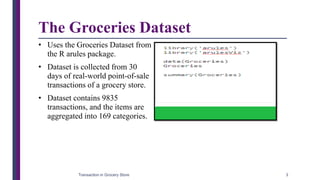
• Uses the Groceries Dataset from
the R arules package.
• Dataset is collected from 30
days of real-world point-of-sale
transactions of a grocery store.
• Dataset contains 9835
transactions, and the items are
aggregated into 169 categories.
Transaction in Grocery Store 3
The Groceries Dataset
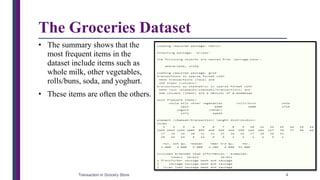
• The summary shows that the
most frequent items in the
dataset include items such as
whole milk, other vegetables,
rolls/buns, soda, and yoghurt.
• These items are often the others.
Transaction in Grocery Store 4
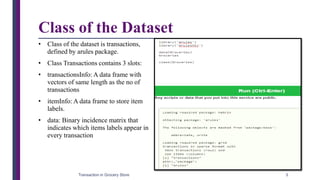
Class of the Dataset
• Class of the dataset is transactions,
defined by arules package.
• Class Transactions contains 3 slots:
• transactionsInfo: A data frame with
vectors of same length as the no of
transactions
• itemInfo: A data frame to store item
labels.
• data: Binary incidence matrix that
indicates which items labels appear in
every transaction
Transaction in Grocery Store 5
Class of the Dataset
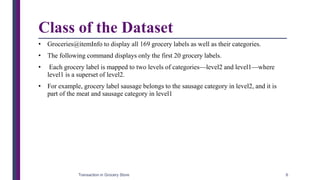
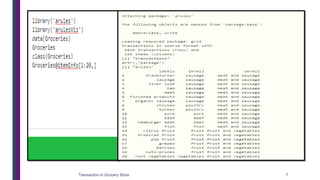
• Groceries@itemInfo to display all 169 grocery labels as well as their categories.
• The following command displays only the first 20 grocery labels.
• Each grocery label is mapped to two levels of categories—level2 and level1—where
level1 is a superset of level2.
• For example, grocery label sausage belongs to the sausage category in level2, and it is
part of the meat and sausage category in level1
Transaction in Grocery Store 6
Transaction in Grocery Store 7
Display Transaction as per Customer Cart
• The following code displays the 10th to 20th
transactions of the Groceries dataset.
• The [10:20] can be changed to [1:9835] to
display all the transactions.
• apply(Groceries@data[,10:20], 2, function(r)
paste(Groceries@itemInfo[r,“labels”],
collapse=”, “) )
• Each row in the output shows a transaction
that includes one or more products, and each
transaction corresponds to everything in a
customer’s shopping cart.
• For example, in the first transaction, a
customer has purchased whole milk and
cereals.
Transaction in Grocery Store 8
Frequent itemset Generation
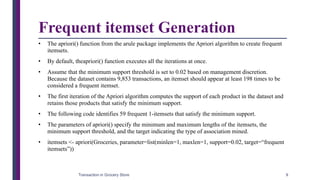
• The apriori() function from the arule package implements the Apriori algorithm to create frequent
itemsets.
• By default, theapriori() function executes all the iterations at once.
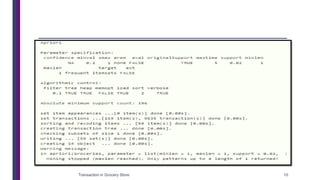
• Assume that the minimum support threshold is set to 0.02 based on management discretion.
Because the dataset contains 9,853 transactions, an itemset should appear at least 198 times to be
considered a frequent itemset.
• The first iteration of the Apriori algorithm computes the support of each product in the dataset and
retains those products that satisfy the minimum support.
• The following code identifies 59 frequent 1-itemsets that satisfy the minimum support.
• The parameters of apriori() specify the minimum and maximum lengths of the itemsets, the
minimum support threshold, and the target indicating the type of association mined.
• itemsets <- apriori(Groceries, parameter=list(minlen=1, maxlen=1, support=0.02, target=“frequent
itemsets”))
Transaction in Grocery Store 9
Transaction in Grocery Store 10
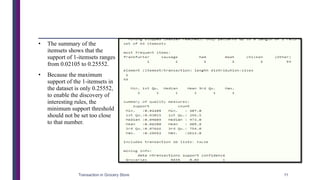
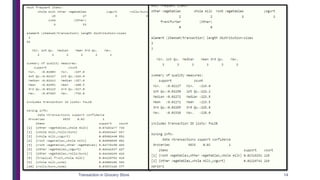
• The summary of the
itemsets shows that the
support of 1-itemsets ranges
from 0.02105 to 0.25552.
• Because the maximum
support of the 1-itemsets in
the dataset is only 0.25552,
to enable the discovery of
interesting rules, the
minimum support threshold
should not be set too close
to that number.
Transaction in Grocery Store 11
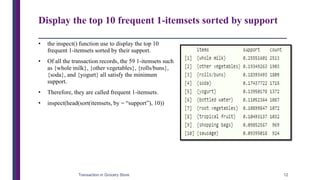
Display the top 10 frequent 1-itemsets sorted by support
• the inspect() function use to display the top 10
frequent 1-itemsets sorted by their support.
• Of all the transaction records, the 59 1-itemsets such
as {whole milk}, {other vegetables}, {rolls/buns},
{soda}, and {yogurt} all satisfy the minimum
support.
• Therefore, they are called frequent 1-itemsets.
• inspect(head(sort(itemsets, by = “support”), 10))
Transaction in Grocery Store 12
Next Iteration
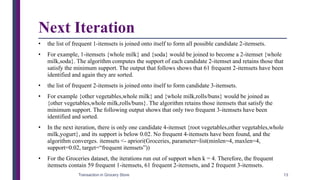
• the list of frequent 1-itemsets is joined onto itself to form all possible candidate 2-itemsets.
• For example, 1-itemsets {whole milk} and {soda} would be joined to become a 2-itemset {whole
milk,soda}. The algorithm computes the support of each candidate 2-itemset and retains those that
satisfy the minimum support. The output that follows shows that 61 frequent 2-itemsets have been
identified and again they are sorted.
• the list of frequent 2-itemsets is joined onto itself to form candidate 3-itemsets.
• For example {other vegetables,whole milk} and {whole milk,rolls/buns} would be joined as
{other vegetables,whole milk,rolls/buns}. The algorithm retains those itemsets that satisfy the
minimum support. The following output shows that only two frequent 3-itemsets have been
identified and sorted.
• In the next iteration, there is only one candidate 4-itemset {root vegetables,other vegetables,whole
milk,yogurt}, and its support is below 0.02. No frequent 4-itemsets have been found, and the
algorithm converges. itemsets <- apriori(Groceries, parameter=list(minlen=4, maxlen=4,
support=0.02, target=“frequent itemsets”))
• For the Groceries dataset, the iterations run out of support when k = 4. Therefore, the frequent
itemsets contain 59 frequent 1-itemsets, 61 frequent 2-itemsets, and 2 frequent 3-itemsets.
Transaction in Grocery Store 13
Transaction in Grocery Store 14
Rules Generation and Visualization
• The apriori() function can also be used to generate rules.
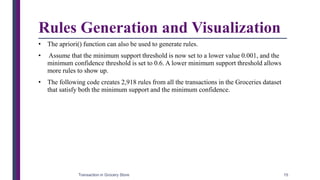
• Assume that the minimum support threshold is now set to a lower value 0.001, and the
minimum confidence threshold is set to 0.6. A lower minimum support threshold allows
more rules to show up.
• The following code creates 2,918 rules from all the transactions in the Groceries dataset
that satisfy both the minimum support and the minimum confidence.
Transaction in Grocery Store 15
Rules Generation
and Visualization
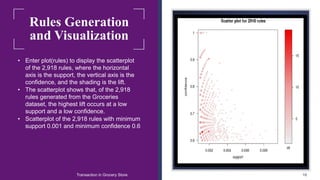
• Enter plot(rules) to display the scatterplot
of the 2,918 rules, where the horizontal
axis is the support, the vertical axis is the
confidence, and the shading is the lift.
• The scatterplot shows that, of the 2,918
rules generated from the Groceries
dataset, the highest lift occurs at a low
support and a low confidence.
• Scatterplot of the 2,918 rules with minimum
support 0.001 and minimum confidence 0.6
Transaction in Grocery Store 16
Visualization of the top
five rules with the
highest lift.
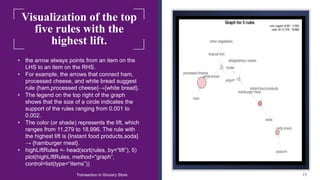
• the arrow always points from an item on the
LHS to an item on the RHS.
• For example, the arrows that connect ham,
processed cheese, and white bread suggest
rule {ham,processed cheese}→{white bread}.
• The legend on the top right of the graph
shows that the size of a circle indicates the
support of the rules ranging from 0.001 to
0.002.
• The color (or shade) represents the lift, which
ranges from 11.279 to 18.996. The rule with
the highest lift is {Instant food products,soda}
→ {hamburger meat}.
• highLiftRules <- head(sort(rules, by=“lift”), 5)
plot(highLiftRules, method=“graph”,
control=list(type=“items”))
Transaction in Grocery Store 17
References
Transaction in Grocery Store 18
https://bhavanakhivsara.files.wordpress.com/2018/06/data-science-and-big-data-analy-
nieizv_book.pdf/
THANK YOU!!
Transaction in Grocery Store 19

Case study on Transaction in Grocery Store

  • 1.
    SNJB’s Late SauK. B. Jain COE, Chandwad Department of Computer Engineering Academic Year 2020-21 Subject: Data Analytics Case Study on Grocery Store By Name: Divya Prafull Wani Roll No:41 Class: BE Computer Date:21-09-2020 Transaction in Grocery Store 1
  • 2.
    Installation of Package UsingR and the arules and arulesViz Packages, this example shows how to use the Apriori Algorithm to generate frequent itemsets and rules and to evaluate and visualize the rules. • install.packages(‘arules’) • install.packages(‘arulesViz’) • library(‘arules’) • library(‘arulesViz’) • Above commands install these 2 packages and import them into current R workspace. Transaction in Grocery Store 2
  • 3.
    The Groceries Dataset •Uses the Groceries Dataset from the R arules package. • Dataset is collected from 30 days of real-world point-of-sale transactions of a grocery store. • Dataset contains 9835 transactions, and the items are aggregated into 169 categories. Transaction in Grocery Store 3
  • 4.
    The Groceries Dataset •The summary shows that the most frequent items in the dataset include items such as whole milk, other vegetables, rolls/buns, soda, and yoghurt. • These items are often the others. Transaction in Grocery Store 4
  • 5.
    Class of theDataset • Class of the dataset is transactions, defined by arules package. • Class Transactions contains 3 slots: • transactionsInfo: A data frame with vectors of same length as the no of transactions • itemInfo: A data frame to store item labels. • data: Binary incidence matrix that indicates which items labels appear in every transaction Transaction in Grocery Store 5
  • 6.
    Class of theDataset • Groceries@itemInfo to display all 169 grocery labels as well as their categories. • The following command displays only the first 20 grocery labels. • Each grocery label is mapped to two levels of categories—level2 and level1—where level1 is a superset of level2. • For example, grocery label sausage belongs to the sausage category in level2, and it is part of the meat and sausage category in level1 Transaction in Grocery Store 6
  • 7.
  • 8.
    Display Transaction asper Customer Cart • The following code displays the 10th to 20th transactions of the Groceries dataset. • The [10:20] can be changed to [1:9835] to display all the transactions. • apply(Groceries@data[,10:20], 2, function(r) paste(Groceries@itemInfo[r,“labels”], collapse=”, “) ) • Each row in the output shows a transaction that includes one or more products, and each transaction corresponds to everything in a customer’s shopping cart. • For example, in the first transaction, a customer has purchased whole milk and cereals. Transaction in Grocery Store 8
  • 9.
    Frequent itemset Generation •The apriori() function from the arule package implements the Apriori algorithm to create frequent itemsets. • By default, theapriori() function executes all the iterations at once. • Assume that the minimum support threshold is set to 0.02 based on management discretion. Because the dataset contains 9,853 transactions, an itemset should appear at least 198 times to be considered a frequent itemset. • The first iteration of the Apriori algorithm computes the support of each product in the dataset and retains those products that satisfy the minimum support. • The following code identifies 59 frequent 1-itemsets that satisfy the minimum support. • The parameters of apriori() specify the minimum and maximum lengths of the itemsets, the minimum support threshold, and the target indicating the type of association mined. • itemsets <- apriori(Groceries, parameter=list(minlen=1, maxlen=1, support=0.02, target=“frequent itemsets”)) Transaction in Grocery Store 9
  • 10.
  • 11.
    • The summaryof the itemsets shows that the support of 1-itemsets ranges from 0.02105 to 0.25552. • Because the maximum support of the 1-itemsets in the dataset is only 0.25552, to enable the discovery of interesting rules, the minimum support threshold should not be set too close to that number. Transaction in Grocery Store 11
  • 12.
    Display the top10 frequent 1-itemsets sorted by support • the inspect() function use to display the top 10 frequent 1-itemsets sorted by their support. • Of all the transaction records, the 59 1-itemsets such as {whole milk}, {other vegetables}, {rolls/buns}, {soda}, and {yogurt} all satisfy the minimum support. • Therefore, they are called frequent 1-itemsets. • inspect(head(sort(itemsets, by = “support”), 10)) Transaction in Grocery Store 12
  • 13.
    Next Iteration • thelist of frequent 1-itemsets is joined onto itself to form all possible candidate 2-itemsets. • For example, 1-itemsets {whole milk} and {soda} would be joined to become a 2-itemset {whole milk,soda}. The algorithm computes the support of each candidate 2-itemset and retains those that satisfy the minimum support. The output that follows shows that 61 frequent 2-itemsets have been identified and again they are sorted. • the list of frequent 2-itemsets is joined onto itself to form candidate 3-itemsets. • For example {other vegetables,whole milk} and {whole milk,rolls/buns} would be joined as {other vegetables,whole milk,rolls/buns}. The algorithm retains those itemsets that satisfy the minimum support. The following output shows that only two frequent 3-itemsets have been identified and sorted. • In the next iteration, there is only one candidate 4-itemset {root vegetables,other vegetables,whole milk,yogurt}, and its support is below 0.02. No frequent 4-itemsets have been found, and the algorithm converges. itemsets <- apriori(Groceries, parameter=list(minlen=4, maxlen=4, support=0.02, target=“frequent itemsets”)) • For the Groceries dataset, the iterations run out of support when k = 4. Therefore, the frequent itemsets contain 59 frequent 1-itemsets, 61 frequent 2-itemsets, and 2 frequent 3-itemsets. Transaction in Grocery Store 13
  • 14.
  • 15.
    Rules Generation andVisualization • The apriori() function can also be used to generate rules. • Assume that the minimum support threshold is now set to a lower value 0.001, and the minimum confidence threshold is set to 0.6. A lower minimum support threshold allows more rules to show up. • The following code creates 2,918 rules from all the transactions in the Groceries dataset that satisfy both the minimum support and the minimum confidence. Transaction in Grocery Store 15
  • 16.
    Rules Generation and Visualization •Enter plot(rules) to display the scatterplot of the 2,918 rules, where the horizontal axis is the support, the vertical axis is the confidence, and the shading is the lift. • The scatterplot shows that, of the 2,918 rules generated from the Groceries dataset, the highest lift occurs at a low support and a low confidence. • Scatterplot of the 2,918 rules with minimum support 0.001 and minimum confidence 0.6 Transaction in Grocery Store 16
  • 17.
    Visualization of thetop five rules with the highest lift. • the arrow always points from an item on the LHS to an item on the RHS. • For example, the arrows that connect ham, processed cheese, and white bread suggest rule {ham,processed cheese}→{white bread}. • The legend on the top right of the graph shows that the size of a circle indicates the support of the rules ranging from 0.001 to 0.002. • The color (or shade) represents the lift, which ranges from 11.279 to 18.996. The rule with the highest lift is {Instant food products,soda} → {hamburger meat}. • highLiftRules <- head(sort(rules, by=“lift”), 5) plot(highLiftRules, method=“graph”, control=list(type=“items”)) Transaction in Grocery Store 17
  • 18.
    References Transaction in GroceryStore 18 https://bhavanakhivsara.files.wordpress.com/2018/06/data-science-and-big-data-analy- nieizv_book.pdf/
  • 19.