The presentation discusses the importance of addressing missing values in machine learning datasets, highlighting common causes for missing data and the necessity of preprocessing before using it in algorithms. It outlines various methods for handling missing values, including deleting rows or columns with null values, replacing missing values with arbitrary or interpolated values, and using Python code examples with the Titanic dataset. The techniques emphasized include forward and backward fill, interpolation, and the use of ‘dropna’ to remove incomplete entries.
WHY VALUES AREMISSING IN MACHINE LEARNING:
We take data from sometimes sources like kaggle.com, sometimes
we collect from different sources by doing web scrapping
containing missing values in it. But do you think ?
• We can collect data and start doing our work?
• Can we implement machine learning algorithms using that data?
4.
The answer isno. Because the data collected is
unprocessed. Unprocessed data must be containing
some unauthorized data.
• Missing values
• Outliers
• Unstructured manner
• Categorical data(which needs to be converted to numerical
variables)
5.
Let’s have alook at the missing data in the dataset below:
6.
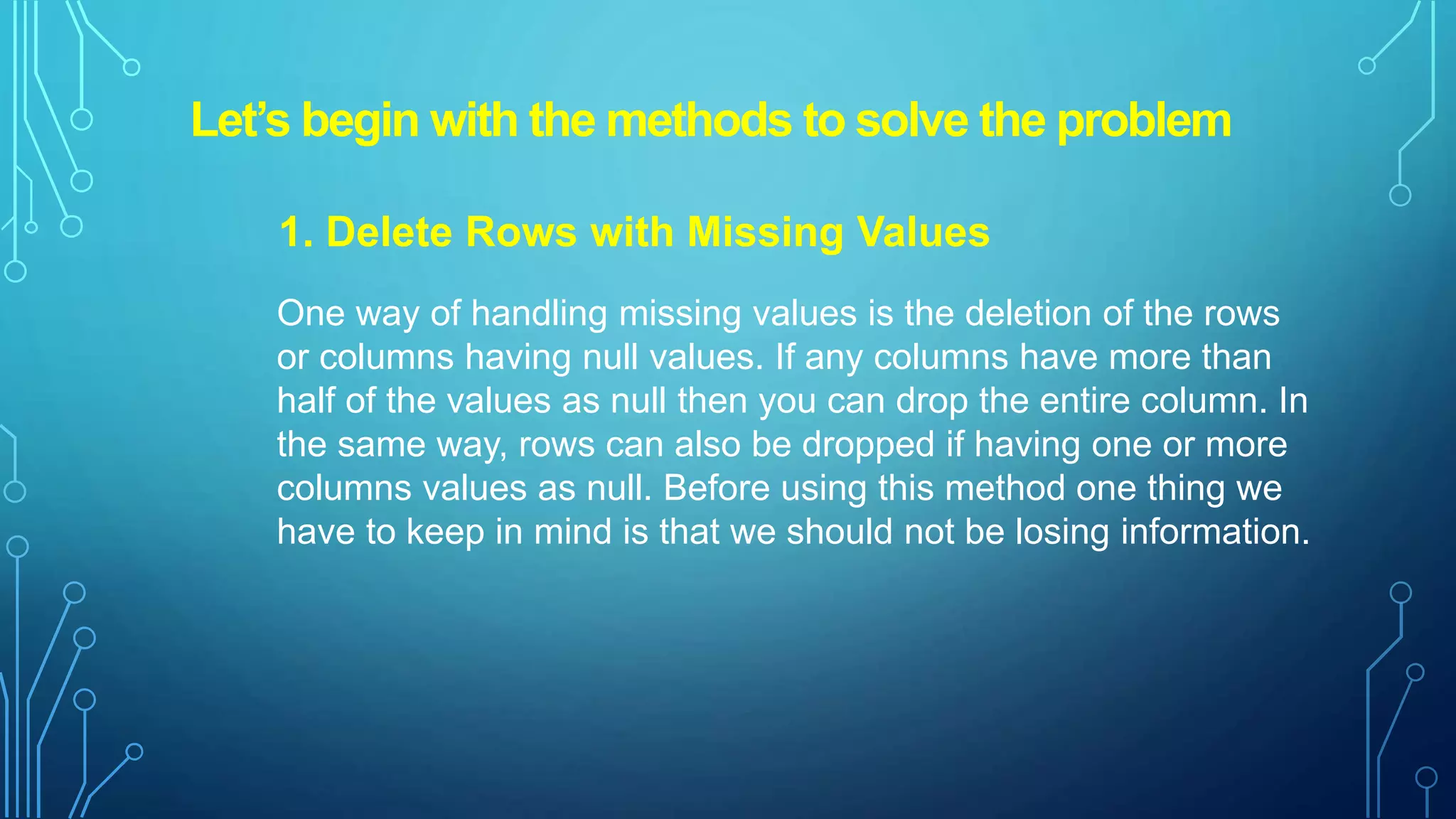
Let’s begin withthe methods to solve the problem
1. Delete Rows with Missing Values
One way of handling missing values is the deletion of the rows
or columns having null values. If any columns have more than
half of the values as null then you can drop the entire column. In
the same way, rows can also be dropped if having one or more
columns values as null. Before using this method one thing we
have to keep in mind is that we should not be losing information.
7.
When to deletethe rows/column in a dataset?
• If a certain column has many missing values then you can
choose to drop the entire column.
• When you have a huge dataset. Deleting for e.g. 2-3
rows/columns will not make much difference.
• Output results do not depend on the Deleted data.
8.
2. Replacing WithArbitrary Value
We can replace the missing value with some arbitrary value using
fillna().
Ex. In the below code, we are replacing the missing values with
‘0’.As well you can replace any particular column missing values
with some arbitrary value also.
There are two ways to replacing with arbitrary value :
1.Replacing with previous value-Forward fill
2.Replacing with next value-Backward fill
9.
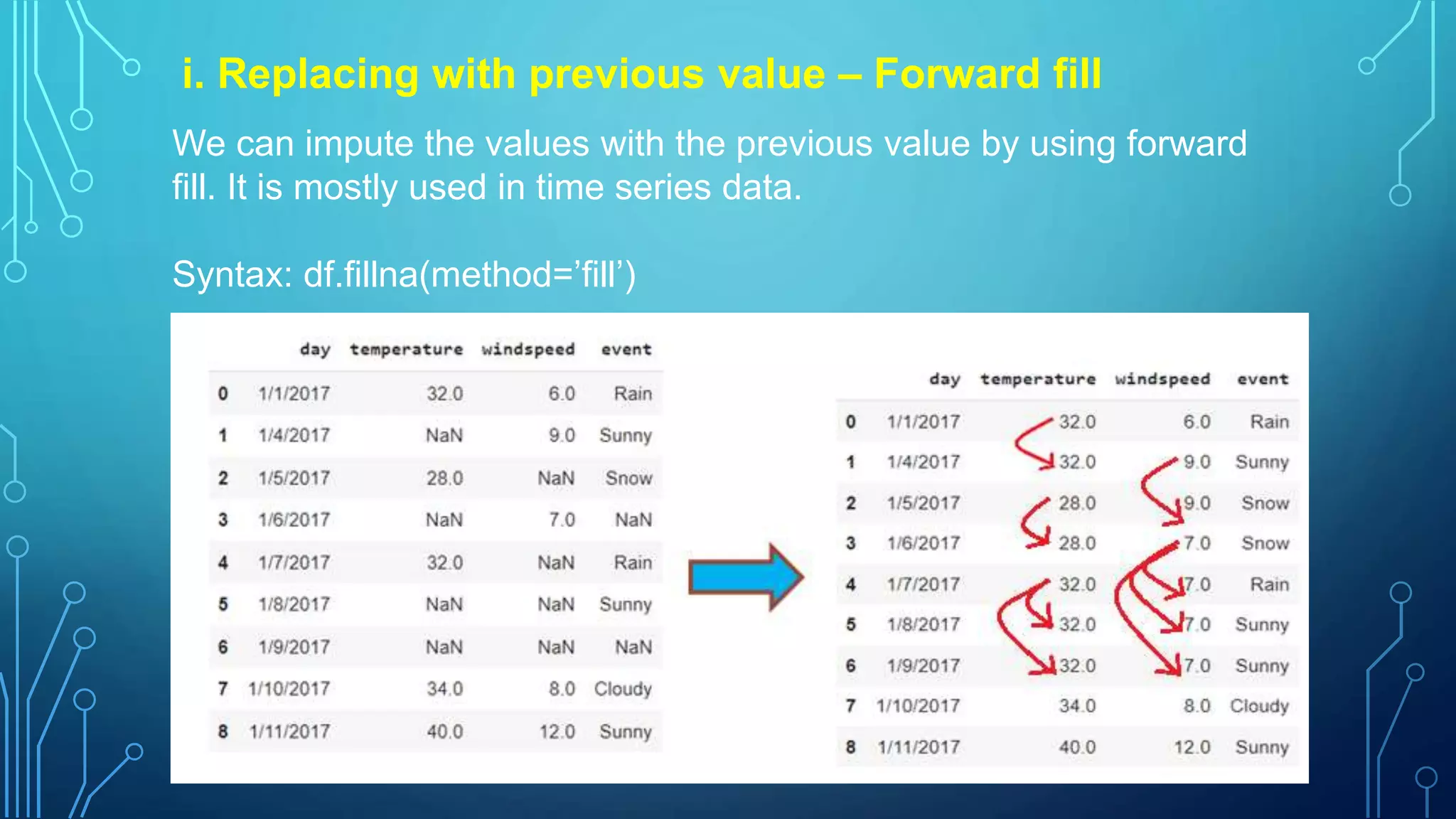
i. Replacing withprevious value – Forward fill
We can impute the values with the previous value by using forward
fill. It is mostly used in time series data.
Syntax: df.fillna(method=’fill’)
10.
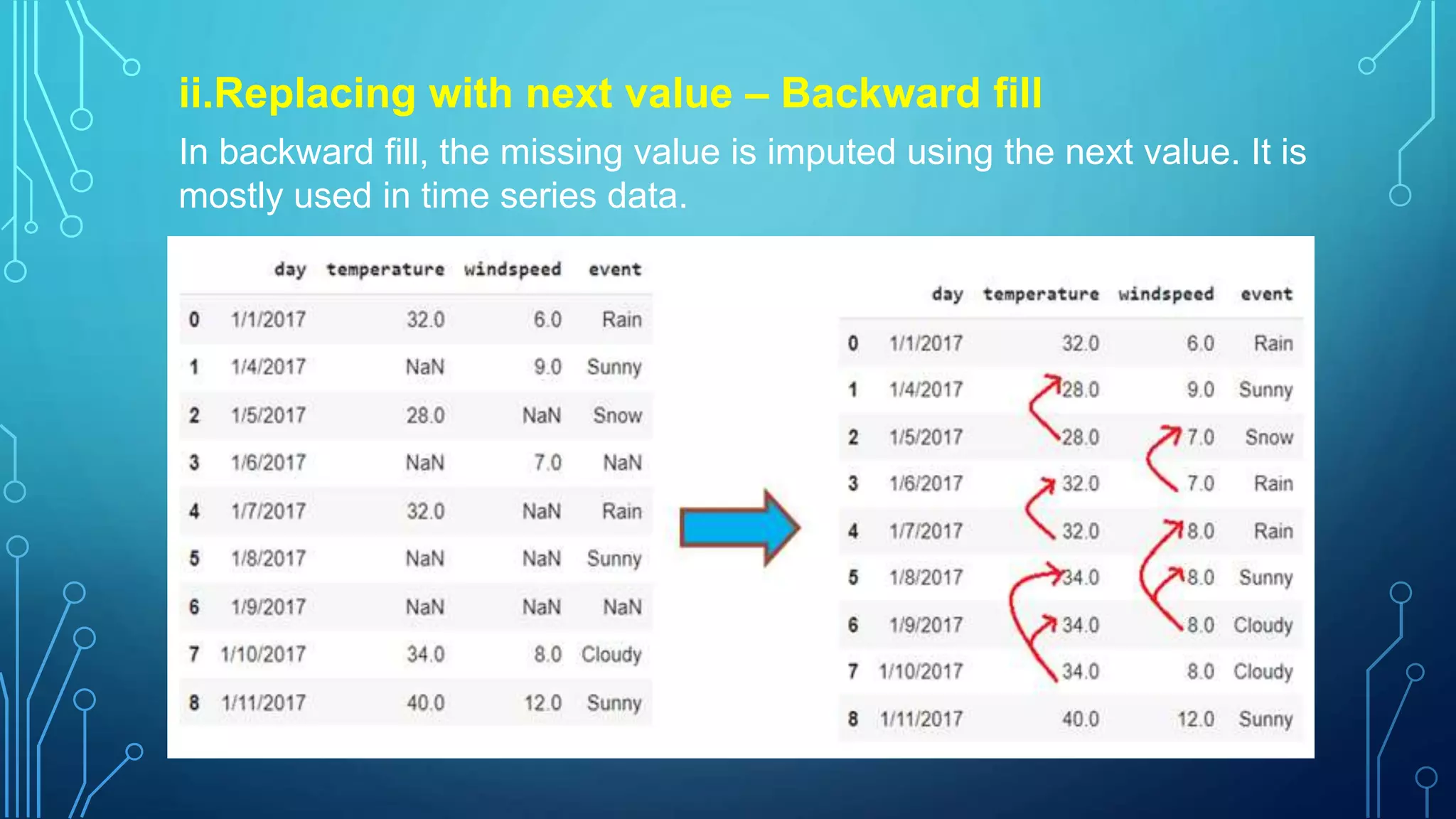
ii.Replacing with nextvalue – Backward fill
In backward fill, the missing value is imputed using the next value. It is
mostly used in time series data.
11.
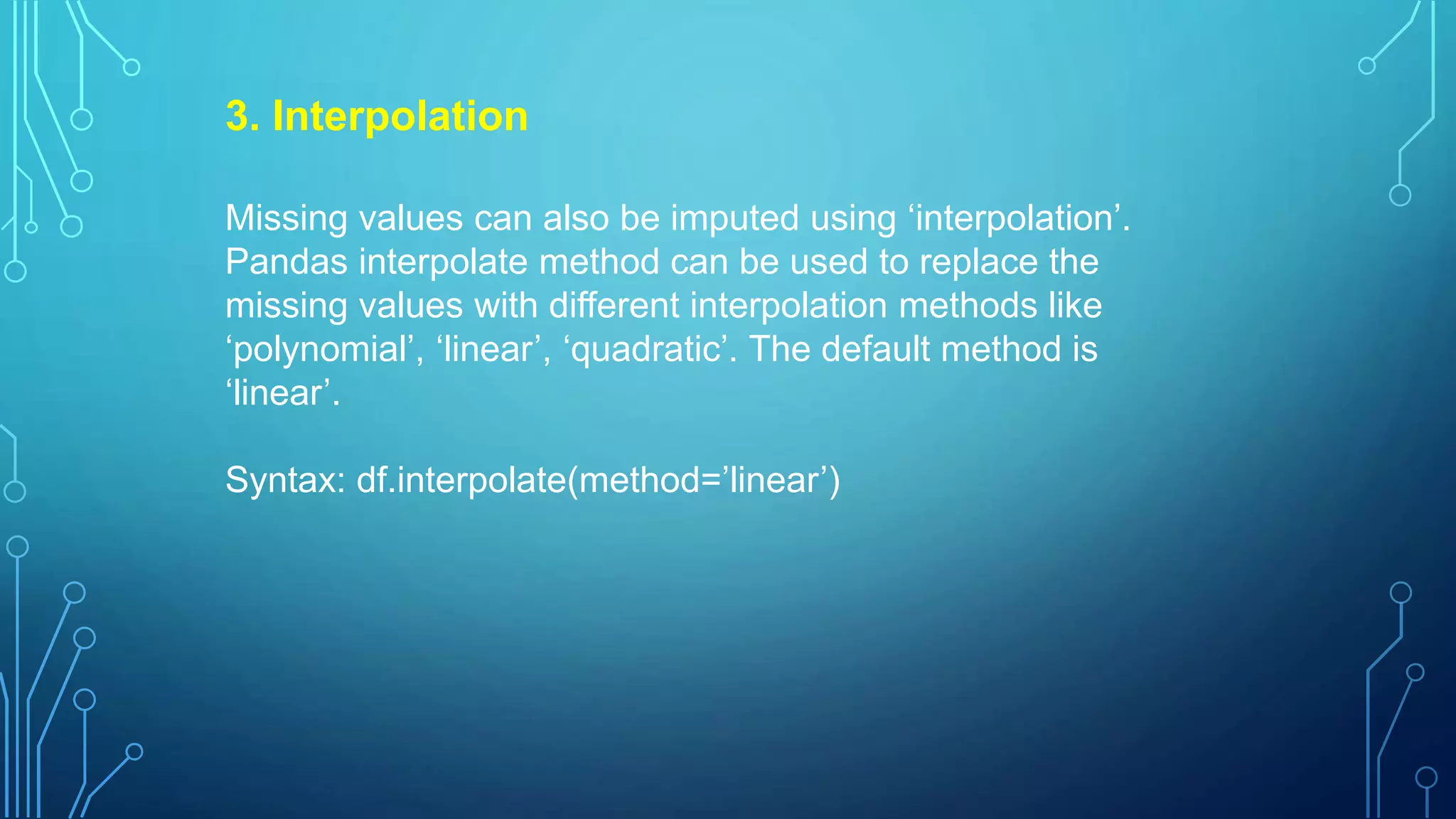
3. Interpolation
Missing valuescan also be imputed using ‘interpolation’.
Pandas interpolate method can be used to replace the
missing values with different interpolation methods like
‘polynomial’, ‘linear’, ‘quadratic’. The default method is
‘linear’.
Syntax: df.interpolate(method=’linear’)
12.
Handling missing values:python code:
We have taken dataset titanic.csv which is
freely available at kaggle.com. This
dataset was taken as it has missing values.
i.Reading the data
import pandas as pd df =
pd.read_csv("train.csv",
usecols=['Age','Fare','Survived'])
df
The dataset is read and used three
columns ‘Age’, ’Fare’, ’Survived’.
13.
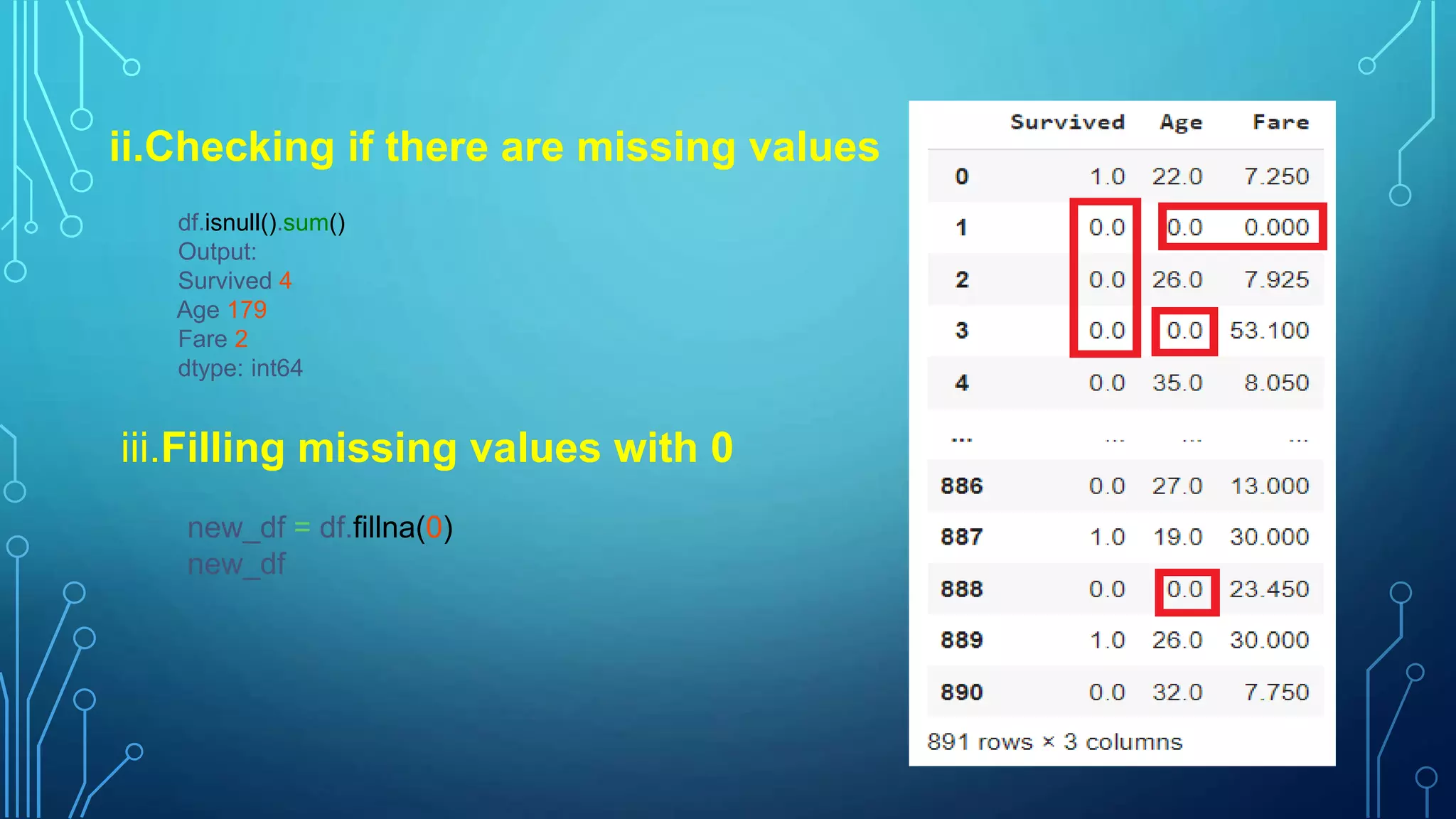
ii.Checking if thereare missing values
df.isnull().sum()
Output:
Survived 4
Age 179
Fare 2
dtype: int64
iii.Filling missing values with 0
new_df = df.fillna(0)
new_df
14.
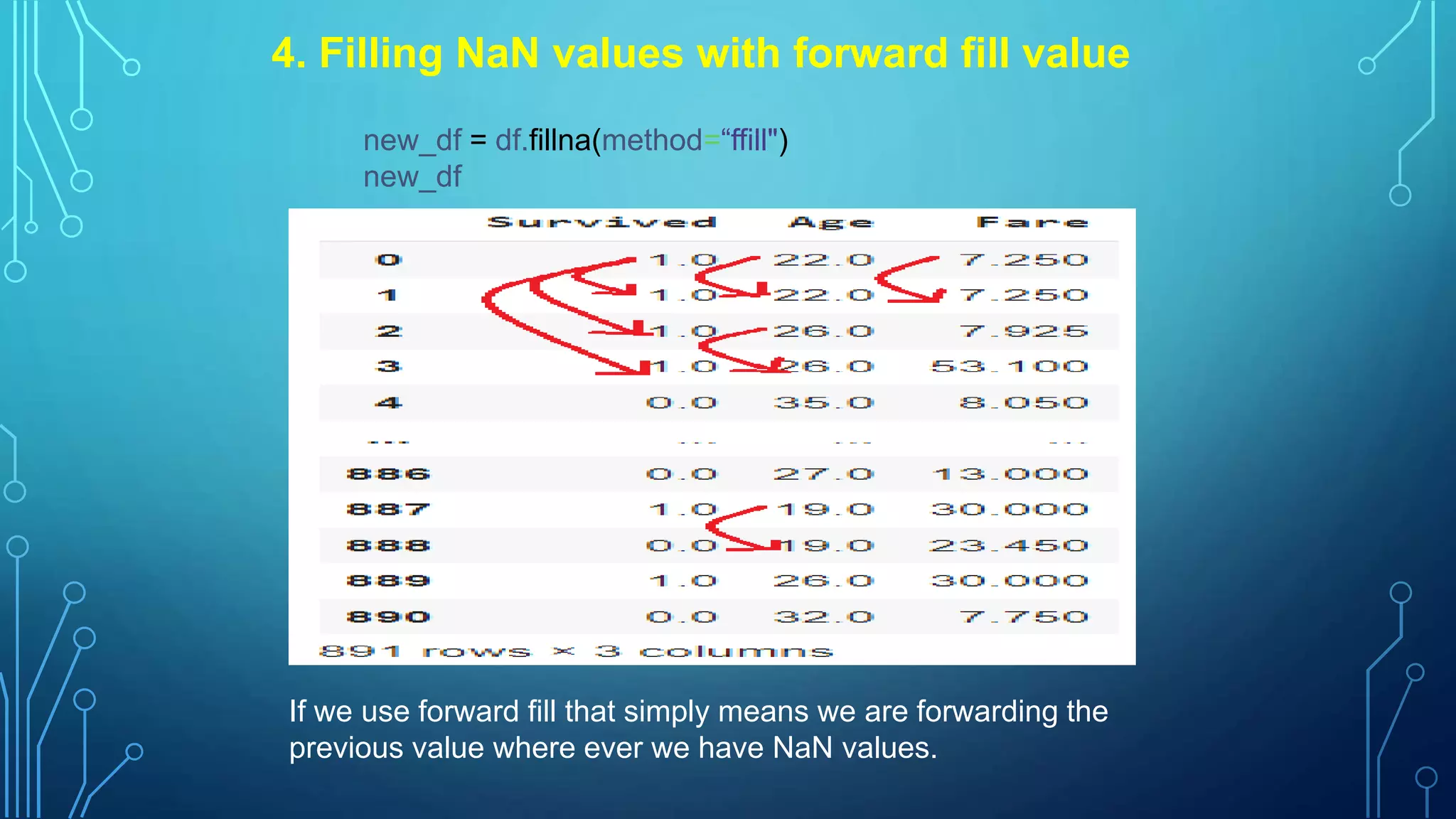
4. Filling NaNvalues with forward fill value
new_df = df.fillna(method=“ffill")
new_df
If we use forward fill that simply means we are forwarding the
previous value where ever we have NaN values.
15.
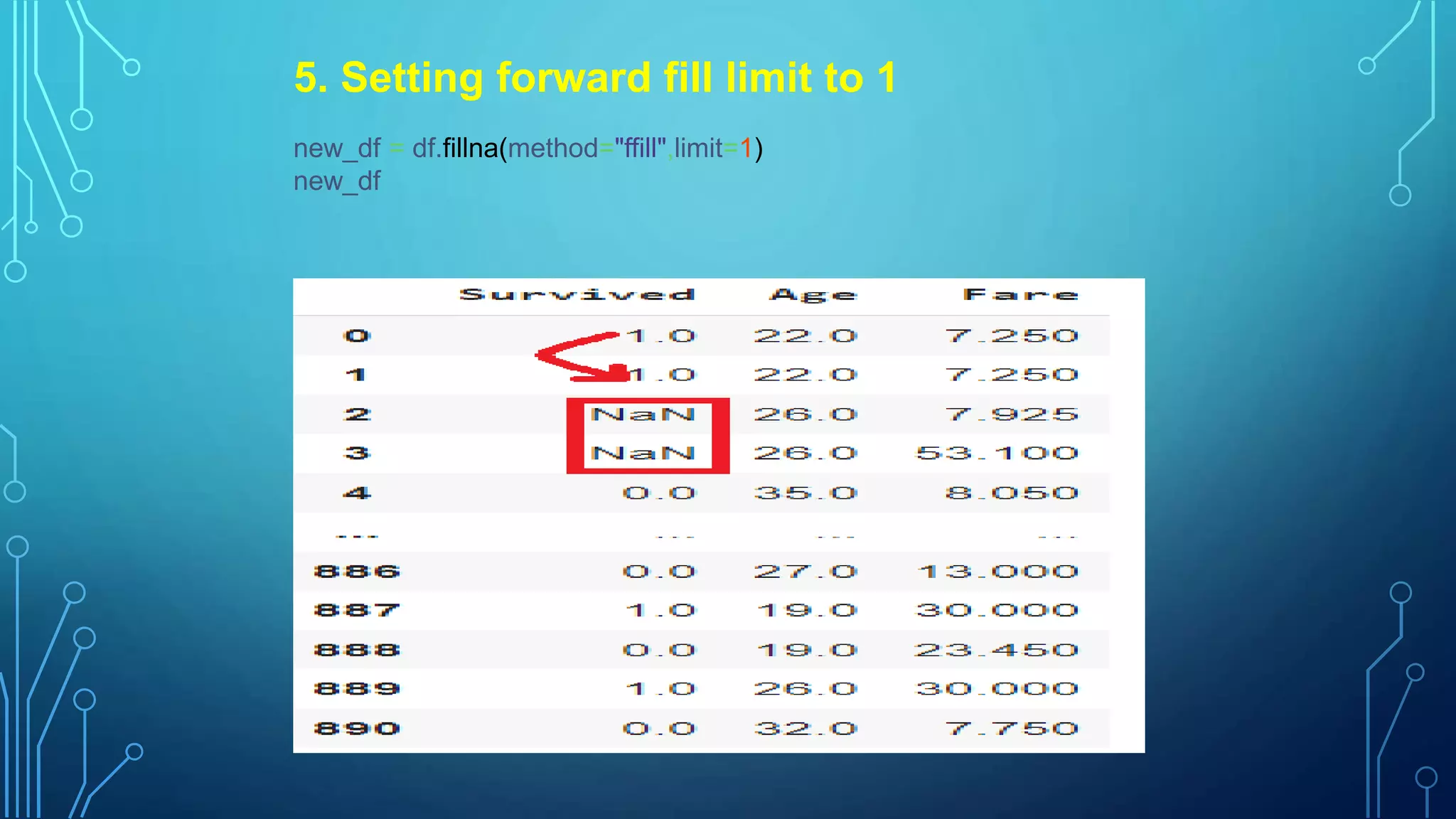
5. Setting forwardfill limit to 1
new_df = df.fillna(method="ffill",limit=1)
new_df
16.
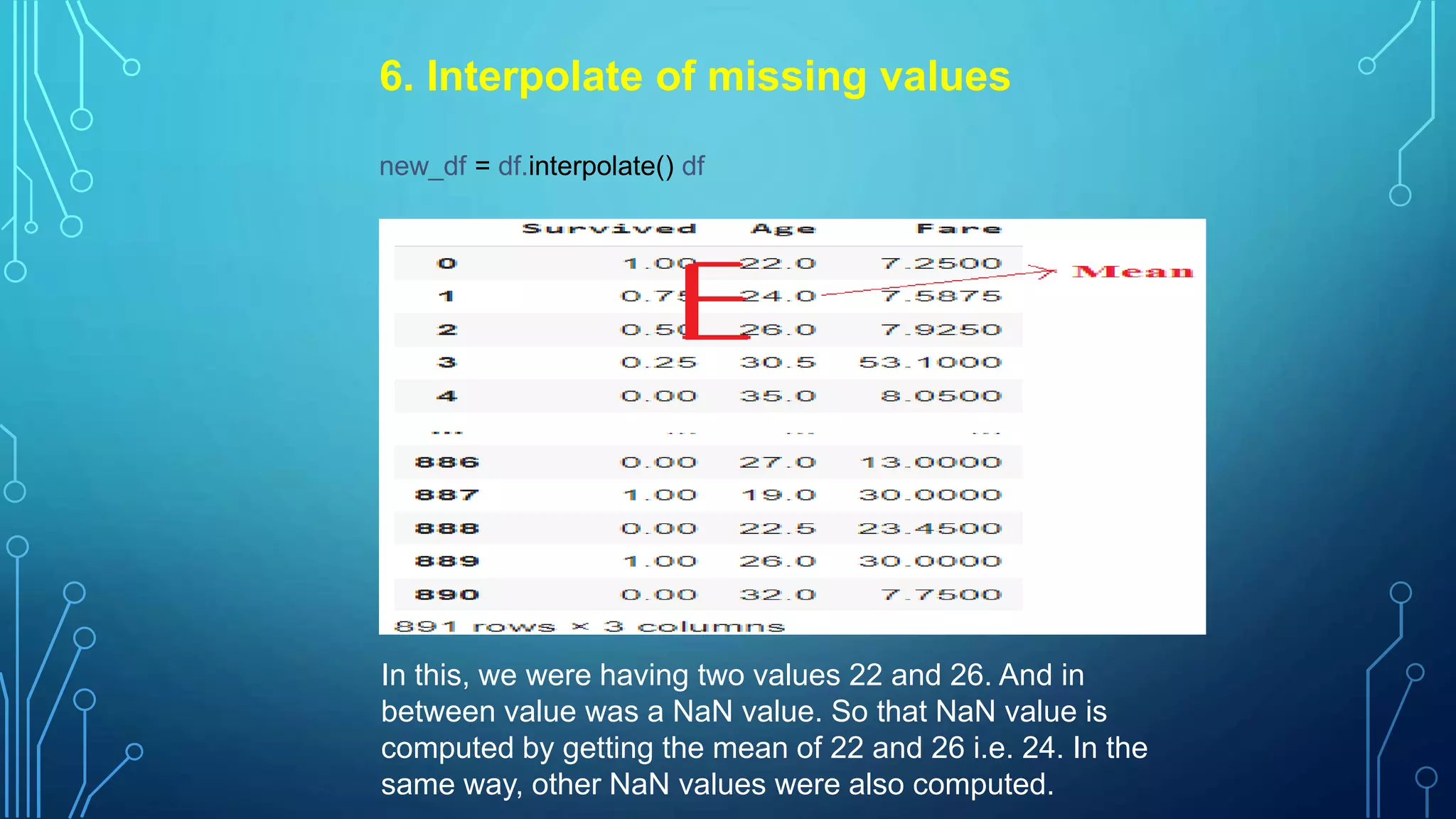
6. Interpolate ofmissing values
new_df = df.interpolate() df
In this, we were having two values 22 and 26. And in
between value was a NaN value. So that NaN value is
computed by getting the mean of 22 and 26 i.e. 24. In the
same way, other NaN values were also computed.
17.
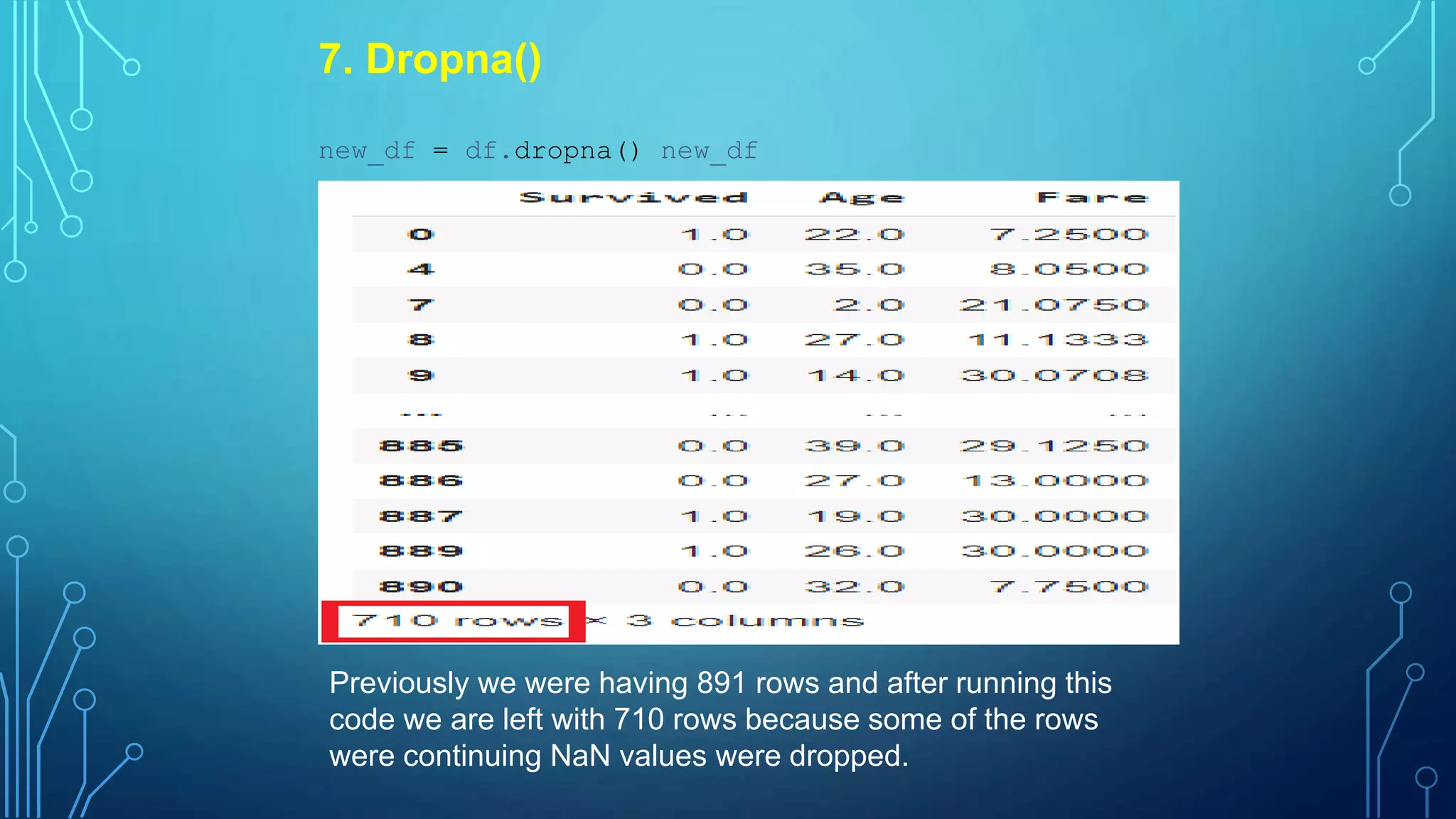
7. Dropna()
new_df =df.dropna() new_df
Previously we were having 891 rows and after running this
code we are left with 710 rows because some of the rows
were continuing NaN values were dropped.
18.
8. Deleting therows having all NaN values
new_df = df.dropna(how='all')
new_df
Those rows in which all the values are
NaN values will be deleted. If the row even
has one value even then it will not be
dropped.





![Handling missing values: python code:
We have taken dataset titanic.csv which is
freely available at kaggle.com. This
dataset was taken as it has missing values.
i.Reading the data
import pandas as pd df =
pd.read_csv("train.csv",
usecols=['Age','Fare','Survived'])
df
The dataset is read and used three
columns ‘Age’, ’Fare’, ’Survived’.](https://image.slidesharecdn.com/handlingmissingvaluesformachinelearning-230502045643-1646a033/75/Handling-Missing-Values-for-Machine-Learning-pptx-12-2048.jpg)




![[DSC Europe 25] Jim Sterne - Adopting Generative AI Capabilities Into the Ent...](https://cdn.slidesharecdn.com/ss_thumbnails/sxhpofuorcagxsaulkmt-3-251204082258-7e66bc48-thumbnail.jpg?width=640&height=640&fit=bounds)


![[DSC Europe 25] Dragana Ilic - AI for Big Data in Astronomy.pptx](https://cdn.slidesharecdn.com/ss_thumbnails/8palya86qaatvjhva1ms-2-dragana-ilic-ai-ilic-251208151906-652b819c-thumbnail.jpg?width=640&height=640&fit=bounds)


![[DSC Europe 25] Bogdan Daniel Maruneac - AI - It starts with you.pptx](https://cdn.slidesharecdn.com/ss_thumbnails/odov3snhrcqs9hx5ny2n-4-251205085715-f1daacfe-thumbnail.jpg?width=640&height=640&fit=bounds)


![[DSC Europe 25] Petar Zivanov - AI meets documents From chatbots to AI-powere...](https://cdn.slidesharecdn.com/ss_thumbnails/xer2bb6nrdc8pdpev0pc-8-251204082258-7c2fa4a1-thumbnail.jpg?width=640&height=640&fit=bounds)
![[DSC Europe 25] Dragan Vucic - Building the Learning Organization - How AI Tr...](https://cdn.slidesharecdn.com/ss_thumbnails/8brigo2sbu6qur6gxrra-7-251205085715-6ae07d24-thumbnail.jpg?width=640&height=640&fit=bounds)


![[DSC Europe 25] Andy Cotgreave - Nothing is new in analytics.pptx](https://cdn.slidesharecdn.com/ss_thumbnails/mba4vzcurvoh5lfrd5zw-6-251205194645-341bbbbe-thumbnail.jpg?width=640&height=640&fit=bounds)