GENERIC TEMPERATURE
CONTROLLER
Capstone Project
March Quarter 2016
Muhammad Abdul Hafiz Steven thrasher
Ibrahim Nor Darrell Pollard
Project advisor David Ney
5/30/2016 TEMPERATURE CONTROLLER ITT TECHNICAL INSTITUTE HILLIARD 2016 1
5/30/2016 TEMPERATURE CONTROLLER ITT TECHNICAL INSTITUTE HILLIARD 2016 2
THE PURPOSE
Temperature controllers are needed in any situation requiring a
given temperature be kept stable. This can be in a situation where
an object is required to be heated, cooled or both and to remain
at the target temperature (set-point), regardless of the changing
environment around it. So a temperature controller is a device
used to hold a desired temperature at a specified value.
5/30/2016 TEMPERATURE CONTROLLER ITT TECHNICAL INSTITUTE HILLIARD 2016 3
THE PURPOSE
The simplest example of a temperature controller is a common
thermostat found in homes. For instance, a hot water heater uses a
thermostat to control the temperature of the water and maintain it at a
certain commanded temperature.
5/30/2016 TEMPERATURE CONTROLLER ITT TECHNICAL INSTITUTE HILLIARD 2016 4
THE PURPOSE
Temperature controllers are also used in ovens. When a temperature is
set for an oven, a controller monitors the actual temperature inside of
the oven. If it falls below the set temperature, it sends a signal to
activate the heater to raise the temperature back to the set-point.
Thermostats are also used in refrigerators. So if the temperature gets
too high, a controller initiates an action to bring the temperature down.
5/30/2016 TEMPERATURE CONTROLLER ITT TECHNICAL INSTITUTE HILLIARD 2016 5
THE PURPOSE
The temperature controller is very important technique in the
laboratories of material science and the industry, because of that we
(Muhammad, Ibrahim, Darrell and Steven ) will perform the project
under title: “GENERIC TEMPERATURE CONTROLLER “for the capstone
project /ET2799 Electrical Engineering Technology.
5/30/2016 TEMPERATURE CONTROLLER ITT TECHNICAL INSTITUTE HILLIARD 2016 6
THE GOALS
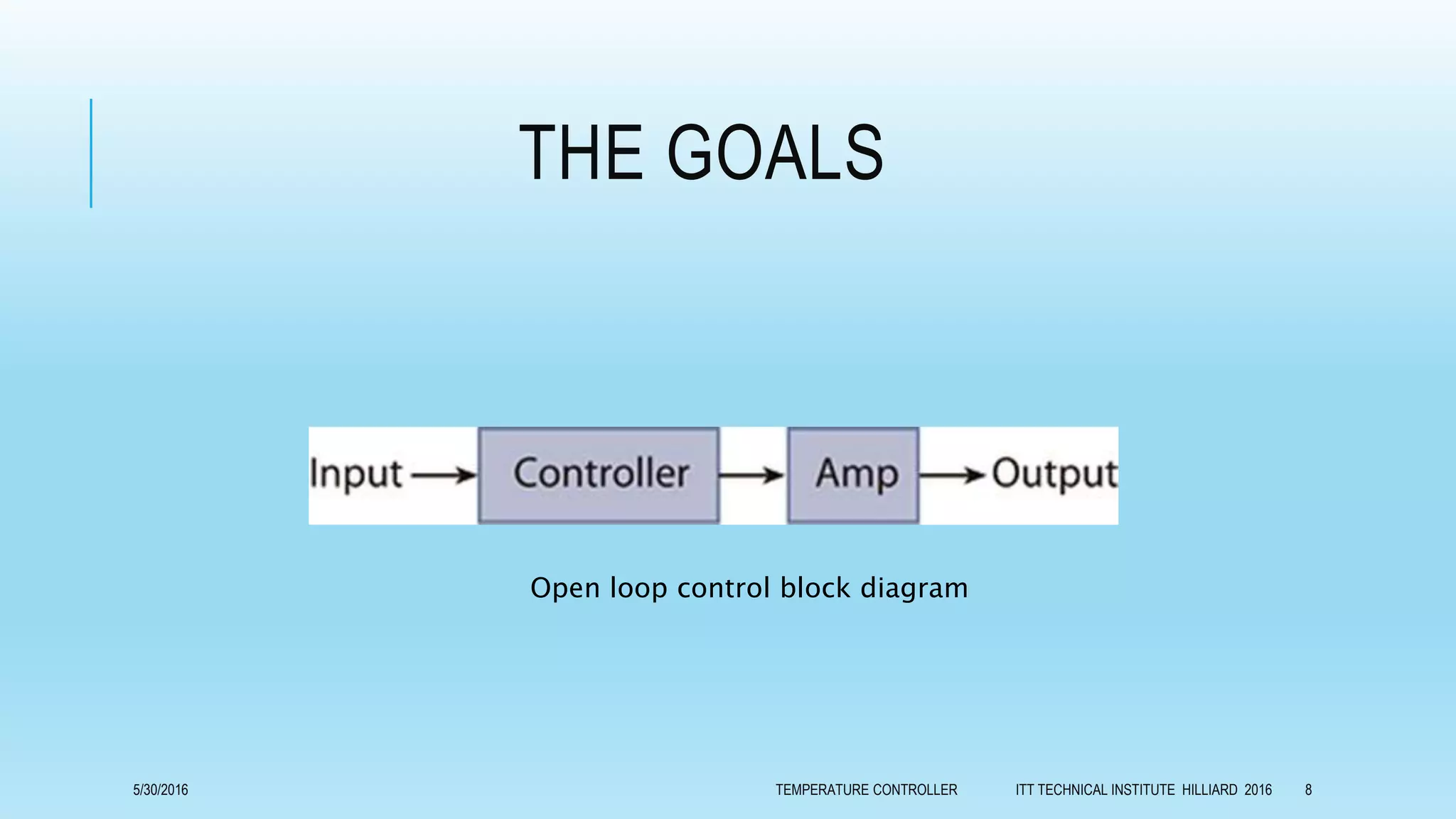
There are two fundamental types of temperature control; open loop and
closed loop control. Open loop is the most basic form and applies
continuous heating/cooling with no regard for the actual temperature
output. It is analogous to the internal heating system in a car. On a cold
day, you may need to turn the heat on to full to warm the car to 75°.
However, during warmer weather, the same setting would leave the
inside of the car much warmer than the desired 75°.
5/30/2016 TEMPERATURE CONTROLLER ITT TECHNICAL INSTITUTE HILLIARD 2016 7
THE GOALS
Open loop control block diagram
5/30/2016 TEMPERATURE CONTROLLER ITT TECHNICAL INSTITUTE HILLIARD 2016 8
THE GOALS
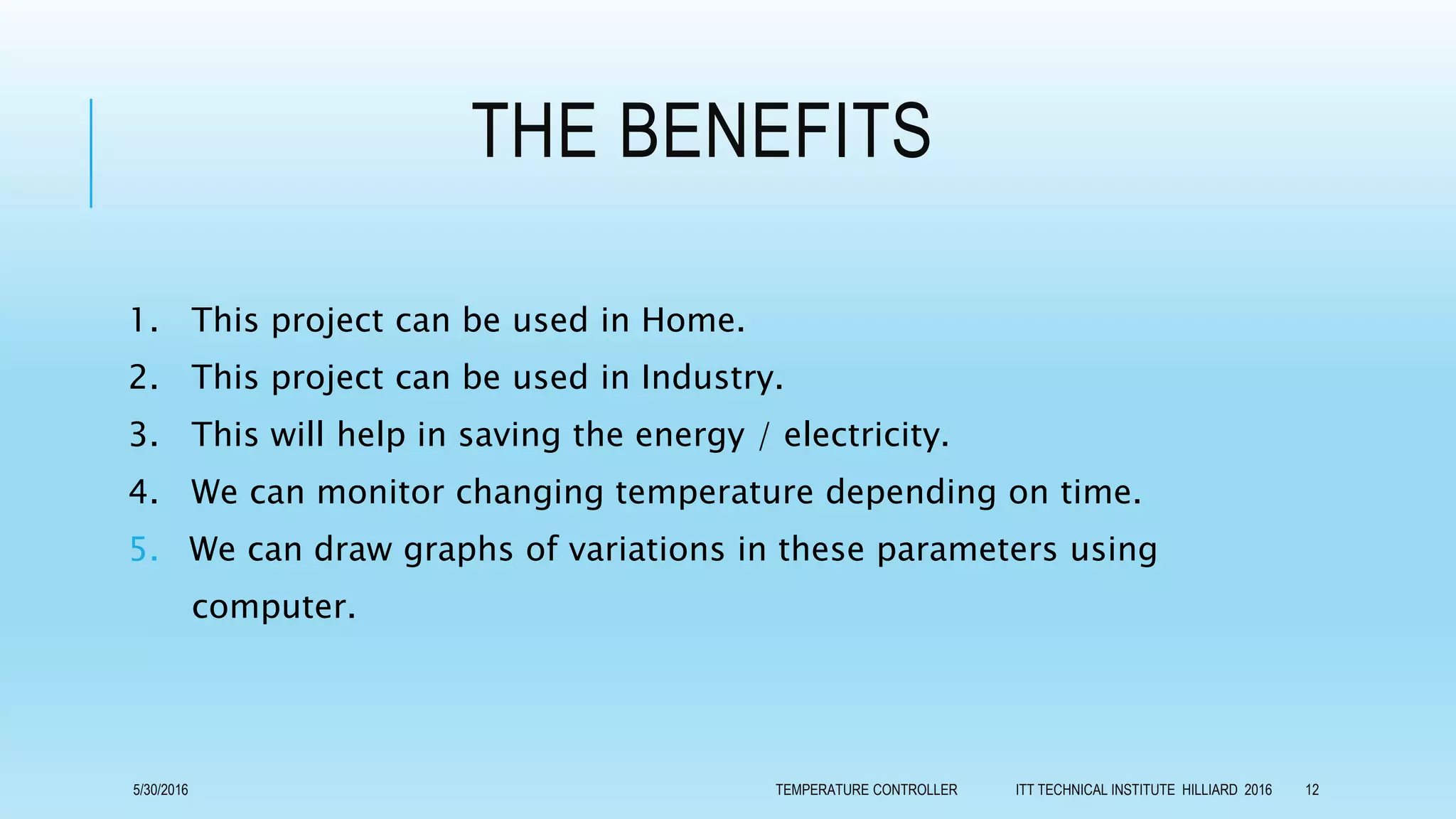
Closed loop control is far more sophisticated than open loop. In a
closed loop application, the output temperature is constantly
measured and adjusted to maintain a constant output at the desired
temperature. Closed loop control is always conscious of the output
signal and will feed this back into the control process. Closed loop
control is analogous to a car with internal climate control.
5/30/2016 TEMPERATURE CONTROLLER ITT TECHNICAL INSTITUTE HILLIARD 2016 9
THE GOALS
If you set the car temperature to 75°, the climate control will automatically adjust
the heating (during cold days) or cooling (during warm days) as required to
maintain the target temperature of 75°.
Closed loop control block diagram
5/30/2016 TEMPERATURE CONTROLLER ITT TECHNICAL INSTITUTE HILLIARD 2016 10
THE GOALS
Our chosen goal is achieving closed loop temperature control,
because it gives us chance to control heating and cooling processes
with the ability of defining the value of temperature at any time
during the experiment.
5/30/2016 TEMPERATURE CONTROLLER ITT TECHNICAL INSTITUTE HILLIARD 2016 11
THE BENEFITS
1. This project can be used in Home.
2. This project can be used in Industry.
3. This will help in saving the energy / electricity.
4. We can monitor changing temperature depending on time.
5. We can draw graphs of variations in these parameters using
computer.
5/30/2016 TEMPERATURE CONTROLLER ITT TECHNICAL INSTITUTE HILLIARD 2016 12
OBJECTIVES
All controllers have several common parts. For starters, controllers
have inputs. The inputs are used to measure a variable in the process
being controlled. In the case of a temperature controller, the
measured variable is temperature.
5/30/2016 TEMPERATURE CONTROLLER ITT TECHNICAL INSTITUTE HILLIARD 2016 13
INPUTS
Temperature controllers can have several types of inputs. The type
of input sensor and signal needed may vary depending on the type
of controlled process. Typical input sensors include thermocouples
and resistive thermal devices (RTD's), and linear inputs such as mV
and mA. Typical standardized thermocouple types include J, K, T,
R, S, B and L types among others.
5/30/2016 TEMPERATURE CONTROLLER ITT TECHNICAL INSTITUTE HILLIARD 2016 14
INPUTS
Controllers can also be set to accept an RTD as a temperature sensing input.
A typical RTD would be a 100Ω platinum sensor.
Alternatively, controllers can be set to accept voltage or current signals in
the millivolt, volt, or milliamp range from other types of sensors such as
pressure, level, or flow sensors. Typical input voltage signals include 0 to
5VDC, 1 to 5VDC, 0 to 10VDC and 2 to 10VDC. Controllers may also be set
up to accept millivolt signals from sensors that include 0 to 50mVDC and 10
to 50mVDC. Controllers can also accept milliamp signals such as 0 to 20mA
or 4 to 20mA.
5/30/2016 TEMPERATURE CONTROLLER ITT TECHNICAL INSTITUTE HILLIARD 2016 15
INPUTS
A controller will typically incorporate a feature to detect when an
input sensor is faulty or absent. This is known as a sensor break
detect. Undetected, this fault condition could cause significant
damage to the equipment being controlled. This feature enables
the controller to stop the process immediately if a sensor break
condition is detected.
5/30/2016 TEMPERATURE CONTROLLER ITT TECHNICAL INSTITUTE HILLIARD 2016 16
OUTPUTS
In addition to inputs, every controller also has an output. Each output
can be used to do several things including control a process (such as
turning on a heating or cooling source), initiate an alarm, or to
retransmit the process value to a programmable logic controller (PLC)
or recorder.
5/30/2016 TEMPERATURE CONTROLLER ITT TECHNICAL INSTITUTE HILLIARD 2016 17
OUTPUTS
Typical outputs provided with temperature controllers include relay
outputs, electro -mechanicl drivers, triac, and linear analog outputs.
A relay output is usually a single-pole double-throw (SPDT) relay
with a DC voltage coil. The controller energizes the relay coil,
providing isolation for the contacts. This lets the contacts control an
external voltage source to power the coil of a much larger heating
contactor.
5/30/2016 TEMPERATURE CONTROLLER ITT TECHNICAL INSTITUTE HILLIARD 2016 18
OUTPUTS
Analog outputs are provided on some controllers which put out a 0–10V
signal or a 4–20mA signal. These signals are calibrated so that the
signal changes as a percentage of the output. For example, if a
controller is sending a 0% signal, the analog output will be 0V or 4mA.
When the controller is sending a 50% signal, the output will be 5V or
12mA.
When the controller is sending a 100% signal, the output will be 10V or
20mA.
5/30/2016 TEMPERATURE CONTROLLER ITT TECHNICAL INSTITUTE HILLIARD 2016 19
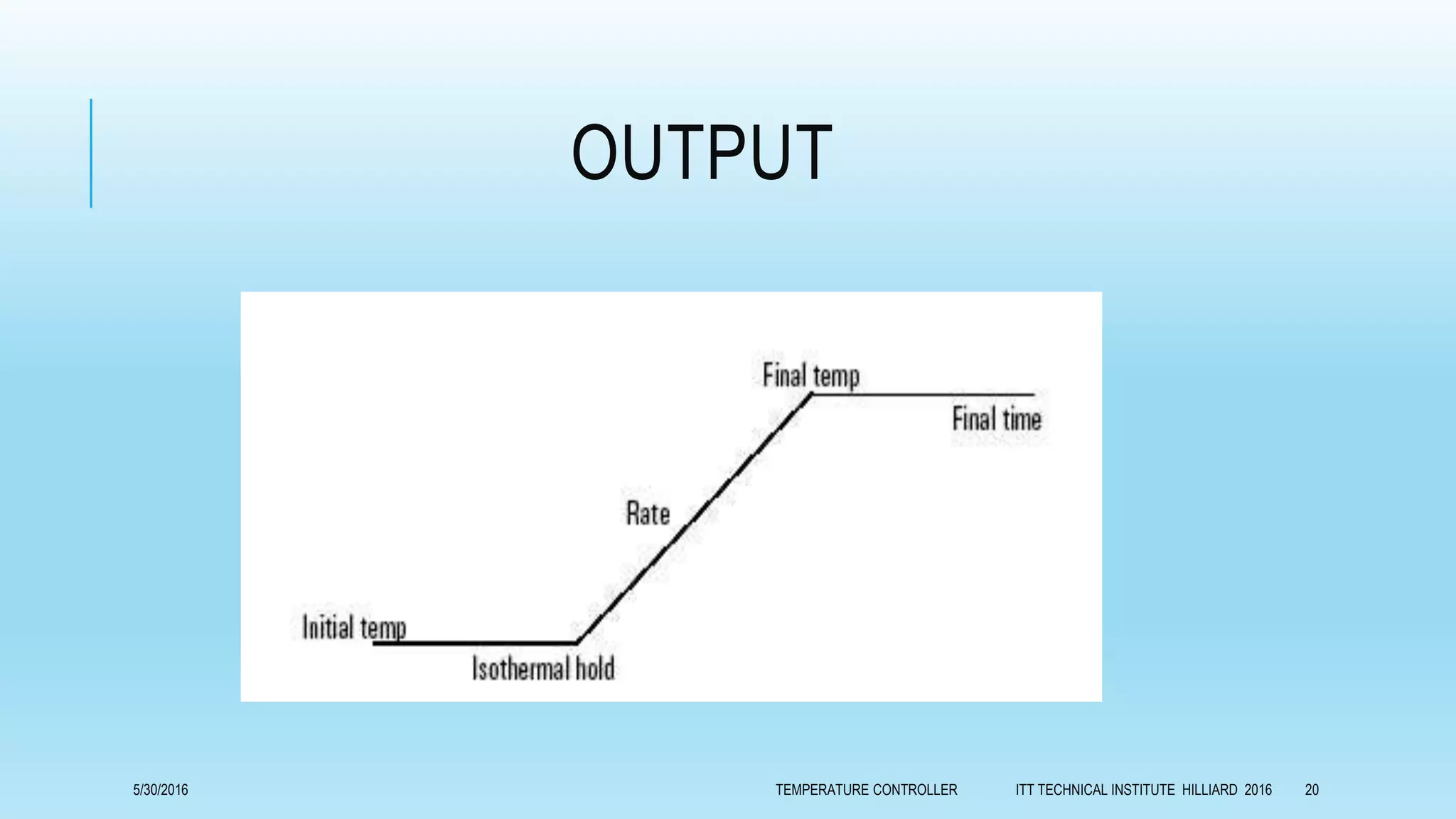
OUTPUT
5/30/2016 TEMPERATURE CONTROLLER ITT TECHNICAL INSTITUTE HILLIARD 2016 20
CONSTRAINTS
We hope that, during next six weeks, we will complete hardware and software
of our project.
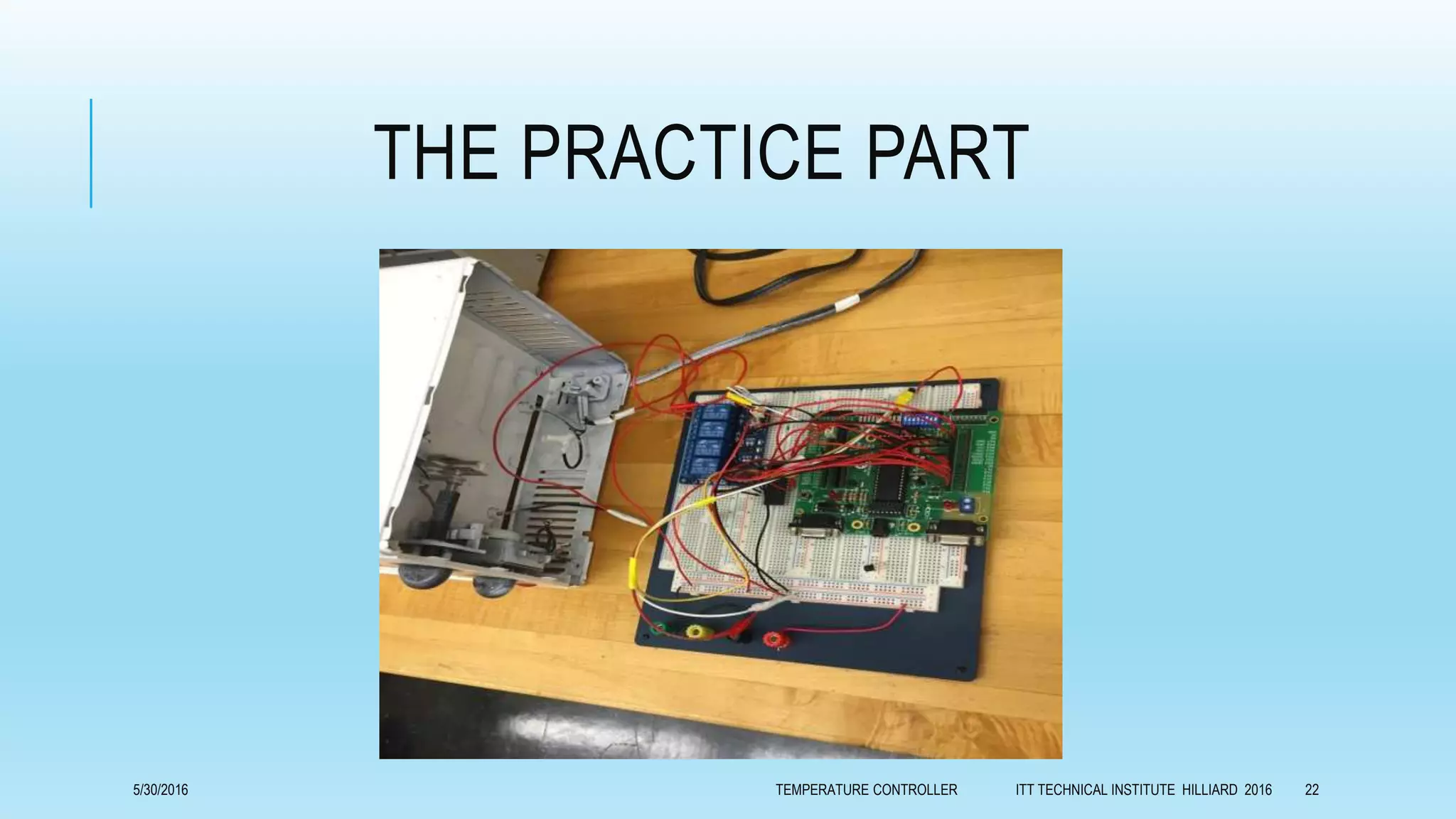
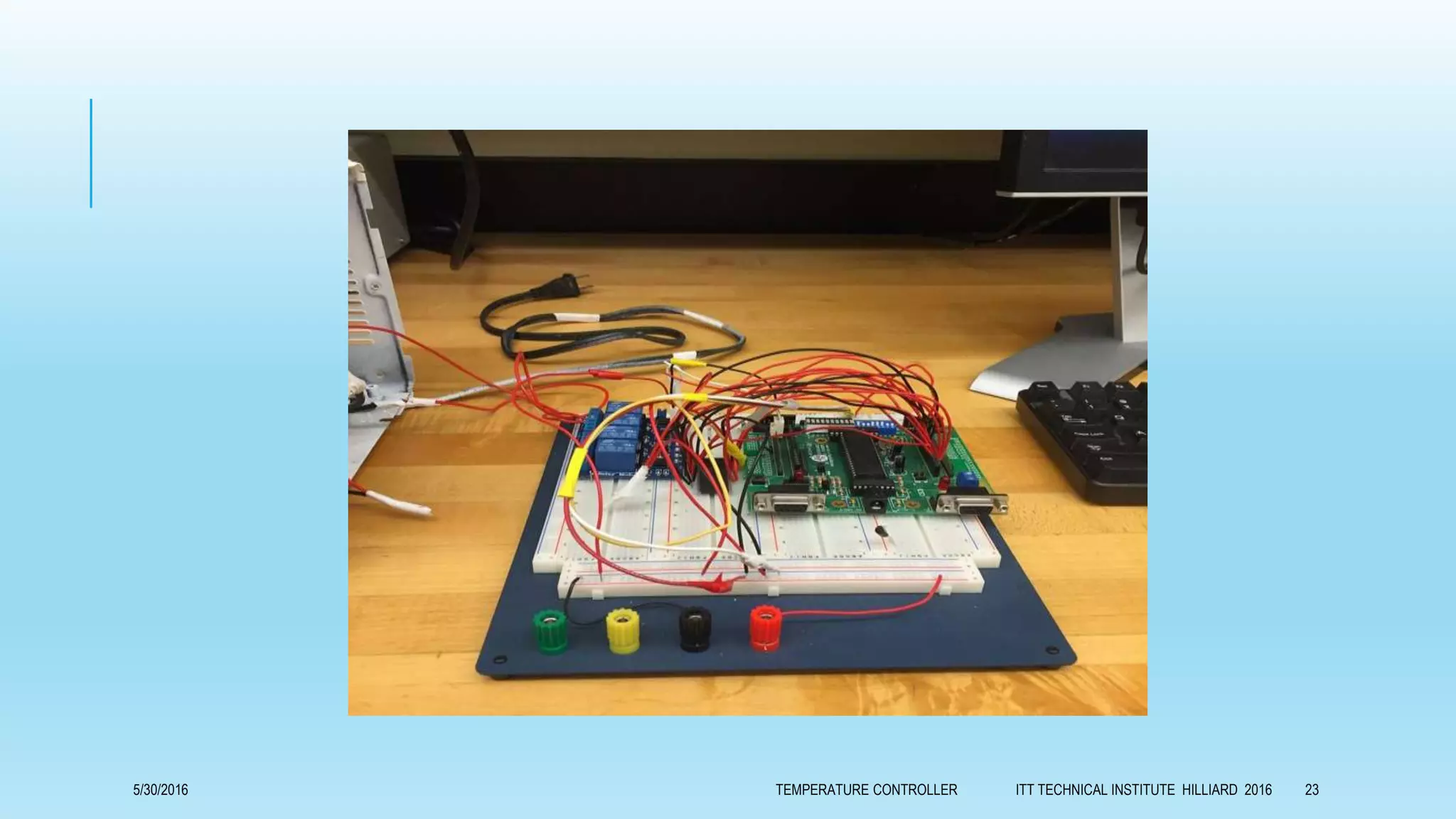
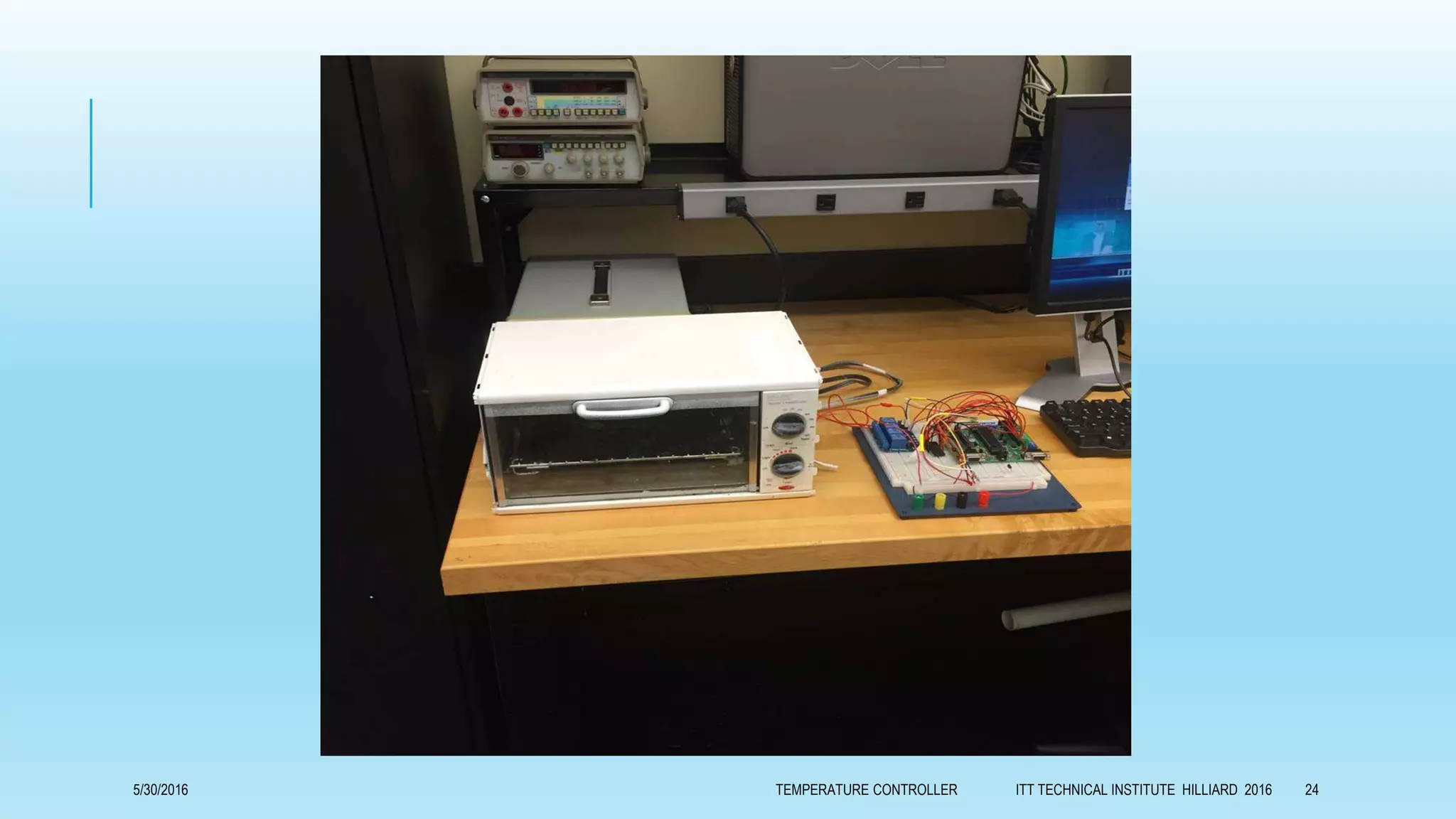
We defined elements what we need as the following:
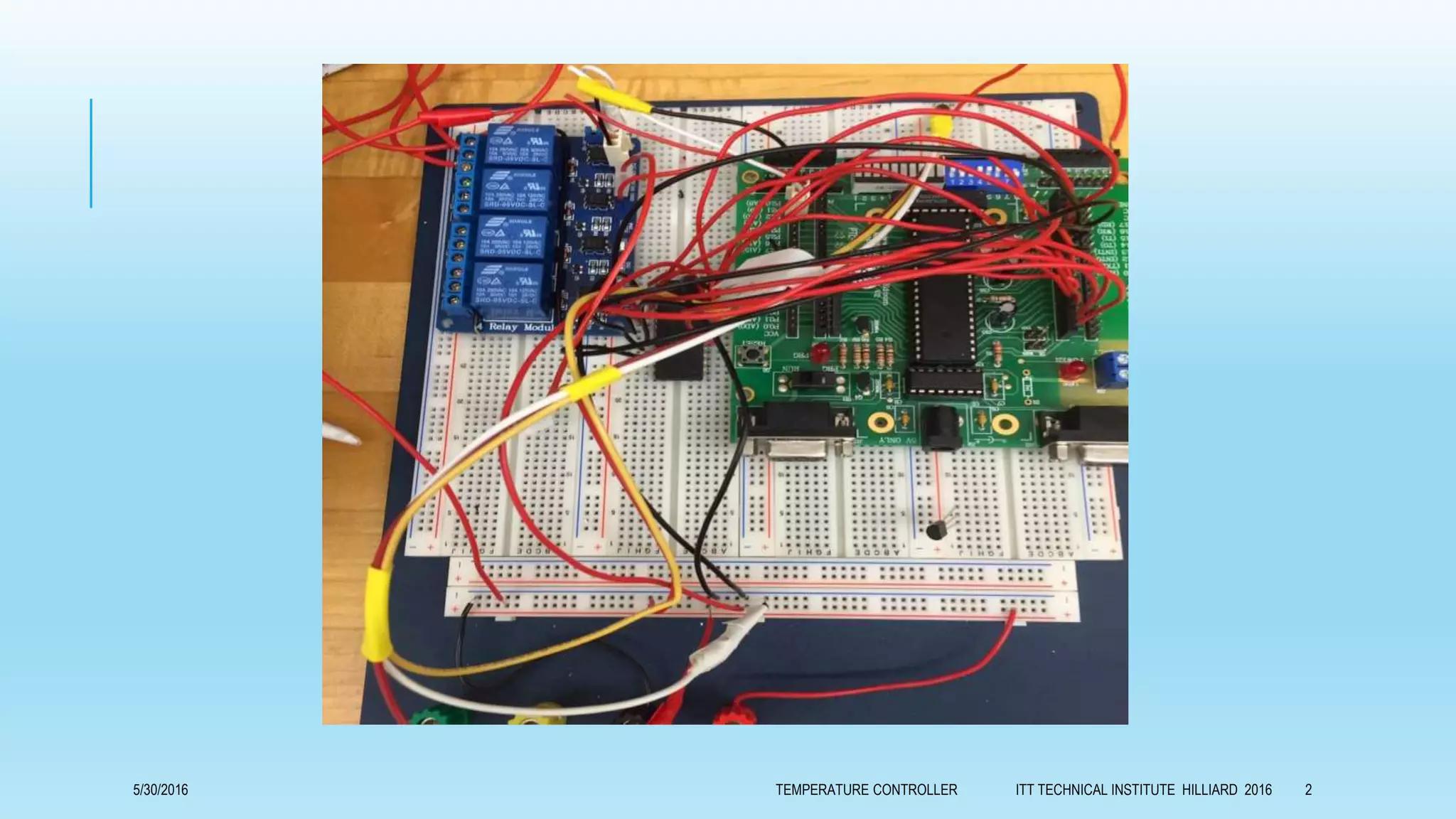
Micro controller 8051triniar
Personal computer
Interface between PC and Micro controller
Temperature sensor
EM relay
Heaters
metallic cabinet as oven body
Power supply.
5/30/2016 TEMPERATURE CONTROLLER ITT TECHNICAL INSTITUTE HILLIARD 2016 21
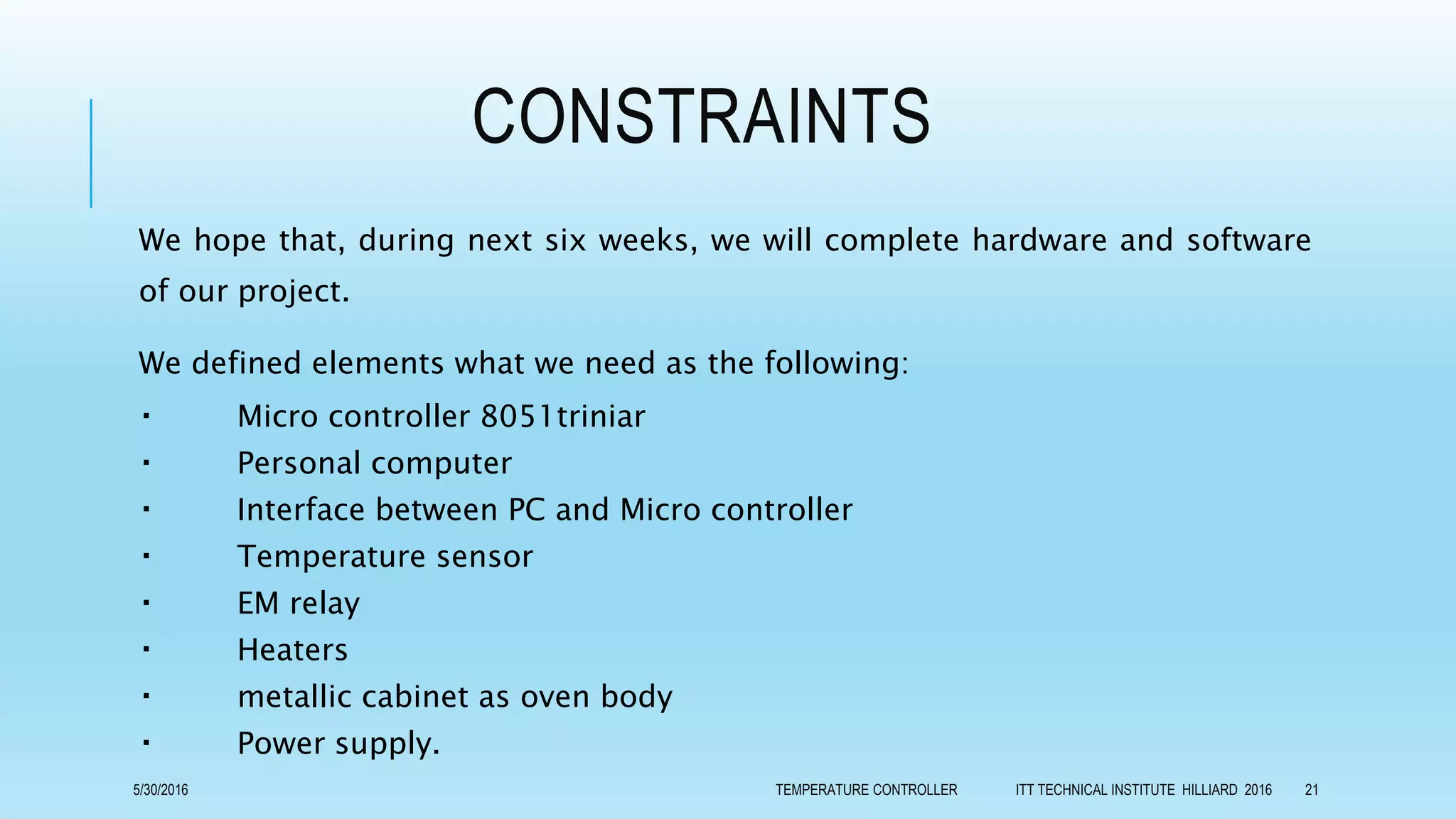
THE PRACTICE PART
5/30/2016 TEMPERATURE CONTROLLER ITT TECHNICAL INSTITUTE HILLIARD 2016 22
5/30/2016 TEMPERATURE CONTROLLER ITT TECHNICAL INSTITUTE HILLIARD 2016 23
5/30/2016 TEMPERATURE CONTROLLER ITT TECHNICAL INSTITUTE HILLIARD 2016 24
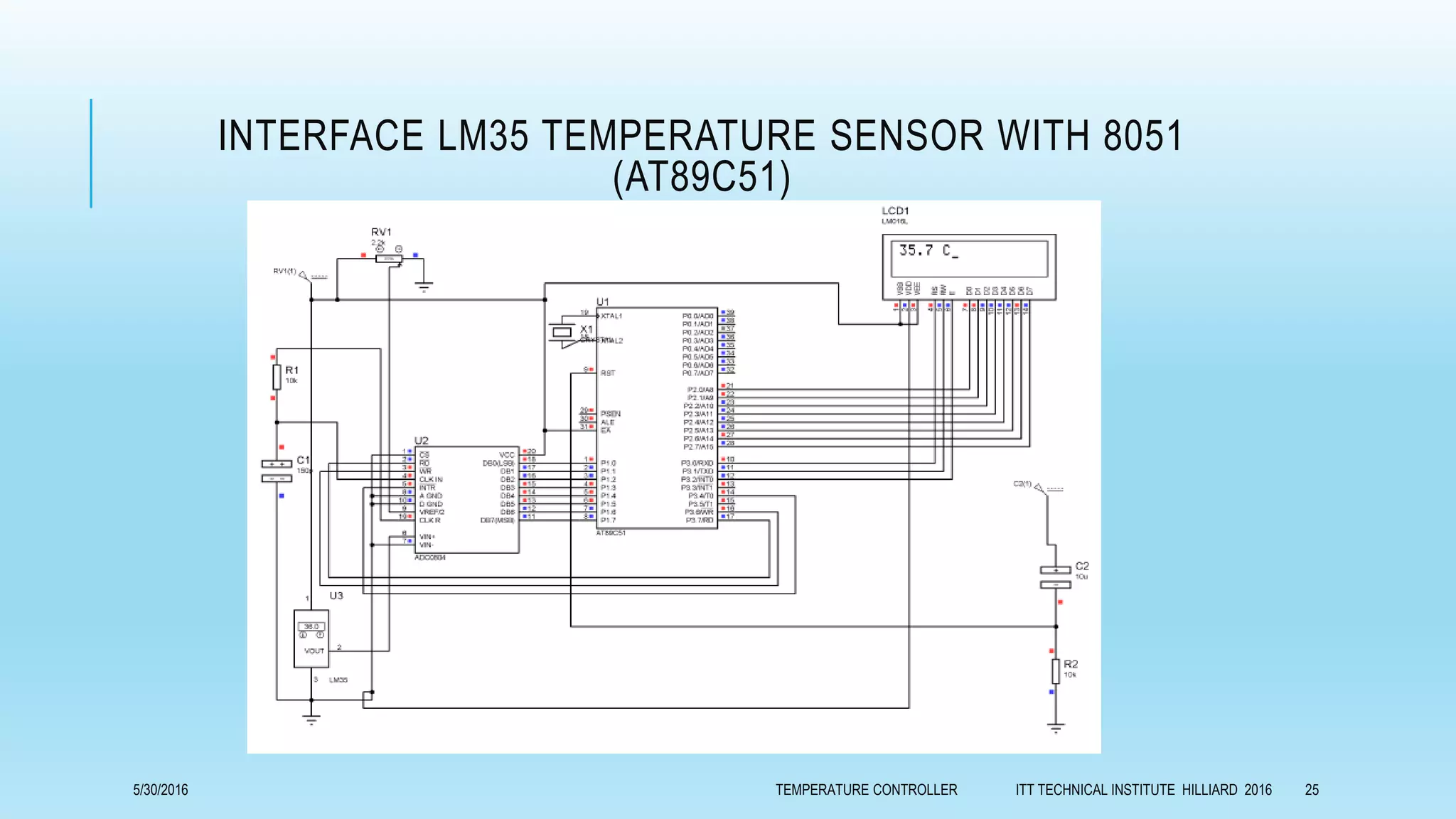
INTERFACE LM35 TEMPERATURE SENSOR WITH 8051
(AT89C51)
5/30/2016 TEMPERATURE CONTROLLER ITT TECHNICAL INSTITUTE HILLIARD 2016 25
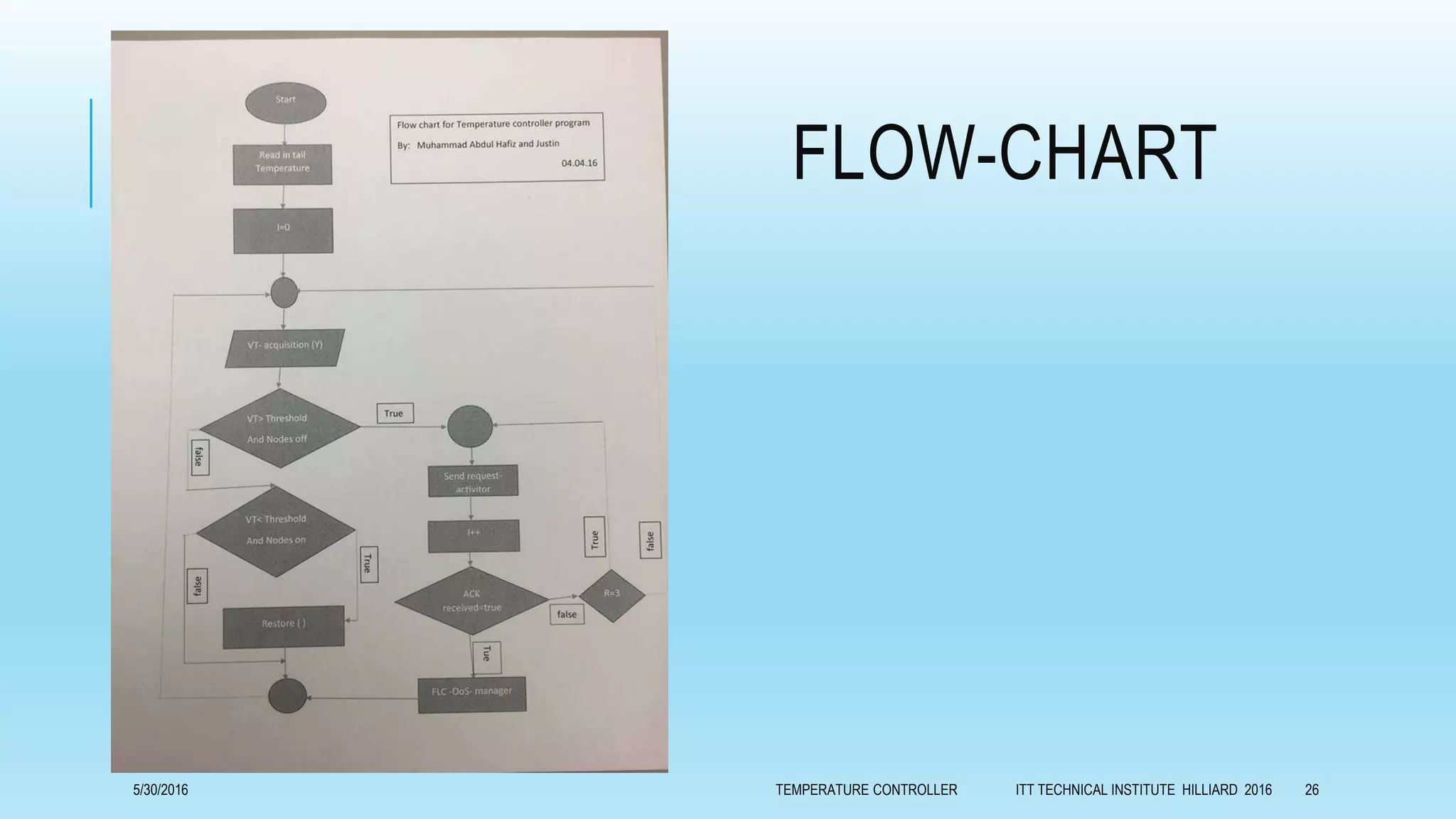
FLOW-CHART
5/30/2016 TEMPERATURE CONTROLLER ITT TECHNICAL INSTITUTE HILLIARD 2016 26
THE PROGRAMS
5/30/2016 TEMPERATURE CONTROLLER ITT TECHNICAL INSTITUTE HILLIARD 2016 27
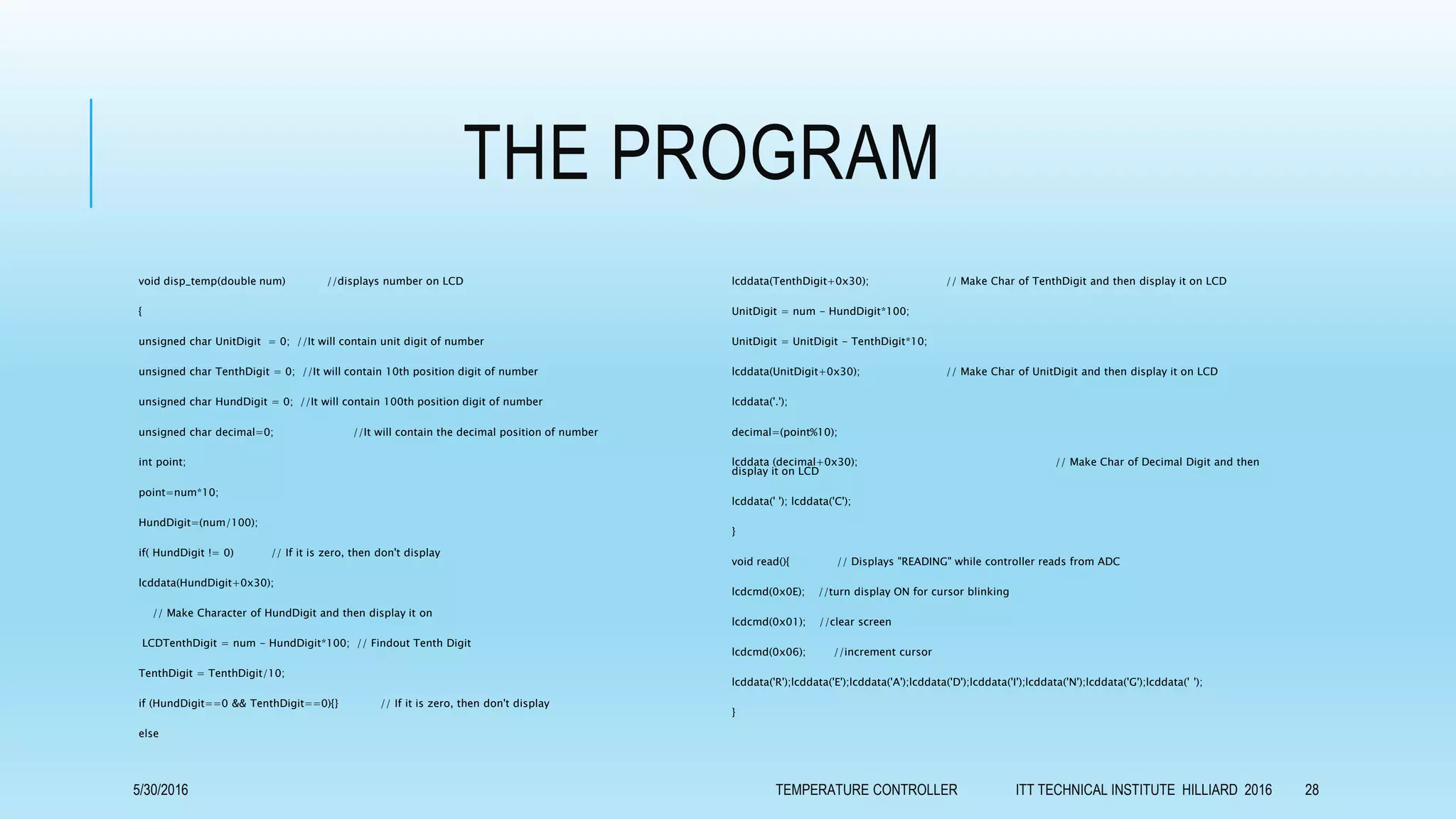
THE PROGRAM
void disp_temp(double num) //displays number on LCD
{
unsigned char UnitDigit = 0; //It will contain unit digit of number
unsigned char TenthDigit = 0; //It will contain 10th position digit of number
unsigned char HundDigit = 0; //It will contain 100th position digit of number
unsigned char decimal=0; //It will contain the decimal position of number
int point;
point=num*10;
HundDigit=(num/100);
if( HundDigit != 0) // If it is zero, then don't display
lcddata(HundDigit+0x30);
// Make Character of HundDigit and then display it on
LCDTenthDigit = num - HundDigit*100; // Findout Tenth Digit
TenthDigit = TenthDigit/10;
if (HundDigit==0 && TenthDigit==0){} // If it is zero, then don't display
else
lcddata(TenthDigit+0x30); // Make Char of TenthDigit and then display it on LCD
UnitDigit = num - HundDigit*100;
UnitDigit = UnitDigit - TenthDigit*10;
lcddata(UnitDigit+0x30); // Make Char of UnitDigit and then display it on LCD
lcddata('.');
decimal=(point%10);
lcddata (decimal+0x30); // Make Char of Decimal Digit and then
display it on LCD
lcddata(' '); lcddata('C');
}
void read(){ // Displays "READING" while controller reads from ADC
lcdcmd(0x0E); //turn display ON for cursor blinking
lcdcmd(0x01); //clear screen
lcdcmd(0x06); //increment cursor
lcddata('R');lcddata('E');lcddata('A');lcddata('D');lcddata('I');lcddata('N');lcddata('G');lcddata(' ');
}
5/30/2016 TEMPERATURE CONTROLLER ITT TECHNICAL INSTITUTE HILLIARD 2016 28
THE PROGRAM
lcddata('R');lcddata('E');lcddata('A');lcddata('D');lcddata('I');lcddata('N');lcddata('G');lcddata(' ');
}
void main()
{
P0=0x00; //intialize port 0 to low
use while controller reads the temperature from
//ADC
read(); //
show reading on LCD while controller reads from ADC
while(1){ // use for checking errors while reading the
value from ADC
newtemp=adc(); //reads first value from ADC
delay(60); //waits 60 msec
pass1=adc(); // reads the Second value from ADC
delay(60); // waits 60 msec
if (newtemp==pass1){ //compare first and second value
break; // if first and second value is same breaks the
loop
}
}
while(1) //enters in the permanent loop
{
T=160; //set reference voltage acting multiplier factor for temperature accuration
newtemp=(((newtemp*T)/255)); //converts the temperature value according to reference adjusted in decimal
lcdcmd(0x0E); //turn display ON for cursor blinking
lcdcmd(0x01); //clear screen
lcdcmd(0x06); //increment
disp_temp(newtemp); //show temperature
delay(300); //waits 3sec before re-measure the value of
temperature
while(1){ // re-measure the value from ADC but this time
double check
newtemp=adc();
delay(60);
pass1=adc();
delay(60);
pass2=adc();
if (newtemp==pass1){
}
5/30/2016 TEMPERATURE CONTROLLER ITT TECHNICAL INSTITUTE HILLIARD 2016 29
THE PROGRAM
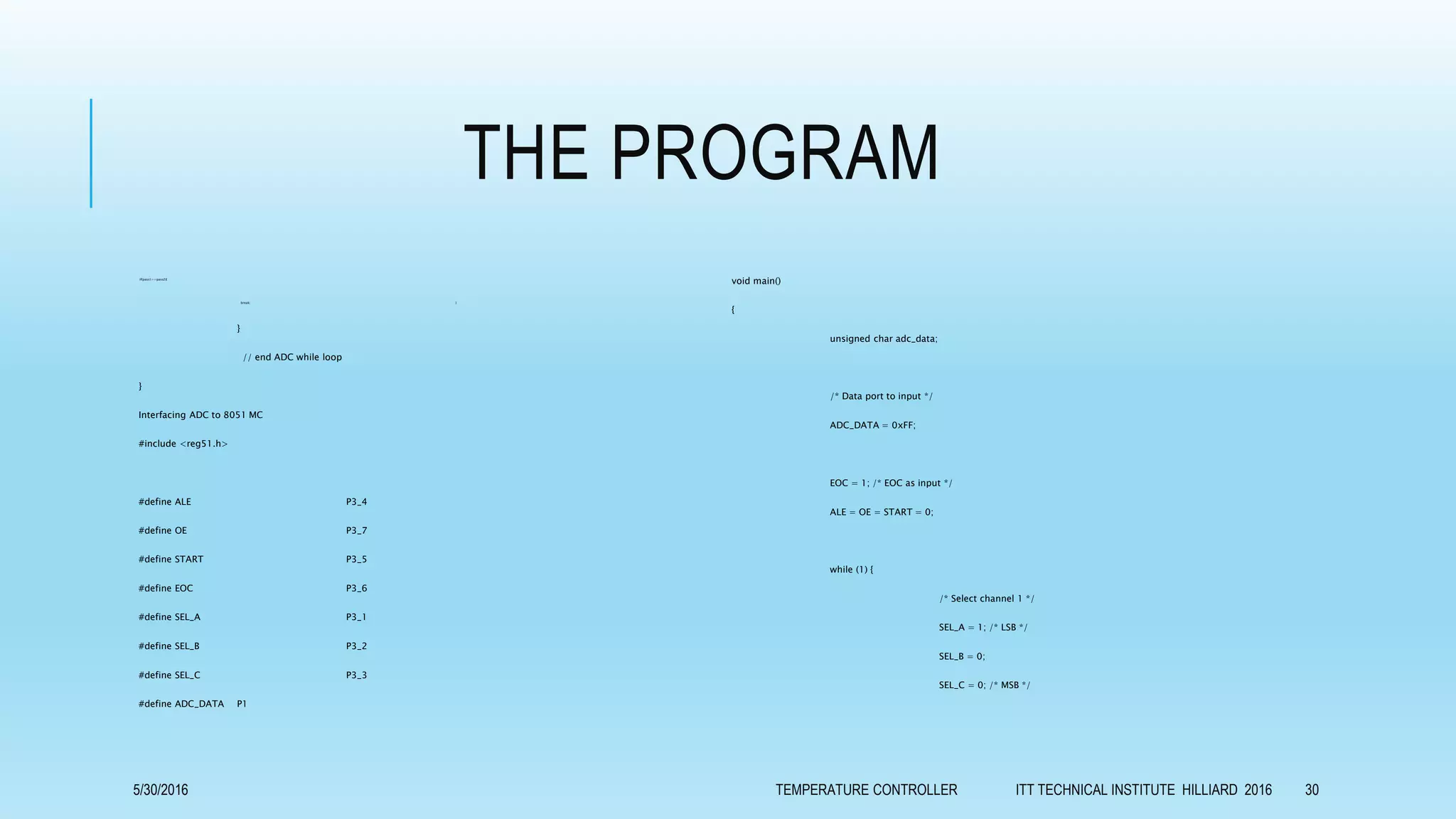
if(pass1==pass2){
break; }
}
// end ADC while loop
}
Interfacing ADC to 8051 MC
#include <reg51.h>
#define ALE P3_4
#define OE P3_7
#define START P3_5
#define EOC P3_6
#define SEL_A P3_1
#define SEL_B P3_2
#define SEL_C P3_3
#define ADC_DATA P1
void main()
{
unsigned char adc_data;
/* Data port to input */
ADC_DATA = 0xFF;
EOC = 1; /* EOC as input */
ALE = OE = START = 0;
while (1) {
/* Select channel 1 */
SEL_A = 1; /* LSB */
SEL_B = 0;
SEL_C = 0; /* MSB */
5/30/2016 TEMPERATURE CONTROLLER ITT TECHNICAL INSTITUTE HILLIARD 2016 30
THE PROGRAM
/* Latch channel select/address */
ALE = 1;
/* Start conversion */
START = 1;
ALE = 0;
START = 0;
/* Wait for end of conversion */
while (EOC == 1);
while (EOC == 0);
/* Assert Read signal */
OE = 1;
/* Read Data */
adc_data = ADC_DATA;
OE = 0;
/* Now adc data is stored */
/* start over for next conversion */
}
}
C code for connecting relay with 8051 mc
#include <reg51.h> //Define 8051 registers
#include<stdio.h>
sbit relay1 = P0^4;
sbit relay2 = P0^5;
void DelayMs(unsigned int); //Delay function
//----------------------------------
// Main Program
//----------------------------------
void main (void)
{
P2 = 0; //Initialize Port
while(1) //Loop Forever
{
relay1 = 1; //Relay1 - ON
relay2 = 0; //Relay2 - Off
DelayMs(200); //Delay 20msec
5/30/2016 TEMPERATURE CONTROLLER ITT TECHNICAL INSTITUTE HILLIARD 2016 31
THE PROGRAM
relay1 = 0; //Relay1 - Off
relay2 = 1; //Relay2 - ON
DelayMs(200); //Delay 20msec
}
}
//---------------------------------
// Delay Function
//---------------------------------
void DelayMs(unsigned int n)
{
unsigned int i,j;
for(j=0;j<n;j++)
{
for(i=0;i<1000;i++);
}
}
5/30/2016 TEMPERATURE CONTROLLER ITT TECHNICAL INSTITUTE HILLIARD 2016 32
Thank you for your patience.
5/30/2016 TEMPERATURE CONTROLLER ITT TECHNICAL INSTITUTE HILLIARD 2016 33

Capston project ITT

  • 1.
    GENERIC TEMPERATURE CONTROLLER Capstone Project MarchQuarter 2016 Muhammad Abdul Hafiz Steven thrasher Ibrahim Nor Darrell Pollard Project advisor David Ney 5/30/2016 TEMPERATURE CONTROLLER ITT TECHNICAL INSTITUTE HILLIARD 2016 1
  • 2.
    5/30/2016 TEMPERATURE CONTROLLERITT TECHNICAL INSTITUTE HILLIARD 2016 2
  • 3.
    THE PURPOSE Temperature controllersare needed in any situation requiring a given temperature be kept stable. This can be in a situation where an object is required to be heated, cooled or both and to remain at the target temperature (set-point), regardless of the changing environment around it. So a temperature controller is a device used to hold a desired temperature at a specified value. 5/30/2016 TEMPERATURE CONTROLLER ITT TECHNICAL INSTITUTE HILLIARD 2016 3
  • 4.
    THE PURPOSE The simplestexample of a temperature controller is a common thermostat found in homes. For instance, a hot water heater uses a thermostat to control the temperature of the water and maintain it at a certain commanded temperature. 5/30/2016 TEMPERATURE CONTROLLER ITT TECHNICAL INSTITUTE HILLIARD 2016 4
  • 5.
    THE PURPOSE Temperature controllersare also used in ovens. When a temperature is set for an oven, a controller monitors the actual temperature inside of the oven. If it falls below the set temperature, it sends a signal to activate the heater to raise the temperature back to the set-point. Thermostats are also used in refrigerators. So if the temperature gets too high, a controller initiates an action to bring the temperature down. 5/30/2016 TEMPERATURE CONTROLLER ITT TECHNICAL INSTITUTE HILLIARD 2016 5
  • 6.
    THE PURPOSE The temperaturecontroller is very important technique in the laboratories of material science and the industry, because of that we (Muhammad, Ibrahim, Darrell and Steven ) will perform the project under title: “GENERIC TEMPERATURE CONTROLLER “for the capstone project /ET2799 Electrical Engineering Technology. 5/30/2016 TEMPERATURE CONTROLLER ITT TECHNICAL INSTITUTE HILLIARD 2016 6
  • 7.
    THE GOALS There aretwo fundamental types of temperature control; open loop and closed loop control. Open loop is the most basic form and applies continuous heating/cooling with no regard for the actual temperature output. It is analogous to the internal heating system in a car. On a cold day, you may need to turn the heat on to full to warm the car to 75°. However, during warmer weather, the same setting would leave the inside of the car much warmer than the desired 75°. 5/30/2016 TEMPERATURE CONTROLLER ITT TECHNICAL INSTITUTE HILLIARD 2016 7
  • 8.
    THE GOALS Open loopcontrol block diagram 5/30/2016 TEMPERATURE CONTROLLER ITT TECHNICAL INSTITUTE HILLIARD 2016 8
  • 9.
    THE GOALS Closed loopcontrol is far more sophisticated than open loop. In a closed loop application, the output temperature is constantly measured and adjusted to maintain a constant output at the desired temperature. Closed loop control is always conscious of the output signal and will feed this back into the control process. Closed loop control is analogous to a car with internal climate control. 5/30/2016 TEMPERATURE CONTROLLER ITT TECHNICAL INSTITUTE HILLIARD 2016 9
  • 10.
    THE GOALS If youset the car temperature to 75°, the climate control will automatically adjust the heating (during cold days) or cooling (during warm days) as required to maintain the target temperature of 75°. Closed loop control block diagram 5/30/2016 TEMPERATURE CONTROLLER ITT TECHNICAL INSTITUTE HILLIARD 2016 10
  • 11.
    THE GOALS Our chosengoal is achieving closed loop temperature control, because it gives us chance to control heating and cooling processes with the ability of defining the value of temperature at any time during the experiment. 5/30/2016 TEMPERATURE CONTROLLER ITT TECHNICAL INSTITUTE HILLIARD 2016 11
  • 12.
    THE BENEFITS 1. Thisproject can be used in Home. 2. This project can be used in Industry. 3. This will help in saving the energy / electricity. 4. We can monitor changing temperature depending on time. 5. We can draw graphs of variations in these parameters using computer. 5/30/2016 TEMPERATURE CONTROLLER ITT TECHNICAL INSTITUTE HILLIARD 2016 12
  • 13.
    OBJECTIVES All controllers haveseveral common parts. For starters, controllers have inputs. The inputs are used to measure a variable in the process being controlled. In the case of a temperature controller, the measured variable is temperature. 5/30/2016 TEMPERATURE CONTROLLER ITT TECHNICAL INSTITUTE HILLIARD 2016 13
  • 14.
    INPUTS Temperature controllers canhave several types of inputs. The type of input sensor and signal needed may vary depending on the type of controlled process. Typical input sensors include thermocouples and resistive thermal devices (RTD's), and linear inputs such as mV and mA. Typical standardized thermocouple types include J, K, T, R, S, B and L types among others. 5/30/2016 TEMPERATURE CONTROLLER ITT TECHNICAL INSTITUTE HILLIARD 2016 14
  • 15.
    INPUTS Controllers can alsobe set to accept an RTD as a temperature sensing input. A typical RTD would be a 100Ω platinum sensor. Alternatively, controllers can be set to accept voltage or current signals in the millivolt, volt, or milliamp range from other types of sensors such as pressure, level, or flow sensors. Typical input voltage signals include 0 to 5VDC, 1 to 5VDC, 0 to 10VDC and 2 to 10VDC. Controllers may also be set up to accept millivolt signals from sensors that include 0 to 50mVDC and 10 to 50mVDC. Controllers can also accept milliamp signals such as 0 to 20mA or 4 to 20mA. 5/30/2016 TEMPERATURE CONTROLLER ITT TECHNICAL INSTITUTE HILLIARD 2016 15
  • 16.
    INPUTS A controller willtypically incorporate a feature to detect when an input sensor is faulty or absent. This is known as a sensor break detect. Undetected, this fault condition could cause significant damage to the equipment being controlled. This feature enables the controller to stop the process immediately if a sensor break condition is detected. 5/30/2016 TEMPERATURE CONTROLLER ITT TECHNICAL INSTITUTE HILLIARD 2016 16
  • 17.
    OUTPUTS In addition toinputs, every controller also has an output. Each output can be used to do several things including control a process (such as turning on a heating or cooling source), initiate an alarm, or to retransmit the process value to a programmable logic controller (PLC) or recorder. 5/30/2016 TEMPERATURE CONTROLLER ITT TECHNICAL INSTITUTE HILLIARD 2016 17
  • 18.
    OUTPUTS Typical outputs providedwith temperature controllers include relay outputs, electro -mechanicl drivers, triac, and linear analog outputs. A relay output is usually a single-pole double-throw (SPDT) relay with a DC voltage coil. The controller energizes the relay coil, providing isolation for the contacts. This lets the contacts control an external voltage source to power the coil of a much larger heating contactor. 5/30/2016 TEMPERATURE CONTROLLER ITT TECHNICAL INSTITUTE HILLIARD 2016 18
  • 19.
    OUTPUTS Analog outputs areprovided on some controllers which put out a 0–10V signal or a 4–20mA signal. These signals are calibrated so that the signal changes as a percentage of the output. For example, if a controller is sending a 0% signal, the analog output will be 0V or 4mA. When the controller is sending a 50% signal, the output will be 5V or 12mA. When the controller is sending a 100% signal, the output will be 10V or 20mA. 5/30/2016 TEMPERATURE CONTROLLER ITT TECHNICAL INSTITUTE HILLIARD 2016 19
  • 20.
    OUTPUT 5/30/2016 TEMPERATURE CONTROLLERITT TECHNICAL INSTITUTE HILLIARD 2016 20
  • 21.
    CONSTRAINTS We hope that,during next six weeks, we will complete hardware and software of our project. We defined elements what we need as the following: Micro controller 8051triniar Personal computer Interface between PC and Micro controller Temperature sensor EM relay Heaters metallic cabinet as oven body Power supply. 5/30/2016 TEMPERATURE CONTROLLER ITT TECHNICAL INSTITUTE HILLIARD 2016 21
  • 22.
    THE PRACTICE PART 5/30/2016TEMPERATURE CONTROLLER ITT TECHNICAL INSTITUTE HILLIARD 2016 22
  • 23.
    5/30/2016 TEMPERATURE CONTROLLERITT TECHNICAL INSTITUTE HILLIARD 2016 23
  • 24.
    5/30/2016 TEMPERATURE CONTROLLERITT TECHNICAL INSTITUTE HILLIARD 2016 24
  • 25.
    INTERFACE LM35 TEMPERATURESENSOR WITH 8051 (AT89C51) 5/30/2016 TEMPERATURE CONTROLLER ITT TECHNICAL INSTITUTE HILLIARD 2016 25
  • 26.
    FLOW-CHART 5/30/2016 TEMPERATURE CONTROLLERITT TECHNICAL INSTITUTE HILLIARD 2016 26
  • 27.
    THE PROGRAMS 5/30/2016 TEMPERATURECONTROLLER ITT TECHNICAL INSTITUTE HILLIARD 2016 27
  • 28.
    THE PROGRAM void disp_temp(doublenum) //displays number on LCD { unsigned char UnitDigit = 0; //It will contain unit digit of number unsigned char TenthDigit = 0; //It will contain 10th position digit of number unsigned char HundDigit = 0; //It will contain 100th position digit of number unsigned char decimal=0; //It will contain the decimal position of number int point; point=num*10; HundDigit=(num/100); if( HundDigit != 0) // If it is zero, then don't display lcddata(HundDigit+0x30); // Make Character of HundDigit and then display it on LCDTenthDigit = num - HundDigit*100; // Findout Tenth Digit TenthDigit = TenthDigit/10; if (HundDigit==0 && TenthDigit==0){} // If it is zero, then don't display else lcddata(TenthDigit+0x30); // Make Char of TenthDigit and then display it on LCD UnitDigit = num - HundDigit*100; UnitDigit = UnitDigit - TenthDigit*10; lcddata(UnitDigit+0x30); // Make Char of UnitDigit and then display it on LCD lcddata('.'); decimal=(point%10); lcddata (decimal+0x30); // Make Char of Decimal Digit and then display it on LCD lcddata(' '); lcddata('C'); } void read(){ // Displays "READING" while controller reads from ADC lcdcmd(0x0E); //turn display ON for cursor blinking lcdcmd(0x01); //clear screen lcdcmd(0x06); //increment cursor lcddata('R');lcddata('E');lcddata('A');lcddata('D');lcddata('I');lcddata('N');lcddata('G');lcddata(' '); } 5/30/2016 TEMPERATURE CONTROLLER ITT TECHNICAL INSTITUTE HILLIARD 2016 28
  • 29.
    THE PROGRAM lcddata('R');lcddata('E');lcddata('A');lcddata('D');lcddata('I');lcddata('N');lcddata('G');lcddata(' '); } voidmain() { P0=0x00; //intialize port 0 to low use while controller reads the temperature from //ADC read(); // show reading on LCD while controller reads from ADC while(1){ // use for checking errors while reading the value from ADC newtemp=adc(); //reads first value from ADC delay(60); //waits 60 msec pass1=adc(); // reads the Second value from ADC delay(60); // waits 60 msec if (newtemp==pass1){ //compare first and second value break; // if first and second value is same breaks the loop } } while(1) //enters in the permanent loop { T=160; //set reference voltage acting multiplier factor for temperature accuration newtemp=(((newtemp*T)/255)); //converts the temperature value according to reference adjusted in decimal lcdcmd(0x0E); //turn display ON for cursor blinking lcdcmd(0x01); //clear screen lcdcmd(0x06); //increment disp_temp(newtemp); //show temperature delay(300); //waits 3sec before re-measure the value of temperature while(1){ // re-measure the value from ADC but this time double check newtemp=adc(); delay(60); pass1=adc(); delay(60); pass2=adc(); if (newtemp==pass1){ } 5/30/2016 TEMPERATURE CONTROLLER ITT TECHNICAL INSTITUTE HILLIARD 2016 29
  • 30.
    THE PROGRAM if(pass1==pass2){ break; } } //end ADC while loop } Interfacing ADC to 8051 MC #include <reg51.h> #define ALE P3_4 #define OE P3_7 #define START P3_5 #define EOC P3_6 #define SEL_A P3_1 #define SEL_B P3_2 #define SEL_C P3_3 #define ADC_DATA P1 void main() { unsigned char adc_data; /* Data port to input */ ADC_DATA = 0xFF; EOC = 1; /* EOC as input */ ALE = OE = START = 0; while (1) { /* Select channel 1 */ SEL_A = 1; /* LSB */ SEL_B = 0; SEL_C = 0; /* MSB */ 5/30/2016 TEMPERATURE CONTROLLER ITT TECHNICAL INSTITUTE HILLIARD 2016 30
  • 31.
    THE PROGRAM /* Latchchannel select/address */ ALE = 1; /* Start conversion */ START = 1; ALE = 0; START = 0; /* Wait for end of conversion */ while (EOC == 1); while (EOC == 0); /* Assert Read signal */ OE = 1; /* Read Data */ adc_data = ADC_DATA; OE = 0; /* Now adc data is stored */ /* start over for next conversion */ } } C code for connecting relay with 8051 mc #include <reg51.h> //Define 8051 registers #include<stdio.h> sbit relay1 = P0^4; sbit relay2 = P0^5; void DelayMs(unsigned int); //Delay function //---------------------------------- // Main Program //---------------------------------- void main (void) { P2 = 0; //Initialize Port while(1) //Loop Forever { relay1 = 1; //Relay1 - ON relay2 = 0; //Relay2 - Off DelayMs(200); //Delay 20msec 5/30/2016 TEMPERATURE CONTROLLER ITT TECHNICAL INSTITUTE HILLIARD 2016 31
  • 32.
    THE PROGRAM relay1 =0; //Relay1 - Off relay2 = 1; //Relay2 - ON DelayMs(200); //Delay 20msec } } //--------------------------------- // Delay Function //--------------------------------- void DelayMs(unsigned int n) { unsigned int i,j; for(j=0;j<n;j++) { for(i=0;i<1000;i++); } } 5/30/2016 TEMPERATURE CONTROLLER ITT TECHNICAL INSTITUTE HILLIARD 2016 32
  • 33.
    Thank you foryour patience. 5/30/2016 TEMPERATURE CONTROLLER ITT TECHNICAL INSTITUTE HILLIARD 2016 33