BACKUP FOR VIRTUAL MACHINESEMC Avamar for VMware EnvironmentsHoria Constantinescuhoria.constantinescu@emc.comBackup & Recovery Systems DivisionEMC Corporation
Physical to Virtual EvolutionVMs were more than half of new logical servers deployed in 2009VM crossover15.012.510.0Millions7.55.02.50.0201220052006200720082009201020112012Physical serversVirtual MachinesSource: IDC MCS, Worldwide Server Virtualization Forecast, February 6, 2009
VMware Adoption and Data Protection NeedsPhase 1IT ProductionCost EfficiencyPhase 2Business ProductionQuality of ServicePhase 3ITaaSBusiness AgilityRapidly growing number of VMsGreater business continuity needsGreater need for improved SLAsLowering the data protection cost structure0%85%INCREASING DATA PROTECTION NEEDS70%Physical Environment50%30%15%100%0%50%100%Virtual Environment
Proactive ApproachBackupRedesignBackupRedesignReactive ApproachProactive Customers Save Time and Money
“Data protection paradigms and architectures (especially backup and recovery) must change in order to adapt to virtualized environments.”Worldwide Storage for the Virtualized Environment Taxonomy (Page 1)Benjamin Woo, Laura DuBois, Noemi Greyzdorf, IDC, December 2010
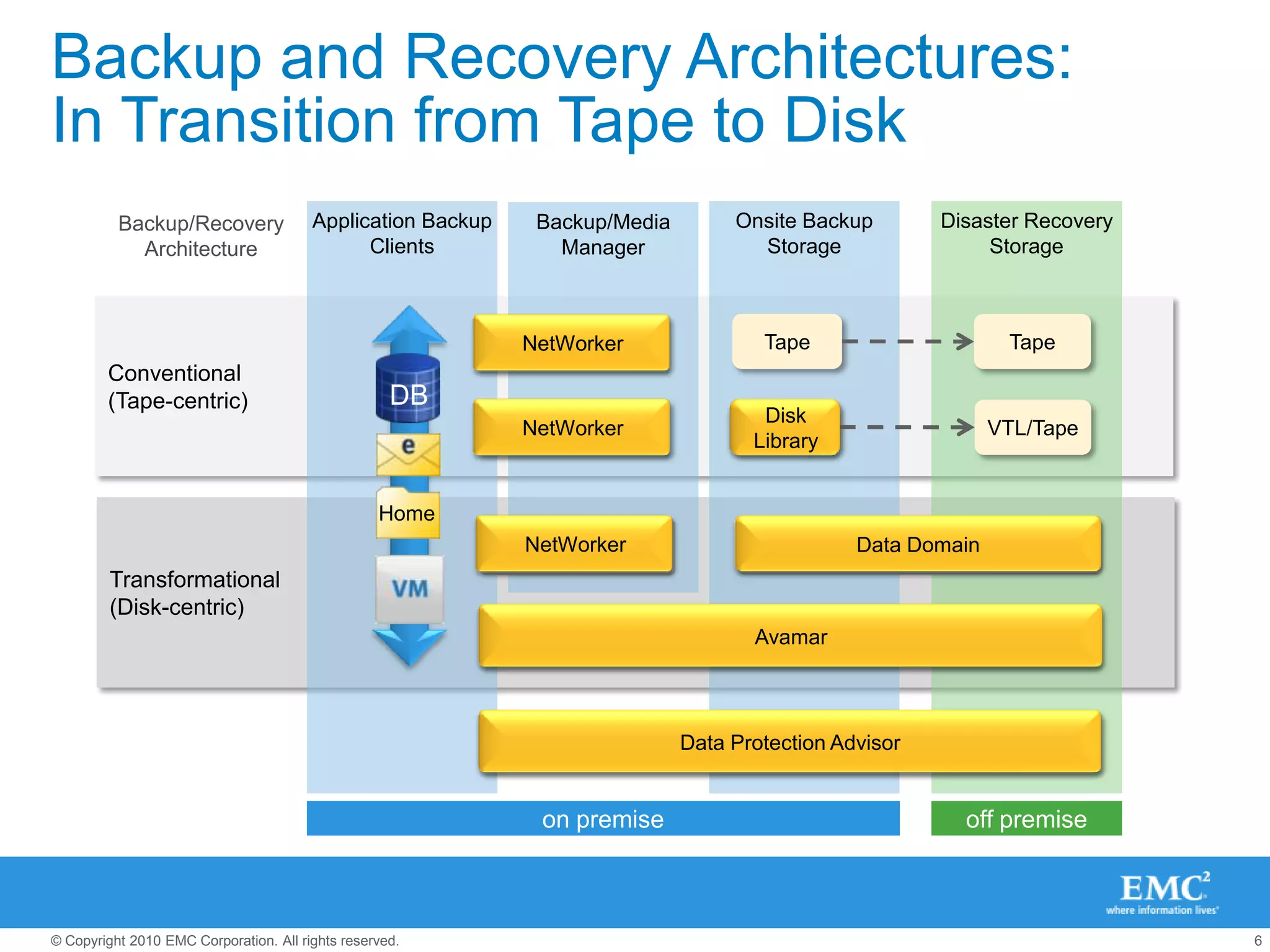
Backup and Recovery Architectures: In Transition from Tape to DiskNetWorkerTapeTapeBackup softwareNetWorkerBackup softwareVTLVTL/TapeNetWorkerData DomainDeduplication storageBackup softwareAvamarOnsite Backup StorageDisaster RecoveryStorageApplication BackupClientsBackup/MediaManagerBackup/Recovery ArchitectureConventional(Tape-centric)Transformational(Disk-centric)Disk LibraryDBDeduplication backup software and systemHomeData Protection AdvisorData Protection Management Softwareon premiseoff premise
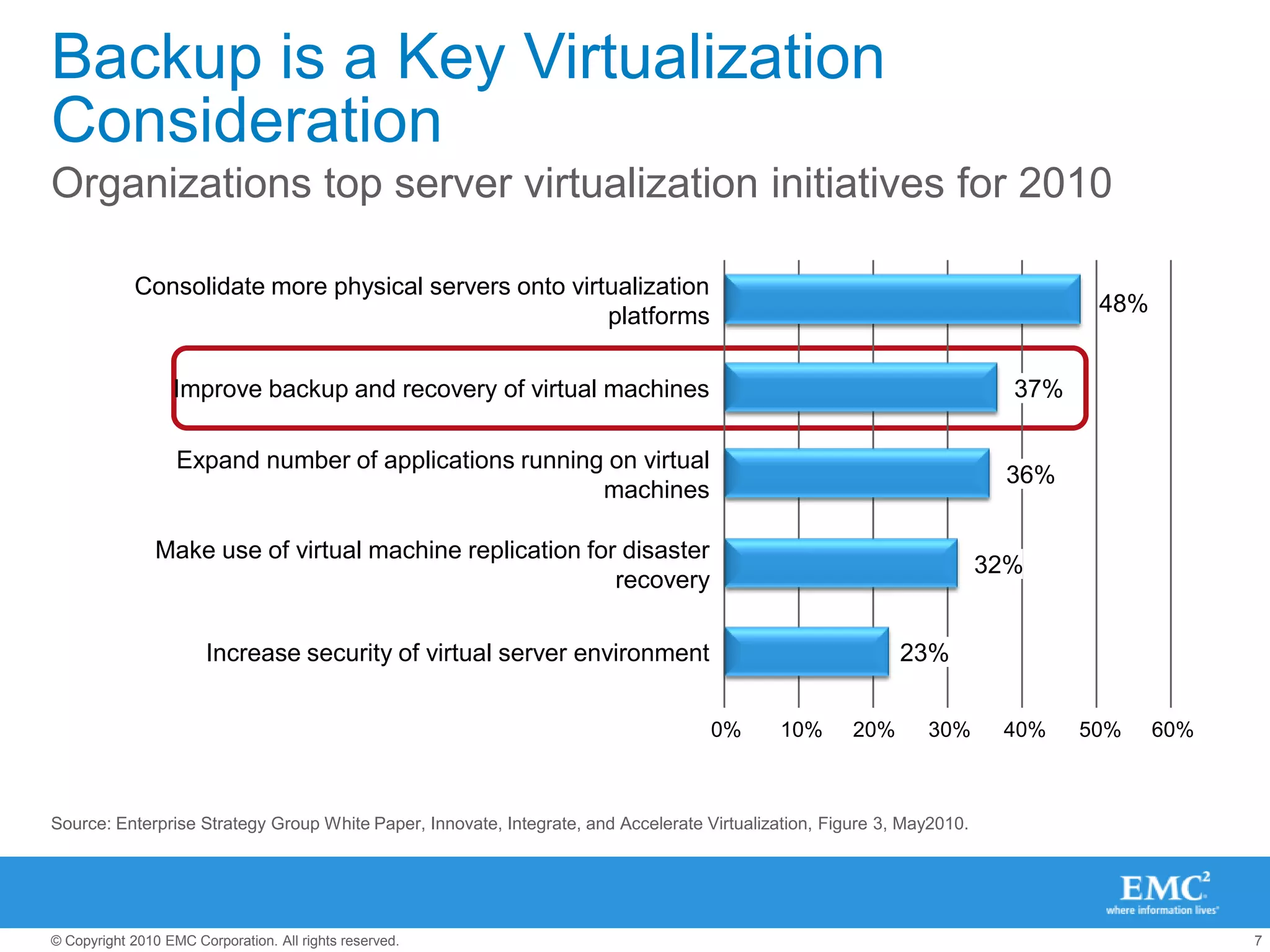
Backup is a Key Virtualization ConsiderationOrganizations top server virtualization initiatives for 2010Consolidate more physical servers onto virtualization platforms48%Improve backup and recovery of virtual machines37%Expand number of applications running on virtual machines36%Make use of virtual machine replication for disaster recovery32%Increase security of virtual server environment23%0%10%20%30%40%50%60%Source: Enterprise Strategy Group White Paper, Innovate, Integrate, and Accelerate Virtualization, Figure 3, May2010.
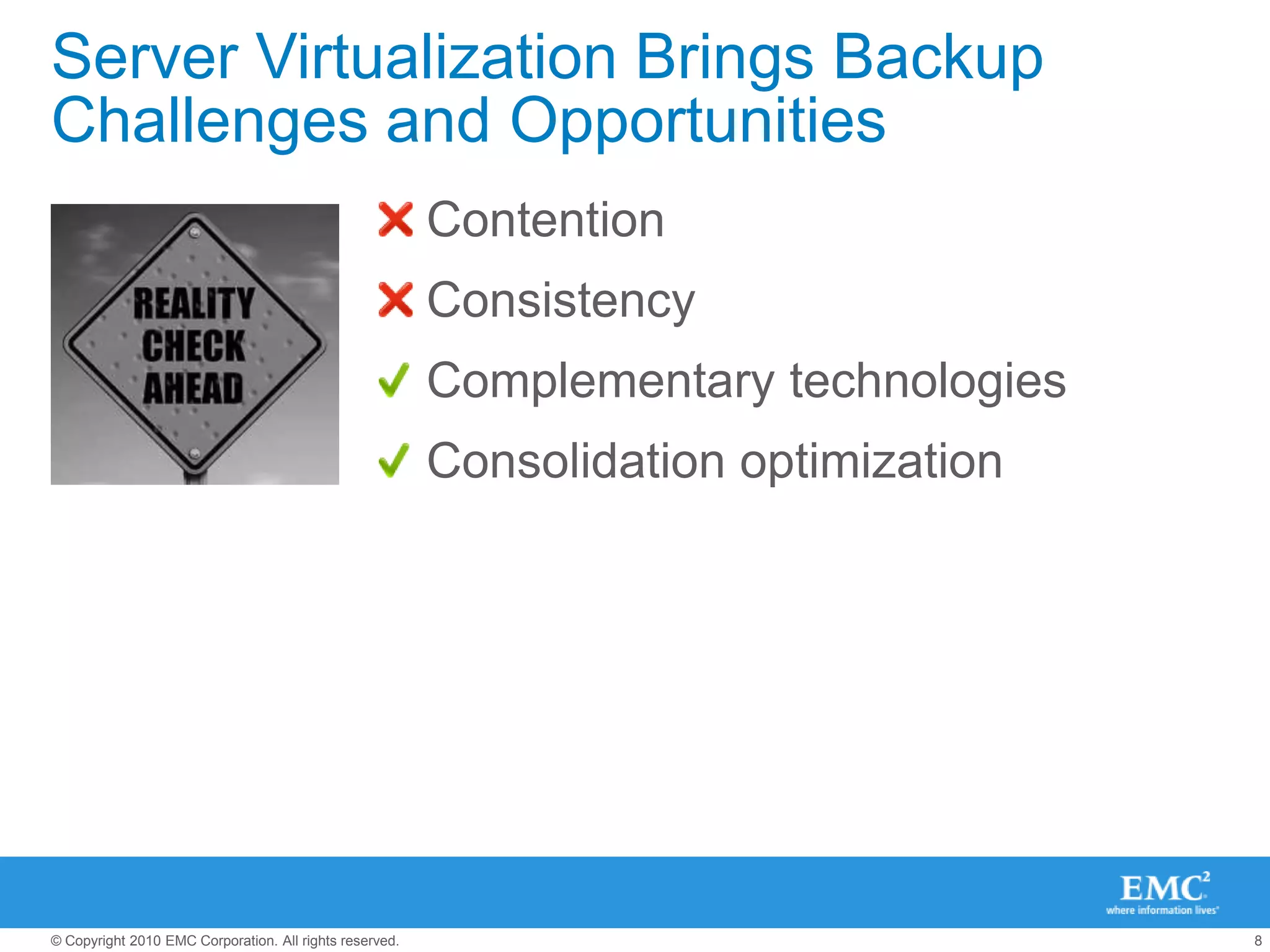
Server Virtualization Brings Backup Challenges and OpportunitiesContentionConsistencyComplementary technologiesConsolidation optimization
The “Must Have” ListBackup for VMware solutions Must address issues, smooth phase transitionsResolve resource contentionSupport both guest and image level backupProvide both file and full virtual machine recoveryMust provide business valueOffer value for both physical and virtual worlds Reduce downtime, cost and riskMust integrate with VMware infrastructureVMware vStorage API; VMware vCenter ServerVMware Site Recovery Manager (for DR automation)
Deduplication is the Key Relieve resource contentionSupport rapid virtual machine cloningContain backup storage growthEnable more effective disaster recovery
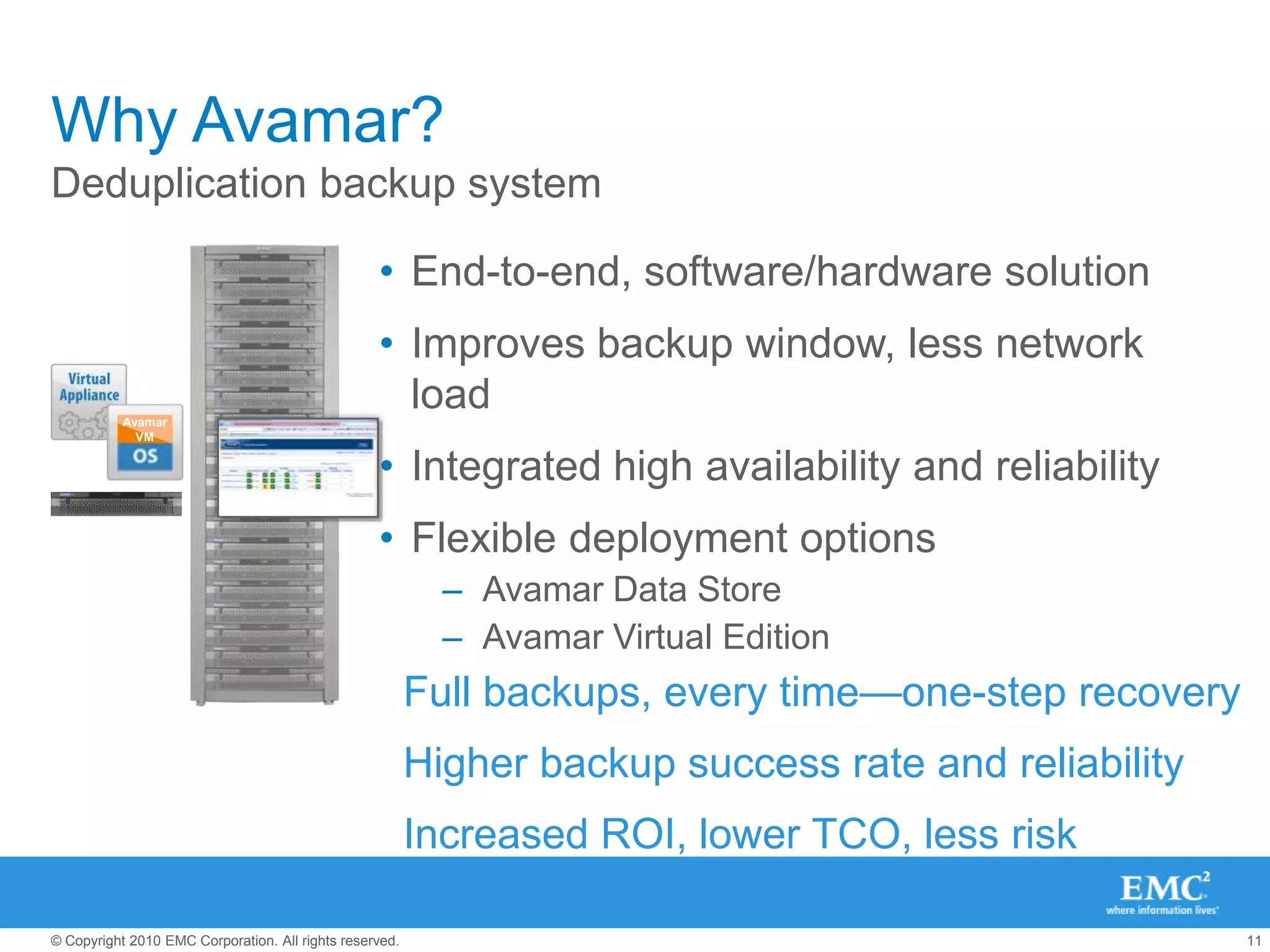
Why Avamar?Deduplication backup systemEnd-to-end, software/hardware solutionImproves backup window, less network loadIntegrated high availability and reliabilityFlexible deployment optionsAvamar Data StoreAvamar Virtual EditionAvamarVMFull backups, every time—one-step recoveryHigher backup success rate and reliabilityIncreased ROI, lower TCO, less risk
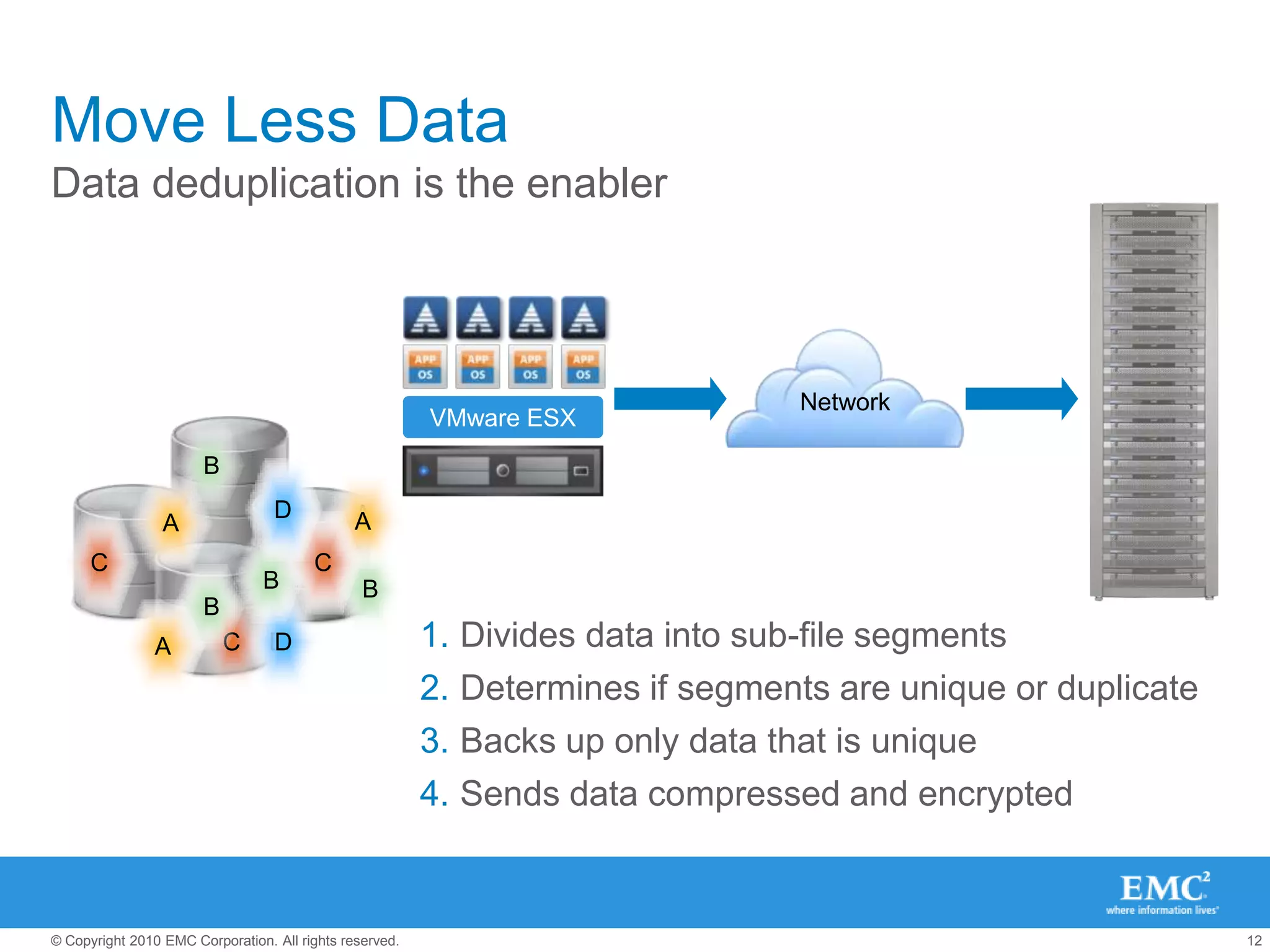
NetworkDDAACCC B B BDAADivides data into sub-file segmentsDetermines if segments are unique or duplicateBacks up only data that is uniqueSends data compressed and encrypted BDAACCVMware ESX B B BCDAMove Less DataData deduplication is the enabler
Avamar for VMwareOptimized for VMware backupGuest backupLow impact agents, relief from resource contention issuesImage backupIntegrated with VMware vStorage APIEasy file-level recovery from image backupTight VMware vCenter integrationDeployable as a virtual appliance—Avamar Virtual Edition
VMware Guest BackupNo-cost Avamar agents assure application consistencyAgent resides in each virtual machineDeduplicates within and across virtual machines – as if they were physical serversReduces resource contention and speeds backupsProvides file-level restore for Windows, Linux and SolarisAvamar AgentsVMware ESX
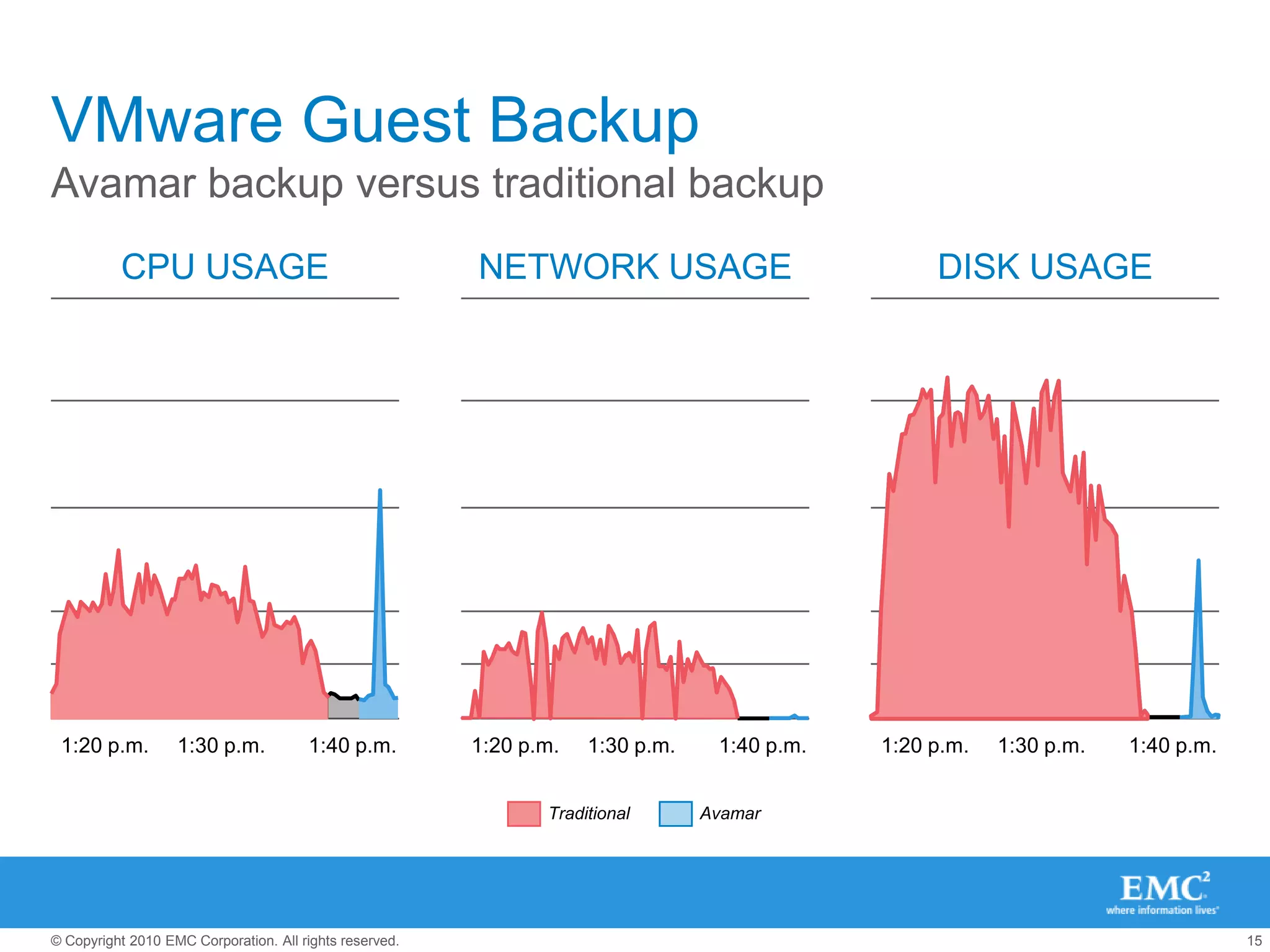
VMware Guest BackupAvamar backup versus traditional backupTraditionalAvamarCPU USAGENETWORK USAGEDISK USAGE1:20 p.m.1:30 p.m.1:40 p.m.1:20 p.m.1:30 p.m.1:40 p.m.1:20 p.m.1:30 p.m.1:40 p.m.
VMware Image BackupAvamar integration with VMware vStorage API Deduplication within and across VMDK filesLoad-balancing across proxy virtual machinesChange-block-tracking minimizes recovery timeFile level recovery from image backupReplication provides DR for backed up VMDKsVirtual MachinesVMware Virtualization LayerMountx86 ArchitectureResource PoolPhysical serverSANstorage= Avamar Software AgentAvamarserverPhysical server
Proxy Server Load BalancingAvamar efficiently uses available resourcesHow does this work?Avamar automatically assigns VMs backup jobs to available proxy servers using a round robin protocolBackups are distributed evenly across available virtual proxy serversBenefitsAutomatic and transparentMore efficient backups Better use of available resourcesSimplifies the management of virtual proxy serversApplied either globally or in groupsStorage LUNsVirtual MachinesVMwareVMwareVMwareDRSVMwareESX SERVER CLUSTERVMwareVMwareVMwareVMwareProxy Servers PoolAvamar
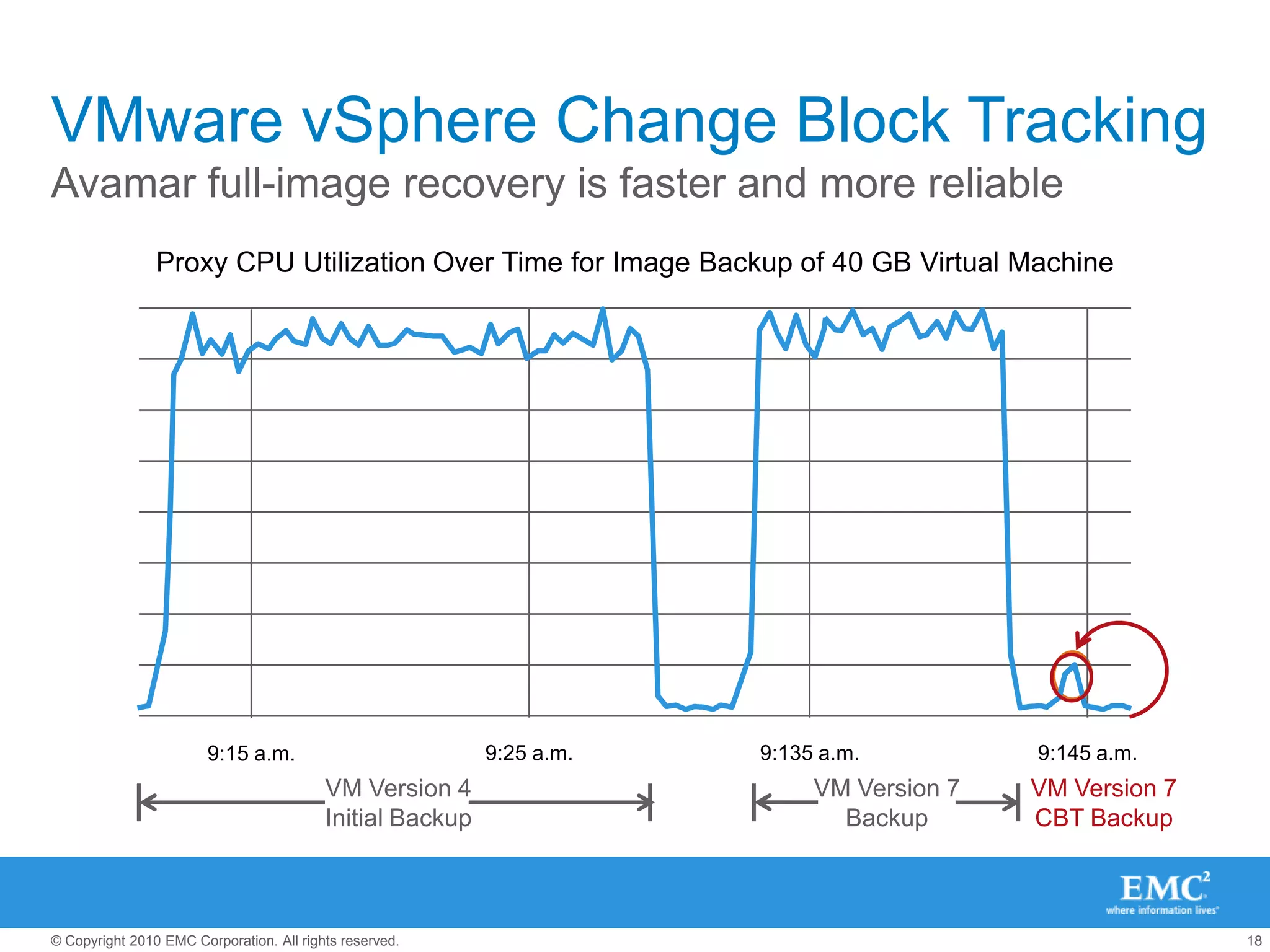
Proxy CPU Utilization Over Time for Image Backup of 40 GB Virtual MachineVMware vSphere Change Block TrackingAvamar full-image recovery is faster and more reliable9:25 a.m.9:135 a.m.9:145 a.m.9:15 a.m.VM Version 7CBT BackupVM Version 7BackupVM Version 4Initial Backup

EMC - 10martie2011

  • 1.
    BACKUP FOR VIRTUALMACHINESEMC Avamar for VMware EnvironmentsHoria Constantinescuhoria.constantinescu@emc.comBackup & Recovery Systems DivisionEMC Corporation
  • 2.
    Physical to VirtualEvolutionVMs were more than half of new logical servers deployed in 2009VM crossover15.012.510.0Millions7.55.02.50.0201220052006200720082009201020112012Physical serversVirtual MachinesSource: IDC MCS, Worldwide Server Virtualization Forecast, February 6, 2009
  • 3.
    VMware Adoption andData Protection NeedsPhase 1IT ProductionCost EfficiencyPhase 2Business ProductionQuality of ServicePhase 3ITaaSBusiness AgilityRapidly growing number of VMsGreater business continuity needsGreater need for improved SLAsLowering the data protection cost structure0%85%INCREASING DATA PROTECTION NEEDS70%Physical Environment50%30%15%100%0%50%100%Virtual Environment
  • 4.
  • 5.
    “Data protection paradigmsand architectures (especially backup and recovery) must change in order to adapt to virtualized environments.”Worldwide Storage for the Virtualized Environment Taxonomy (Page 1)Benjamin Woo, Laura DuBois, Noemi Greyzdorf, IDC, December 2010
  • 6.
    Backup and RecoveryArchitectures: In Transition from Tape to DiskNetWorkerTapeTapeBackup softwareNetWorkerBackup softwareVTLVTL/TapeNetWorkerData DomainDeduplication storageBackup softwareAvamarOnsite Backup StorageDisaster RecoveryStorageApplication BackupClientsBackup/MediaManagerBackup/Recovery ArchitectureConventional(Tape-centric)Transformational(Disk-centric)Disk LibraryDBDeduplication backup software and systemHomeData Protection AdvisorData Protection Management Softwareon premiseoff premise
  • 7.
    Backup is aKey Virtualization ConsiderationOrganizations top server virtualization initiatives for 2010Consolidate more physical servers onto virtualization platforms48%Improve backup and recovery of virtual machines37%Expand number of applications running on virtual machines36%Make use of virtual machine replication for disaster recovery32%Increase security of virtual server environment23%0%10%20%30%40%50%60%Source: Enterprise Strategy Group White Paper, Innovate, Integrate, and Accelerate Virtualization, Figure 3, May2010.
  • 8.
    Server Virtualization BringsBackup Challenges and OpportunitiesContentionConsistencyComplementary technologiesConsolidation optimization
  • 9.
    The “Must Have”ListBackup for VMware solutions Must address issues, smooth phase transitionsResolve resource contentionSupport both guest and image level backupProvide both file and full virtual machine recoveryMust provide business valueOffer value for both physical and virtual worlds Reduce downtime, cost and riskMust integrate with VMware infrastructureVMware vStorage API; VMware vCenter ServerVMware Site Recovery Manager (for DR automation)
  • 10.
    Deduplication is theKey Relieve resource contentionSupport rapid virtual machine cloningContain backup storage growthEnable more effective disaster recovery
  • 11.
    Why Avamar?Deduplication backupsystemEnd-to-end, software/hardware solutionImproves backup window, less network loadIntegrated high availability and reliabilityFlexible deployment optionsAvamar Data StoreAvamar Virtual EditionAvamarVMFull backups, every time—one-step recoveryHigher backup success rate and reliabilityIncreased ROI, lower TCO, less risk
  • 12.
    NetworkDDAACCC B BBDAADivides data into sub-file segmentsDetermines if segments are unique or duplicateBacks up only data that is uniqueSends data compressed and encrypted BDAACCVMware ESX B B BCDAMove Less DataData deduplication is the enabler
  • 13.
    Avamar for VMwareOptimizedfor VMware backupGuest backupLow impact agents, relief from resource contention issuesImage backupIntegrated with VMware vStorage APIEasy file-level recovery from image backupTight VMware vCenter integrationDeployable as a virtual appliance—Avamar Virtual Edition
  • 14.
    VMware Guest BackupNo-costAvamar agents assure application consistencyAgent resides in each virtual machineDeduplicates within and across virtual machines – as if they were physical serversReduces resource contention and speeds backupsProvides file-level restore for Windows, Linux and SolarisAvamar AgentsVMware ESX
  • 15.
    VMware Guest BackupAvamarbackup versus traditional backupTraditionalAvamarCPU USAGENETWORK USAGEDISK USAGE1:20 p.m.1:30 p.m.1:40 p.m.1:20 p.m.1:30 p.m.1:40 p.m.1:20 p.m.1:30 p.m.1:40 p.m.
  • 16.
    VMware Image BackupAvamarintegration with VMware vStorage API Deduplication within and across VMDK filesLoad-balancing across proxy virtual machinesChange-block-tracking minimizes recovery timeFile level recovery from image backupReplication provides DR for backed up VMDKsVirtual MachinesVMware Virtualization LayerMountx86 ArchitectureResource PoolPhysical serverSANstorage= Avamar Software AgentAvamarserverPhysical server
  • 17.
    Proxy Server LoadBalancingAvamar efficiently uses available resourcesHow does this work?Avamar automatically assigns VMs backup jobs to available proxy servers using a round robin protocolBackups are distributed evenly across available virtual proxy serversBenefitsAutomatic and transparentMore efficient backups Better use of available resourcesSimplifies the management of virtual proxy serversApplied either globally or in groupsStorage LUNsVirtual MachinesVMwareVMwareVMwareDRSVMwareESX SERVER CLUSTERVMwareVMwareVMwareVMwareProxy Servers PoolAvamar
  • 18.
    Proxy CPU UtilizationOver Time for Image Backup of 40 GB Virtual MachineVMware vSphere Change Block TrackingAvamar full-image recovery is faster and more reliable9:25 a.m.9:135 a.m.9:145 a.m.9:15 a.m.VM Version 7CBT BackupVM Version 7BackupVM Version 4Initial Backup
  • 19.
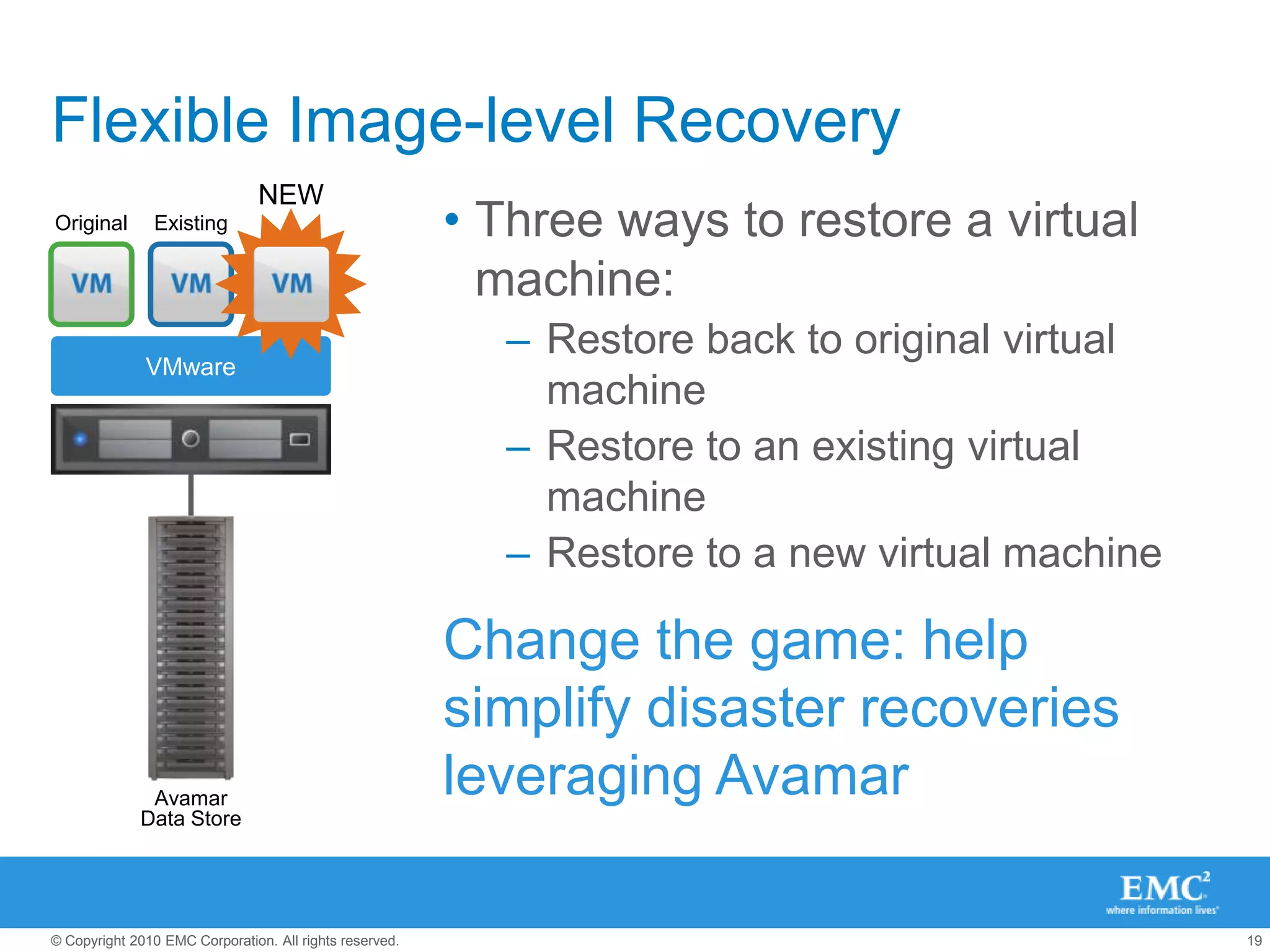
    Flexible Image-level RecoveryNEWThreeways to restore a virtual machine:Restore back to original virtual machineRestore to an existing virtual machineRestore to a new virtual machineOriginalExistingVMwareAvamarData StoreChange the game: help simplify disaster recoveries leveraging Avamar
  • 20.
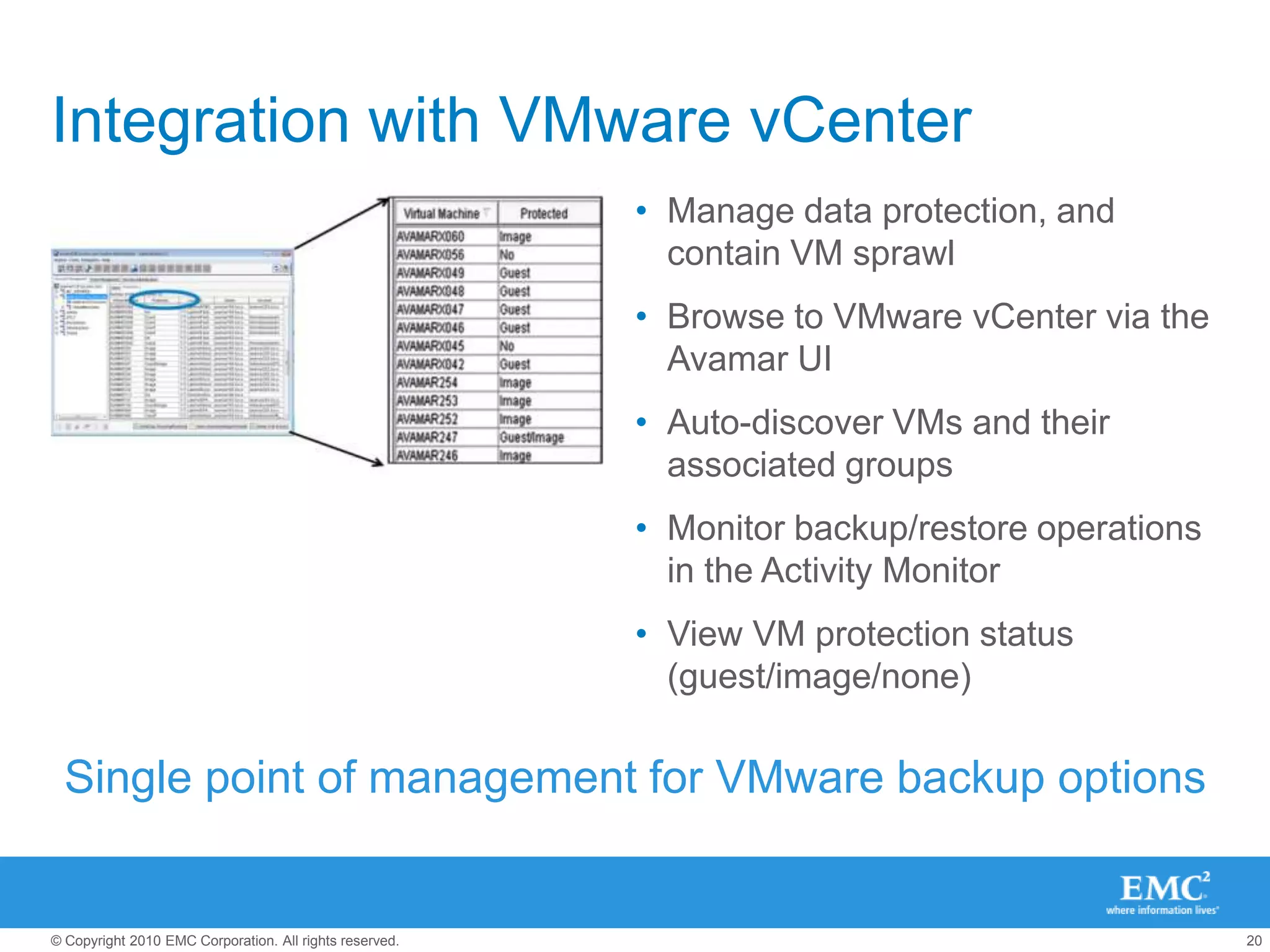
    Integration with VMwarevCenterManage data protection, and contain VM sprawlBrowse to VMware vCenter via the Avamar UIAuto-discover VMs and their associated groupsMonitor backup/restore operations in the Activity MonitorView VM protection status (guest/image/none)Single point of management for VMware backup options
  • 21.
    Customer Voices“An importantfeature for us in choosing Avamar was its remote replication. This allowed us to replicate backup data between our new production datacenter and DR datacenter, eliminating tape handling.”“We had the strategy to go to VMware, but the performance of our traditional backups was just crawling, so we had to bring in Avamar first before we could grow it further. Avamar was, and is, a critical component to our virtualization initiative.”“We’re basically virtualizing everything we can with VMware. Avamar helps us manage this transition more efficiently and reliably by giving us a standard way to manage both physical and virtual backups.”
  • 22.
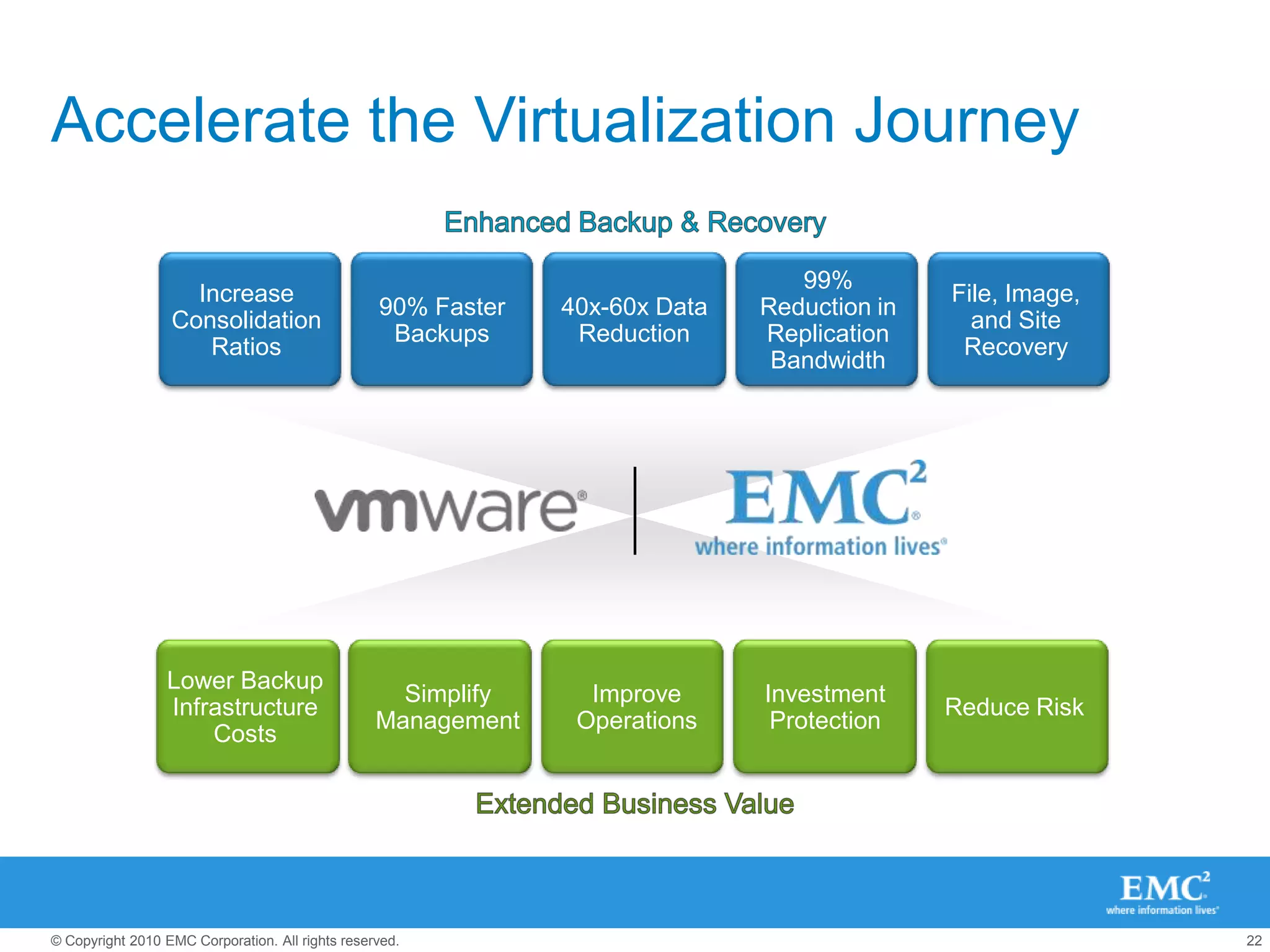
    Accelerate the VirtualizationJourneyEnhanced Backup & Recovery99% Reduction in Replication BandwidthIncrease Consolidation RatiosFile, Image, and Site Recovery40x-60x Data Reduction90% Faster BackupsLower Backup Infrastructure CostsInvestment ProtectionReduce RiskSimplify ManagementImprove OperationsExtended Business Value
  • 23.
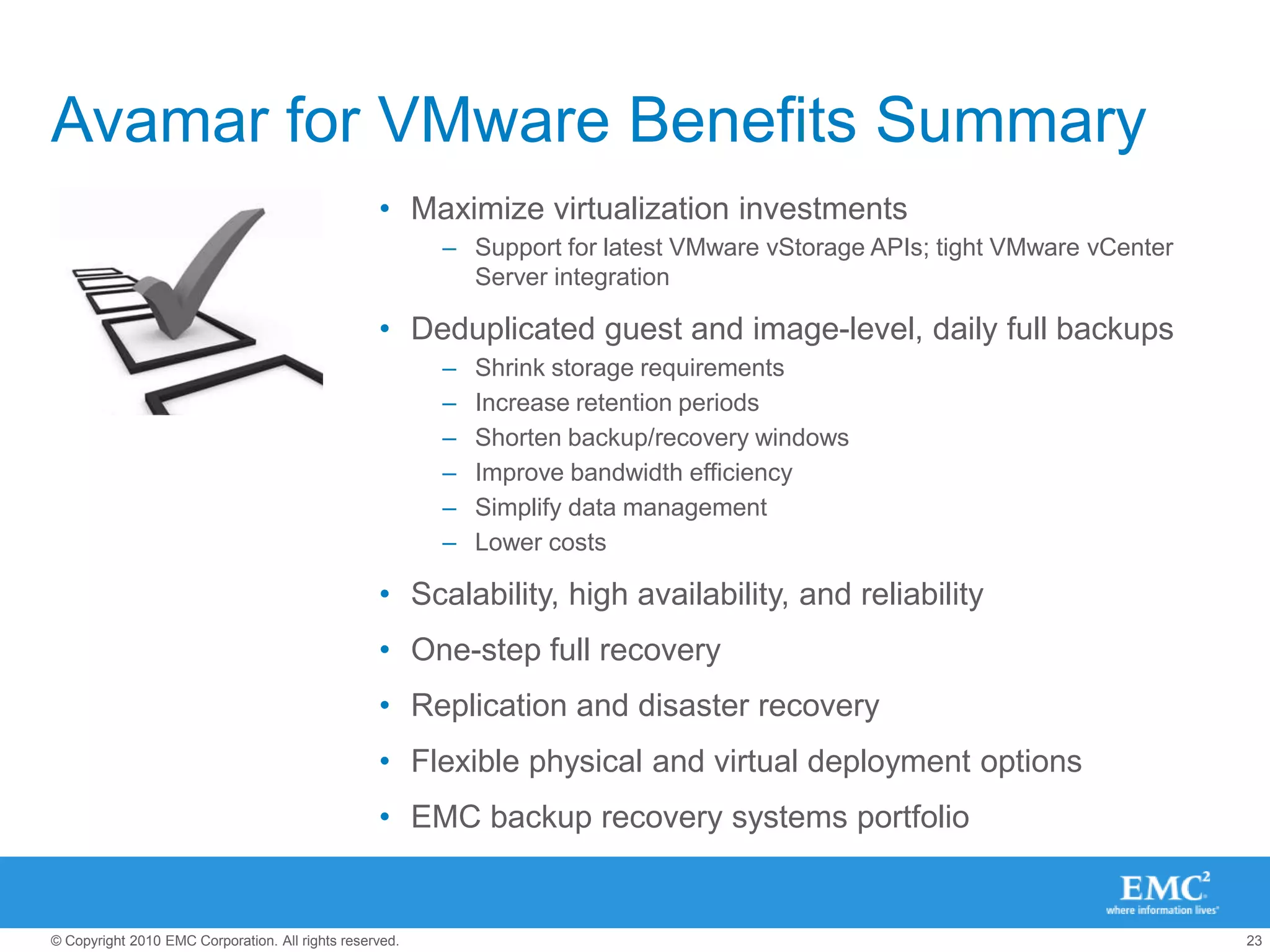
    Avamar for VMwareBenefits SummaryMaximize virtualization investmentsSupport for latest VMware vStorage APIs; tight VMware vCenter Server integrationDeduplicated guest and image-level, daily full backupsShrink storage requirementsIncrease retention periodsShorten backup/recovery windowsImprove bandwidth efficiencySimplify data managementLower costsScalability, high availability, and reliabilityOne-step full recoveryReplication and disaster recoveryFlexible physical and virtual deployment optionsEMC backup recovery systems portfolio
  • 24.
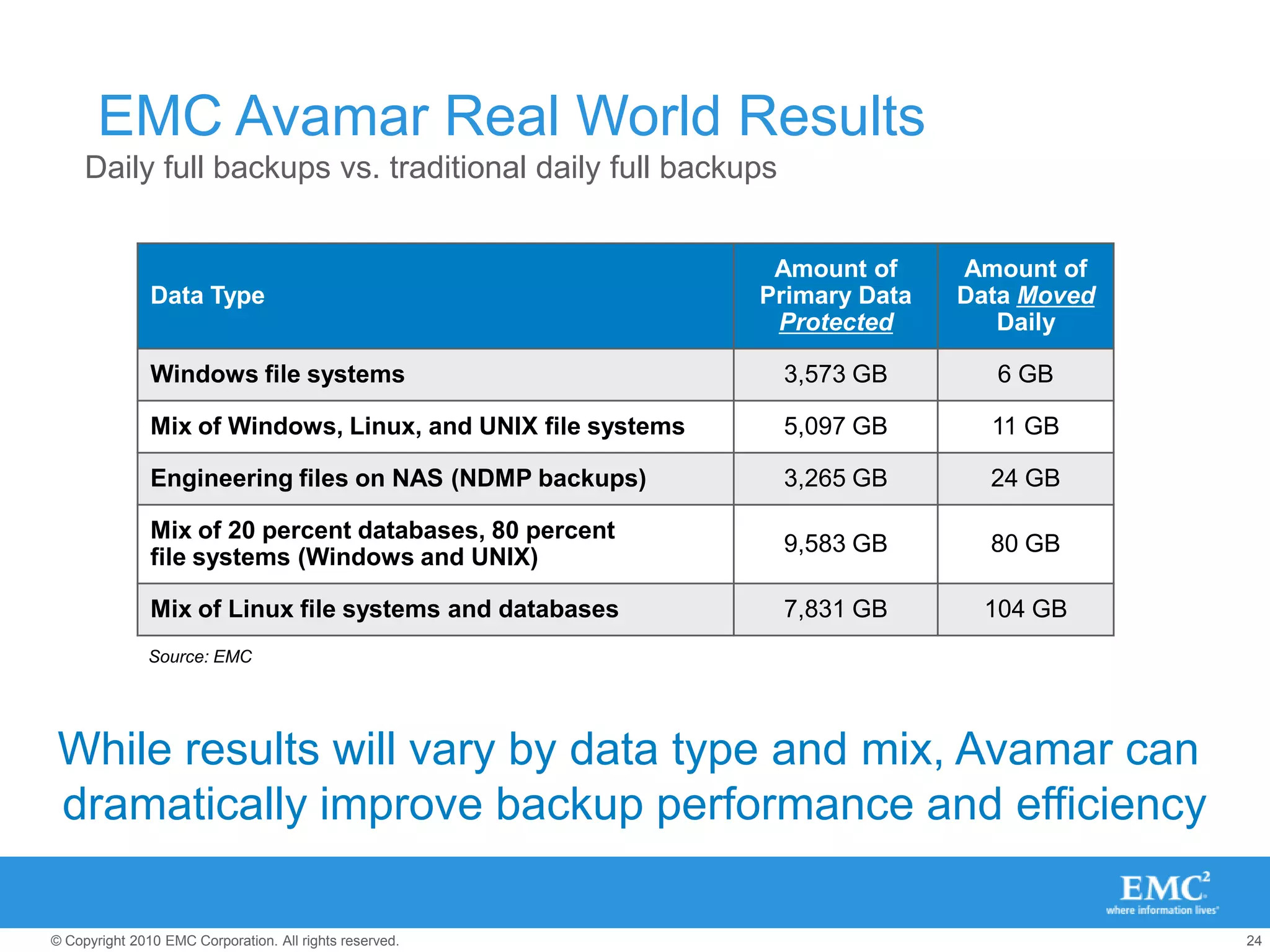
    EMC Avamar RealWorld ResultsDaily full backups vs. traditional daily full backupsSource: EMCWhile results will vary by data type and mix, Avamar can dramatically improve backup performance and efficiency
  • 25.
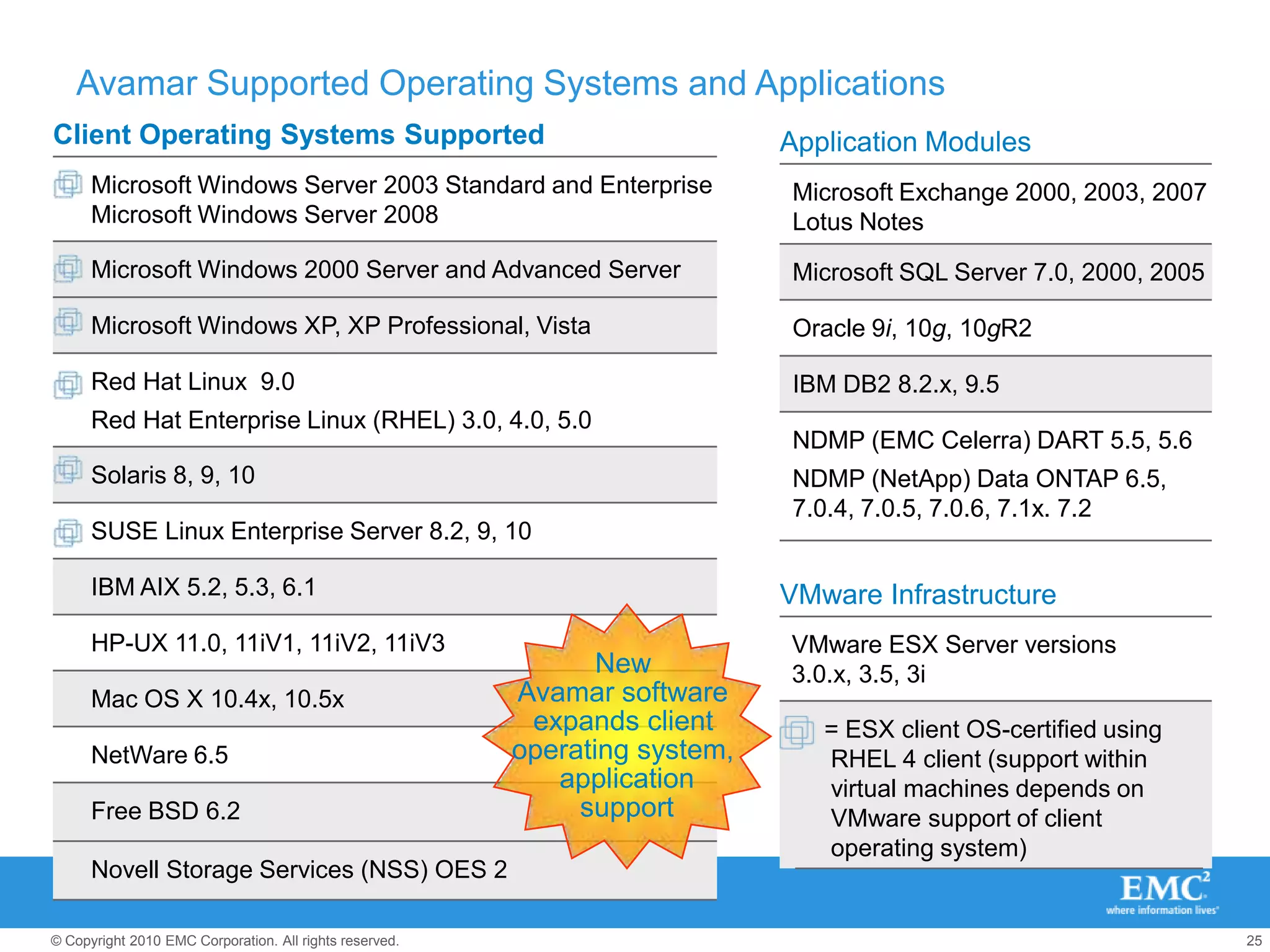
    Avamar Supported OperatingSystems and ApplicationsApplication ModulesMicrosoft Exchange 2000, 2003, 2007Lotus NotesMicrosoft SQL Server 7.0, 2000, 2005Oracle 9i, 10g, 10gR2IBM DB2 8.2.x, 9.5NDMP (EMC Celerra) DART 5.5, 5.6NDMP (NetApp) Data ONTAP 6.5, 7.0.4, 7.0.5, 7.0.6, 7.1x. 7.2VMware InfrastructureNew Avamar software expands client operating system, applicationsupportVMware ESX Server versions 3.0.x, 3.5, 3i= ESX client OS-certified using RHEL 4 client (support within virtual machines depends on VMware support of client operating system)
  • 27.
    EMC #1IN BACKUPFOR VIRTUALIZATION.
  • 28.
    Avamar Virtual Editionfor VMwareAvamar Server deployed as a virtual applianceLeverages existing ESX servers and storageReplication (of applications and storage)Facilitates rapid, cost-effective deployment and return on investmentSupports vMotion for deployment and flexibilityUp to 2 Avamar Virtual Edition for VMware virtual appliances per VMware ESX server for scalabilityAvamarVMAvamarVMAvamarVMResource PoolVMware Virtualization Layerx86 Architecture
  • 29.
    “Given the functionalstrength and deployment flexibility of the product family, we believe that Avamar for VMware has the potential to become the de facto standard for backup and recovery in medium-to-large VMware deployments. At the very least, the current offering provides a yardstick against which other solutions in this space will be measured. VMware customers can look forward to an ever expanding set of features and capabilities as the product evolves over the coming year.”EMC Avamar for VMware: Tailor-Made Backup and Recovery for VMware Infrastructure Environments ArunTaneja, Founder Taneja Group, February 2009Avamar and VMware