POINT TO POINT WIRELESS SOLUTIONS GROUP


                 Cambium
                 PTP 600 Series
                 Release Notes
                 System Release 600-10-04
1 INTRODUCTION
This document provides information for the Cambium Networks PTP 600 Series System
Release PTP 600-10-04.

Software updates for PTP products are available from:

       www.cambiumnetworks.com/support/ptp/software

The information in this document is subject to change without notice. The
recommendations, technical data, configurations and statements in this document are
believed to be reliable and accurate, but are presented without implied or express
warranty. Users must take full responsibility for their applications of any product specified
in this document. The information in this document is proprietary to Cambium Networks
Ltd.


2 PTP VARIANTS
System Release 600-10-04 is compatible with all existing PTP 600 hardware variants.


3 RELEASED PRODUCTS
3.1 Embedded software
ODU:

       Boot software, BOOT-01-02

       Recovery software, RECOVERY-08-01, RECOVERY-09-00

       Standard application software, 600-10-04

       UC-APL application software UC-APL-600-10-04

       Management Information Base (MIB), 600-10-04

PTP-SYNC:

       Boot Loader, v0.04

       Firmware, v00.07

       Main application software, v01.01

3.2 Link Planner software
Link Planner 3.3.1.

3.3 User guide
PTP 600 User Guide, phn-2512 005v000.


phn-3018 001v000 – August 2012                                                       Page 2 of 8
4 NEW FEATURES
4.1 New region (RC28) for 5.8 GHz Greece
System Release 600-10-04 supports a new region code (RC28) for operation in Greece, with
the following characteristics: 36 dBm EIRP, 23 dBm/MHz EIRP density, 5725 MHz to 5795
MHz.

4.2 New region (RC29) for 5.8 GHz Portugal, Iceland, Serbia
System Release 600-10-04 supports a new region code (RC29) for operation in Portugal,
Iceland and Serbia, with the following characteristics: 36 dBm EIRP, 23 dBm/MHz EIRP
density, 5725 MHz to 5850 MHz.

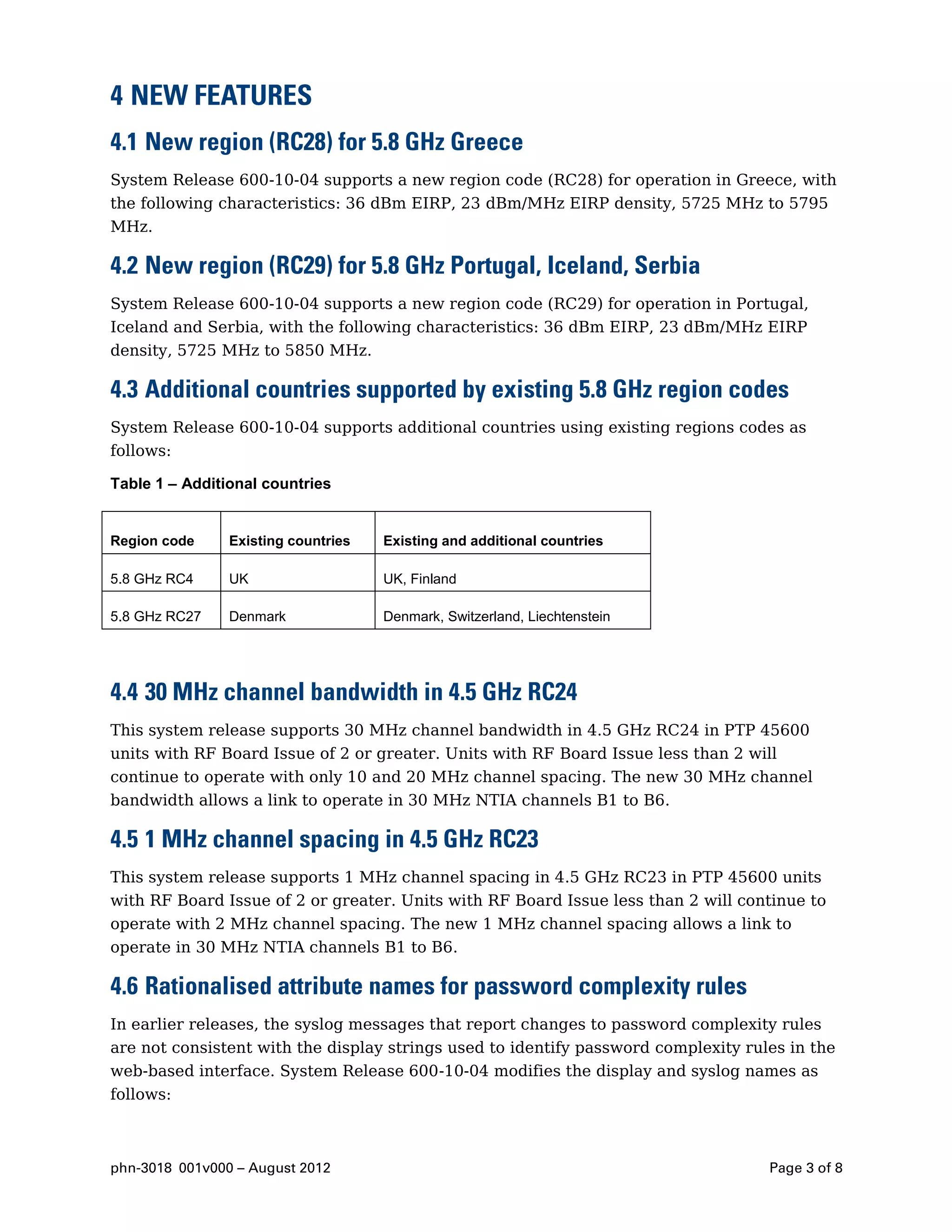
4.3 Additional countries supported by existing 5.8 GHz region codes
System Release 600-10-04 supports additional countries using existing regions codes as
follows:

Table 1 – Additional countries


Region code     Existing countries   Existing and additional countries

5.8 GHz RC4     UK                   UK, Finland

5.8 GHz RC27    Denmark              Denmark, Switzerland, Liechtenstein


4.4 30 MHz channel bandwidth in 4.5 GHz RC24
This system release supports 30 MHz channel bandwidth in 4.5 GHz RC24 in PTP 45600
units with RF Board Issue of 2 or greater. Units with RF Board Issue less than 2 will
continue to operate with only 10 and 20 MHz channel spacing. The new 30 MHz channel
bandwidth allows a link to operate in 30 MHz NTIA channels B1 to B6.

4.5 1 MHz channel spacing in 4.5 GHz RC23
This system release supports 1 MHz channel spacing in 4.5 GHz RC23 in PTP 45600 units
with RF Board Issue of 2 or greater. Units with RF Board Issue less than 2 will continue to
operate with 2 MHz channel spacing. The new 1 MHz channel spacing allows a link to
operate in 30 MHz NTIA channels B1 to B6.

4.6 Rationalised attribute names for password complexity rules
In earlier releases, the syslog messages that report changes to password complexity rules
are not consistent with the display strings used to identify password complexity rules in the
web-based interface. System Release 600-10-04 modifies the display and syslog names as
follows:


phn-3018 001v000 – August 2012                                                      Page 3 of 8
Maximum ASCII Series is changed to Maximum Sequential Characters

     Maximum Consecutive Character Type is changed to Maximum Consecutive
     Characters

     Maximum Consecutive Repeated Characters is changed to Maximum Repeated
     Characters

     Minimum Number Of Specific Characters is changed to Minimum Mandatory
     Characters

4.7 View Summary and Status Pages without Login
The existing Disable Front Page Login control name in the web-based interface has been
renamed View Summary And Status Pages Without Login in 600-10-04, with the operation
of the control unchanged. The name change is intended to clarify the sense and operation of
the control.

4.8 Security wizard control for cross-site request forgery protection
In 600-10-04, the Security Wizard now includes the Cross-Site Request Forgery Protection
control. This change is intended to draw attention to this important control during security
configuration.

4.9 Security-related parameters in back-up and restore
System Release 600-10-04 saves the following attribute values during a configuration back-
up process and loads the same values during a configuration restore process:

     autoLogoutPeriod

     maximumNumberOfLoginAttempts

     loginAttemptLockoutAction

     loginAttemptLockoutPeriod

     passwordExpiryPeriod

     minimumPasswordChangePeriod

     minimumPasswordLength

     passwordReuse

     passwordExpiryAction

     webpageSessionControl

     passwordCanContainUserName

     minimumMandatoryCharacters

     maximumRepeatedCharacters

     maximumConsecutiveCharacters

     maximumSequentialCharacters


phn-3018 001v000 – August 2012                                                      Page 4 of 8
maximumRepeatedPatternLength

     matchReversedPatterns

     minimumNumberOfChangedCharacters

     specialCharacters
     displayLoginInformation

     requireAcknowledgementOfNotices

     crossSiteRequestForgeryProtection

4.10 SNMP read/write access for Master Slave Mode
System Release 600-10-04 provides read/write access for the masterSlaveMode object in
the PTP 600 SNMP MIB. This object previously provided read-only access. If the mode of a
unit is changed via the SNMP MIB, the new mode will take effect following a reboot.

4.11 Lowest Ethernet Modulation Mode
System Release 600-10-04 introduces a new Lowest Ethernet Modulation Mode control in
the Installation Wizard and in the System Configuration page of the web-based interface.
Ethernet data will be bridged between the Data port and the Wireless Port of the ODU
when the wireless link is up and the modulation mode of the wireless link is equal to or
greater than the Lowest Ethernet Modulation Mode.

If the Lowest Ethernet Modulation Mode is set to BPSK 0.63 Single then bridging does not
depend on modulation mode, and the behaviour of the link is unchanged from earlier
system releases.

This system release also introduces an Ethernet Bridging Status alarm in the web-based
interface. Ethernet Bridging Status is set to Disabled when the modulation mode of the
wireless link is lower than Lowest Ethernet Modulation Mode or when the wireless link is
down. Ethernet Bridging Status is also supported in the SNMP, SMTP and syslog interfaces.

Lowest Ethernet Modulation Mode is inactive in an ODU in install armed state.

Data Port and Management Port Wireless Down Alert actions now take place when
Ethernet Bridging Status transitions to the Disabled state.

This release introduces an Ethernet Bridging Availability control on the System Statistics
web-page. Ethernet Bridging Availability is calculated as the total time that Ethernet
Bridging Status has been in Enabled state divided by the total elapsed time, where both
times are counted since the last counter reset.

The Lowest Ethernet Modulation Mode control is likely to be useful in networks that have
alternate routes, for example where PTP links are in a ring or mesh topology. In this
application, Lowest Ethernet Modulation Mode should be set to ensure that an active link
will provide at least the minimum necessary capacity for high-priority constant bit rate
traffic such as voice over IP or TDM pseudo wire. This means that an active link will be


phn-3018 001v000 – August 2012                                                      Page 5 of 8
blocked when the capacity falls below the minimum required, triggering a routing change
that brings alternate links into use.

Use the Link Planner to determine the capacity of a link at different modulation modes.

4.12 Complete the Installation Wizard without entering the Install Arm
     State
System Release 600-10-04 replaces the existing Installation Tones control in the web-based
interface with a new Installation Mode control. The Installation Mode control allows an
operator to change configuration of the ODU through use of the Installation Wizard without
arming the ODU for installation.

Operators should set Installation Mode to Arm With Tones or Arm Without Tones when
installing a new link, when aligning antennas, or when changing link range. Operators may
set Installation Mode to Change Config Without Arming when making a configuration
change where alignment and range remain constant.

The option to complete the Installation Wizard without arming the ODU will be particularly
useful if a link is reconfigured whilst it carries significant data traffic. An armed ODU
operates in BPSK until disarmed by management action. If armed ODUs are overloaded
with data traffic, and are configured without enhanced QoS for network management, this
can prevent management of the remote end of the link, and thus disarming of the remote
unit.


5 PROBLEMS AND LIMITATIONS CORRECTED
Syslog message is not sent when the syslog client is disabled
In earlier releases, a syslog message is not generated when the syslog client is disabled.
This has been corrected in 600-10-04.

Syslog message Tx Max Power does not match attribute name Maximum Transmit
Power
In 600-10-04, changes to transmitter power are reported using the attribute name
Maximum Transmit Power, to match the attribute name on the System Status web-page.

User account names not reset by Reset To Factory Defaults button
In earlier releases, the Reset To Factory Defaults button on the Local User Accounts web-
page resets passwords of all identity-based accounts, and disables accounts 4 to 10, as
expected. However, the existing account names are not reset for accounts 4 to 10. In 600-
10-04 account names are correctly reset for accounts 4 to 10.

MD5 authentication problems in SNMPv3
In earlier releases, SNMP transactions using MD5 authentication fail occasionally,
sometimes resulting in a reboot of the ODU. This problem has been corrected in 600-10-04.


phn-3018 001v000 – August 2012                                                        Page 6 of 8
6 KNOWN PROBLEMS OR LIMITATIONS
Passwords reset on upgrade from 600-08-50
Passwords will be reset on upgrade from 600-08-50 or earlier releases to 600-10-04. Users
must take care to restore the passwords, or create new passwords, following the upgrade.

Downgrading 600-10-04 application software
PTP 600-10-00 introduced a new 2048-bit DSA signature in the download package for the
main application image. This results in the following restrictions:

     A unit with application software 600-10-04 and Recovery-10-02 cannot be downgraded
     to a release older than 600-10-00.

     A unit with application software 600-10-04 and Recovery-08-01 or Recovery-09-00 can
     be downgraded to any release from 600-08-03 to 600-09-10 inclusive by loading the
     older application software image using recovery.

     A unit with application software 600-10-04 cannot be downgraded to a release older
     than 600-08-03 under any circumstances.

Note that downgrade should always be done by erasing all configuration data and loading
the older application software in the recovery mode.


7 TECHNICAL SUPPORT
For Technical Support, please visit our support pages at:

     www.cambiumnetworks.com/support

Or contact the PTP Technical Support helpdesk using the phone numbers available from:
     http://www.cambiumnetworks.com/support/technical.php


phn-3018 001v000 – August 2012                                                    Page 7 of 8
Cambium Networks
Cambium Networks provides professional grade fixed wireless broadband and microwave
solutions for customers around the world. Our solutions are deployed in thousands of
networks in over 153 countries, with our innovative technologies providing reliable, secure,
cost-effective connectivity that’s easy to deploy and proven to deliver outstanding metrics.

Our award-winning Point to Point (PTP) radio solutions operate in licensed, unlicensed and
defined use frequency bands including specific FIPS 140-2 solutions for the U.S. Federal
market. Ruggedized for 99.999% availability, our PTP solutions have an impeccable track
record for delivering reliable high-speed backhaul connectivity even in the most challenging
non-line-of-sight RF environments.

Our flexible Point-to-Multipoint (PMP) solutions operate in the licensed, unlicensed and
federal frequency bands, providing reliable, secure, cost effective access networks. With
more than three million modules deployed in networks around the world, our PMP access
network solutions prove themselves day-in and day-out in residential access, leased line
replacement, video surveillance and smart grid infrastructure applications.

Cambium Networks solutions are proven, respected leaders in the wireless broadband
industry. We design, deploy and deliver innovative data, voice and video connectivity
solutions that enable and ensure the communications of life, empowering personal,
commercial and community growth virtually everywhere in the world.


                                                                       www.cambiumnetworks.com
Cambium Networks and the stylized circular logo are trademarks of Cambium Networks, Ltd. All other
trademarks are the property of their respective owners.
© Copyright 2012 Cambium Networks, Ltd. All rights reserved.

Cambium ptp 600 series 10 04 system release note

  • 1.
    POINT TO POINTWIRELESS SOLUTIONS GROUP Cambium PTP 600 Series Release Notes System Release 600-10-04
  • 2.
    1 INTRODUCTION This documentprovides information for the Cambium Networks PTP 600 Series System Release PTP 600-10-04. Software updates for PTP products are available from: www.cambiumnetworks.com/support/ptp/software The information in this document is subject to change without notice. The recommendations, technical data, configurations and statements in this document are believed to be reliable and accurate, but are presented without implied or express warranty. Users must take full responsibility for their applications of any product specified in this document. The information in this document is proprietary to Cambium Networks Ltd. 2 PTP VARIANTS System Release 600-10-04 is compatible with all existing PTP 600 hardware variants. 3 RELEASED PRODUCTS 3.1 Embedded software ODU: Boot software, BOOT-01-02 Recovery software, RECOVERY-08-01, RECOVERY-09-00 Standard application software, 600-10-04 UC-APL application software UC-APL-600-10-04 Management Information Base (MIB), 600-10-04 PTP-SYNC: Boot Loader, v0.04 Firmware, v00.07 Main application software, v01.01 3.2 Link Planner software Link Planner 3.3.1. 3.3 User guide PTP 600 User Guide, phn-2512 005v000. phn-3018 001v000 – August 2012 Page 2 of 8
  • 3.
    4 NEW FEATURES 4.1New region (RC28) for 5.8 GHz Greece System Release 600-10-04 supports a new region code (RC28) for operation in Greece, with the following characteristics: 36 dBm EIRP, 23 dBm/MHz EIRP density, 5725 MHz to 5795 MHz. 4.2 New region (RC29) for 5.8 GHz Portugal, Iceland, Serbia System Release 600-10-04 supports a new region code (RC29) for operation in Portugal, Iceland and Serbia, with the following characteristics: 36 dBm EIRP, 23 dBm/MHz EIRP density, 5725 MHz to 5850 MHz. 4.3 Additional countries supported by existing 5.8 GHz region codes System Release 600-10-04 supports additional countries using existing regions codes as follows: Table 1 – Additional countries Region code Existing countries Existing and additional countries 5.8 GHz RC4 UK UK, Finland 5.8 GHz RC27 Denmark Denmark, Switzerland, Liechtenstein 4.4 30 MHz channel bandwidth in 4.5 GHz RC24 This system release supports 30 MHz channel bandwidth in 4.5 GHz RC24 in PTP 45600 units with RF Board Issue of 2 or greater. Units with RF Board Issue less than 2 will continue to operate with only 10 and 20 MHz channel spacing. The new 30 MHz channel bandwidth allows a link to operate in 30 MHz NTIA channels B1 to B6. 4.5 1 MHz channel spacing in 4.5 GHz RC23 This system release supports 1 MHz channel spacing in 4.5 GHz RC23 in PTP 45600 units with RF Board Issue of 2 or greater. Units with RF Board Issue less than 2 will continue to operate with 2 MHz channel spacing. The new 1 MHz channel spacing allows a link to operate in 30 MHz NTIA channels B1 to B6. 4.6 Rationalised attribute names for password complexity rules In earlier releases, the syslog messages that report changes to password complexity rules are not consistent with the display strings used to identify password complexity rules in the web-based interface. System Release 600-10-04 modifies the display and syslog names as follows: phn-3018 001v000 – August 2012 Page 3 of 8
  • 4.
    Maximum ASCII Seriesis changed to Maximum Sequential Characters Maximum Consecutive Character Type is changed to Maximum Consecutive Characters Maximum Consecutive Repeated Characters is changed to Maximum Repeated Characters Minimum Number Of Specific Characters is changed to Minimum Mandatory Characters 4.7 View Summary and Status Pages without Login The existing Disable Front Page Login control name in the web-based interface has been renamed View Summary And Status Pages Without Login in 600-10-04, with the operation of the control unchanged. The name change is intended to clarify the sense and operation of the control. 4.8 Security wizard control for cross-site request forgery protection In 600-10-04, the Security Wizard now includes the Cross-Site Request Forgery Protection control. This change is intended to draw attention to this important control during security configuration. 4.9 Security-related parameters in back-up and restore System Release 600-10-04 saves the following attribute values during a configuration back- up process and loads the same values during a configuration restore process: autoLogoutPeriod maximumNumberOfLoginAttempts loginAttemptLockoutAction loginAttemptLockoutPeriod passwordExpiryPeriod minimumPasswordChangePeriod minimumPasswordLength passwordReuse passwordExpiryAction webpageSessionControl passwordCanContainUserName minimumMandatoryCharacters maximumRepeatedCharacters maximumConsecutiveCharacters maximumSequentialCharacters phn-3018 001v000 – August 2012 Page 4 of 8
  • 5.
    maximumRepeatedPatternLength matchReversedPatterns minimumNumberOfChangedCharacters specialCharacters displayLoginInformation requireAcknowledgementOfNotices crossSiteRequestForgeryProtection 4.10 SNMP read/write access for Master Slave Mode System Release 600-10-04 provides read/write access for the masterSlaveMode object in the PTP 600 SNMP MIB. This object previously provided read-only access. If the mode of a unit is changed via the SNMP MIB, the new mode will take effect following a reboot. 4.11 Lowest Ethernet Modulation Mode System Release 600-10-04 introduces a new Lowest Ethernet Modulation Mode control in the Installation Wizard and in the System Configuration page of the web-based interface. Ethernet data will be bridged between the Data port and the Wireless Port of the ODU when the wireless link is up and the modulation mode of the wireless link is equal to or greater than the Lowest Ethernet Modulation Mode. If the Lowest Ethernet Modulation Mode is set to BPSK 0.63 Single then bridging does not depend on modulation mode, and the behaviour of the link is unchanged from earlier system releases. This system release also introduces an Ethernet Bridging Status alarm in the web-based interface. Ethernet Bridging Status is set to Disabled when the modulation mode of the wireless link is lower than Lowest Ethernet Modulation Mode or when the wireless link is down. Ethernet Bridging Status is also supported in the SNMP, SMTP and syslog interfaces. Lowest Ethernet Modulation Mode is inactive in an ODU in install armed state. Data Port and Management Port Wireless Down Alert actions now take place when Ethernet Bridging Status transitions to the Disabled state. This release introduces an Ethernet Bridging Availability control on the System Statistics web-page. Ethernet Bridging Availability is calculated as the total time that Ethernet Bridging Status has been in Enabled state divided by the total elapsed time, where both times are counted since the last counter reset. The Lowest Ethernet Modulation Mode control is likely to be useful in networks that have alternate routes, for example where PTP links are in a ring or mesh topology. In this application, Lowest Ethernet Modulation Mode should be set to ensure that an active link will provide at least the minimum necessary capacity for high-priority constant bit rate traffic such as voice over IP or TDM pseudo wire. This means that an active link will be phn-3018 001v000 – August 2012 Page 5 of 8
  • 6.
    blocked when thecapacity falls below the minimum required, triggering a routing change that brings alternate links into use. Use the Link Planner to determine the capacity of a link at different modulation modes. 4.12 Complete the Installation Wizard without entering the Install Arm State System Release 600-10-04 replaces the existing Installation Tones control in the web-based interface with a new Installation Mode control. The Installation Mode control allows an operator to change configuration of the ODU through use of the Installation Wizard without arming the ODU for installation. Operators should set Installation Mode to Arm With Tones or Arm Without Tones when installing a new link, when aligning antennas, or when changing link range. Operators may set Installation Mode to Change Config Without Arming when making a configuration change where alignment and range remain constant. The option to complete the Installation Wizard without arming the ODU will be particularly useful if a link is reconfigured whilst it carries significant data traffic. An armed ODU operates in BPSK until disarmed by management action. If armed ODUs are overloaded with data traffic, and are configured without enhanced QoS for network management, this can prevent management of the remote end of the link, and thus disarming of the remote unit. 5 PROBLEMS AND LIMITATIONS CORRECTED Syslog message is not sent when the syslog client is disabled In earlier releases, a syslog message is not generated when the syslog client is disabled. This has been corrected in 600-10-04. Syslog message Tx Max Power does not match attribute name Maximum Transmit Power In 600-10-04, changes to transmitter power are reported using the attribute name Maximum Transmit Power, to match the attribute name on the System Status web-page. User account names not reset by Reset To Factory Defaults button In earlier releases, the Reset To Factory Defaults button on the Local User Accounts web- page resets passwords of all identity-based accounts, and disables accounts 4 to 10, as expected. However, the existing account names are not reset for accounts 4 to 10. In 600- 10-04 account names are correctly reset for accounts 4 to 10. MD5 authentication problems in SNMPv3 In earlier releases, SNMP transactions using MD5 authentication fail occasionally, sometimes resulting in a reboot of the ODU. This problem has been corrected in 600-10-04. phn-3018 001v000 – August 2012 Page 6 of 8
  • 7.
    6 KNOWN PROBLEMSOR LIMITATIONS Passwords reset on upgrade from 600-08-50 Passwords will be reset on upgrade from 600-08-50 or earlier releases to 600-10-04. Users must take care to restore the passwords, or create new passwords, following the upgrade. Downgrading 600-10-04 application software PTP 600-10-00 introduced a new 2048-bit DSA signature in the download package for the main application image. This results in the following restrictions: A unit with application software 600-10-04 and Recovery-10-02 cannot be downgraded to a release older than 600-10-00. A unit with application software 600-10-04 and Recovery-08-01 or Recovery-09-00 can be downgraded to any release from 600-08-03 to 600-09-10 inclusive by loading the older application software image using recovery. A unit with application software 600-10-04 cannot be downgraded to a release older than 600-08-03 under any circumstances. Note that downgrade should always be done by erasing all configuration data and loading the older application software in the recovery mode. 7 TECHNICAL SUPPORT For Technical Support, please visit our support pages at: www.cambiumnetworks.com/support Or contact the PTP Technical Support helpdesk using the phone numbers available from: http://www.cambiumnetworks.com/support/technical.php phn-3018 001v000 – August 2012 Page 7 of 8
  • 8.
    Cambium Networks Cambium Networksprovides professional grade fixed wireless broadband and microwave solutions for customers around the world. Our solutions are deployed in thousands of networks in over 153 countries, with our innovative technologies providing reliable, secure, cost-effective connectivity that’s easy to deploy and proven to deliver outstanding metrics. Our award-winning Point to Point (PTP) radio solutions operate in licensed, unlicensed and defined use frequency bands including specific FIPS 140-2 solutions for the U.S. Federal market. Ruggedized for 99.999% availability, our PTP solutions have an impeccable track record for delivering reliable high-speed backhaul connectivity even in the most challenging non-line-of-sight RF environments. Our flexible Point-to-Multipoint (PMP) solutions operate in the licensed, unlicensed and federal frequency bands, providing reliable, secure, cost effective access networks. With more than three million modules deployed in networks around the world, our PMP access network solutions prove themselves day-in and day-out in residential access, leased line replacement, video surveillance and smart grid infrastructure applications. Cambium Networks solutions are proven, respected leaders in the wireless broadband industry. We design, deploy and deliver innovative data, voice and video connectivity solutions that enable and ensure the communications of life, empowering personal, commercial and community growth virtually everywhere in the world. www.cambiumnetworks.com Cambium Networks and the stylized circular logo are trademarks of Cambium Networks, Ltd. All other trademarks are the property of their respective owners. © Copyright 2012 Cambium Networks, Ltd. All rights reserved.