Copyright Notice
These slides are distributed under the Creative Commons License.
DeepLearning.AI makes these slides available for educational purposes. You may not
use or distribute these slides for commercial purposes. You may make copies of these
slides and use or distribute them for educational purposes as long as you
cite DeepLearning.AI as the source of the slides.
For the rest of the details of the license, see
https://creativecommons.org/licenses/by-sa/2.0/legalcode
Neural Architecture Search
Welcome
Neural Architecture Search
Hyperparameter tuning
Neural Architecture Search
● Neural architecture search (NAS) is is a technique for automating the
design of artificial neural networks
● It helps finding the optimal architecture
● This is a search over a huge space
● AutoML is an algorithm to automate this search
Types of parameters in ML Models
● Trainable parameters:
○ Learned by the algorithm during training
○ e.g. weights of a neural network
● Hyperparameters:
○ set before launching the learning process
○ not updated in each training step
○ e.g: learning rate or the number of units in a dense layer
Manual hyperparameter tuning is not scalable
● Hyperparameters can be numerous even for small models
● e.g shallow DNN:
○ Architecture choices
○ activation functions
○ Weight initialization strategy
○ Optimization hyperparameters such as learning rate, stop condition
● Tuning them manually can be a real brain teaser
● Tuning helps with model performance
Automating hyperparameter tuning with Keras Tuner
● Automation is key: open source resources to the rescue
● Keras Tuner:
○ Hyperparameter tuning with Tensorflow 2.0.
○ Many methods available
Neural Architecture Search
Keras Autotuner Demo
Setting up libraries and dataset
import tensorflow as tf
from tensorflow import keras
mnist = tf.keras.datasets.mnist
(x_train, y_train),(x_test, y_test) = mnist.load_data()
x_train, x_test = x_train / 255.0, x_test / 255.0
Deep learning “Hello world!”
model = tf.keras.models.Sequential([
tf.keras.layers.Flatten(input_shape=(28, 28)),
tf.keras.layers.Dense(512, activation='relu'),
tf.keras.layers.Dropout(0.2),
tf.keras.layers.Dense(10, activation='softmax')
])
model.compile(optimizer='adam',
loss='sparse_categorical_crossentropy',
metrics=['accuracy'])
model.fit(x_train, y_train, epochs=5)
model.evaluate(x_test, y_test)
Model performance
Epoch 1/5
1875/1875 - 10s 5ms/step - loss: 0.3603 - accuracy: 0.8939
Epoch 2/5
1875/1875 - 10s 5ms/step - loss: 0.1001 - accuracy: 0.9695
Epoch 3/5
1875/1875 - 10s 5ms/step - loss: 0.0717 - accuracy: 0.9781
Epoch 4/5
1875/1875 - 10s 5ms/step - loss: 0.0515 - accuracy: 0.9841
Epoch 5/5
1875/1875 - 10s 5ms/step - loss: 0.0432 - accuracy: 0.9866
Parameters rational: if any
model = tf.keras.models.Sequential([
tf.keras.layers.Flatten(input_shape=(28, 28)),
tf.keras.layers.Dense(512, activation='relu'),
tf.keras.layers.Dropout(0.2),
tf.keras.layers.Dense(10, activation='softmax')
])
model.compile(optimizer='adam',
loss='sparse_categorical_crossentropy',
metrics=['accuracy'])
model.fit(x_train, y_train, epochs=5)
model.evaluate(x_test, y_test)
Is this architecture optimal?
● Do the model need more or less hidden units to perform well?
● How does model size affect the convergence speed?
● Is there any trade off between convergence speed, model size and
accuracy?
● Search automation is the natural path to take
● Keras tuner built in search functionality.
Automated search with Keras tuner
# First, install Keras Tuner
!pip install -q -U keras-tuner
# Import Keras Tuner after it has been installed
import kerastuner as kt
Building model with iterative search
def model_builder(hp):
model = keras.Sequential()
model.add(keras.layers.Flatten(input_shape=(28, 28)))
hp_units = hp.Int('units', min_value=16, max_value=512, step=16)
model.add(keras.layers.Dense(units=hp_units, activation='relu'))
model.add(tf.keras.layers.Dropout(0.2))
model.add(keras.layers.Dense(10))
model.compile(optimizer='adam',loss='sparse_categorical_crossentropy',
metrics=['accuracy'])
return model
Search strategy
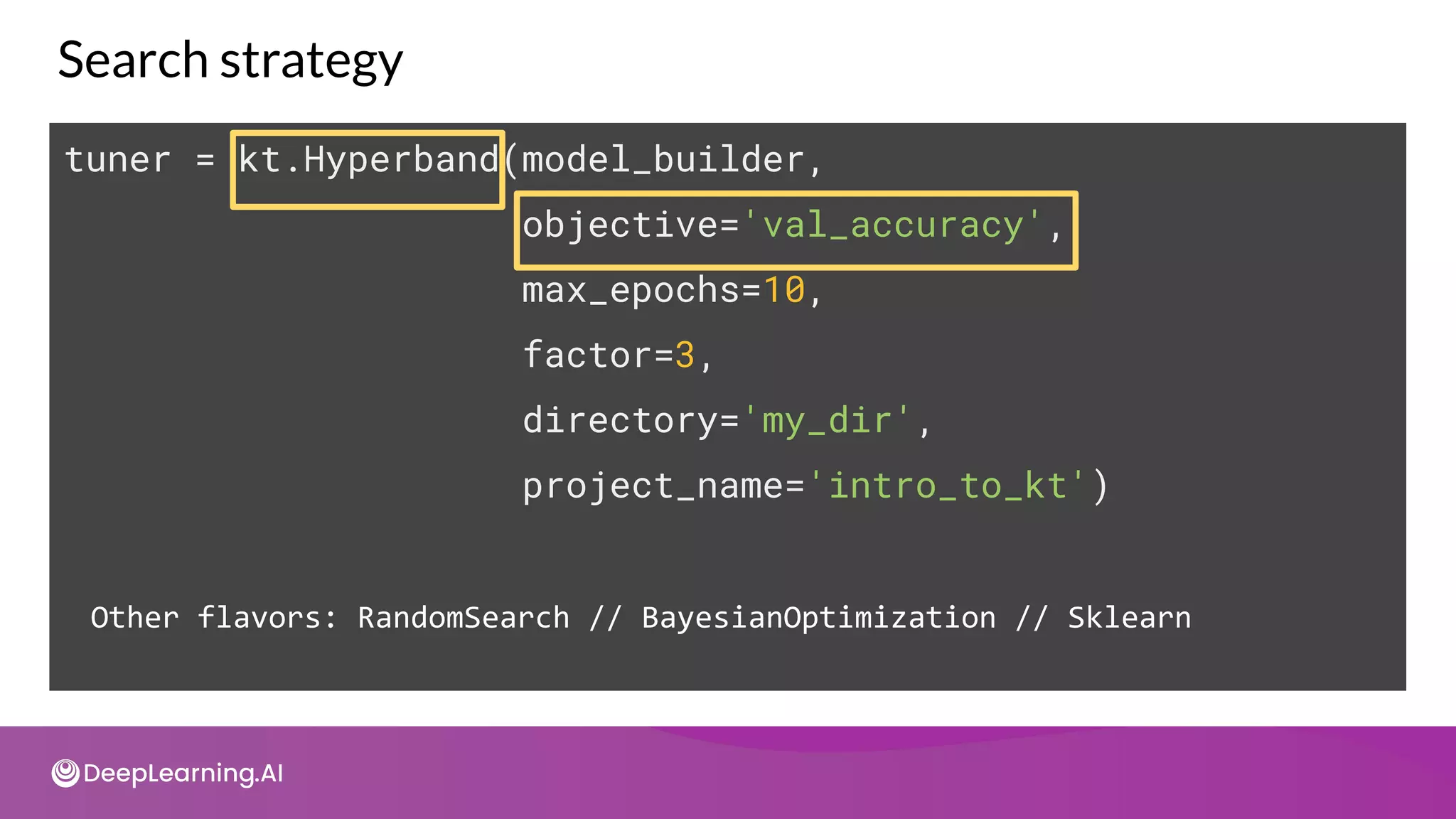
tuner = kt.Hyperband(model_builder,
objective='val_accuracy',
max_epochs=10,
factor=3,
directory='my_dir',
project_name='intro_to_kt')
Other flavors: RandomSearch // BayesianOptimization // Sklearn
Callback configuration
stop_early =
tf.keras.callbacks.EarlyStopping(monitor='val_loss',
patience=5)
tuner.search(x_train,
y_train,
epochs=50,
validation_split=0.2,
callbacks=[stop_early])
Search output
Trial 24 Complete [00h 00m 22s]
val_accuracy: 0.3265833258628845
Best val_accuracy So Far: 0.5167499780654907
Total elapsed time: 00h 05m 05s
Search: Running Trial #25
Hyperparameter |Value |Best Value So Far
units |192 |48
tuner/epochs |10 |2
tuner/initial_e...|4 |0
tuner/bracket |1 |2
tuner/round |1 |0
tuner/trial_id |a2edc917bda476c...|None
Back to your model
model = tf.keras.models.Sequential([
tf.keras.layers.Flatten(input_shape=(28, 28)),
tf.keras.layers.Dense(48, activation='relu'),
tf.keras.layers.Dropout(0.2),
tf.keras.layers.Dense(10, activation='softmax')
])
Training output
Epoch 1/5
1875/1875 - 3s 1ms/step - loss: 0.6427 - accuracy: 0.8090
Epoch 2/5
1875/1875 - 3s 1ms/step - loss: 0.2330 - accuracy: 0.9324
Epoch 3/5
1875/1875 - 3s 1ms/step - loss: 0.1835 - accuracy: 0.9448
Epoch 4/5
1875/1875 - 3s 1ms/step - loss: 0.1565 - accuracy: 0.9515
Epoch 5/5
1875/1875 - 3s 1ms/step - loss: 0.1393 - accuracy: 0.9564
AutoML
Intro to AutoML
Outline
● Introduction to AutoML
● Neural Architecture Search
● Search Space and Search Strategies
● Performance Estimation
● AutoML on the Cloud
Automated Machine Learning (AutoML)
Auto ML
Data
Pipeline
Model
Training
Model
Deployment
Model
Monitoring
Discovery
Data
Validation
Feature
Engineering
Train Model
Data
Ingestion
Validate
Model
AutoML automates the entire ML workflow
Neural Architecture Search
Search Space
A
Neural Architecture a ∈ A
Architecture is picked from
this space by search
strategy
Accuracy
Latency
Performance Estimation Strategy
Performance
Search Strategy
Neural Architecture Search
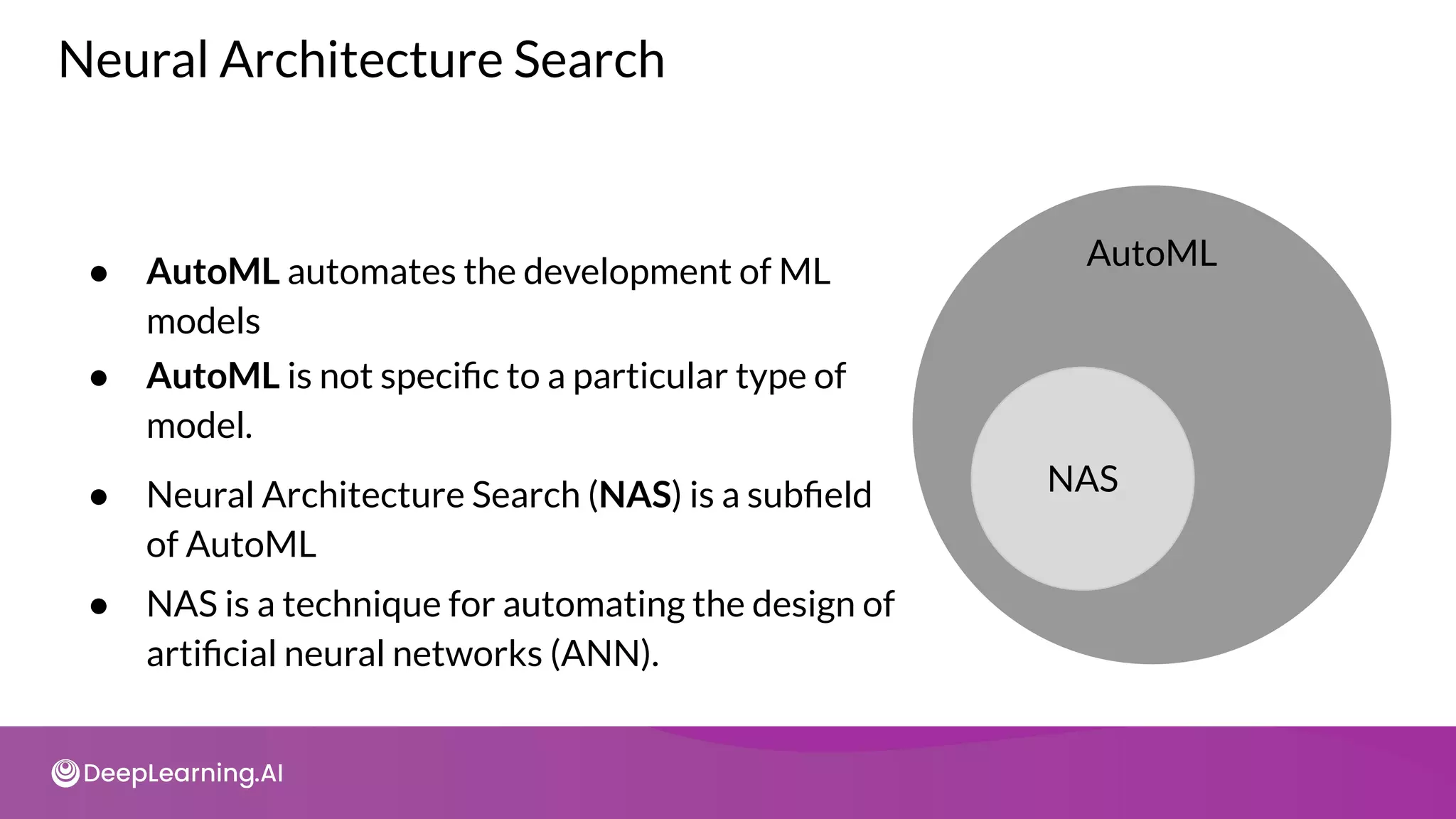
● AutoML automates the development of ML
models
● AutoML is not specific to a particular type of
model.
● NAS is a technique for automating the design of
artificial neural networks (ANN).
NAS
AutoML
● Neural Architecture Search (NAS) is a subfield
of AutoML
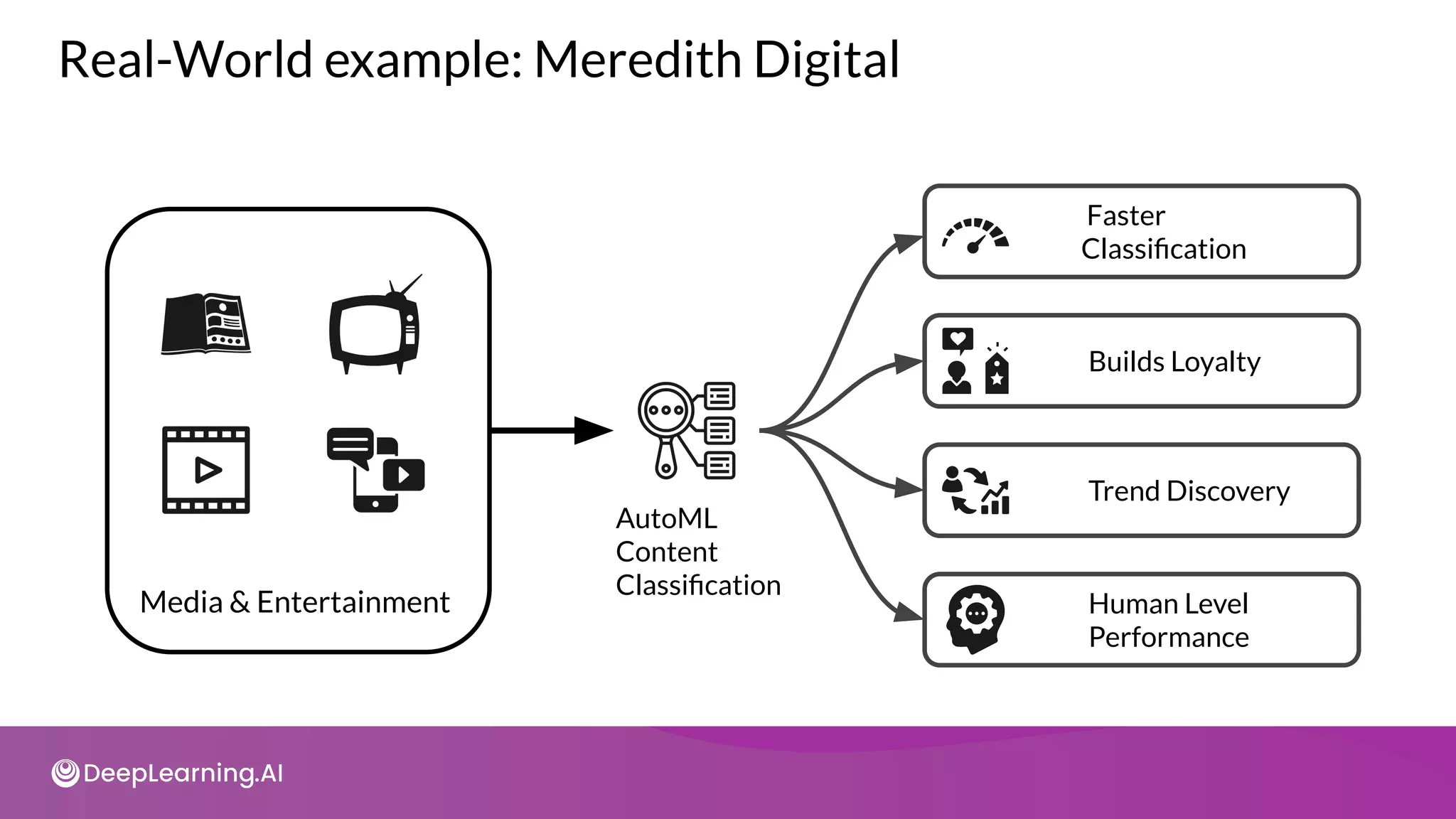
Real-World example: Meredith Digital
Media & Entertainment
AutoML
Content
Classification
Faster
Classification
Builds Loyalty
Trend Discovery
Human Level
Performance
AutoML
Understanding Search
Spaces
Types of Search Spaces
input
Macro
L0
L1
LN-1
LN
output
Li
Node
Connection
Micro
input
output
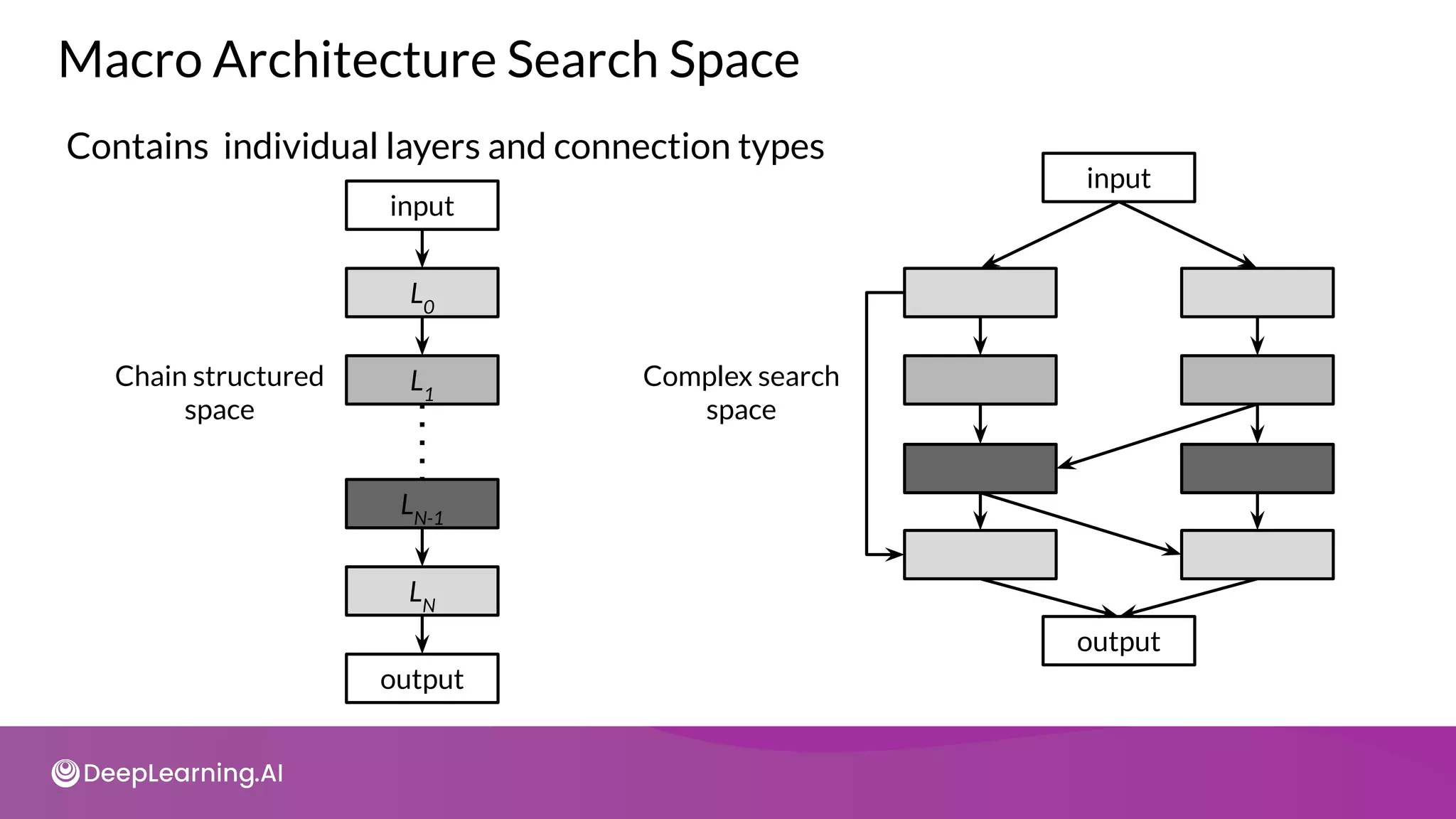
Macro Architecture Search Space
Contains individual layers and connection types
input
Chain structured
space
L0
L1
LN-1
LN
output
input
Complex search
space
output
Micro Architecture Search Space
Normal Cell
Reduction Cell
Repertoire
input
output
input
output
input
output
input
AutoML
Search Strategies
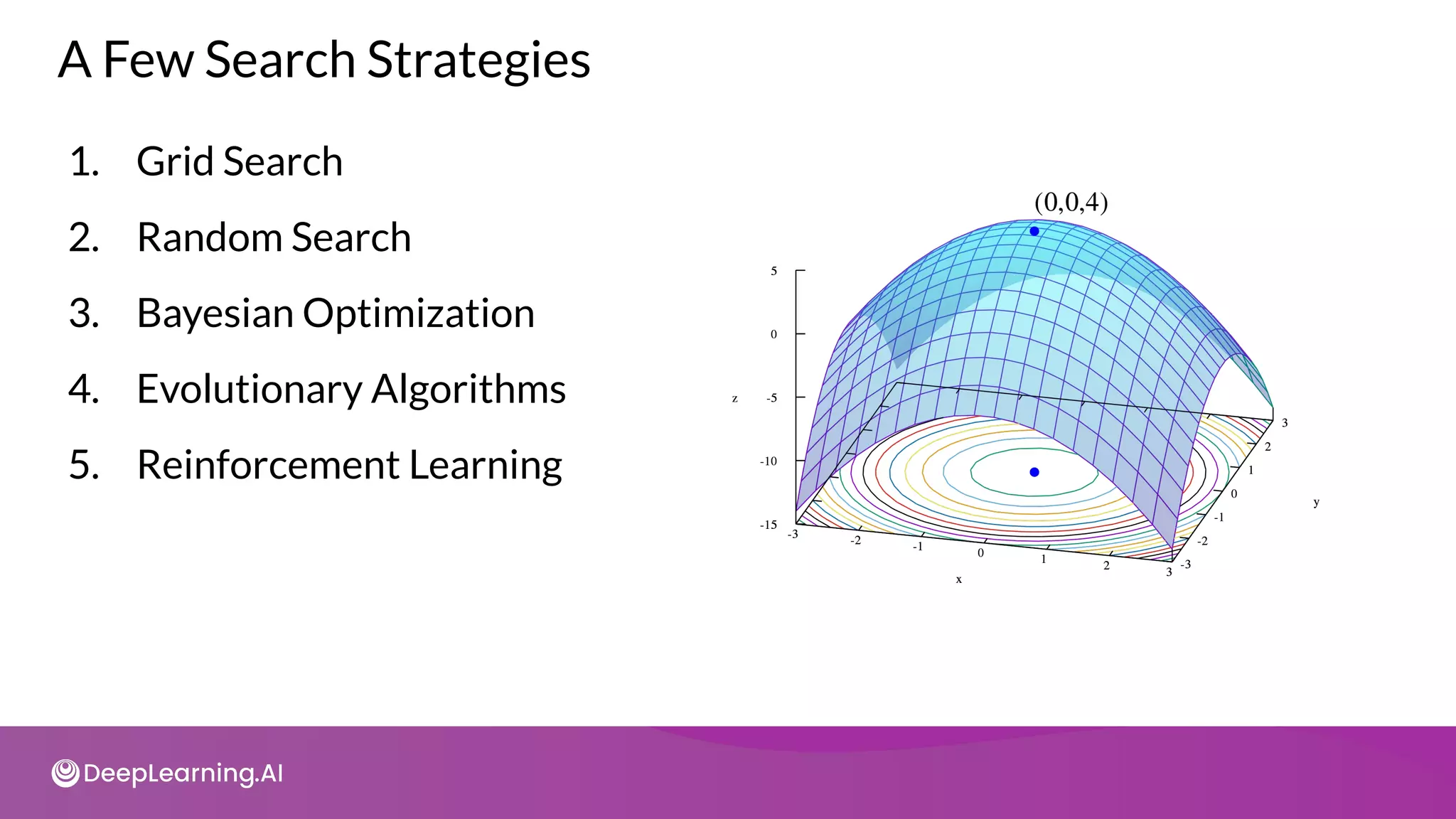
1. Grid Search
2. Random Search
3. Bayesian Optimization
4. Evolutionary Algorithms
5. Reinforcement Learning
A Few Search Strategies
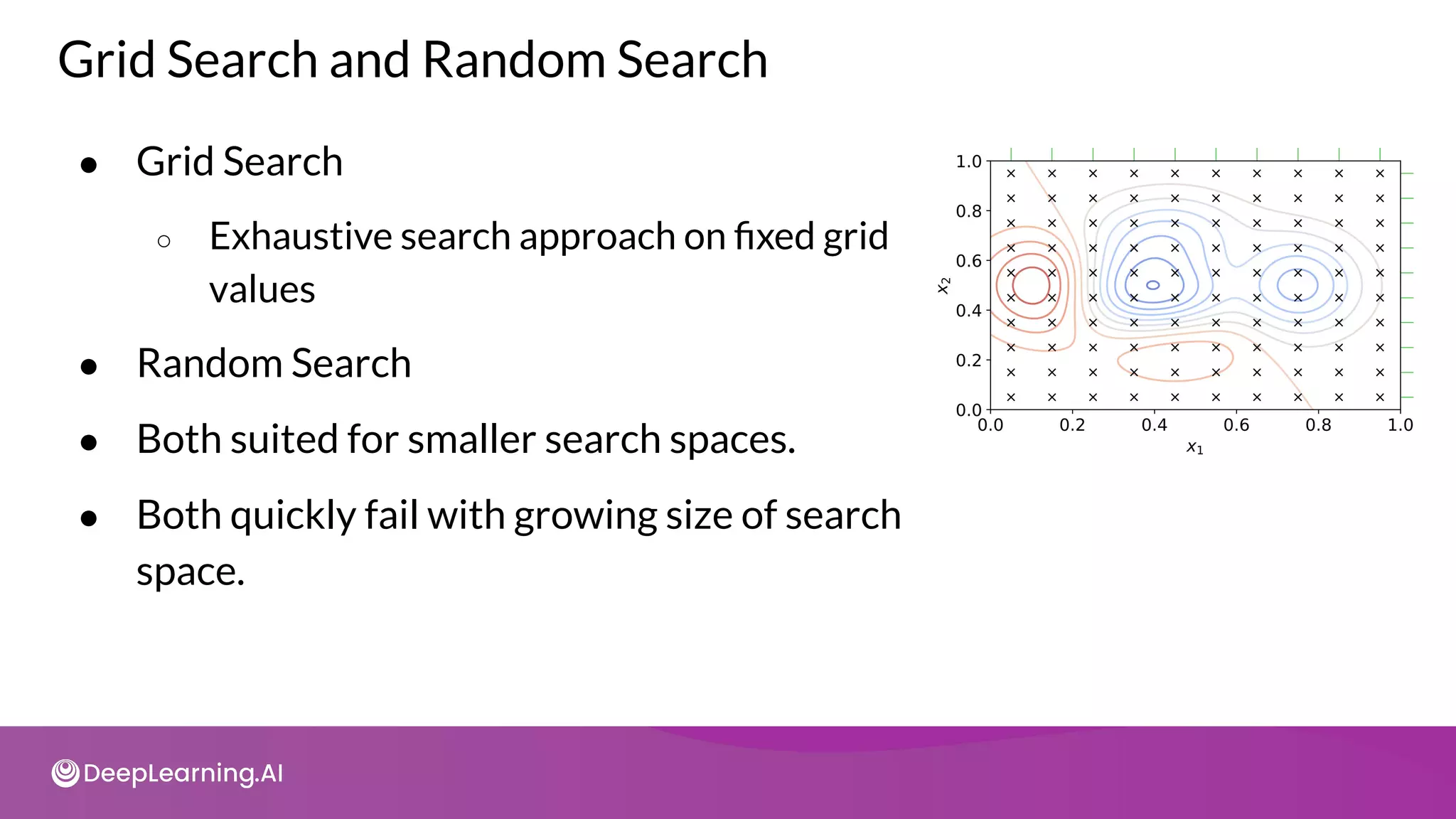
Grid Search and Random Search
● Grid Search
○ Exhaustive search approach on fixed grid
values
● Random Search
● Both suited for smaller search spaces.
● Both quickly fail with growing size of search
space.
Bayesian Optimization
● Assumes that a specific probability
distribution, is underlying the performance.
● Tested architectures constrain the
probability distribution and guide the
selection of the next option.
● In this way, promising architectures can be
stochastically determined and tested.
Parents Selected
Parents
Parents
+
Offspring
X
X X
Select
+
remove
Replace
with
offspring
Repeat
Evolutionary Methods
Reinforcement Learning
State
● The performance estimation
strategy determines the reward
Reward
● Agents goal is to maximize a
reward
Agent
● The available options are
selected from the search space Action
Search
space
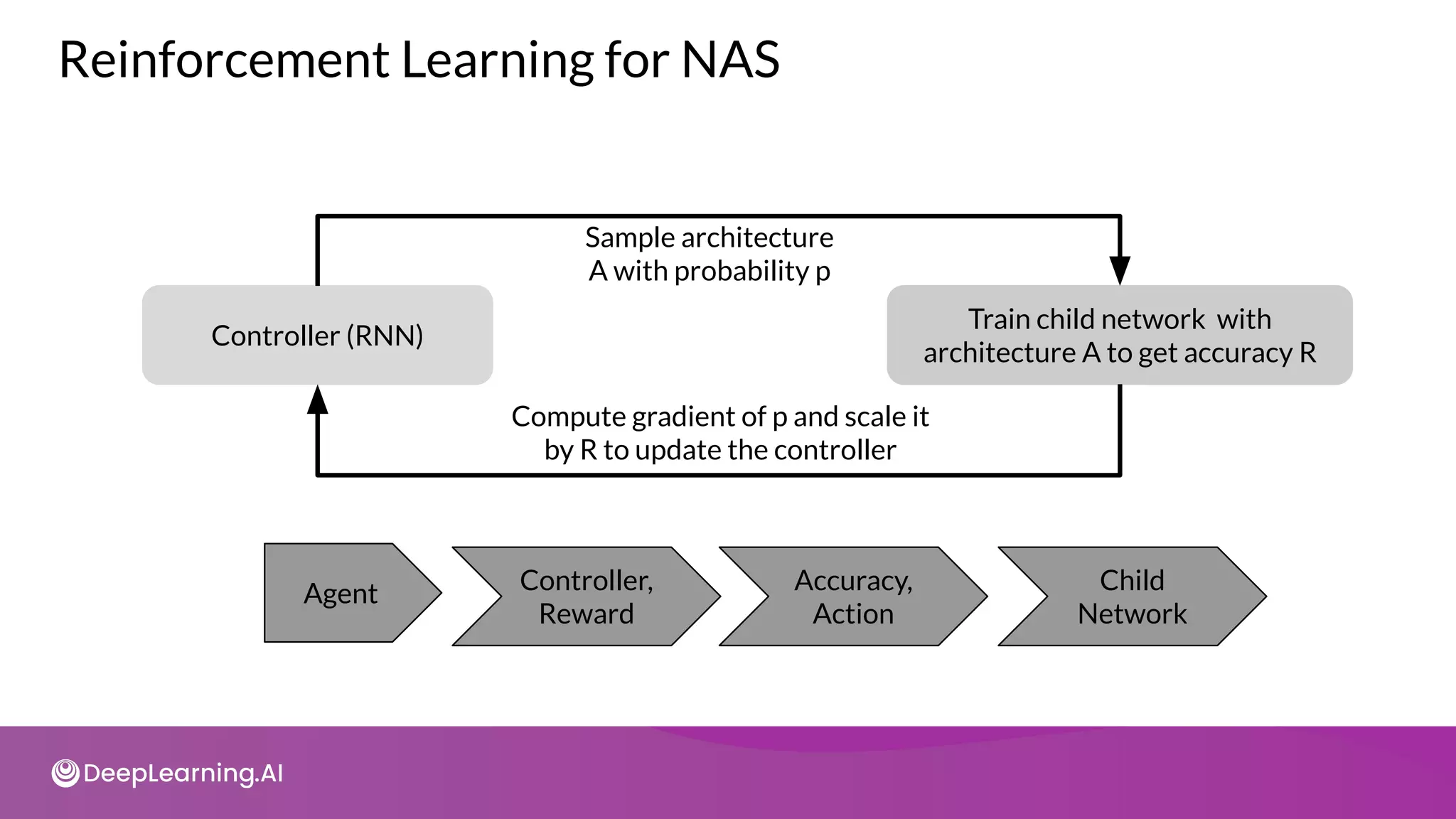
Controller (RNN)
Train child network with
architecture A to get accuracy R
Agent Controller,
Reward
Accuracy,
Action
Child
Network
Sample architecture
A with probability p
Compute gradient of p and scale it
by R to update the controller
Reinforcement Learning for NAS
AutoML
Measuring AutoML Efficacy
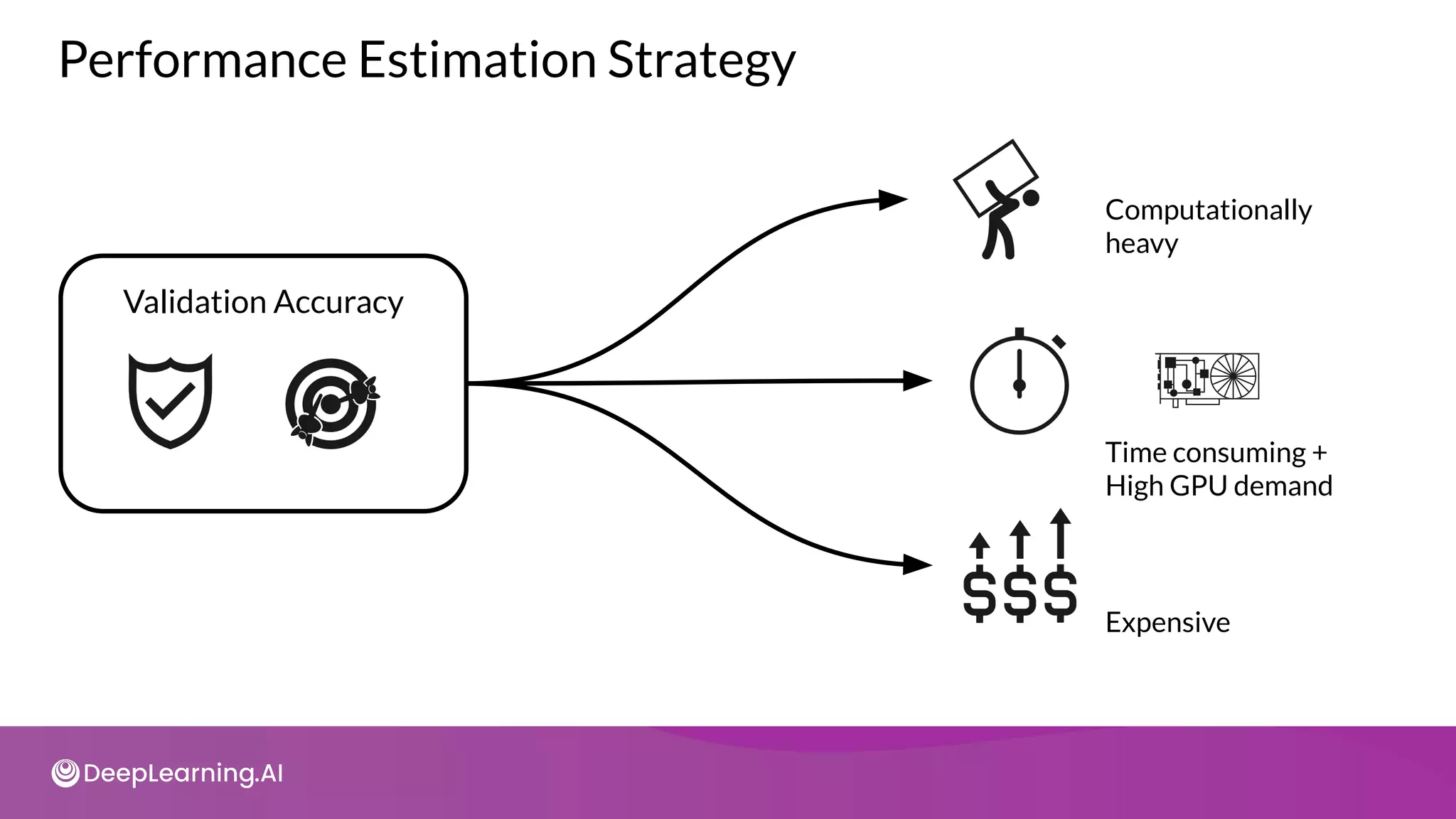
Validation Accuracy
Performance Estimation Strategy
Computationally
heavy
Time consuming +
High GPU demand
Expensive
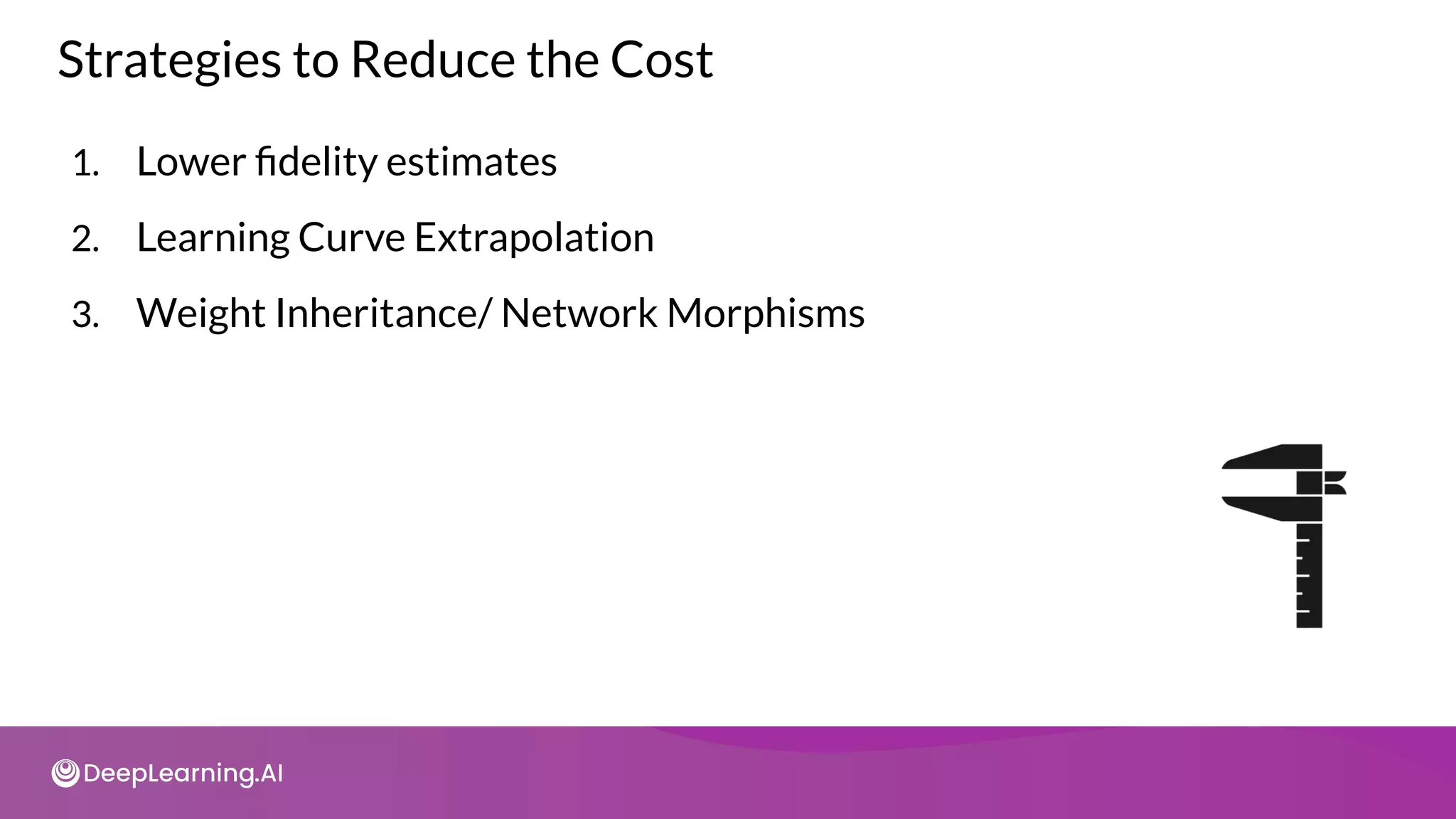
1. Lower fidelity estimates
2. Learning Curve Extrapolation
3. Weight Inheritance/ Network Morphisms
Strategies to Reduce the Cost
Lower Fidelity Estimates
Reduce
training time
Data subset
Low resolution
images
Fewer filters
and cells
● Reduce cost but
underestimates performance
● Works if relative ranking of
architectures does not
change due to lower fidelity
estimates
● Recent research shows this
is not the case
Learning Curve Extrapolation
● Requires predicting the learning curve reliably
X
X
● Extrapolates based on initial learning.
● Removes poor performers
Weight Inheritance/Network Morphisms
● Initialize weights of new architectures based on previously trained
architectures
○ Similar to transfer learning
● Uses Network Morphism
● Underlying function unchanged
○ New network inherits knowledge from parent network.
○ Computational speed up: only a few days of GPU usage
○ Network size not inherently bounded
AutoML
AutoML on the Cloud
Popular Cloud Offerings
Cloud-based AutoML
Amazon SageMaker Autopilot
Microsoft Azure Automated Machine Learning
Google Cloud AutoML
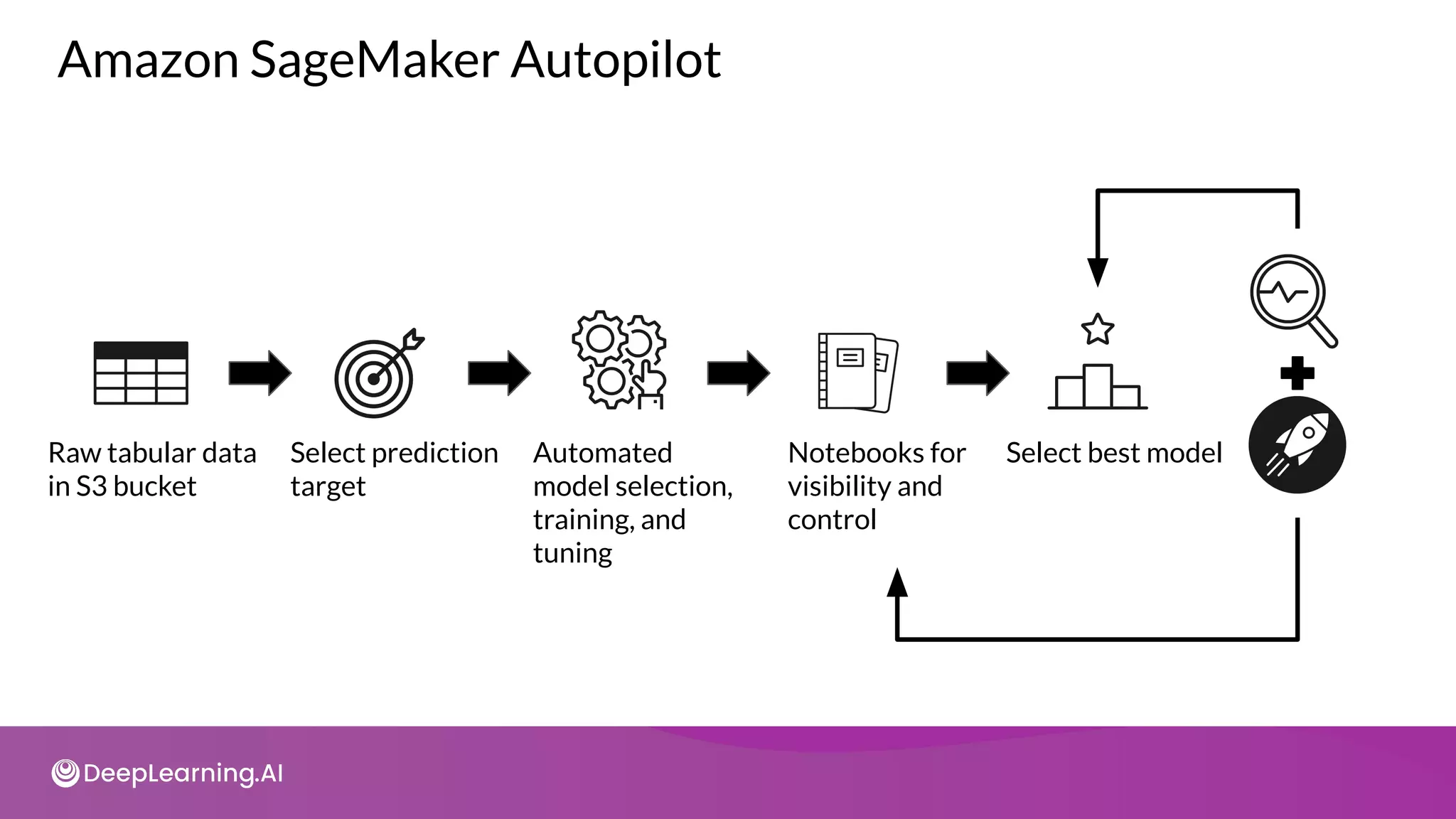
Amazon SageMaker Autopilot
Raw tabular data
in S3 bucket
Select prediction
target
Automated
model selection,
training, and
tuning
Notebooks for
visibility and
control
Select best model
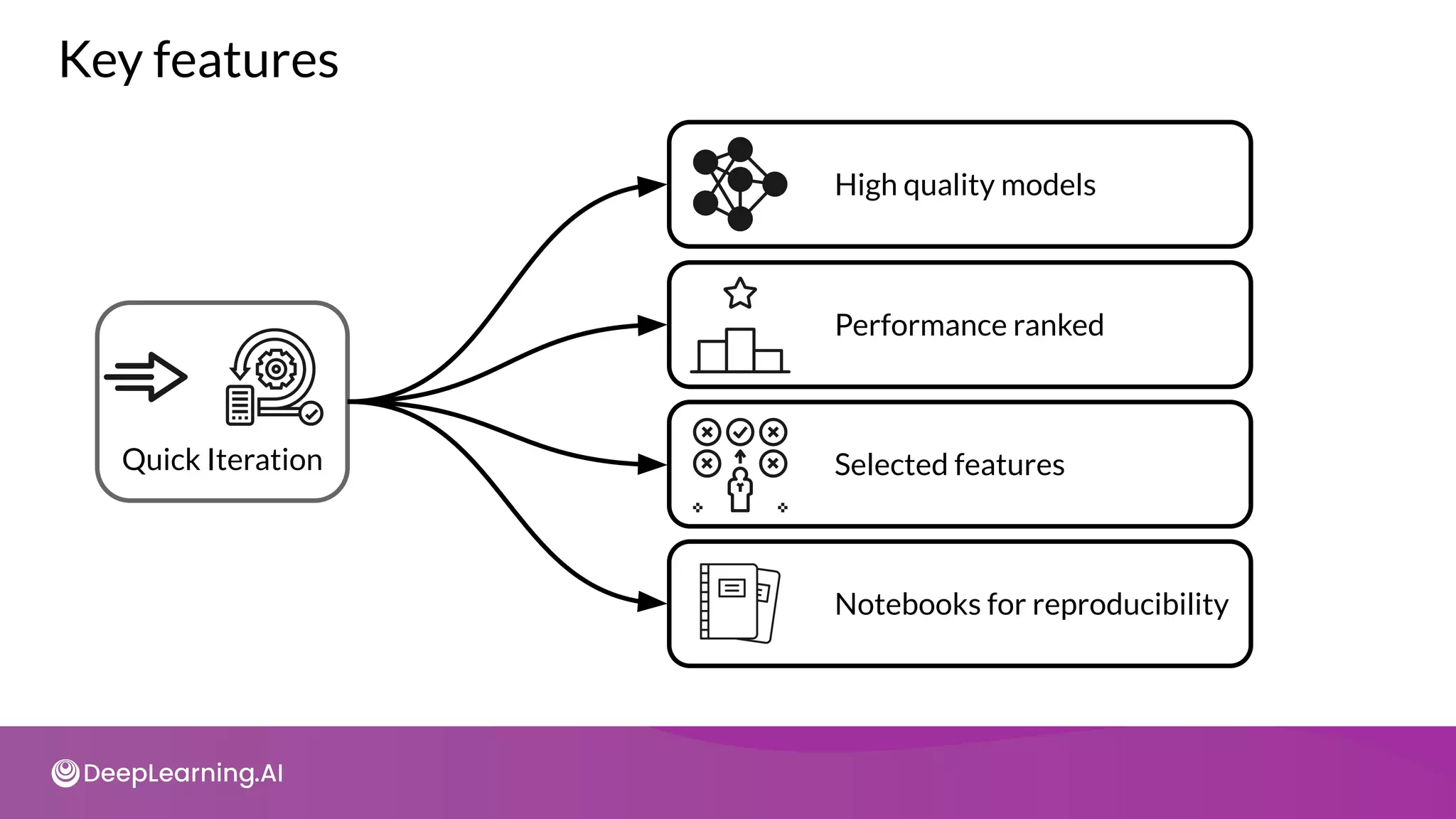
Key features
Quick Iteration
High quality models
Performance ranked
Selected features
Notebooks for reproducibility
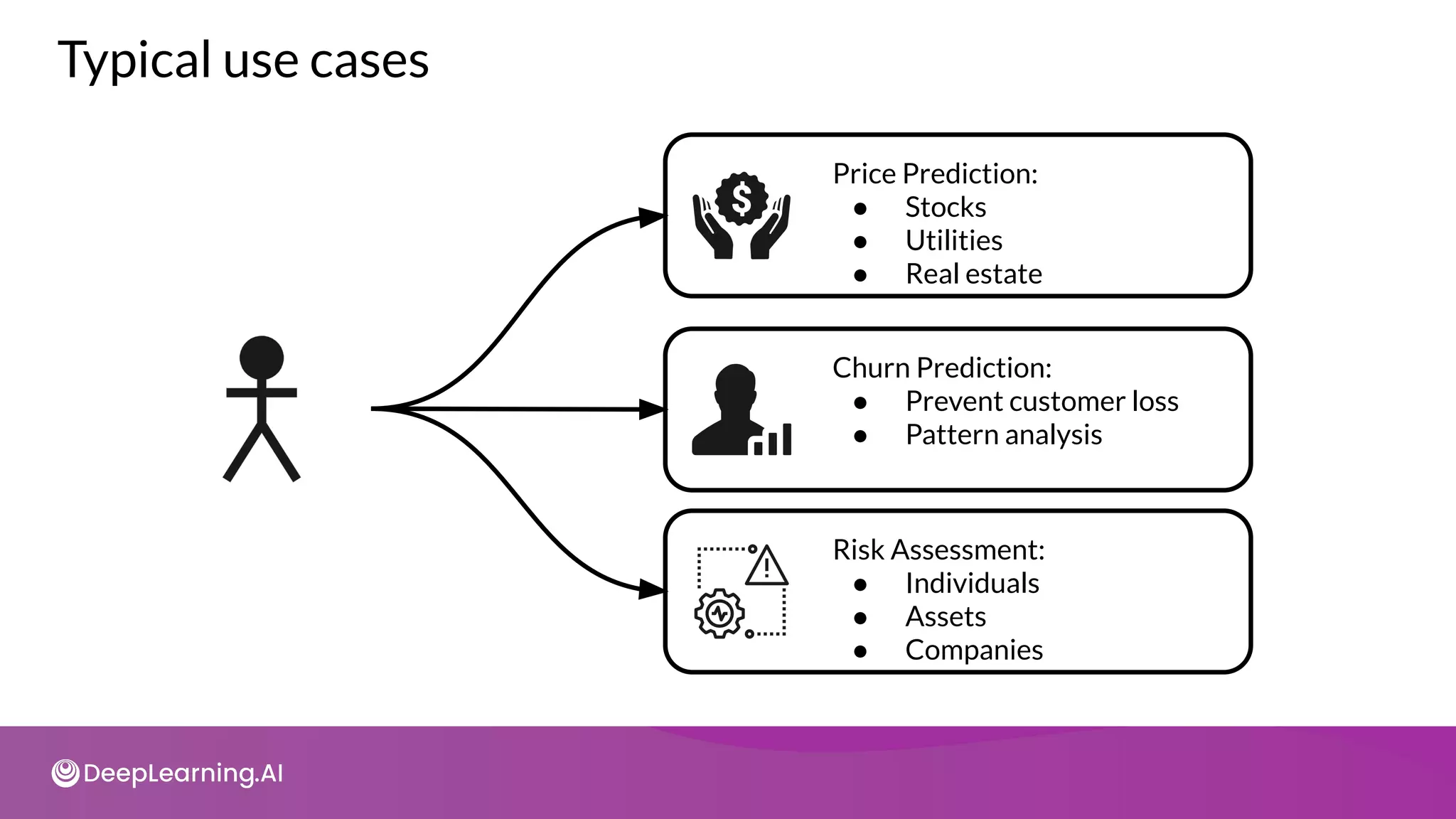
Typical use cases
Price Prediction:
● Stocks
● Utilities
● Real estate
Risk Assessment:
● Individuals
● Assets
● Companies
Churn Prediction:
● Prevent customer loss
● Pattern analysis
Microsoft Azure
Automated Machine Learning
Microsoft Azure AutoML
Automated Feature
Selection
Automated Model
Selection
Optimized model
Hyperparameter
Tuning
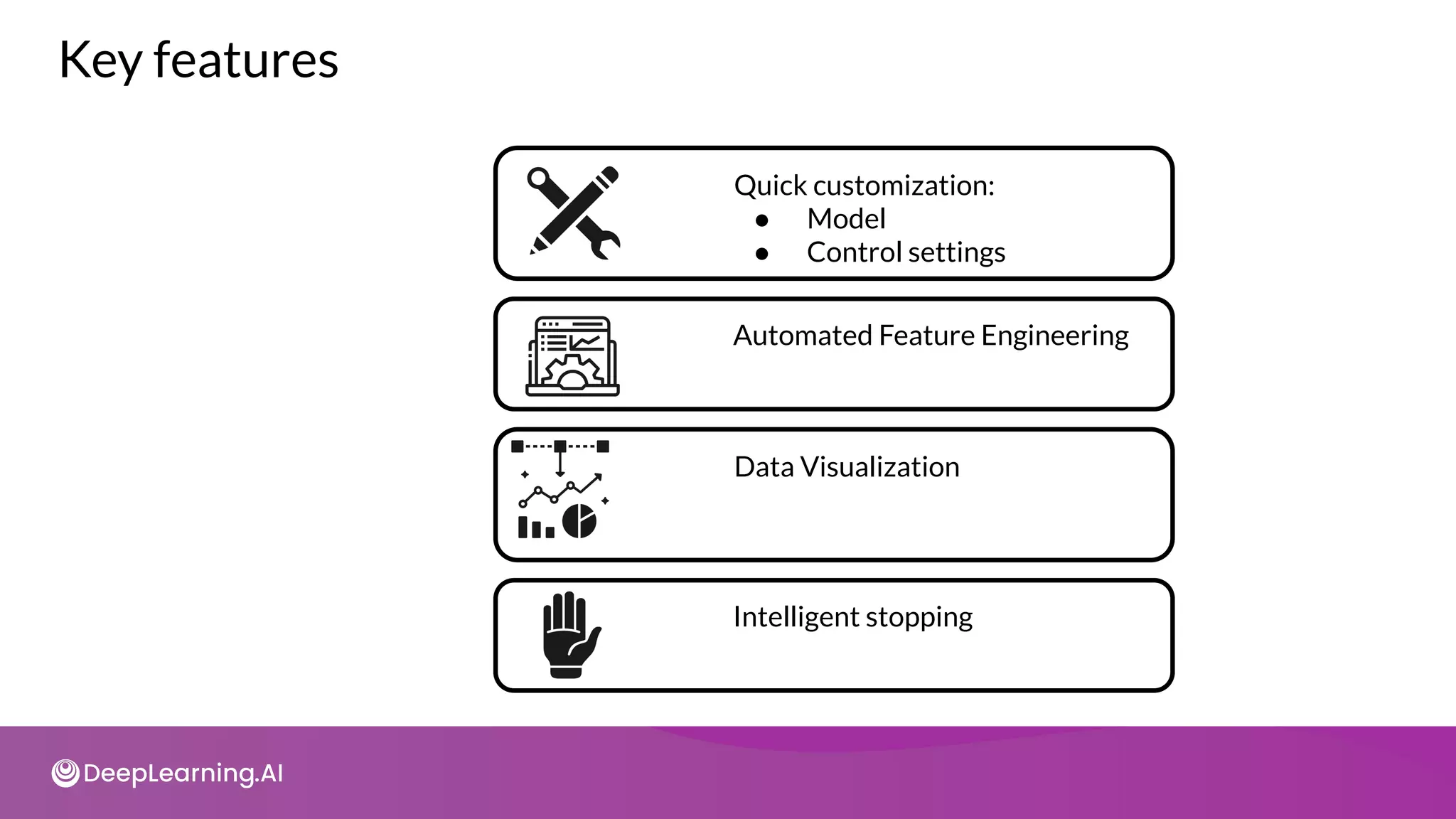
Key features
Quick customization:
● Model
● Control settings
Data Visualization
Automated Feature Engineering
Intelligent stopping
Key features
● Experiment summaries
● Metric visualizations
Model Interpretability
Pattern Discovery
Google Cloud AutoML
Google Cloud AutoML
● Accessible to beginners
● Train high-quality models
● GUI Based
● Pipeline life-cycle
● Neural Architecture Search
● Transfer Learning
● Data labeling
● Data cleaning
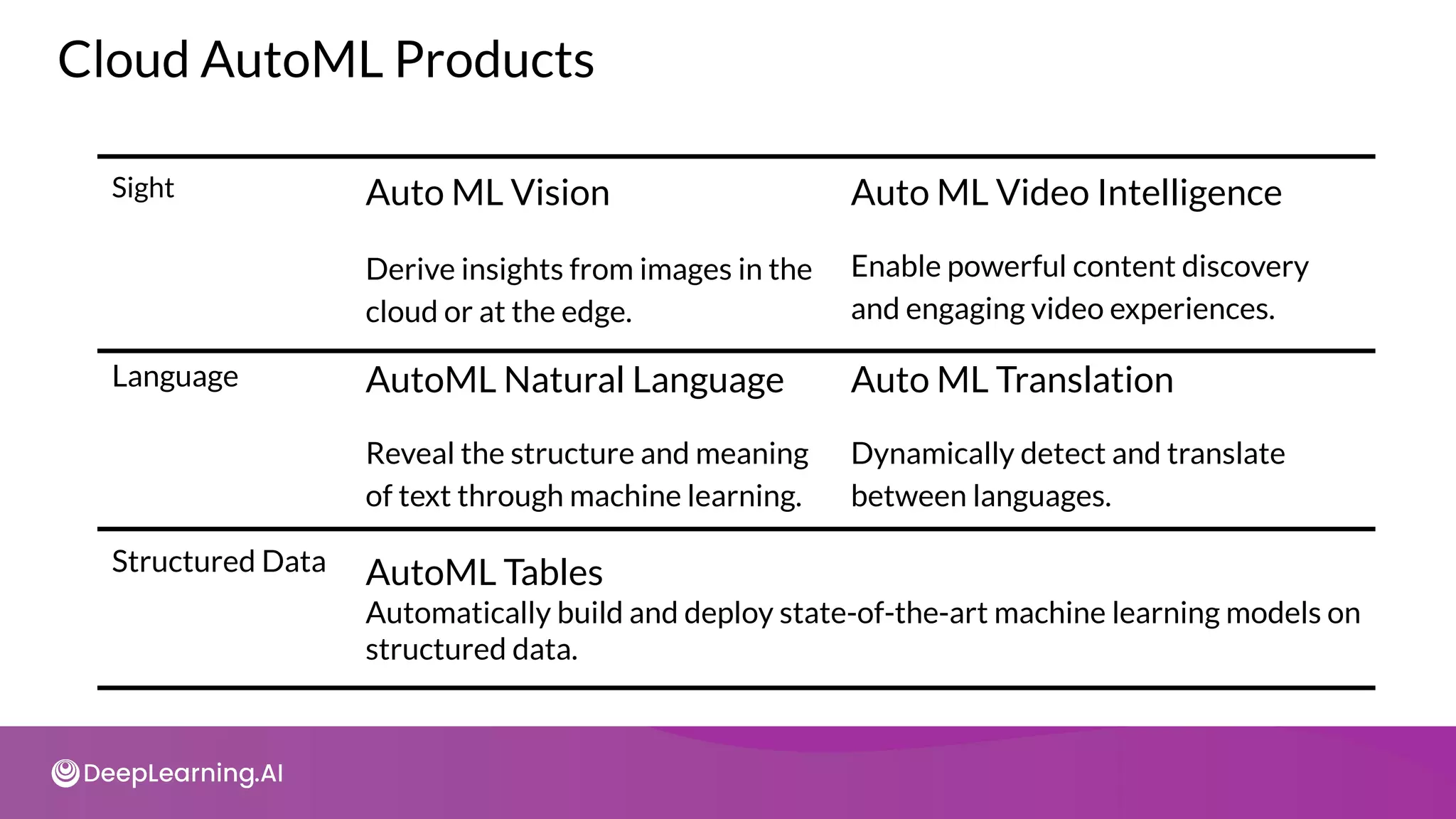
Structured Data AutoML Tables
Automatically build and deploy state-of-the-art machine learning models on
structured data.
Cloud AutoML Products
Sight Auto ML Vision
Derive insights from images in the
cloud or at the edge.
Auto ML Video Intelligence
Enable powerful content discovery
and engaging video experiences.
Language AutoML Natural Language
Reveal the structure and meaning
of text through machine learning.
Auto ML Translation
Dynamically detect and translate
between languages.
AutoML Vision Products
AutoML Vision Object Detection AutoML Vision Edge Object Detection
Auto ML Vision Classification AutoML Vision Edge Image Classification
AutoML Video Intelligence Classification
Enables you to train machine learning models, to classify shots and segments on
your videos according to your own defined labels.
AutoML Video Intelligence Products
AutoML Video Object detection
Enables you to train machine learning models to detect and track multiple
objects, in shots and segments.
So what’s in the secret sauce?
How do these Cloud offerings perform AutoML?
● We don’t know (or can’t say) and they’re not about to
tell us
● The underlying algorithms will be similar to what
we’ve learned
● The algorithms will evolve with the state of the art
AutoML
Assignment Setup
Setup
AutoML
1
Steps to Classify Images using AutoML Vision
2
Create
Dataset
Upload images to
Cloud Storage and
create dataset in
Vision.
3
Train Evaluate
4
Deploy
model for
serving
5
Deploy
6
Test
Generate
predictions using
deployed model
● Qwiklabs provides real cloud environments that help developers and IT
professionals learn cloud platforms and software.
● Check tutorial on Qwiklabs basics
Setup
AutoML
1 2
Create
Dataset
3
Train Evaluate
4 5
Deploy
6
Test

It’s your turn!

C3 w1

  • 1.
    Copyright Notice These slidesare distributed under the Creative Commons License. DeepLearning.AI makes these slides available for educational purposes. You may not use or distribute these slides for commercial purposes. You may make copies of these slides and use or distribute them for educational purposes as long as you cite DeepLearning.AI as the source of the slides. For the rest of the details of the license, see https://creativecommons.org/licenses/by-sa/2.0/legalcode
  • 2.
  • 3.
  • 4.
    Neural Architecture Search ●Neural architecture search (NAS) is is a technique for automating the design of artificial neural networks ● It helps finding the optimal architecture ● This is a search over a huge space ● AutoML is an algorithm to automate this search
  • 5.
    Types of parametersin ML Models ● Trainable parameters: ○ Learned by the algorithm during training ○ e.g. weights of a neural network ● Hyperparameters: ○ set before launching the learning process ○ not updated in each training step ○ e.g: learning rate or the number of units in a dense layer
  • 6.
    Manual hyperparameter tuningis not scalable ● Hyperparameters can be numerous even for small models ● e.g shallow DNN: ○ Architecture choices ○ activation functions ○ Weight initialization strategy ○ Optimization hyperparameters such as learning rate, stop condition ● Tuning them manually can be a real brain teaser ● Tuning helps with model performance
  • 7.
    Automating hyperparameter tuningwith Keras Tuner ● Automation is key: open source resources to the rescue ● Keras Tuner: ○ Hyperparameter tuning with Tensorflow 2.0. ○ Many methods available
  • 8.
  • 9.
    Setting up librariesand dataset import tensorflow as tf from tensorflow import keras mnist = tf.keras.datasets.mnist (x_train, y_train),(x_test, y_test) = mnist.load_data() x_train, x_test = x_train / 255.0, x_test / 255.0
  • 10.
    Deep learning “Helloworld!” model = tf.keras.models.Sequential([ tf.keras.layers.Flatten(input_shape=(28, 28)), tf.keras.layers.Dense(512, activation='relu'), tf.keras.layers.Dropout(0.2), tf.keras.layers.Dense(10, activation='softmax') ]) model.compile(optimizer='adam', loss='sparse_categorical_crossentropy', metrics=['accuracy']) model.fit(x_train, y_train, epochs=5) model.evaluate(x_test, y_test)
  • 11.
    Model performance Epoch 1/5 1875/1875- 10s 5ms/step - loss: 0.3603 - accuracy: 0.8939 Epoch 2/5 1875/1875 - 10s 5ms/step - loss: 0.1001 - accuracy: 0.9695 Epoch 3/5 1875/1875 - 10s 5ms/step - loss: 0.0717 - accuracy: 0.9781 Epoch 4/5 1875/1875 - 10s 5ms/step - loss: 0.0515 - accuracy: 0.9841 Epoch 5/5 1875/1875 - 10s 5ms/step - loss: 0.0432 - accuracy: 0.9866
  • 12.
    Parameters rational: ifany model = tf.keras.models.Sequential([ tf.keras.layers.Flatten(input_shape=(28, 28)), tf.keras.layers.Dense(512, activation='relu'), tf.keras.layers.Dropout(0.2), tf.keras.layers.Dense(10, activation='softmax') ]) model.compile(optimizer='adam', loss='sparse_categorical_crossentropy', metrics=['accuracy']) model.fit(x_train, y_train, epochs=5) model.evaluate(x_test, y_test)
  • 13.
    Is this architectureoptimal? ● Do the model need more or less hidden units to perform well? ● How does model size affect the convergence speed? ● Is there any trade off between convergence speed, model size and accuracy? ● Search automation is the natural path to take ● Keras tuner built in search functionality.
  • 14.
    Automated search withKeras tuner # First, install Keras Tuner !pip install -q -U keras-tuner # Import Keras Tuner after it has been installed import kerastuner as kt
  • 15.
    Building model withiterative search def model_builder(hp): model = keras.Sequential() model.add(keras.layers.Flatten(input_shape=(28, 28))) hp_units = hp.Int('units', min_value=16, max_value=512, step=16) model.add(keras.layers.Dense(units=hp_units, activation='relu')) model.add(tf.keras.layers.Dropout(0.2)) model.add(keras.layers.Dense(10)) model.compile(optimizer='adam',loss='sparse_categorical_crossentropy', metrics=['accuracy']) return model
  • 16.
    Search strategy tuner =kt.Hyperband(model_builder, objective='val_accuracy', max_epochs=10, factor=3, directory='my_dir', project_name='intro_to_kt') Other flavors: RandomSearch // BayesianOptimization // Sklearn
  • 17.
  • 18.
    Search output Trial 24Complete [00h 00m 22s] val_accuracy: 0.3265833258628845 Best val_accuracy So Far: 0.5167499780654907 Total elapsed time: 00h 05m 05s Search: Running Trial #25 Hyperparameter |Value |Best Value So Far units |192 |48 tuner/epochs |10 |2 tuner/initial_e...|4 |0 tuner/bracket |1 |2 tuner/round |1 |0 tuner/trial_id |a2edc917bda476c...|None
  • 19.
    Back to yourmodel model = tf.keras.models.Sequential([ tf.keras.layers.Flatten(input_shape=(28, 28)), tf.keras.layers.Dense(48, activation='relu'), tf.keras.layers.Dropout(0.2), tf.keras.layers.Dense(10, activation='softmax') ])
  • 20.
    Training output Epoch 1/5 1875/1875- 3s 1ms/step - loss: 0.6427 - accuracy: 0.8090 Epoch 2/5 1875/1875 - 3s 1ms/step - loss: 0.2330 - accuracy: 0.9324 Epoch 3/5 1875/1875 - 3s 1ms/step - loss: 0.1835 - accuracy: 0.9448 Epoch 4/5 1875/1875 - 3s 1ms/step - loss: 0.1565 - accuracy: 0.9515 Epoch 5/5 1875/1875 - 3s 1ms/step - loss: 0.1393 - accuracy: 0.9564
  • 21.
  • 22.
    Outline ● Introduction toAutoML ● Neural Architecture Search ● Search Space and Search Strategies ● Performance Estimation ● AutoML on the Cloud
  • 23.
    Automated Machine Learning(AutoML) Auto ML Data Pipeline Model Training Model Deployment Model Monitoring Discovery
  • 24.
  • 25.
    Neural Architecture Search SearchSpace A Neural Architecture a ∈ A Architecture is picked from this space by search strategy Accuracy Latency Performance Estimation Strategy Performance Search Strategy
  • 26.
    Neural Architecture Search ●AutoML automates the development of ML models ● AutoML is not specific to a particular type of model. ● NAS is a technique for automating the design of artificial neural networks (ANN). NAS AutoML ● Neural Architecture Search (NAS) is a subfield of AutoML
  • 27.
    Real-World example: MeredithDigital Media & Entertainment AutoML Content Classification Faster Classification Builds Loyalty Trend Discovery Human Level Performance
  • 28.
  • 29.
    Types of SearchSpaces input Macro L0 L1 LN-1 LN output Li Node Connection Micro input output
  • 30.
    Macro Architecture SearchSpace Contains individual layers and connection types input Chain structured space L0 L1 LN-1 LN output input Complex search space output
  • 31.
    Micro Architecture SearchSpace Normal Cell Reduction Cell Repertoire input output input output input output input
  • 32.
  • 33.
    1. Grid Search 2.Random Search 3. Bayesian Optimization 4. Evolutionary Algorithms 5. Reinforcement Learning A Few Search Strategies
  • 34.
    Grid Search andRandom Search ● Grid Search ○ Exhaustive search approach on fixed grid values ● Random Search ● Both suited for smaller search spaces. ● Both quickly fail with growing size of search space.
  • 35.
    Bayesian Optimization ● Assumesthat a specific probability distribution, is underlying the performance. ● Tested architectures constrain the probability distribution and guide the selection of the next option. ● In this way, promising architectures can be stochastically determined and tested.
  • 36.
  • 37.
    Reinforcement Learning State ● Theperformance estimation strategy determines the reward Reward ● Agents goal is to maximize a reward Agent ● The available options are selected from the search space Action Search space
  • 38.
    Controller (RNN) Train childnetwork with architecture A to get accuracy R Agent Controller, Reward Accuracy, Action Child Network Sample architecture A with probability p Compute gradient of p and scale it by R to update the controller Reinforcement Learning for NAS
  • 39.
  • 40.
    Validation Accuracy Performance EstimationStrategy Computationally heavy Time consuming + High GPU demand Expensive
  • 41.
    1. Lower fidelityestimates 2. Learning Curve Extrapolation 3. Weight Inheritance/ Network Morphisms Strategies to Reduce the Cost
  • 42.
    Lower Fidelity Estimates Reduce trainingtime Data subset Low resolution images Fewer filters and cells ● Reduce cost but underestimates performance ● Works if relative ranking of architectures does not change due to lower fidelity estimates ● Recent research shows this is not the case
  • 43.
    Learning Curve Extrapolation ●Requires predicting the learning curve reliably X X ● Extrapolates based on initial learning. ● Removes poor performers
  • 44.
    Weight Inheritance/Network Morphisms ●Initialize weights of new architectures based on previously trained architectures ○ Similar to transfer learning ● Uses Network Morphism ● Underlying function unchanged ○ New network inherits knowledge from parent network. ○ Computational speed up: only a few days of GPU usage ○ Network size not inherently bounded
  • 45.
  • 46.
    Popular Cloud Offerings Cloud-basedAutoML Amazon SageMaker Autopilot Microsoft Azure Automated Machine Learning Google Cloud AutoML
  • 47.
  • 48.
    Amazon SageMaker Autopilot Rawtabular data in S3 bucket Select prediction target Automated model selection, training, and tuning Notebooks for visibility and control Select best model
  • 49.
    Key features Quick Iteration Highquality models Performance ranked Selected features Notebooks for reproducibility
  • 50.
    Typical use cases PricePrediction: ● Stocks ● Utilities ● Real estate Risk Assessment: ● Individuals ● Assets ● Companies Churn Prediction: ● Prevent customer loss ● Pattern analysis
  • 51.
  • 52.
    Microsoft Azure AutoML AutomatedFeature Selection Automated Model Selection Optimized model Hyperparameter Tuning
  • 53.
    Key features Quick customization: ●Model ● Control settings Data Visualization Automated Feature Engineering Intelligent stopping
  • 54.
    Key features ● Experimentsummaries ● Metric visualizations Model Interpretability Pattern Discovery
  • 55.
  • 56.
    Google Cloud AutoML ●Accessible to beginners ● Train high-quality models ● GUI Based ● Pipeline life-cycle ● Neural Architecture Search ● Transfer Learning ● Data labeling ● Data cleaning
  • 57.
    Structured Data AutoMLTables Automatically build and deploy state-of-the-art machine learning models on structured data. Cloud AutoML Products Sight Auto ML Vision Derive insights from images in the cloud or at the edge. Auto ML Video Intelligence Enable powerful content discovery and engaging video experiences. Language AutoML Natural Language Reveal the structure and meaning of text through machine learning. Auto ML Translation Dynamically detect and translate between languages.
  • 58.
    AutoML Vision Products AutoMLVision Object Detection AutoML Vision Edge Object Detection Auto ML Vision Classification AutoML Vision Edge Image Classification
  • 59.
    AutoML Video IntelligenceClassification Enables you to train machine learning models, to classify shots and segments on your videos according to your own defined labels. AutoML Video Intelligence Products AutoML Video Object detection Enables you to train machine learning models to detect and track multiple objects, in shots and segments.
  • 60.
    So what’s inthe secret sauce? How do these Cloud offerings perform AutoML? ● We don’t know (or can’t say) and they’re not about to tell us ● The underlying algorithms will be similar to what we’ve learned ● The algorithms will evolve with the state of the art
  • 61.
  • 62.
    Setup AutoML 1 Steps to ClassifyImages using AutoML Vision 2 Create Dataset Upload images to Cloud Storage and create dataset in Vision. 3 Train Evaluate 4 Deploy model for serving 5 Deploy 6 Test Generate predictions using deployed model
  • 63.
    ● Qwiklabs providesreal cloud environments that help developers and IT professionals learn cloud platforms and software. ● Check tutorial on Qwiklabs basics Setup AutoML 1 2 Create Dataset 3 Train Evaluate 4 5 Deploy 6 Test
  • 64.