Introduction to Machine
Learning with R
Dr. Shirin Glander
codecentric AG
28.06.2018
Table of Contents
About me & this workshop
Getting started
Machine Learning
How to prepare your data for ML
ML with caret
ML with h2o
Deep Dive into Neural Networks
How do Neural Nets learn?
Training neural nets in R
About me & this workshop
How I ended up here
About this workshop
Machine Learning with the caret package
• data prep
• missingness
• decision trees
• random forests
• gradient boosting
• feature selection
• hyperparameter tuning
• plotting
Machine Learning with the h2o package
• hyperparameter tuning
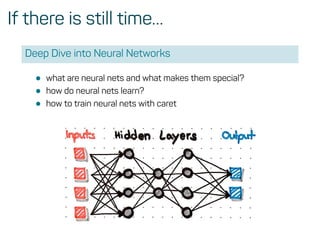
If there is still time…
Deep Dive into Neural Networks
• what are neural nets and what makes them special?
• how do neural nets learn?
• how to train neural nets with caret
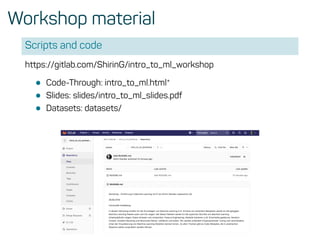
Workshop material
Scripts and code
https://gitlab.com/ShirinG/intro_to_ml_workshop
• Code-Through: intro_to_ml.html*
• Slides: slides/intro_to_ml_slides.pdf
• Datasets: datasets/
Why use R
• open-source, cross-platform
• established language (there are lots and lots of packages)
• high quality packages with proper documentation (CRAN)
• graphics capabilities - ggplot2!!!
• RStudio + R Markdown!!
• community support!
Getting started
R + RStudio - Best practices
• Step 1) create a new project
R + RStudio - Best practices
• Step 2) create a new R Markdown document
Machine Learning
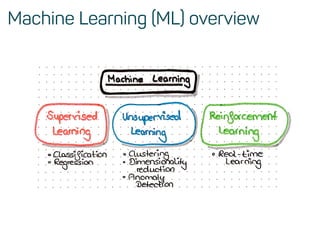
Machine Learning (ML) overview
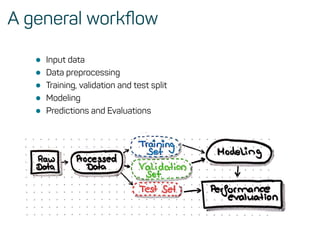
A general workflow
• Input data
• Data preprocessing
• Training, validation and test split
• Modeling
• Predictions and Evaluations
How to prepare your data for ML
Reading in data
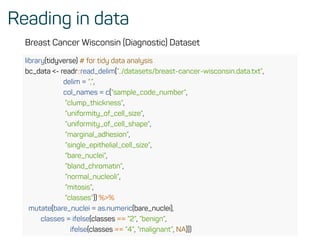
Breast Cancer Wisconsin (Diagnostic) Dataset
library(tidyverse) # for tidy data analysis
bc_data <- readr::read_delim(”../datasets/breast-cancer-wisconsin.data.txt”,
delim = ”,”,
col_names = c(”sample_code_number”,
”clump_thickness”,
”uniformity_of_cell_size”,
”uniformity_of_cell_shape”,
”marginal_adhesion”,
”single_epithelial_cell_size”,
”bare_nuclei”,
”bland_chromatin”,
”normal_nucleoli”,
”mitosis”,
”classes”)) %>%
mutate(bare_nuclei = as.numeric(bare_nuclei),
classes = ifelse(classes == ”2”, ”benign”,
ifelse(classes == ”4”, ”malignant”, NA)))
Missingness
mice::md.pattern(bc_data, plot = FALSE)
## sample_code_number clump_thickness uniformity_of_cell_size
## 683 1 1 1
## 16 1 1 1
## 0 0 0
## uniformity_of_cell_shape marginal_adhesion single_epithelial_cell_size
## 683 1 1 1
## 16 1 1 1
## 0 0 0
## bland_chromatin normal_nucleoli mitosis classes bare_nuclei
## 683 1 1 1 1 1 0
## 16 1 1 1 1 0 1
## 0 0 0 0 16 16
bc_data <- bc_data[complete.cases(bc_data), ] %>% .[, c(11, 2:10)]
• or impute with the mice package
Response variable for classification
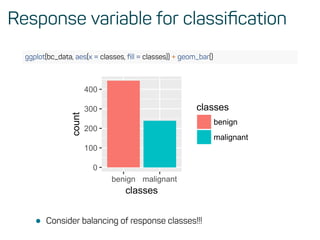
ggplot(bc_data, aes(x = classes, fill = classes)) + geom_bar()
0
100
200
300
400
benign malignant
classes
count
classes
benign
malignant
• Consider balancing of response classes!!!
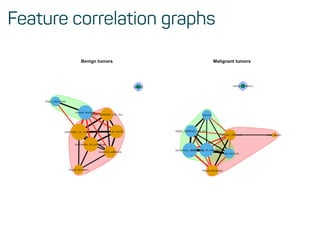
Feature correlation graphs
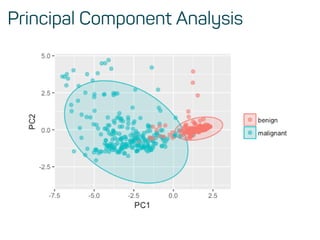
Principal Component Analysis
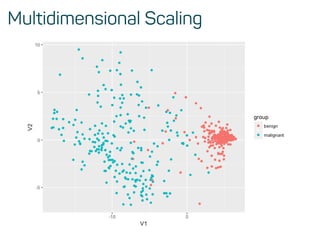
Multidimensional Scaling
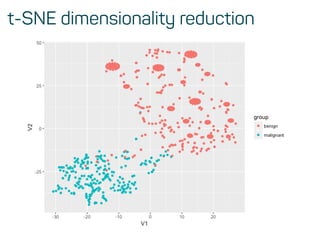
t-SNE dimensionality reduction
ML with caret
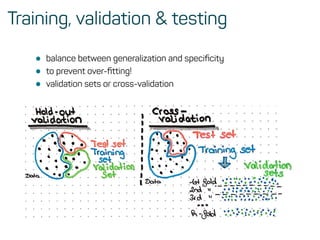
Training, validation & testing
• balance between generalization and specificity
• to prevent over-fitting!
• validation sets or cross-validation
Training, validation & testing
• balance between generalization and specificity
• to prevent over-fitting!
• validation sets or cross-validation
Training, validation and test data
library(caret)
set.seed(42)
index <- createDataPartition(bc_data$classes, p = 0.7, list = FALSE)
train_data <- bc_data[index, ]
test_data <- bc_data[-index, ]
• the main function in caret
?caret::train
This function sets up a grid of tuning parameters for a
number of classification and regression routines, fits each
model and calculates a resampling based performance
measure.
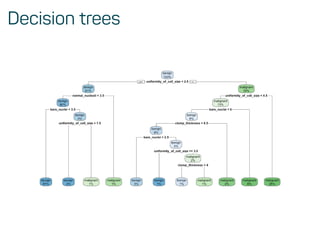
Decision trees
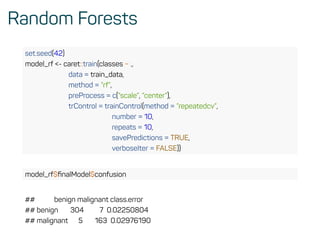
Random Forests
set.seed(42)
model_rf <- caret::train(classes ~ .,
data = train_data,
method = ”rf”,
preProcess = c(”scale”, ”center”),
trControl = trainControl(method = ”repeatedcv”,
number = 10,
repeats = 10,
savePredictions = TRUE,
verboseIter = FALSE))
model_rf$finalModel$confusion
## benign malignant class.error
## benign 304 7 0.02250804
## malignant 5 163 0.02976190
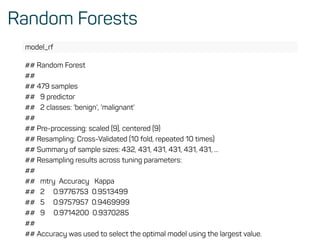
Random Forests
model_rf
## Random Forest
##
## 479 samples
## 9 predictor
## 2 classes: 'benign', 'malignant'
##
## Pre-processing: scaled (9), centered (9)
## Resampling: Cross-Validated (10 fold, repeated 10 times)
## Summary of sample sizes: 432, 431, 431, 431, 431, 431, ...
## Resampling results across tuning parameters:
##
## mtry Accuracy Kappa
## 2 0.9776753 0.9513499
## 5 0.9757957 0.9469999
## 9 0.9714200 0.9370285
##
## Accuracy was used to select the optimal model using the largest value.
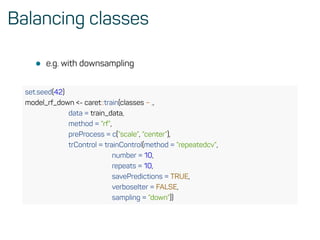
Balancing classes
• e.g. with downsampling
set.seed(42)
model_rf_down <- caret::train(classes ~ .,
data = train_data,
method = ”rf”,
preProcess = c(”scale”, ”center”),
trControl = trainControl(method = ”repeatedcv”,
number = 10,
repeats = 10,
savePredictions = TRUE,
verboseIter = FALSE,
sampling = ”down”))
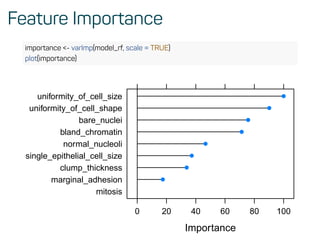
Feature Importance
importance <- varImp(model_rf, scale = TRUE)
plot(importance)
Importance
mitosis
marginal_adhesion
clump_thickness
single_epithelial_cell_size
normal_nucleoli
bland_chromatin
bare_nuclei
uniformity_of_cell_shape
uniformity_of_cell_size
0 20 40 60 80 100
Predictions on test data
confusionMatrix(predict(model_rf, test_data), as.factor(test_data$classes))
## Confusion Matrix and Statistics
##
## Reference
## Prediction benign malignant
## benign 128 4
## malignant 5 67
##
## Accuracy : 0.9559
## 95% CI : (0.9179, 0.9796)
## No Information Rate : 0.652
## P-Value [Acc > NIR] : <2e-16
##
## Kappa : 0.9031
## Mcnemar's Test P-Value : 1
##
## Sensitivity : 0.9624
## Specificity : 0.9437
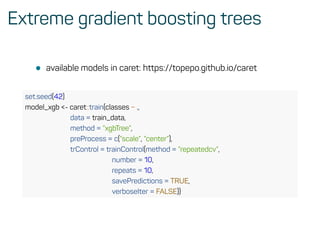
Extreme gradient boosting trees
• available models in caret: https://topepo.github.io/caret
set.seed(42)
model_xgb <- caret::train(classes ~ .,
data = train_data,
method = ”xgbTree”,
preProcess = c(”scale”, ”center”),
trControl = trainControl(method = ”repeatedcv”,
number = 10,
repeats = 10,
savePredictions = TRUE,
verboseIter = FALSE))
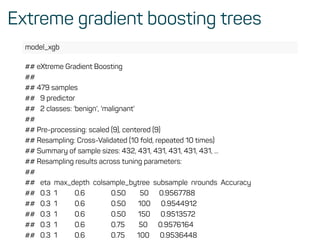
Extreme gradient boosting trees
model_xgb
## eXtreme Gradient Boosting
##
## 479 samples
## 9 predictor
## 2 classes: 'benign', 'malignant'
##
## Pre-processing: scaled (9), centered (9)
## Resampling: Cross-Validated (10 fold, repeated 10 times)
## Summary of sample sizes: 432, 431, 431, 431, 431, 431, ...
## Resampling results across tuning parameters:
##
## eta max_depth colsample_bytree subsample nrounds Accuracy
## 0.3 1 0.6 0.50 50 0.9567788
## 0.3 1 0.6 0.50 100 0.9544912
## 0.3 1 0.6 0.50 150 0.9513572
## 0.3 1 0.6 0.75 50 0.9576164
## 0.3 1 0.6 0.75 100 0.9536448
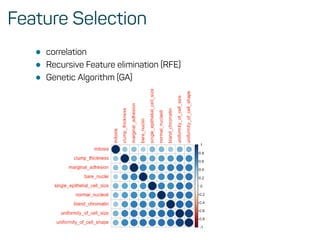
Feature Selection
• correlation
• Recursive Feature elimination (RFE)
• Genetic Algorithm (GA)
Hyperparameter tuning with caret
• Cartesian Grid
grid <- expand.grid(mtry = c(1:10))
train(..., tuneGrid = grid)
• Random Search
trainControl(..., tuneGrid = grid, search = ”random”)
ML with h2o
ML with h2o
library(h2o)
h2o.init(nthreads = -1)
## Connection successful!
##
## R is connected to the H2O cluster:
## H2O cluster uptime: 13 minutes 18 seconds
## H2O cluster timezone: Europe/Berlin
## H2O data parsing timezone: UTC
## H2O cluster version: 3.20.0.2
## H2O cluster version age: 6 days
## H2O cluster name: H2O_started_from_R_shiringlander_jrj894
## H2O cluster total nodes: 1
## H2O cluster total memory: 3.13 GB
## H2O cluster total cores: 8
## H2O cluster allowed cores: 8
## H2O cluster healthy: TRUE
## H2O Connection ip: localhost
## H2O Connection port: 54321
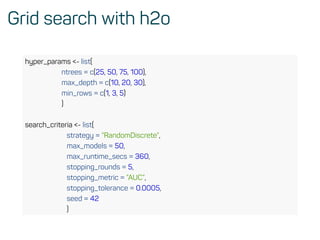
Grid search with h2o
hyper_params <- list(
ntrees = c(25, 50, 75, 100),
max_depth = c(10, 20, 30),
min_rows = c(1, 3, 5)
)
search_criteria <- list(
strategy = ”RandomDiscrete”,
max_models = 50,
max_runtime_secs = 360,
stopping_rounds = 5,
stopping_metric = ”AUC”,
stopping_tolerance = 0.0005,
seed = 42
)
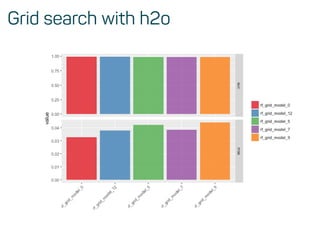
Grid search with h2o
Evaluate model performance
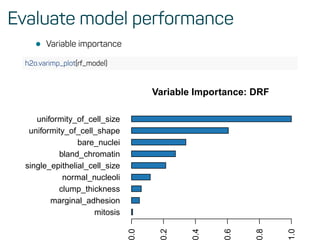
• Variable importance
h2o.varimp_plot(rf_model)
mitosis
marginal_adhesion
clump_thickness
normal_nucleoli
single_epithelial_cell_size
bland_chromatin
bare_nuclei
uniformity_of_cell_shape
uniformity_of_cell_size
Variable Importance: DRF
.0
.2
.4
.6
.8
.0
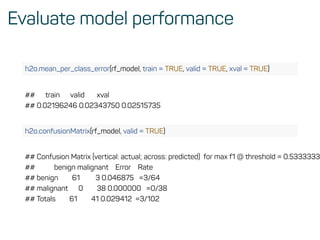
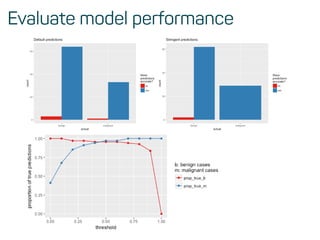
Evaluate model performance
h2o.mean_per_class_error(rf_model, train = TRUE, valid = TRUE, xval = TRUE)
## train valid xval
## 0.02196246 0.02343750 0.02515735
h2o.confusionMatrix(rf_model, valid = TRUE)
## Confusion Matrix (vertical: actual; across: predicted) for max f1 @ threshold = 0.5333333
## benign malignant Error Rate
## benign 61 3 0.046875 =3/64
## malignant 0 38 0.000000 =0/38
## Totals 61 41 0.029412 =3/102
Evaluate model performance
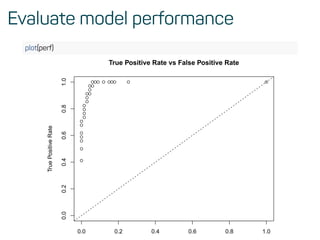
perf <- h2o.performance(rf_model, test)
h2o.logloss(perf)
## [1] 0.1072519
h2o.mse(perf)
## [1] 0.03258482
h2o.auc(perf)
## [1] 0.9916594
Evaluate model performance
plot(perf)
0.0 0.2 0.4 0.6 0.8 1.0
0.00.20.40.60.81.0 True Positive Rate vs False Positive Rate
TruePositiveRate
Evaluate model performance
Deep Dive into Neural Networks
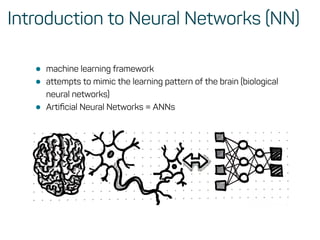
Introduction to Neural Networks (NN)
• machine learning framework
• attempts to mimic the learning pattern of the brain (biological
neural networks)
• Artificial Neural Networks = ANNs
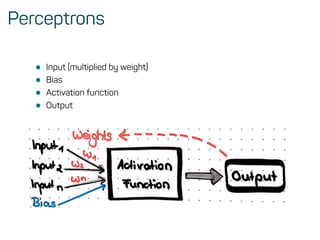
Perceptrons
• Input (multiplied by weight)
• Bias
• Activation function
• Output
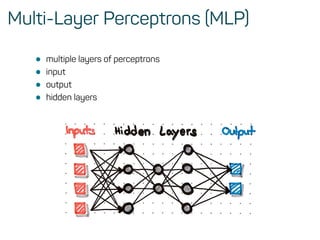
Multi-Layer Perceptrons (MLP)
• multiple layers of perceptrons
• input
• output
• hidden layers
How do Neural Nets learn?
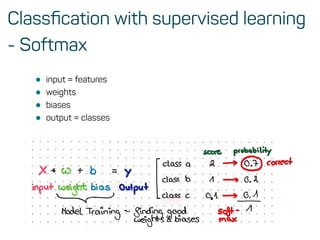
Classfication with supervised learning
- Softmax
• input = features
• weights
• biases
• output = classes
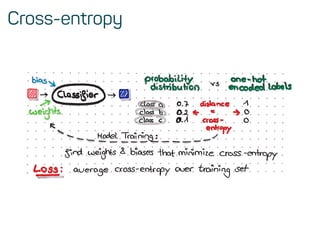
Cross-entropy
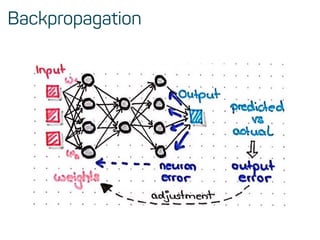
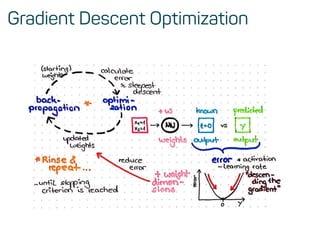
Backpropagation
Gradient Descent Optimization
Training neural nets in R
Features & data preprocessing
library(ISLR)
print(head(College))
Private Apps Accept Enroll Top10perc Top25perc F.Undergrad P.Undergrad Outstate Room.Board Books Personal PhD Terminal S.F.Ratio perc.alumni Expend Grad.Rate
Abilene Christian University Yes 1660.00 1232.00 721.00 23.00 52.00 2885.00 537.00 7440.00 3300.00 450.00 2200.00 70.00 78.00 18.10 12.00 7041.00 60.00
Adelphi University Yes 2186.00 1924.00 512.00 16.00 29.00 2683.00 1227.00 12280.00 6450.00 750.00 1500.00 29.00 30.00 12.20 16.00 10527.00 56.00
Adrian College Yes 1428.00 1097.00 336.00 22.00 50.00 1036.00 99.00 11250.00 3750.00 400.00 1165.00 53.00 66.00 12.90 30.00 8735.00 54.00
Agnes Scott College Yes 417.00 349.00 137.00 60.00 89.00 510.00 63.00 12960.00 5450.00 450.00 875.00 92.00 97.00 7.70 37.00 19016.00 59.00
Alaska Pacific University Yes 193.00 146.00 55.00 16.00 44.00 249.00 869.00 7560.00 4120.00 800.00 1500.00 76.00 72.00 11.90 2.00 10922.00 15.00
Albertson College Yes 587.00 479.00 158.00 38.00 62.00 678.00 41.00 13500.00 3335.00 500.00 675.00 67.00 73.00 9.40 11.00 9727.00 55.00
# Create vector of column max and min values
maxs <- apply(College[, 2:18], 2, max)
mins <- apply(College[, 2:18], 2, min)
# Use scale() and convert the resulting matrix to a data frame
scaled.data <- as.data.frame(scale(College[,2:18],
center = mins,
scale = maxs - mins))
Train and test split
# Convert column Private from Yes/No to 1/0
Private = as.numeric(College$Private)-1
data = cbind(Private,scaled.data)
library(caret)
set.seed(42)
# Create split
idx <- createDataPartition(data$Private, p = .75, list = FALSE)
train <- data[idx, ]
test <- data[-idx, ]
Modeling
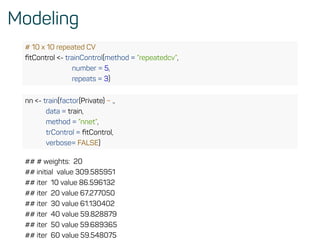
# 10 x 10 repeated CV
fitControl <- trainControl(method = ”repeatedcv”,
number = 5,
repeats = 3)
nn <- train(factor(Private) ~ .,
data = train,
method = ”nnet”,
trControl = fitControl,
verbose= FALSE)
## # weights: 20
## initial value 309.585951
## iter 10 value 86.596132
## iter 20 value 67.277050
## iter 30 value 61.130402
## iter 40 value 59.828879
## iter 50 value 59.689365
## iter 60 value 59.548075
Predictions and Evaluations
# Compute predictions on test set
predicted.nn.values <- predict(nn, test[2:18])
# print results
print(head(predicted.nn.values, 3))
## [1] 1 1 1
## Levels: 0 1
table(test$Private, predicted.nn.values)
## predicted.nn.values
## 0 1
## 0 47 3
## 1 4 140
Thank you!
… and stay in contact
• @ShirinGlander
• www.shirin-glander.de
• www.codecentric.de
• https://www.youtube.com/codecentricAI

Workshop - Introduction to Machine Learning with R

  • 1.
    Introduction to Machine Learningwith R Dr. Shirin Glander codecentric AG 28.06.2018
  • 2.
    Table of Contents Aboutme & this workshop Getting started Machine Learning How to prepare your data for ML ML with caret ML with h2o Deep Dive into Neural Networks How do Neural Nets learn? Training neural nets in R
  • 3.
    About me &this workshop
  • 4.
    How I endedup here
  • 5.
    About this workshop MachineLearning with the caret package • data prep • missingness • decision trees • random forests • gradient boosting • feature selection • hyperparameter tuning • plotting Machine Learning with the h2o package • hyperparameter tuning
  • 6.
    If there isstill time… Deep Dive into Neural Networks • what are neural nets and what makes them special? • how do neural nets learn? • how to train neural nets with caret
  • 7.
    Workshop material Scripts andcode https://gitlab.com/ShirinG/intro_to_ml_workshop • Code-Through: intro_to_ml.html* • Slides: slides/intro_to_ml_slides.pdf • Datasets: datasets/
  • 8.
    Why use R •open-source, cross-platform • established language (there are lots and lots of packages) • high quality packages with proper documentation (CRAN) • graphics capabilities - ggplot2!!! • RStudio + R Markdown!! • community support!
  • 9.
  • 10.
    R + RStudio- Best practices • Step 1) create a new project
  • 11.
    R + RStudio- Best practices • Step 2) create a new R Markdown document
  • 12.
  • 13.
  • 14.
    A general workflow •Input data • Data preprocessing • Training, validation and test split • Modeling • Predictions and Evaluations
  • 15.
    How to prepareyour data for ML
  • 16.
    Reading in data BreastCancer Wisconsin (Diagnostic) Dataset library(tidyverse) # for tidy data analysis bc_data <- readr::read_delim(”../datasets/breast-cancer-wisconsin.data.txt”, delim = ”,”, col_names = c(”sample_code_number”, ”clump_thickness”, ”uniformity_of_cell_size”, ”uniformity_of_cell_shape”, ”marginal_adhesion”, ”single_epithelial_cell_size”, ”bare_nuclei”, ”bland_chromatin”, ”normal_nucleoli”, ”mitosis”, ”classes”)) %>% mutate(bare_nuclei = as.numeric(bare_nuclei), classes = ifelse(classes == ”2”, ”benign”, ifelse(classes == ”4”, ”malignant”, NA)))
  • 17.
    Missingness mice::md.pattern(bc_data, plot =FALSE) ## sample_code_number clump_thickness uniformity_of_cell_size ## 683 1 1 1 ## 16 1 1 1 ## 0 0 0 ## uniformity_of_cell_shape marginal_adhesion single_epithelial_cell_size ## 683 1 1 1 ## 16 1 1 1 ## 0 0 0 ## bland_chromatin normal_nucleoli mitosis classes bare_nuclei ## 683 1 1 1 1 1 0 ## 16 1 1 1 1 0 1 ## 0 0 0 0 16 16 bc_data <- bc_data[complete.cases(bc_data), ] %>% .[, c(11, 2:10)] • or impute with the mice package
  • 18.
    Response variable forclassification ggplot(bc_data, aes(x = classes, fill = classes)) + geom_bar() 0 100 200 300 400 benign malignant classes count classes benign malignant • Consider balancing of response classes!!!
  • 19.
  • 20.
  • 21.
  • 22.
  • 23.
  • 24.
    Training, validation &testing • balance between generalization and specificity • to prevent over-fitting! • validation sets or cross-validation
  • 25.
    Training, validation &testing • balance between generalization and specificity • to prevent over-fitting! • validation sets or cross-validation
  • 26.
    Training, validation andtest data library(caret) set.seed(42) index <- createDataPartition(bc_data$classes, p = 0.7, list = FALSE) train_data <- bc_data[index, ] test_data <- bc_data[-index, ] • the main function in caret ?caret::train This function sets up a grid of tuning parameters for a number of classification and regression routines, fits each model and calculates a resampling based performance measure.
  • 27.
  • 28.
    Random Forests set.seed(42) model_rf <-caret::train(classes ~ ., data = train_data, method = ”rf”, preProcess = c(”scale”, ”center”), trControl = trainControl(method = ”repeatedcv”, number = 10, repeats = 10, savePredictions = TRUE, verboseIter = FALSE)) model_rf$finalModel$confusion ## benign malignant class.error ## benign 304 7 0.02250804 ## malignant 5 163 0.02976190
  • 29.
    Random Forests model_rf ## RandomForest ## ## 479 samples ## 9 predictor ## 2 classes: 'benign', 'malignant' ## ## Pre-processing: scaled (9), centered (9) ## Resampling: Cross-Validated (10 fold, repeated 10 times) ## Summary of sample sizes: 432, 431, 431, 431, 431, 431, ... ## Resampling results across tuning parameters: ## ## mtry Accuracy Kappa ## 2 0.9776753 0.9513499 ## 5 0.9757957 0.9469999 ## 9 0.9714200 0.9370285 ## ## Accuracy was used to select the optimal model using the largest value.
  • 30.
    Balancing classes • e.g.with downsampling set.seed(42) model_rf_down <- caret::train(classes ~ ., data = train_data, method = ”rf”, preProcess = c(”scale”, ”center”), trControl = trainControl(method = ”repeatedcv”, number = 10, repeats = 10, savePredictions = TRUE, verboseIter = FALSE, sampling = ”down”))
  • 31.
    Feature Importance importance <-varImp(model_rf, scale = TRUE) plot(importance) Importance mitosis marginal_adhesion clump_thickness single_epithelial_cell_size normal_nucleoli bland_chromatin bare_nuclei uniformity_of_cell_shape uniformity_of_cell_size 0 20 40 60 80 100
  • 32.
    Predictions on testdata confusionMatrix(predict(model_rf, test_data), as.factor(test_data$classes)) ## Confusion Matrix and Statistics ## ## Reference ## Prediction benign malignant ## benign 128 4 ## malignant 5 67 ## ## Accuracy : 0.9559 ## 95% CI : (0.9179, 0.9796) ## No Information Rate : 0.652 ## P-Value [Acc > NIR] : <2e-16 ## ## Kappa : 0.9031 ## Mcnemar's Test P-Value : 1 ## ## Sensitivity : 0.9624 ## Specificity : 0.9437
  • 33.
    Extreme gradient boostingtrees • available models in caret: https://topepo.github.io/caret set.seed(42) model_xgb <- caret::train(classes ~ ., data = train_data, method = ”xgbTree”, preProcess = c(”scale”, ”center”), trControl = trainControl(method = ”repeatedcv”, number = 10, repeats = 10, savePredictions = TRUE, verboseIter = FALSE))
  • 34.
    Extreme gradient boostingtrees model_xgb ## eXtreme Gradient Boosting ## ## 479 samples ## 9 predictor ## 2 classes: 'benign', 'malignant' ## ## Pre-processing: scaled (9), centered (9) ## Resampling: Cross-Validated (10 fold, repeated 10 times) ## Summary of sample sizes: 432, 431, 431, 431, 431, 431, ... ## Resampling results across tuning parameters: ## ## eta max_depth colsample_bytree subsample nrounds Accuracy ## 0.3 1 0.6 0.50 50 0.9567788 ## 0.3 1 0.6 0.50 100 0.9544912 ## 0.3 1 0.6 0.50 150 0.9513572 ## 0.3 1 0.6 0.75 50 0.9576164 ## 0.3 1 0.6 0.75 100 0.9536448
  • 35.
    Feature Selection • correlation •Recursive Feature elimination (RFE) • Genetic Algorithm (GA)
  • 36.
    Hyperparameter tuning withcaret • Cartesian Grid grid <- expand.grid(mtry = c(1:10)) train(..., tuneGrid = grid) • Random Search trainControl(..., tuneGrid = grid, search = ”random”)
  • 37.
  • 38.
    ML with h2o library(h2o) h2o.init(nthreads= -1) ## Connection successful! ## ## R is connected to the H2O cluster: ## H2O cluster uptime: 13 minutes 18 seconds ## H2O cluster timezone: Europe/Berlin ## H2O data parsing timezone: UTC ## H2O cluster version: 3.20.0.2 ## H2O cluster version age: 6 days ## H2O cluster name: H2O_started_from_R_shiringlander_jrj894 ## H2O cluster total nodes: 1 ## H2O cluster total memory: 3.13 GB ## H2O cluster total cores: 8 ## H2O cluster allowed cores: 8 ## H2O cluster healthy: TRUE ## H2O Connection ip: localhost ## H2O Connection port: 54321
  • 39.
    Grid search withh2o hyper_params <- list( ntrees = c(25, 50, 75, 100), max_depth = c(10, 20, 30), min_rows = c(1, 3, 5) ) search_criteria <- list( strategy = ”RandomDiscrete”, max_models = 50, max_runtime_secs = 360, stopping_rounds = 5, stopping_metric = ”AUC”, stopping_tolerance = 0.0005, seed = 42 )
  • 40.
  • 41.
    Evaluate model performance •Variable importance h2o.varimp_plot(rf_model) mitosis marginal_adhesion clump_thickness normal_nucleoli single_epithelial_cell_size bland_chromatin bare_nuclei uniformity_of_cell_shape uniformity_of_cell_size Variable Importance: DRF .0 .2 .4 .6 .8 .0
  • 42.
    Evaluate model performance h2o.mean_per_class_error(rf_model,train = TRUE, valid = TRUE, xval = TRUE) ## train valid xval ## 0.02196246 0.02343750 0.02515735 h2o.confusionMatrix(rf_model, valid = TRUE) ## Confusion Matrix (vertical: actual; across: predicted) for max f1 @ threshold = 0.5333333 ## benign malignant Error Rate ## benign 61 3 0.046875 =3/64 ## malignant 0 38 0.000000 =0/38 ## Totals 61 41 0.029412 =3/102
  • 43.
    Evaluate model performance perf<- h2o.performance(rf_model, test) h2o.logloss(perf) ## [1] 0.1072519 h2o.mse(perf) ## [1] 0.03258482 h2o.auc(perf) ## [1] 0.9916594
  • 44.
    Evaluate model performance plot(perf) 0.00.2 0.4 0.6 0.8 1.0 0.00.20.40.60.81.0 True Positive Rate vs False Positive Rate TruePositiveRate
  • 45.
  • 46.
    Deep Dive intoNeural Networks
  • 47.
    Introduction to NeuralNetworks (NN) • machine learning framework • attempts to mimic the learning pattern of the brain (biological neural networks) • Artificial Neural Networks = ANNs
  • 48.
    Perceptrons • Input (multipliedby weight) • Bias • Activation function • Output
  • 49.
    Multi-Layer Perceptrons (MLP) •multiple layers of perceptrons • input • output • hidden layers
  • 50.
    How do NeuralNets learn?
  • 51.
    Classfication with supervisedlearning - Softmax • input = features • weights • biases • output = classes
  • 52.
  • 53.
  • 54.
  • 55.
  • 56.
    Features & datapreprocessing library(ISLR) print(head(College)) Private Apps Accept Enroll Top10perc Top25perc F.Undergrad P.Undergrad Outstate Room.Board Books Personal PhD Terminal S.F.Ratio perc.alumni Expend Grad.Rate Abilene Christian University Yes 1660.00 1232.00 721.00 23.00 52.00 2885.00 537.00 7440.00 3300.00 450.00 2200.00 70.00 78.00 18.10 12.00 7041.00 60.00 Adelphi University Yes 2186.00 1924.00 512.00 16.00 29.00 2683.00 1227.00 12280.00 6450.00 750.00 1500.00 29.00 30.00 12.20 16.00 10527.00 56.00 Adrian College Yes 1428.00 1097.00 336.00 22.00 50.00 1036.00 99.00 11250.00 3750.00 400.00 1165.00 53.00 66.00 12.90 30.00 8735.00 54.00 Agnes Scott College Yes 417.00 349.00 137.00 60.00 89.00 510.00 63.00 12960.00 5450.00 450.00 875.00 92.00 97.00 7.70 37.00 19016.00 59.00 Alaska Pacific University Yes 193.00 146.00 55.00 16.00 44.00 249.00 869.00 7560.00 4120.00 800.00 1500.00 76.00 72.00 11.90 2.00 10922.00 15.00 Albertson College Yes 587.00 479.00 158.00 38.00 62.00 678.00 41.00 13500.00 3335.00 500.00 675.00 67.00 73.00 9.40 11.00 9727.00 55.00 # Create vector of column max and min values maxs <- apply(College[, 2:18], 2, max) mins <- apply(College[, 2:18], 2, min) # Use scale() and convert the resulting matrix to a data frame scaled.data <- as.data.frame(scale(College[,2:18], center = mins, scale = maxs - mins))
  • 57.
    Train and testsplit # Convert column Private from Yes/No to 1/0 Private = as.numeric(College$Private)-1 data = cbind(Private,scaled.data) library(caret) set.seed(42) # Create split idx <- createDataPartition(data$Private, p = .75, list = FALSE) train <- data[idx, ] test <- data[-idx, ]
  • 58.
    Modeling # 10 x10 repeated CV fitControl <- trainControl(method = ”repeatedcv”, number = 5, repeats = 3) nn <- train(factor(Private) ~ ., data = train, method = ”nnet”, trControl = fitControl, verbose= FALSE) ## # weights: 20 ## initial value 309.585951 ## iter 10 value 86.596132 ## iter 20 value 67.277050 ## iter 30 value 61.130402 ## iter 40 value 59.828879 ## iter 50 value 59.689365 ## iter 60 value 59.548075
  • 59.
    Predictions and Evaluations #Compute predictions on test set predicted.nn.values <- predict(nn, test[2:18]) # print results print(head(predicted.nn.values, 3)) ## [1] 1 1 1 ## Levels: 0 1 table(test$Private, predicted.nn.values) ## predicted.nn.values ## 0 1 ## 0 47 3 ## 1 4 140
  • 60.
    Thank you! … andstay in contact • @ShirinGlander • www.shirin-glander.de • www.codecentric.de • https://www.youtube.com/codecentricAI