Instructions are very much similar to sentences/statements in
English language. It is the combination of various tokens,
character set elements to perform a desired task/output to
help a program make it complete.
OR
Instructions in C are the commands in the program that will
instruct C compiler to perform specific tasks or actions.
Whenever we write a C instruction, we are telling C compiler
to do a task for us.
Following are the categories of instructions:
 Declaration instructions
 Input/output instructions
 Assignment instructions
 Arithmetic/logical instructions
 Control instructions
These are used to declare different kind of variable
further to be used by the C program.
Eg:- we want to make a program and declare the variable
suppose, we want to write the area of rectangle. So the
declaration is
int A, B, Area;
OR
int l, b, area;
We want to add two numbers, then the declarations is
int A, B, sum;
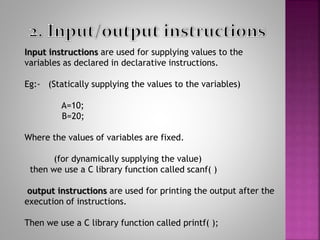
Input instructions are used for supplying values to the
variables as declared in declarative instructions.
Eg:- (Statically supplying the values to the variables)
A=10;
B=20;
Where the values of variables are fixed.
(for dynamically supplying the value)
then we use a C library function called scanf( )
output instructions are used for printing the output after the
execution of instructions.
Then we use a C library function called printf( );
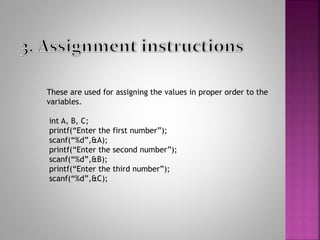
These are used for assigning the values in proper order to the
variables.
int A, B, C;
printf(“Enter the first number”);
scanf(“%d”,&A);
printf(“Enter the second number”);
scanf(“%d”,&B);
printf(“Enter the third number”);
scanf(“%d”,&C);
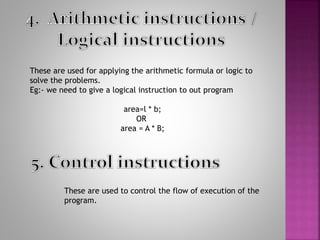
These are used for applying the arithmetic formula or logic to
solve the problems.
Eg:- we need to give a logical instruction to out program
area=l * b;
OR
area = A * B;
These are used to control the flow of execution of the
program.
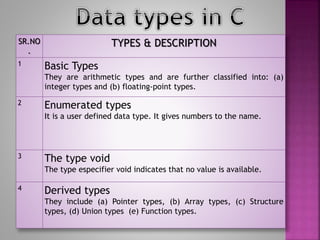
SR.NO
.
TYPES & DESCRIPTION
1 Basic Types
They are arithmetic types and are further classified into: (a)
integer types and (b) floating-point types.
2 Enumerated types
It is a user defined data type. It gives numbers to the name.
3 The type void
The type especifier void indicates that no value is available.
4 Derived types
They include (a) Pointer types, (b) Array types, (c) Structure
types, (d) Union types (e) Function types.
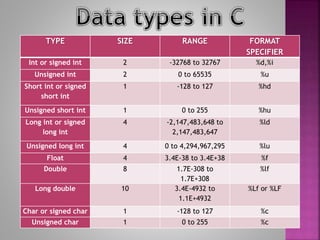
TYPE SIZE RANGE FORMAT
SPECIFIER
Int or signed int 2 -32768 to 32767 %d,%i
Unsigned int 2 0 to 65535 %u
Short int or signed
short int
1 -128 to 127 %hd
Unsigned short int 1 0 to 255 %hu
Long int or signed
long int
4 -2,147,483,648 to
2,147,483,647
%ld
Unsigned long int 4 0 to 4,294,967,295 %lu
Float 4 3.4E-38 to 3.4E+38 %f
Double 8 1.7E-308 to
1.7E+308
%lf
Long double 10 3.4E-4932 to
1.1E+4932
%Lf or %LF
Char or signed char 1 -128 to 127 %c
Unsigned char 1 0 to 255 %c
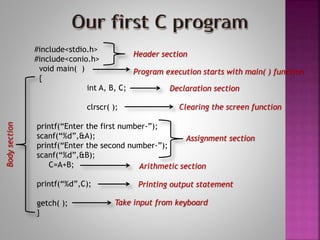
#include<stdio.h>
#include<conio.h>
void main( )
{
int A, B, C;
clrscr( );
printf(“Enter the first number-”);
scanf(“%d”,&A);
printf(“Enter the second number-”);
scanf(“%d”,&B);
C=A+B;
printf(“%d”,C);
getch( );
}
Header section
Program execution starts with main( ) function
Declaration section
Clearing the screen function
Assignment section
Arithmetic section
Printing output statement
Take input from keyboard
Body
section
stdio.h
Standard input output header file
This header files contains the definition of standard
Input output functions used by a C program.
Eg:- printf( ); scanf( );
Output Input
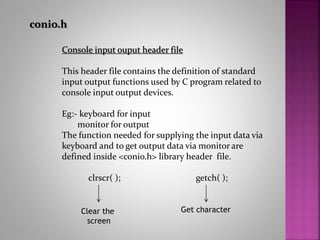
conio.h
Console input ouput header file
This header file contains the definition of standard
input output functions used by C program related to
console input output devices.
Eg:- keyboard for input
monitor for output
The function needed for supplying the input data via
keyboard and to get output data via monitor are
defined inside <conio.h> library header file.
clrscr( ); getch( );
Clear the
screen
Get character
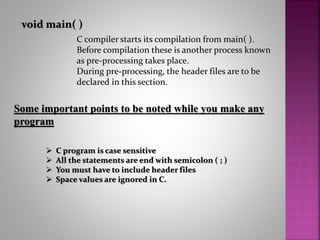
void main( )
C compiler starts its compilation from main( ).
Before compilation these is another process known
as pre-processing takes place.
During pre-processing, the header files are to be
declared in this section.
Some important points to be noted while you make any
program
 C program is case sensitive
 All the statements are end with semicolon ( ; )
 You must have to include header files
 Space values are ignored in C.

C programming language for beginners

  • 2.
    Instructions are verymuch similar to sentences/statements in English language. It is the combination of various tokens, character set elements to perform a desired task/output to help a program make it complete. OR Instructions in C are the commands in the program that will instruct C compiler to perform specific tasks or actions. Whenever we write a C instruction, we are telling C compiler to do a task for us.
  • 3.
    Following are thecategories of instructions:  Declaration instructions  Input/output instructions  Assignment instructions  Arithmetic/logical instructions  Control instructions
  • 4.
    These are usedto declare different kind of variable further to be used by the C program. Eg:- we want to make a program and declare the variable suppose, we want to write the area of rectangle. So the declaration is int A, B, Area; OR int l, b, area; We want to add two numbers, then the declarations is int A, B, sum;
  • 5.
    Input instructions areused for supplying values to the variables as declared in declarative instructions. Eg:- (Statically supplying the values to the variables) A=10; B=20; Where the values of variables are fixed. (for dynamically supplying the value) then we use a C library function called scanf( ) output instructions are used for printing the output after the execution of instructions. Then we use a C library function called printf( );
  • 6.
    These are usedfor assigning the values in proper order to the variables. int A, B, C; printf(“Enter the first number”); scanf(“%d”,&A); printf(“Enter the second number”); scanf(“%d”,&B); printf(“Enter the third number”); scanf(“%d”,&C);
  • 7.
    These are usedfor applying the arithmetic formula or logic to solve the problems. Eg:- we need to give a logical instruction to out program area=l * b; OR area = A * B; These are used to control the flow of execution of the program.
  • 8.
    SR.NO . TYPES & DESCRIPTION 1Basic Types They are arithmetic types and are further classified into: (a) integer types and (b) floating-point types. 2 Enumerated types It is a user defined data type. It gives numbers to the name. 3 The type void The type especifier void indicates that no value is available. 4 Derived types They include (a) Pointer types, (b) Array types, (c) Structure types, (d) Union types (e) Function types.
  • 9.
    TYPE SIZE RANGEFORMAT SPECIFIER Int or signed int 2 -32768 to 32767 %d,%i Unsigned int 2 0 to 65535 %u Short int or signed short int 1 -128 to 127 %hd Unsigned short int 1 0 to 255 %hu Long int or signed long int 4 -2,147,483,648 to 2,147,483,647 %ld Unsigned long int 4 0 to 4,294,967,295 %lu Float 4 3.4E-38 to 3.4E+38 %f Double 8 1.7E-308 to 1.7E+308 %lf Long double 10 3.4E-4932 to 1.1E+4932 %Lf or %LF Char or signed char 1 -128 to 127 %c Unsigned char 1 0 to 255 %c
  • 10.
    #include<stdio.h> #include<conio.h> void main( ) { intA, B, C; clrscr( ); printf(“Enter the first number-”); scanf(“%d”,&A); printf(“Enter the second number-”); scanf(“%d”,&B); C=A+B; printf(“%d”,C); getch( ); } Header section Program execution starts with main( ) function Declaration section Clearing the screen function Assignment section Arithmetic section Printing output statement Take input from keyboard Body section
  • 11.
    stdio.h Standard input outputheader file This header files contains the definition of standard Input output functions used by a C program. Eg:- printf( ); scanf( ); Output Input
  • 12.
    conio.h Console input ouputheader file This header file contains the definition of standard input output functions used by C program related to console input output devices. Eg:- keyboard for input monitor for output The function needed for supplying the input data via keyboard and to get output data via monitor are defined inside <conio.h> library header file. clrscr( ); getch( ); Clear the screen Get character
  • 13.
    void main( ) Ccompiler starts its compilation from main( ). Before compilation these is another process known as pre-processing takes place. During pre-processing, the header files are to be declared in this section. Some important points to be noted while you make any program  C program is case sensitive  All the statements are end with semicolon ( ; )  You must have to include header files  Space values are ignored in C.