








Bypassing NAC Solutions and
Mitigations
Suraj Khetani
Regional Associate Security Consultant
Gulf Business Machines
Topics
• What is Network Access Control and how it works
• Inherent issue with NAC
• 2 NAC Bypass techniques
• Possible Mitigations
What is NAC?
Network Access Control or NAC is solution to prevent
unauthorized access to internal networks. It restricts access
to the network based on identity or security posture of the
device that is trying to connect.
How NAC works
• When a device connects to the network, the NAC relies
on one or more detection techniques to detect the devices’
presence.
• DHCP Proxy
• Broadcast Listener
• Listening to (sniffing) IP traffic
• SNMP Traps
NAC flow
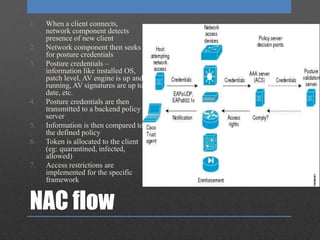
1. When a client connects,
network component detects
presence of new client
2. Network component then seeks
for posture credentials
3. Posture credentials –
information like installed OS,
patch level, AV engine is up and
running, AV signatures are up to
date, etc.
4. Posture credentials are then
transmitted to a backend policy
server
5. Information is then compared to
the defined policy
6. Token is allocated to the client
(eg: quarantined, infected,
allowed)
7. Access restrictions are
implemented for the specific
framework
Scenario
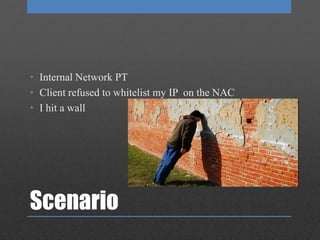
• Internal Network PT
• Client refused to whitelist my IP on the NAC
• I hit a wall
Analysis
• We have a client who wishes to access the network.
• And network wants to give access based on the policy.
• So the NAC needs to get the information from the client.
• And the client is asked to provide that information.
Issue
• The NAC is asking an untrusted client to provide
information which will then be used to give access to the
client.
• How can the NAC check if the information given by the
client is valid?
Now What???
Back to Basics
How????
Information Gathering
Bypass Scenario#1
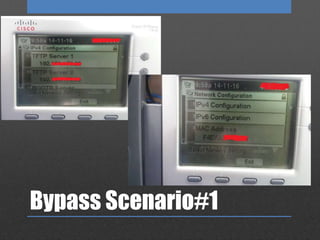
• Had a VoIP phone next to me of an employee who was on
leave
• Started fidgeting with it
Bypass Scenario#1
• It had a settings option
Bypass Scenario#1
Bypass Scenario#1
I got the following:
• Call Manager TFTP server IP address,
• DHCP server IP,
• Default gateway,
• MAC Address of VoIP phone, etc.
Thinking to myself
Bypass Scenario#1
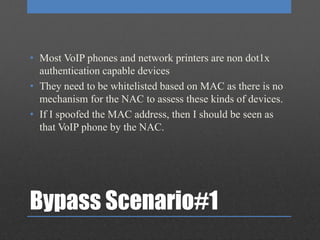
• Most VoIP phones and network printers are non dot1x
authentication capable devices
• They need to be whitelisted based on MAC as there is no
mechanism for the NAC to assess these kinds of devices.
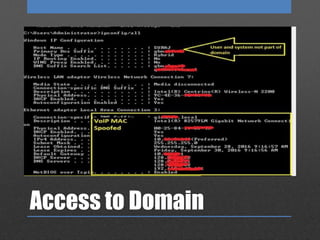
• If I spoofed the MAC address, then I should be seen as
that VoIP phone by the NAC.
Converting my thoughts
to actions
Access to Domain
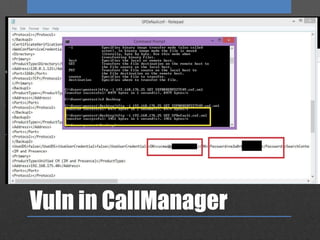
Vuln in CallManager
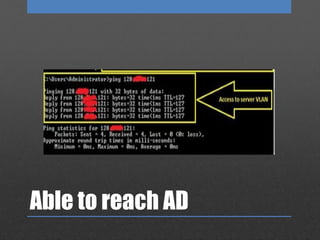
Able to reach AD
Bypass Technique#2
• Converted IPv4 address to IPv6
• Link: https://www.trustwave.com/Resources/SpiderLabs-
Blog/NAC-doesn-t-like-your-penetration-testing-device--
IPv6-to-the-rescue!/
Mitigations
• Lock down access to view network configuration on VoIP
phones.
• A core firewall in the network will help that restricts
traffic from Voice VLAN to Data VLAN. Not all traffic
should be trusted from Voice VLAN.
• Devices could be identified by analyzing the TTL value
of the ICMP ECHO response
Bypassing nac solutions and mitigations

Bypassing nac solutions and mitigations

  • 1.
    Bypassing NAC Solutionsand Mitigations Suraj Khetani Regional Associate Security Consultant Gulf Business Machines
  • 2.
    Topics • What isNetwork Access Control and how it works • Inherent issue with NAC • 2 NAC Bypass techniques • Possible Mitigations
  • 3.
    What is NAC? NetworkAccess Control or NAC is solution to prevent unauthorized access to internal networks. It restricts access to the network based on identity or security posture of the device that is trying to connect.
  • 4.
    How NAC works •When a device connects to the network, the NAC relies on one or more detection techniques to detect the devices’ presence. • DHCP Proxy • Broadcast Listener • Listening to (sniffing) IP traffic • SNMP Traps
  • 5.
    NAC flow 1. Whena client connects, network component detects presence of new client 2. Network component then seeks for posture credentials 3. Posture credentials – information like installed OS, patch level, AV engine is up and running, AV signatures are up to date, etc. 4. Posture credentials are then transmitted to a backend policy server 5. Information is then compared to the defined policy 6. Token is allocated to the client (eg: quarantined, infected, allowed) 7. Access restrictions are implemented for the specific framework
  • 6.
    Scenario • Internal NetworkPT • Client refused to whitelist my IP on the NAC • I hit a wall
  • 8.
    Analysis • We havea client who wishes to access the network. • And network wants to give access based on the policy. • So the NAC needs to get the information from the client. • And the client is asked to provide that information.
  • 10.
    Issue • The NACis asking an untrusted client to provide information which will then be used to give access to the client. • How can the NAC check if the information given by the client is valid?
  • 11.
  • 12.
  • 13.
  • 14.
  • 15.
    Bypass Scenario#1 • Hada VoIP phone next to me of an employee who was on leave • Started fidgeting with it
  • 16.
    Bypass Scenario#1 • Ithad a settings option
  • 17.
  • 18.
    Bypass Scenario#1 I gotthe following: • Call Manager TFTP server IP address, • DHCP server IP, • Default gateway, • MAC Address of VoIP phone, etc.
  • 19.
  • 20.
    Bypass Scenario#1 • MostVoIP phones and network printers are non dot1x authentication capable devices • They need to be whitelisted based on MAC as there is no mechanism for the NAC to assess these kinds of devices. • If I spoofed the MAC address, then I should be seen as that VoIP phone by the NAC.
  • 21.
  • 22.
  • 23.
  • 24.
  • 25.
    Bypass Technique#2 • ConvertedIPv4 address to IPv6 • Link: https://www.trustwave.com/Resources/SpiderLabs- Blog/NAC-doesn-t-like-your-penetration-testing-device-- IPv6-to-the-rescue!/
  • 26.
    Mitigations • Lock downaccess to view network configuration on VoIP phones. • A core firewall in the network will help that restricts traffic from Voice VLAN to Data VLAN. Not all traffic should be trusted from Voice VLAN. • Devices could be identified by analyzing the TTL value of the ICMP ECHO response

Editor's Notes

  • #7 Eg: Metadata collected from uploaded documents reveal information like users, third party software, hardware,
  • #12 Eg: Metadata collected from uploaded documents reveal information like users, third party software, hardware,
  • #13 Eg: Metadata collected from uploaded documents reveal information like users, third party software, hardware,
  • #16 Eg: Metadata collected from uploaded documents reveal information like users, third party software, hardware,
  • #17 Eg: Metadata collected from uploaded documents reveal information like users, third party software, hardware,
  • #18 Eg: Metadata collected from uploaded documents reveal information like users, third party software, hardware,
  • #19 Eg: Metadata collected from uploaded documents reveal information like users, third party software, hardware,
  • #20 Eg: Metadata collected from uploaded documents reveal information like users, third party software, hardware,