



Linux Privilege Escalation 101
Rashid Feroze
About Me
• Security consultant at Payatu Labs
• Blockchain Enthusiast
• Mountain lover
Agenda
Am I
root?
Agenda
Whoami
#root
Real Agenda
• What is Privilege escalation?
• Why do we need this?
• Why it happens?
• How we can perform it?
• How can we protect us from this?
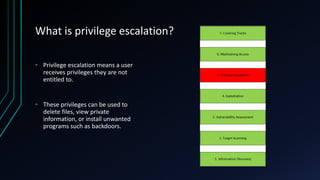
What is privilege escalation?
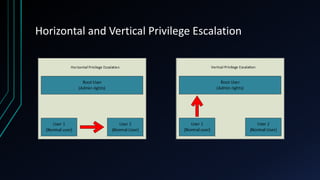
• Privilege escalation means a user
receives privileges they are not
entitled to.
• These privileges can be used to
delete files, view private
information, or install unwanted
programs such as backdoors.
Horizontal and Vertical Privilege Escalation
Why we need Privilege Escalation?
• Read/Write any sensitive file
• Persist easily between reboots
• Insert a permanent backdoor
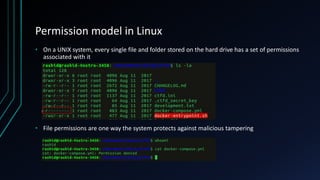
Permission model in Linux
• On a UNIX system, every single file and folder stored on the hard drive has a set of permissions
associated with it
• File permissions are one way the system protects against malicious tampering
How we can become root?
• Multiple ways!
• Kernel exploits are mostly preferred by general folks
• Exploiting services which are running as root
• Exploiting SUID executables
• Exploiting SUDO rights/user
• Exploiting badly configured cron jobs
• Exploiting users with ‘ . ’ in their path
• Exploiting Linux Wildcards
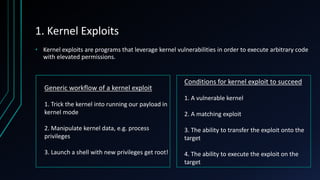
1. Kernel Exploits
• Kernel exploits are programs that leverage kernel vulnerabilities in order to execute arbitrary code
with elevated permissions.
Generic workflow of a kernel exploit
1. Trick the kernel into running our payload in
kernel mode
2. Manipulate kernel data, e.g. process
privileges
3. Launch a shell with new privileges get root!
Conditions for kernel exploit to succeed
1. A vulnerable kernel
2. A matching exploit
3. The ability to transfer the exploit onto the
target
4. The ability to execute the exploit on the
target
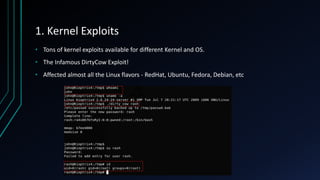
1. Kernel Exploits
• Tons of kernel exploits available for different Kernel and OS.
• The Infamous DirtyCow Exploit!
• Affected almost all the Linux flavors - RedHat, Ubuntu, Fedora, Debian, etc
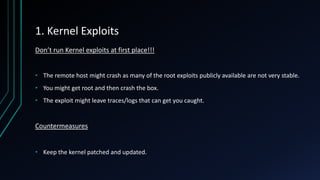
1. Kernel Exploits
Don’t run Kernel exploits at first place!!!
• The remote host might crash as many of the root exploits publicly available are not very stable.
• You might get root and then crash the box.
• The exploit might leave traces/logs that can get you caught.
Countermeasures
• Keep the kernel patched and updated.
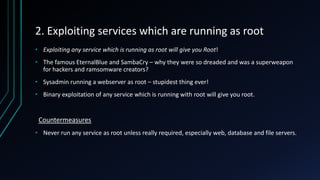
2. Exploiting services which are running as root
• Exploiting any service which is running as root will give you Root!
• The famous EternalBlue and SambaCry – why they were so dreaded and was a superweapon
for hackers and ramsomware creators?
• Sysadmin running a webserver as root – stupidest thing ever!
• Binary exploitation of any service which is running with root will give you root.
Countermeasures
• Never run any service as root unless really required, especially web, database and file servers.
3. Exploiting SUID executables
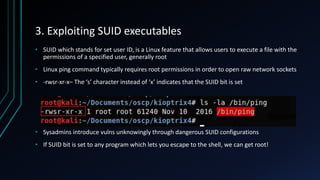
• SUID which stands for set user ID, is a Linux feature that allows users to execute a file with the
permissions of a specified user, generally root
• Linux ping command typically requires root permissions in order to open raw network sockets
• -rwsr-xr-x– The ‘s’ character instead of ‘x’ indicates that the SUID bit is set
• Sysadmins introduce vulns unknowingly through dangerous SUID configurations
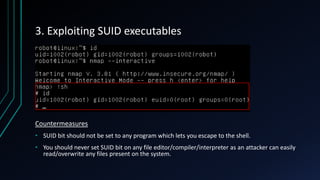
• If SUID bit is set to any program which lets you escape to the shell, we can get root!
3. Exploiting SUID executables
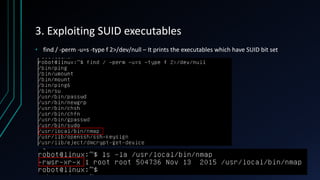
• find / -perm -u=s -type f 2>/dev/null – It prints the executables which have SUID bit set
3. Exploiting SUID executables
Countermeasures
• SUID bit should not be set to any program which lets you escape to the shell.
• You should never set SUID bit on any file editor/compiler/interpreter as an attacker can easily
read/overwrite any files present on the system.
4. Exploiting sudo rights/user
• What is SUDO?
4. Exploiting sudo rights/user
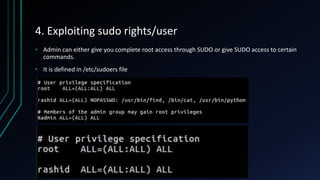
• Admin can either give you complete root access through SUDO or give SUDO access to certain
commands.
• It is defined in /etc/sudoers file
4. Exploiting sudo rights/user
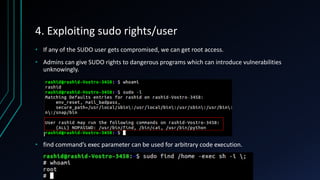
• If any of the SUDO user gets compromised, we can get root access.
• Admins can give SUDO rights to dangerous programs which can introduce vulnerabilities
unknowingly.
• find command’s exec parameter can be used for arbitrary code execution.
4. Exploiting sudo rights/user
Countermeasures
• Do not give sudo rights to any program which lets you escape to the shell.
• Never give SUDO rights to vi, more, less, nmap, perl, ruby, python, gdb and others.
5. Exploiting badly configured cron jobs
• Cron jobs, if not configured properly can be exploited to get root privilege
• Cron jobs generally run with root privileges
• What if we tamper any cron script/binary?
 1. Any script or binaries in cron jobs which are writable?
 2. Can we write over the cron file itself.
 3. Is cron.d directory writable?
Countermeasures
• Any script or binaries defined in cron jobs should not be writable
• cron file should not be writable by anyone except root.
• cron.d directory should not be writable by anyone except root.
6. Exploiting users with ‘.’ in their path
• Having ‘.’ in your PATH means that the user is able to execute binaries/scripts from the current
directory.
 With ‘.’ in path – program
 Without ‘.’ in path – ./program
• Susan is an administrator and she adds ‘.’ in her path so that she doesn’t have to write the 2
characters again.
 Another user ‘rashid’ knew that susan has added ‘.’ in her PATH because she is lazy
 rashid tells susan that ‘ls’ command is not working in his directory
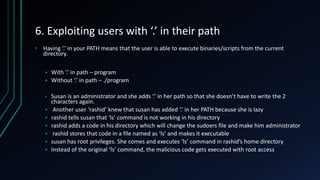
 rashid adds a code in his directory which will change the sudoers file and make him administrator
 rashid stores that code in a file named as ‘ls’ and makes it executable
 susan has root privileges. She comes and executes ‘ls’ command in rashid’s home directory
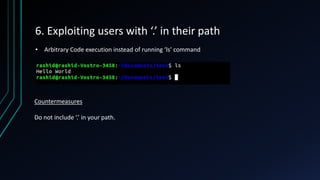
 Instead of the original ‘ls’ command, the malicious code gets executed with root access
6. Exploiting users with ‘.’ in their path
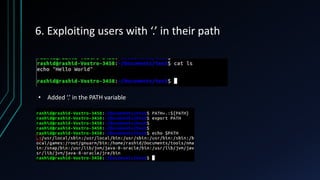
• Added ‘.’ in the PATH variable
6. Exploiting users with ‘.’ in their path
Countermeasures
Do not include ‘.’ in your path.
• Arbitrary Code execution instead of running ‘ls’ command
Enumeration scripts
• While it is advised to enumerate manually, using scripts makes it much easier, though it
generates a lot of noise.
• unix-privesc-check – http://pentestmonkey.net/tools/audit/unix-privesc-check
• Linuxprivchecker(my favorite) – https://github.com/sleventyeleven/Linuxprivchecker
• LinEnum – https://github.com/rebootuser/LinEnum
Privilege Escalation is all about Enumeration!
https://blog.g0tmi1k.com/2011/08/basic-linux-privilege-escalation/
https://payatu.com/guide-linux-privilege-escalation/
SE Linux
• Security-Enhanced Linux (SELinux) is a Linux kernel security module that provides a mechanism
for supporting access control security policies
• By default, processes are blocked from doing any activities unless the explicit permission is
granted
• Runs in two modes – Enforcing and permissive
• Harder to manage but increases security.
What Next?
• Windows privilege escalation
• Maintaining Access
• Persistence Backdoor
• Clearing your traces
References
• http://www.dankalia.com/tutor/01005/0100501004.htmhttps://tc.gtisc.gatech.edu/bss/2014/
r/kernel-exploits.pdf
• https://www.youtube.com/watch?v=dk2wsyFiosg
• https://www.sans.org/reading-room/whitepapers/testing/attack-defend-Linux-privilege-
escalation-techniques-2016-37562
Thanks 
Rashid@payatu.com
https://facebook.com/Rashid.feroz1

Linux privilege escalation 101

  • 1.
    Linux Privilege Escalation101 Rashid Feroze
  • 2.
    About Me • Securityconsultant at Payatu Labs • Blockchain Enthusiast • Mountain lover
  • 3.
  • 4.
  • 5.
    Real Agenda • Whatis Privilege escalation? • Why do we need this? • Why it happens? • How we can perform it? • How can we protect us from this?
  • 6.
    What is privilegeescalation? • Privilege escalation means a user receives privileges they are not entitled to. • These privileges can be used to delete files, view private information, or install unwanted programs such as backdoors.
  • 7.
    Horizontal and VerticalPrivilege Escalation
  • 8.
    Why we needPrivilege Escalation? • Read/Write any sensitive file • Persist easily between reboots • Insert a permanent backdoor
  • 9.
    Permission model inLinux • On a UNIX system, every single file and folder stored on the hard drive has a set of permissions associated with it • File permissions are one way the system protects against malicious tampering
  • 10.
    How we canbecome root? • Multiple ways! • Kernel exploits are mostly preferred by general folks • Exploiting services which are running as root • Exploiting SUID executables • Exploiting SUDO rights/user • Exploiting badly configured cron jobs • Exploiting users with ‘ . ’ in their path • Exploiting Linux Wildcards
  • 11.
    1. Kernel Exploits •Kernel exploits are programs that leverage kernel vulnerabilities in order to execute arbitrary code with elevated permissions. Generic workflow of a kernel exploit 1. Trick the kernel into running our payload in kernel mode 2. Manipulate kernel data, e.g. process privileges 3. Launch a shell with new privileges get root! Conditions for kernel exploit to succeed 1. A vulnerable kernel 2. A matching exploit 3. The ability to transfer the exploit onto the target 4. The ability to execute the exploit on the target
  • 12.
    1. Kernel Exploits •Tons of kernel exploits available for different Kernel and OS. • The Infamous DirtyCow Exploit! • Affected almost all the Linux flavors - RedHat, Ubuntu, Fedora, Debian, etc
  • 13.
    1. Kernel Exploits Don’trun Kernel exploits at first place!!! • The remote host might crash as many of the root exploits publicly available are not very stable. • You might get root and then crash the box. • The exploit might leave traces/logs that can get you caught. Countermeasures • Keep the kernel patched and updated.
  • 14.
    2. Exploiting serviceswhich are running as root • Exploiting any service which is running as root will give you Root! • The famous EternalBlue and SambaCry – why they were so dreaded and was a superweapon for hackers and ramsomware creators? • Sysadmin running a webserver as root – stupidest thing ever! • Binary exploitation of any service which is running with root will give you root. Countermeasures • Never run any service as root unless really required, especially web, database and file servers.
  • 15.
    3. Exploiting SUIDexecutables • SUID which stands for set user ID, is a Linux feature that allows users to execute a file with the permissions of a specified user, generally root • Linux ping command typically requires root permissions in order to open raw network sockets • -rwsr-xr-x– The ‘s’ character instead of ‘x’ indicates that the SUID bit is set • Sysadmins introduce vulns unknowingly through dangerous SUID configurations • If SUID bit is set to any program which lets you escape to the shell, we can get root!
  • 16.
    3. Exploiting SUIDexecutables • find / -perm -u=s -type f 2>/dev/null – It prints the executables which have SUID bit set
  • 17.
    3. Exploiting SUIDexecutables Countermeasures • SUID bit should not be set to any program which lets you escape to the shell. • You should never set SUID bit on any file editor/compiler/interpreter as an attacker can easily read/overwrite any files present on the system.
  • 18.
    4. Exploiting sudorights/user • What is SUDO?
  • 19.
    4. Exploiting sudorights/user • Admin can either give you complete root access through SUDO or give SUDO access to certain commands. • It is defined in /etc/sudoers file
  • 20.
    4. Exploiting sudorights/user • If any of the SUDO user gets compromised, we can get root access. • Admins can give SUDO rights to dangerous programs which can introduce vulnerabilities unknowingly. • find command’s exec parameter can be used for arbitrary code execution.
  • 21.
    4. Exploiting sudorights/user Countermeasures • Do not give sudo rights to any program which lets you escape to the shell. • Never give SUDO rights to vi, more, less, nmap, perl, ruby, python, gdb and others.
  • 22.
    5. Exploiting badlyconfigured cron jobs • Cron jobs, if not configured properly can be exploited to get root privilege • Cron jobs generally run with root privileges • What if we tamper any cron script/binary?  1. Any script or binaries in cron jobs which are writable?  2. Can we write over the cron file itself.  3. Is cron.d directory writable? Countermeasures • Any script or binaries defined in cron jobs should not be writable • cron file should not be writable by anyone except root. • cron.d directory should not be writable by anyone except root.
  • 23.
    6. Exploiting userswith ‘.’ in their path • Having ‘.’ in your PATH means that the user is able to execute binaries/scripts from the current directory.  With ‘.’ in path – program  Without ‘.’ in path – ./program • Susan is an administrator and she adds ‘.’ in her path so that she doesn’t have to write the 2 characters again.  Another user ‘rashid’ knew that susan has added ‘.’ in her PATH because she is lazy  rashid tells susan that ‘ls’ command is not working in his directory  rashid adds a code in his directory which will change the sudoers file and make him administrator  rashid stores that code in a file named as ‘ls’ and makes it executable  susan has root privileges. She comes and executes ‘ls’ command in rashid’s home directory  Instead of the original ‘ls’ command, the malicious code gets executed with root access
  • 24.
    6. Exploiting userswith ‘.’ in their path • Added ‘.’ in the PATH variable
  • 25.
    6. Exploiting userswith ‘.’ in their path Countermeasures Do not include ‘.’ in your path. • Arbitrary Code execution instead of running ‘ls’ command
  • 26.
    Enumeration scripts • Whileit is advised to enumerate manually, using scripts makes it much easier, though it generates a lot of noise. • unix-privesc-check – http://pentestmonkey.net/tools/audit/unix-privesc-check • Linuxprivchecker(my favorite) – https://github.com/sleventyeleven/Linuxprivchecker • LinEnum – https://github.com/rebootuser/LinEnum
  • 27.
    Privilege Escalation isall about Enumeration! https://blog.g0tmi1k.com/2011/08/basic-linux-privilege-escalation/ https://payatu.com/guide-linux-privilege-escalation/
  • 28.
    SE Linux • Security-EnhancedLinux (SELinux) is a Linux kernel security module that provides a mechanism for supporting access control security policies • By default, processes are blocked from doing any activities unless the explicit permission is granted • Runs in two modes – Enforcing and permissive • Harder to manage but increases security.
  • 29.
    What Next? • Windowsprivilege escalation • Maintaining Access • Persistence Backdoor • Clearing your traces
  • 30.
    References • http://www.dankalia.com/tutor/01005/0100501004.htmhttps://tc.gtisc.gatech.edu/bss/2014/ r/kernel-exploits.pdf • https://www.youtube.com/watch?v=dk2wsyFiosg •https://www.sans.org/reading-room/whitepapers/testing/attack-defend-Linux-privilege- escalation-techniques-2016-37562
  • 31.