
Building IoT Solutions using
Windows IoT Core - (Part 2 of
3 Series)Notes:
 If you experience audio issues during the webinar, you can dial in through telephone
details provided to you in your registration confirmation email.
 Please feel free to post questions in the questions dialog and we will try to answer as
many as we can at the end.
 Recording of this session will be shared in next 24-48 hours.
 You can also write to us at marketing@winwire.com for any clarifications or information.
Session Speaker
Vineet Arora
CTO
WinWire Technologies
MCA – Microsoft Certified
Azure Architect
Microsoft V-TSP
Amit Dubay
Director – Cloud & Mobility
WinWire Technologies
Microsoft Azure Certified
Developer
Vineet Arora
CTO
WinWire Technologies
MCA – Microsoft Certified
Azure Architect
Microsoft V-TSP
Agenda
Sample IoT Solution
Developing and Deploying UWP apps
Windows 10 IoT Solution Development
Introducing Windows 10 IoT Core
Demo
1
2
3
4
5
“”
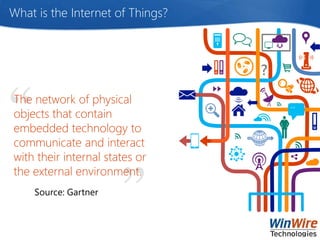
What is the Internet of Things?
The network of physical
objects that contain
embedded technology to
communicate and interact
with their internal states or
the external environment.
Source: Gartner
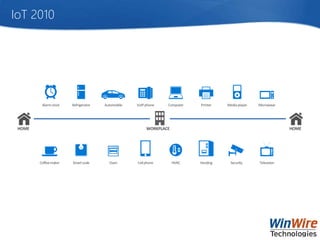
IoT 2010
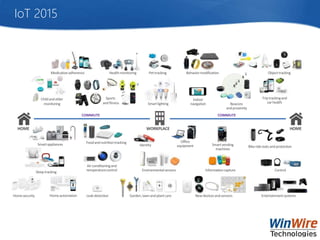
IoT 2015
”Windows 10 represents the
culmination of our platform
convergence journey with
Windows now running on a
single, unified Windows core.”
Dir., Windows Dev Platform
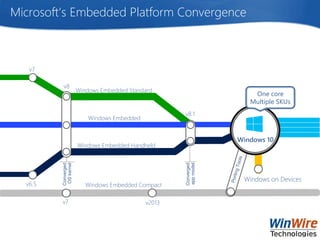
Microsoft’s Embedded Platform Convergence
v6.5
Windows Embedded Handheld
Windows Embedded
Windows on Devices
Windows Embedded Standard
v8.1
Converged
OSkernel
Converged
appmodel
v7
Windows Embedded Compact
Windows 10
v2013
v8
v7
One core
Multiple SKUs
A converged core means
we can leverage our
Windows dev skills for IoT
solutions
and extend/scale them by
leveraging Azure as
backend
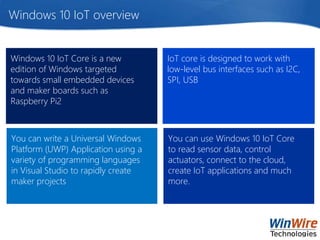
Windows 10 IoT overview
You can write a Universal Windows
Platform (UWP) Application using a
variety of programming languages
in Visual Studio to rapidly create
maker projects
Windows 10 IoT Core is a new
edition of Windows targeted
towards small embedded devices
and maker boards such as
Raspberry Pi2
IoT core is designed to work with
low-level bus interfaces such as I2C,
SPI, USB
You can use Windows 10 IoT Core
to read sensor data, control
actuators, connect to the cloud,
create IoT applications and much
more.
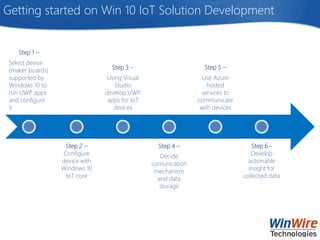
Getting started on Win 10 IoT Solution Development
Step 1 –
Select device
(maker boards)
supported by
Windows 10 to
run UWP apps
and configure
it
Step 2 –
Configure
device with
Windows 10
IoT core
Step 3 –
Using Visual
Studio
develop UWP
apps for IoT
devices
Step 4 –
Decide
comunication
mechanism
and data
storage
Step 5 –
Use Azure
hosted
services to
communicate
with devices
Step 6 –
Develop
actionable
insight for
collected data
Getting started on Win 10 IoT Solution Development
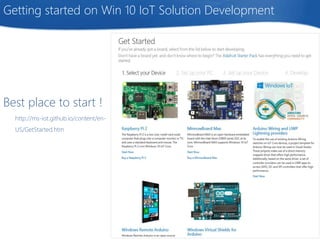
Best place to start !
http://ms-iot.github.io/content/en-
US/GetStarted.htm
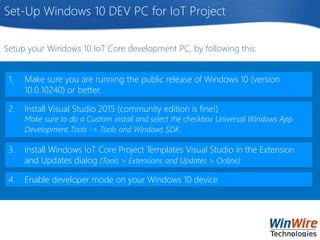
Set-Up Windows 10 DEV PC for IoT Project
1. Make sure you are running the public release of Windows 10 (version
10.0.10240) or better.
2. Install Visual Studio 2015 (community edition is fine!)
Make sure to do a Custom install and select the checkbox Universal Windows App
Development Tools -> Tools and Windows SDK.
3. Install Windows IoT Core Project Templates Visual Studio in the Extension
and Updates dialog (Tools > Extensions and Updates > Online)
4. Enable developer mode on your Windows 10 device
Setup your Windows 10 IoT Core development PC, by following this:
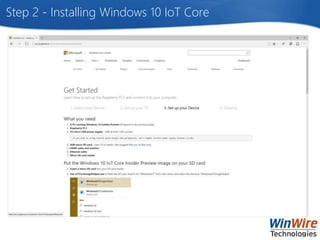
Step 2 - Installing Windows 10 IoT Core
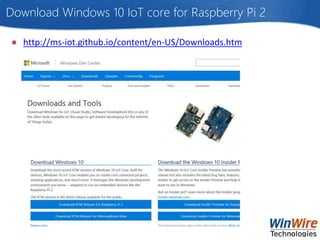
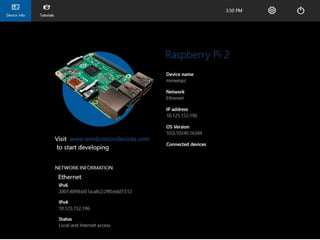
Download Windows 10 IoT core for Raspberry Pi 2
● http://ms-iot.github.io/content/en-US/Downloads.htm
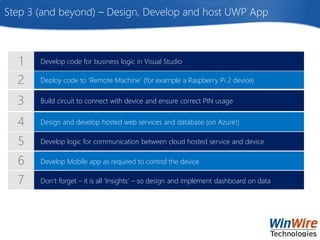
Deploy code to ‘Remote Machine’ (for example a Raspberry Pi 2 device)
Develop code for business logic in Visual Studio
Build circuit to connect with device and ensure correct PIN usage
Design and develop hosted web services and database (on Azure!)
Develop logic for communication between cloud hosted service and device
Develop Mobile app as required to control the device
Don’t forget – it is all ‘Insights’ – so design and implement dashboard on data
Step 3 (and beyond) – Design, Develop and host UWP App
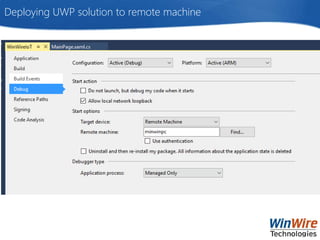
Deploying UWP solution to remote machine
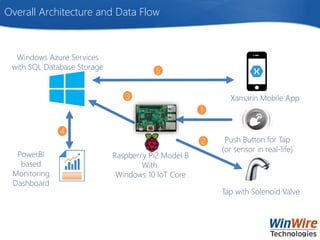
WinIoT Water management Project Overview
● Our project involved leveraging Windows 10 IoT Core on Raspberry Pi2 to
control and measure water flow through a Solenoid water control valve
● Showcases how Azure based Services and Database Storage is used to ensure
scalability of solution
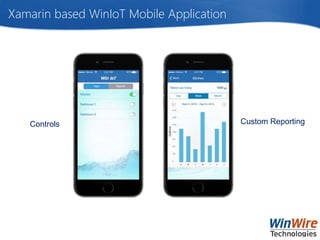
● The solution also leverages Xamarin platform to develop an app to monitor the
usage
● The app can demonstrate how to use water optimally and will allow users to
keep a close watch on their water consumption by each outlet
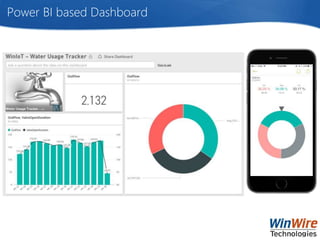
● Collected data is also visualized on PowerBI based dashboard
● Featured as contest entry on https://www.hackster.io/ Windows 10 IoT contest
Overall Architecture and Data Flow
1
2
3 Xamarin Mobile App
Tap with Solenoid Valve
PowerBI
based
Monitoring
Dashboard
Windows Azure Services
with SQL Database Storage
Raspberry Pi2 Model B
With
Windows 10 IoT Core
Push Button for Tap
(or sensor in real-life)
5
4
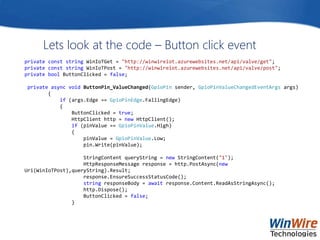
Lets look at the code – Button click event
private const string WinIoTGet = "http://winwireiot.azurewebsites.net/api/valve/get";
private const string WinIoTPost = "http://winwireiot.azurewebsites.net/api/valve/post";
private bool ButtonClicked = false;
private async void ButtonPin_ValueChanged(GpioPin sender, GpioPinValueChangedEventArgs args)
{
if (args.Edge == GpioPinEdge.FallingEdge)
{
ButtonClicked = true;
HttpClient http = new HttpClient();
if (pinValue == GpioPinValue.High)
{
pinValue = GpioPinValue.Low;
pin.Write(pinValue);
StringContent queryString = new StringContent("1");
HttpResponseMessage response = http.PostAsync(new
Uri(WinIoTPost),queryString).Result;
response.EnsureSuccessStatusCode();
string responseBody = await response.Content.ReadAsStringAsync();
http.Dispose();
ButtonClicked = false;
}
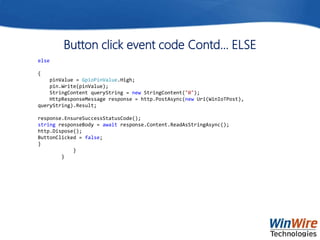
Button click event code Contd… ELSE
else
{
pinValue = GpioPinValue.High;
pin.Write(pinValue);
StringContent queryString = new StringContent("0");
HttpResponseMessage response = http.PostAsync(new Uri(WinIoTPost),
queryString).Result;
response.EnsureSuccessStatusCode();
string responseBody = await response.Content.ReadAsStringAsync();
http.Dispose();
ButtonClicked = false;
}
}
}
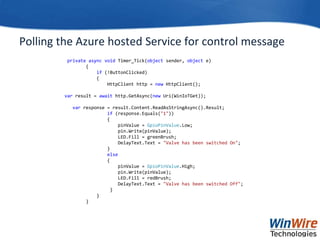
Polling the Azure hosted Service for control message
private async void Timer_Tick(object sender, object e)
{
if (!ButtonClicked)
{
HttpClient http = new HttpClient();
var result = await http.GetAsync(new Uri(WinIoTGet));
var response = result.Content.ReadAsStringAsync().Result;
if (response.Equals("1"))
{
pinValue = GpioPinValue.Low;
pin.Write(pinValue);
LED.Fill = greenBrush;
DelayText.Text = "Valve has been switched On";
}
else
{
pinValue = GpioPinValue.High;
pin.Write(pinValue);
LED.Fill = redBrush;
DelayText.Text = "Valve has been switched Off";
}
}
}
Power BI based Dashboard
Xamarin based WinIoT Mobile Application
Controls Custom Reporting
The Azure IoT Suite is a collection of Azure services that come together in a composite
suite that you can quickly spin up preconfigured IoT solutions in minutes. The suite
contains the following core Azure services:
• IoT Hub
• Event hub
• Stream Analytics ()
• Storage blob
• Web/Mobile app
• DocumentDb
• Web Jobs
• Logic Apps
• Azure Active Directory
• The idea is to accelerate time to value, but also allows you to customize it, so that
you can add devices and modify rules and alerts to tailor to your needs.
• Microsoft Partners can work with customers to fine tune specific assets and
processes and integrate with backend systems.
Azure IoT Suite - Overview
Azure IoT Suite - Benefits
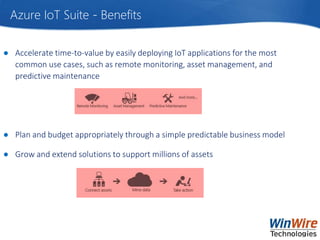
● Accelerate time-to-value by easily deploying IoT applications for the most
common use cases, such as remote monitoring, asset management, and
predictive maintenance
● Plan and budget appropriately through a simple predictable business model
● Grow and extend solutions to support millions of assets
Who We Are
IT solutions company
making information
actionable for the
enterprises in the
mobile-cloud world
Mobility,
Cloud,
Collaboration &
Analytics
Technologies
Collaboration and
Analytics solutions
leveraging pre-built
solution accelerators
Microsoft Partner for
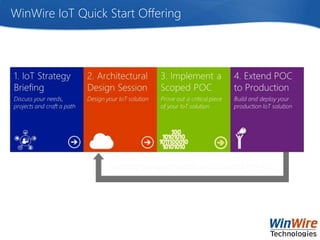
WinWire IoT Quick Start Offering
marketing@winwire.com
www.winwire.com
http://www.winwire.com/blog-winsights/
www.twitter.com/winwire
Q & A
Next Webinar
Topic : Cortana Analytics
When: Dec 17th at 9am PT
Visit to Register -
http://www.winwire.com/webinars/

Building IoT Solutions using Windows IoT Core

  • 1.
    Building IoT Solutionsusing Windows IoT Core - (Part 2 of 3 Series)Notes:  If you experience audio issues during the webinar, you can dial in through telephone details provided to you in your registration confirmation email.  Please feel free to post questions in the questions dialog and we will try to answer as many as we can at the end.  Recording of this session will be shared in next 24-48 hours.  You can also write to us at marketing@winwire.com for any clarifications or information.
  • 2.
    Session Speaker Vineet Arora CTO WinWireTechnologies MCA – Microsoft Certified Azure Architect Microsoft V-TSP Amit Dubay Director – Cloud & Mobility WinWire Technologies Microsoft Azure Certified Developer Vineet Arora CTO WinWire Technologies MCA – Microsoft Certified Azure Architect Microsoft V-TSP
  • 3.
    Agenda Sample IoT Solution Developingand Deploying UWP apps Windows 10 IoT Solution Development Introducing Windows 10 IoT Core Demo 1 2 3 4 5
  • 5.
    “” What is theInternet of Things? The network of physical objects that contain embedded technology to communicate and interact with their internal states or the external environment. Source: Gartner
  • 6.
  • 7.
  • 8.
    ”Windows 10 representsthe culmination of our platform convergence journey with Windows now running on a single, unified Windows core.” Dir., Windows Dev Platform
  • 9.
    Microsoft’s Embedded PlatformConvergence v6.5 Windows Embedded Handheld Windows Embedded Windows on Devices Windows Embedded Standard v8.1 Converged OSkernel Converged appmodel v7 Windows Embedded Compact Windows 10 v2013 v8 v7 One core Multiple SKUs
  • 10.
    A converged coremeans we can leverage our Windows dev skills for IoT solutions and extend/scale them by leveraging Azure as backend
  • 11.
    Windows 10 IoToverview You can write a Universal Windows Platform (UWP) Application using a variety of programming languages in Visual Studio to rapidly create maker projects Windows 10 IoT Core is a new edition of Windows targeted towards small embedded devices and maker boards such as Raspberry Pi2 IoT core is designed to work with low-level bus interfaces such as I2C, SPI, USB You can use Windows 10 IoT Core to read sensor data, control actuators, connect to the cloud, create IoT applications and much more.
  • 13.
    Getting started onWin 10 IoT Solution Development Step 1 – Select device (maker boards) supported by Windows 10 to run UWP apps and configure it Step 2 – Configure device with Windows 10 IoT core Step 3 – Using Visual Studio develop UWP apps for IoT devices Step 4 – Decide comunication mechanism and data storage Step 5 – Use Azure hosted services to communicate with devices Step 6 – Develop actionable insight for collected data
  • 14.
    Getting started onWin 10 IoT Solution Development Best place to start ! http://ms-iot.github.io/content/en- US/GetStarted.htm
  • 15.
    Set-Up Windows 10DEV PC for IoT Project 1. Make sure you are running the public release of Windows 10 (version 10.0.10240) or better. 2. Install Visual Studio 2015 (community edition is fine!) Make sure to do a Custom install and select the checkbox Universal Windows App Development Tools -> Tools and Windows SDK. 3. Install Windows IoT Core Project Templates Visual Studio in the Extension and Updates dialog (Tools > Extensions and Updates > Online) 4. Enable developer mode on your Windows 10 device Setup your Windows 10 IoT Core development PC, by following this:
  • 16.
    Step 2 -Installing Windows 10 IoT Core
  • 17.
    Download Windows 10IoT core for Raspberry Pi 2 ● http://ms-iot.github.io/content/en-US/Downloads.htm
  • 19.
    Deploy code to‘Remote Machine’ (for example a Raspberry Pi 2 device) Develop code for business logic in Visual Studio Build circuit to connect with device and ensure correct PIN usage Design and develop hosted web services and database (on Azure!) Develop logic for communication between cloud hosted service and device Develop Mobile app as required to control the device Don’t forget – it is all ‘Insights’ – so design and implement dashboard on data Step 3 (and beyond) – Design, Develop and host UWP App
  • 20.
    Deploying UWP solutionto remote machine
  • 21.
    WinIoT Water managementProject Overview ● Our project involved leveraging Windows 10 IoT Core on Raspberry Pi2 to control and measure water flow through a Solenoid water control valve ● Showcases how Azure based Services and Database Storage is used to ensure scalability of solution ● The solution also leverages Xamarin platform to develop an app to monitor the usage ● The app can demonstrate how to use water optimally and will allow users to keep a close watch on their water consumption by each outlet ● Collected data is also visualized on PowerBI based dashboard ● Featured as contest entry on https://www.hackster.io/ Windows 10 IoT contest
  • 22.
    Overall Architecture andData Flow 1 2 3 Xamarin Mobile App Tap with Solenoid Valve PowerBI based Monitoring Dashboard Windows Azure Services with SQL Database Storage Raspberry Pi2 Model B With Windows 10 IoT Core Push Button for Tap (or sensor in real-life) 5 4
  • 23.
    Lets look atthe code – Button click event private const string WinIoTGet = "http://winwireiot.azurewebsites.net/api/valve/get"; private const string WinIoTPost = "http://winwireiot.azurewebsites.net/api/valve/post"; private bool ButtonClicked = false; private async void ButtonPin_ValueChanged(GpioPin sender, GpioPinValueChangedEventArgs args) { if (args.Edge == GpioPinEdge.FallingEdge) { ButtonClicked = true; HttpClient http = new HttpClient(); if (pinValue == GpioPinValue.High) { pinValue = GpioPinValue.Low; pin.Write(pinValue); StringContent queryString = new StringContent("1"); HttpResponseMessage response = http.PostAsync(new Uri(WinIoTPost),queryString).Result; response.EnsureSuccessStatusCode(); string responseBody = await response.Content.ReadAsStringAsync(); http.Dispose(); ButtonClicked = false; }
  • 24.
    Button click eventcode Contd… ELSE else { pinValue = GpioPinValue.High; pin.Write(pinValue); StringContent queryString = new StringContent("0"); HttpResponseMessage response = http.PostAsync(new Uri(WinIoTPost), queryString).Result; response.EnsureSuccessStatusCode(); string responseBody = await response.Content.ReadAsStringAsync(); http.Dispose(); ButtonClicked = false; } } }
  • 25.
    Polling the Azurehosted Service for control message private async void Timer_Tick(object sender, object e) { if (!ButtonClicked) { HttpClient http = new HttpClient(); var result = await http.GetAsync(new Uri(WinIoTGet)); var response = result.Content.ReadAsStringAsync().Result; if (response.Equals("1")) { pinValue = GpioPinValue.Low; pin.Write(pinValue); LED.Fill = greenBrush; DelayText.Text = "Valve has been switched On"; } else { pinValue = GpioPinValue.High; pin.Write(pinValue); LED.Fill = redBrush; DelayText.Text = "Valve has been switched Off"; } } }
  • 26.
    Power BI basedDashboard
  • 27.
    Xamarin based WinIoTMobile Application Controls Custom Reporting
  • 28.
    The Azure IoTSuite is a collection of Azure services that come together in a composite suite that you can quickly spin up preconfigured IoT solutions in minutes. The suite contains the following core Azure services: • IoT Hub • Event hub • Stream Analytics () • Storage blob • Web/Mobile app • DocumentDb • Web Jobs • Logic Apps • Azure Active Directory • The idea is to accelerate time to value, but also allows you to customize it, so that you can add devices and modify rules and alerts to tailor to your needs. • Microsoft Partners can work with customers to fine tune specific assets and processes and integrate with backend systems. Azure IoT Suite - Overview
  • 29.
    Azure IoT Suite- Benefits ● Accelerate time-to-value by easily deploying IoT applications for the most common use cases, such as remote monitoring, asset management, and predictive maintenance ● Plan and budget appropriately through a simple predictable business model ● Grow and extend solutions to support millions of assets
  • 30.
    Who We Are ITsolutions company making information actionable for the enterprises in the mobile-cloud world Mobility, Cloud, Collaboration & Analytics Technologies Collaboration and Analytics solutions leveraging pre-built solution accelerators
  • 31.
  • 32.
    WinWire IoT QuickStart Offering
  • 33.
    marketing@winwire.com www.winwire.com http://www.winwire.com/blog-winsights/ www.twitter.com/winwire Q & A NextWebinar Topic : Cortana Analytics When: Dec 17th at 9am PT Visit to Register - http://www.winwire.com/webinars/

Editor's Notes

  • #7 Point: In 2010 we had basic device connectivity leveraging wireless technology gathering basic telemetry
  • #8 Point With the use of the cloud we are seeing common IOT scenarios emerge We are seeing more use of command and control as well to support these scenarios