Qt for S60 Mark Wilcox
What I’m Talking About   What is Qt? Qt Modules Qt for S60 Technology Previews Porting Qt applications to S60 Example: CuteMaze Porting other applications to Qt on S60 Example: GDAL Viewer
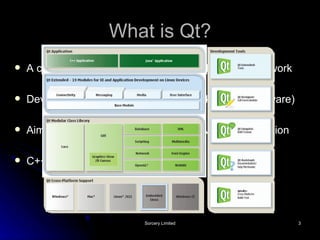
What is Qt? A cross-platform (soon to be free) application framework Developed by Trolltech (bought by Nokia -> Qt Software) Aims to look native on every platform via GUI emulation C++ code, highly modular
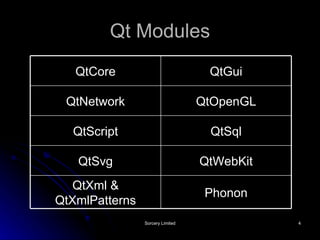
Qt Modules Phonon QtXml & QtXmlPatterns QtWebKit QtSvg QtSql QtScript QtOpenGL QtNetwork QtGui QtCore
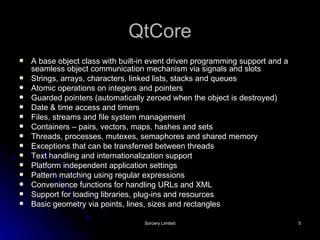
QtCore A base object class with built-in event driven programming support and a seamless object communication mechanism via signals and slots Strings, arrays, characters, linked lists, stacks and queues Atomic operations on integers and pointers Guarded pointers (automatically zeroed when the object is destroyed) Date & time access and timers Files, streams and file system management Containers – pairs, vectors, maps, hashes and sets Threads, processes, mutexes, semaphores and shared memory Exceptions that can be transferred between threads Text handling and internationalization support Platform independent application settings Pattern matching using regular expressions Convenience functions for handling URLs and XML Support for loading libraries, plug-ins and resources Basic geometry via points, lines, sizes and rectangles
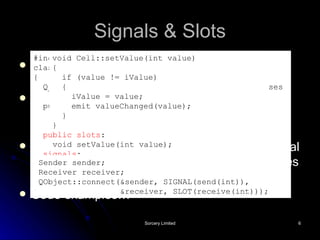
Signals & Slots Extension to C++ via code generated by the Qt Meta-Object Compiler (moc) As part of class definition, declare signals that object will emit and slots that are targets for signals A signal can also be connected to another signal so that emission of the first automatically causes the second to be emitted Code examples… #include <QObject> class Cell : public QObject { Q_OBJECT // This macro is required for all classes // that implement signals and slots public: Cell() { iValue = 0; } int value() const { return iValue; } public slots : void setValue(int value); signals : void valueChanged(int newValue); private: int iValue; }; void Cell::setValue(int value) { if (value != iValue) { iValue = value; emit valueChanged(value); } } Sender sender; Receiver receiver; QObject::connect(&sender, SIGNAL(send(int)), &receiver, SLOT(receive(int)));
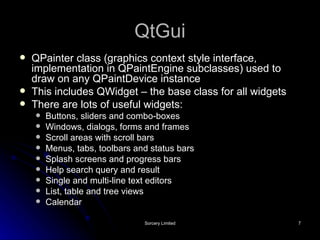
QtGui QPainter class (graphics context style interface, implementation in QPaintEngine subclasses) used to draw on any QPaintDevice instance This includes QWidget – the base class for all widgets There are lots of useful widgets: Buttons, sliders and combo-boxes Windows, dialogs, forms and frames Scroll areas with scroll bars Menus, tabs, toolbars and status bars Splash screens and progress bars Help search query and result Single and multi-line text editors List, table and tree views Calendar
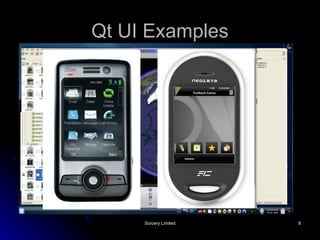
Qt UI Examples
QtNetwork Portable and simple network programming classes for: UDP, TCP, SSL and local sockets Key and certificate handling for secure communications HTTP and FTP protocol implementations Host address lookup by name A managed request and response mechanism Proxies, authentication and cookie management Local and remotely accessible (TCP) servers
QtOpenGL Allows developers to combine a Qt UI with 3D graphics rendered using OpenGL OpenGL ES used on embedded platforms Module not yet available for Qt for S60
QtScript Make your applications scriptable with Qt Script Based on ECMAScript (JavaScript/JScript) QScriptEngine class used to evaluate scripts that are: Typed by the user Loaded from disk Downloaded from network Can mix signals & slots between C++ and script and create dynamic connections from script (moc at work again!)
QtSql Database integration module 3-layered architecture Driver layer SQL API layer UI layer Provides model classes for use in a model/view architecture in combination with data-aware widgets from the QtGui module Not yet available for Qt for S60 but will integrate with sqlite
QtSvg For displaying Scalable Vector Graphics Currently only the static features of SVG Tiny version 1.2 are supported Simply create a QSvgWidget and load an SVG file with it
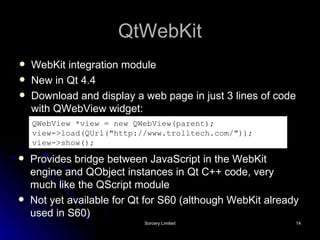
QtWebKit WebKit integration module New in Qt 4.4 Download and display a web page in just 3 lines of code with QWebView widget: QWebView *view = new QWebView(parent); view->load(QUrl(&quot;http://www.trolltech.com/&quot;)); view->show();   Provides bridge between JavaScript in the WebKit engine and QObject instances in Qt C++ code, very much like the QScript module Not yet available for Qt for S60 (although WebKit already used in S60)
QtXml & QtXmlPatterns Utility classes for reading and writing XML SAX & DOM based parsers XQuery/XPath language support Not yet available in Qt for S60
Phonon Cross-platform multimedia framework Started as part of KDE and was then adopted into Qt Actually just a common interface to various backends for different platforms Helix backend being developed for Qt for S60 – not yet available
Qt for S60 Port of Qt to S60 Currently in a “technology preview” state No commercial use allowed, GPL use and evaluation only until it’s officially released Incomplete feature set and plenty of bugs still to be fixed Actually fairly stable and usable already (with a few major issues where things aren’t implemented yet!)
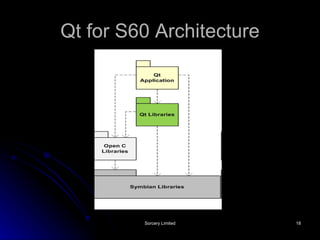
Qt for S60 Architecture
Qt for S60 Builds Qt uses a platform independent project file with a .pro extension A Qt tool called qmake generates build files for each platform from the .pro files So, on S60 the MMP, bld.inf and PKG files are generated by qmake – they should not be edited An extension makefile is also generated by qmake to support Qt extensions to C++ (e.g. moc, uic – Qt Designer support, rcc – resources)
Implicit Sharing Symbian/S60 developers likely to be concerned by apparently high levels of stack usage in Qt applications It is higher than standard Symbian code but… Many objects, including QString, are implicitly shared with copy-on-write semantics – only one copy of the data exists (allocated on the heap) with shallow copy performed and a reference count incremented until a change is made This allows passing of such objects as arguments and returning them from functions without a significant performance penalty
Technology Previews Qt Software open source philosophy of release early and often – get developer/customer feedback Qt for S60 following this process “ Pyramid” release in October – “just” QtCore, QtGui and QtNetwork “ Temple” release in December – added new modules, bugfixes and toolchain improvements “ Garden” release scheduled for Q109 – more modules and S60 UI integration planned (Qt apps to look like native apps) Final release scheduled for Q309
Porting Qt Applications to S60 Even though Qt is cross-platform, a new layout is probably required for the smaller screen size of mobile platforms Some UI design may need changing to work with keypad only input on many devices We need to wait for the “Garden” release to know exactly how things are going to work (although we can get plenty of clues from the Windows CE port of Qt) Known factors: Applications will run “maximized” by default – you’ll still be able to see the status bar and softkey area QMenuBar for an application’s main window will map onto the left softkey options menu (you can control which menu item also goes on the right (& centre?) softkey
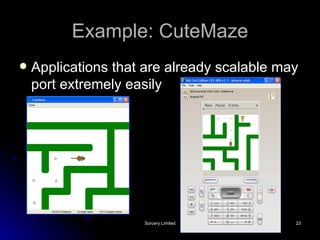
Example: CuteMaze Applications that are already scalable may port extremely easily
Porting Other Apps to Qt for S60 If you’re porting any application not developed with Qt to S60 then it would be crazy not to consider Qt as a target: Simpler and easier to code for than native S60 UI framework (Avkon) Much more portable than other alternatives – almost free porting after that to Windows Mobile and embedded Linux devices Slight performance penalty compared to native Symbian code
Example: GDAL Viewer Simple viewer application for multiple map formats (learn about GDAL later) 2-stage porting effort: First from Win32 to Qt on a Linux desktop Second to Qt for S60 Stage one took an experienced Qt developer with zero knowledge of Win32 ~5 hours Stage two took me 20 minutes
Questions?
Cool Qt Demo - WolfenQt http:// labs.trolltech.com/blogs/category/labs/internet/webkit /

Qt for S60

  • 1.
    Qt for S60Mark Wilcox
  • 2.
    What I’m TalkingAbout What is Qt? Qt Modules Qt for S60 Technology Previews Porting Qt applications to S60 Example: CuteMaze Porting other applications to Qt on S60 Example: GDAL Viewer
  • 3.
    What is Qt?A cross-platform (soon to be free) application framework Developed by Trolltech (bought by Nokia -> Qt Software) Aims to look native on every platform via GUI emulation C++ code, highly modular
  • 4.
    Qt Modules PhononQtXml & QtXmlPatterns QtWebKit QtSvg QtSql QtScript QtOpenGL QtNetwork QtGui QtCore
  • 5.
    QtCore A baseobject class with built-in event driven programming support and a seamless object communication mechanism via signals and slots Strings, arrays, characters, linked lists, stacks and queues Atomic operations on integers and pointers Guarded pointers (automatically zeroed when the object is destroyed) Date & time access and timers Files, streams and file system management Containers – pairs, vectors, maps, hashes and sets Threads, processes, mutexes, semaphores and shared memory Exceptions that can be transferred between threads Text handling and internationalization support Platform independent application settings Pattern matching using regular expressions Convenience functions for handling URLs and XML Support for loading libraries, plug-ins and resources Basic geometry via points, lines, sizes and rectangles
  • 6.
    Signals & SlotsExtension to C++ via code generated by the Qt Meta-Object Compiler (moc) As part of class definition, declare signals that object will emit and slots that are targets for signals A signal can also be connected to another signal so that emission of the first automatically causes the second to be emitted Code examples… #include <QObject> class Cell : public QObject { Q_OBJECT // This macro is required for all classes // that implement signals and slots public: Cell() { iValue = 0; } int value() const { return iValue; } public slots : void setValue(int value); signals : void valueChanged(int newValue); private: int iValue; }; void Cell::setValue(int value) { if (value != iValue) { iValue = value; emit valueChanged(value); } } Sender sender; Receiver receiver; QObject::connect(&sender, SIGNAL(send(int)), &receiver, SLOT(receive(int)));
  • 7.
    QtGui QPainter class(graphics context style interface, implementation in QPaintEngine subclasses) used to draw on any QPaintDevice instance This includes QWidget – the base class for all widgets There are lots of useful widgets: Buttons, sliders and combo-boxes Windows, dialogs, forms and frames Scroll areas with scroll bars Menus, tabs, toolbars and status bars Splash screens and progress bars Help search query and result Single and multi-line text editors List, table and tree views Calendar
  • 8.
  • 9.
    QtNetwork Portable andsimple network programming classes for: UDP, TCP, SSL and local sockets Key and certificate handling for secure communications HTTP and FTP protocol implementations Host address lookup by name A managed request and response mechanism Proxies, authentication and cookie management Local and remotely accessible (TCP) servers
  • 10.
    QtOpenGL Allows developersto combine a Qt UI with 3D graphics rendered using OpenGL OpenGL ES used on embedded platforms Module not yet available for Qt for S60
  • 11.
    QtScript Make yourapplications scriptable with Qt Script Based on ECMAScript (JavaScript/JScript) QScriptEngine class used to evaluate scripts that are: Typed by the user Loaded from disk Downloaded from network Can mix signals & slots between C++ and script and create dynamic connections from script (moc at work again!)
  • 12.
    QtSql Database integrationmodule 3-layered architecture Driver layer SQL API layer UI layer Provides model classes for use in a model/view architecture in combination with data-aware widgets from the QtGui module Not yet available for Qt for S60 but will integrate with sqlite
  • 13.
    QtSvg For displayingScalable Vector Graphics Currently only the static features of SVG Tiny version 1.2 are supported Simply create a QSvgWidget and load an SVG file with it
  • 14.
    QtWebKit WebKit integrationmodule New in Qt 4.4 Download and display a web page in just 3 lines of code with QWebView widget: QWebView *view = new QWebView(parent); view->load(QUrl(&quot;http://www.trolltech.com/&quot;)); view->show(); Provides bridge between JavaScript in the WebKit engine and QObject instances in Qt C++ code, very much like the QScript module Not yet available for Qt for S60 (although WebKit already used in S60)
  • 15.
    QtXml & QtXmlPatternsUtility classes for reading and writing XML SAX & DOM based parsers XQuery/XPath language support Not yet available in Qt for S60
  • 16.
    Phonon Cross-platform multimediaframework Started as part of KDE and was then adopted into Qt Actually just a common interface to various backends for different platforms Helix backend being developed for Qt for S60 – not yet available
  • 17.
    Qt for S60Port of Qt to S60 Currently in a “technology preview” state No commercial use allowed, GPL use and evaluation only until it’s officially released Incomplete feature set and plenty of bugs still to be fixed Actually fairly stable and usable already (with a few major issues where things aren’t implemented yet!)
  • 18.
    Qt for S60Architecture
  • 19.
    Qt for S60Builds Qt uses a platform independent project file with a .pro extension A Qt tool called qmake generates build files for each platform from the .pro files So, on S60 the MMP, bld.inf and PKG files are generated by qmake – they should not be edited An extension makefile is also generated by qmake to support Qt extensions to C++ (e.g. moc, uic – Qt Designer support, rcc – resources)
  • 20.
    Implicit Sharing Symbian/S60developers likely to be concerned by apparently high levels of stack usage in Qt applications It is higher than standard Symbian code but… Many objects, including QString, are implicitly shared with copy-on-write semantics – only one copy of the data exists (allocated on the heap) with shallow copy performed and a reference count incremented until a change is made This allows passing of such objects as arguments and returning them from functions without a significant performance penalty
  • 21.
    Technology Previews QtSoftware open source philosophy of release early and often – get developer/customer feedback Qt for S60 following this process “ Pyramid” release in October – “just” QtCore, QtGui and QtNetwork “ Temple” release in December – added new modules, bugfixes and toolchain improvements “ Garden” release scheduled for Q109 – more modules and S60 UI integration planned (Qt apps to look like native apps) Final release scheduled for Q309
  • 22.
    Porting Qt Applicationsto S60 Even though Qt is cross-platform, a new layout is probably required for the smaller screen size of mobile platforms Some UI design may need changing to work with keypad only input on many devices We need to wait for the “Garden” release to know exactly how things are going to work (although we can get plenty of clues from the Windows CE port of Qt) Known factors: Applications will run “maximized” by default – you’ll still be able to see the status bar and softkey area QMenuBar for an application’s main window will map onto the left softkey options menu (you can control which menu item also goes on the right (& centre?) softkey
  • 23.
    Example: CuteMaze Applicationsthat are already scalable may port extremely easily
  • 24.
    Porting Other Appsto Qt for S60 If you’re porting any application not developed with Qt to S60 then it would be crazy not to consider Qt as a target: Simpler and easier to code for than native S60 UI framework (Avkon) Much more portable than other alternatives – almost free porting after that to Windows Mobile and embedded Linux devices Slight performance penalty compared to native Symbian code
  • 25.
    Example: GDAL ViewerSimple viewer application for multiple map formats (learn about GDAL later) 2-stage porting effort: First from Win32 to Qt on a Linux desktop Second to Qt for S60 Stage one took an experienced Qt developer with zero knowledge of Win32 ~5 hours Stage two took me 20 minutes
  • 26.
  • 27.
    Cool Qt Demo- WolfenQt http:// labs.trolltech.com/blogs/category/labs/internet/webkit /