Effective Visualization Interfaces
 for Planning Support Systems:
            a formative study


       Kanjanee Budthimedhee, PhD.
Overview

   Background
      Research Problem

      Research Objective

      Research Design

   Principles
   Discussion
Background:   Research Problem

 Planning   Support Systems (PSS)
    Data

    Model

    Interface

 How   to create effective visualization interfaces?
Background:    Research Objective

   Literature
        Cognitive quality of graphic components and tasks, Spatial relationship property
         between the components, and Human-computer interaction factors

      Principles        for effective visualization interfaces not
       articulated
   Objective
      Derive principles for designing effective
       visualization interfaces
PSS Interface Effectiveness

   Making Plan involves Shaping Attention
   PSS must: Direct interest
               Counter short term memory limit
              Maintain attention
               Leverage influence of representation
Background:   Research Method

• Formative evaluation
   • Build various interface prototypes
   • Assess effectiveness and derive principles
• Questions
   • What components are effective?
   • What layouts are effective?
   • How to direct interest & maintain engagement?
Background:   Research Design

   Project PSS: Land-use Evaluation and impact
    Assessment Model (LEAM)
   Interface design evolved over three years
   Evaluators of interface effectiveness
       LEAM colleagues
       Planning students
       Other stakeholders


        LEAM, a scenario-based PSS simulates regional land-use change as a
         consequence of policy choices interacting with different economic and demographic
         futures
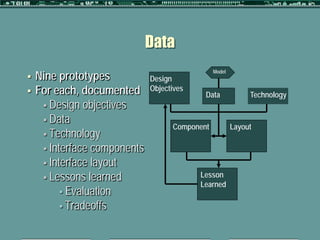
Data

    Nine prototypes
                                                Model
                             Design
   For each, documented      Objectives
                                            Data             Technology
      Design objectives
      Data
                                    Component           Layout
      Technology
      Interface components
      Interface layout
      Lessons learned                     Lesson
                                           Learned
           Evaluation
           Tradeoffs
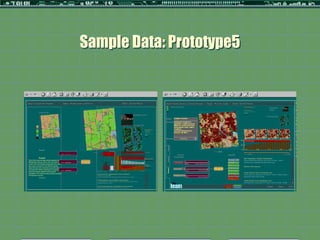
Sample Data: Prototype5
Principles
Inferences from the data
 Effective Components
 Effective Layout
 Other Principles
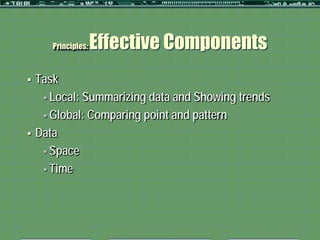
Principles:   Effective Components
   Task
      Local: Summarizing data and Showing trends

      Global: Comparing point and pattern

   Data
      Space

      Time
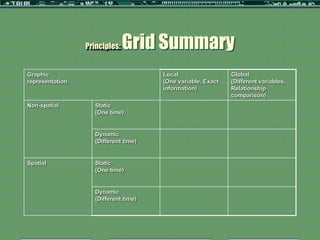
Principles:   Grid Summary
Graphic                                Local                  Global
representation                         (One variable, Exact   (Different variables,
                                       information)           Relationship
                                                              comparison)
Non-spatial         Static
                    (One time)


                    Dynamic
                    (Different time)


Spatial             Static
                    (One time)


                    Dynamic
                    (Different time)
Principles:   Graphic Representation
Graphic representation       Local                               Global
                             (One variable, Exact information)   (Different variables, Relationship
                                                                 comparison)

Non-       Static            -Separated bar     -Description     -Grouped bar or         -Comparison
spatial    (One time)        or icon [or        (summarizing     icons                   -Alternatives
                             Table chart]       data)            -2attributes: shape     -Options
                             -1attribute                         and texture/color       -Relations
                             used: shape or                      (Add dimension =        (Comparing
                             color                               see more                Points and
                                                                 relationship)           Patterns)
                                                                                         (summarizing
                                                                                         data)


           Dynamic           -Line or Bars      -Trends          -Lines or bars          -Comparison
           (Different        -2attributes:      (showing         -3attributes: shape,    -Alternatives
           time)             shape and          trends over      texture/color, and      -Options
                             spatial            time)            spatial pattern         -Relations
                             pattern/location                                            (Comparing
                                                                                         Points and
                                                                                         Patterns)
                                                                                         (showing
                                                                                         trends over
                                                                                         time)
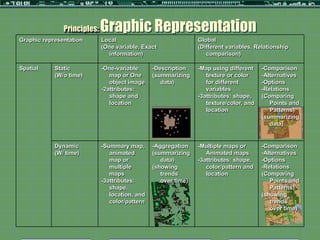
Principles:   Graphic Representation
Graphic representation       Local                              Global
                             (One variable, Exact               (Different variables, Relationship
                               information)                        comparison)

Spatial     Static           -One-variable      -Description    -Map using different    -Comparison
            (W/o time)          map or One      (summarizing       texture or color     -Alternatives
                                object image       data)           for different        -Options
                             -2attributes:                         variables            -Relations
                                shape and                       -3attributes: shape,    (Comparing
                                location                           texture/color, and      Points and
                                                                   location                Patterns)
                                                                                        (summarizing
                                                                                           data)


            Dynamic          -Summary map,      -Aggregation    -Multiple maps or       -Comparison
            (W/ time)           animated        (summarizing       Animated maps        -Alternatives
                                map or             data)        -3attributes: shape,    -Options
                                multiple        (showing           color/pattern and    -Relations
                                maps               trends          location             (Comparing
                             -3attributes:         over time)                              Points and
                                shape,                                                     Patterns)
                                location, and                                           (showing
                                color/pattern                                              trends
                                                                                           over time)
Principles:   Effective Layout
   Role of Media
   Role of Structure
      Provide information about plan and its
       consequences
      Help evaluate alternative land use policies

          Display must be proximate

          Display must be comparable
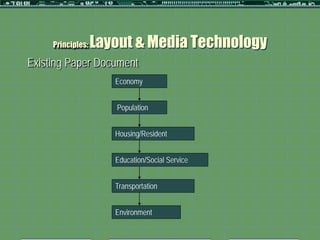
Principles:   Layout & Media Technology
Existing Paper Document
                      Economy


                      Population


                      Housing/Resident


                      Education/Social Service


                      Transportation


                      Environment
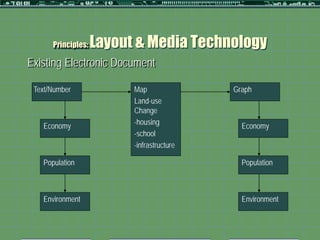
Principles:   Layout & Media Technology
Existing Electronic Document

 Text/Number              Map               Graph
                          Land-use
                          Change
   Economy                -housing            Economy
                          -school
                          -infrastructure

   Population                                 Population


   Environment                                Environment
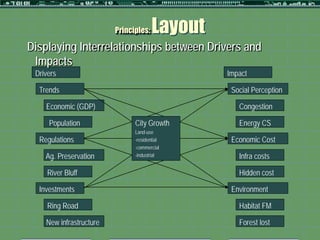
Principles:   Layout
Displaying Interrelationships between Drivers and
 Impacts
 Drivers                                        Impact

  Trends                                         Social Perception

    Economic (GDP)                                 Congestion

     Population                City Growth         Energy CS
                               Land-use
  Regulations                  -residential      Economic Cost
                               -commercial
    Ag. Preservation           -industrial         Infra costs

     River Bluff                                   Hidden cost

  Investments                                    Environment

     Ring Road                                     Habitat FM

    New infrastructure                             Forest lost
Principles:   Layout
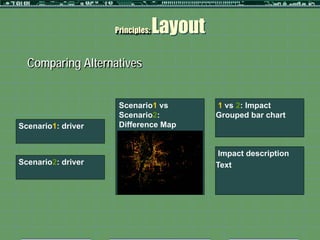
  Comparing Alternatives


                     Scenario1 vs          1 vs 2: Impact
                     Scenario2:            Grouped bar chart
Scenario1: driver    Difference Map


                                            Impact description
Scenario2: driver                          Text
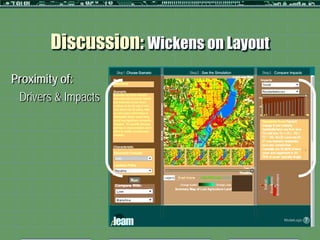
Discussion: Wickens on Layout
Proximity of:
 Drivers & Impacts
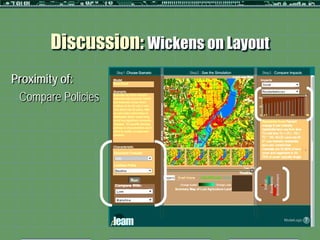
Discussion: Wickens on Layout
Proximity of:
 Compare Policies
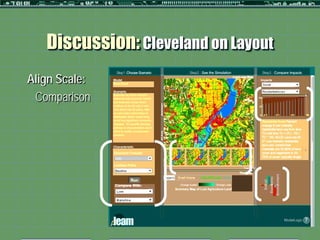
Discussion: Cleveland on Layout
Align Scale:
 Comparison
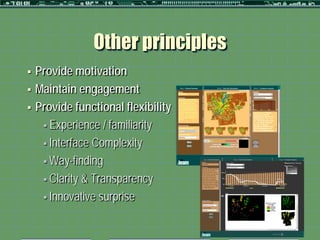
Other principles
   Provide motivation
   Maintain engagement
   Provide functional flexibility
      Experience / familiarity

      Interface Complexity

      Way-finding

      Clarity & Transparency

      Innovative surprise           Maximum number
                                        of animals
                                             <100
                                             100-200
                                             200-500
                                             > 500
                                             No Data
Conclusion
 Bridgethe gap in PSS interface literature
 Improvement
   Broader range of users/evaluators
   More formative study of PSS development

 Future   study
   Experimental study of each principle
   Aural media as an enhancement
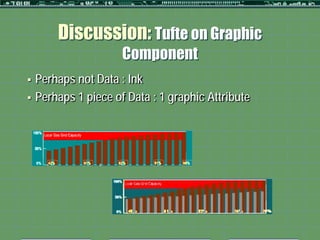
Discussion: Tufte on Graphic
                      Component
   Perhaps not Data : Ink
   Perhaps 1 piece of Data : 1 graphic Attribute
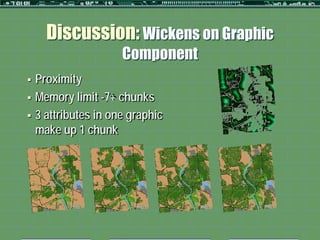
Discussion: Wickens on Graphic
                      Component
   Proximity
   Memory limit -7+ chunks
   3 attributes in one graphic
    make up 1 chunk

Budthimedhee - Input2012

  • 1.
    Effective Visualization Interfaces for Planning Support Systems: a formative study Kanjanee Budthimedhee, PhD.
  • 2.
    Overview  Background  Research Problem  Research Objective  Research Design  Principles  Discussion
  • 3.
    Background: Research Problem  Planning Support Systems (PSS)  Data  Model  Interface  How to create effective visualization interfaces?
  • 4.
    Background: Research Objective  Literature  Cognitive quality of graphic components and tasks, Spatial relationship property between the components, and Human-computer interaction factors  Principles for effective visualization interfaces not articulated  Objective  Derive principles for designing effective visualization interfaces
  • 5.
    PSS Interface Effectiveness  Making Plan involves Shaping Attention  PSS must: Direct interest  Counter short term memory limit Maintain attention  Leverage influence of representation
  • 6.
    Background: Research Method • Formative evaluation • Build various interface prototypes • Assess effectiveness and derive principles • Questions • What components are effective? • What layouts are effective? • How to direct interest & maintain engagement?
  • 7.
    Background: Research Design  Project PSS: Land-use Evaluation and impact Assessment Model (LEAM)  Interface design evolved over three years  Evaluators of interface effectiveness  LEAM colleagues  Planning students  Other stakeholders  LEAM, a scenario-based PSS simulates regional land-use change as a consequence of policy choices interacting with different economic and demographic futures
  • 8.
    Data Nine prototypes Model  Design  For each, documented Objectives Data Technology  Design objectives  Data Component Layout  Technology  Interface components  Interface layout  Lessons learned Lesson Learned  Evaluation  Tradeoffs
  • 9.
  • 10.
    Principles Inferences from thedata  Effective Components  Effective Layout  Other Principles
  • 11.
    Principles: Effective Components  Task  Local: Summarizing data and Showing trends  Global: Comparing point and pattern  Data  Space  Time
  • 12.
    Principles: Grid Summary Graphic Local Global representation (One variable, Exact (Different variables, information) Relationship comparison) Non-spatial Static (One time) Dynamic (Different time) Spatial Static (One time) Dynamic (Different time)
  • 13.
    Principles: Graphic Representation Graphic representation Local Global (One variable, Exact information) (Different variables, Relationship comparison) Non- Static -Separated bar -Description -Grouped bar or -Comparison spatial (One time) or icon [or (summarizing icons -Alternatives Table chart] data) -2attributes: shape -Options -1attribute and texture/color -Relations used: shape or (Add dimension = (Comparing color see more Points and relationship) Patterns) (summarizing data) Dynamic -Line or Bars -Trends -Lines or bars -Comparison (Different -2attributes: (showing -3attributes: shape, -Alternatives time) shape and trends over texture/color, and -Options spatial time) spatial pattern -Relations pattern/location (Comparing Points and Patterns) (showing trends over time)
  • 14.
    Principles: Graphic Representation Graphic representation Local Global (One variable, Exact (Different variables, Relationship information) comparison) Spatial Static -One-variable -Description -Map using different -Comparison (W/o time) map or One (summarizing texture or color -Alternatives object image data) for different -Options -2attributes: variables -Relations shape and -3attributes: shape, (Comparing location texture/color, and Points and location Patterns) (summarizing data) Dynamic -Summary map, -Aggregation -Multiple maps or -Comparison (W/ time) animated (summarizing Animated maps -Alternatives map or data) -3attributes: shape, -Options multiple (showing color/pattern and -Relations maps trends location (Comparing -3attributes: over time) Points and shape, Patterns) location, and (showing color/pattern trends over time)
  • 15.
    Principles: Effective Layout  Role of Media  Role of Structure  Provide information about plan and its consequences  Help evaluate alternative land use policies  Display must be proximate  Display must be comparable
  • 16.
    Principles: Layout & Media Technology Existing Paper Document Economy Population Housing/Resident Education/Social Service Transportation Environment
  • 17.
    Principles: Layout & Media Technology Existing Electronic Document Text/Number Map Graph Land-use Change Economy -housing Economy -school -infrastructure Population Population Environment Environment
  • 18.
    Principles: Layout Displaying Interrelationships between Drivers and Impacts Drivers Impact Trends Social Perception Economic (GDP) Congestion Population City Growth Energy CS Land-use Regulations -residential Economic Cost -commercial Ag. Preservation -industrial Infra costs River Bluff Hidden cost Investments Environment Ring Road Habitat FM New infrastructure Forest lost
  • 19.
    Principles: Layout Comparing Alternatives Scenario1 vs 1 vs 2: Impact Scenario2: Grouped bar chart Scenario1: driver Difference Map Impact description Scenario2: driver Text
  • 20.
    Discussion: Wickens onLayout Proximity of: Drivers & Impacts
  • 21.
    Discussion: Wickens onLayout Proximity of: Compare Policies
  • 22.
    Discussion: Cleveland onLayout Align Scale: Comparison
  • 23.
    Other principles  Provide motivation  Maintain engagement  Provide functional flexibility  Experience / familiarity  Interface Complexity  Way-finding  Clarity & Transparency  Innovative surprise Maximum number of animals <100 100-200 200-500 > 500 No Data
  • 24.
    Conclusion  Bridgethe gapin PSS interface literature  Improvement  Broader range of users/evaluators  More formative study of PSS development  Future study  Experimental study of each principle  Aural media as an enhancement
  • 26.
    Discussion: Tufte onGraphic Component  Perhaps not Data : Ink  Perhaps 1 piece of Data : 1 graphic Attribute
  • 27.
    Discussion: Wickens onGraphic Component  Proximity  Memory limit -7+ chunks  3 attributes in one graphic make up 1 chunk