What do you know about digital graphics?
LEARNING OBJECTIVES
• LIST A RANGE OF CONSIDERATIONS RELATING TO DIGITAL GRAPHICS TECHNOLOGY
• DESCRIBE FEATURES OF DIGITAL GRAPHICS TECHNOLOGY WITH REFERENCE TO EXAMPLES
DIGITAL IMAGES: TWO KINDS OF IMAGE

1.Vector
2.Bitmap (Raster)
VECTOR
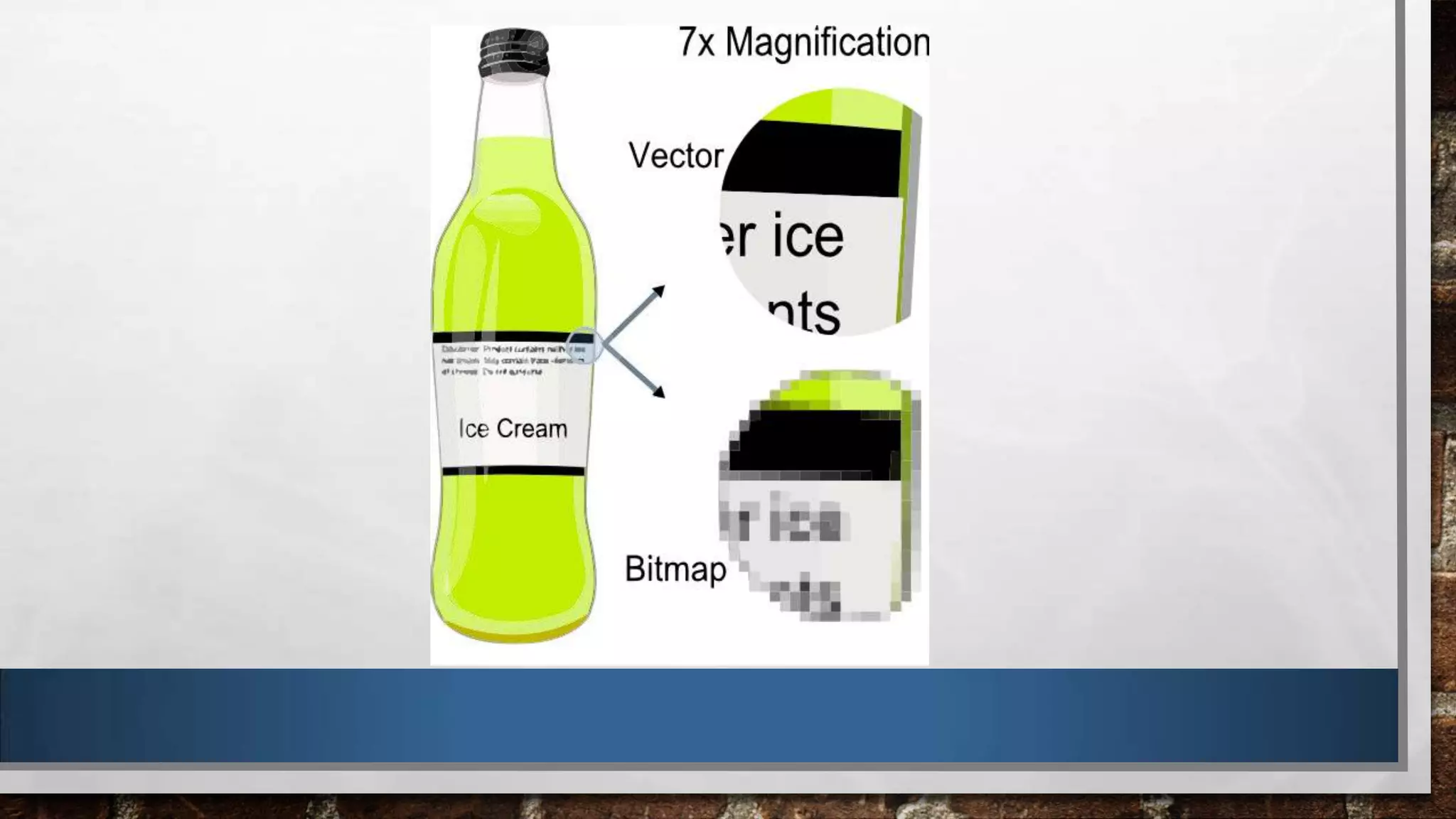
• Made of points, lines and curves – the image is built and displayed
through mathematical expressions.

• It can be scaled (re-sized) and will not loose clarity or quality.
• Resolution-independent – can be printed at any resolution.
VECTOR CONT
Common file formats: .ai, .cdr, .ps, .pdfs
Common vector graphic programmes: Adobe illustrator, CorelDraw,
FreeHand
Common uses of vector graphics: Drawing, illustrations, cartoons
BITMAP (RASTER)
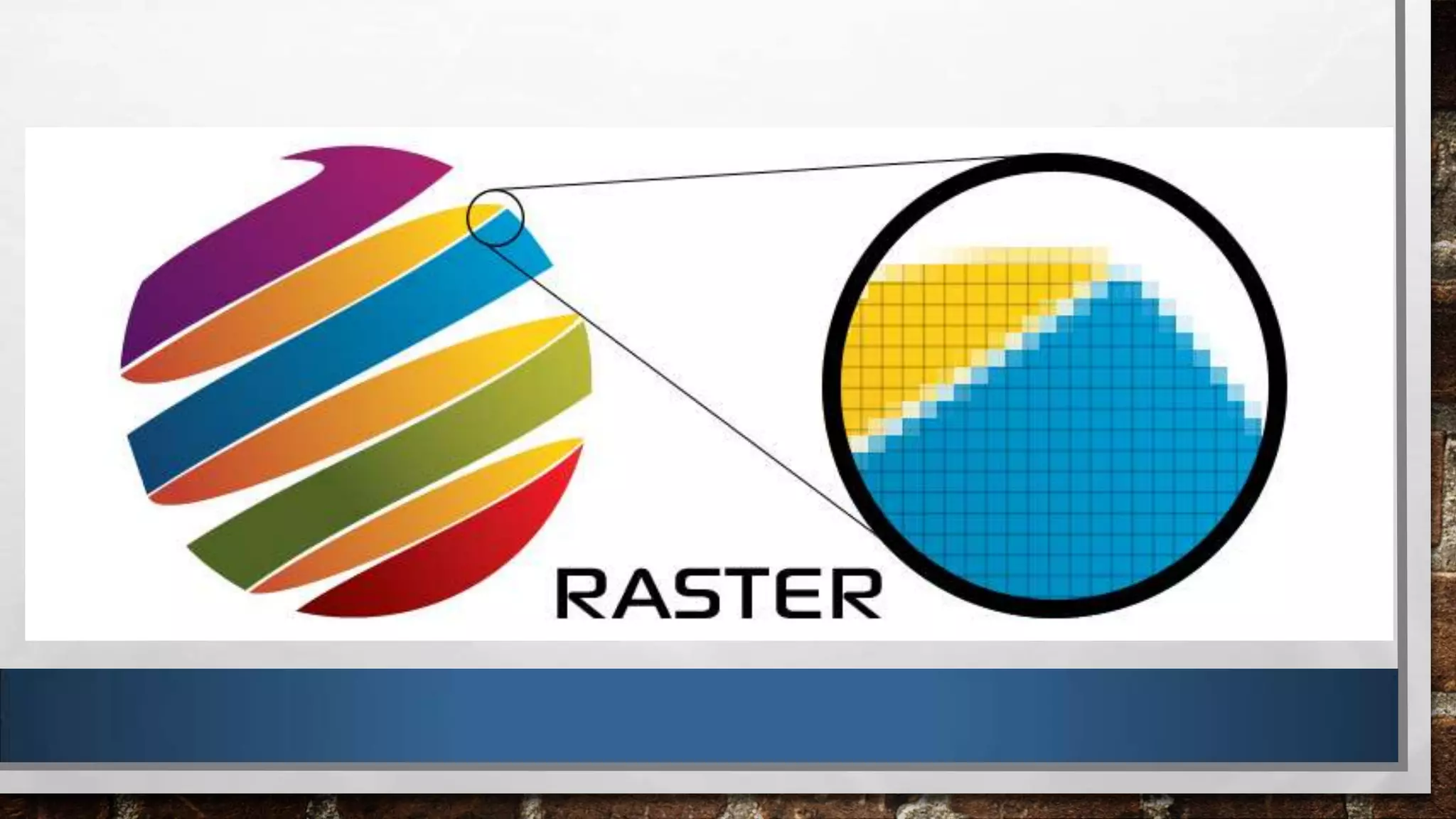
•Made up of pixels.
•Resolution-dependent - it can not be scaled up without
loosing quality.
BITMAP (RASTER) CONT
Common bitmap files: .jpg, .jpeg, .gif, .png, .tif, .tiff, .bmp
Common bitmap programmes: Paint, Photoshop
Common bitmap images: Photographs and Paintings.
PIXEL
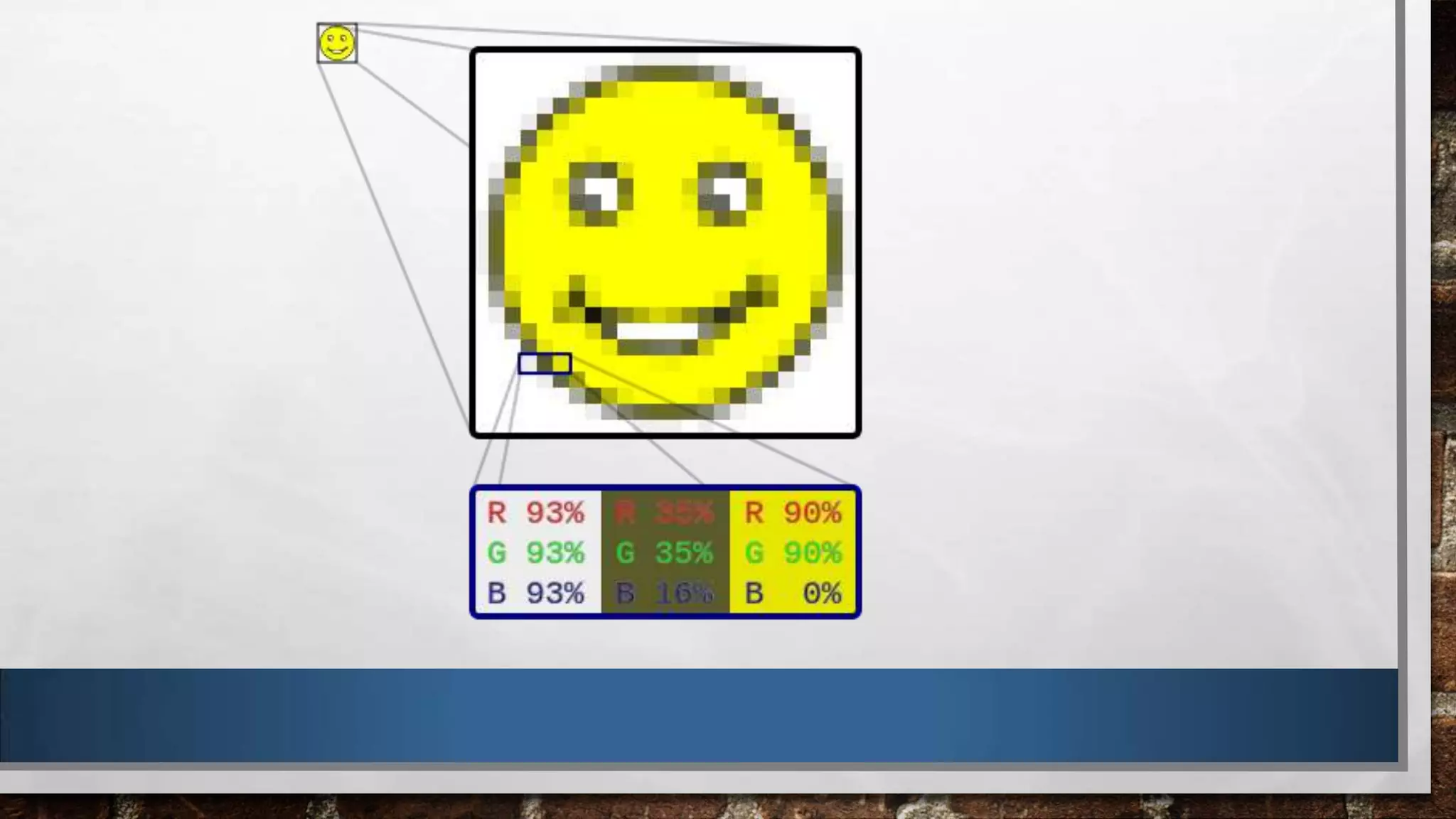
• The smallest part of a bitmap (raster) Image. This pixel will have a single colour. If you zoom in
far enough, or scale a bitmap image up, you can see its pixels.
OR

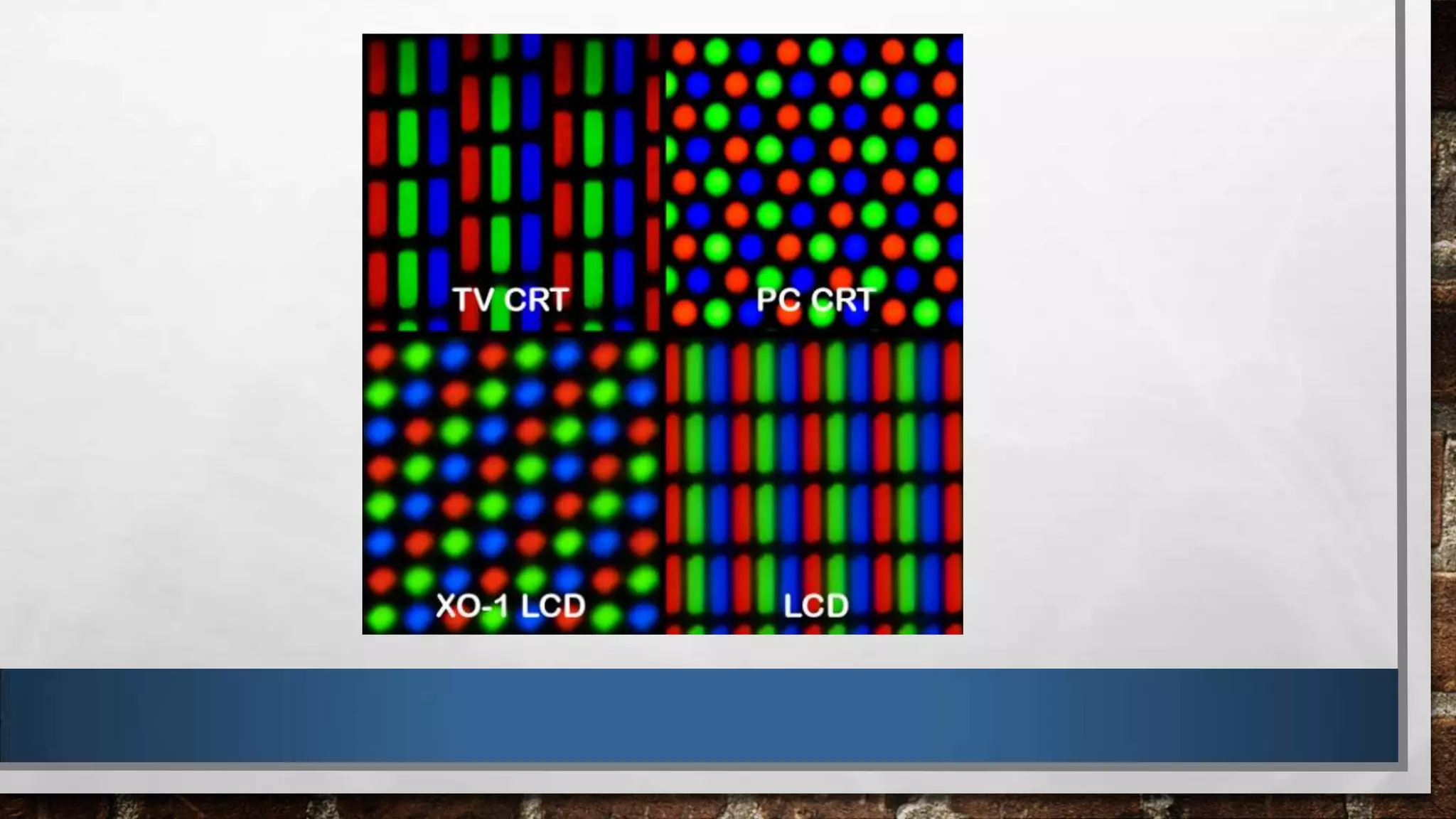
• The smallest controlled element of a screen. Each pixel on a screen emits Red, Green and Blue
light. By changing the levels of each colour (Red, Green and Blue) your screen is able to produce
every possible colour.
FACTORS WHICH IMPACT IMAGE QUALITY
• Compression: this is when you try to reduce the size of a file, perhaps to make it easier to send to
someone else.

• By compressing the image you loose data, this means you loose quality.
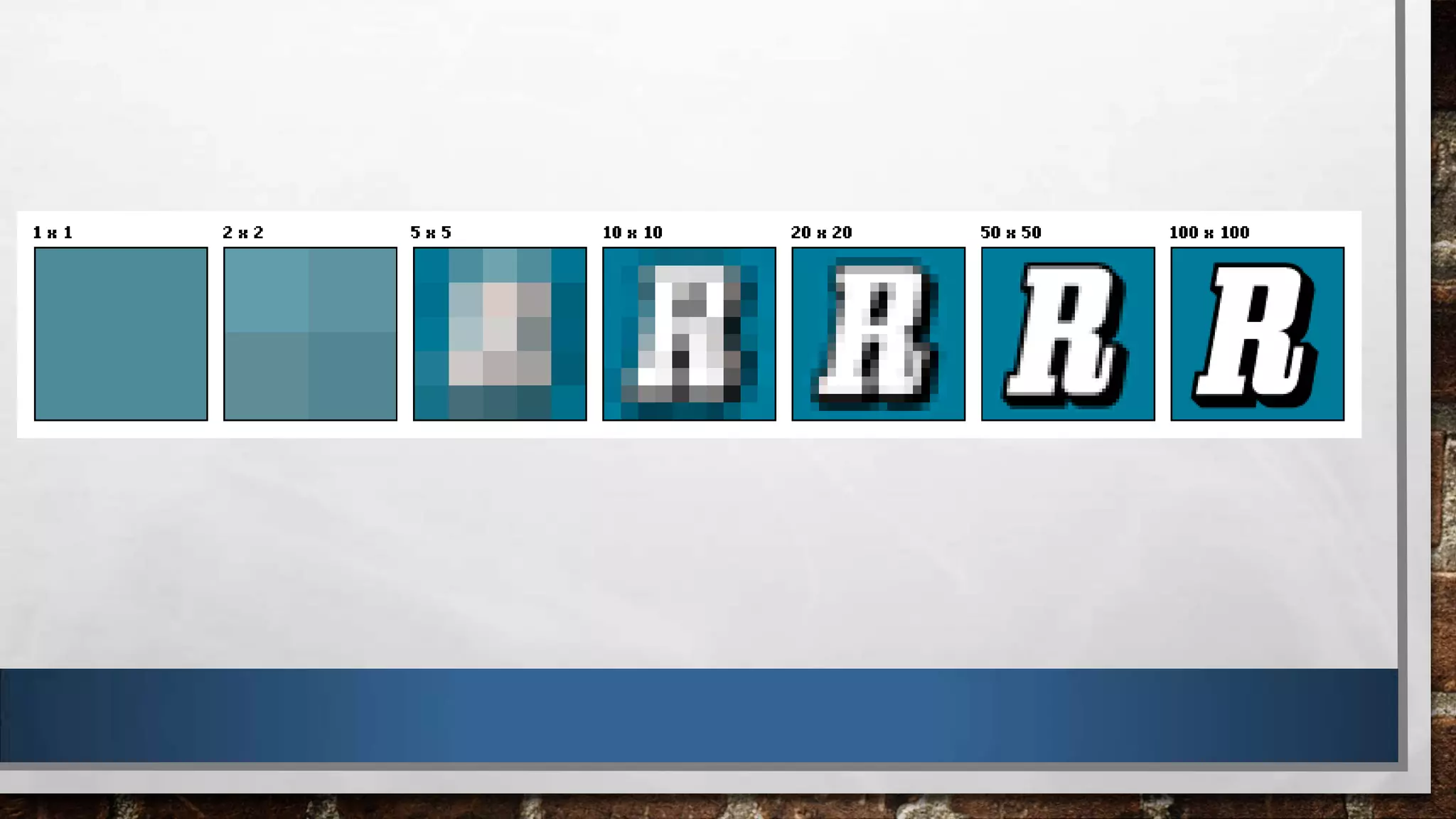
Resolution: this is the size of a image. It is how many pixels tall, and wide, an image is.

The higher the resolution = the better the quality.

However this means the file size is larger.

Resolution only applies to bitmap images.
IMAGE CAPTURING
1.
2.
3.

Scanning an image which has been drawn. This image can not be resized without loosing
quality.

Digitally drawing an image in Photoshop with a sketchpad and stylus. This image can be
resized, providing it is being drawn as a vector image.

Using a digital camera. Simply takes a photo which is saved digitally. Stored as a bitmap
image, so will loose quality if re-sized.
OUTPUT
How an image will be outputted often determines the kind of image it needs to be.

Outputs: Print (Paper), Screen & Online

Print: Printing uses the CYMK Colour Pallet (Cyan, Yellow, Magenta, Black)
Screen: Use pixels to display and image, so uses the RGB Colour Pallet (Red, Green, Blue)
STORAGE
File size: the larger an image is, or the higher its resolution, the larger the file is:

• Harder to email
• Longer to download
• Takes up more space in a computers memory
STORAGE CONT
Naming conventions: It is important to save work with suitable names so you, or others, can locate
them. If you are working on a large project as part of a team your files must be organised and
named appropriately.

• Work 1, Image2, Background5 are not clear enough.
• Website_Banner_Background, New_Company_Logo_hidef etc are more exact, and eaiser for others
to find, and understand, without having to open and look at lots of other images.
STORAGE CONT
Asset management: When working on a project, or any work, it is important to keep files organised.

• Save work, with suitable names, into correct folders
• This means others are able to use and access your work, and you are able to access theirs more
efficently

Btec creative media production digital graphics technology

  • 2.
    What do youknow about digital graphics?
  • 3.
    LEARNING OBJECTIVES • LISTA RANGE OF CONSIDERATIONS RELATING TO DIGITAL GRAPHICS TECHNOLOGY • DESCRIBE FEATURES OF DIGITAL GRAPHICS TECHNOLOGY WITH REFERENCE TO EXAMPLES
  • 4.
    DIGITAL IMAGES: TWOKINDS OF IMAGE 1.Vector 2.Bitmap (Raster)
  • 5.
    VECTOR • Made ofpoints, lines and curves – the image is built and displayed through mathematical expressions. • It can be scaled (re-sized) and will not loose clarity or quality. • Resolution-independent – can be printed at any resolution.
  • 6.
    VECTOR CONT Common fileformats: .ai, .cdr, .ps, .pdfs Common vector graphic programmes: Adobe illustrator, CorelDraw, FreeHand Common uses of vector graphics: Drawing, illustrations, cartoons
  • 7.
    BITMAP (RASTER) •Made upof pixels. •Resolution-dependent - it can not be scaled up without loosing quality.
  • 8.
    BITMAP (RASTER) CONT Commonbitmap files: .jpg, .jpeg, .gif, .png, .tif, .tiff, .bmp Common bitmap programmes: Paint, Photoshop Common bitmap images: Photographs and Paintings.
  • 11.
    PIXEL • The smallestpart of a bitmap (raster) Image. This pixel will have a single colour. If you zoom in far enough, or scale a bitmap image up, you can see its pixels. OR • The smallest controlled element of a screen. Each pixel on a screen emits Red, Green and Blue light. By changing the levels of each colour (Red, Green and Blue) your screen is able to produce every possible colour.
  • 14.
    FACTORS WHICH IMPACTIMAGE QUALITY • Compression: this is when you try to reduce the size of a file, perhaps to make it easier to send to someone else. • By compressing the image you loose data, this means you loose quality.
  • 15.
    Resolution: this isthe size of a image. It is how many pixels tall, and wide, an image is. The higher the resolution = the better the quality. However this means the file size is larger. Resolution only applies to bitmap images.
  • 17.
    IMAGE CAPTURING 1. 2. 3. Scanning animage which has been drawn. This image can not be resized without loosing quality. Digitally drawing an image in Photoshop with a sketchpad and stylus. This image can be resized, providing it is being drawn as a vector image. Using a digital camera. Simply takes a photo which is saved digitally. Stored as a bitmap image, so will loose quality if re-sized.
  • 18.
    OUTPUT How an imagewill be outputted often determines the kind of image it needs to be. Outputs: Print (Paper), Screen & Online Print: Printing uses the CYMK Colour Pallet (Cyan, Yellow, Magenta, Black) Screen: Use pixels to display and image, so uses the RGB Colour Pallet (Red, Green, Blue)
  • 19.
    STORAGE File size: thelarger an image is, or the higher its resolution, the larger the file is: • Harder to email • Longer to download • Takes up more space in a computers memory
  • 20.
    STORAGE CONT Naming conventions:It is important to save work with suitable names so you, or others, can locate them. If you are working on a large project as part of a team your files must be organised and named appropriately. • Work 1, Image2, Background5 are not clear enough. • Website_Banner_Background, New_Company_Logo_hidef etc are more exact, and eaiser for others to find, and understand, without having to open and look at lots of other images.
  • 21.
    STORAGE CONT Asset management:When working on a project, or any work, it is important to keep files organised. • Save work, with suitable names, into correct folders • This means others are able to use and access your work, and you are able to access theirs more efficently