Vector
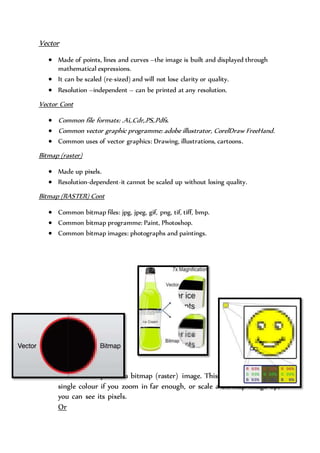
 Made of points, lines and curves –the image is built and displayed through
mathematical expressions.
 It can be scaled (re-sized) and will not lose clarity or quality.
 Resolution –independent – can be printed at any resolution.
Vector Cont
 Common file formats: .Ai,.Cdr,.PS,.Pdfs.
 Common vector graphic programme: adobe illustrator, CorelDraw FreeHand.
 Common uses of vector graphics: Drawing, illustrations, cartoons.
Bitmap (raster)
 Made up pixels.
 Resolution-dependent-it cannot be scaled up without losing quality.
Bitmap (RASTER) Cont
 Common bitmap files: jpg, jpeg, gif, png, tif, tiff, bmp.
 Common bitmap programme: Paint, Photoshop.
 Common bitmap images: photographs and paintings.
Pixel
 The smallest part of a bitmap (raster) image. This pixel will have a
single colour if you zoom in far enough, or scale a bit map image up,
you can see its pixels.
Or
 The smallest controlled element of a screen. Each pixel on screen
emits red green and blue light.by changing the levels of each colour
(Red, green and blue) your screen is able to produce every possible
colour.
Factors which impact image quality
 Compressions: This is when you try to reduce the size of a file,
perhaps to make it easier to send to someone else.
 By compressing the image you lose data, this means you lose quality.
 Resolution: This is the size of an image .It is how many pixels tall and
wide, an image is.
 The higher the resolution=the better the quality.
 However this means the file size is larger.
 Resolution only applies to bitmap images.
Image capturing
 Scanning an image which has been drawn. This image cannot be
resized without losing quality.
 Digitally drawing an image in Photoshop with a sketchpad and
styles. This image can be resized, providing it is being drawn as a
vector.
 Using a digital camera simply takes a photo which is saved quality.
Stored as a bitmap image so will lose quality if resized.
Storage
File size the larger an image is or the higher its resolution.
 Harder to email
 Longer to download
 Takes up more space in a computer’s memory
 It’s important to name files properly with suitably names so that you
can remember the folder name.
Storage Cont
 Save work with suitable names, intro correct folders
 This means others are able to access theirs more efficiently.

Vectors UNIT 13 assignment (W.A)

  • 1.
    Vector  Made ofpoints, lines and curves –the image is built and displayed through mathematical expressions.  It can be scaled (re-sized) and will not lose clarity or quality.  Resolution –independent – can be printed at any resolution. Vector Cont  Common file formats: .Ai,.Cdr,.PS,.Pdfs.  Common vector graphic programme: adobe illustrator, CorelDraw FreeHand.  Common uses of vector graphics: Drawing, illustrations, cartoons. Bitmap (raster)  Made up pixels.  Resolution-dependent-it cannot be scaled up without losing quality. Bitmap (RASTER) Cont  Common bitmap files: jpg, jpeg, gif, png, tif, tiff, bmp.  Common bitmap programme: Paint, Photoshop.  Common bitmap images: photographs and paintings. Pixel  The smallest part of a bitmap (raster) image. This pixel will have a single colour if you zoom in far enough, or scale a bit map image up, you can see its pixels. Or
  • 2.
     The smallestcontrolled element of a screen. Each pixel on screen emits red green and blue light.by changing the levels of each colour (Red, green and blue) your screen is able to produce every possible colour. Factors which impact image quality  Compressions: This is when you try to reduce the size of a file, perhaps to make it easier to send to someone else.  By compressing the image you lose data, this means you lose quality.  Resolution: This is the size of an image .It is how many pixels tall and wide, an image is.  The higher the resolution=the better the quality.  However this means the file size is larger.  Resolution only applies to bitmap images. Image capturing  Scanning an image which has been drawn. This image cannot be resized without losing quality.  Digitally drawing an image in Photoshop with a sketchpad and styles. This image can be resized, providing it is being drawn as a vector.  Using a digital camera simply takes a photo which is saved quality. Stored as a bitmap image so will lose quality if resized. Storage File size the larger an image is or the higher its resolution.  Harder to email  Longer to download
  • 3.
     Takes upmore space in a computer’s memory  It’s important to name files properly with suitably names so that you can remember the folder name. Storage Cont  Save work with suitable names, intro correct folders  This means others are able to access theirs more efficiently.