Chapter 2 and some other need-to-know stuff
 What you see is different than what the
camera sees
 GIGO Principle
 Garbage In, Garbage Out
 Power to your camera
 Battery
 AC Adaptor
 Viewfinder vs. LCD
 InsertingTapes
 Be Gentle!!!
 Adjustments to the camera
 Viewfinder
 Strap(s)
 Recording
 2 Record buttons
 Record lamp
 Recording yourself
 Flip the screen!
 Amount of time you should leave for editing
so you don’t cut off front or back ends of
shot.
 Camera needs time after you hit RECORD before
it actually starts
 Pre Roll…count to 5 before the action truly
begins
 Post Roll…count to 5
 Professionals use tripods…be professional
 Leveling
 For smaller cameras—use monopods
 Don’t transport while attached
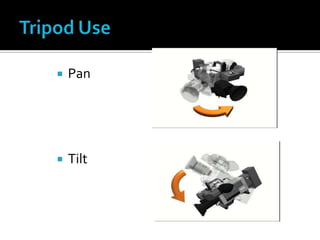
 Pan
 Tilt
 Sometimes tripods just aren’t practical
 example: football game
 Don’t zoom
 Use your own body and/or surroundings
▪ Both hands
▪ Elbow in
 Uncoil your body as you pan
 Tells the camera what objects are white
 Very blue or very orange shots
 If light is changing (ex: sun setting) you HAVE
to reset white balance regularly
 If possible – manually white balance
 ZOOMALLTHEWAY IN on something white
 Follow instruction manual
 Don’t cover white balance sensor
 Be sure red from tall light isn’t reflecting off
your hand
 2 levers
 W=Wide,T=Tight/Telephoto
 Lightly for slow zoom, hard for fast zoom
 Optical zoom—lens/mechanism actually
moves to adjust
 Zoom factor of 1x to 15x
 Digital zoom—super magnification BUT
further you zoom, the harder it is to keep
focus and steady shot
 500x, 750x or more
 As magnification increases, quality decreases
 STAY AWAY FROM DIGITAL ZOOM
 Just like white-balancing, if you use
“automatic” setting, the camera has to guess
 You’re the only one who knows whatYOU
want to be focused, soYOU should use
manual if you can
 Follow instructions in manual
 Might be an “MF” button
 Done by rotating lens itself OR inside a menu
 Zoom all in the way in on your subject
 Focus
 Zoom back out and setup your shot
 If you’re shooting a person—zoom in & focus
on their eyes, because that’s where your
audience looks first
 Focus is an issue of distance between the
subject and camera
 If the distance between the two changes—the
image needs to be refocused
 Most objects need to be at least 5 feet away
to zoom/focus properly
 If within 5 feet, zoom all the way out and
move the CAMERA closer
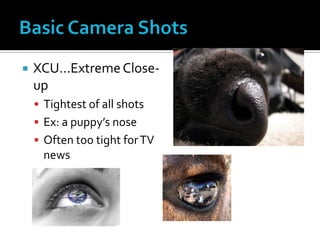
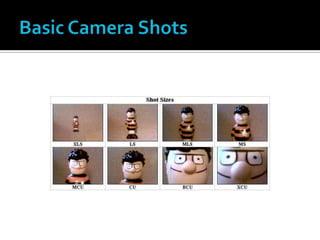
 XCU…ExtremeClose-
up
 Tightest of all shots
 Ex: a puppy’s nose
 Often too tight forTV
news
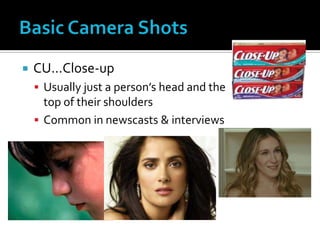
 CU…Close-up
 Usually just a person’s head and the
top of their shoulders
 Common in newscasts & interviews
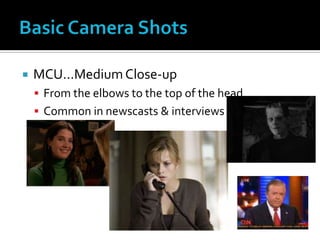
 MCU…MediumClose-up
 From the elbows to the top of the head
 Common in newscasts & interviews
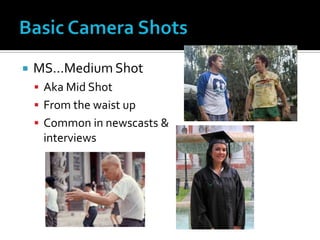
 MS…Medium Shot
 Aka Mid Shot
 From the waist up
 Common in newscasts &
interviews
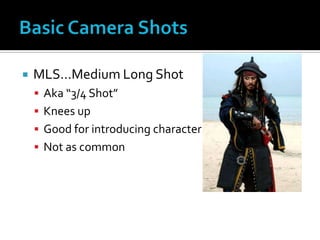
 MLS…Medium Long Shot
 Aka “3/4 Shot”
 Knees up
 Good for introducing character
 Not as common
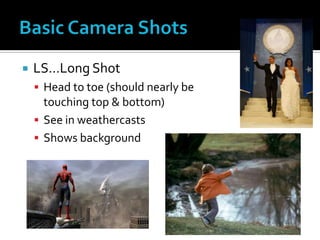
 LS…Long Shot
 Head to toe (should nearly be
touching top & bottom)
 See in weathercasts
 Shows background
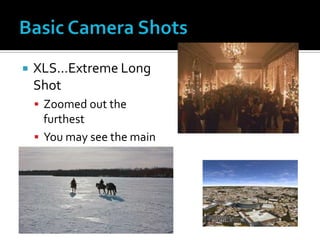
 XLS…Extreme Long
Shot
 Zoomed out the
furthest
 You may see the main
object, plus LOTS of
background
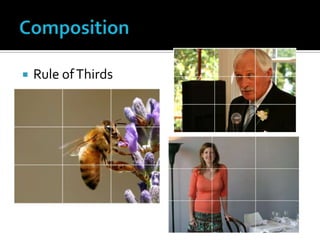
 Rule ofThirds
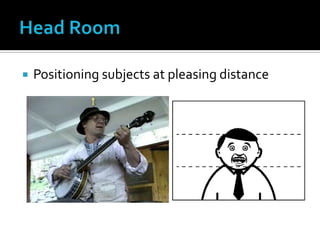
 Positioning subjects at pleasing distance
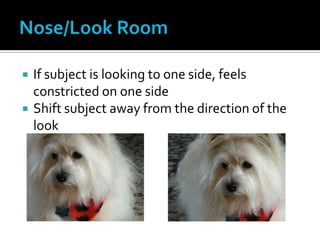
 If subject is looking to one side, feels
constricted on one side
 Shift subject away from the direction of the
look
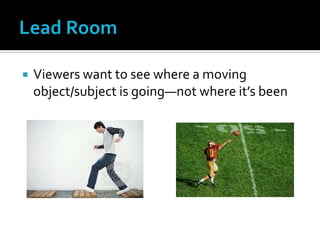
 Viewers want to see where a moving
object/subject is going—not where it’s been
 Nothing distracting—like kids making funny
faces behind you
 Nothing boring—like hall walls
 Find settings that are relevant to your story
 Ex: if you’re doing a story about busses, go
outside and shoot your piece with busses in
the background
 If you’re doing a story about the school
store’s Slushee Machine, and you want to
interview students about their favorite
flavor, where could you set up the
shot/interviews?
 That’s all! For now : )

Breaking Down the Basics of Video - MIPA 2013

  • 1.
    Chapter 2 andsome other need-to-know stuff
  • 2.
     What yousee is different than what the camera sees  GIGO Principle  Garbage In, Garbage Out
  • 3.
     Power toyour camera  Battery  AC Adaptor  Viewfinder vs. LCD  InsertingTapes  Be Gentle!!!
  • 4.
     Adjustments tothe camera  Viewfinder  Strap(s)  Recording  2 Record buttons  Record lamp  Recording yourself  Flip the screen!
  • 5.
     Amount oftime you should leave for editing so you don’t cut off front or back ends of shot.  Camera needs time after you hit RECORD before it actually starts  Pre Roll…count to 5 before the action truly begins  Post Roll…count to 5
  • 6.
     Professionals usetripods…be professional  Leveling  For smaller cameras—use monopods  Don’t transport while attached
  • 7.
  • 8.
     Sometimes tripodsjust aren’t practical  example: football game  Don’t zoom  Use your own body and/or surroundings ▪ Both hands ▪ Elbow in  Uncoil your body as you pan
  • 9.
     Tells thecamera what objects are white  Very blue or very orange shots  If light is changing (ex: sun setting) you HAVE to reset white balance regularly
  • 10.
     If possible– manually white balance  ZOOMALLTHEWAY IN on something white  Follow instruction manual  Don’t cover white balance sensor  Be sure red from tall light isn’t reflecting off your hand
  • 11.
     2 levers W=Wide,T=Tight/Telephoto  Lightly for slow zoom, hard for fast zoom
  • 12.
     Optical zoom—lens/mechanismactually moves to adjust  Zoom factor of 1x to 15x  Digital zoom—super magnification BUT further you zoom, the harder it is to keep focus and steady shot  500x, 750x or more  As magnification increases, quality decreases  STAY AWAY FROM DIGITAL ZOOM
  • 13.
     Just likewhite-balancing, if you use “automatic” setting, the camera has to guess  You’re the only one who knows whatYOU want to be focused, soYOU should use manual if you can
  • 14.
     Follow instructionsin manual  Might be an “MF” button  Done by rotating lens itself OR inside a menu
  • 15.
     Zoom allin the way in on your subject  Focus  Zoom back out and setup your shot  If you’re shooting a person—zoom in & focus on their eyes, because that’s where your audience looks first
  • 16.
     Focus isan issue of distance between the subject and camera  If the distance between the two changes—the image needs to be refocused
  • 17.
     Most objectsneed to be at least 5 feet away to zoom/focus properly  If within 5 feet, zoom all the way out and move the CAMERA closer
  • 18.
     XCU…ExtremeClose- up  Tightestof all shots  Ex: a puppy’s nose  Often too tight forTV news
  • 19.
     CU…Close-up  Usuallyjust a person’s head and the top of their shoulders  Common in newscasts & interviews
  • 20.
     MCU…MediumClose-up  Fromthe elbows to the top of the head  Common in newscasts & interviews
  • 21.
     MS…Medium Shot Aka Mid Shot  From the waist up  Common in newscasts & interviews
  • 22.
     MLS…Medium LongShot  Aka “3/4 Shot”  Knees up  Good for introducing character  Not as common
  • 23.
     LS…Long Shot Head to toe (should nearly be touching top & bottom)  See in weathercasts  Shows background
  • 24.
     XLS…Extreme Long Shot Zoomed out the furthest  You may see the main object, plus LOTS of background
  • 26.
  • 27.
     Positioning subjectsat pleasing distance
  • 28.
     If subjectis looking to one side, feels constricted on one side  Shift subject away from the direction of the look
  • 29.
     Viewers wantto see where a moving object/subject is going—not where it’s been
  • 30.
     Nothing distracting—likekids making funny faces behind you  Nothing boring—like hall walls  Find settings that are relevant to your story
  • 31.
     Ex: ifyou’re doing a story about busses, go outside and shoot your piece with busses in the background  If you’re doing a story about the school store’s Slushee Machine, and you want to interview students about their favorite flavor, where could you set up the shot/interviews?
  • 32.
     That’s all!For now : )