Blooms Taxonomy
&
Learning Objectives
Presented By
Dr. Anamika
Asst. Prof. M.Ed. N.K.B.M.G. (P.G.) College
Chandausi, Sambhal (U.P.)
angelanamika22@gmail.com
Aim and objectives
Aim
 Where one aspire to be by the end
 Usually written by using an infinitive verb
(to + verb)
 For example, My aim is to investigate, to
understand, and to explore etc.
Objectives
 Specific steps taken to achieve aim
 Achievable and measurable
 Usually written by using an action verb
and expressed through active sentences.
 For example, I will… collect, construct,
produce, test, measure, analyze etc.
Learning Objectives
What the learners will do?
Learner-centered
Explicit and Understandable
Facilitate getting learning evidences
Observable by performance of learners
Can be changed or modified depending upon
the needs of the learners
Deep understanding of the content is one of
the most important requirements for writing
learning objectives
Taxonomy of Learning Objectives
 Taxonomy – Just a word for a form of classification
 M. K. Gandhi [Harijan: July 31, 1937] - By Education
I mean an all-round drawing out of the best in child
and man - body, mind and spirit.
Hand Head Heart – 3 ‘H’
 Psychomotor Cognitive Affective – 3 Domains
- Benjamin Samuel Bloom [1956]
Key Points
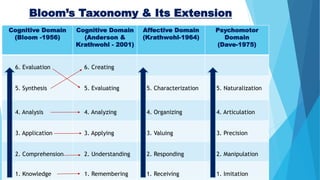
 Bloom’s taxonomy is a set of three hierarchical models
used to classify educational learning objectives into
levels of complexity and specificity. The models were
named after Benjamin Bloom, who chaired the
committee of educators that devised the taxonomy.
 The original cognitive domain was published in 1956.
 The affective domain was categorized by David R.
Krathwohl (Co-author of Bloom’s Taxonomy) in 1964.
 There are 3 versions of psychomotor domain by 3
different authors — Harrow (1972); Simpson (1972); and
Dave (1975).
 A revised version of the taxonomy for the cognitive
domain was created in 2001 by Lorin W. Anderson
(former student of Bloom) and David Reading Krathwohl.
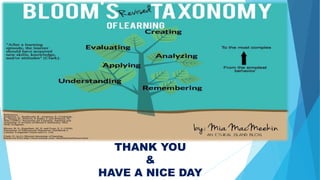
Bloom’s Taxonomy & Its Extension
Cognitive Domain
(Bloom -1956)
Cognitive Domain
(Anderson &
Krathwohl - 2001)
Affective Domain
(Krathwohl-1964)
Psychomotor
Domain
(Dave-1975)
6. Evaluation 6. Creating
5. Synthesis 5. Evaluating 5. Characterization 5. Naturalization
4. Analysis 4. Analyzing 4. Organizing 4. Articulation
3. Application 3. Applying 3. Valuing 3. Precision
2. Comprehension 2. Understanding 2. Responding 2. Manipulation
1. Knowledge 1. Remembering 1. Receiving 1. Imitation
Bloom's Digital Taxonomy
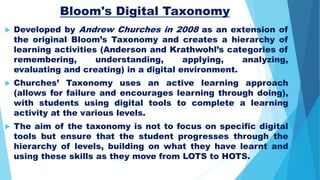
 Developed by Andrew Churches in 2008 as an extension of
the original Bloom’s Taxonomy and creates a hierarchy of
learning activities (Anderson and Krathwohl’s categories of
remembering, understanding, applying, analyzing,
evaluating and creating) in a digital environment.
 Churches’ Taxonomy uses an active learning approach
(allows for failure and encourages learning through doing),
with students using digital tools to complete a learning
activity at the various levels.
 The aim of the taxonomy is not to focus on specific digital
tools but ensure that the student progresses through the
hierarchy of levels, building on what they have learnt and
using these skills as they move from LOTS to HOTS.
Remembering
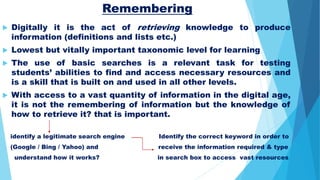
 Digitally it is the act of retrieving knowledge to produce
information (definitions and lists etc.)
 Lowest but vitally important taxonomic level for learning
 The use of basic searches is a relevant task for testing
students’ abilities to find and access necessary resources and
is a skill that is built on and used in all other levels.
 With access to a vast quantity of information in the digital age,
it is not the remembering of information but the knowledge of
how to retrieve it? that is important.
identify a legitimate search engine Identify the correct keyword in order to
(Google / Bing / Yahoo) and receive the information required & type
understand how it works? in search box to access vast resources
Understanding
 The construction of meaning and the building of relationships
 Involved the categorizing and tagging of bookmarks through
register an account with social bookmarking application
Delicious (www.delicious.com) & then bookmark a number of
relevant websites or specific web articles
 Once the links have been created, the student would spend
some time adding tags to the bookmarks.
 Tagging create relationships among various bookmarks
 Create tag bundles to group similar tags together
 This task allows the student to organize the information they
have retrieved, create links between resources and construct
meaning from this categorization process.
Applying
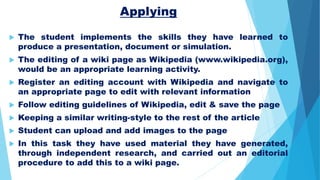
 The student implements the skills they have learned to
produce a presentation, document or simulation.
 The editing of a wiki page as Wikipedia (www.wikipedia.org),
would be an appropriate learning activity.
 Register an editing account with Wikipedia and navigate to
an appropriate page to edit with relevant information
 Follow editing guidelines of Wikipedia, edit & save the page
 Keeping a similar writing-style to the rest of the article
 Student can upload and add images to the page
 In this task they have used material they have generated,
through independent research, and carried out an editorial
procedure to add this to a wiki page.
Analyzing
 The student learns to process data, dividing it into parts and
determining the relationships between these parts and the
overall purpose of the project.
 At this level the use of an online survey tool as Survey
Monkey (www.surveymonkey.com) could be an appropriate
learning activity.
 Register an account with Survey Monkey and set a survey
questionnaire with closing date by using the online tools
 Invite respondents to participate
 After closing date, use available tools in Survey Monkey to
organize the results – comparing responses, dividing
respondents into groups and deciding how these groups relate
to each other and how they relate to the overall survey topic?
Evaluating
 Make criteria-based judgements through critiquing and checking
 In the digital environment there are a multitude of opportunities
for discussion and an ease of participation through comments
 Through the task of moderating and critically responding to
comments made on a blog post
 Using a free blogging platform such as WordPress
(www.wordpress.com), write a blog post, encourage comment
and interact with the ideas presented. Activate email alert option
on adding new comment
 Evaluate and decide about making the comment publicly visible
or delete it using the tools supplied by WordPress
 Student learns to evaluate comments on a blog post using a set
of criteria - does it contribute to the online discussion? and then
respond accordingly
Creating
 Concerned with taking various elements and creating a new,
coherent product
 The learning activity the student could participate in at this level
could be the publishing and distribution of an e-book through the
Amazon (www.amazon.com) platform.
 Using an application such as Microsoft Word, lay out the text,
formatting chapter and section headings and deciding on fonts
to use & add any images decided to use. Save the file.
 Create an account at the Amazon Direct Publishing website,
input the e-book's metadata (author name, description, etc.) and
upload the Microsoft Word version book.
 Using the tools Amazon provides, create a cover with price for e-
book. The Amazon software would then convert these elements
into an e-book format to be read on the Kindle. Once reviewed by
staff members, the e-book would be available for sale.
THANK YOU
&
HAVE A NICE DAY

Bloom's Taxonomy & Learning Objectives

  • 1.
    Blooms Taxonomy & Learning Objectives PresentedBy Dr. Anamika Asst. Prof. M.Ed. N.K.B.M.G. (P.G.) College Chandausi, Sambhal (U.P.) angelanamika22@gmail.com
  • 2.
    Aim and objectives Aim Where one aspire to be by the end  Usually written by using an infinitive verb (to + verb)  For example, My aim is to investigate, to understand, and to explore etc. Objectives  Specific steps taken to achieve aim  Achievable and measurable  Usually written by using an action verb and expressed through active sentences.  For example, I will… collect, construct, produce, test, measure, analyze etc.
  • 3.
    Learning Objectives What thelearners will do? Learner-centered Explicit and Understandable Facilitate getting learning evidences Observable by performance of learners Can be changed or modified depending upon the needs of the learners Deep understanding of the content is one of the most important requirements for writing learning objectives
  • 4.
    Taxonomy of LearningObjectives  Taxonomy – Just a word for a form of classification  M. K. Gandhi [Harijan: July 31, 1937] - By Education I mean an all-round drawing out of the best in child and man - body, mind and spirit. Hand Head Heart – 3 ‘H’  Psychomotor Cognitive Affective – 3 Domains - Benjamin Samuel Bloom [1956]
  • 5.
    Key Points  Bloom’staxonomy is a set of three hierarchical models used to classify educational learning objectives into levels of complexity and specificity. The models were named after Benjamin Bloom, who chaired the committee of educators that devised the taxonomy.  The original cognitive domain was published in 1956.  The affective domain was categorized by David R. Krathwohl (Co-author of Bloom’s Taxonomy) in 1964.  There are 3 versions of psychomotor domain by 3 different authors — Harrow (1972); Simpson (1972); and Dave (1975).  A revised version of the taxonomy for the cognitive domain was created in 2001 by Lorin W. Anderson (former student of Bloom) and David Reading Krathwohl.
  • 6.
    Bloom’s Taxonomy &Its Extension Cognitive Domain (Bloom -1956) Cognitive Domain (Anderson & Krathwohl - 2001) Affective Domain (Krathwohl-1964) Psychomotor Domain (Dave-1975) 6. Evaluation 6. Creating 5. Synthesis 5. Evaluating 5. Characterization 5. Naturalization 4. Analysis 4. Analyzing 4. Organizing 4. Articulation 3. Application 3. Applying 3. Valuing 3. Precision 2. Comprehension 2. Understanding 2. Responding 2. Manipulation 1. Knowledge 1. Remembering 1. Receiving 1. Imitation
  • 7.
    Bloom's Digital Taxonomy Developed by Andrew Churches in 2008 as an extension of the original Bloom’s Taxonomy and creates a hierarchy of learning activities (Anderson and Krathwohl’s categories of remembering, understanding, applying, analyzing, evaluating and creating) in a digital environment.  Churches’ Taxonomy uses an active learning approach (allows for failure and encourages learning through doing), with students using digital tools to complete a learning activity at the various levels.  The aim of the taxonomy is not to focus on specific digital tools but ensure that the student progresses through the hierarchy of levels, building on what they have learnt and using these skills as they move from LOTS to HOTS.
  • 8.
    Remembering  Digitally itis the act of retrieving knowledge to produce information (definitions and lists etc.)  Lowest but vitally important taxonomic level for learning  The use of basic searches is a relevant task for testing students’ abilities to find and access necessary resources and is a skill that is built on and used in all other levels.  With access to a vast quantity of information in the digital age, it is not the remembering of information but the knowledge of how to retrieve it? that is important. identify a legitimate search engine Identify the correct keyword in order to (Google / Bing / Yahoo) and receive the information required & type understand how it works? in search box to access vast resources
  • 9.
    Understanding  The constructionof meaning and the building of relationships  Involved the categorizing and tagging of bookmarks through register an account with social bookmarking application Delicious (www.delicious.com) & then bookmark a number of relevant websites or specific web articles  Once the links have been created, the student would spend some time adding tags to the bookmarks.  Tagging create relationships among various bookmarks  Create tag bundles to group similar tags together  This task allows the student to organize the information they have retrieved, create links between resources and construct meaning from this categorization process.
  • 10.
    Applying  The studentimplements the skills they have learned to produce a presentation, document or simulation.  The editing of a wiki page as Wikipedia (www.wikipedia.org), would be an appropriate learning activity.  Register an editing account with Wikipedia and navigate to an appropriate page to edit with relevant information  Follow editing guidelines of Wikipedia, edit & save the page  Keeping a similar writing-style to the rest of the article  Student can upload and add images to the page  In this task they have used material they have generated, through independent research, and carried out an editorial procedure to add this to a wiki page.
  • 11.
    Analyzing  The studentlearns to process data, dividing it into parts and determining the relationships between these parts and the overall purpose of the project.  At this level the use of an online survey tool as Survey Monkey (www.surveymonkey.com) could be an appropriate learning activity.  Register an account with Survey Monkey and set a survey questionnaire with closing date by using the online tools  Invite respondents to participate  After closing date, use available tools in Survey Monkey to organize the results – comparing responses, dividing respondents into groups and deciding how these groups relate to each other and how they relate to the overall survey topic?
  • 12.
    Evaluating  Make criteria-basedjudgements through critiquing and checking  In the digital environment there are a multitude of opportunities for discussion and an ease of participation through comments  Through the task of moderating and critically responding to comments made on a blog post  Using a free blogging platform such as WordPress (www.wordpress.com), write a blog post, encourage comment and interact with the ideas presented. Activate email alert option on adding new comment  Evaluate and decide about making the comment publicly visible or delete it using the tools supplied by WordPress  Student learns to evaluate comments on a blog post using a set of criteria - does it contribute to the online discussion? and then respond accordingly
  • 13.
    Creating  Concerned withtaking various elements and creating a new, coherent product  The learning activity the student could participate in at this level could be the publishing and distribution of an e-book through the Amazon (www.amazon.com) platform.  Using an application such as Microsoft Word, lay out the text, formatting chapter and section headings and deciding on fonts to use & add any images decided to use. Save the file.  Create an account at the Amazon Direct Publishing website, input the e-book's metadata (author name, description, etc.) and upload the Microsoft Word version book.  Using the tools Amazon provides, create a cover with price for e- book. The Amazon software would then convert these elements into an e-book format to be read on the Kindle. Once reviewed by staff members, the e-book would be available for sale.
  • 14.