Blogging Pains

 Kayleigh Platz
 Social Media Specialist
Agenda
•   Introduction to blogging
•   The blogging community
•   Blog platforms
•   Inspiration
•   Tips and Tricks
•   Questions
•   Dive in – hands-on time!
Introduction to Blogging
• What is it?
• Who does it?
• Why do it?
What is it?
• Text, image, sound,
  video
• Recorded entries,
  musings, posts
• Platforms for shared
  conversations
• Open and authentic
  thoughts
                              It8bit.com
Who Does it?
•   Businesses
•   Charities
•   Individuals
•   Children
•   Animals
Why Do It?
•   To record your thoughts
•   To share your knowledge
•   As a creative outlet
•   To make a living [note: a lot of my
    examples in this presentation fit under this
    definition now]
The Blogging Community
               •   Geographical
               •   Interest-based
               •   Business-based
               •   Online Diary


Cutecats.com
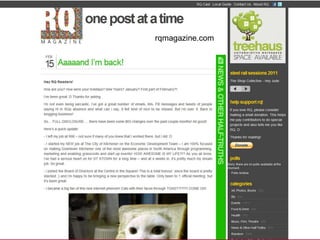
Geographical Blogging
• Blogging focused around a specific area or
  region
• Community based blogs help spread
  awareness to a local community
• Can be both commercial and individual
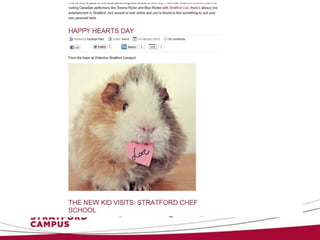
rqmagazine.com
Interest-based Blogging
• A blog based           – Food
  around a specific      – Fashion/ lifestyle
  theme, group, cultur   – Nail art
  e, pop-culture         – Ryan Gosling
  item, hobby or more    – NFL
• Popular interest-      – Cute animals
  based blogs themes     – Weddings
  are
  – Knitting
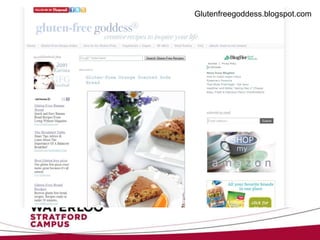
Glutenfreegoddess.blogspot.com
www.bakerella.com
Cupcakesandcashmere.com
Thesartorialist.com
Business-based Blogging
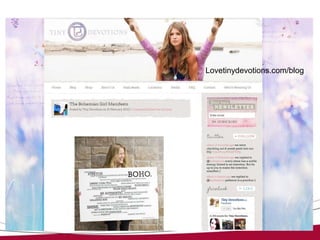
• Many corporations and small businesses
  blog
• Why?
  – Powerful way to introduce the human life
    behind a company
  – Share knowledge
  – Grow a community
Lovetinydevotions.com/blog
Online Diary
• The original web log
• Updates on a person’s thoughts,
  experiences and life
Blog Platforms
•   WordPress
•   Blogger
•   Tumblr
•   Twitter
•   YouTube
•   All of these have free and some have paid
    options
WordPress
   See your
    pages,
  comments
   and tags


              Stats let you see
               when you are
                 being read
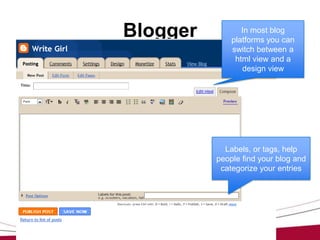
Blogger          In most blog
              platforms you can
              switch between a
               html view and a
                 design view


            Labels, or tags, help
          people find your blog and
           categorize your entries
Blogger


   This is the Blogger view if you have a
  gmail account. Same features but with a
                cleaner look.
Tumblr


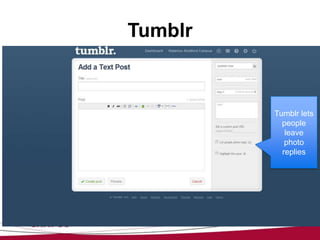
         Tumblr lets
           people
            leave
            photo
           replies
Twitter


   When you start to
 compose a tweet, the
 text box expands and
you have other posting
   options including
    adding a photo
YouTube

          Your videos don’t have
          to be edited fancy. You
          can record straight
          from your computer’s
          webcam and post!
Inspiration
• Your reading list
   – Grow your own list of
     favourite blogs
• Share and care
   – Interact with other
     bloggers
• Pinterest
   – A great website for
     inspiration
Tips and Tricks
•   Equipment needed
•   Make it your own
•   Scheduling
•   Time
•   Sharing the word
Equipment Needed
•   A computer
•   You!
•   A blog account
•   Other sprinkles
    – A photo/ video camera
    – Photo editing software
    – Web design/HTML experience
Make It Your Own
• Look and feel          • Writing for the web
• Personal brand           – Short sentences
  – Write for yourself       (and posts)
                           – Have your own
• Professional brand
                             personality
  – Write for your
                           – A picture is worth a
    consumer
                             thousand words
• Strategy and             – When in doubt,
  guidelines                 hyperlink
Scheduling
• Many blog platforms allow you to schedule
  a post to be published once it’s written
  – Helps you track when your blog is read most
    often
• Schedule your own writing time in your
  calendar
  – Keeps you aware of your time
Time
• Blogging does take a time commitment
• The writing process takes time
• Adding pictures, hyperlinks, videos takes
  time
• Encourage your company (or you) to allow
  time for the project
Sharing the Word
• If your blog is      • If you want more
  personal, you may      readers – spread
  only share the link    the word!
  with close friends      – Twitter
  and family (Blogger     – Facebook
  lets you lock blogs)    – Your email signature
                          – Business cards
Questions?
               Kayleigh Platz
           kplatz@uwaterloo.ca
      stratfordcampus.uwaterloo.ca
http://stratfordcampusblog.uwaterloo.ca/
                @uwstratford
                @write_girl
Your Turn!
• You’ll need:
  – A name
  – A domain
  – An idea
• Remember to
  – Add hyperlinks
  – Give credit where credit is due

Blogging pains

  • 1.
    Blogging Pains KayleighPlatz Social Media Specialist
  • 2.
    Agenda • Introduction to blogging • The blogging community • Blog platforms • Inspiration • Tips and Tricks • Questions • Dive in – hands-on time!
  • 3.
    Introduction to Blogging •What is it? • Who does it? • Why do it?
  • 4.
    What is it? •Text, image, sound, video • Recorded entries, musings, posts • Platforms for shared conversations • Open and authentic thoughts It8bit.com
  • 5.
    Who Does it? • Businesses • Charities • Individuals • Children • Animals
  • 6.
    Why Do It? • To record your thoughts • To share your knowledge • As a creative outlet • To make a living [note: a lot of my examples in this presentation fit under this definition now]
  • 7.
    The Blogging Community • Geographical • Interest-based • Business-based • Online Diary Cutecats.com
  • 8.
    Geographical Blogging • Bloggingfocused around a specific area or region • Community based blogs help spread awareness to a local community • Can be both commercial and individual
  • 9.
  • 11.
    Interest-based Blogging • Ablog based – Food around a specific – Fashion/ lifestyle theme, group, cultur – Nail art e, pop-culture – Ryan Gosling item, hobby or more – NFL • Popular interest- – Cute animals based blogs themes – Weddings are – Knitting
  • 12.
  • 13.
  • 14.
  • 16.
  • 17.
    Business-based Blogging • Manycorporations and small businesses blog • Why? – Powerful way to introduce the human life behind a company – Share knowledge – Grow a community
  • 20.
  • 21.
    Online Diary • Theoriginal web log • Updates on a person’s thoughts, experiences and life
  • 24.
    Blog Platforms • WordPress • Blogger • Tumblr • Twitter • YouTube • All of these have free and some have paid options
  • 25.
    WordPress See your pages, comments and tags Stats let you see when you are being read
  • 26.
    Blogger In most blog platforms you can switch between a html view and a design view Labels, or tags, help people find your blog and categorize your entries
  • 27.
    Blogger This is the Blogger view if you have a gmail account. Same features but with a cleaner look.
  • 28.
    Tumblr Tumblr lets people leave photo replies
  • 29.
    Twitter When you start to compose a tweet, the text box expands and you have other posting options including adding a photo
  • 30.
    YouTube Your videos don’t have to be edited fancy. You can record straight from your computer’s webcam and post!
  • 31.
    Inspiration • Your readinglist – Grow your own list of favourite blogs • Share and care – Interact with other bloggers • Pinterest – A great website for inspiration
  • 32.
    Tips and Tricks • Equipment needed • Make it your own • Scheduling • Time • Sharing the word
  • 33.
    Equipment Needed • A computer • You! • A blog account • Other sprinkles – A photo/ video camera – Photo editing software – Web design/HTML experience
  • 34.
    Make It YourOwn • Look and feel • Writing for the web • Personal brand – Short sentences – Write for yourself (and posts) – Have your own • Professional brand personality – Write for your – A picture is worth a consumer thousand words • Strategy and – When in doubt, guidelines hyperlink
  • 35.
    Scheduling • Many blogplatforms allow you to schedule a post to be published once it’s written – Helps you track when your blog is read most often • Schedule your own writing time in your calendar – Keeps you aware of your time
  • 36.
    Time • Blogging doestake a time commitment • The writing process takes time • Adding pictures, hyperlinks, videos takes time • Encourage your company (or you) to allow time for the project
  • 37.
    Sharing the Word •If your blog is • If you want more personal, you may readers – spread only share the link the word! with close friends – Twitter and family (Blogger – Facebook lets you lock blogs) – Your email signature – Business cards
  • 38.
    Questions? Kayleigh Platz kplatz@uwaterloo.ca stratfordcampus.uwaterloo.ca http://stratfordcampusblog.uwaterloo.ca/ @uwstratford @write_girl
  • 39.
    Your Turn! • You’llneed: – A name – A domain – An idea • Remember to – Add hyperlinks – Give credit where credit is due