B-LOGGING IN THE EFL CLASSROOM: TESOL GREECE WORKSHOP


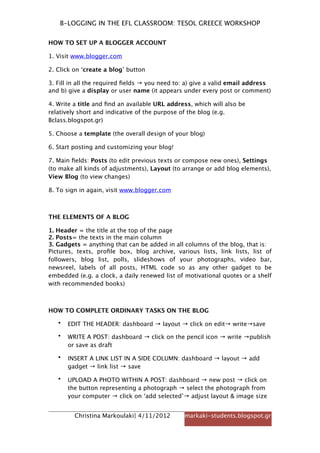
HOW TO SET UP A BLOGGER ACCOUNT

1. Visit www.blogger.com

2. Click on ‘create a blog’ button

3. Fill in all the required fields → you need to: a) give a valid email address
and b) give a display or user name (it appears under every post or comment)

4. Write a title and find an available URL address, which will also be
relatively short and indicative of the purpose of the blog (e.g.
Bclass.blogspot.gr)

5. Choose a template (the overall design of your blog)

6. Start posting and customizing your blog!

7. Main fields: Posts (to edit previous texts or compose new ones), Settings
(to make all kinds of adjustments), Layout (to arrange or add blog elements),
View Blog (to view changes)

8. To sign in again, visit www.blogger.com


THE ELEMENTS OF A BLOG

1. Header = the title at the top of the page
2. Posts= the texts in the main column
3. Gadgets = anything that can be added in all columns of the blog, that is:
Pictures, texts, profile box, blog archive, various lists, link lists, list of
followers, blog list, polls, slideshows of your photographs, video bar,
newsreel, labels of all posts, HTML code so as any other gadget to be
embedded (e.g. a clock, a daily renewed list of motivational quotes or a shelf
with recommended books)


HOW TO COMPLETE ORDINARY TASKS ON THE BLOG

   •   EDIT THE HEADER: dashboard → layout → click on edit→ write→save

   •   WRITE A POST: dashboard → click on the pencil icon → write →publish
       or save as draft

   •   INSERT A LINK LIST IN A SIDE COLUMN: dashboard → layout → add
       gadget → link list → save

   •   UPLOAD A PHOTO WITHIN A POST: dashboard → new post → click on
       the button representing a photograph → select the photograph from
       your computer → click on ‘add selected’→ adjust layout & image size


         Christina Markoulaki| 4/11/2012       markaki-students.blogspot.gr
B-LOGGING IN THE EFL CLASSROOM: TESOL GREECE WORKSHOP

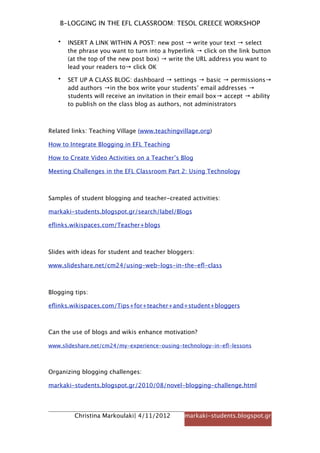
   •   INSERT A LINK WITHIN A POST: new post → write your text → select
       the phrase you want to turn into a hyperlink → click on the link button
       (at the top of the new post box) → write the URL address you want to
       lead your readers to→ click OK

   •   SET UP A CLASS BLOG: dashboard → settings → basic → permissions→
       add authors →in the box write your students’ email addresses →
       students will receive an invitation in their email box→ accept → ability
       to publish on the class blog as authors, not administrators


Related links: Teaching Village (www.teachingvillage.org)

How to Integrate Blogging in EFL Teaching

How to Create Video Activities on a Teacher’s Blog

Meeting Challenges in the EFL Classroom Part 2: Using Technology


Samples of student blogging and teacher-created activities:

markaki-students.blogspot.gr/search/label/Blogs

eflinks.wikispaces.com/Teacher+blogs


Slides with ideas for student and teacher bloggers:

www.slideshare.net/cm24/using-web-logs-in-the-efl-class


Blogging tips:

eflinks.wikispaces.com/Tips+for+teacher+and+student+bloggers


Can the use of blogs and wikis enhance motivation?

www.slideshare.net/cm24/my-experience-ousing-technology-in-efl-lessons


Organizing blogging challenges:

markaki-students.blogspot.gr/2010/08/novel-blogging-challenge.html


         Christina Markoulaki| 4/11/2012        markaki-students.blogspot.gr

B-logging in the EFL Classroom

  • 1.
    B-LOGGING IN THEEFL CLASSROOM: TESOL GREECE WORKSHOP HOW TO SET UP A BLOGGER ACCOUNT 1. Visit www.blogger.com 2. Click on ‘create a blog’ button 3. Fill in all the required fields → you need to: a) give a valid email address and b) give a display or user name (it appears under every post or comment) 4. Write a title and find an available URL address, which will also be relatively short and indicative of the purpose of the blog (e.g. Bclass.blogspot.gr) 5. Choose a template (the overall design of your blog) 6. Start posting and customizing your blog! 7. Main fields: Posts (to edit previous texts or compose new ones), Settings (to make all kinds of adjustments), Layout (to arrange or add blog elements), View Blog (to view changes) 8. To sign in again, visit www.blogger.com THE ELEMENTS OF A BLOG 1. Header = the title at the top of the page 2. Posts= the texts in the main column 3. Gadgets = anything that can be added in all columns of the blog, that is: Pictures, texts, profile box, blog archive, various lists, link lists, list of followers, blog list, polls, slideshows of your photographs, video bar, newsreel, labels of all posts, HTML code so as any other gadget to be embedded (e.g. a clock, a daily renewed list of motivational quotes or a shelf with recommended books) HOW TO COMPLETE ORDINARY TASKS ON THE BLOG • EDIT THE HEADER: dashboard → layout → click on edit→ write→save • WRITE A POST: dashboard → click on the pencil icon → write →publish or save as draft • INSERT A LINK LIST IN A SIDE COLUMN: dashboard → layout → add gadget → link list → save • UPLOAD A PHOTO WITHIN A POST: dashboard → new post → click on the button representing a photograph → select the photograph from your computer → click on ‘add selected’→ adjust layout & image size Christina Markoulaki| 4/11/2012 markaki-students.blogspot.gr
  • 2.
    B-LOGGING IN THEEFL CLASSROOM: TESOL GREECE WORKSHOP • INSERT A LINK WITHIN A POST: new post → write your text → select the phrase you want to turn into a hyperlink → click on the link button (at the top of the new post box) → write the URL address you want to lead your readers to→ click OK • SET UP A CLASS BLOG: dashboard → settings → basic → permissions→ add authors →in the box write your students’ email addresses → students will receive an invitation in their email box→ accept → ability to publish on the class blog as authors, not administrators Related links: Teaching Village (www.teachingvillage.org) How to Integrate Blogging in EFL Teaching How to Create Video Activities on a Teacher’s Blog Meeting Challenges in the EFL Classroom Part 2: Using Technology Samples of student blogging and teacher-created activities: markaki-students.blogspot.gr/search/label/Blogs eflinks.wikispaces.com/Teacher+blogs Slides with ideas for student and teacher bloggers: www.slideshare.net/cm24/using-web-logs-in-the-efl-class Blogging tips: eflinks.wikispaces.com/Tips+for+teacher+and+student+bloggers Can the use of blogs and wikis enhance motivation? www.slideshare.net/cm24/my-experience-ousing-technology-in-efl-lessons Organizing blogging challenges: markaki-students.blogspot.gr/2010/08/novel-blogging-challenge.html Christina Markoulaki| 4/11/2012 markaki-students.blogspot.gr