Bind – Domain Name Systems
PART - 01
Mustafa Golam
IPWorks Overview
Agenda(TbU)
BIND definition
Functional View
Information Model and O&M
Service Aware Policy Control
Bearer Resource Control
Cross Control Functions
Platform
What is IPWorks?
 IPWorks is a software platform that provides
DNS/ENUM,DHCP,CLF and AAA services for IPv4
networks.
 IPWorks includes an element management system for
configuration, control and monitoring of these
services.
 IPWorks is designed to fit with mobile networks such
as GPRS, WCDMA, IP-Multimedia, IMS and in
Generic Internet Protocol (IP) networks
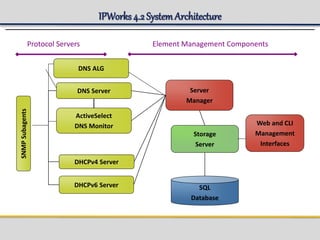
IPWorks4.2 SystemArchitecture
Protocol Servers Element Management Components
DNS Server
Storage
Server
Web and CLI
Management
Interfaces
DHCPv4 Server
ActiveSelect
DNS Monitor
SQL
Database
Server
Manager
DHCPv6 Server
DNS ALG
SNMPSubagents
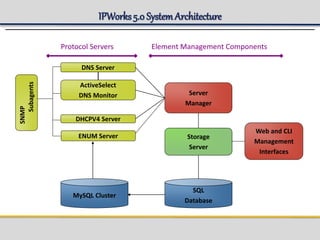
IPWorks5.0 SystemArchitecture
Protocol Servers Element Management Components
DNS Server
Storage
Server
Web and CLI
Management
Interfaces
DHCPV4 Server
ActiveSelect
DNS Monitor
SQL
Database
Server
Manager
SNMP
Subagents
ENUM Server
MySQL Cluster
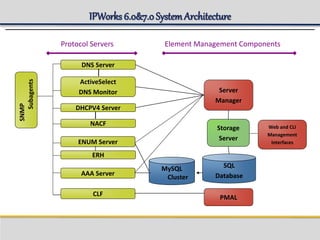
IPWorks 6.0&7.0SystemArchitecture
Protocol Servers Element Management Components
DNS Server
Storage
Server
Web and CLI
Management
Interfaces
DHCPV4 Server
ActiveSelect
DNS Monitor
SQL
Database
Server
Manager
SNMP
Subagents
ENUM Server
MySQL
Cluster
NACF
AAA Server
CLF
PMAL
ERH
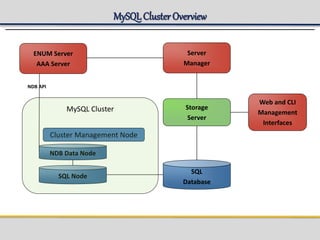
MySQLCluster Overview
Storage
Server
SQL
Database
Server
Manager
SQL Node
Web and CLI
Management
Interfaces
NDB Data Node
Cluster Management Node
NDB API
ENUM Server
AAA Server
MySQL Cluster
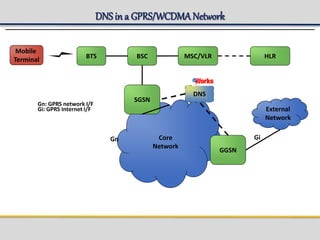
DNS in a GPRS/WCDMANetwork
Core
Network
External
Network
SGSN
Mobile
Terminal BTS
GGSN
BSC MSC/VLR HLR
Gn Gi
Gn: GPRS network I/F
Gi: GPRS Internet I/F
DNS
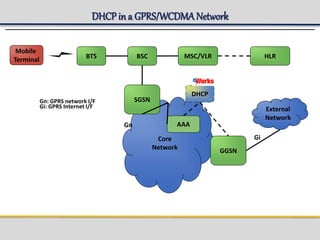
DHCP in a GPRS/WCDMANetwork
Core
Network
External
Network
SGSN
Mobile
Terminal BTS
GGSN
BSC MSC/VLR HLR
Gn
Gi
AAA
DHCP
Gn: GPRS network I/F
Gi: GPRS Internet I/F
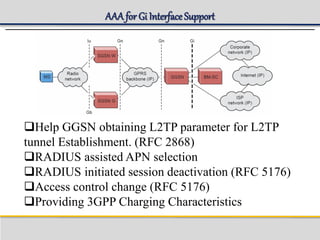
AAA for Gi InterfaceSupport
Help GGSN obtaining L2TP parameter for L2TP
tunnel Establishment. (RFC 2868)
RADIUS assisted APN selection
RADIUS initiated session deactivation (RFC 5176)
Access control change (RFC 5176)
Providing 3GPP Charging Characteristics
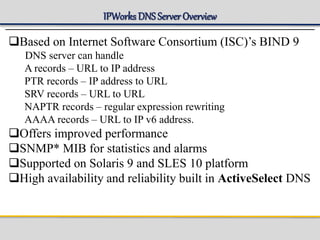
IPWorks DNS Server Overview
Based on Internet Software Consortium (ISC)’s BIND 9
DNS server can handle
A records – URL to IP address
PTR records – IP address to URL
SRV records – URL to URL
NAPTR records – regular expression rewriting
AAAA records – URL to IP v6 address.
Offers improved performance
SNMP* MIB for statistics and alarms
Supported on Solaris 9 and SLES 10 platform
High availability and reliability built in ActiveSelect DNS
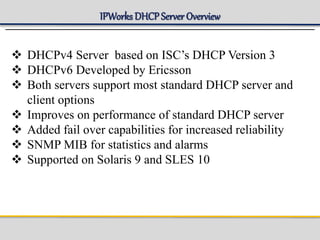
IPWorks DHCP Server Overview
 DHCPv4 Server based on ISC’s DHCP Version 3
 DHCPv6 Developed by Ericsson
 Both servers support most standard DHCP server and
client options
 Improves on performance of standard DHCP server
 Added fail over capabilities for increased reliability
 SNMP MIB for statistics and alarms
 Supported on Solaris 9 and SLES 10
IPWorks AAA overview
Authentication – Who are you?
Authorization – What services am I allowed to give you?
Accounting – What did you do with my services while you
were using them?
AAA Proxy/Agent – AAA Server can also be acting as a
proxy/agent AAA server by routing Auth/Authz/Acct
requests to another AAA Server for processing
IPWorks Features (I)
Named :
This process runs the DNS server and resolver. It reads the
“named.conf” configuration file and the zone files with start.
IPWorks features with-in named available are:
ASDNS :
Add on feature of DNS. Using ActiveSelect DNS, domain
names (resources) may be configured so that DNS will
monitor the resources and answer queries with responses that
vary according to the loading or status of the resources.
Transaction Logging: It is to provide a historical (long-term) log of all
major activity for the IPWorks DNS protocol server. It exists to
determine what has happened to the network in the past.
IPWorks Feature (II)
Statistical Counters
It enables the remote operator to supervise statistical parameters. The
DNS server writes the values of the parameters into a shared memory
map and an SNMP subagent reads them and sends them to an SNMP
client.
rndc
a utility that allows you to administer the named daemon, locally or
remotely, with command line statements (halt, stop, start, reload, stats,
refresh etc).
rndc <options> <command> <command-options>
IPWorks DNS server and DNS SM communicate using this command.
It is one way communication.
IPWorks Features (III)
dig This process is started with a DNS lookup utility command.
DIG is a tool for interrogating DNS servers. It performs DNS lookups
and displays the answers that are returned from the name server's that
were queried. It is possible to dig for information about zones that uses
active select.
nsupdate This process is started with a command used to submit
DDNS (Dynamic DNS) update requests. This allows resource records
to be added or removed from a zone without manually editing the zone
file (“Hot provisioning”)
dnssec Short for DNS Security, this feature allows for zones to be
cryptographically signed with a zone key. In this way, the information
about a specific zone can be verified as coming from a name server
that has signed it with a particular private key, as long as the recipient
has that name server's public key.
dnssec-keygen -a hmac-md5 -b <bit-length> -n HOST <key-file-name>
IPWorks Configurationand O&MInterface
Server Manager (SM)
Command Line Interface (CLI)
Web User Interface (WebUI)
Control Panel (CP)
IPWorks Storage Server
A interface to configure Protocol Servers Provides
authorized access for the configuration.
Server-Client architecture:
The CLI is a client: CLI is an interface to the Storage
Server, which forwards the user requests to SS.
The Storage Server is a Server: SS will process the CLI
requests and provision data into Database, and sends the
response to CLI.
Storage Server writes the provisioned data into MySQL
database.
IPWorks Server Manager
Interface between Storage Server and Protocol Servers
Loads the configuration file, checks for parameters specified in
Control Panel ( Log Level, SS address, etc…)
For DNS, the DNSSM performs these operations:
Update DnsServer.
Restart DnsServer.
Check the status of Dns Server.
Old Zone files clean up.
Fetch Resource Record from Dns Server.
Provides utility method for adding/deleting RRs in Dns Server
Get the keys for "dynamic" views( tsig keys) on startup.
Issues rndc commands to Dns Server for various operation.
IPWorks Command line Interface
The Character based interface to Storage Server Command
line interface for user to interact with SS.
Commands are divided into two categories
Commands
Operations
IPWCLI: command to enter the CLI to execute the
provisioning.
Some configuration examples:
create arecord dns104.mnc001.mcc214.gprs. 10.15.120.30
create masterzone dns104 mnc006.mcc214.gprs -set DefaultTtl=3600
IPWorks AAA overview
Key features
Web-based management interface to Storage Server
Provides remote configuration and control of protocol
servers
Facilitates authorized and secure access
Supports IE
Note: Similar but less features than the CLI interface.
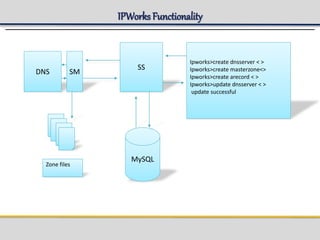
IPWorks Functionality
DNS SM
SS
Ipworks>create dnsserver < >
Ipworks>create masterzone<>
Ipworks>create arecord < >
Ipworks>update dnsserver < >
update successful
MySQL
Zone files
IPWorks ASDNSfeature
 Deployment
– Unique to the Ericsson IPWorks DNS Server. Proprietary
functionality.
– The use is optional, can be used without monitoring resources
applied (like the VFE GPRS case)
– Still standard DNS (interoperate with non-ActiveSelect
servers)
 Operation
– ActiveSelect Monitors send status updates to DNS servers
– Status updates used to dynamically alter DNS responses
 Therefore intelligent decisions can be made on what to include in a
DNS response.
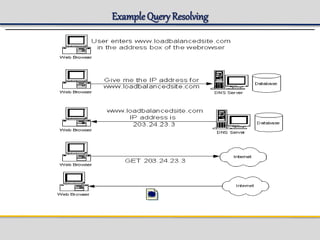
IPWorks DNS LoadBalancing
DNS Server may contain several IP addresses mapping to a
same site name.
For example www.loadbalancedsite.com is mapped to three
IP addresses.
www.loadbalancedsite.com A 203.34.23.3
www.loadbalancedsite.com A 203.34.23.4
www.loadbalancedsite.com A 203.34.23.5
DNS Server uses round robin fashion to distribute the load
among all the three servers.
ExampleQuery Resolving
IPWorks AAA overview
Functionalities of ASDNS
 Monitoring
 Ordering
 Filtering
 Only addresses that are reachable should be returned
 Address which is in close proximity to the source is
to be returned.
 Load balancing is required.
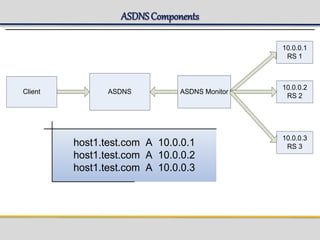
ASDNSComponents
ASDNS ASDNS MonitorClient
10.0.0.1
RS 1
10.0.0.2
RS 2
10.0.0.3
RS 3host1.test.com A 10.0.0.1
host1.test.com A 10.0.0.2
host1.test.com A 10.0.0.3
Views and Areas
 Views:
Permits the support of multiple (possibly conflicting)
definitions of zones within a DNS Server. Normally
applied to implement iDNS and eDNS in the same DNS
server.
 TSIG:
Securing the communications between a DNS Server and
an ActiveSelect Monitor.
 Areas:
An area is a virtual container used for organizing some of
the managed objects in IPWorks.
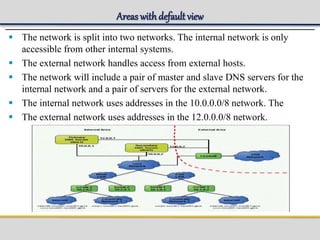
Areas withdefault view
 The network is split into two networks. The internal network is only
accessible from other internal systems.
 The external network handles access from external hosts.
 The network will include a pair of master and slave DNS servers for the
internal network and a pair of servers for the external network.
 The internal network uses addresses in the 10.0.0.0/8 network. The
 The external network uses addresses in the 12.0.0.0/8 network.
Control Panel
Key Features
 Terminal-based (Unix) management interface
 Provides local configuration and control of IPWorks
components installed on the local machine
 Facilitates starting and stopping of IPWorks processes
 Facilitates configuration setting specific to the current
host
 To start the CP, run ipwscp
 Only root user can execute process operations.
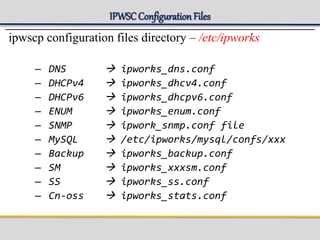
IPWSCConfigurationFiles
ipwscp configuration files directory – /etc/ipworks
– DNS  ipworks_dns.conf
– DHCPv4  ipworks_dhcv4.conf
– DHCPv6  ipworks_dhcpv6.conf
– ENUM  ipworks_enum.conf
– SNMP  ipwork_snmp.conf file
– MySQL  /etc/ipworks/mysql/confs/xxx
– Backup  ipworks_backup.conf
– SM  ipworks_xxxsm.conf
– SS  ipworks_ss.conf
– Cn-oss  ipworks_stats.conf
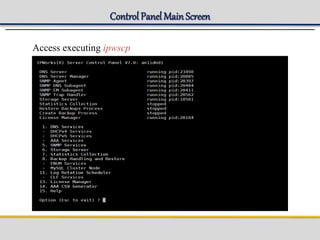
Control Panel MainScreen
Access executing ipwscp
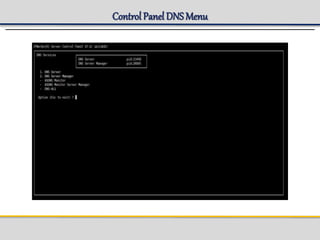
Control Panel DNS Menu
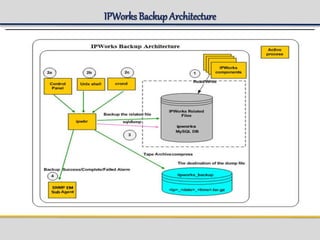
IPWorks Backup
 Backup and restore granularity
– Partial backup and restore is supported.
The backup of MySQL data (ipworks and MYSQLDB) can be
enabled and disabled from the Control Panel.
Note: All the other data types are automatically backed up during the
backup operation and restored during the restore operation.
Note: Ensure that the MySQL Server Daemon is running before
starting backup with the Backup MySQL Enabled.
 Scheduling support for backups
When performing a backup the user can be able to choose between:
● Instant Backup: The Instant backup of data can be taken from
the Solaris Command prompt as well as the Control Panel.
● Scheduled backup (each day/week/month/ etc.)
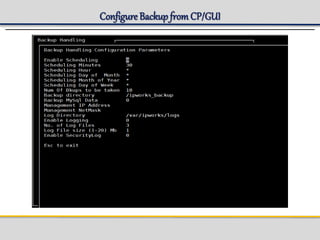
Configure Backup fromControl Panel
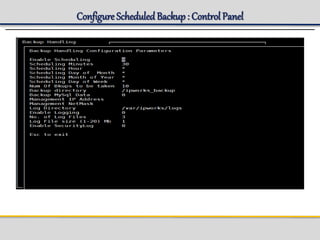
Configure the parameters for backup. Select Backup Handling and
Restore > Configure Scheduler.
 Mandatory parameters:
Enable Scheduling, Scheduling Minutes, Scheduling Hour,
Scheduling Day of Month, Scheduling Month of Year, Scheduling
Day of Week, Management IP Address.
 Management NetMask, Backup directory
Optional parameters: Num Of Bkups to be taken, , Backup
MySql Data, Log Directory, Enable Logging Where setting Backup
MySql Data to 1 enables a dump of all MySQL data.
Note: Ensure that the MySQL Server Daemon is running before
starting backup with the Backup MySql Data enabled. In the Sun
Cluster environment, the Backup MySql Data on the standby node
must be disabled.
Configure Backup fromCP/GUI
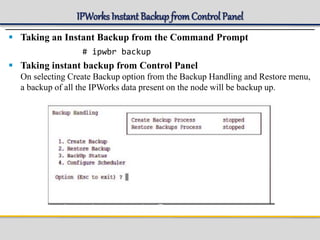
IPWorks Instant Backup fromControl Panel
 Taking an Instant Backup from the Command Prompt
# ipwbr backup
 Taking instant backup from Control Panel
On selecting Create Backup option from the Backup Handling and Restore menu,
a backup of all the IPWorks data present on the node will be backup up.
Configure ScheduledBackup: Control Panel
Verifying Backup
 List Backup
# ipwbr list <absolute path of backup archive>
 Enable logging for the backup.
 Select Backup Handling and Restore > Configure Scheduler .
 Ensure that Enable Logging is set to 1. If not, set it to 1.
 Get the hostname.
# hostname
 Check the log file.
# tail -f /var/ipworks/logs/ipworks_backup_<hostname>.log
 6.Check the status of the backup that has been performed. ?If the backup is
successful, the following line is displayed:
<TIME> backup process completed with <WARNING_NUMBER> warning(s).
 If the backup is failed, the following line is displayed:
<TIME> backup process Failed.
IPWorks BackupArchitecture
Restoring Backup
 Restore replaces the current configuration files with the
contents from the backup archive.
Note:
The Restore process will stop all the running IPWorks
Processes except MYSQL and SNMP processes.
The processes which were stopped will be restarted after
the Restore operation is completed.
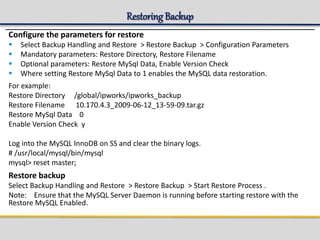
Restoring Backup
Configure the parameters for restore
 Select Backup Handling and Restore > Restore Backup > Configuration Parameters
 Mandatory parameters: Restore Directory, Restore Filename
 Optional parameters: Restore MySql Data, Enable Version Check
 Where setting Restore MySql Data to 1 enables the MySQL data restoration.
For example:
Restore Directory /global/ipworks/ipworks_backup
Restore Filename 10.170.4.3_2009-06-12_13-59-09.tar.gz
Restore MySql Data 0
Enable Version Check y
Log into the MySQL InnoDB on SS and clear the binary logs.
# /usr/local/mysql/bin/mysql
mysql> reset master;
Restore backup
Select Backup Handling and Restore > Restore Backup > Start Restore Process .
Note: Ensure that the MySQL Server Daemon is running before starting restore with the
Restore MySQL Enabled.
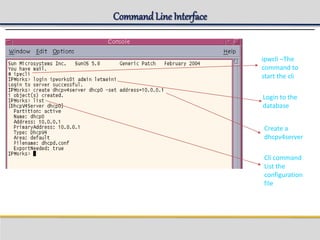
Command LineInterface
The CLI enables the manipulation of storage server objects
There are three possible profiles to associate with a user: administrator, reader and writer.
The default user for administration is admin
Access the cli executing ipwcli
From a shell prompt, start the CLI and log in to the Storage Server.
# ipwcli
IPWorks> login (it will ask for username and password)
Login to server successful.
IPWorks>
Commands can be specified in 3 ways:
1.Interactively in the CLI command shell.
2.On the command line, when the CLI command shell is started
3.In a text file that contains a sequence of commands to execute.
Command LineInterface
ipwcli –The
command to
start the cli
Login to the
database
Create a
dhcpv4server
Cli command
List the
configuration
file
Few Concepts
DnsServer:
Key : Finds the TSIG key (s) that will (should) be defined in this server's configuration file. This is
computed based on the presence of the keys in the configuration options for the server, as well as
the views and zones defined in the server.
View: Finds the views for this server.
Master Zone: Finds the master zone declarations for this server.
Source Zone : Finds the slave/stub zone declarations for which this server is the source.
Master Zone:
Incremental Resource Record: This relation will be used only in case of incremental updates. This
includes both the zone-specific resource records and the resources records that are in the area
associated with this zone that belong in this zone.
Auth NS Record : Finds the NS records that declare authoritative servers for this zone.
SOA Record : Finds the SOA record that defines the source server for this zone.
Cutoff NSRecord: Finds the NS records that declare zone cuts for this zone.
Server : Finds the dns server for this zone. View : Finds the view for this zone.
Glue Record : Finds the glue records contained in this zone.
Modified Resource Record: This relation will be used only in case of incremental updates. This
relation retrieves all the modified/ deleted resource records in this zone from the last update time
of the zone to the current time. This includes only the resources records that are in the area
associated with this zone that belong in this zone.
Resource Records
Zone :Finds the zone (s) for this resource record. Partition :Find the partition for the current object.
Area :Find the area for this object.
Few Concepts
ResourceRecord:
This class serves as a basis for all the resource record classes to extend. This allows
for the definition of common fields and relationships.
Common Fields( for Provisioning)
Ttl: The resource record 'time to live', or TTL, as specified in RFC1035: “ a 32 bit
signed integer that specifies the time interval that the resource record may be
cached before the source of the information should again be consulted”.
Class : The resource record class (RFC1035). This will almost always have a value
of 'IN', representing a name on the Internet.
Type: The resource record type, represented as a text mnemonic.
RData : A variable length string of octets that describes the resource. The
format of this information varies according to the TYPE and CLASS of the
Resource Record.
lastModTime: This shows the last modified time i.e create/modify/delete time
of the resource record.
Few Concepts(contd.)
Slave Zone:A slave zone is a replica of a master zone. The master list
specifies one or more IP addresses of master servers that the slave contacts
to update its copy of the zone. By default, transfers are made from port 53
on the servers; this can be changed for all servers by specifying a port
number before the list of IP addresses, or on a per-server basis after the IP
address. Authentication to the master can also be done with per-server
TSIG keys.
Stub Zone: A stub zone is similar to a slave zone, except that it replicates
only the NS records of a master zone instead of the entire zone.
Parent Zone: A parent zone is a managed zone in the same area that is cut
by this zone.
Zone cut : A Zone Cut is a name in a zone's namespace where there is
delegation to another zone.
FurtherStudy
3GPP Documentation
kb.juniper.net/
https://www.youtube.com/watch?v=YQRSa0JgmWQ
https://www.youtube.com/watch?v=R-6sgxD4KQo
https://www.youtube.com/watch?v=Riicg93L9eQ
https://www.youtube.com/watch?v=drdI6ylciW4
Google
When you’re confused
Q&A

BIND DNS IPWorks Introduction To Advanced

  • 1.
    Bind – DomainName Systems PART - 01 Mustafa Golam IPWorks Overview
  • 2.
    Agenda(TbU) BIND definition Functional View InformationModel and O&M Service Aware Policy Control Bearer Resource Control Cross Control Functions Platform
  • 3.
    What is IPWorks? IPWorks is a software platform that provides DNS/ENUM,DHCP,CLF and AAA services for IPv4 networks.  IPWorks includes an element management system for configuration, control and monitoring of these services.  IPWorks is designed to fit with mobile networks such as GPRS, WCDMA, IP-Multimedia, IMS and in Generic Internet Protocol (IP) networks
  • 4.
    IPWorks4.2 SystemArchitecture Protocol ServersElement Management Components DNS Server Storage Server Web and CLI Management Interfaces DHCPv4 Server ActiveSelect DNS Monitor SQL Database Server Manager DHCPv6 Server DNS ALG SNMPSubagents
  • 5.
    IPWorks5.0 SystemArchitecture Protocol ServersElement Management Components DNS Server Storage Server Web and CLI Management Interfaces DHCPV4 Server ActiveSelect DNS Monitor SQL Database Server Manager SNMP Subagents ENUM Server MySQL Cluster
  • 6.
    IPWorks 6.0&7.0SystemArchitecture Protocol ServersElement Management Components DNS Server Storage Server Web and CLI Management Interfaces DHCPV4 Server ActiveSelect DNS Monitor SQL Database Server Manager SNMP Subagents ENUM Server MySQL Cluster NACF AAA Server CLF PMAL ERH
  • 7.
    MySQLCluster Overview Storage Server SQL Database Server Manager SQL Node Weband CLI Management Interfaces NDB Data Node Cluster Management Node NDB API ENUM Server AAA Server MySQL Cluster
  • 8.
    DNS in aGPRS/WCDMANetwork Core Network External Network SGSN Mobile Terminal BTS GGSN BSC MSC/VLR HLR Gn Gi Gn: GPRS network I/F Gi: GPRS Internet I/F DNS
  • 9.
    DHCP in aGPRS/WCDMANetwork Core Network External Network SGSN Mobile Terminal BTS GGSN BSC MSC/VLR HLR Gn Gi AAA DHCP Gn: GPRS network I/F Gi: GPRS Internet I/F
  • 10.
    AAA for GiInterfaceSupport Help GGSN obtaining L2TP parameter for L2TP tunnel Establishment. (RFC 2868) RADIUS assisted APN selection RADIUS initiated session deactivation (RFC 5176) Access control change (RFC 5176) Providing 3GPP Charging Characteristics
  • 11.
    IPWorks DNS ServerOverview Based on Internet Software Consortium (ISC)’s BIND 9 DNS server can handle A records – URL to IP address PTR records – IP address to URL SRV records – URL to URL NAPTR records – regular expression rewriting AAAA records – URL to IP v6 address. Offers improved performance SNMP* MIB for statistics and alarms Supported on Solaris 9 and SLES 10 platform High availability and reliability built in ActiveSelect DNS
  • 12.
    IPWorks DHCP ServerOverview  DHCPv4 Server based on ISC’s DHCP Version 3  DHCPv6 Developed by Ericsson  Both servers support most standard DHCP server and client options  Improves on performance of standard DHCP server  Added fail over capabilities for increased reliability  SNMP MIB for statistics and alarms  Supported on Solaris 9 and SLES 10
  • 13.
    IPWorks AAA overview Authentication– Who are you? Authorization – What services am I allowed to give you? Accounting – What did you do with my services while you were using them? AAA Proxy/Agent – AAA Server can also be acting as a proxy/agent AAA server by routing Auth/Authz/Acct requests to another AAA Server for processing
  • 14.
    IPWorks Features (I) Named: This process runs the DNS server and resolver. It reads the “named.conf” configuration file and the zone files with start. IPWorks features with-in named available are: ASDNS : Add on feature of DNS. Using ActiveSelect DNS, domain names (resources) may be configured so that DNS will monitor the resources and answer queries with responses that vary according to the loading or status of the resources. Transaction Logging: It is to provide a historical (long-term) log of all major activity for the IPWorks DNS protocol server. It exists to determine what has happened to the network in the past.
  • 15.
    IPWorks Feature (II) StatisticalCounters It enables the remote operator to supervise statistical parameters. The DNS server writes the values of the parameters into a shared memory map and an SNMP subagent reads them and sends them to an SNMP client. rndc a utility that allows you to administer the named daemon, locally or remotely, with command line statements (halt, stop, start, reload, stats, refresh etc). rndc <options> <command> <command-options> IPWorks DNS server and DNS SM communicate using this command. It is one way communication.
  • 16.
    IPWorks Features (III) digThis process is started with a DNS lookup utility command. DIG is a tool for interrogating DNS servers. It performs DNS lookups and displays the answers that are returned from the name server's that were queried. It is possible to dig for information about zones that uses active select. nsupdate This process is started with a command used to submit DDNS (Dynamic DNS) update requests. This allows resource records to be added or removed from a zone without manually editing the zone file (“Hot provisioning”) dnssec Short for DNS Security, this feature allows for zones to be cryptographically signed with a zone key. In this way, the information about a specific zone can be verified as coming from a name server that has signed it with a particular private key, as long as the recipient has that name server's public key. dnssec-keygen -a hmac-md5 -b <bit-length> -n HOST <key-file-name>
  • 17.
    IPWorks Configurationand O&MInterface ServerManager (SM) Command Line Interface (CLI) Web User Interface (WebUI) Control Panel (CP)
  • 18.
    IPWorks Storage Server Ainterface to configure Protocol Servers Provides authorized access for the configuration. Server-Client architecture: The CLI is a client: CLI is an interface to the Storage Server, which forwards the user requests to SS. The Storage Server is a Server: SS will process the CLI requests and provision data into Database, and sends the response to CLI. Storage Server writes the provisioned data into MySQL database.
  • 19.
    IPWorks Server Manager Interfacebetween Storage Server and Protocol Servers Loads the configuration file, checks for parameters specified in Control Panel ( Log Level, SS address, etc…) For DNS, the DNSSM performs these operations: Update DnsServer. Restart DnsServer. Check the status of Dns Server. Old Zone files clean up. Fetch Resource Record from Dns Server. Provides utility method for adding/deleting RRs in Dns Server Get the keys for "dynamic" views( tsig keys) on startup. Issues rndc commands to Dns Server for various operation.
  • 20.
    IPWorks Command lineInterface The Character based interface to Storage Server Command line interface for user to interact with SS. Commands are divided into two categories Commands Operations IPWCLI: command to enter the CLI to execute the provisioning. Some configuration examples: create arecord dns104.mnc001.mcc214.gprs. 10.15.120.30 create masterzone dns104 mnc006.mcc214.gprs -set DefaultTtl=3600
  • 21.
    IPWorks AAA overview Keyfeatures Web-based management interface to Storage Server Provides remote configuration and control of protocol servers Facilitates authorized and secure access Supports IE Note: Similar but less features than the CLI interface.
  • 22.
    IPWorks Functionality DNS SM SS Ipworks>creatednsserver < > Ipworks>create masterzone<> Ipworks>create arecord < > Ipworks>update dnsserver < > update successful MySQL Zone files
  • 23.
    IPWorks ASDNSfeature  Deployment –Unique to the Ericsson IPWorks DNS Server. Proprietary functionality. – The use is optional, can be used without monitoring resources applied (like the VFE GPRS case) – Still standard DNS (interoperate with non-ActiveSelect servers)  Operation – ActiveSelect Monitors send status updates to DNS servers – Status updates used to dynamically alter DNS responses  Therefore intelligent decisions can be made on what to include in a DNS response.
  • 24.
    IPWorks DNS LoadBalancing DNSServer may contain several IP addresses mapping to a same site name. For example www.loadbalancedsite.com is mapped to three IP addresses. www.loadbalancedsite.com A 203.34.23.3 www.loadbalancedsite.com A 203.34.23.4 www.loadbalancedsite.com A 203.34.23.5 DNS Server uses round robin fashion to distribute the load among all the three servers.
  • 25.
  • 26.
    IPWorks AAA overview Functionalitiesof ASDNS  Monitoring  Ordering  Filtering  Only addresses that are reachable should be returned  Address which is in close proximity to the source is to be returned.  Load balancing is required.
  • 27.
    ASDNSComponents ASDNS ASDNS MonitorClient 10.0.0.1 RS1 10.0.0.2 RS 2 10.0.0.3 RS 3host1.test.com A 10.0.0.1 host1.test.com A 10.0.0.2 host1.test.com A 10.0.0.3
  • 28.
    Views and Areas Views: Permits the support of multiple (possibly conflicting) definitions of zones within a DNS Server. Normally applied to implement iDNS and eDNS in the same DNS server.  TSIG: Securing the communications between a DNS Server and an ActiveSelect Monitor.  Areas: An area is a virtual container used for organizing some of the managed objects in IPWorks.
  • 29.
    Areas withdefault view The network is split into two networks. The internal network is only accessible from other internal systems.  The external network handles access from external hosts.  The network will include a pair of master and slave DNS servers for the internal network and a pair of servers for the external network.  The internal network uses addresses in the 10.0.0.0/8 network. The  The external network uses addresses in the 12.0.0.0/8 network.
  • 30.
    Control Panel Key Features Terminal-based (Unix) management interface  Provides local configuration and control of IPWorks components installed on the local machine  Facilitates starting and stopping of IPWorks processes  Facilitates configuration setting specific to the current host  To start the CP, run ipwscp  Only root user can execute process operations.
  • 31.
    IPWSCConfigurationFiles ipwscp configuration filesdirectory – /etc/ipworks – DNS  ipworks_dns.conf – DHCPv4  ipworks_dhcv4.conf – DHCPv6  ipworks_dhcpv6.conf – ENUM  ipworks_enum.conf – SNMP  ipwork_snmp.conf file – MySQL  /etc/ipworks/mysql/confs/xxx – Backup  ipworks_backup.conf – SM  ipworks_xxxsm.conf – SS  ipworks_ss.conf – Cn-oss  ipworks_stats.conf
  • 32.
  • 33.
  • 34.
    IPWorks Backup  Backupand restore granularity – Partial backup and restore is supported. The backup of MySQL data (ipworks and MYSQLDB) can be enabled and disabled from the Control Panel. Note: All the other data types are automatically backed up during the backup operation and restored during the restore operation. Note: Ensure that the MySQL Server Daemon is running before starting backup with the Backup MySQL Enabled.  Scheduling support for backups When performing a backup the user can be able to choose between: ● Instant Backup: The Instant backup of data can be taken from the Solaris Command prompt as well as the Control Panel. ● Scheduled backup (each day/week/month/ etc.)
  • 35.
    Configure Backup fromControlPanel Configure the parameters for backup. Select Backup Handling and Restore > Configure Scheduler.  Mandatory parameters: Enable Scheduling, Scheduling Minutes, Scheduling Hour, Scheduling Day of Month, Scheduling Month of Year, Scheduling Day of Week, Management IP Address.  Management NetMask, Backup directory Optional parameters: Num Of Bkups to be taken, , Backup MySql Data, Log Directory, Enable Logging Where setting Backup MySql Data to 1 enables a dump of all MySQL data. Note: Ensure that the MySQL Server Daemon is running before starting backup with the Backup MySql Data enabled. In the Sun Cluster environment, the Backup MySql Data on the standby node must be disabled.
  • 36.
  • 37.
    IPWorks Instant BackupfromControl Panel  Taking an Instant Backup from the Command Prompt # ipwbr backup  Taking instant backup from Control Panel On selecting Create Backup option from the Backup Handling and Restore menu, a backup of all the IPWorks data present on the node will be backup up.
  • 38.
  • 39.
    Verifying Backup  ListBackup # ipwbr list <absolute path of backup archive>  Enable logging for the backup.  Select Backup Handling and Restore > Configure Scheduler .  Ensure that Enable Logging is set to 1. If not, set it to 1.  Get the hostname. # hostname  Check the log file. # tail -f /var/ipworks/logs/ipworks_backup_<hostname>.log  6.Check the status of the backup that has been performed. ?If the backup is successful, the following line is displayed: <TIME> backup process completed with <WARNING_NUMBER> warning(s).  If the backup is failed, the following line is displayed: <TIME> backup process Failed.
  • 40.
  • 41.
    Restoring Backup  Restorereplaces the current configuration files with the contents from the backup archive. Note: The Restore process will stop all the running IPWorks Processes except MYSQL and SNMP processes. The processes which were stopped will be restarted after the Restore operation is completed.
  • 42.
    Restoring Backup Configure theparameters for restore  Select Backup Handling and Restore > Restore Backup > Configuration Parameters  Mandatory parameters: Restore Directory, Restore Filename  Optional parameters: Restore MySql Data, Enable Version Check  Where setting Restore MySql Data to 1 enables the MySQL data restoration. For example: Restore Directory /global/ipworks/ipworks_backup Restore Filename 10.170.4.3_2009-06-12_13-59-09.tar.gz Restore MySql Data 0 Enable Version Check y Log into the MySQL InnoDB on SS and clear the binary logs. # /usr/local/mysql/bin/mysql mysql> reset master; Restore backup Select Backup Handling and Restore > Restore Backup > Start Restore Process . Note: Ensure that the MySQL Server Daemon is running before starting restore with the Restore MySQL Enabled.
  • 43.
    Command LineInterface The CLIenables the manipulation of storage server objects There are three possible profiles to associate with a user: administrator, reader and writer. The default user for administration is admin Access the cli executing ipwcli From a shell prompt, start the CLI and log in to the Storage Server. # ipwcli IPWorks> login (it will ask for username and password) Login to server successful. IPWorks> Commands can be specified in 3 ways: 1.Interactively in the CLI command shell. 2.On the command line, when the CLI command shell is started 3.In a text file that contains a sequence of commands to execute.
  • 44.
    Command LineInterface ipwcli –The commandto start the cli Login to the database Create a dhcpv4server Cli command List the configuration file
  • 45.
    Few Concepts DnsServer: Key :Finds the TSIG key (s) that will (should) be defined in this server's configuration file. This is computed based on the presence of the keys in the configuration options for the server, as well as the views and zones defined in the server. View: Finds the views for this server. Master Zone: Finds the master zone declarations for this server. Source Zone : Finds the slave/stub zone declarations for which this server is the source. Master Zone: Incremental Resource Record: This relation will be used only in case of incremental updates. This includes both the zone-specific resource records and the resources records that are in the area associated with this zone that belong in this zone. Auth NS Record : Finds the NS records that declare authoritative servers for this zone. SOA Record : Finds the SOA record that defines the source server for this zone. Cutoff NSRecord: Finds the NS records that declare zone cuts for this zone. Server : Finds the dns server for this zone. View : Finds the view for this zone. Glue Record : Finds the glue records contained in this zone. Modified Resource Record: This relation will be used only in case of incremental updates. This relation retrieves all the modified/ deleted resource records in this zone from the last update time of the zone to the current time. This includes only the resources records that are in the area associated with this zone that belong in this zone. Resource Records Zone :Finds the zone (s) for this resource record. Partition :Find the partition for the current object. Area :Find the area for this object.
  • 46.
    Few Concepts ResourceRecord: This classserves as a basis for all the resource record classes to extend. This allows for the definition of common fields and relationships. Common Fields( for Provisioning) Ttl: The resource record 'time to live', or TTL, as specified in RFC1035: “ a 32 bit signed integer that specifies the time interval that the resource record may be cached before the source of the information should again be consulted”. Class : The resource record class (RFC1035). This will almost always have a value of 'IN', representing a name on the Internet. Type: The resource record type, represented as a text mnemonic. RData : A variable length string of octets that describes the resource. The format of this information varies according to the TYPE and CLASS of the Resource Record. lastModTime: This shows the last modified time i.e create/modify/delete time of the resource record.
  • 47.
    Few Concepts(contd.) Slave Zone:Aslave zone is a replica of a master zone. The master list specifies one or more IP addresses of master servers that the slave contacts to update its copy of the zone. By default, transfers are made from port 53 on the servers; this can be changed for all servers by specifying a port number before the list of IP addresses, or on a per-server basis after the IP address. Authentication to the master can also be done with per-server TSIG keys. Stub Zone: A stub zone is similar to a slave zone, except that it replicates only the NS records of a master zone instead of the entire zone. Parent Zone: A parent zone is a managed zone in the same area that is cut by this zone. Zone cut : A Zone Cut is a name in a zone's namespace where there is delegation to another zone.
  • 48.
  • 49.